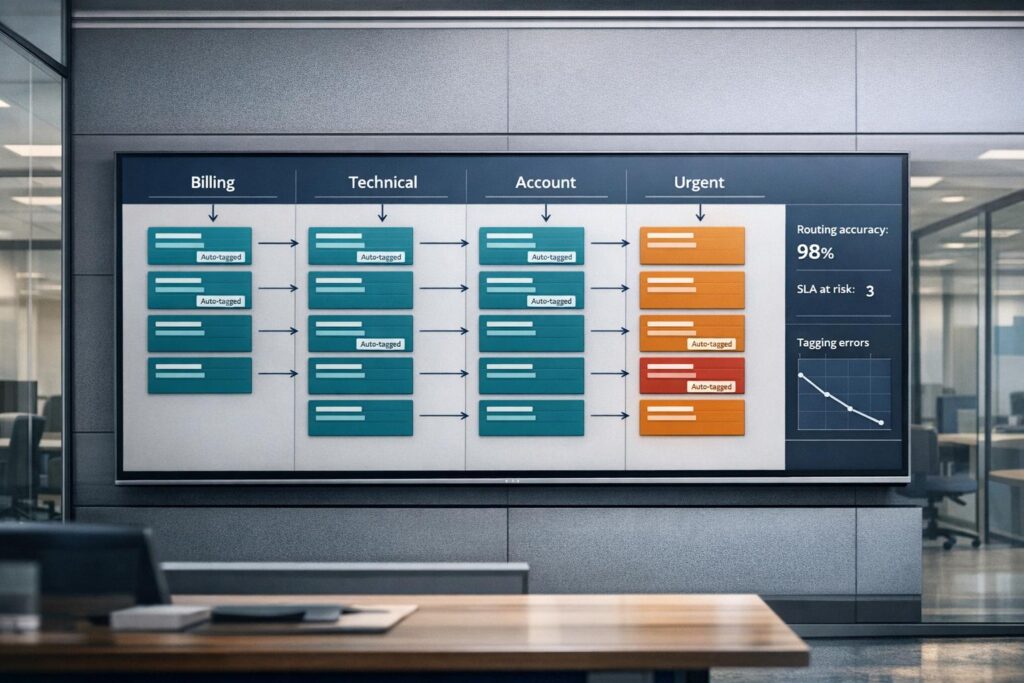
AI-driven ticket categorization solves the inefficiencies of manual tagging, such as delays, errors, and inconsistent data. By using Natural Language Processing (NLP) and machine learning, AI automates ticket sorting, improves accuracy, and ensures consistent reporting. Here’s what you need to know:
- The Problem: Manual tagging is slow, inconsistent, and prone to errors. Agents may mislabel tickets, leading to delays and unreliable data.
- The Solution: AI analyzes ticket content to identify intent, sentiment, and key details – accurately categorizing tickets in seconds.
- Key Benefits: Faster response times, reduced agent workload, better data for reporting, and fewer misrouted tickets.
- How It Works:
- Intent Detection: Understands the purpose of tickets, regardless of wording.
- Sentiment Analysis: Flags frustrated customers for prioritization.
- Entity Extraction: Pulls key details like product names or error codes.
- Real-World Example: Wolseley Canada used AI to handle 7,000–8,000 tickets/month, improving routing and SLA tracking.
AI categorization integrates with support systems, prioritizes critical tickets, and self-improves over time. To implement it, train models using historical data, integrate with your ticketing platform, and monitor performance regularly. This approach reduces errors, saves time, and enhances customer satisfaction.
Ticketing Triage: Let AI Sort and Route Your Tickets
sbb-itb-e60d259
How AI Fixes Manual Tagging Errors
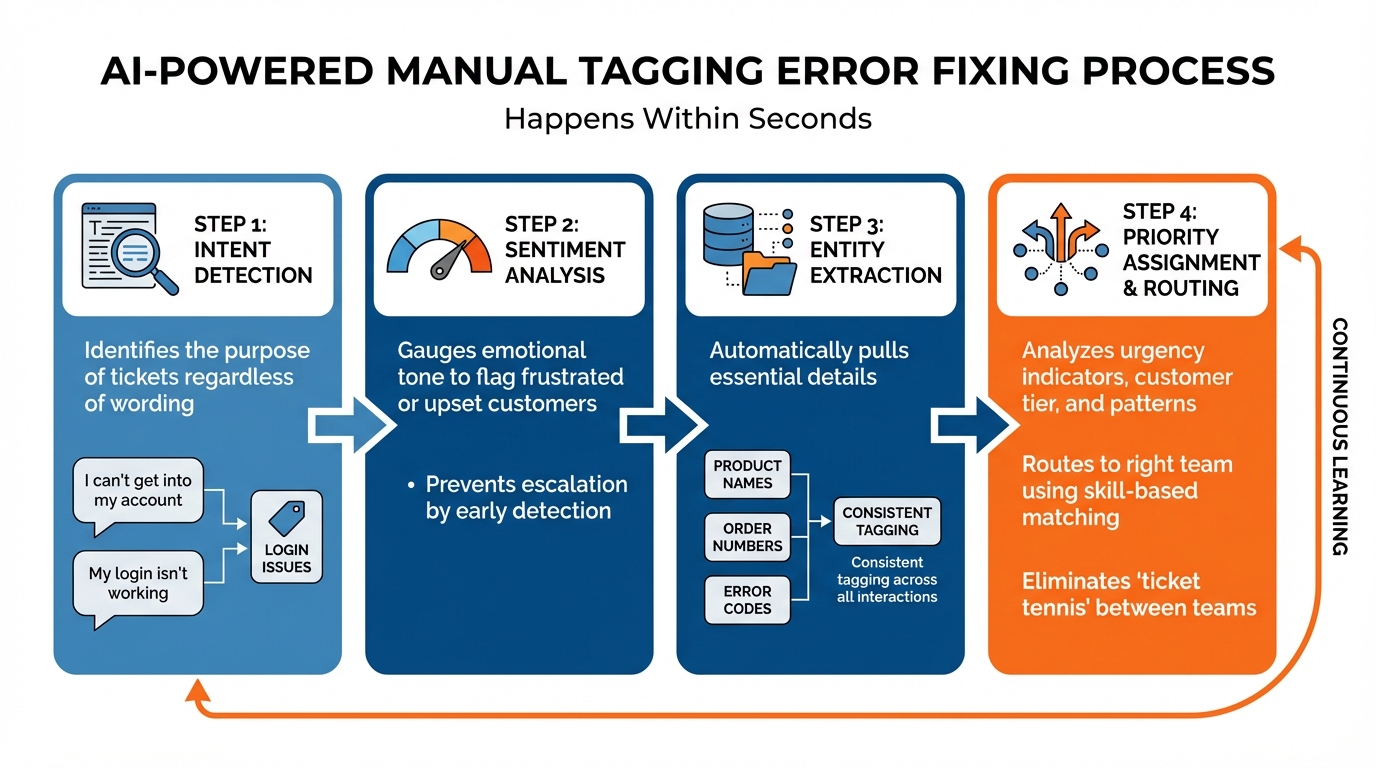
How AI Ticket Categorization Works: 4-Step Process
AI steps in to tackle tagging errors at their core by analyzing tickets with precise accuracy. Instead of relying on agents to remember which category fits a particular issue, AI leverages Natural Language Processing (NLP) and machine learning to automatically analyze every ticket. It identifies the customer’s true intent and extracts key details – all within seconds.
This advanced analysis fills gaps that traditional systems often miss, ensuring a more reliable tagging process.
"AI ensures that tickets are classified based on their actual content, leading to much cleaner and more reliable data for reporting, trend analysis, and identifying areas for product or process improvement." – Nooshin Alibhai, Founder and CEO, Supportbench [4]
Unlike rigid rule-based systems that falter when customers misspell product names or use synonyms, AI understands the context. It doesn’t need a specific term like "outage" to recognize a critical system failure. It can even identify frustrated customers, whether or not they mark their ticket as "urgent."
How NLP Analyzes and Categorizes Tickets
NLP focuses on the core issues within a ticket, stripping away vague subject lines and irrelevant information. It uses several techniques to categorize tickets effectively:
- Intent detection identifies the purpose of the ticket, whether it’s a refund request, a bug report, or a feature suggestion – no matter how it’s worded.
- Sentiment analysis gauges emotional tone, flagging frustrated or upset customers early to prevent escalation.
- Entity extraction automatically pulls out essential details like product names, order numbers, and error codes, ensuring consistent tagging across all interactions [1].
"An AI-powered system… understands they’re both talking about the same problem and tags them both as ‘Login Issues,’ [even if one says] ‘I can’t get into my account’ and another writes ‘My login isn’t working.’" – Stevia Putri, eesel AI [1]
This ability to grasp context allows AI to handle variations that would confuse keyword-based systems. For example, a customer saying "money back" gets the same "Refund Request" tag as someone who writes "I want a refund."
Beyond identifying details, AI standardizes tagging to maintain consistency across the board.
Eliminating Inconsistent Tagging with AI
AI eliminates the inconsistencies caused by individual agents interpreting the same issue differently. One agent might tag a slow dashboard as "Performance Issue", while another calls it a "Bug", creating overlapping categories that muddle reporting. AI ensures a uniform standard for all tickets, applying the same logic around the clock [4].
It also corrects errors introduced by customers. For instance, if someone selects "General Question" from a dropdown but describes a critical billing failure in their message, AI overrides the incorrect category based on the ticket’s actual content. Misleading subject lines like "Quick Question" are ignored in favor of the ticket’s core issue, such as a "system down" alert buried in the message [4].
"AI ensures rules and logic are applied consistently 24/7, reducing variability based on individual dispatcher judgment or agent workload pressures." – Nooshin Alibhai, Founder and CEO, Supportbench [4]
Automatic Priority Assignment and Routing
AI also determines ticket priority by analyzing key factors. It looks for urgency indicators like "system down", checks customer tier information from CRM data, and evaluates patterns such as repeated follow-up emails. Sentiment analysis highlights frustration or anger, ensuring upset customers are prioritized – even if they don’t explicitly label their issue as "urgent" [4][5].
Once priority is assigned, AI routes tickets to the right team using skill-based matching. For example, a SAML 2.0 authentication error is sent directly to a security specialist instead of a generalist queue. The system considers agent expertise, language skills, and current workload to ensure tickets reach the right person immediately – avoiding the "ticket tennis" scenario where requests bounce between teams [4][5].
This streamlined process greatly reduces triage time. Traditional systems often fail when a customer describes a critical issue without using specific trigger words. AI, however, interprets the context and routes the ticket appropriately, ensuring urgent matters receive attention quickly, regardless of how the request is phrased [4].
How to Implement AI for Ticket Categorization
Implementing AI for ticket categorization involves three key phases: setting up categories and training your model, integrating AI into your support platform, and monitoring its performance over time. Together, these steps create a workflow that minimizes manual errors and improves efficiency.
Set Up Categories and Train Your AI Model
Start by defining categories tailored to your B2B needs. These could include issue types (e.g., Product Bug, Billing Question, Feature Request), priority levels (Critical, High, Medium, Low), or team assignments (Engineering, Customer Success, Finance) [7]. Keep it simple – stick to 10–15 clear, mutually exclusive categories to avoid confusion.
Next, gather historical ticket data in CSV or JSON format with two columns: ticket text and its corresponding label [6]. Before using this data, make sure to clean it up by removing signatures, HTML tags, and any sensitive information. Divide the dataset into 80% for training and 20% for validation [6].
When it comes to training, you have two main options:
- Fine-tuning: This involves adapting pre-trained models like BERT or DistilBERT to your data using tools like Hugging Face [6]. It’s a good fit for teams with technical expertise.
- LLM prompting: Models like GPT-4 or Claude can categorize tickets using zero-shot or few-shot prompts, eliminating the need for extensive training [7][8]. For companies with strict data compliance requirements, on-premise APIs allow you to train models locally via Dockerized REST APIs, ensuring data security [6].
To speed up the process, consider a semi-automated approach: use an LLM to pre-label tickets, then have human annotators refine the labels using tools like Label Studio. Pre-labeling with GPT typically achieves 80–90% accuracy before human review [8], saving significant time compared to manual labeling.
"Shifting the workflow from ‘data labeling’ to ‘reviewing and refining’ of LLM-generated labels significantly accelerates your workflow." – Open Ticket AI [8]
Once your model is trained, you’re ready to integrate it into your support systems.
Connect AI to Your Support Platform
The next step is to integrate your AI model with your ticketing system so it can process incoming tickets automatically [7][4]. This can be done through native integrations, custom API setups, or data warehouse tools. Ensure the AI has access to all relevant knowledge sources, such as internal wikis (e.g., Confluence, Notion), shared documents (e.g., Google Docs), and CRM systems [1].
For B2B teams, configure the AI to prioritize tickets from high-value clients or premium customer tiers [4]. Test the integration using historical tickets to identify any errors before going live [1].
Start small by applying the AI to a single support channel or a specific ticket type, like password resets or billing inquiries [1]. Test its performance on 10–15 tickets and compare the results with experienced agents’ judgments [7]. If you’re using LLM APIs, set a low temperature (0.0–0.3) to ensure consistent and reliable outputs [8].
Track Performance and Improve AI Accuracy
After deployment, continuous monitoring is crucial to maintain accuracy as ticket types and business needs evolve. One of the most important metrics to track is the recategorization rate – how often agents manually adjust AI-assigned categories [7]. A high rate suggests the model needs retraining or that the categories are unclear.
Establish a feedback loop where agents can flag misclassifications. This flagged data becomes invaluable for retraining models and preventing "model drift" [9]. Use analytics dashboards to monitor key metrics like accuracy and F1 scores, and schedule regular retraining sessions as new ticket trends emerge.
"The future of customer support isn’t about replacing human agents – it’s about giving them superpowers so they can focus on what matters most: solving complex problems and building relationships with customers." – Fivetran [7]
Supportbench AI: Built-In Ticket Categorization
Supportbench brings AI-powered ticket categorization to the forefront as a core feature of its platform. By leveraging Natural Language Processing (NLP) and Machine Learning, the system analyzes key phrases, product names, issue types, and even customer sentiment to automatically categorize support tickets.
Automatic Tagging Without the Hassle
Supportbench’s AI begins categorizing tickets the moment they arrive, eliminating the need for manual sorting. It evaluates various factors, including customer sentiment, critical alert phrases like "system down", and customer tier data pulled from your CRM [4]. Unlike traditional rule-based systems that falter when customers misspell product names or describe issues vaguely, Supportbench’s AI focuses on the intent and meaning behind each request.
A great example of this in action is Wolseley Canada. In June 2025, they adopted Supportbench to manage an influx of 7,000 to 8,000 support emails per month. Under the guidance of Eilis Byrnes, Customer Service and Process Improvement Manager, the team automated ticket routing based on case types and client profiles. This upgrade not only resolved overdue support issues but also gave senior leadership real-time insights into SLA performance [10].
"The ticketing system assisted us in resolving instances that were long overdue and in providing the staff with a smooth platform experience."
- Eilis Byrnes, Customer Service and Process Improvement Manager, Wolseley Canada [10]
This case highlights how automated routing can transform support efficiency. By analyzing sentiment, key phrases, and customer data, Supportbench AI ensures tickets are routed instantly to agents with the right skills, language capabilities, and availability [4][10].
Beyond tagging, the platform uses these insights to refine SLAs and optimize workflows, making support operations more seamless.
AI Integration with SLAs and Workflows
Supportbench’s AI goes a step further by dynamically adjusting SLAs based on the urgency and context of each case [11]. For instance, if the system detects a critical alert phrase or identifies a Premier-tier client nearing renewal, it automatically tightens response times to prioritize the issue – all without requiring manual input or complex configurations.
The platform also offers predictive First Contact Resolution (FCR) scoring and sentiment analysis, enabling agents to make proactive adjustments [11]. Real-time predictions about customer satisfaction help agents tailor their responses before a situation escalates. On top of that, resolved tickets can be turned into knowledge base articles with a single click, as the AI organizes and tags them automatically [11].
"AI determines priority not just based on a selected field or a single keyword, but by analyzing a confluence of factors."
- Nooshin Alibhai, Founder and CEO, Supportbench [4]
This precision not only improves ticket categorization but also enhances operational reporting. Since the AI classifies tickets based on actual content rather than subjective human judgment, your data remains accurate and actionable [4]. No more inconsistent tagging or missed priority updates – just clean, reliable insights that help you spot trends and continuously improve your support processes.
Tracking Results and Avoiding Common Mistakes
As AI takes over ticket categorization, keeping an eye on performance and addressing potential problems is essential to maintain its benefits.
Metrics to Measure AI Performance
Once your AI is up and running, accuracy alone won’t cut it – especially if 80% of your tickets fall under a broad category like "general inquiry" [12]. A model that predicts only the majority class might still hit 80% accuracy but fail to provide meaningful insights [12]. That’s why you need to focus on Precision (the percentage of correctly predicted tags) and Recall (the percentage of actual issues captured) [12][13].
For a more rounded perspective, use the F1-Score, which balances Precision and Recall into a single metric [12]. If your tickets require multiple tags – like "Billing" and "Urgent" – consider tracking Hamming Loss (the percentage of misclassified labels) and Subset Accuracy (the percentage of tickets with all tags correctly applied) [12]. On top of technical metrics, keep an eye on business outcomes like faster response times, better first-contact resolution, and higher automation rates [3].
"…accuracy is no longer a proper measure [for imbalanced datasets], since it does not distinguish between the numbers of correctly classified examples of different classes. Hence, it may lead to erroneous conclusions…" – Authoritative Source, Open Ticket AI [12]
Use tools like a confusion matrix to visualize misclassifications and apply macro-averaging to ensure rare but critical categories, such as "Security Bug" or "VIP Churn Risk", are accurately assessed [12][13]. This can help pinpoint specific problem areas – for instance, if the AI is confusing "Billing Issue" with "Payment Inquiry." With this insight, you can fine-tune the model using targeted training data.
While improving metrics is crucial, avoiding common mistakes is just as important to ensure your AI performs well over time.
Common Implementation Problems to Avoid
One of the biggest mistakes? Treating AI as a "set-and-forget" solution. Ticket patterns evolve with seasonal trends, new product launches, and shifts in customer language, which can lead to model drift [12][13]. Plan quarterly audits to retrain your AI and remove outdated tags [2]. Before deploying, test the model on historical tickets to catch false positives early [3][13].
Another issue is inconsistent tagging in your training data. For example, if your team has used variations like "product-issue", "prod_issue", and "product_bug", your AI will inherit that inconsistency [2][3]. To prevent this, create a "source of truth" document with standardized tags and stick to it. Also, don’t limit your training data to public help center articles – include internal resources like wikis, Confluence pages, and past ticket resolutions for richer context [3][1].
Lastly, steer clear of "black box" AI tools that don’t allow you to customize or understand the decision-making process [3][13]. You need transparency to tweak the AI when it makes errors. Start with broad categories and only add complexity once your initial model proves reliable [7].
Conclusion
AI-powered ticket categorization has reshaped how businesses handle support requests. By leveraging natural language processing (NLP), it eliminates the inconsistencies and inefficiencies of manual tagging, capturing intent and sentiment with precision. The result? Cleaner data and response times improved by as much as 20% [14].
Beyond speeding up responses, AI also cuts costs. It removes the need for manual sorting and reduces unnecessary inter-team transfers [1][4]. In B2B support, where account-based prioritization and skill-based routing are critical, AI adds a layer of contextual intelligence. For instance, when AI prioritizes a high-value ticket or ensures a critical API issue reaches the right specialist, it doesn’t just save time – it protects revenue and strengthens client trust [4].
Supportbench takes this a step further with its built-in AI automation, seamlessly connecting with CRM data, SLAs, and workflows. Nooshin Alibhai highlights the importance of this shift:
"For support leaders aiming to optimize their operations, embracing intelligent automation is no longer optional; it’s essential" [4].
To sustain these benefits, continuous monitoring and adaptation are key. Feedback loops help the AI adjust to new products, changes in customer language, and evolving business demands. When implemented thoughtfully, AI transforms support operations into systems that are not only scalable and efficient but also deeply customer-focused.
FAQs
What ticket volume do I need before AI categorization is worth it?
When you’re dealing with hundreds of tickets every day, AI categorization can save both time and money. As ticket volumes increase, manually tagging each one becomes not only time-consuming but also prone to mistakes. For smaller ticket volumes, manual tagging might still work. But once you hit higher scales, AI offers clear advantages: it improves accuracy, speeds up the routing process, and ensures consistent categorization. This consistency is especially important for smooth operations and reliable reporting, particularly in complex setups involving multiple stakeholders.
How do I keep AI ticket tags accurate as products and customer language change?
To keep AI ticket tags accurate as products and customer language shift, it’s important to routinely review and adjust your categorization system. Start by spotting and removing tags that are redundant or no longer relevant. Update the system by retraining AI models with fresh ticket data to reflect new terms and trends. Keep an eye on metrics like recategorization rates and ticket trends to confirm your tags stay aligned with changes in products and customer communication. Regular reviews and retraining are essential for maintaining accuracy over time.
What data do I need to train AI ticket categorization without exposing sensitive info?
To train AI for ticket categorization while safeguarding sensitive information, it’s crucial to work with anonymized or labeled datasets that exclude any personally identifiable information (PII) or confidential details. This means stripping out sensitive elements like names, account numbers, and email addresses. Instead, replace them with generic placeholders or descriptive categories.
For example, you might substitute a name with "[Customer Name]" or an account number with "[Account Number]." By doing this, the dataset remains useful for training while protecting privacy. Pair this sanitized ticket text with corresponding categories to ensure the AI can accurately classify tickets without compromising security.