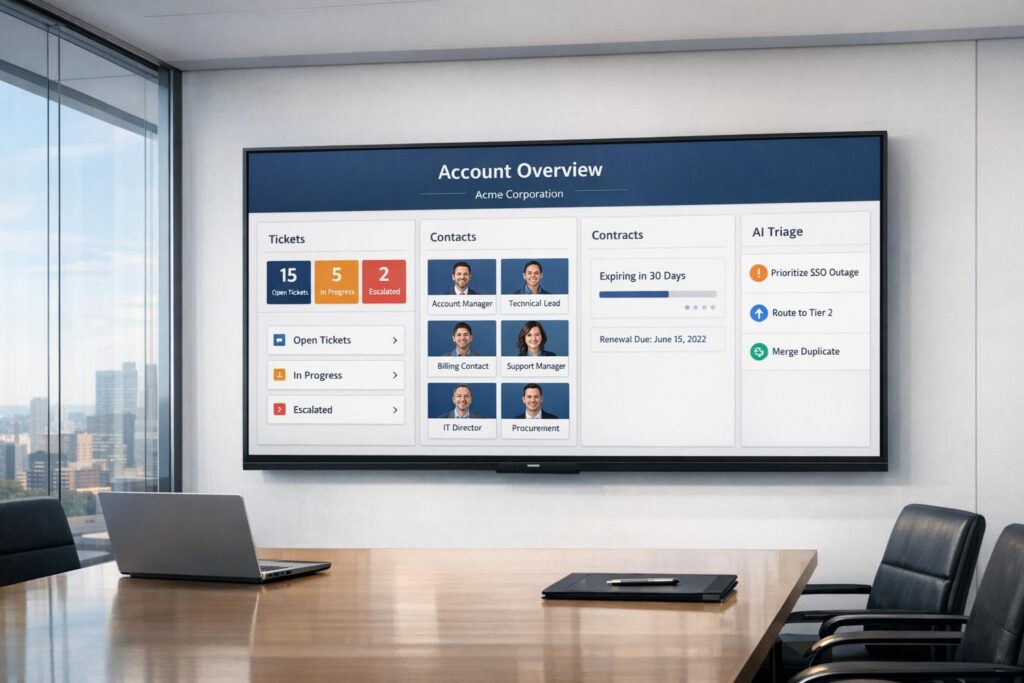
Managing B2B customer support with user-based tickets often leads to inefficiencies. Why? Because these systems treat individual user issues as separate, unrelated events, missing the bigger picture of an entire account’s challenges. This makes it harder for support teams to connect the dots, leading to wasted time and poor customer experiences.
The solution? Account-based views. These consolidate all customer data – tickets, contacts, contracts, and more – into a single, company-level record. This approach helps teams:
- See all tickets and interactions tied to one organization.
- Identify patterns across accounts to address recurring issues faster.
- Improve collaboration across departments like Support, Sales, and R&D.
Switching to account-based views transforms support from reactive to efficient, ensuring better service for high-value accounts. Below, we’ll explore how to implement this step-by-step, from reviewing your current systems to integrating data and automating workflows.
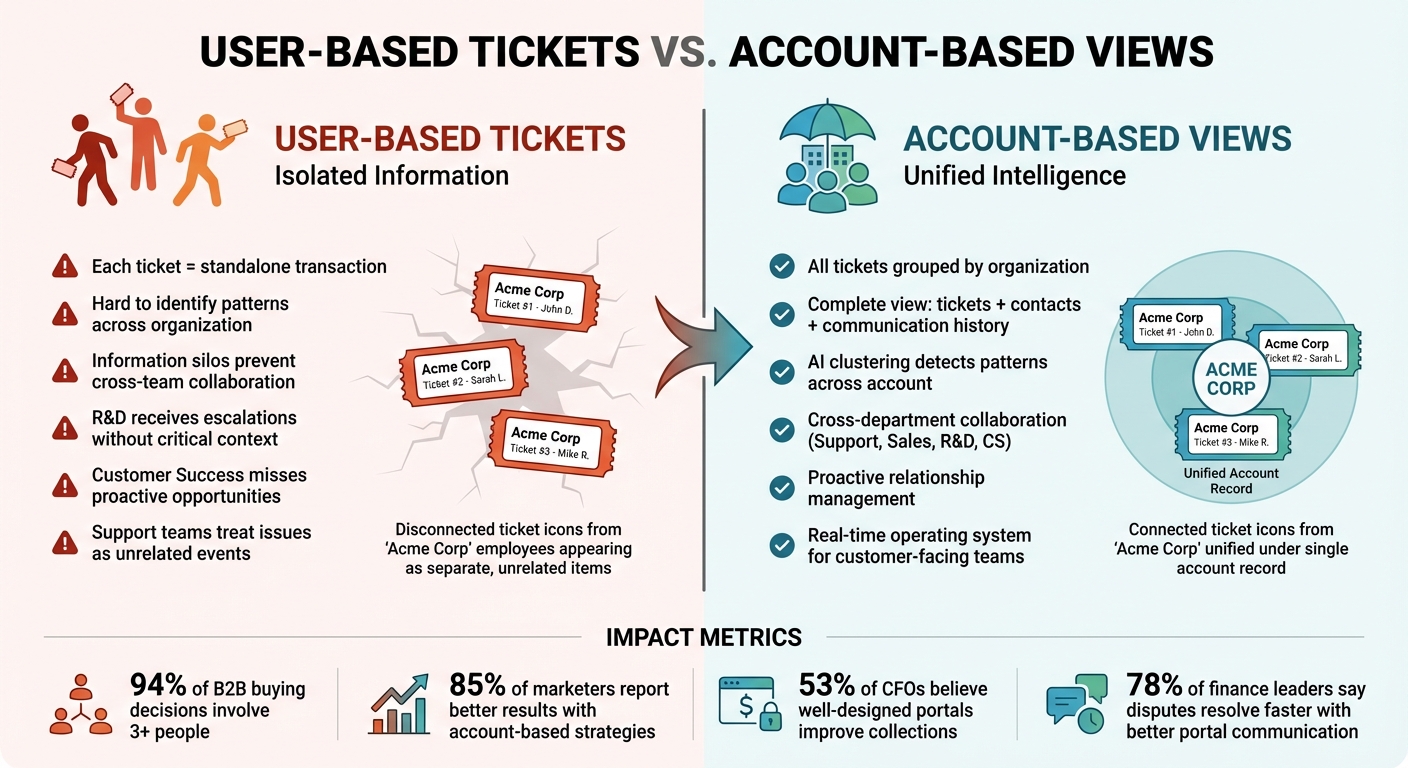
User-Based Tickets vs. Account-Based Views
User-Based Tickets vs Account-Based Views in B2B Support
What Are Account-Based Views?
Account-based views bring together all customer-related data – tickets, contacts, communication history, and other relevant details – under a single organizational record. Instead of handling users as separate entities, this method groups them under one account. For example, if three employees from Acme Corp submit tickets, your team will see them as part of the same organization rather than individual users.
Modern B2B support tools simplify this process by automating account creation. Actions like setting up a Slack channel with a customer or receiving emails from a specific domain can automatically create or update the account record [2]. This cuts out manual data entry and ensures your system mirrors the actual relationships with your customers.
This approach provides a complete view of all tickets, contacts, and the overall health of an account, which is especially important for B2B support [2]. Role-based access adds another layer of efficiency, allowing customer admins to see all organizational tickets while restricting individual users to their own [3].
Problems with User-Based Ticket Systems in B2B Support
User-based ticket systems often isolate information. Each ticket functions as a standalone transaction, making it tough to identify patterns or recurring issues that affect an entire organization. For instance, when Port analyzed a vague customer complaint about "GitLab instabilities" in March 2026, they only uncovered the real issue after grouping all tickets from that account. The consolidated view revealed a clear list of related problems, turning a confusing situation into a focused troubleshooting effort [1].
"Every company has a goldmine of valuable information trapped in its support tickets… The data is often siloed, making it difficult for teams like Research & Development (R&D) or Customer Success (CS) to extract actionable insights without manually digging through endless ticket histories."
– Idit Matas, March 11, 2026 [1]
Without an account-level perspective, your R&D team might receive escalations without critical context – like deployment types, integration versions, or environment details – causing delays in resolving issues [1]. Similarly, Customer Success teams miss opportunities for proactive health checks because they lack a unified view of an account’s challenges [1].
These issues highlight why an account-based system is essential. Breaking down these silos creates a more unified and proactive support framework.
Benefits of Account-Based Views
Account-based views transform support from reactive problem-solving into proactive relationship management. By consolidating data from platforms like HubSpot, Zendesk, Jira, and Slack into what Port calls a "Context Lake", teams can detect trends and systemic issues that might go unnoticed by individual agents [1]. AI clustering further enhances this by analyzing patterns across an account’s ticket history, offering R&D and Product teams actionable insights for better decision-making [1].
"Thena’s accounts view isn’t just a database – it’s a real-time operating system for your customer-facing teams."
– Thena AI [2]
This approach also benefits customers by giving them full visibility into their organization’s requests, cutting down on follow-up emails and calls [3]. Support teams can use aggregated data to prepare for strategic meetings, ensuring every pain point is addressed beforehand [1]. Additionally, collaboration improves across departments – Sales, Support, R&D, and Customer Success – when everyone works from the same unified record [2]. Instead of viewing support as a series of isolated interactions, account-based views provide a comprehensive perspective on the customer’s journey over time [1].
sbb-itb-e60d259
Planning Your Account-Based Portal Implementation
Review Your Current Portal and Data Architecture
Start by assessing whether your current systems can handle account-level data aggregation. Does your platform support API integrations that seamlessly link with your CRM, ERP, and other tools? These integrations are critical for maintaining consistent data across all customer touchpoints [5]. Additionally, map out your account hierarchies to capture all relevant stakeholders within your customer organizations [7]. This evaluation will help you decide whether you can enhance your existing infrastructure or need to upgrade to a more advanced platform.
"If your AR portal is outdated, hard to use, or inaccurate; it’s a usability issue and a revenue recognition risk."
– Pradyut Hande, Associate Director of Product Marketing, Growfin [6]
Ensure your portal connects effectively with your ERP to provide real-time updates on invoice statuses, payment histories, and disputes [6]. Inaccurate or delayed data can damage customer trust and increase support requests. Test the portal’s functionality across devices and browsers to confirm reliable performance for user registration, login, and data synchronization [5]. Use the table below to guide your assessment:
| Assessment Area | Key Considerations |
|---|---|
| Data Integrity | Real-time syncing, accuracy of balances, document access [6] |
| User Experience | Intuitive navigation, 360-degree visibility, mobile accessibility [5][6] |
| Integration | API availability, seamless data flow between internal/external systems [5] |
Once you have a clear understanding of your data infrastructure, the next step is to define user roles, permissions, and account ownership.
Define Roles, Permissions, and Account Ownership
To fully leverage unified account views, establish clear roles and permissions that enable smooth data integration. Create a single source of truth by consolidating all communications – whether through Slack, email, or API interactions – into structured account records [2]. Use automated account mapping to instantly update records when new customer email domains or Slack channels are detected [2].
"To approach Customer Success from an account-centric perspective, you need to identify all the key people within your customer’s company, as well as the key players in your company that may engage with them."
– Philipp Wolf, CEO, Custify [7]
Build a 360-degree account view that includes all tickets (open, in-progress, on-hold) linked to an account, along with contacts, notes, and activity logs [2]. Add metadata fields for important details like account health, industry, billing address, and classification to help prioritize accounts effectively [2]. Tailor visibility based on roles: for example, account admins can see the full organizational picture, while individual users only access their relevant tickets. This approach eliminates information silos and ensures that support, success, and sales teams are aligned [2].
Set KPIs to Measure Success
Once roles and data flows are in place, identify metrics that track account-level performance rather than just individual activity. Focus on account engagement scores, which measure interactions across the organization – such as website visits, email opens, and content downloads – to determine how actively accounts are using your portal [8][9]. Another key metric is the account penetration rate, which tracks how many decision-makers within a target account are engaged. For high-priority accounts, aim for at least 60% penetration to boost renewal likelihood [9].
Monitor self-service adoption by observing the shift from traditional support channels (phone or email) to portal-based actions like viewing orders or accessing documents [12]. Additionally, track license utilization, which measures the ratio of active users to total licenses sold. High utilization signals that an account is deriving value from your product [10]. Given that 94% of B2B buying decisions involve three or more people [11], these account-focused metrics provide a clearer picture of success than traditional user-based metrics. Regularly review these KPIs with sales, marketing, and support teams to refine your strategy based on the data [11].
How to Implement Account-Based Views: Step-by-Step
Configure Role-Based Access for Account Visibility
The first step in setting up account-based views is defining access levels to manage who can see account-level data. Views can be configured as Shared (for teams) or Personal (for individual agents). Use the "Ticket: Organization" condition to group and filter tickets by accounts instead of individual users. This ensures agents have a complete view of an organization’s activity rather than just isolated user requests.
For accounts with sensitive information, assign group-based permissions. For example, Level 1 agents might only access basic account details, while Level 2 agents handle financial or contract-related data. If you’re on an Enterprise-level plan, you can use custom roles to limit the number of shared and personal views agents can access, ensuring they only see data relevant to their responsibilities.
| Access Level | Visibility Scope | Best Use Case |
|---|---|---|
| Any Agent | Entire support team | General queues or account overviews. |
| Specific Groups | Departments like Finance or Tech | Sensitive data or tiered support (Level 1/2). |
| Only You | Individual agent only | Personal workflows and account tracking. |
| Organization-Based | Specific customer accounts | Dedicated account management for B2B support. |
Tips for setting up views:
- Preview new views to ensure filters work as expected.
- Clone existing views to maintain formatting and permissions when onboarding new accounts.
- Use double colons (::) in view titles to group them into folders for better organization.
Once access levels are in place, the next step is integrating data from your systems to create a unified view.
Integrate Data Across Systems for Account-Level Aggregation
To build a complete account-based view, connect your CRM, ERP, and other tools to create a centralized data repository. This repository becomes the single source of truth for all account interactions. Implement event-driven ingestion using tools like Amazon EventBridge and AWS Lambda to capture updates in real time. This eliminates manual data entry and ensures your system always reflects the latest information [13][14].
Automate account mapping by linking records through unique identifiers, such as email domains or CRM account IDs. This ensures that interactions are grouped accurately. During integration, enrich raw data with user-friendly messages or account-specific metadata before sending it to the central repository [14].
For example, an AWS-based analytics pipeline used EventBridge and Lambda to send support data to an S3 bucket. This enabled global case management through QuickSight dashboards, with administrators managing cases across accounts without switching roles. The automated setup reduced deployment time to just 2–3 minutes [13].
| Integration Component | Role in Aggregation |
|---|---|
| Event Bus | Routes updates from multiple sources to a central hub [13][14] |
| Lambda/Serverless | Enriches events with account context and metadata [14] |
| S3/Data Lake | Stores raw and transformed data from all accounts [13] |
| Glue/ETL | Cleans and catalogs data for consistent reporting [13] |
| Athena/QuickSight | Queries and visualizes cross-account metrics [13][14] |
With the data pipeline in place, you can use AI to streamline ticket triage and prioritize key accounts.
Use AI for Account-Level Triage and Automation
AI-powered ticket routing and prioritization play a crucial role in simplifying support workflows and keeping account records updated. By automating these tasks, your team can focus on meaningful customer interactions. For instance, AI-driven systems can automatically create and update account records based on interactions through Slack, email, and APIs, ensuring data remains current [2].
"The accounts view in Thena is the single source of truth for managing all your customer accounts – automatically created from your team’s real-world interactions across Slack, email, API, and other integrated systems." [2]
AI can also use account metadata for intelligent triage. Beyond ticket status, it can factor in details like account health, billing information, or strategic importance to prioritize high-value accounts. This ensures that tickets from such accounts are addressed promptly, even if they aren’t marked as urgent [2]. By classifying accounts based on health, industry, or importance, AI can route tickets to the right teams more effectively.
"All your trusted BI capabilities of Amazon QuickSight now come with powerful new AI features that integrate chat agents, deep research, and automation in one seamless experience." [13]
AI systems should present a full account view, including all linked tickets and contact details. This gives agents the context they need to make informed decisions, relying on the complete history of the account rather than isolated ticket data [2]. With this setup, your team can deliver more proactive and efficient support.
Testing and Optimizing Account-Based Views
Test Account Visibility and Data Accuracy
To make the most of an AI-driven, account-level support portal, start by ensuring your data is consistent and visible. Use the Preview button in your view configuration to test conditions against actual ticket data before activating the setup [4][16]. This step helps catch errors in filters early, avoiding situations where agents end up with incomplete or missing information by enhancing agent efficiency with customer notes.
Set up a failsafe view that lists all unsolved tickets without applying any filters or groupings. If the ticket count in your specific account views doesn’t match the total in this failsafe view, it suggests some tickets are slipping through the cracks [4]. These "blackhole tickets" exist but aren’t visible to anyone.
"The ‘All Unsolved Tickets’ failsafe view catches these [blackhole tickets]. If you see tickets there that shouldn’t be, trace back to find which condition is excluding them incorrectly."
– eesel.ai [4]
Follow the MECE principle (Mutually Exclusive, Collectively Exhaustive) when designing your view structure. Every ticket should belong to just one primary view to avoid duplication, and no ticket should be left out entirely [4]. To confirm this, create a test customer account using an email domain you control. Enable portal access, log in as that user, and check what’s visible [15]. Submit a test ticket and verify it appears in your backend system. Ensure agent replies sync correctly as well [15].
If a view returns zero results, troubleshoot by gradually removing filters to identify overly restrictive conditions. Mistakes like typos in tags or custom field values often cause these issues [4].
Once you’ve confirmed data accuracy, shift your focus to securing account-level views.
Verify Security and Compliance
Security checks go far beyond simple password tests. Conduct vulnerability assessments for risks like SQL injection, XSS, and CSRF to ensure sensitive account data isn’t exposed to unauthorized users [5].
Test role-based access by using different user profiles to confirm that each group only sees the data they’re allowed to access [4][15]. For instance, a Finance team member should only view financial tickets, while a Level 1 support agent shouldn’t have access to contract details. Running User Acceptance Testing (UAT) with a small group of real users is another way to confirm that security measures work without blocking legitimate access [5].
Don’t overlook mobile security testing. With 78% of finance leaders noting that payment disputes could be resolved faster with better portal communication [6], it’s critical to ensure account views function securely on mobile devices. Test the portal on smartphones and tablets to verify that visibility rules hold up across all platforms.
After addressing security and compliance, focus on refining your views based on performance and user feedback.
Refine Based on User Feedback and Metrics
Keep an eye on your failsafe view count as a key performance indicator. If the ticket count in your account-based views doesn’t match the total from the "All Unsolved Tickets" view, there’s likely a configuration issue that needs immediate attention [4]. This simple metric can help identify problems before they affect customers.
Watch for performance issues in complex views. Filters with too many OR statements or custom fields can slow down load times, frustrating agents and customers alike [4]. If a view takes more than a few seconds to load, try simplifying the conditions or breaking them into smaller, separate views.
Adopt clear naming conventions for all views – like "Account Name – Status" or "Team – Priority" – to make navigation easier for users [4]. Regularly audit your views to eliminate overlaps and prevent duplicate work [4]. Remember, 53% of CFOs believe that a well-designed portal can improve collections [6], highlighting the importance of usability in achieving business goals.
Conclusion
Switching from user-based tickets to account-based views isn’t just a technical tweak – it’s a game-changer for managing B2B relationships. By bringing together total dues, outstanding payments, and a complete interaction history into one dashboard, your team gets a clear, unified view, eliminating the need for piecing together scattered data[6]. This approach delivers measurable benefits, with 85% of marketers reporting better results from such strategies[7].
AI-native platforms make this shift even smoother. When customers log disputes with full context through a portal, resolution cycles are shortened, giving your support team more time to focus on solving real problems instead of chasing down information[6]. Kimberly Smith from Clarify Capital highlights the proactive nature of this approach:
"CSMs anticipate issues that may arise and work to develop processes to smooth things out. They’re solving problems before they happen at different consumer journey touchpoints"[7].
Platforms like Supportbench take this further by offering built-in tools like AI summarization, account-level triage, and automated ticket routing – all without extra costs. These features allow teams to quickly understand account details, gauge customer sentiment across their history, and ensure seamless handovers between internal teams[17]. Eilis Byrnes, Customer Service Manager at Wolseley, shared how this technology transformed their operations:
"Our agents can now effortlessly manage thousands of emails daily, thanks to the platform’s ease of use and accuracy"[18].
The numbers back this up: 53% of CFOs believe that a well-designed customer collaboration portal can enhance collections[6]. By enabling features like self-service dispute management and integrating your portal with ERP and CRM systems for real-time data updates, you’re not just improving efficiency – you’re building trust and retaining revenue over the long term.
With the steps and AI strategies outlined here, you can confidently transition to account-based views, setting the stage for scalable, proactive support that meets the demands of complex B2B relationships.
FAQs
How do I map users to the right account?
To connect users with the right accounts, begin by outlining the relationships between accounts – like parent companies and their subsidiaries – and establish a clear hierarchy. Use specific criteria, such as roles or organizational units, to guide user assignments. Tools like automated mapping systems or AI-based updates can simplify this process. Periodically review and adjust mappings, especially during organizational shifts, to maintain accuracy and minimize mistakes. This approach helps streamline operations and reduces the risk of errors.
What permissions prevent customers from seeing other accounts?
Permissions such as role-based access controls (RBAC) and row-level security (RLS) help limit access by assigning users specific roles and restricting them to data relevant to their organization. These measures ensure that users can only view information tied to their accounts, preventing access to data from other accounts within the system.
How can AI prioritize tickets by account impact?
AI sorts tickets by evaluating key factors like customer profiles, emotional tone, and business context in real time. With tools like Natural Language Processing (NLP), sentiment analysis, and historical data, it quickly determines urgency and priority. This approach cuts manual sorting time by 45%, accelerates resolution of critical cases by 30%, and delivers over 90% accuracy in routing. The result? Teams can focus on the tickets that matter most to the business.