



Most support teams do not need “just a help center” anymore. If 81% of customers try self-service first, and most teams only get 30% to 45% ticket deflection, the big issue is simple: can people find the right answer, and is that answer still correct?
From what I see in this comparison, Helpjuice still fits teams that want a standalone doc portal with solid publishing controls. But if you ship product changes every week, need AI search, need tighter access rules, or want reporting tied to ticket outcomes, it starts to feel like more manual work than many support teams want to carry.
Here’s the short version:
- Helpjuice works best when I want a branded knowledge base and can afford manual article upkeep.
- Modern AI-native knowledge bases work better when I need search by intent, stale-content checks, gap spotting, and support metrics tied to deflection and resolution.
- Cost is not just the sticker price. Seats, AI tier upgrades, and writer time can push the total much higher than the base $249/month plan suggests.
- Migration risk is usually not the article import. It’s search setup, access rules, and restructuring long docs for AI retrieval.
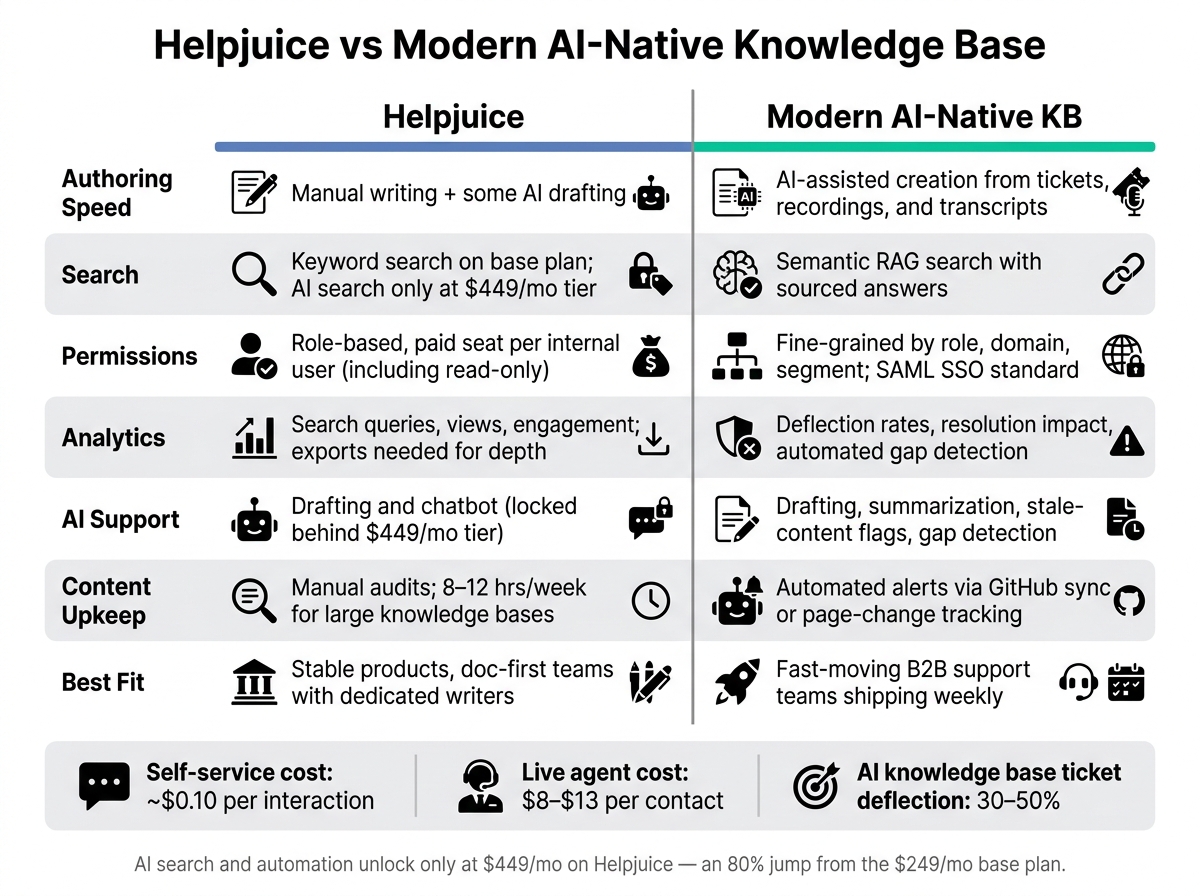
Helpjuice vs Modern AI-Native Knowledge Base: Side-by-Side Comparison
The 8 Best Knowledge Base Tools for Smarter Team Documentation
sbb-itb-e60d259
Quick comparison
| Criteria | Helpjuice | Modern AI-native knowledge base |
|---|---|---|
| Authoring speed | Manual writing with some AI drafting | AI-assisted creation and updates from support inputs |
| Search | Keyword search on lower tiers; AI search on higher tiers | Semantic/RAG search with sourced answers |
| Permissions | Role-based, seat-based access | Finer control by role, account, or segment |
| Analytics | Search, views, engagement | Deflection, resolution impact, search gaps |
| AI support | Drafting, chatbot help | Drafting, summarization, stale flags, gap detection |
| Upkeep | Manual audits | More automated maintenance |
| Best fit | Stable product, doc-first team | Fast-moving B2B support teams |
If I were choosing in 2026, I’d use five checks first: authoring speed, search quality, permissions, analytics, and AI support. That gives a plain way to judge whether Helpjuice is still enough – or whether a knowledge-centric support solution is the better fit.
Helpjuice today: where it works and where it slows teams down

Helpjuice is a standalone knowledge base, not a support workflow tool. It works best for teams that need a published help center, not a layer for handling support work. The key question is simple: does that setup keep answers up to date, easy to find, and easy to track as the knowledge base grows?
Authoring, structure, and day-to-day upkeep
Helpjuice covers the main publishing basics. You get WYSIWYG and Markdown editing, plus accordions, tabs, decision trees, revision history, and scheduled publishing. But the upkeep side still leans heavily on manual work [7][8].
That’s where the strain shows. Helpjuice helps teams publish docs, but it doesn’t flag stale articles or point out content gaps based on ticket trends [8][2]. For a large knowledge base, keeping content current can take 8 to 12 hours of manual writer time per week [2].
Some day-to-day issues add extra drag too. Users report cursor jumps during autosave, formatting issues with complex tables, and slow bug fixes [8]. Collaboration also runs through review and approval instead of live co-editing, so fast changes can take longer than they should. That matters most for support teams that need to update answers fast, not just polish article drafts.
Search, permissions, analytics, and AI basics
Search supports natural-language queries, typo tolerance, and PDF text [6][8]. Failed-search reporting also shows what customers looked for but couldn’t find, and 51% of users say that directly leads to content fixes [7].
Permissions include role-based access for authors, editors, and viewers, along with IP restrictions. SSO through Okta is available on the $449/month AI plan [7][8]. Helpjuice also counts every internal user as a paid seat [8][6], which can push bigger rollouts toward the $799/month unlimited tier.
Swifty AI adds drafting, search, and chat, but it doesn’t solve the upkeep problem. It’s also locked behind the $449/month tier, which is an 80% jump from the $249/month base plan [5][8]. In practical support work, Swifty AI also doesn’t cover summarization, tagging, or gap detection. Analytics track queries, failed searches, and engagement, but deeper reporting still needs exports [8]. For many support teams, that’s the line between a publishing system and something that helps run support day to day.
Helpjuice vs modern knowledge bases: the side-by-side comparison
Authoring speed, search quality, and permissions
Against the criteria above, the gap shows up most in day-to-day work. This isn’t just about feature lists. It’s about how much manual effort your team has to carry.
Helpjuice still leans on manual upkeep, while modern knowledge bases automate more of the job.
Automated documentation helps keep support content in step with product changes. Search shows the same split. Helpjuice’s base plan uses keyword search, and AI search only becomes available at the $449/month tier [3][9]. Modern knowledge bases use Retrieval-Augmented Generation (RAG), which reads intent instead of looking for exact word matches and returns answers with sources [2]. Once a knowledge base grows past 500 documents, that search gap gets much bigger [2].
Permissions tell a similar story. Helpjuice charges for every internal user with a paid seat, even if that person only needs read access [3][5]. For teams that want broad internal knowledge sharing, that can add quiet extra cost fast.
| Capability | Helpjuice | Modern AI-Native KB |
|---|---|---|
| Authoring | Manual writing + AI drafting from Slack or ticket threads | Auto-generated from screen recordings, video transcripts, or code |
| Search type | Keyword search / contextual AI at higher tiers | Semantic RAG with answers with sources |
| Content freshness | Manual updates | Flags stale content via GitHub sync or page-change tracking |
| Permissions model | Role-based, per seat; paid reader seats vs. reader access without authoring seats | Role-based plus domain-based gating and SAML SSO |
Features only matter if they change support results.
Analytics, AI workflows, and support impact
Reporting matters when it leads to better support decisions. Helpjuice shows activity. Modern knowledge bases tie content performance to support outcomes. And that matters, because stale content can lead AI systems to give answers that sound sure but are wrong.
The workflow gap matters just as much. Helpjuice’s AI Suite can help with drafting and chat, but it doesn’t summarize case histories, auto-tag content with topic grouping, or spot content gaps by reviewing thousands of support conversations. In many support teams now, those aren’t nice-to-have features. They’re treated as baseline.
Well-set-up AI knowledge bases can deflect 30% to 50% of repeat tickets [2]. That’s a big deal when a self-service resolution costs about $0.10, while a live support contact costs $8.00 to $13.00 [2][4]. If your team is trying to lower cost per ticket, these differences aren’t cosmetic. They hit daily operations.
| Capability | Helpjuice | Modern AI-Native KB |
|---|---|---|
| Gap detection | Manual review of search analytics | Automated analysis of ticket patterns |
| Auto-tagging | Included in the $449/month AI tier | Standard; uses topic grouping |
| Deflection tracking | Basic search and view data | Tied to resolution rates and handle time |
| Stale content alerts | Manual audits required | Automated alerts triggered by code or UI changes |
| Summarization | Article-level summaries for chatbot | Full case history summarization to draft new docs |
Cost, migration, and implementation risk
Those gaps hit both your budget and your day-to-day work.
Hidden costs beyond the subscription price
The subscription fee is almost never the biggest cost. With Helpjuice, per-user pricing means each internal user needs a paid seat, including employees who only need read access for internal docs [3][8]. In practice, that often nudges teams toward the $799/month unlimited plan, even if only a small group is writing or editing content.
AI access also doesn’t start on the base plan. It begins at the $449/month tier [3][8]. Then there’s the labor cost that doesn’t show up on the pricing page: article audits. Implementing a KCS knowledge base can help streamline this process by integrating content creation into the support workflow. Helpjuice does not flag articles that become outdated after product changes, so your team has to keep checking content by hand [8][10].
When AI sits inside the same support workflow, you can cut out a separate AI tier and avoid paying for duplicate tools.
Budget is one side of it. Migration is where teams often run into trouble.
Migration paths and common migration failure points
Importing content sounds like the hard part, but it usually isn’t. The bigger problems tend to be permissions and search setup.
Permission models are often the first thing teams get wrong during migration. If you’re moving from Helpjuice’s per-user setup to a role-based or flat-fee model, every rule around internal versus external visibility has to be rebuilt by hand.
Search can also change the moment you migrate, not weeks later. A move from keyword-based search to semantic search or RAG-based retrieval takes more than a bulk import. Long articles usually need to be broken into shorter sections with clearer headings so retrieval works the way it should [1][2].
"An AI knowledge base trained on stale articles is more dangerous than no AI at all. It returns wrong answers in conversational tone, complete with citations to the wrong source, and customers believe it." – Henrik Roth, Co-Founder, HappySupport [2]
A safer way to handle the move is to start with the 50 highest-traffic articles, check redirects, and then roll out the rest in batches.
How to choose the right knowledge base approach now
When Helpjuice is enough and when it is not
Once you’ve pinned down cost and migration risk, the next question is pretty simple: how much upkeep can your support team take on without slowing down everything else?
Helpjuice still works for teams that don’t change their product often, have people assigned to writing, and mainly want a branded, searchable help center. Its flat-rate pricing can also make sense when internal readership gets big enough that per-seat pricing starts to hurt.
But weekly releases change the picture fast. Manual upkeep can turn into a grind. A 200-article knowledge base can take 8 to 12 hours a week to keep accurate. At that point, a manual-only model gets hard to defend.
If you also need AI search or chatbots, costs climb fast. Moving from Helpjuice’s base tier to its AI tier means an 80% price increase [3][9]. And if your analytics can’t show deflection, then the knowledge base isn’t helping run support better. It’s just another thing to maintain.
Use the same five checks every time:
- Authoring speed
- Search
- Permissions
- Analytics
- AI support
That gives you a clean way to judge whether your current setup still helps with day-to-day support work, or whether it’s starting to get in the way.
A decision checklist for AI-native B2B support
Use these criteria to pick the right setup.
- Weekly or daily product shipping requires automated maintenance.
- High article volume without dedicated writers requires a system that generates and flags content automatically.
- Permissions and approvals that vary by role, customer, or regulated workflow require fine-grained governance.
- Search must return governed answers fast enough for agents and customers.
- Analytics must show which articles deflect tickets to prove and improve ROI.
- Built-in AI should draft content, summarize cases, and surface content gaps.
The math here is hard to ignore. A self-service interaction costs about $0.10, while a live agent contact costs between $8 and $13 [2][4]. That’s a huge gap. On top of that, mature support teams using modern AI setups see 30% to 45% ticket deflection on self-serve cases [1].
So the issue isn’t just whether you have a knowledge base. It’s whether that knowledge base can help maintain itself and support AI use without pushing you into a higher-priced plan. If it can’t, reaching those numbers gets much tougher.
What matters most is whether AI can work from content that is current and governed. When the knowledge base sits inside the same system that handles cases, permissions, and analytics, it becomes much easier to keep answers accurate and track what’s working.
FAQs
How do I know if my knowledge base is hurting deflection?
Your knowledge base may be hurting deflection if people can’t find answers, the content is old, or key details just aren’t there.
Start by checking for poor search performance. A zero-result rate above 10% on your top 20 customer queries is a red flag. So are repeat dead-end searches, or cases where users click several results and still don’t solve the issue.
It also helps to look for content problems that quietly drive up frustration and ticket volume, like:
- Outdated articles
- Conflicting answers across pages
- Gaps where common questions still have no answer
When those issues pile up, users stop trusting the knowledge base and head straight to support.
What should I audit before migrating to an AI-native knowledge base?
Audit your current content and workflows first. Start with the basics: make sure your articles are accurate and up to date. If AI is trained on stale content, it can give polished answers that are flat-out wrong. It also helps to review version control and how product changes get tracked, so your docs don’t drift away from what the product actually does.
Then look at search performance for your top customer questions. At the same time, check whether your governance model and permissions can grow with you as usage expands. And before you move ahead, map out three-year total cost of ownership so you can spot hidden AI-tier markups and credit-based pricing before they hit your budget.
When does manual article upkeep become too expensive?
It gets too expensive when the work required to keep documentation up to date costs more than the platform saves. For a typical 200-article knowledge base, that can add up to $25,000 to $37,000 per year in writer time.
In fast-moving SaaS teams, product updates keep coming. That means teams have to run manual audits again and again. As a result, stale content is hard to avoid, which can hurt AI performance and chip away at customer trust.
Related Blog Posts
- How AI Cuts Knowledge Base Costs for B2B Support Teams
- What Is a Help Desk? Definition, Benefits, and Real Examples
- Knowledge Base Examples: What Great Help Centers Have in Common
- Front vs. Supportbench: Why Collaboration Tools Can’t Replace a Helpdesk
Evaluating help desks for a B2B team?
Supportbench is all-inclusive from $32 per agent per month, with migration and onboarding included. See pricing or book a 20-minute demo.






