



Merging two support teams too fast is how SLAs slip, queues get messy, and backlog grows. If I were leading this move, I’d keep it simple: set the future support model first, audit both teams in detail, standardize workflows and ownership, then roll out in waves with clear rollback rules.
Here’s the core plan in plain English:
- Decide the end state first: platform, channels, queues, SLAs, escalation paths, and who owns each call
- Audit both teams before changing tools: systems, inboxes, tags, routing rules, integrations, macros, and reporting links
- Standardize the work model: one taxonomy, one SLA model, clear queue ownership, and documented escalation rules
- Use AI during the move: triage, routing, summaries, QA scoring, and alerts to limit misroutes and backlog
- Cut over in waves: start with a 5–10% pilot, fix issues, then expand
- Track hard numbers after go-live: first response time, resolution time, backlog age, escalation rate, CSAT, CES, and FCR
- Plan for a short dip in output: teams often see a 20–40% drop in productivity for the first 4–8 weeks
A few points stand out. First, most post-acquisition support issues are process issues, not tool issues. Second, unclear ownership causes delays fast. Third, bad knowledge base content weakens both agent work and AI routing. And fourth, one big cutover is often where things start to fail.
If you want a low-risk path, the article boils down to this: define the target model, map the current state, rebuild the workflows, move in phases, and watch the first 90 days closely.
| Phase | What I’d focus on | Main output |
|---|---|---|
| Target model | Service tiers, platform, decision rights | 1-page TOM |
| Audit | Systems, taxonomy, SLAs, KB, KPIs | Gap list and baseline |
| Workflow design | Queues, ownership, routing, escalation rules | Unified workflow model |
| Cutover | Pilot, dual-run, risk tracking, rollback checks | Wave-based migration |
| Stabilization | Daily metric review for 30/60/90 days | Post-migration scorecard |
That’s the whole playbook: pick the model, clean the process, move in small waves, and measure everything.
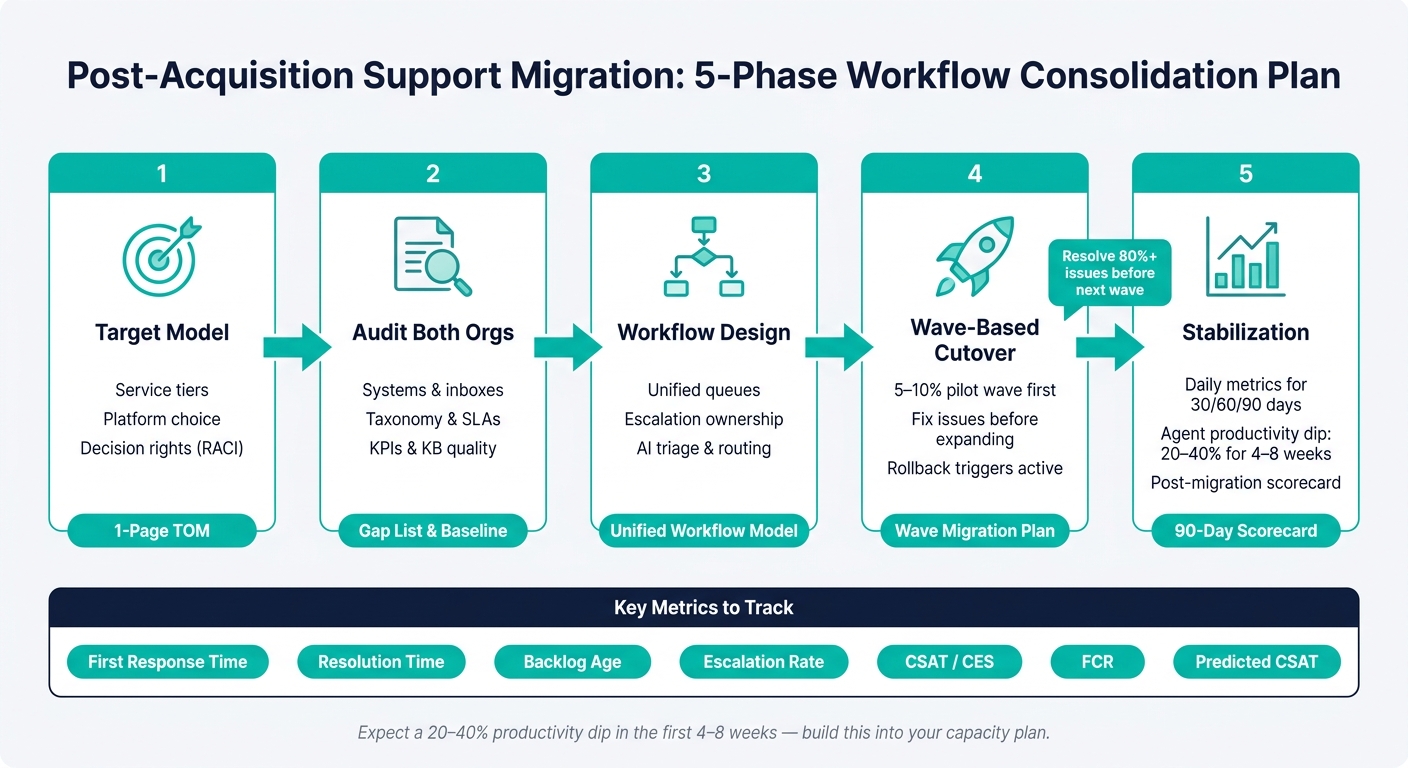
Post-Acquisition Support Migration: 5-Phase Workflow Consolidation Plan
How to Scale Customer Services After a MERGER and ACQUISITION
sbb-itb-e60d259
1. Define the target operating model before changing systems
One of the most common post-acquisition mistakes is diving straight into system consolidation. That usually backfires. First, define the future state. That future state is your target operating model (TOM).
Set support goals, service tiers, and decision rights
Start by defining the service outcome for the unified organization. Before anyone touches systems, the TOM should lock in support tiers, the standard case lifecycle, service expectations, and decision rights. For B2B accounts, decide which processes to keep, merge, or redesign and assign a clear owner to each call.
A simple RACI helps settle decision rights before the work starts. That matters more than it sounds. Without clear ownership, teams can get stuck arguing over taxonomy, queues, or SLA trade-offs while the migration slows to a crawl.
Here’s a simple split:
- Support Ops owner: workflows, queues, and SLAs
- Content owner: the knowledge base, macros, and AI-readiness
- Technical owner: exports, sandbox environments, and integrations
- Executive Sponsor: budget deadlocks and go-live approval
Once those owners are set, map the systems, queues, and workflows that need to change.
Choose the long-term platform and AI operating model
Pick the platform based on B2B case complexity, not raw ticket volume. A good fit needs to handle complex account context, long-running cases, renewal-sensitive escalations, and deep system integrations.
There’s a practical reason for this too: agents usually work well across only 4–5 applications [4]. When one platform brings case management, knowledge, escalation tracking, and AI into the same interface, agents spend less time bouncing between tools and more time solving cases.
The long-term platform should support:
- complex account context
- long-running cases
- integrated workflows
- AI-assisted triage, routing, summaries, and QA
Write a one-page target operating model
Before any data moves, write down the future state on a single page. Keep it tight. That one-pager should define the platform, channels, queue structure, case lifecycle, escalation paths, SLA rules, knowledge ownership, automation boundaries, and rollback criteria.
This document becomes the standard for migration trade-offs. If two teams disagree on escalation ownership or taxonomy structure, the TOM settles it. Update the one-pager only when migration decisions change.
Use the TOM as the baseline for the current-state audit in the next step.
2. Audit both support orgs and map what needs to be consolidated
Once the target operating model is set, audit both orgs before you touch any workflow. Start by mapping the people, processes, data, and tools across both support teams. The goal is simple: figure out which workflows can be standardized, which need a full rethink, and which should stay separate until cutover.
Use that inventory to sort work into three buckets: what can be merged, what needs redesign, and what should remain separate for now. That keeps the move grounded in facts instead of guesswork.
Inventory systems, inboxes, integrations, and reporting dependencies
List every support tool both teams use. That includes ticketing platforms, shared inboxes, knowledge bases, CRM connections, and automation tools. For each one, note the owner, what data it syncs, and where handoffs or manual rekeying create cutover risk.
That last part matters more than it may seem. If case history or reporting depends on data moving across several tools, one broken handoff can throw the whole chain off. A ticket that touches multiple systems can create data quality issues fast if even one link fails. It’s much better to map those dependencies now than scramble after go-live.
Map ticket taxonomy, workflows, SLAs, and escalation rules
Two support orgs almost never classify work the same way. Tags, labels, category names, priority levels, and escalation logic usually drift over time, even when both teams handle similar issues. Sometimes an escalation path lives in one person’s head – or runs through a named individual instead of a documented process. That’s a weak spot you want to remove.
Build a side-by-side comparison of:
- taxonomy
- priority levels
- SLA targets
- queue routing rules
- closure codes
- business-hours vs. calendar-day SLAs
- whether pending statuses stop the SLA clock
For each area, decide whether to adopt one org’s setup as-is, merge the best parts of both, or redesign it for the combined team. Start with the mismatches tied to the highest ticket volume and the most risk.
This is also the right time to flag unused tags, duplicate categories, and stale macros. Bringing old clutter into the new system just adds noise, and that slows triage from day one.
Baseline KPIs, backlog volume, and knowledge quality
Before anything moves, capture the metrics that show how each org performs today. At a minimum, document cycle time, SLA attainment, backlog volume, and key escalation points. You need a clean baseline so you can compare performance after migration.
Run the same kind of audit on both knowledge bases. Check article coverage against the most common ticket categories, flag duplicates, and mark content that’s out of date or no longer correct. Poor knowledge quality can weaken AI triage after migration, which then affects routing and QA scoring too.
These baselines show exactly which workflow changes need to happen before consolidation.
3. Design the unified workflows, queues, and controls
With the audit done, you can see where the two orgs match up and where they clash. Now comes the hard part: turning that into one operating model agents can use day to day and managers can track with confidence. Use the audit findings to lock the new rules before cutover.
Standardize taxonomy, priority rules, and customer SLAs
Start by turning the audit into one shared set of tags, fields, and SLA rules. Then decide what to adopt, what to merge, and what to redesign so the combined support model is stable before cutover [1].
Get the rules aligned first. Tuning can wait until after cutover.
SLA alignment is often where teams feel the most friction. Put the current targets side by side, define one shared model for priority rules and service hours, and standardize customer and agent terms early. Those definitions shape downstream field names and the customer experience [4]. Automations, routing logic, and SLA policies also need to be rebuilt by hand so they match the new target operating model [6].
Once the rules are set, tie queue ownership to them.
Redesign roles, queues, and escalation ownership
When support teams merge, they usually end up with too many queues and fuzzy ownership. Clean that up by building queues around case type and escalation path, and give each queue a named owner. Fewer queues and clear ownership help cut handoff failures during the transition [5].
Escalation ownership needs to be explicit. For each queue, assign a process owner to stop workflow drift. Then document:
- what triggers a ticket move
- what data moves with the ticket
- what happens when the case closes
If you’re running legacy and target systems in parallel, sync status and resolution notes during dual-run so both systems stay aligned [1] [7].
With the queue model in place, AI can help cut routing mistakes and keep backlog from piling up during dual-run.
Use AI to cut backlog, misroutes, and workflow drift
The consolidation window is one of the riskiest periods for misroutes and workflow drift. AI-driven process mining can show how support work happens in practice, not just how it looks on paper. That makes it easier to spot weak points in routing and escalation paths [1].
AI can also help with AI-powered ticket routing by issue type and severity during the transition. That cuts manual routing errors while teams get used to new workflows [6].
Automated ticket sync filtering can move only the tickets that should pass between systems based on field values, assignment groups, or ticket type [7]. Automated SLA alerts give teams real-time visibility into overdue tickets and help enforce compliance workflows before backlog starts to build [2].
4. Run the migration in waves and stabilize after cutover
With unified workflows, queues, and AI controls in place, the next move is execution. A phased rollout keeps risk in check and gives your team time to fix issues before they hit the full customer base.
Build the phased cutover plan and risk register
Once the unified workflows are set, rollout turns into a controlled process. Move by channel or customer segment. Start with a 5–10% pilot wave, fix what it exposes, then expand to the next wave. That pilot needs to mirror real-world complexity, including edge cases, and confirm routing, SLA clocks, escalation paths, and reporting before you scale up. Resolve at least 80% of identified issues before moving to the next wave [3].
During the transition, freeze new workflow additions. First migrate the current state. Tune and refine it only after the base is stable [1].
Pair the phased plan with a live risk register. These are the failure points that tend to do the most damage in B2B case-heavy migrations:
| Risk | Impact | Mitigation | Owner | Rollback trigger |
|---|---|---|---|---|
| Field mapping failure | Misrouted tickets; broken reporting | Visual mapping review; sandbox testing with real data samples | Support Ops | >5% misroute rate in pilot wave |
| Integration breakage | Lost escalations; workflow gaps | Inventory all endpoints (Slack, Jira); webhook re-mapping pre-cutover | Technical owner | Any escalation lost in transit |
| SLA degradation | Backlog spikes; customer churn | 4–6 week stabilization period; dedicated on-call team; phased rollout | Support Ops | SLA attainment drops below baseline threshold |
| AI model cold-start | Loss of predictive insights | Preserve historical signals before switching systems | Technical owner | Triage accuracy falls below pre-migration level |
| Data corruption | Lost case history; audit failure | Pre-migration audit; full backup before each migration phase | Technical owner | Any confirmed data loss or case history gap |
After each wave, plan for a 4–6 week stabilization period. During that window, assign people to watch escalation rates, SLA compliance, and agent throughput every day [3]. That may sound cautious, but migrations tend to fail in the handoff between "it launched" and "it settled down."
Consolidate inboxes, portals, and the knowledge base
Once the first wave is stable, bring channels and content into the same cutover window. Route legacy email addresses into the new system, then keep a parallel-run period long enough to catch exceptions and cut the risk of missed tickets.
Before moving historical data, disable all outbound notifications in the new system. This step matters more than it seems. Skip it, and you can trigger "ticket created" alerts for cases that were resolved months or even years ago [6]. Run an incremental sync during off-peak hours to catch tickets created or updated during the main transfer window [6].
For the knowledge base, use the migration as a cleanup moment. Stale or duplicate content hurts routing and answer quality after cutover. Retire old articles. Merge duplicates. If you’re using AI to draft KB articles from resolved cases, review the subject, summary, and keywords before anything goes live [6].
Align reporting and track the first 30, 60, and 90 days
Once channels and content are live, reporting becomes the last control layer to normalize. Reporting is often the first thing to break when field structures shift, so map legacy categories into the new model before cutover. That way, managers can compare performance across the transition instead of staring at mismatched dashboards.
For the first 90 days, run a set stabilization cadence. Validate data integrity in week one, gather agent feedback at day 7 and day 30, and watch core metrics daily for the first two weeks [6]. Compare each post-cutover metric to the baseline captured in section 2.
| Metric | Why it matters post-migration |
|---|---|
| First response time | Flags routing delays and queue activation issues |
| Resolution time | Reveals workflow friction in the new model |
| Backlog age | Shows whether volume is clearing or accumulating |
| Escalation rate | Indicates handoff and ownership gaps |
| CSAT / CES | Tracks customer perception through the transition |
| Predicted CSAT | Surfaces at-risk cases before surveys close |
| FCR (First Contact Resolution) | Measures whether the unified knowledge base is working |
Expect a dip in output after cutover. Agent productivity usually drops 20–40% in the first 4–8 weeks as teams get used to the new UI and workflows [3]. Build that into your capacity plan. Then use the 60- and 90-day reviews to adjust staffing, queue ownership, and automation rules before expanding automation, staffing changes, or queue reassignments.
Conclusion: One support model, clear controls, and measurable improvement
Post-acquisition support migrations tend to go off track when teams skip the groundwork and jump straight into system setup. That’s usually where things start to wobble. The better path is pretty simple: define the future-state model, map the current one, standardize workflows, and then cut over in waves.
That order matters. It helps keep service levels steady while the new operating model settles in.
Done well, these steps lead to one support model with clear ownership, consistent SLAs, and lower migration risk. And when AI handles triage, routing, QA, and escalation signals, the combined team can move through the transition with less backlog and fewer misroutes.
Success is easy to judge: stable service, cleaner routing, faster resolution, and a 90-day scorecard that shows the new model is working.
FAQs
How long should a support migration take?
A standard support migration usually takes 8 to 16 weeks from planning to full cutover. If you’re dealing with an enterprise consolidation, where data is messy and integrations run deep, the timeline often stretches to 12 to 24 weeks.
Some teams push for a faster Big Bang cutover. That can work, but a phased approach is usually the lower-risk path. Either way, set aside 4 to 6 weeks of hypercare after launch so the team can steady day-to-day work and keep a close eye on KPIs.
What should we migrate first after an acquisition?
First, audit and align ticket taxonomy, SLA definitions, and priority levels across product lines so routing stays consistent.
Then focus on Day 1 integrations: inbound email ingestion, CRM sync, SSO, and billing entitlement checks.
For data migration, move accounts and organizations first. After that, bring over contacts, custom objects, tickets, and attachments.
Before you standardize workflows, clean the records and merge them into one master data foundation.
How do we keep SLAs from slipping during cutover?
Skip the big-bang cutover. Roll this out in phases instead, and test new workflows with a specialized Tiger Team first. That gives you a chance to spot broken automations, routing gaps, and escalation failures before they hit your full customer base.
During a four- to six-week hypercare period, watch SLA compliance and escalation rates closely. Set clear rollback thresholds – for example, if SLA breaches climb above 10%. Also, manually rebuild and verify business rules against your pre-migration baseline.
Related Blog Posts
- Support vs project management tools: where implementations fall apart
- How to migrate integrations when switching helpdesks
- How to keep historical CRM context when migrating support tools
- How to handle mergers and acquisitions in your support data model
Evaluating help desks for a B2B team?
Supportbench is all-inclusive from $32 per agent per month, with migration and onboarding included. See pricing or book a 20-minute demo.






