



A merger can break support faster than most teams expect. If account links, SLA rules, ticket statuses, and product entitlements do not match on day one, you can end up with lost tickets, wrong routing, and bad reports.
If I had to boil this down, I’d focus on four things first:
- Set the end state before changing data
- Map both systems and find rule conflicts early
- Move data in phases, not all at once
- Keep history, audit dates, and source tags intact
A few numbers from the article stand out:
- Agent output can drop 20%–40% for 4–8 weeks after cutover
- Some acquired teams have 3x more systems than diligence shows
- Duplicate records can hide 20%–40% of the actual customer base
- A 5%–10% pilot helps catch bad mappings before full migration
- Many teams keep only the last 24 months of active history in production
Here’s the core idea in plain English: I’d treat routing, entitlements, SLA timers, and reporting as the first things to protect. Then I’d clean duplicates, map statuses and priorities into one model, preserve original ticket dates, and stop migrated records from firing live automations.
Quick comparison
| Focus area | What I’d do first | What can go wrong if skipped |
|---|---|---|
| Data scope | Define must-keep support outcomes | Tickets, SLAs, and dashboards drift right away |
| System review | List every support system and connection | Hidden tools break routing and reports |
| Unified model | Standardize accounts, contacts, products, statuses, priorities | Agents work in mixed rules and mixed meanings |
| Migration | Move accounts → contacts → entitlements → tickets | Broken links, wrong owners, SLA gaps |
| History | Keep source tags and original dates | AI, reporting, and timelines become unreliable |
| Post-cutover checks | Rebuild KPI definitions and review exceptions monthly | Small data issues spread across the new setup |
So the short answer is this: don’t start with field cleanup. Start with the support outcomes you must protect, build one shared model, migrate in waves, and verify that routing, SLAs, history, and reporting still work after the deal closes.
Assess the combined support data landscape
Before you design the merged model, take stock of every system that touches support data. That includes ticketing platforms, CRMs, contract records, knowledge bases, BI reports, and old case archives.
Also check for shadow systems. These are the off-the-books tools teams use without IT oversight. They matter more than people think. In some acquisitions, the target has 3x more systems than the diligence documents show [5].
The point here is simple: find every system and every connection that can affect routing, SLAs, reporting, or account visibility. That inventory becomes your starting point for field mapping, routing rules, and migration sequencing.
Map systems, entities, and relationships
Start with a data dictionary. This is the formal record of every object in both systems, including standard and custom objects, plus the dependencies between them and the way records connect across systems [3].
If you skip this step, teams tend to misread duplicate records, send cases to the wrong owner, and keep business rules that clash with each other. In support operations, that means you need to document things like:
- Parent-child account hierarchies
- Contact roles
- Product catalogs
- Contract terms
- Entitlement logic
- Escalation groups
- Queues
- Ticket fields
Account hierarchy depth needs extra attention. One company may only track parent accounts. The other may use a deeper hierarchy with different support-level rules tied to each layer. That gap can break automated routing the moment the two datasets are combined.
Once the objects and relationships are mapped, move to the conflicts most likely to disrupt live support first.
Find conflicts that will break operations first
Put routing, entitlements, and SLA tracking at the top of the list. Triage by operational risk, not by how much data is involved.
| Entity | Definition Gap | Duplicate Risk | Routing / SLA Impact |
|---|---|---|---|
| Accounts | Different parent-child hierarchy depth | High | Conflicting "Global" vs. "Regional" support tiers |
| Contacts | "Technical Lead" vs. "Admin" role definitions | High | Wrong notification routing for critical escalations |
| Products | SKU vs. Product Family mapping | Low | Entitlement failures for legacy product versions |
| Statuses | "Pending" in one system = "On Hold" in another | N/A | Broken "Time to Resolve" reporting |
| Priorities | 3-level vs. 5-level severity scales | N/A | 1-hour critical response targets missed against contract |
| Teams / Queues | Overlapping escalation groups; different tier boundaries | N/A | Customers bouncing between agents with no clear owner |
Mismatched severity scales are a common cause of SLA breaches. If one company defines P1 as a 1-hour response and the other uses a 4-hour target for the same incident type, you need a rule in place before cutover [1].
Assign data owners and decision rules
Set up a cross-functional governance group with Support Operations, IT, Finance, Legal, and Customer Success, and establish internal SLAs to manage cross-departmental expectations. Then use a RACI matrix to spell out who is Responsible, Accountable, Consulted, and Informed for each entity type [1].
This part matters because survivorship rules are business rules, not technical rules [5]. IT can enforce them in the system, but the call on which account record, billing address, or SLA commitment wins has to come from the business side.
As a rule of thumb, use the most authoritative source instead of whichever record was updated last. For example:
For top accounts, do a manual review before migration [5].
That assessment helps you decide which objects can stay in standard fields, which need remapping, and which need manual review before migration.
sbb-itb-e60d259
Design a unified, AI-ready support data model
Turn the assessment into one support model that everyone uses. This becomes the source of truth for migration, routing, and reporting.
Standardize accounts, contacts, products, and entitlements
The first call is deciding which account hierarchy becomes the master structure. One company may group accounts by geography. The other may group them by business unit. Those two setups can’t live side by side in one support model without causing problems in routing and reporting.
Pick one hierarchy, then map everything else to it.
For global customers with subsidiaries and partners, set clear parent-child relationships. That keeps entitlement and visibility rules steady across the full account tree.
Contact roles need the same cleanup. Create one canonical role list, then map each legacy role to that list before migration. That way, agents and automations use the same escalation logic across both organizations.
On the product side, bring SKUs, product families, and support entitlements into one catalog. Entitlements should remain tied to active contracts and renewal dates. Keep the mapping rules clear so contracts, renewals, and coverage rules stay in sync after migration.
Harmonize ticket lifecycle, priorities, and SLA logic
Next, clean up the fields that run day-to-day support. Before you move even one live case, map every legacy status to a single lifecycle:
| Legacy Status (Company A) | Legacy Status (Company B) | Unified Target Status |
|---|---|---|
| New | Unassigned | New |
| In Progress | Open | Active |
| Pending Customer | Awaiting Info | Pending |
| Solved | Fixed | Resolved |
| Closed | Archived | Closed |
Priority standardization works the same way. If one company used a 3-level scale and the other used 5 levels, you need a documented crosswalk from each legacy value to the new standard, along with the SLA commitment tied to it.
Then rebuild SLA policies around contract tier and business risk. After that, line up calendars and escalation rules across the combined organization. If those pieces don’t match, the model may look clean on paper but fall apart in live support.
Build taxonomy for AI classification, search, and knowledge
A clean taxonomy is the difference between a support model that simply runs and one that supports automation. If you want AI classification, search, and knowledge recommendations to work well, your ticket fields need to capture issue type, intent, sentiment, and environment in a steady, structured format.
Don’t make the taxonomy too detailed. It should be specific enough for routing and reporting, but simple enough that agents will use it the same way every time.
Also, keep a source-system field on every migrated record. That gives you a clear link back to the legacy data or the new model. During a phased cutover, those source markers make traceability much easier.
Migrate in phases without breaking routing or history
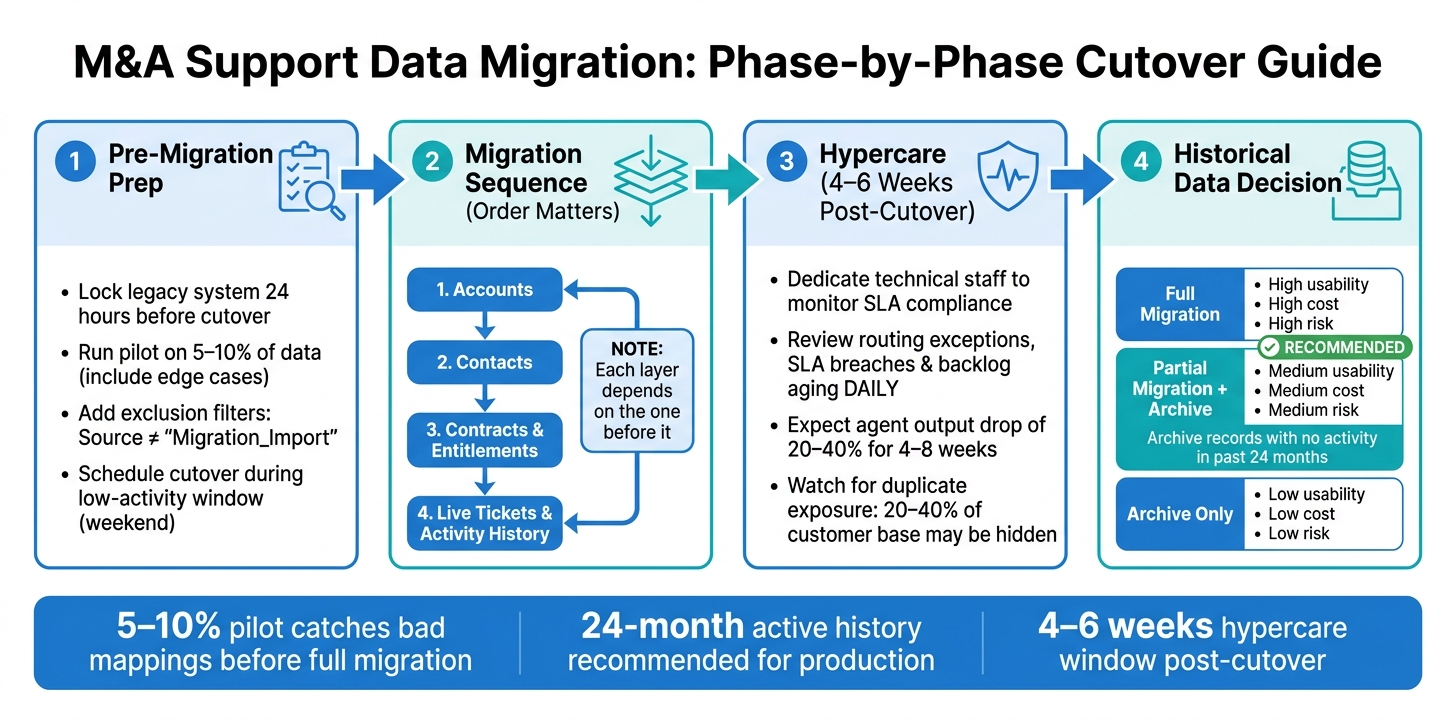
M&A Support Data Migration: 4-Phase Process Guide
Once the unified model is set, move in a controlled sequence so routing, SLAs, and history don’t fall apart mid-migration.
Phase the cutover for live cases, entitlements, and legacy data
Order matters more than speed here. Move data in this sequence: accounts first, then contacts, then contracts and entitlements, and last, live tickets and activity history. Each layer relies on the one before it. If tickets land before accounts exist, you can end up with broken links and routing holes.
Skip the big-bang cutover. A phased rollout works better. Move user groups or data types in waves so if something goes wrong, the blast radius stays small. Before the full move, run a pilot on 5–10% of your data, and make sure that sample includes the ugliest edge cases. That’s where field mapping problems usually show up.
Lock the legacy system for new data entry 24 hours before the cutover window. Then schedule the cutover for a weekend or another low-activity period. After go-live, plan for 4–6 weeks of heavier support, with dedicated technical staff watching SLA compliance and agent throughput. During hypercare, review routing exceptions, SLA breaches, and backlog aging every day.
Once the cutover sequence is set, define matching rules before records start moving.
Cleanse duplicates and preserve historical traceability
Mergers often expose a messy truth: companies may have 20% to 40% fewer unique customers than reported because duplicates are spread across systems [4]. Use email addresses as the main match key for contacts and web domains for accounts. It’s a clean, repeatable way to find duplicates before a single record gets moved.
When you merge duplicate accounts or contacts, don’t delete the old record. Archive it and apply a clear source tag. Keep original ticket IDs, source tags, and past sentiment or escalation flags so AI and reporting can preserve the timeline. If those fields disappear, trend reporting starts to bend, and AI loses the sequence it needs to spot the right signals.
If your platform allows audit field preservation, turn it on. That way, original creation dates move over instead of being replaced by the migration date. If you skip that step, every migrated ticket can look like it was created on the same day, which wrecks historical reporting.
Also, add exclusion filters to your automations in the new system. For example:
"Source is not equal to ‘Migration_Import’"
That stops old records from firing live SLA timers, routing logic, or customer notifications the second they appear.
Choose the right historical data strategy for cost and usability
Once live records are stable, decide how much old history should live in production.
Records with no activity in the past 24 months are usually better archived than moved into the live production system. They increase storage cost, slow search, and in most teams, agents barely touch them.
Here’s a side-by-side look at the three main options:
| Strategy | Agent Usability | Reporting Continuity | Storage Cost | Implementation Risk |
|---|---|---|---|---|
| Full Migration | High: all data in one searchable interface | High: seamless year-over-year trend analysis | High: significant impact on storage limits | High: complex mapping for legacy schemas |
| Partial Migration + Archive | Medium: recent data is live; older data requires a separate login | Medium: requires data blending for long-term trends | Medium: optimized for active record costs | Medium: requires clear cut-off date logic |
| Archive only | Low: agents must switch systems to see any history | Low: historical reporting is siloed in the old system | Low: minimal impact on new system costs | Low: no complex data transformation required |
For most active support teams, partial migration plus archive is the best fit. Agents keep the context they need for current work, without paying to move years of stale records that almost no one opens. Whatever cut-off date you choose – usually 24 months of active history – document it clearly so reporting teams know exactly where live data stops and archived data starts.
Rebuild reporting, benchmarks, and ongoing governance
After cutover, reporting shows whether routing, SLA logic, and customer history still work in the merged support model.
Standardize KPI definitions and rebuild post-merger dashboards
Before you rebuild even one dashboard, get the definitions straight. The same KPI can show different numbers when each legacy team measured it in its own way. Start with the metrics that matter most, then document the agreed definitions in one shared reference that Finance, Operations, and Support all approve.
This is where teams usually get tripped up:
| KPI | Legacy Definition A | Legacy Definition B | Unified Post-Merger Definition |
|---|---|---|---|
| First Response Time | Calendar hours from ticket creation | Business hours from first human touch | Business hours from creation to first substantive human response |
| Resolution Time | Time until "Solved" status | Time until "Closed" status | Total elapsed business hours from creation to "Resolved" status |
| SLA Attainment | % of tickets meeting first response | % of tickets meeting all milestones | % of tickets meeting both response and resolution targets per priority |
| Backlog | All "New" and "Open" tickets | All "Unresolved" tickets | Any ticket not in "Resolved", "Closed", or "Pending Customer" status – used as a reporting metric only |
These definitions also act as a final test of whether account, ticket, and entitlement mappings made it through migration intact. Run both systems side by side for one reporting cycle so you can reconcile gaps before you retire the old dashboards.
Once the main dashboards line up, use AI signals to find the places where the merged model still slips.
Use AI signals to monitor integration health
After a merger, AI signals often flag data-model problems before managers spot them. If CSAT predictions suddenly get less accurate, or sentiment analysis starts giving uneven results, that usually points to a field mapping failure or broken data lineage, not a drop in support quality [1].
Track AI-only resolution rate as a new benchmark next to your standard KPIs. It measures the share of issues fully resolved by AI with zero human intervention, which makes it a solid signal for whether your taxonomy still supports clean classification and routing [2]. If that number drops sharply after cutover, something likely broke in AI-powered routing and classification logic during migration. In most cases, the cause traces back to taxonomy gaps or field mapping errors introduced during the merge.
One point matters a lot here: keep your AI layer separate from the CRM. When AI capabilities live inside one platform, they turn into a migration risk. A separate AI layer sitting outside the CRM keeps historical sentiment signals, escalation predictions, and trend continuity in place even when the systems underneath change. It also helps you avoid the long retraining window that often follows a platform switch [1].
Feed those exceptions into the monthly governance review so the team can fix problems before they spread.
Maintain a monthly governance cadence after cutover
Once reporting settles down, lock in a review cadence. Assign one steward from each side to own the monthly review of duplicates, missing fields, and routing exceptions. That same group should review taxonomy and SLA rules every quarter, and send new product lines or business units through change control before they affect routing or reporting [6].
A fixed review cadence helps catch drift before it shows up in reporting.
FAQs
How do we choose the source of truth after a merger?
Pick your source of truth at the field level, not by system. In plain English, one tool doesn’t get to own everything. Ownership should follow the business function behind each field: CRM owns account identity and ownership, billing owns subscription status, MRR, and renewal dates, and the support platform owns ticket history and SLA status.
When records clash, stick to those ownership rules. Match records with deterministic identifiers, skip null values so blank fields don’t wipe out known data, and write down survivorship rules. Keep human oversight in place for merges and exceptions.
What data should we migrate first to avoid support disruption?
To avoid support disruption during a merger or acquisition, move data in this order:
- accounts and organizations
- contacts tied to those accounts
- entitlements and custom objects
- tickets, comments, and attachments
Start by defining a canonical identity model. In plain English, that means mapping each system to persistent, deterministic identifiers so records line up the same way every time.
From there, use a phased migration and a crosswalk table to keep relationships intact and preserve historical context. That step matters more than it may seem at first glance. If IDs don’t match cleanly, tickets can lose their account links, contacts can drift away from the right organizations, and past support history can become hard to trace.
How much historical support data should stay in production?
Keep historical support data live in production until the cutover is stable and your consolidated identity mapping, parent-child links, and ticket-to-account relationships are trustworthy and easy to query.
Don’t delete or fully archive legacy context during migration. Hold on to the raw history, use legacy_id crosswalks, and retire legacy systems on a set schedule, often after hypercare and a planned 180+ day window.
That extra runway helps you avoid broken routing, orphaned records, and signal loss in AI systems and reporting.
Related Blog Posts
- How do you migrate from Salesforce Service Cloud to a helpdesk without losing case history?
- Support vs project management tools: where implementations fall apart
- How to keep historical CRM context when migrating support tools
- How to support multi-domain customers (subsidiaries, acquisitions)
Evaluating help desks for a B2B team?
Supportbench is all-inclusive from $32 per agent per month, with migration and onboarding included. See pricing or book a 20-minute demo.






