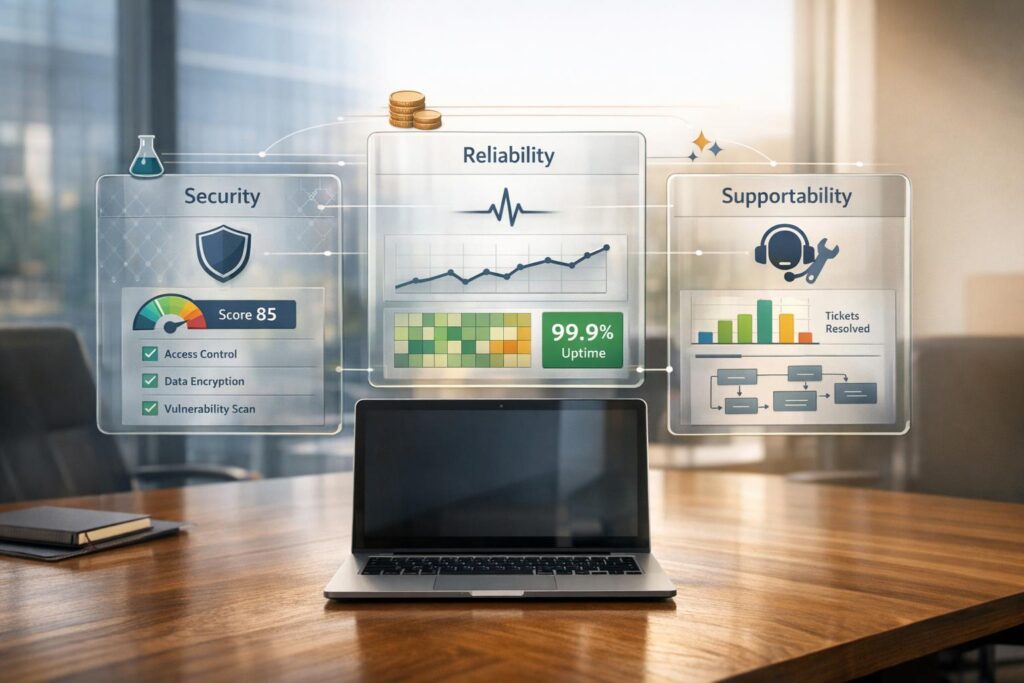
Marketplace integrations can simplify workflows, but if poorly evaluated, they lead to costly problems like data breaches, downtime, and maintenance headaches. To avoid these risks, focus on three core areas:
- Security: Check for SOC 2 Type II certification, OAuth 2.0 authentication, TLS 1.3 encryption, and clear data deletion policies. Vendors must demonstrate robust access controls and compliance.
- Reliability: Evaluate uptime (99.9%+), error handling, and bidirectional data sync during a proof-of-concept phase. Test for how integrations handle failures and ensure real-time monitoring tools are in place.
- Supportability: Determine who manages updates (vendor, third-party, or internal team). Look for tools allowing non-technical adjustments and assess long-term costs beyond license fees.
Key takeaway: A structured evaluation process ensures integrations meet your needs while reducing risks and hidden costs. Negotiate proof-of-concept trials, cross-check vendor claims, and use AI tools for continuous monitoring.
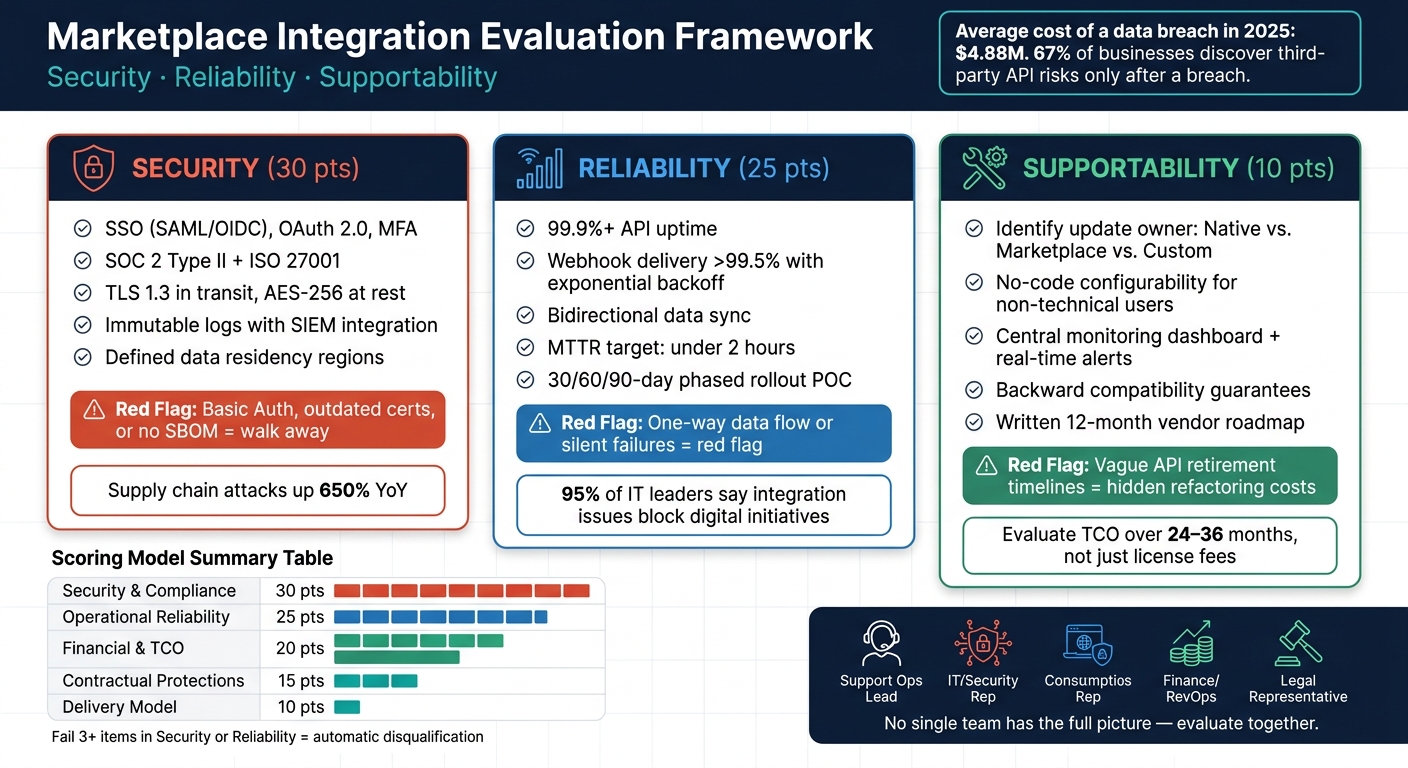
Marketplace Integration Evaluation Framework: Security, Reliability & Supportability
Building an Evaluation Framework
Having a clear evaluation framework is crucial when assessing integrations. Without it, the process can become chaotic – team members may focus on unrelated priorities, vendors might steer the conversation, and decisions could end up being based more on instinct than solid evidence.
Mapping Integrations to Your Workflows
Start by listing all your current and planned integrations. Classify each one as either Native (managed by the platform vendor), Marketplace (developed and maintained by a third party), or Custom (built internally using APIs). This classification helps determine who is responsible for updates – native connectors update automatically, while marketplace connectors might need manual updates [3].
Next, link these categories to the workflows they impact, such as SLA management, case routing, AI automation, or billing. It’s important that integrations offer bidirectional synchronization to enable real-time workflows. Create a data flow map that outlines where data originates, where it moves, and where it’s stored. This map will be invaluable when your security team needs to evaluate the integration.
Once you’ve mapped your integrations, you’ll be in a strong position to set clear evaluation goals.
Setting Clear Evaluation Goals
Ambiguity in goals often leads to unclear outcomes. Before diving into vendor demos, define what success looks like in operational terms. For example, if you’re addressing a specific challenge, translate it into measurable objectives – like reducing handle time by 20% or improving first contact resolution rates.
"If the vendor cannot map each major feature to a business KPI, you are buying capability, not outcomes. In enterprise procurement, capability without measurement often becomes expensive ambiguity." – Speciality.info [4]
In addition to operational goals, establish technical baselines that are non-negotiable. For most B2B environments, these might include SOC 2 Type II certification, OAuth 2.0 authentication, and automated retry logic for failed syncs. These aren’t optional extras – they’re essential safeguards. Skipping these minimum requirements could introduce risks that undermine your operational goals.
Forming a Cross-Functional Review Team
No single team has the full perspective needed to evaluate an integration. For example, support operations may understand how workflows will be affected but might not have the expertise to assess API security risks. On the other hand, IT and security teams can evaluate protocols but might not fully account for the cost of agent downtime. Finance and RevOps are critical for calculating the Total Cost of Ownership (TCO), which includes implementation, staffing, and maintenance – not just the license fee.
Your review team should include:
- A support operations lead
- An IT/security representative
- A finance or RevOps team member
- A legal representative (especially if regulated data is involved)
Each team member brings a unique perspective, and the gaps between these viewpoints are often where potential risks or issues hide [2]. Together, they can provide a comprehensive evaluation.
Building a Scoring Model
To ensure consistency, create a scoring model that assigns weighted points to key evaluation categories. Below is an example structure:
| Evaluation Category | Suggested Weight | Key Evidence to Request |
|---|---|---|
| Security & Compliance | 30 pts | SOC 2 Type II report, OAuth 2.0 flow, TLS version |
| Operational Reliability | 25 pts | Historical SLA data, retry logic documentation, status page |
| Financial & TCO | 20 pts | License fees, implementation costs, maintenance estimates |
| Contractual Protections | 15 pts | Audit rights, data deletion procedures, change-of-control clauses |
| Delivery Model | 10 pts | Native vs. Marketplace status, API changelog, support SLAs |
If a vendor fails three or more items in critical categories like security or reliability, they should be excluded, no matter how appealing other aspects may seem. By scoring each integration candidate against the same model, you’ll have a fair and transparent way to compare options. This approach ensures that every integration meets the necessary benchmarks for security, reliability, and ongoing support.
sbb-itb-e60d259
How to Evaluate Security in Marketplace Integrations
When it comes to marketplace integrations, security must be your top priority. Every security issue directly impacts the scoring model discussed earlier – feeding into the Security & Compliance category and influencing your overall vendor score. A poorly secured integration doesn’t just risk customer data; it opens the door to regulatory penalties and damages the trust you’ve worked hard to build. Consider this: by 2025, the average cost of a data breach is expected to reach $4.88 million, and 67% of businesses only discover third-party API risks after a breach occurs [1][6]. That’s a price no one wants to pay.
Security Criteria to Check
Before moving forward with any integration, there are essential security criteria that must be met. Think of these as your non-negotiables – if a vendor can’t check these boxes, it’s time to walk away.
| Security Criterion | Requirement | Red Flag |
|---|---|---|
| Authentication | SSO (SAML/OIDC), OAuth 2.0, MFA | Basic Auth or long-lived API keys without rotation |
| Compliance | SOC 2 Type II, ISO 27001 | Self-attestation or outdated certifications |
| Encryption | TLS 1.3 in transit, AES-256 at rest | Deprecated SSL/TLS 1.0 support |
| Logging | Immutable logs with SIEM integration | No access logs or failed login tracking |
| Data Residency | Clearly defined regions (e.g., US, EU) | Lack of clarity on data processing locations |
Another critical point: ensure vendors follow the principle of least privilege. They should only request the minimum permissions needed for their workflows. If a vendor asks for broad "read all" access to emails or files when only specific objects are required, that’s a red flag. Additionally, make sure the contract includes a clear data deletion policy. Vendors should be required to return your data in standard formats (like CSV or JSON) within seven days of termination.
If a vendor provides a SOC 2 Type II report that’s more than six months old, demand a bridge letter to cover the gap since their last audit. Stale reports are not sufficient proof of compliance.
Security Questions to Ask Vendors
When evaluating a vendor, your questions should dig into how they handle security behind the scenes. Here are some key examples:
- How are API tokens scoped, rotated, and revoked, especially when employees leave?
- Do your audit logs track failed authentication attempts and rate limit violations?
- What is your SLA for breach notification, and is it under 72 hours?
- Can you share third-party penetration test results from the last 12 months?
- Do you maintain a Software Bill of Materials (SBOM) to identify vulnerabilities in upstream libraries?
The SBOM question is particularly important. Supply chain attacks have increased by 650% year-over-year [1], and an integration is only as secure as its dependencies. If a vendor can’t produce an SBOM, it’s a sign they may not fully understand their own vulnerabilities.
Using AI to Identify Security Risks
AI tools can take your security evaluations to the next level. Reviewing questionnaires manually is slow and prone to errors, but AI-powered platforms like Supportbench can analyze data flow patterns and potential exposure risks in real time. This gives your security team a head start, often uncovering risks before the vendor even reports them.
This capability is especially important as informal coding practices rise. For example, non-developers using AI tools to create micro-apps for scheduling or approvals might bypass IT reviews entirely, quietly expanding your attack surface. Automated policy checks that scan for unauthorized data access or third-party calls are now essential to keep up with these risks.
"Speed is no substitute for governance. Micro-apps should reduce friction, not create new compliance headaches." – organiser.info [5]
AI also enables semantic drift detection, which alerts your team when an integration’s data access patterns change in unexpected ways. This kind of monitoring transforms a one-time security review into a continuous risk management approach, helping you stay ahead of evolving threats.
How to Assess Integration Reliability
Security often gets the spotlight during vendor evaluations, but it’s reliability failures that truly disrupt support operations. In fact, a survey revealed that 95% of IT leaders say integration challenges actively block their most important digital initiatives [3]. This isn’t just an annoyance – it’s a serious risk to the stability of your support systems.
Reliability Metrics to Track
Uptime percentages alone don’t tell the whole story. For mission-critical integrations, you should aim for 99.9% API availability, but even that number can be misleading. To get a clearer picture, also monitor webhook delivery success rates (ideally over 99.5% using exponential backoff retries), data sync success rates, and error rates per transaction [2]. In environments powered by AI, traditional metrics often fall short.
| Metric Category | Standard Integration Metrics | AI-Driven Support Metrics |
|---|---|---|
| Availability | Uptime % and status page accuracy | Model availability and API latency |
| Data Integrity | Sync success rates | Hallucination rates and grounding accuracy |
| Error Handling | Retry success and failure alerts | Confidence scores and escalation thresholds |
| Monitoring | Centralized dashboard status | Per-conversation execution traces |
Vendor status pages can sometimes be misleading. Cross-reference them with your internal monitoring tools for a more accurate view [3].
Once you’ve identified these metrics, the next step is to put reliability to the test in a real-world setting.
Testing Reliability Before Going Live
Don’t rely solely on the vendor’s staging environment. Instead, negotiate a structured proof of concept that connects directly to your systems. A practical strategy is a 30/60/90-day phased rollout:
- Days 0–30: Focus on technical validation, such as API latency and sandbox testing.
- Days 31–60: Launch a limited user pilot, simulating outages to test system responses.
- Days 61–90: Conduct a governance review and proceed with a full rollout [5].
During the pilot phase, run a 48-hour test covering create, update, and delete operations. Simulate an API error to ensure the system reacts appropriately – whether by pausing, routing to an exception handler, or flagging the issue.
"Silent failures are the most dangerous behavior in enterprise workflows." – Team Kissflow [3]
Ensure bidirectional data flow during testing to verify consistency in both outbound and inbound data. If a vendor can only demonstrate one-way data flow, that’s a red flag likely to cause issues in production.
How AI Helps Monitor Reliability
Once the integration is live, continuous monitoring becomes essential. This is where AI steps in, transitioning from a testing tool to an ongoing monitoring solution. AI-native platforms can provide per-conversation traces, helping to pinpoint API failures and decision errors [6]. This level of observability shifts your approach from reacting to issues to proactively managing them.
In the first 90 days post-launch, track the false positive and negative rates of AI-driven decisions on a weekly basis. This helps catch reliability issues early, before they escalate into larger problems [2]. Platforms like Supportbench can also alert you to unexpected shifts in data access or response patterns – indicating that something has changed in the underlying system without your team being notified.
"The gap between a compelling demo and a production system handling 10,000 conversations a day is not a configuration problem. It is an architecture problem." – Thomas Wing-Evans, Head of AI, Lorikeet [6]
Set a clear Mean Time to Recover (MTTR) target of under 2 hours for any outage affecting critical workflows [2]. If a vendor can’t meet this in their SLA, consider it a significant factor in your evaluation process before signing an agreement.
How to Evaluate Supportability and Long-Term Costs
While reliability testing ensures a smooth launch, evaluating supportability is what keeps day-to-day operations running efficiently. If an integration is tough to maintain, it can drain engineering resources, increase operational expenses, and slow down your support team by creating unnecessary bottlenecks.
Supportability Criteria to Review
Start with the basics: who is responsible for the integration when something breaks? There’s a big difference between native connectors (maintained by the platform vendor), marketplace connectors (managed by third-party developers), and custom API solutions (handled by your internal team). As Team Kissflow aptly put it:
"A vendor claiming 500 integrations where most are marketplace or custom means something very different from a vendor with 50 deeply supported native connections." – Team Kissflow [3]
Next, consider whether non-technical staff can handle routine workflow changes without involving developers. If every minor tweak requires engineering input, you’re setting up a bottleneck that will only grow worse over time. Also, confirm that the vendor offers tools like a central monitoring dashboard, real-time failure alerts, and detailed logs for debugging [3].
| Evaluation Criterion | What to Look For | Impact on Supportability |
|---|---|---|
| Update Ownership | Native vs. 3rd-party vs. Custom | Determines who fixes issues when external APIs change |
| Versioning | Backward compatibility guarantees | Minimizes retesting after platform updates |
| Visibility | Centralized dashboard and real-time alerts | Helps catch failures early before they disrupt operations |
| Configurability | No-code changes for business users | Reduces reliance on engineering for routine updates |
| Roadmap | Written 12-month status matrix | Differentiates live features from marketing promises |
These criteria directly influence your integration’s long-term performance. Be sure to ask vendors pointed questions: How far in advance do they announce API retirements? Do they ensure backward compatibility? If their answers are vague, you may need to budget for ongoing refactoring costs.
Calculating Long-Term Maintenance Costs
One common mistake is underestimating integration costs by focusing only on license fees. Over 24–36 months, the real costs come from something often referred to as integration debt – the ongoing effort required for data mapping updates, authentication changes, exception handling, and governance reviews [4].
"Integration debt represents the ongoing hidden costs of enterprise software." – Marcus Ellery, Senior SEO Content Strategist [4]
To get a clear picture, use a three-layer cost model. Start with direct labor costs, which include time spent on reviews, ticket triage, and configuration management. Add exception handling costs, covering escalations, manual fixes, and rework caused by integration issues. Finally, factor in opportunity costs, such as leadership and engineering hours diverted from more impactful projects. Even a single high-maintenance integration can consume dozens of engineering hours every quarter.
Before signing any contract, make sure it’s clear who handles changes like updates to field names or authentication models in downstream systems. If your team is responsible, those costs need to be part of your decision-making process.
How AI Reduces Supportability Costs
AI-powered platforms can make a big difference in managing these costs. Automated tools monitor data access and flag API changes, reducing the need for manual oversight [5]. This shift allows your team to move from reactive problem-solving to proactive management.
Platforms like Supportbench streamline maintenance by letting non-technical administrators adjust workflows, routing rules, and escalation logic without writing code. This reduces labor costs, speeds up issue resolution, and minimizes the need for engineering involvement. Ultimately, AI-driven solutions help your support operations scale efficiently as your integration needs grow.
Conclusion: How to Make Better Integration Decisions
A poorly executed integration can drain engineering resources, compromise customer data, and disrupt support operations. By carefully assessing security, reliability, and supportability, you can mitigate these risks and lay the groundwork for long-term success. A structured evaluation process ensures these challenges remain manageable.
Key Takeaways
The three pillars outlined in this guide – security, reliability, and supportability – are deeply interconnected. For instance, even the most reliable integration can become a risk without strong access controls or the ability to handle real-world performance demands. Similarly, a well-designed integration can turn into a burden if no one is accountable for its ongoing maintenance.
Here’s what to keep in mind during every evaluation:
- Always confirm the connector type, as it determines accountability when issues arise.
- Request a proof of concept tailored to your actual data and field structures [3].
- Consider the total cost of operating the integration over 24–36 months, not just the upfront licensing fee [4].
"The real test is not whether the integration can be built; it is whether it can be operated reliably over 24 to 36 months." – Marcus Ellery, Senior SEO Content Strategist, Speciality.info [4]
By applying these principles, you can confidently navigate integration decisions while preparing to leverage advanced tools.
The Role of AI-Native Platforms
AI-native platforms take these principles a step further by offering proactive integration management. Instead of relying on manual checks, these platforms provide continuous monitoring, automated anomaly detection, and real-time failure alerts. This shifts the focus from reactive problem-solving to proactive oversight. Tools like Supportbench enable non-technical users to modify workflows without relying on engineering, which can significantly reduce ongoing costs.
As Thomas Wing-Evans aptly noted: "The gap between a compelling demo and a production system handling 10,000 conversations a day is not a configuration problem. It is an architecture problem." [6] By prioritizing architecture, clear ownership, and long-term operability over superficial features, you can make integration decisions that stand the test of time.
FAQs
What’s the fastest way to spot a risky integration before buying?
The fastest way to spot a potentially risky integration? Skip the vendor’s polished demos and go straight for a structured proof of concept (POC) using your own systems. Here’s what to watch for during the POC:
- Bidirectional field mapping: Can data flow seamlessly in both directions?
- API failure handling: Does the system retry failed requests automatically?
- Silent failure detection: Is the integration set up to catch and alert you to unnoticed errors?
On the security side, ask for dated evidence logs to confirm their claims. Lastly, ensure the integration is truly native – steer clear of third-party connectors, which often bring unnecessary complexity and potential security vulnerabilities.
How can I ensure an integration stays reliable in production and not just in a demo?
When evaluating a service provider, it’s crucial to dig into their operational reliability. Start by requesting their current SOC 2 Type II report. This document will give you insights into their security and operational controls. Pay close attention to any exceptions or areas of concern noted in the report.
Next, examine their historical uptime metrics. Look for patterns in outages and review their incident postmortems to understand how they handle disruptions. A transparent and thorough postmortem indicates a commitment to learning from mistakes.
During testing, avoid relying on a sandbox environment. Instead, connect directly to your systems and simulate real-world scenarios, like API downtime. This helps you confirm that their retry logic functions as expected under stress.
Also, make sure they have a centralized monitoring dashboard in place. This tool should provide real-time visibility into system performance and alerts. Finally, negotiate a contractual SLA that clearly outlines resolution times for production issues. This ensures accountability and sets expectations for issue management.
How can I estimate the true 24–36 month cost of an integration?
To project the 24–36 month cost of an integration, you need to calculate the Total Cost of Ownership (TCO), which goes well beyond just licensing fees. Start by examining ticket workflows to identify any manual tasks, fragmented processes, or ongoing maintenance efforts. It’s also a good idea to ask vendors about their support for updates, such as field changes or authentication policies.
Here are key factors to consider:
- Operational Burden: This includes the time your staff spends on monitoring, fine-tuning, and other ongoing tasks.
- Usage-Based Fees: Think about costs tied to API usage limits or additional storage needs.
- Infrastructure Costs: Don’t overlook expenses for things like migration efforts and training your team.
By factoring in these elements, you’ll get a clearer picture of the true cost over time.
Related Blog Posts
- How do you evaluate “foreign access risk” when choosing a US vs non-US helpdesk?
- How do you choose a helpdesk for regulated or high-risk B2B customers (scorecard)?
- Support software selection scorecard for Support Ops leaders
- How to choose between native integrations vs marketplace apps for support tools