


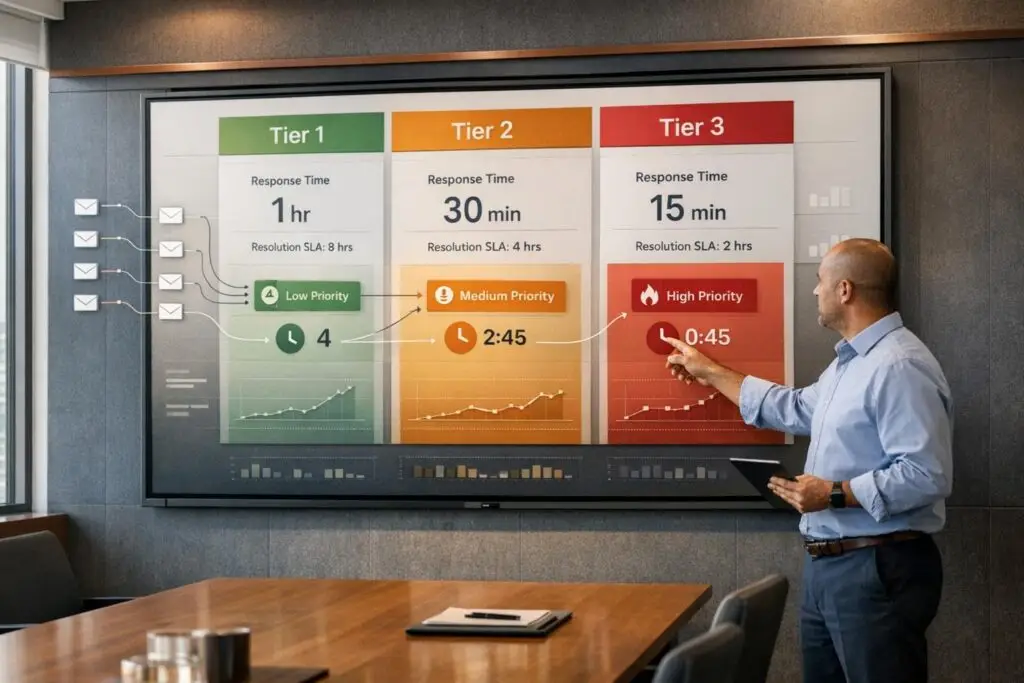
Clear support tiers can transform your customer service and sales process. Here’s the key takeaway: separating internal technical tiers (who resolves an issue) from customer-facing tiers (what service levels customers buy) is critical. This ensures efficient ticket routing, aligns with SLAs, and simplifies sales conversations.
Key points to focus on:
- Define objectives: Ensure tiers shield experts from routine tasks, meet SLA commitments, and prioritize issues effectively.
- Work within constraints: Match tier design to existing contracts and operational capabilities.
- Audit current setup: Analyze ticket data to identify bottlenecks, unclear routing, or documentation gaps.
- Simplify customer-facing tiers: Use 3–4 tiers with clear, outcome-focused descriptions like "Advanced Technical Support" instead of internal jargon.
- Leverage AI tools: Automate routing, monitor SLAs, and use predictive analytics to improve service levels.
Why this matters: Well-structured tiers reduce resolution time, improve customer satisfaction, and make it easier for sales teams to communicate value. Automating tier logic and regularly reviewing performance ensures your system stays effective over time.
How to Design Premium Support in SaaS: Boost Customer Satisfaction & Retention
sbb-itb-e60d259
Setting the Foundation for Your Support Tiers
Before diving into tier names or SLA tables, it’s essential to lay the groundwork. Skipping this step often results in support tiers that look great in theory but fall apart in practice. This can lead to confusion among agents about when to escalate or leave customers feeling dissatisfied with the service they receive. By starting with a clear foundation, you create a system that not only simplifies internal processes but also sets the stage for transparent, customer-focused tiers, which we’ll explore in later sections.
Define What Your Tiers Need to Accomplish
Start by identifying the key objectives your support tiers should achieve. For many teams, this includes shielding senior engineers from routine issues, meeting SLA commitments, and keeping costs under control without compromising service quality. Tiers should help assign issue ownership and prioritize severity levels to ensure timely resolutions [1].
Avoid vague escalation triggers. Instead, use clear, objective criteria like issue type, customer tier, product area, or time-in-queue [2]. For higher tiers (like Tier 3 and beyond), collaborate with Engineering and Product leaders to establish specific criteria for reallocating resources [2].
"Leadership doesn’t understand how much escalations impact the organization. It’s a bottleneck that can be removed rather easily." – Tina Grubisa, Head of Value Consulting, Mosaic AI [2]
Know Your Constraints Before You Start
When designing your tiers, it’s critical to work within the boundaries of existing obligations. These might include customer contracts with defined response times, regulatory requirements, or legacy SLA commitments that aren’t easily changed. A common misstep is building tiers based on aspirational goals rather than what’s already contractually required. For example, if Enterprise customers are promised a 1-hour response time, your structure must make that feasible [2]. Start by mapping your escalation process to the commitments you’ve already made, then pinpoint the gaps between your current capabilities and those promises. This clarity ensures your tier design is both practical and realistic.
Audit Your Current Support Setup
Once you’ve established your goals and constraints, it’s time to analyze your current support operations. Dive into ticket data by category – such as product questions, billing issues, configuration challenges, or feature outages. Identify which categories generate the most volume, take the longest to resolve, or involve frequent handoffs between team members. High transfer rates often indicate unclear tier definitions or poor initial routing. If certain issue types regularly get stuck in the queue, the problem is usually tied to a lack of documentation or specialized expertise rather than staffing shortages. Additionally, outdated self-service knowledge base resources can weaken the effectiveness of Tier 0. Conducting this audit provides a solid baseline, ensuring that every decision moving forward is grounded in reality.
How to Structure Support Tiers Customers Can Understand
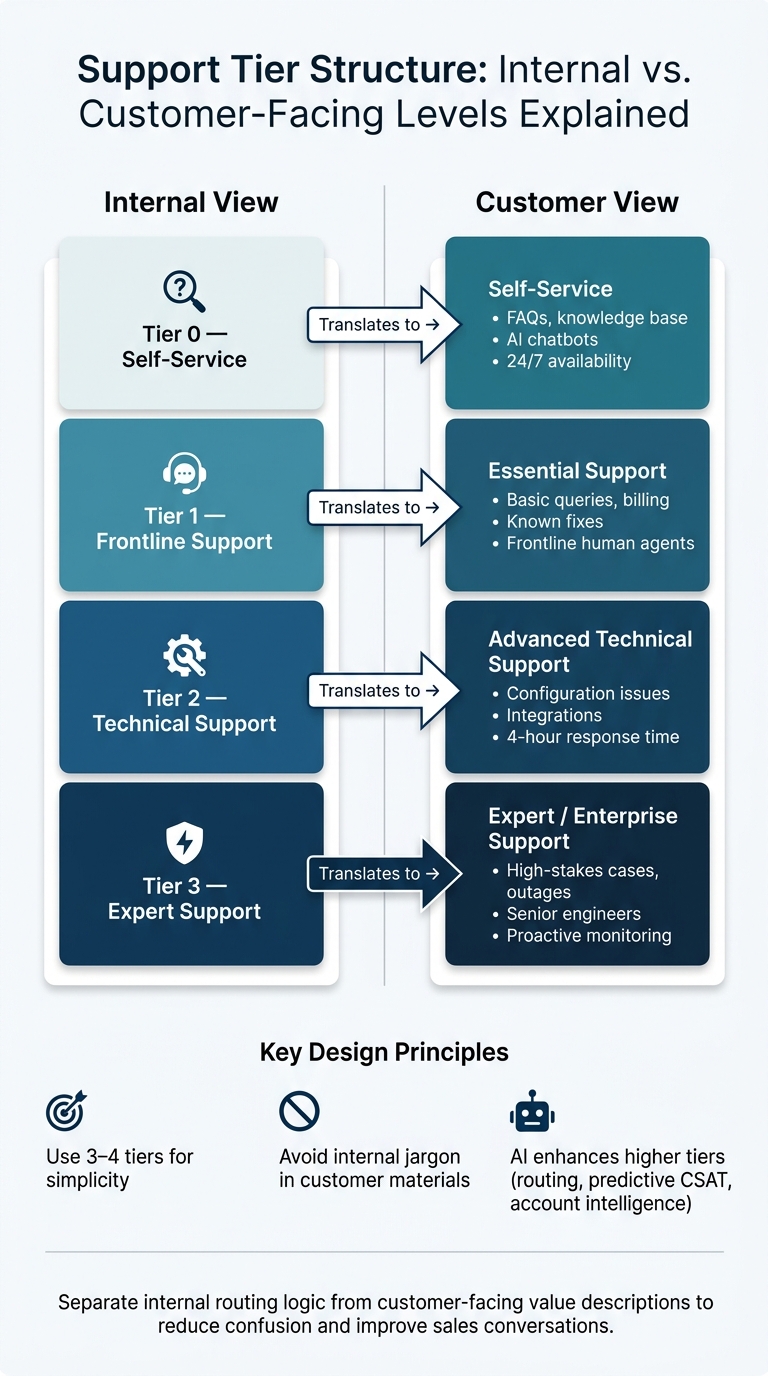
Support Tier Structure: Internal vs. Customer-Facing Levels Explained
Pick a Tiering Model That Makes Sense
Using a three-tier model – like Essential, Advanced, and Enterprise – makes it easier for customers to compare options while helping your sales team position services effectively.
Stick to tiers with clearly defined responsibilities. If you can’t explain the difference between two tiers in a single sentence, they probably belong together [2]. Too many tiers can create unnecessary handoffs, leading to friction [2]. Many successful B2B support teams stick to 3–4 tiers for simplicity [2].
Avoid using internal terms like "Tier 1" or "Tier 2" in customer-facing materials. These names reflect internal processes rather than the value customers receive. Instead, pick names that emphasize the benefits customers will experience.
This simplified structure helps set clear expectations for service outcomes.
Spell Out What Each Tier Includes
Be specific about what each tier offers. Include details like coverage hours, response times, communication channels, and escalation processes. Steer clear of vague terms like "priority support" that might confuse customers.
Here’s an example of how internal support levels can be translated into customer-focused outcomes:
| Internal Level | Customer-Facing Focus | Typical Issues Handled |
|---|---|---|
| Tier 0 | Self-Service | FAQs, knowledge base articles, AI-driven responses, repetitive questions |
| Tier 1 | Frontline Support | Basic product queries, billing issues, permissions, known fixes |
| Tier 2 | Technical Support | Configuration challenges, integration issues, unexpected behaviors |
| Tier 3 | Expert Support | High-stakes cases, feature outages, senior-level involvement |
Use this framework to craft customer-friendly tier descriptions. For instance, instead of saying "Tier 2 access", describe it as "technical troubleshooting with a guaranteed 4-hour response time."
Use AI Features to Set Higher Tiers Apart
Once your tiers are well-defined, AI tools can help you enhance and differentiate your higher service levels.
At the base level, AI-powered self-service tools handle routine inquiries around the clock, freeing up human agents for more complex tasks [1].
"Self-service can reduce ticket volume and give users 24/7 access to service." – Suptask [1]
For higher tiers, advanced AI features like dynamic SLAs and predictive CSAT and CES analysis offer measurable benefits. These tools help identify potential service risks before they escalate. Enterprise customers especially benefit from features like account intelligence, which includes proactive health monitoring and churn risk alerts.
| AI Feature | Tier Application | Customer Value |
|---|---|---|
| AI Agents / Chatbots | Self-Service (Baseline) | Instant, 24/7 resolution for routine tasks |
| Automated Routing | Essential / Advanced | Faster access to the right expert; shorter wait times |
| Predictive CSAT / Dynamic SLAs | Advanced / Enterprise | Assurance of quality service through data-driven insights |
| Account Intelligence | Enterprise | Proactive monitoring and alerts for account health and churn risks |
Make sure customers know about these AI-driven capabilities. For example, if your Enterprise tier includes predictive CSAT monitoring, highlight it in your tier descriptions. This ensures both customers and your sales team understand the added benefits.
Making Tiers Easy for Sales Teams to Explain and Sell
Once you’ve established a clear tier structure, the next challenge is helping your sales team communicate its value effectively.
Write Tier Benefits in Plain Language
Avoid overwhelming prospects with jargon-filled tier comparison sheets. Phrases like "Tier 2 escalation path" or "Level 3 technical routing" can leave decision-makers scratching their heads. Instead, focus on what each tier does for the customer. Who will handle their issue? What kind of experience can they expect?
For instance, instead of saying "Tier 2 access", try something like: "A technical specialist will investigate your issue and provide a detailed root cause analysis quickly." This kind of outcome-focused language gives sales reps a straightforward, repeatable way to explain each tier.
Position your tiers as a system designed to connect customers with the right expert for their needs – not as a hierarchy of prestige. This approach helps sales teams avoid pushing higher tiers onto customers who don’t need them, which can lead to mismatched expectations and increased churn [1].
Build Sales Tools and Run Team Training
Once you’ve nailed down clear, customer-friendly descriptions for each tier, arm your sales team with tools to make their job easier. A one-page reference sheet can be incredibly helpful. Include:
- A short, easy-to-understand description of each tier.
- The typical owner responsible for that tier.
- A few common examples of issues handled at each level.
Here’s an example:
| Tier | Sales-Ready Description | Typical Owner | Common Examples |
|---|---|---|---|
| Tier 0 | Automated self-service | Help Center / AI | Password resets, FAQs, basic billing |
| Tier 1 | Frontline human support | General support team | Account setup, routine troubleshooting |
| Tier 2 | Technical specialists | Product specialists | Configuration issues, reproducible bugs |
| Tier 3 | Expert engineering support | Senior engineers | API failures, systemic bugs, root cause analysis |
To make training stick, use real-world examples. Share past tickets to show how issues were allocated to the right tier – or escalated too early or too late. This helps your team understand that support tiers define who handles the issue, while factors like severity and priority determine how fast it’s resolved [1].
Keep Internal and External Messaging Consistent
Finally, ensure that what you promise customers aligns with what your team delivers. Every internal label should have a customer-facing counterpart. For example, "Tier 2 Technical Specialist" might be presented externally as "Advanced Technical Support", while "Tier 3 Senior Engineering" could be framed as "Expert Resolution."
The best way to maintain this consistency? Build tier logic directly into your support tools. When escalation paths are automated – based on criteria like issue type, account level, or business impact – agents are more likely to follow the established service model. This ensures that what sales promises in contracts becomes the default behavior in your platform, not a decision left to chance under pressure.
Running and Improving Your Support Tiers with AI
Set Up Tier Logic in Your Support Tools
Your support platform should handle tier logic automatically, removing the need for agents to make routing decisions manually. This streamlines operations and ensures consistency.
For instance, tools like Supportbench allow you to tag accounts by tier, enforce tier-specific SLA rules, and set up workflows that align with each customer segment. Let’s say an enterprise account is tagged as a premium tier – this can automatically trigger tighter SLA windows, which is especially handy during renewal periods. Escalation management is also automated, ensuring cases are routed to the right team without delays.
The key to effective trigger logic is being specific and measurable. For example, define rules such as "escalate if backend access is required" or "escalate if the error code isn’t listed in the guide." These clear conditions prevent unnecessary handoffs, keeping the resolution process efficient.
Use Data and AI to Sharpen Your Tiers Over Time
Once your tier logic is automated, data analysis becomes your best tool for refining the structure. Pay attention to these metrics:
| Metric | What It Reveals |
|---|---|
| Self-service completion rate | Pinpoints where Tier 0 content isn’t meeting customer needs, leading them to contact agents. |
| First-contact resolution (FCR) | Shows if Tier 1 agents have the tools and knowledge to resolve issues without escalation. |
| Escalation rate by issue type | Highlights topics that are too complex for Tier 1 or require better documentation. |
| Reopen rate | Flags premature ticket closures or inadequate resolutions in earlier tiers. |
| Customer Effort Score (CES) | Measures how smooth escalation handoffs are and whether customers need to repeat themselves. |
For example, a rising escalation rate might suggest a training gap at Tier 1, while a drop in CSAT at Tier 2 often points to delays in resolution times. AI tools like Supportbench’s predictive CSAT and CES scoring can help identify these trends early, so you can address them before they affect customer retention.
Here’s a tip: every resolved Tier 2 or Tier 3 case should contribute to your Tier 0 knowledge base. Make it a habit to document recurring solutions as knowledge articles within 48 hours. Over time, this practice can deflect 20–40% of tickets, keeping them from ever reaching a human agent [3].
Schedule Regular Tier Reviews
Using data-driven insights, schedule consistent reviews of your tier structure. Tiers aren’t a one-and-done setup – they need regular adjustments to stay effective.
A quick 15-minute weekly sync with tier leads can help identify immediate issues, inefficiencies, or gaps in documentation [3]. Monthly reviews are a good time to analyze trend data, like SLA compliance, FCR rates, and escalation patterns, to see if routing rules need tweaking.
Once a quarter, involve both support and sales teams in a broader review of the tier structure. If a tier’s scope has shifted, update customer-facing descriptions and sales materials to match. It’s essential that what sales promises in contracts aligns with what the platform consistently delivers – not by chance, but by design.
Conclusion: Designing Support Tiers That Work for Customers and Sales
Creating effective support tiers takes careful planning. The key lies in establishing clear definitions, setting realistic boundaries, and crafting a structure that aligns with the needs of both customers and sales teams. When each tier has well-defined entry criteria, clear ownership, and measurable goals, the system operates more smoothly – ensuring no customer gets overlooked.
It’s crucial to separate issue ownership from response urgency. Support tiers focus on routing issues to the right expertise, while priority determines how quickly those issues are addressed. Blurring these lines can lead to confusion for agents, customers, and sales reps, impacting both efficiency and customer satisfaction. Keeping these elements distinct promotes better operations and clearer communication.
AI plays a vital role in enhancing every tier by providing key metrics like escalation rates, reopen rates, and customer effort scores. Insights from resolved Tier 2 and Tier 3 cases can be fed back into Tier 0 resources and Tier 1 guides, allowing the support system to adapt and grow alongside your product and customer base [1]. This feedback loop ensures your support strategy keeps pace with evolving customer expectations.
FAQs
How do I separate internal support tiers from customer-facing tiers?
To keep internal and customer-facing support tiers distinct, it’s important to outline their responsibilities clearly. Customer-facing tiers, like Tier 1 and Tier 2, should manage direct communication and handle initial troubleshooting efforts. On the other hand, internal tiers should tackle more complex diagnostics and problem-solving tasks.
Set up clear escalation procedures, ensuring that customer-facing agents maintain control of all communication. This reduces confusion and overlap while keeping the process smooth. This structure ensures support is both efficient and professional at every stage.
How many customer-facing support tiers should I offer?
The number of support tiers you need depends on factors like your company’s size, the complexity of your product, and the type of support your customers require. Most B2B teams stick to at least three tiers:
- Tier 1 (Frontline): Handles basic inquiries and common issues.
- Tier 2 (Technical Specialists): Tackles more complex technical problems.
- Tier 3 (Highest Expertise): Deals with advanced or rare issues requiring deep knowledge.
For smaller teams or simpler products, you might only need Tier 0 (self-service options) and Tier 1. The key is to keep the number of tiers as low as possible while still resolving issues effectively and meeting customer expectations.
Which metrics show my tier model is working?
Key metrics to monitor include self-service completion rates, first-contact resolution (FCR), escalation rates by issue type, time to resolution by tier, reopen rates, customer effort scores, post-escalation satisfaction, SLA compliance, and CSAT (Customer Satisfaction Score). Breaking these metrics down by tier provides valuable insights into performance and highlights opportunities for improvement.
Related Blog Posts
- What’s the best way to set up tier 1 / tier 2 / tier 3 support workflows in a help desk?
- How do you design a tiered support model without slowing down resolution?
- How do you handle support for “mission-critical” customers without building a VIP mess?
- Queue design: by severity, by team, by product, or by customer tier?






