


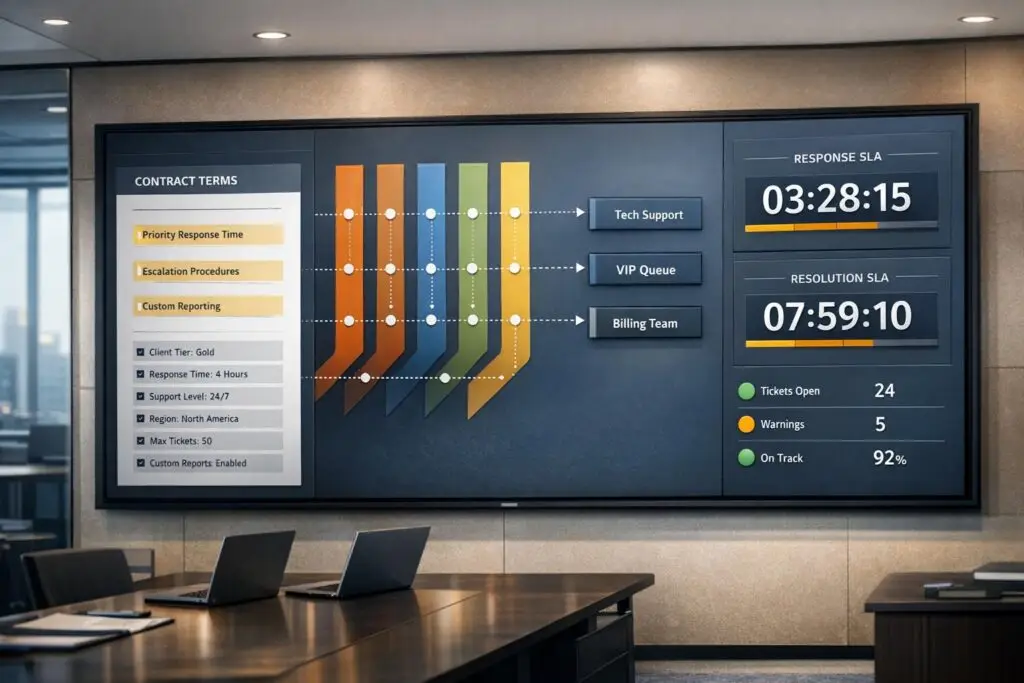
B2B support teams often struggle with managing customer-specific contract terms like response times, escalation processes, and priority levels. These details are usually buried in PDFs or scattered across systems, leading to missed SLA commitments and inefficient ticket routing. The solution? Turn those contract terms into structured, actionable data for automation.
Here’s what you need to know:
- Why it matters: Mismanaged SLA commitments can result in lost revenue and unhappy customers. Automating routing and SLA enforcement ensures tickets are handled correctly and efficiently.
- How it works: Extract key contract terms (e.g., response times, business hours, escalation paths) and store them in a centralized metadata system. Use this data to create automated workflows for ticket routing and SLA tracking.
- Benefits: Reduced SLA breaches, better prioritization of high-value accounts, and fewer manual errors.
This guide explains how to structure contract data, set up routing rules, enforce SLAs, and continuously refine the process. By integrating contract metadata into your support workflows, you can improve accuracy, meet commitments, and enhance customer satisfaction.
How to Automate Ticket Routing & SLA Enforcement Using Contract Data
Mapping Contract Terms into Structured Data
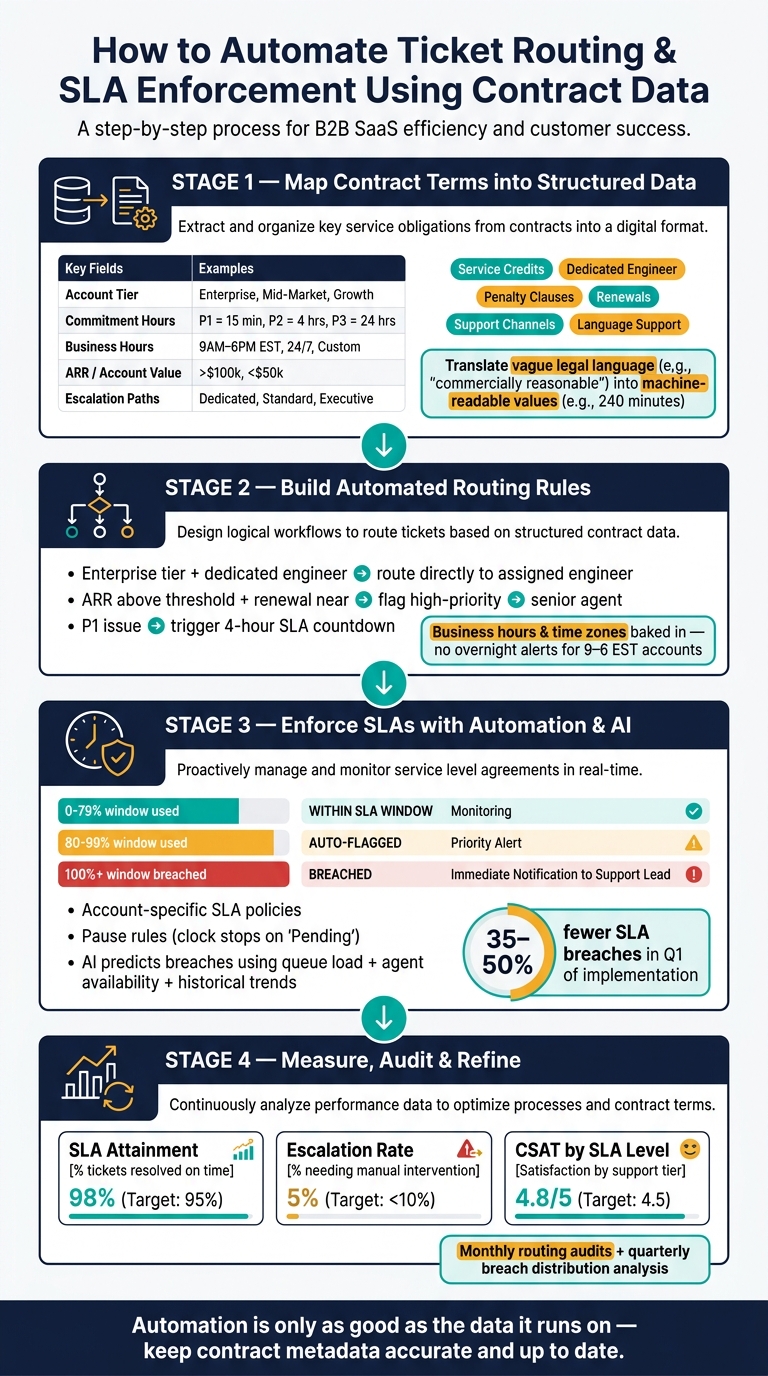
To enable automation, contract commitments need to move beyond static PDFs and become structured, system-readable data. By translating legal language into clear, actionable fields, systems can query and act on this data efficiently. This structured format forms the backbone for creating automated workflows and SLA policies.
Key Contract Terms for Routing and SLAs
Not every clause in a contract is relevant to automation – only specific ones matter, and they often fall into well-defined categories.
Support tiers and priority levels play a critical role in setting response and resolution times. For instance, a contract might require a 15-minute response for P1 (Critical) issues and a 4-hour response for P2 (High). These timeframes must be stored as numeric values (like minutes or hours) to ensure systems can process them effectively. Similarly, service availability – whether it’s 24/7 support or limited to 9:00 AM–6:00 PM local time – directly impacts how SLA timers operate.
Account attributes such as ARR, renewal dates, or VIP status allow systems to automatically prioritize high-value or high-risk tickets, eliminating the need for manual intervention. Additionally, escalation paths – like assigning specific support engineers to accounts or triggering financial remedies (e.g., service credits for repeated P1 breaches) – must be captured in structured fields instead of buried in contract notes.
Building a Contract Data Model
To manage this effectively, a dedicated contract metadata layer is essential. This layer acts as a centralized table or a set of CRM fields, storing each account’s unique commitments and serving as the source of truth for automation systems.
Here’s an example of how critical fields can be organized:
| Data Field | Purpose in Automation | Source System |
|---|---|---|
| Account Tier | Sets SLA targets and routing priorities | CRM (Salesforce/HubSpot) |
| Commitment Hours | Defines numeric response/resolution times | Contract Metadata Table |
| Business Hours | Establishes the SLA "clock" | Metadata/System Settings |
| ARR / Account Value | Prioritizes high-value tickets | CRM |
| Intent / Category | Routes tickets to specific skill-based queues | AI Classifier / Web Form |
By syncing this metadata with your CRM, you ensure that any changes to customer terms automatically reflect in the support platform, reducing manual errors. Standardizing this data model is key to driving reliable automation across systems.
Standardizing Contract Terms for Automation
One major hurdle is the inconsistency in how contract terms are written. Legal language often includes vague phrases like "commercially reasonable response time" or "best efforts within a business day", which aren’t machine-readable.
The solution? A translation layer. This governance process converts ambiguous terms into fixed, standardized values before they enter the system. For example:
- "4-hour response" becomes
240(minutes). - "Business hours" is mapped to a predefined calendar, such as
US-EST-StandardorUS-PST-24x7.
For accounts with custom terms, a metadata override table linked to account IDs ensures that these exceptions don’t disrupt automation logic.
"Breach numbers that are calculated incorrectly are worse than no breach numbers at all, because they create false confidence or false panic." – Yaro Labs [1]
Consistency in naming conventions is another critical factor. If one record uses "P1" while another uses "Priority-1" or "Critical", routing rules will fail to match them correctly. Standardizing these values across all systems – CRM, support platforms, and intake forms – ensures seamless communication. Documenting the schema is equally important to prevent future discrepancies and maintain alignment across teams and tools.
sbb-itb-e60d259
Building Automated Routing from Contract Data
Automating ticket routing with structured contract terms eliminates the need for manual handling, ensuring every ticket gets where it needs to go as soon as it’s created.
Defining Routing Rules
Routing rules rely on simple if-then logic, driven by contract metadata. For example:
- If an account is on an Enterprise tier with a dedicated support engineer, tickets are routed directly to that engineer.
- If an account’s ARR exceeds a specific threshold and a renewal is near, the ticket is flagged as high-priority and sent to a senior agent.
- If an issue is labeled as P1, a contractual 4-hour response countdown is triggered [1].
These rules draw from a mix of data sources, combining insights from support systems, CRM platforms, and contract metadata:
| Data Source | Key Metadata | Purpose |
|---|---|---|
| Support System | Ticket creation time, priority, status | Tracks SLA clock start and monitors ticket status |
| CRM | Account tier, ARR, renewal date, CSM | Adds business context and highlights high-value accounts |
| Contract Layer | Custom SLA hours, business hour rules | Overrides standard rules with account-specific contractual obligations |
One critical detail: business hours and time zones must be baked into the rules from the start. For example, a P2 ticket submitted at night for an account operating from 9:00 AM to 6:00 PM EST shouldn’t trigger an overnight alert. The rule needs to account for when the SLA clock should actually begin. This careful integration ensures smooth workflows and avoids unnecessary escalations.
Setting Up Routing Workflows
Once the rules are defined, workflows bring them to life. Here’s how it works:
- When a ticket is created, the system pulls relevant metadata.
- CRM data, like ARR and renewal status, is added to determine if standard tier rules apply or if a higher-priority route is needed.
- The ticket is categorized by issue type and priority, using either form inputs or AI-driven classification.
- Finally, the ticket is routed to the appropriate queue, team, or agent based on all the combined data.
To help agents prioritize, queues should be sorted by how much of the SLA window has been used, not just by ticket creation time. For example, a ticket that’s 85% through its SLA response window is more urgent than one created five minutes ago. Teams using SLA dashboards with this kind of visibility report a 35% to 50% drop in SLA breaches within the first quarter of implementation [1].
Using AI to Improve Routing Accuracy
AI takes routing a step further by refining decisions in ways static rules can’t. It can:
- Analyze sentiment to identify urgency.
- Classify issue intent from free-text descriptions.
- Predict SLA breaches by considering queue load, agent availability, and past resolution times.
"Visibility changes behavior – support leads prioritize differently when they can see the SLA clock." – Yaro Labs [1]
Supportbench integrates AI directly into the routing process, automatically prioritizing cases, assigning precise issue types, and tagging tickets. This reduces reliance on manual judgment and creates a dynamic routing system that adjusts to real-time conditions. Even during busy periods or unexpected spikes, this approach ensures contracts are honored and resolutions stay on track.
Automating SLA Management with Contract Terms
Once you’ve set up structured contract data for routing, the next logical step is to ensure SLAs (Service Level Agreements) are enforced based on each account’s specific commitments. This means moving beyond manual checks and ensuring every ticket aligns with the agreed-upon standards.
Translating SLA Terms into Enforceable Policies
The key here is converting contract terms into actionable, system-readable rules. Instead of relying on generic, team-wide averages, aim for account-specific, tier-based SLA tracking. For example, a P1 ticket for one account might require a 2-hour response, while another account on a different plan might allow 4 hours. Your system needs to recognize these differences and enforce them automatically.
A contract metadata table is essential for this. It should store each account’s SLA overrides, covering priority levels, response times, and business hour rules. This table acts as the system’s go-to reference whenever a ticket is created.
Here’s a breakdown of key SLA policy components:
| SLA Policy Component | Description | System Implementation |
|---|---|---|
| Response Target | Time allowed for the first human reply | Compare timestamps (Created vs. First Reply) |
| Resolution Target | Time allowed to close the ticket | Compare timestamps (Created vs. Solved) |
| Business Hours | Defined "working hours" for SLA timing | Use regional calendars and time zone offsets |
| Pause Rules | Handling time when waiting on the customer | Suspend clock for statuses like "Pending" |
| Breach Threshold | Trigger warnings before SLA failure | Alerts at configurable points (e.g., 80% of SLA window) |
Once these policies are defined, you can set up calendars and pause rules to ensure accuracy.
Setting SLA Calendars and Pause Rules
Business hours differ across accounts, so assigning the right calendar to each service tier is critical. These calendars should reflect the customer’s time zone, not your support center’s. Additionally, managing holidays is important – dynamic holiday sets that account for regional public holidays help maintain SLA accuracy.
On the pause front, the SLA timer should stop when a ticket is marked as "Pending" (waiting on the customer) or "Awaiting Vendor" (blocked by a third party). It should resume automatically when the customer replies, ensuring no unnecessary time is counted. To avoid tickets lingering in a paused state, set reminders to follow up after 48 hours and close tickets automatically after 5–7 days of inactivity. Regularly auditing pause usage is also essential, as agents might occasionally move tickets to "Pending" while still working on them, which can skew SLA data.
Once calendars and pause rules are set, automation can take over to enforce SLAs seamlessly.
Enforcing SLAs with Automation and AI
AI-powered ticket routing and prioritization is central to enforcing SLAs. It handles clock logic, applies the correct calendars, accounts for pauses, and sends alerts when SLAs approach breach thresholds. A practical example: tickets nearing 80% of their SLA window are flagged yellow, while breached tickets turn red and trigger immediate notifications to support leads [1].
"A ticket that reaches 80% of its SLA window turns yellow automatically. A breached ticket turns red and triggers a notification to the support lead." – Yaro Labs [1]
Proactive alerts via tools like Slack or internal messaging systems mean support leads don’t have to monitor queues constantly. AI can further enhance this process by predicting potential breaches based on factors like queue load, agent availability, and historical trends. This allows teams to intervene before the SLA clock runs out. For instance, platforms like Supportbench can adjust SLA response times dynamically when contextual signals – such as an upcoming contract renewal – indicate a ticket is high-priority. Teams using this kind of SLA automation often report 35–50% fewer breaches within the first quarter [1].
"The dashboard doesn’t prevent breaches, but it dramatically reduces the probability that a breach sequence escalates to a contractual remedy by catching the pattern early." – Yaro Labs [1]
Avoiding Pitfalls and Improving SLA Automation Over Time
Using structured contract data can do more than just streamline automated routing and SLA enforcement – it also helps sidestep common mistakes that could throw your support operations off track.
Common Implementation Pitfalls
Before committing to strict SLA terms, like a 1-hour response time, take a step back and review six months of support data. Overpromising can set unrealistic expectations for automation, leading to more SLA breaches and eroding customer trust.
Another frequent issue? Disconnected systems. If your CRM or CLM doesn’t update in real time, outdated contract terms can cause tickets to be routed incorrectly. Imagine a customer upgrades their plan, but the support system isn’t updated – this could send their ticket to the wrong queue. To avoid this, use middleware or native integrations that automatically update fields like "SLA Tier", "Support Level", and "Contract End Date" whenever a contract is signed or modified.
Also, don’t overlook the risk of losing critical contract details when key team members leave. Custom response times or escalation paths tied to specific contracts can become inaccessible without proper documentation. Assigning a dedicated team to maintain this data ensures automation relies on accurate, up-to-date information.
By addressing these issues, you can maintain reliable contract data, which forms the backbone of consistent SLA enforcement.
Keeping Contract Data Accurate
To keep your contract metadata in check, assign a dedicated RevOps or Customer Success team to manage it. This team should handle updates to SLA tiers, ARR fields, and renewal dates whenever a contract changes. Failing to update these fields can lead to automation using outdated rules, causing unnecessary breaches.
Remember, automation is only as good as the data it runs on. Conduct monthly routing audits to confirm that high-tier accounts are being routed correctly. Additionally, perform quarterly breach distribution analyses to identify patterns – such as breaches concentrated in a specific tier, time zone, or agent group. These insights help ensure AI-driven routing systems have the accurate inputs they need to function effectively.
Accurate data doesn’t just power automation; it also provides meaningful performance metrics that guide continuous improvement.
Measuring Performance and Refining Your Setup
Tracking automation performance is key. Focus on metrics like SLA attainment, escalation rates, and CSAT by SLA level:
- SLA attainment shows the percentage of tickets resolved within the agreed timeframe.
- Escalation rates indicate how often automated routing requires manual intervention.
- CSAT by SLA level reveals whether premium customers are getting the experience they expect.
Dive deeper into breach causes – like staffing shortages or misconfigured pause rules – and adjust your automation logic accordingly. AI tools can help by spotting patterns in breach data that might be hard to catch manually, enabling smarter updates to routing rules and SLA policies.
Keep in mind, SLA automation isn’t a one-and-done process. It needs regular fine-tuning as your team grows, contracts evolve, and support demands shift. Teams that actively monitor SLA dashboards often see a 35–50% drop in breach rates within the first quarter of implementation [1].
Conclusion: Turning Contract Terms into Automated Support Execution
Once you’ve mapped, automated, and fine-tuned your contract-driven workflows, achieving efficient support execution becomes a tangible goal. The process hinges on four core steps: organizing your contract data, establishing routing rules, setting up SLA policies, and continuously improving these systems using real-world performance metrics. Each step supports the next, and skipping one can throw the entire system off balance.
The benefits of this approach are undeniable. Automating workflows based on contract terms eliminates the need for manual case assignments, giving support teams more time to focus on delivering meaningful customer outcomes. As NC Squared explains:
"SLA policies aren’t about control – they’re about creating predictable rhythm." [2]
This rhythm relies on precise contract data, up-to-date routing rules, and AI to manage enforcement and escalation seamlessly.
Supportbench offers a solution tailored for AI-powered B2B support. It features dynamic SLAs that adapt to critical moments like renewals, a workflow engine aligned with contract tiers and account metadata, and built-in AI for triage, escalation prediction, and CSAT scoring – all without requiring additional tools or costly add-ons. And it starts at just $32 per agent/month. This all-in-one platform transforms contract terms into streamlined, predictable support workflows.
FAQs
Which contract terms should we structure first?
Structuring impact and urgency is where it all begins. These two factors are critical for prioritizing and routing support operations effectively. By clearly defining them, you establish a shared understanding across your team, which is essential for creating a reliable priority matrix. This matrix ensures consistent ticket handling and helps enforce SLAs (Service Level Agreements) without confusion.
Once you’ve nailed down impact and urgency, it’s time to tackle other key terms like service tiers, response times, and escalation policies. These elements form the backbone of a well-organized system, making it easier to automate routing processes and manage SLAs seamlessly.
How do we handle custom SLAs and time zones without breaking automation?
To handle custom SLAs and time zones efficiently, create workflows that reflect specific contract terms and regional variations. Leverage tools like timers, escalation rules, and filters to set response and resolution goals tailored to ticket details such as priority or support level. Implement time zone-aware routing to ensure response times are realistic, and keep a close eye on SLA timers using alerts to avoid breaches. This approach helps maintain automation that stays dependable and aligned with your commitments.
What data quality checks prevent wrong SLA breach reporting?
To ensure SLA breach reporting is accurate, start by setting up business hours, holidays, and time zones correctly. This foundational step is crucial for tracking timelines effectively. Next, adjust breach thresholds, such as status indicators (e.g., on track, approaching, breached), so they align perfectly with the terms outlined in your contracts.
Make it a habit to conduct root cause analyses for any breaches. This helps confirm timelines are accurate and uncovers any recurring issues that might need attention. These proactive measures ensure your SLA breach data stays reliable and free from misreporting errors.






