


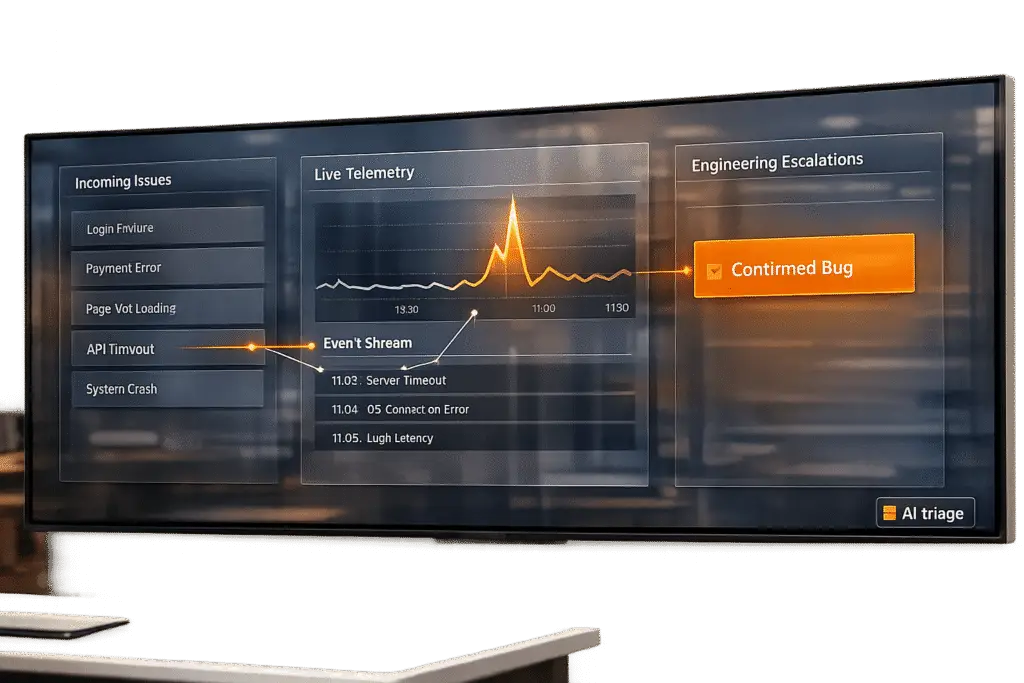
AI can help support teams quickly identify whether a reported issue is a real software bug or something else, like user error or misconfiguration. Misclassifying issues wastes time and delays fixes, but AI can analyze patterns, keywords, and technical signals to improve accuracy. For example, a B2B SaaS company reduced resolution times by 73% and saved $13,000 monthly by implementing an AI-driven triage system.
Key Takeaways:
- AI-Powered Triage: Speeds up ticket classification and routing by identifying bugs based on keywords, logs, and user patterns.
- Accuracy Boost: AI systems can reduce misclassification rates from 15% to 3%.
- Cost Savings: Automating repetitive tasks saves time and prevents wasted engineering hours.
- Setup Essentials: Centralized data, historical case records, and AI-ready platforms are necessary for success.
- AI in Action: Tools like Supportbench enable automated tagging, routing, and escalation workflows.
By integrating AI into support workflows, teams can focus on solving problems faster while minimizing errors and inefficiencies.
Building a Bug Taxonomy That Works with AI
Defining What Is and Is Not a Bug
Once you’ve got an AI-ready support platform in place, the next step is creating a clear bug taxonomy.
Start by ensuring your team agrees on precise definitions for each category. Without this clarity, labeling becomes inconsistent, and AI classification suffers.
A practical taxonomy usually includes four main categories: genuine bugs (when functionality doesn’t work as expected), user errors (cases where the product functions correctly, but the user needs guidance), configuration issues (problems tied to incorrect setup or environment-specific factors), and feature requests (new functionality users want but doesn’t currently exist). Modern AI can handle these categories using multi-label classification, assigning probability scores so a ticket might be flagged as both a user error and a potential bug.
AI identifies these categories by analyzing three types of signals:
- Lexical signals: Keywords like "crash", "exception", or "broken."
- Structural signals: Technical artifacts, such as stack traces, error codes, and log snippets, which often indicate a genuine bug.
- Semantic signals: AI uses embeddings to understand meaning, so phrases like "app won’t open" and "fails to launch" are recognized as describing the same problem, even if the wording differs.
This layered approach helps AI distinguish between genuine bugs and other issues with greater accuracy.
"Your AI is only as good as your labels. Establish consistent categories." – BugBrain Team [4]
Setting Up the Taxonomy in Your Support System
Once you’ve defined your categories, it’s time to standardize the process for tagging and intake.
Start by enforcing mandatory intake fields on all support forms. At a minimum, collect details like the product version, operating environment (e.g., OS or browser), and steps to reproduce the issue. These structured inputs give AI the context needed to differentiate between a configuration issue and a reproducible defect.
Next, apply standardized tags to every case. Set a confidence threshold of 0.85 or higher for auto-tagging. If the AI’s confidence falls below this threshold, flag the case for human review. This method, often called confidence-gated triage, ensures that critical bugs aren’t misclassified as user errors. If you’re starting without much historical data, large language models (LLMs) can step in, using zero-shot prompts to classify tickets based on plain-language descriptions of each taxonomy category [5].
Before deploying your system, validate it by running the model against a sample of 100–1,000 pre-labeled historical tickets (commonly referred to as "Golden Tickets"). This lets you measure accuracy without affecting live customer data [7].
Using Comparison Tables to Clarify Classification
A comparison table provides both agents and AI with a shared framework for decision-making. It maps each issue type to its key signals, the AI action it should trigger, and who is responsible for resolving it. This table also informs the AI’s routing logic, ensuring decisions align with the workflows discussed earlier. This is a core component of AI-powered ticket routing and prioritization used by innovative support teams.
| Issue Type | Key Signals | AI Action | Ownership |
|---|---|---|---|
| Critical Bug | "data loss", "production down", stack traces, 500 errors | Immediate escalation | Engineering (on-call) |
| Bug | "broken", "crash", "exception", regression patterns | Route to Engineering; tag severity | Engineering Support |
| User Error | "how do I", question marks, no error logs | Auto-draft help article; tag as Education | Customer Support |
| Configuration | Environment mentions, "setup", specific version flags | Route to Technical Support | Technical Support |
| Feature Request | "I wish", "can you add", "would be nice" | Route to Product backlog | Product Management |
This table serves a dual purpose: it keeps human agents aligned on classification decisions and acts as a reference for configuring AI routing rules. By clearly outlining signals and escalation paths, both people and AI can make more consistent and accurate decisions, reducing the risk of errors.
sbb-itb-e60d259
Autonomous Bug Fixing Through AI Agents That Detect, Reproduce, and Repair
Automating Case Triage with AI
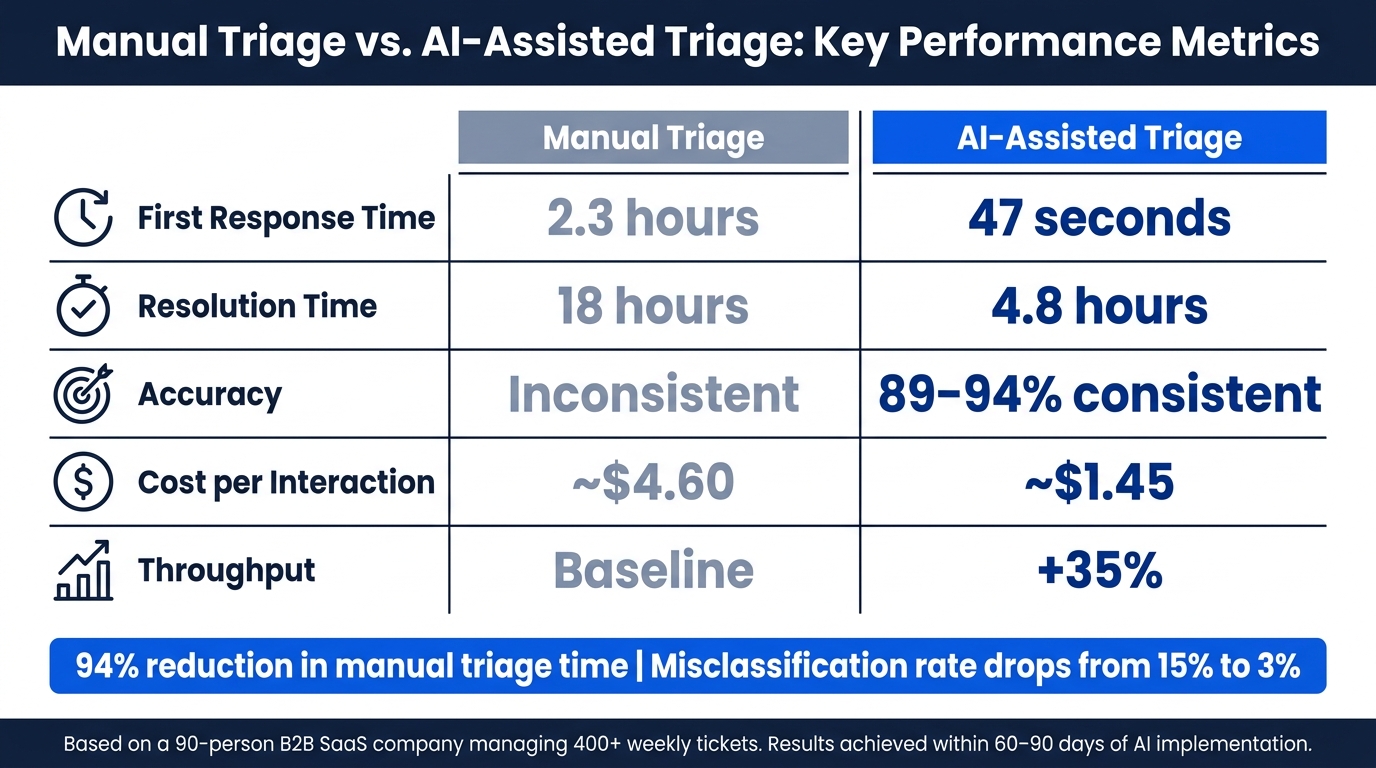
Manual Triage vs. AI-Assisted Triage: Key Performance Metrics
How AI-Powered Triage Workflows Function
Once you’ve established your taxonomy and standardized intake fields, the next step is to handle cases quickly to avoid escalation.
AI triage systems tackle incoming cases in three main steps. First, they clean and normalize the raw input – removing HTML from emails, tidying up chat fragments, and aligning structured fields from web forms into a consistent format. Skipping this step can reduce classification accuracy by 10–15% [3]. Next, the system uses semantic analysis powered by transformer-based embeddings. This allows it to recognize that phrases like "the dashboard won’t load" and "I can’t access the main screen" describe the same issue [6][2]. Each classification is then assigned a confidence score. Cases scoring above the routing threshold are automatically forwarded, while others are flagged for human review [3].
"The bottleneck is triage: reading, categorizing, prioritizing, and routing each ticket before anyone starts solving it." – Saksham Solanki, AI Systems Architect [3]
A key design element is to let the AI handle classification – figuring out intent and priority – while deterministic business rules manage routing. This is because language models don’t have the context to know which engineer is on call or which queue is overloaded [3].
Once classification is complete, the focus shifts to routing, ensuring each case lands with the right team as quickly as possible.
Routing Cases Based on Bug Likelihood
After classification, automated routing ensures high-priority cases get immediate attention. Cases with strong technical indicators – like stack traces or error codes – are sent directly to a dedicated bug queue for engineering teams to address. Cases flagged as potential bugs but below the confidence threshold are sent for human review. Meanwhile, lower-priority issues, such as user errors, configuration problems, or feature requests, remain with frontline support. This ensures that critical production issues are addressed without delay. Tools like Supportbench integrate this kind of AI-driven routing, using automation rules to prioritize cases, assign issue types, and tag tickets automatically.
Manual Triage vs. AI-Assisted Triage: A Side-by-Side Look
To illustrate the impact of AI assistance, consider a real-world example. In March 2026, Saksham Solanki, an AI Systems Architect, implemented a custom AI triage system for a 90-person B2B SaaS company managing over 400 tickets weekly. Within 60 days, first response times dropped from 2.3 hours to just 47 seconds, while resolution times decreased from 18 hours to 4.8 hours. Over 90 days, feedback-loop adjustments improved triage accuracy from 89% to 94%. The system’s monthly cost was $340 [3].
| Metric | Manual Triage | AI-Assisted Triage |
|---|---|---|
| First Response Time | 2.3 hours | 47 seconds |
| Resolution Time | 18 hours | 4.8 hours |
| Accuracy | Inconsistent | 89–94% (consistent) |
| Cost per Interaction | ~$4.60 | ~$1.45 |
| Throughput | Baseline | +35% |
These results highlight the efficiency gains from adopting AI-driven triage. To ensure a smooth transition, it’s best to run your AI system in shadow mode for at least one week. During this time, the system processes tickets alongside your manual workflow but doesn’t act on them. This lets you fine-tune confidence thresholds and identify misclassification patterns before going live [3].
Using AI to Find Patterns and Detect Anomalies
Spotting Patterns Across Multiple Cases
Once automated triage is in place, AI can take the next step: recognizing patterns to uncover broader, systemic issues. While a support agent might only see a single, isolated problem, AI has the ability to identify trends across hundreds – or even thousands – of tickets.
This is where semantic clustering comes into play. AI transforms ticket text into high-dimensional vectors, capturing the meaning behind the words. This allows it to group together complaints like "the dashboard won’t load", "I can’t see my reports", and "the main screen is blank", even though these phrases use completely different language to describe the same issue [2][6]. These clusters then appear in your queue as a single systemic issue, not as dozens of individual complaints.
By grouping related tickets, AI reduces duplicate work and provides stronger evidence for validating bugs. According to BugBrain, AI-driven bug triage can slash manual triage time by up to 94% and reduce misclassification rates from 15% to just 3% [4].
Once patterns are spotted, the next step is to confirm them using system-level data.
Connecting Customer Reports with System Telemetry
Customer feedback alone isn’t enough to confirm a bug. What turns a suspected issue into a verified defect is linking those reports to backend telemetry – things like error logs, stack traces, distributed traces, and deployment histories.
AI excels at making these connections. For example, if 30 users report "payment failing" within two hours of a new release, and backend logs show an error occurring at the same time, AI can instantly flag this as a likely regression [6]. By correlating customer complaints with system data, AI transforms anecdotal feedback into actionable, engineering-grade insights.
"Embedding techniques enable the model to recognize that ‘the app won’t open’ and ‘fails to launch’ describe the same core issue." – Katelin Teen, eesel.ai [6]
When setting up anomaly detection, prioritize recall over precision. Missing a real regression is far more damaging than flagging a false positive [2]. Start with thresholds that catch everything, then fine-tune for accuracy later.
Case-Level Analysis vs. Pattern-Level Analysis
AI’s real strength lies in its ability to compare individual cases against larger trends. Unlike a human agent, who can only focus on one ticket at a time, AI processes thousands of tickets simultaneously, identifying patterns that a person might never notice.
| Metric | Case-Level (Manual) | Pattern-Level (AI-Assisted) |
|---|---|---|
| Focus | Resolving individual tickets | Identifying systemic issues |
| Scalability | Struggles with high volume | Handles large datasets effortlessly |
| Consistency | Varies by agent | Embedding-based and objective |
| Speed | Minutes to hours per ticket | Milliseconds for classification |
| Result | Fixes one user’s issue | Fixes issues for thousands of users |
This shift from resolving individual tickets to identifying patterns is what makes AI not just faster, but fundamentally better at detecting bugs. By bridging the gap between case-level analysis and larger trends, AI enables support teams to operate more efficiently and effectively, catching problems that manual review would likely miss.
Building AI-Driven Escalation Workflows
AI-driven escalation workflows take automated triage and anomaly detection a step further, streamlining the path from identifying issues to resolving them efficiently within engineering teams.
Using AI to Predict Which Cases Need Engineering
Not every bug report warrants an engineering ticket. Flooding teams with low-priority issues creates unnecessary noise, slows down resolution times, and erodes trust.
AI steps in by classifying the intent of each ticket and assigning a severity score – often using scales like P0–P3 or Critical/High/Medium/Low – based on the described impact. Leveraging a confidence-based filter (similar to triage systems), AI escalates only the cases that meet a predefined threshold. Anything that falls short is flagged for human review [3][4].
"A wrongly classified critical bug is worse than a slower correct classification." – BugBrain Team [4]
While AI determines the issue and its severity, deterministic rules handle routing. Lookup tables – not the AI model – ensure consistent assignment to the correct engineering queue or on-call team. This separation avoids the unpredictability of letting a language model make routing decisions [3].
This predictive approach ensures only the most relevant cases move forward, setting the stage for detailed, actionable escalation reports.
Generating Engineering-Ready Bug Reports with AI
Once high-confidence bugs are identified, the next step is to ensure they are delivered to engineering with all the necessary details.
AI can generate structured escalation reports that include reproduction steps, logs, probable root causes, relevant links, and the business impact of the issue. If connected to your codebase or repository, it can even pinpoint specific functions, lines of code, or branches likely tied to the defect [1][10]. This transforms vague complaints into actionable insights, enabling engineers to start debugging immediately.
To maintain accuracy, agents should verify AI-suggested file paths or code references before finalizing escalations. AI excels at handling well-defined problems with ample context but may falter in ambiguous situations [1]. A quick human check at this stage ensures the reliability of the escalation pipeline.
Raw Escalations vs. AI-Structured Escalations
The difference between raw escalations and AI-structured ones is night and day. Raw escalations often lack critical details like reproduction steps, logs, or a clear severity rationale. This forces engineers to spend time rediscovering information that support teams may already know. AI-driven triage and pattern detection fill these gaps, reducing manual reassignments and delays.
| Metric | Raw Escalations | AI-Structured Escalations |
|---|---|---|
| Triage Speed | ~5–8 minutes per ticket | 3–5 seconds per ticket [8] |
| Context Quality | Often missing logs or steps | Includes stack traces, linked issues, code citations [4][1] |
| Reassignment Rate | 15–25% [10] | Minimal, due to root cause mapping [10] |
| Priority Basis | Subjective or category-based | Business impact: ARR, renewal risk, affected users [10] |
| Misclassification Rate | ~15% [4] | ~3% [4] |
The reassignment rate alone highlights the advantage. Each manual reassignment adds about 47 minutes to the total resolution time [10]. Multiply that across hundreds of tickets a month, and the delays can quickly spiral into a significant operational challenge. AI-structured escalations address this by ensuring the right team gets the right case with the right context – on the first attempt.
Take Bolt as an example. After implementing AI-driven triage with leveraging a knowledge base, their average resolution time dropped dramatically – from 129.8 hours to 62.7 hours between February 2024 and January 2025 [10]. This isn’t just an incremental improvement; it’s a transformative shift in how engineering teams handle real bugs at scale.
Measuring and Improving AI Bug Detection Over Time
Effective AI-driven bug detection isn’t a "set it and forget it" solution. As your product grows and support demands increase, tracking the right metrics and refining your approach becomes essential.
Key Metrics to Track AI Performance
Here’s a breakdown of the metrics to monitor:
| Metric Category | What to Track |
|---|---|
| Technical | Precision, recall, F1 score, confidence scores |
| Operational | Triage time, misrouting rate, auto-resolution rate |
| Business Impact | SLA breach rate, CSAT, engineering workload reduction |
Precision and recall are critical for understanding how well your AI identifies bugs. As the BugBrain Team explains:
"For bug classification, recall often matters more – missing a critical bug is worse than misclassifying a feature request." [2]
Operational metrics like misrouting rate and manual triage time reveal how efficiently your system handles bug reports. AI-driven triage has been shown to cut manual triage time by as much as 94% [4]. On the business side, keep an eye on SLA breach rates and engineering workload. For example, assess whether developers are still spending too much time switching contexts due to poorly classified bugs.
Building a Feedback Loop Between Agents and AI
Improving AI performance isn’t just about the initial setup – it’s about constant learning. The key is to make corrections easy for the people closest to the work. Every override or correction should feed directly back into the system, creating a dynamic model that evolves with your needs.
Set a confidence threshold to ensure cases below a certain confidence level are routed for human review. Once resolved, these cases can serve as new training data [2] [4]. Regular retraining – ideally on a quarterly basis – helps counteract model drift as usage patterns shift. A good indicator of progress? Monitor the human override rate per category; if it drops below 15%, your system may be ready for full automation [11].
"Garbage in, garbage out. Invest time in cleaning and accurately labeling your historical data before training." – BugBrain Team [4]
Metaview’s engineering team demonstrated the value of this approach by integrating AI triage with tools like Datadog and Postgres. This reduced the time spent on manual triage from 30–45 minutes to just 5 minutes of human review – slashing manual effort by 80% [11].
While refining AI performance is vital, maintaining oversight and prioritizing data privacy are equally important.
Maintaining Oversight, Audit Trails, and Data Privacy
As AI takes on more decision-making in customer support, transparency and security must remain top priorities. Every automated decision should include a clear reasoning trace, which is increasingly becoming a compliance standard – especially with the EU AI Act set to take effect in 2026 [10].
Data privacy demands more than surface-level protections. As DevRev highlights:
"Prompt-level guardrails are jailbreakable. Data-level permissions (RBAC at the knowledge graph node level) aren’t." [10]
Your AI triage system should inherit Role-Based Access Controls (RBAC) directly from your existing CRM or helpdesk. This ensures sensitive customer data remains protected at its source. Additionally, decisions involving high-stakes issues – like security vulnerabilities or legal matters – should always require human approval, no matter how confident the AI might be [9].
Conclusion: Making AI a Core Part of Bug Detection
Getting bug classification right isn’t just a technical detail – it’s a major factor in controlling costs. For instance, teams managing 2,000 tickets a month can lose over $329,000 annually due to misrouted tickets, with each reassignment eating up about 47 minutes of productivity [10].
Integrating AI into the process can drastically improve resolution times. Companies like Bolt and BILL have shown that embedding AI deeply into their support workflows – not just adding it as an afterthought – leads to faster resolutions and significant cost savings [10]. These results aren’t outliers; they demonstrate what’s possible when AI becomes a core part of the operation.
To turn these benefits into lasting improvements, focus on actionable steps: start with classification, establish confidence thresholds, integrate AI with engineering tools, and use knowledge-centric feedback loops to fine-tune the system. These measures reduce manual tasks and speed up triage and escalation processes.
As Thomas Hils, a seasoned customer support expert, puts it:
"AI is excellent at narrow problems with rich context, merciless at broad problems with thin context. Pick your spots. The wins are at the narrow end." – Thomas Hils, 10+ year customer support veteran [1]
As ticket volumes grow and customer expectations rise, B2B support operations face increasing pressure. AI-driven bug detection offers a way to scale these efforts effectively. Teams that adopt AI-native workflows – leveraging triage, pattern recognition, and continuous feedback – will lead the way as AI evolves to handle 80% of common support issues autonomously by 2029 [10].
FAQs
What data do we need before AI can classify bugs accurately?
To help AI classify bugs effectively, it requires a well-organized set of labeled historical ticket data. This data should include key metadata such as:
- Categories and resolution codes
- Timestamps and customer segments
- Service identifiers and error messages
- Steps to reproduce the issue
- Environment details
Additionally, including clear closure notes and outcomes is essential for teaching AI to recognize patterns, often referred to as "failure signatures."
For training to be reliable, there must be a sufficient number of labeled examples. These examples should clearly distinguish between bugs, user errors, and feature requests. This helps ensure the AI can confidently identify issues and validate its confidence thresholds during classification.
How should we set and tune the confidence threshold for auto-triage?
To ensure reliability in distinguishing bugs from non-bugs, start with a conservative confidence threshold – something like 85% or higher. This approach prioritizes accuracy, reducing the risk of misclassification. Implement a two-tier workflow: automatically route issues that surpass this threshold, while flagging anything below it for manual review by a human. Over time, as the system improves through feedback and testing, you can gradually increase automation. Tighten the threshold incrementally to minimize false positives and ensure the process becomes even more precise.
How do we connect support tickets to logs and telemetry to confirm a bug?
To confirm a bug, it’s crucial to connect tickets to concrete evidence. Here’s how you can approach this process:
- Gather Metadata: During intake, collect key details such as timestamps, service IDs, and error messages. These pieces of information help establish context and trace the issue effectively.
- Link Tickets to Logs and Telemetry: Dive into logs and telemetry data to verify if the reported failure actually happened. For instance, check whether the event was triggered or if clusters of similar errors appear in the system.
- Identify Patterns: Look for recurring error signatures by matching patterns in logs and tickets. This step can reveal whether the issue is isolated or part of a broader problem.
Once you’ve confirmed the bug using this evidence, escalate it to the engineering team for resolution.






