


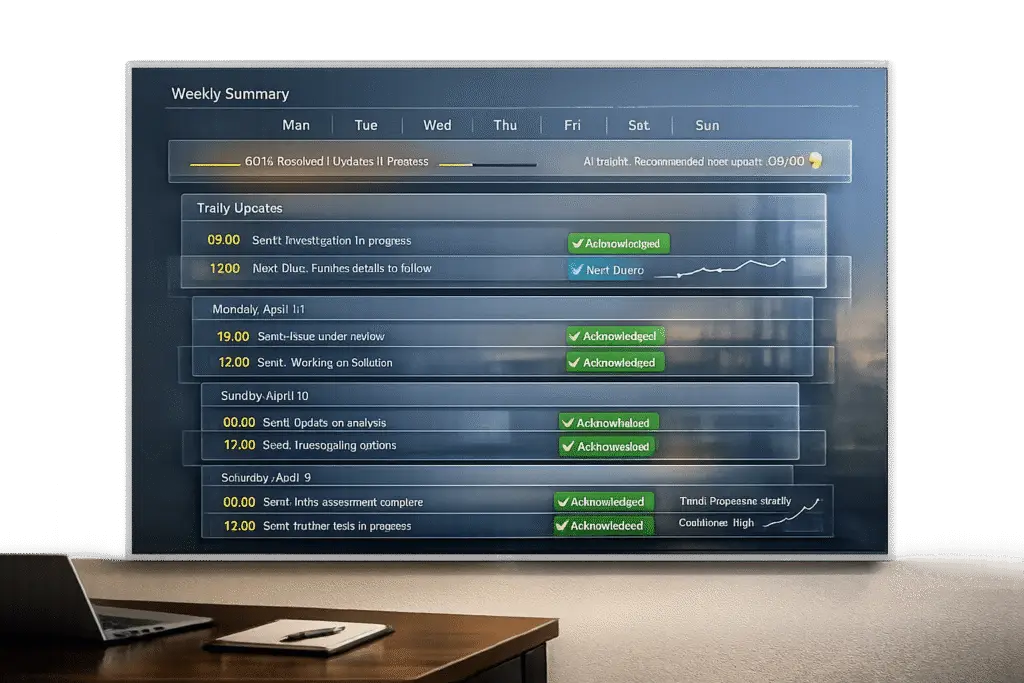
When dealing with complex issues in B2B environments, silence can harm customer trust. Regular updates – daily or weekly – help reassure stakeholders, reduce support tickets, and improve issue resolution. Here’s how to set up an effective update cadence:
- Identify stakeholders: Group them (e.g., engineering, executives, customers) and assign roles like Incident Commander or Communication Owner.
- Assess issue severity: Use a structured approach (e.g., SEV1 = updates every 20–30 minutes, SEV3 = daily updates).
- Set daily updates: Stick to a "heartbeat rule" – update even if there’s no progress. Focus on impact, not technical details.
- Automate updates: Use AI tools to draft summaries, set triggers, and ensure consistency.
- Provide weekly summaries: Highlight key details (e.g., what happened, business impact, next steps) in a concise format.
- Monitor and adjust: Track metrics like update frequency and ticket deflection. Gather feedback to refine your process.
Clear, consistent communication builds trust and reduces escalations. Even during prolonged issues, a structured update process can strengthen relationships and safeguard revenue.
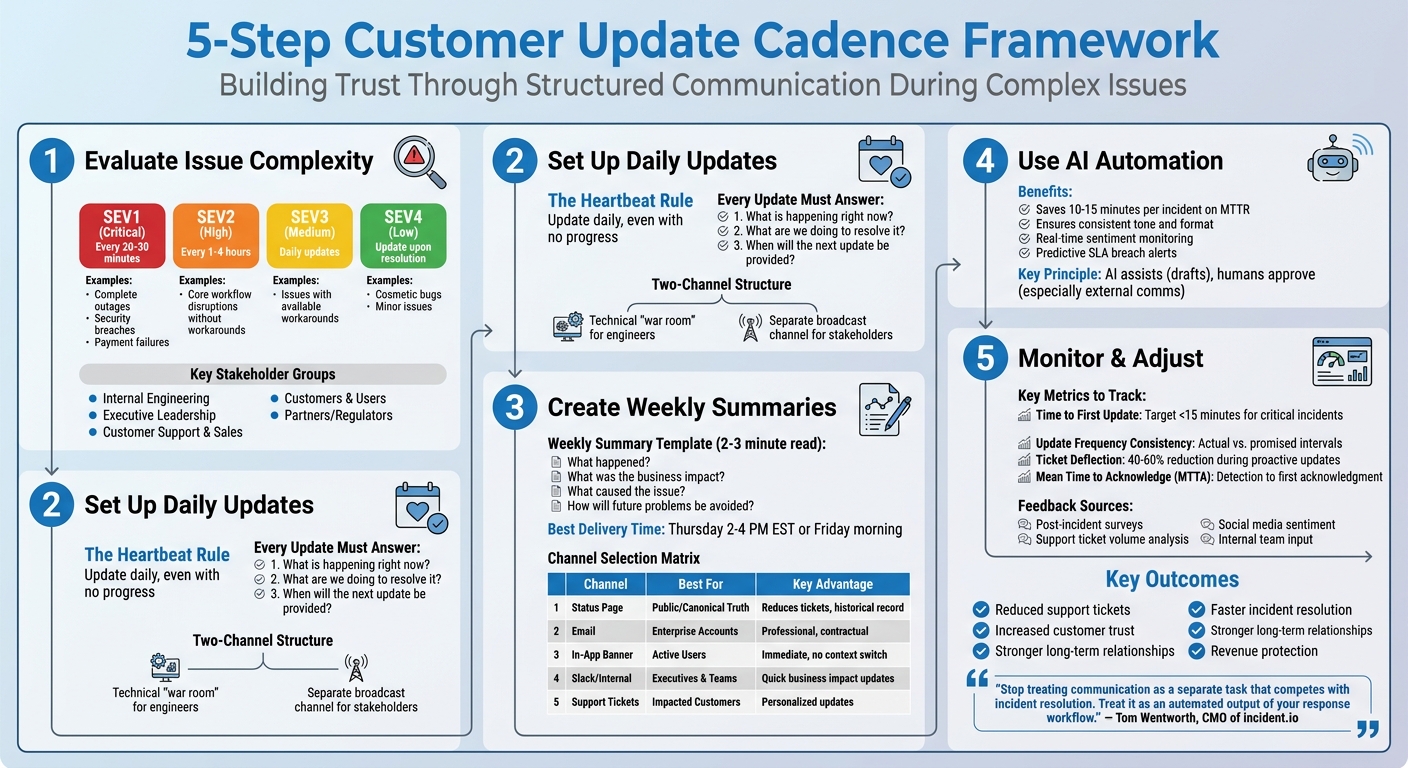
5-Step Customer Update Cadence Framework for Complex Issues
Step 1: Evaluate Issue Complexity and Stakeholder Requirements
Before deciding on an update schedule, it’s crucial to figure out who your key stakeholders are and assess how severe the issue is. Skipping this step can result in two extremes: leaving critical stakeholders in the dark or overwhelming others with unnecessary details. This foundational step helps you create update schedules and communication protocols that meet everyone’s needs.
Identify Key Stakeholders
Stakeholders can be grouped into five main categories:
- Internal Engineering: Needs technical details, such as failure logs.
- Executive Leadership: Requires insights into business impact and risk exposure.
- Customer Support and Sales: Needs clear, reusable messaging to communicate confidently.
- Customers and Users: Want to know if they’re affected and when to expect updates.
- Partners or Regulators: Require documented facts to meet compliance standards [3].
To manage communication effectively, assign key roles ahead of time:
- Incident Commander: Oversees coordination.
- Communication Owner: Focuses on crafting updates (separate from the issue resolution team).
- Technical Leads: Provide detailed status updates [3].
As Laura Clayton points out:
"Incident communication is a structured system, not a one-time message. It defines who communicates, through which channels, using which templates, and how often updates are shared" [3].
For external stakeholders, automation can pinpoint who needs updates. For example, you can notify customers subscribed to specific status page components or those with open support tickets related to the issue. Tailor communication channels to each group: Slack or Teams for engineers, concise reports for executives, and public status pages for customers [3][4][2].
Once you’ve identified stakeholders and assigned roles, it’s time to evaluate how complex the issue is to determine how frequently updates should be shared.
Assess the Issue’s Complexity
The complexity of the issue directly impacts how often updates should be sent. Here’s a breakdown:
- Critical (SEV1): Complete outages, security breaches, or payment failures need updates every 20–30 minutes [1][5].
- High (SEV2): Issues disrupting core workflows without a workaround require updates every 1–4 hours.
- Medium (SEV3): Problems with available workarounds can be updated once a day.
- Low (SEV4): Cosmetic bugs or minor issues only need updates upon resolution [1][5].
To gauge complexity, ask whether the issue involves data security, legal risks, or impacts a large group of users [3]. For critical incidents, aim to send the first notification to customers within 15 minutes [2]. If multiple teams – like engineering, legal, and leadership – are involved, structured communication becomes even more essential [3][5].
sbb-itb-e60d259
Step 2: Set Up Daily Update Schedule and Triggers
After evaluating the complexity of the issue, the next step is to establish a daily update schedule for incidents that require regular updates to stakeholders. This approach works best for lower-severity incidents (SEV2 or SEV3), where the impact is considerable but manageable with existing workarounds. These types of issues demand consistent attention and cannot be left unresolved for extended periods.
Define Rules for Daily Updates
The key principle here is the "heartbeat rule": ensure a daily update is sent, even if no new progress has been made. Silence can lead stakeholders to assume the issue is being neglected, which can erode trust faster than openly admitting more time is needed for investigation. As Tom Wentworth from incident.io aptly puts it:
"The solution isn’t ‘better discipline’ or ‘remember to update more often.’ The solution is treating communication like code: automated, templated, and reliable."
Each daily update should address three essential questions:
- What is happening right now?
- What are we doing to resolve it?
- When will the next update be provided?
Keep the language straightforward and avoid technical jargon. Instead of detailing backend issues (e.g., "database replica lag"), focus on how the problem impacts users (e.g., "users may see outdated data"). If there’s no ETA available, be upfront and state, "unknown at this time", rather than making premature commitments.
Additionally, adopt a two-channel structure:
- Use a technical "war room" for engineers to collaborate and troubleshoot.
- Maintain a separate broadcast channel for stakeholder updates.
This separation reduces distractions and allows engineers to focus on resolving the issue while ensuring stakeholders stay informed.
Once these rules are in place, the next step is to automate the update process using triggers.
Configure Triggers for Daily Updates
Automation is the backbone of maintaining a consistent update schedule. Set up time-based triggers to remind the incident lead to post an update every 24 hours. Additionally, implement data-change triggers to escalate issues automatically when certain conditions arise – such as a priority shift to "Urgent", an imminent SLA breach, or 24 hours of inactivity. Annie Myrvang from Pipeline CRM explains it well:
"If we think of automations as simple ‘when this… then this’ statements, the triggers are what kick the automation into action."
For more intricate cases, configure triggers to move tickets between pipelines while preserving historical data. To avoid overwhelming stakeholders with frequent notifications, schedule daily batch alert messages during off-peak hours (e.g., 12:00 a.m. to 4:00 a.m.). This approach consolidates updates from the past 24 hours, ensuring transparency without causing notification fatigue.
Step 3: Create Weekly Summary Schedule and Templates
Once you’ve set up daily updates, it’s time to create a weekly summary. This summary is designed to offer a high-level overview, perfect for executives who need clarity on ongoing, complex issues. By building on the daily updates, weekly summaries help maintain transparency and accountability, especially for problems that span multiple weeks or involve multiple teams. They provide the essential business context without requiring stakeholders to sift through every detail from daily updates.
Structure Weekly Summaries for Clarity
A good weekly summary should be quick to read – around 2–3 minutes – and answer the following key questions: What happened? What was the business impact? What caused the issue? How will future problems be avoided?
Start with the most critical information right at the top. For instance: "The checkout issue affecting 12% of customers was resolved on 5/9/2026 at 2:30 p.m. EST (duration: 4 hours, 15 minutes)." This ensures that busy stakeholders immediately grasp the most pressing details. Follow this with a breakdown of the business impact, such as the percentage of customers affected, revenue risks, and how long the disruption lasted.
Next, explain the root cause in plain language. Avoid overly technical jargon. For example, instead of saying, "PostgreSQL primary WAL segment accumulation", use something like, "A database issue delayed order processing." Finally, outline the steps being taken to prevent similar problems in the future, including clear ownership and deadlines. For example: "Implement automated database monitoring – Owner: Sarah Chen, Due: 5/18/2026."
As Runframe aptly puts it:
"The pattern: Describe symptoms, not systems. Customers care about ‘can I check out,’ not ‘your database shard’"
[7].
If the issue is still unresolved, include a workaround or "Support Path" to ensure stakeholders have actionable information even before the root fix is complete. Use simple, straightforward language that addresses what matters most to your audience.
Select the Right Delivery Channels
Once your summary is ready, it’s crucial to pick the right delivery channels to ensure it reaches the intended audience effectively. Different stakeholders have different preferences:
- Executives often prefer concise Slack or email updates that focus on the business impact and timelines.
- Customers with open tickets should receive updates directly within their ticket threads, keeping them informed without additional effort on their part.
- Active users benefit from in-app banners that provide immediate updates without requiring them to leave the application.
To avoid fragmented communication, establish a single "source of truth" where the most detailed timeline is maintained. This could be a status page, a dedicated email thread, or a dashboard link. All other channels should direct stakeholders back to this central source. As Runframe advises:
"Status is the truth. Everything else points to it"
[7].
Timing is critical. Send weekly summaries on Thursday afternoon or Friday morning (between 2:00 p.m. and 4:00 p.m. EST). This timing allows stakeholders to review and respond before the weekend and helps align teams for the upcoming week. For email communication, target specific segments to minimize noise and include dashboard links for those who need more detailed data. Always include the next update time to set clear expectations.
Here’s a quick guide to matching channels with stakeholder needs:
| Channel | Best For | Key Advantage |
|---|---|---|
| Status Page | Public/Canonical Truth | Reduces support tickets and provides a historical record [6][7] |
| Enterprise/High-Touch Accounts | Professional and suitable for contractual communication [7] | |
| In-App Banner | Active Users | Immediate updates without leaving the app [4] |
| Slack/Internal | Executives & Internal Teams | Quick, informal updates for business impact discussions [7] |
| Support Tickets | Impacted Customers | Personalized updates for those already seeking help [4] |
Step 4: Use AI for Automated Summaries and Alerts
Manual updates can drag out incident resolution times, adding 10–15 extra minutes to the Mean Time to Resolution (MTTR) for each incident [1]. For B2B support teams juggling multiple complex issues, those extra minutes pile up fast, turning efficient communication into a bottleneck.
AI-powered automation changes the game by analyzing ticket data, creating summaries, and sending alerts based on preset rules. This not only speeds up updates but also lets your team focus on solving problems instead of managing routine tasks. It’s a smart way to ensure clear and consistent communication during high-pressure incidents.
Automate Routine Updates
AI summarization tools are a lifesaver for handling complex cases with lots of moving parts. These tools scan ticket data and create concise, actionable overviews, so your team doesn’t have to sift through endless notes and logs manually [8]. For example, you can set up triggers to automatically draft updates when certain milestones are reached – like when a ticket escalates from SEV2 to SEV1. Stakeholders are notified immediately, keeping everyone in the loop even during fast-evolving situations.
Take Supportbench’s AI-driven case summaries as an example. When new activity is logged in a complex case, the AI updates the entire case history to reflect the latest context. This is especially handy during handovers or shift changes. Plus, it can strip out unnecessary technical jargon to create clear, customer-ready weekly summaries that focus on progress and next steps [8].
By automating these routine tasks, AI not only saves time but also ensures that updates are reliable and consistent.
Improve Accuracy and Consistency
AI doesn’t just automate – it also improves the quality of updates. By sticking to a standardized format and professional tone, AI helps ensure that every communication is clear, complete, and error-free. This is particularly important for B2B stakeholders, who expect polished and predictable reporting [8].
AI can even monitor customer sentiment in real time. If it detects frustration or dissatisfaction, the system can adjust by increasing the frequency of updates or escalating the issue to a higher-priority workflow. Similarly, urgency detection flags patterns or keywords that indicate cases needing closer attention, ensuring they don’t get buried in the standard update cycle.
Predictive alerts add another layer of proactivity. For example, if AI notices that a ticket is stagnating and risks breaching an SLA, it can trigger an internal alert to refresh the customer update – even if there’s been little technical progress. This approach reduces the risk of delays and strengthens stakeholder trust, reinforcing the communication strategy you’ve worked hard to build.
That said, it’s important to keep AI in an "assist" role rather than letting it operate entirely on its own – especially for external communications. As incident.io wisely points out:
"AI should assist (drafting) rather than act autonomously (sending without human review). For external communications, keeping a human in the loop protects your brand reputation" [1].
To ensure your AI system is ready for live use, start by running it in "shadow mode." This allows you to test its decision-making and reliability without affecting actual communications [9]. It’s a practical way to build confidence in the system before it interacts directly with stakeholders.
Step 5: Monitor Performance and Adjust Your Cadence
Once you’ve set up daily and weekly updates, the next step is to keep a close eye on how well they’re working. Monitoring performance and making adjustments based on feedback and data ensures your communication stays clear and effective. This, in turn, boosts incident resolution and builds trust with your customers.
Collect Feedback from Stakeholders
Feedback is key to understanding how your updates are received. Use targeted surveys after major incidents to ask stakeholders about the clarity, timing, and usefulness of your updates. It’s important to separate feedback on communication from the technical resolution itself [2].
Post-incident reviews can also be a goldmine for insights. By analyzing the timeline of your communications, you can spot delays, identify areas of confusion, or uncover points where updates were misunderstood [3]. For example, if you’re seeing a spike in "is it fixed yet?" tickets, it might mean you’re not providing updates frequently enough [2][3]. Social media sentiment is another useful tool – are customers praising your transparency, or are they frustrated by a lack of information? [2].
Don’t forget to gather input from your internal teams. Customer Support and Sales can offer valuable perspectives on whether your updates gave them what they needed to handle customer concerns [3]. If they’re scrambling for answers or sending mixed messages, it’s a sign that your internal communication cadence needs fine-tuning.
While qualitative feedback provides the "why", metrics can show you the "what."
Track Impact with Metrics
Metrics give you a concrete way to measure the effectiveness of your communication. Start by tracking the Time to First Customer Update – how quickly you send out the first external message after detecting a critical issue. For major incidents, aim to do this within 15 minutes [2][3].
Another key metric is Update Frequency Consistency. Compare your promised update intervals (e.g., "every 30 minutes") with the actual timestamps of your updates. Missing these intervals can erode trust [3].
Ticket deflection is another powerful indicator. Proactive updates can reduce the number of support tickets by 40–60% during an incident [2]. Additionally, monitor the Mean Time to Acknowledge (MTTA), which measures the time from detecting an issue to the first acknowledgment. Delays here could point to missed alerts or unclear responsibilities [3].
Treat your communication metrics with the same level of scrutiny as your technical metrics during post-mortems. Regularly review these numbers and adjust your cadence based on what the data tells you. For instance, if you’re consistently missing your 30-minute update goal during SEV1 incidents, you might need to either revise the target or implement automation to help meet it.
Common Challenges and How to Solve Them
Even with well-defined update processes, teams can still encounter obstacles during execution. In AI-native B2B support operations, communication needs to be both clear and efficient. Two major challenges include overwhelming stakeholders with unnecessary technical details and inconsistent communication across teams.
Avoid Overwhelming Stakeholders
Bombarding stakeholders with too much technical jargon or excessive updates can lead to confusion and a loss of trust.
To prevent this, use severity-based routing. For example, a SEV3 incident with a workaround doesn’t need executive alerts or public updates on the status page. On the other hand, critical SEV0 or SEV1 incidents – those impacting revenue or a large number of users – should have updates every 15–30 minutes to keep everyone informed[1].
Focus on describing the impact rather than diving into technical specifics. For instance, instead of saying, "database shard replication lag", communicate the effect: "checkout is unavailable for 20% of users." As UptimeRobot wisely noted:
"A short update that says nothing has changed is better than silence. Silence creates uncertainty."[3]
Consistency in messaging across teams also plays a key role in maintaining trust with stakeholders.
Maintain Consistency Across Teams
When different teams manage updates independently, conflicting information can erode trust. One channel might say "investigating", another might promise a fix within 10 minutes, while another goes silent altogether.
To address this, standardize update templates and appoint a single communication lead. Establish a central source of truth, such as a status page or a dedicated document, and ensure all other communication channels – like Slack, email, or social media – redirect to this source[1][7].
Separate the roles of issue resolution and communication. Engineers working to resolve the issue shouldn’t also be tasked with writing updates, as this can slow down both the fix and the flow of information. Instead, assign an Incident Commander (IC) to manage communication. The IC can use pre-approved templates tailored to different severity levels to ensure consistency. Automated reminders can also help the IC maintain a steady update cadence, avoiding gaps that might leave stakeholders unsure about the progress[1].
Wrapping It Up
Creating a structured update routine for complex issues isn’t just about keeping people in the loop – it’s about closing communication gaps and easing stakeholder concerns. When you stick to a regular schedule of daily and weekly updates, you show stakeholders they’re not being left in the dark, even if there’s no new progress to share [1][6].
The processes outlined here demonstrate how consistent updates can bring tangible benefits to your operations. By staying ahead with proactive customer support, you can cut down on support tickets and speed up incident resolution. This approach also helps your team avoid wasting time on repetitive "Is it fixed yet?" questions. Automating routine updates and separating the communication role from the technical resolution team creates a smoother workflow [1]. As Tom Wentworth, CMO of incident.io, aptly notes:
"Stop treating communication as a separate task that competes with incident resolution. Treat it as an automated output of your response workflow." [1]
Even more importantly, being transparent during a crisis can often strengthen customer trust more than months of flawless service ever could [6]. By focusing on how customers are affected instead of diving into technical jargon, sticking to clear update schedules, and maintaining consistency across all platforms, you show customers that your company is a reliable partner – one they can trust with long-term commitments.
Here’s a quick recap of the five steps that turn incident communication into a trust-building tool:
- Understand the complexity of the issue and what stakeholders need.
- Set up daily updates triggered automatically.
- Use structured weekly summaries to provide a bigger picture.
- Incorporate AI tools to ensure efficient and consistent communication.
- Track performance data and tweak your approach as needed.
FAQs
What’s the best update cadence for SEV2 vs. SEV3 issues?
The frequency of updates should align with the seriousness of the issue. For SEV2 issues, providing updates every 1-2 hours keeps customers informed without overwhelming them. In the case of SEV3 issues, updates every 4-6 hours strike a balance between keeping customers in the loop and avoiding excessive communication. Adjusting update intervals based on severity helps maintain customer trust and minimizes the risk of unnecessary escalations.
Who should own customer communications during an incident?
The Incident Owner or Incident Commander is responsible for managing customer communications during an incident. Their job is to ensure that all messaging remains consistent, oversee outbound updates, and serve as the central point of information. This involves coordinating efforts across teams, providing timely and accurate updates, and maintaining clear communication to help build and sustain customer trust throughout the incident.
How can we automate updates without risking wrong messaging?
To keep updates running smoothly, use templated workflows as part of your response process. By integrating AI, you can draft messages based on real-time data, ensuring both consistency and accuracy. Stick to a regular update schedule – even when there’s no new information to share – to maintain transparency.
Establishing clear roles and escalation protocols is key. Severity-based routing ensures that the right stakeholders get the right messages at the right time. Regularly reviewing these workflows helps minimize mistakes and keeps your messaging on point.
Related Blog Posts
- How do you create a customer communication cadence during long investigations (update rules)?
- Incident communication templates for B2B support teams (portal + email)
- What Support should send to CSMs weekly (and how to automate it)
- How to write customer updates that reduce anxiety during long investigations






