



Managing vulnerability reports is crucial for maintaining trust, regulatory compliance, and your organization’s reputation. Mishandling reports can lead to severe consequences, as seen in the 2022 Uber case where a cover-up resulted in legal action. Here’s a quick guide on how to handle vulnerability reports effectively:
- Set Up Clear Reporting Processes: Publish a Vulnerability Disclosure Policy (VDP) with reporting guidelines and a safe harbor clause. Use a security.txt file for easy contact access.
- Acknowledge and Triage Reports: Respond within 24-48 hours and validate reports to filter out false positives. AI tools can speed up categorization and duplicate detection to optimize triage workflows.
- Prioritize by Risk: Use CVSS scores, exploitability, and asset criticality to rank vulnerabilities. Focus on issues that pose the greatest business risk.
- Fix and Communicate: Assign fixes to the right teams, test solutions, and provide updates to researchers. Transparency builds trust.
- Verify and Document: Retest fixes, monitor for regressions, and track metrics like Mean Time to Remediate (MTTR). Publish advisories to maintain openness.
AI tools are transforming this process in 2026, helping organizations reduce response times, streamline triage, and prioritize effectively. However, human oversight remains essential for contextual decisions. Follow these steps to handle reports professionally and strengthen your security posture.
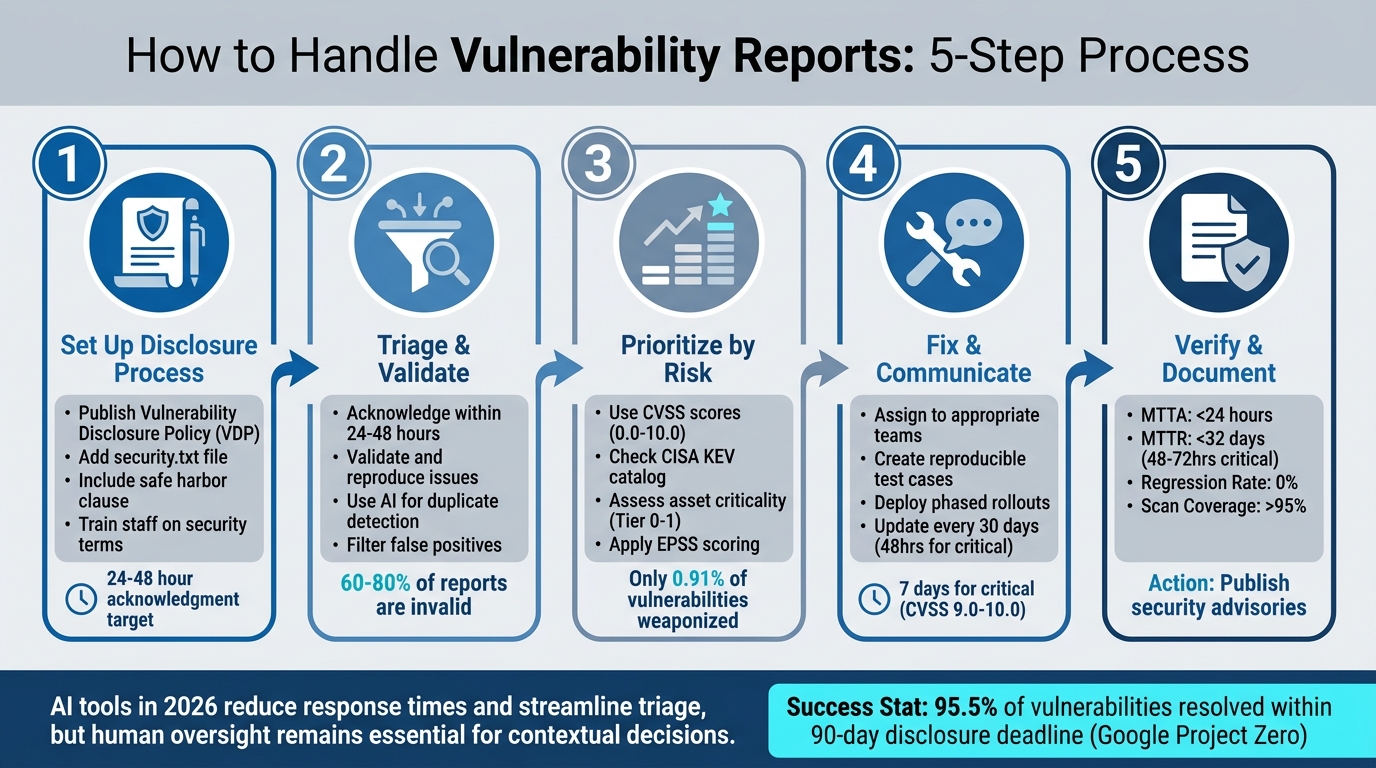
5-Step Vulnerability Report Management Process for Support Teams
Vulnerability Management Explained The Complete Process
sbb-itb-e60d259
Step 1: Set Up a Responsible Disclosure Process
The first step in a solid vulnerability management process is ensuring researchers and customers have a clear, secure way to report vulnerabilities. A Vulnerability Disclosure Policy (VDP) serves as a public document that outlines reporting procedures, specifies the scope of assets included, and provides guidelines for legitimate research [3][10]. Think of it as a roadmap that not only builds trust but also ensures that vulnerability reports land in the right hands.
Publish Clear Reporting Guidelines
Make sure your VDP is easy to find and straightforward to understand. A dedicated security page (e.g., yourdomain.com/security-policy) is a great place to share this information. Use it to spell out:
- How to report vulnerabilities.
- Which domains, APIs, or applications are open for testing.
- What’s off-limits (e.g., third-party services or physical locations) [10].
Including a safe harbor clause is critical. This reassures researchers that they won’t face legal action if they act in good faith. Such clauses can encourage researchers to report issues privately rather than disclosing them publicly.
Set realistic expectations for response times. Instead of making rigid promises, use flexible language like “We aim to acknowledge reports within three business days.” Pair your VDP with a security.txt file (as per RFC 9116) located at /.well-known/security.txt. This file makes it easier for automated tools and researchers to find your contact information [8][10]. Be sure to include a monitored email alias (e.g., security@yourdomain.com) and a PGP key for secure communication.
Once your guidelines are in place, ensure your team is prepared to manage incoming reports effectively.
Train Staff for First-Level Handling
Even the most well-crafted VDP can fail if your frontline staff isn’t prepared. Train your team to recognize terms like "SQL injection", "XSS", "remote code execution", or "unauthorized access", so they can quickly identify security-related issues and escalate them appropriately. Use tools like inbox labels (e.g., SECURITY-REPORTS) or automated ticket routing to ensure no report slips through the cracks [10][12].
Establish protocols for acknowledging reports promptly – ideally within 24 hours. Use supportive and professional language, and avoid committing to fixed timelines for fixes until the issue has been assessed. For example, Microsoft’s Security Response Center uses a Researcher Portal to guide submissions and completes its initial triage within two U.S. business days [9]. The main goal is to confirm receipt, verify the report as security-related, and escalate it promptly to the right team.
Step 2: Triage and Validate Incoming Reports
Once you have a solid disclosure process in place, the next step is to focus on handling incoming reports effectively. When a vulnerability report lands in your queue, time becomes critical. Acting quickly not only helps resolve issues faster but also builds trust with the researcher and minimizes the risk of premature public disclosure. The triage phase is where you sift through reports to identify genuine security risks, determine their severity, and assign them to the right team. Given that 60%-80% of vulnerability submissions turn out to be invalid [15], having a clear validation process can save your team from wasting time on false positives.
Acknowledge Reports Quickly
Responding promptly is key. Make sure to send a formal acknowledgment within 24 to 48 hours of receiving a report [3]. This lets the researcher know their submission has been received and sets the tone for a professional and transparent engagement.
"A 24-hour acknowledgment does several things: it confirms the report was received, it shows good faith, and it starts the clock on responsible disclosure norms from a position of positive engagement rather than radio silence." – Hunchbite [3]
To keep things efficient, use pre-written templates for common scenarios like initial acknowledgments, requests for clarification, or invalid reports [13][14]. If your Vulnerability Disclosure Policy (VDP) includes tools like GitHub‘s Private Vulnerability Reporting or a dedicated security email alias, use these channels to ensure sensitive discussions remain private [11][14]. Avoid making promises about payments or using threatening language in your first response [3].
Once the report has been acknowledged, move on to categorizing and validating it.
Categorize and Validate Reports
After acknowledging the report, the next step is to verify whether it’s in scope, reproducible, and not a duplicate of a previously reported issue [2][13]. Start by confirming that the affected asset (such as a domain, API, or application) falls under your VDP. Then, try to reproduce the reported issue in a controlled environment that mirrors your production setup [2][5]. If the report is unclear, ask for additional details like reproduction steps, affected versions, or proof-of-concept code.
Modern AI tools can make this process faster and more efficient. For example, AI-driven systems can perform initial checks to ensure the report aligns with your scope, identify the affected asset, and flag potential duplicates – even analyzing attached screenshots to spot recurring issues described differently by various researchers [17][19]. These tools can also map reports to the Common Weakness Enumeration (CWE) framework and use browser automation to reproduce certain vulnerabilities, generating screenshots and logs as proof [17]. In one case from early 2026, a security team used AI to identify a shared root cause across multiple reports submitted within 14 minutes, enabling them to fix the issue in just under two hours [18].
To further streamline the process, use techniques like fingerprinting (hashing key fields) or semantic similarity (vector embeddings) to consolidate duplicate reports [2]. Adding context about the affected asset (such as its owner, environment, and whether it’s internet-facing) and telemetry data (like logs or WAF alerts) during triage can also help assess the potential business impact [2][5]. While AI tools can speed up initial classification, final decisions should always be made by a human [5][15].
Step 3: Prioritize and Assess Impact
Once you’ve validated the reports, the next step is to determine their potential impact. With over 22,000 CVEs reported each year and 38% of intrusions tied to unpatched vulnerabilities, treating every report as equally urgent just isn’t practical [20]. To focus on what matters most, combine technical scores with business context to address vulnerabilities that pose real threats to your operations.
Use CVSS for Scoring
The Common Vulnerability Scoring System (CVSS) offers a standardized range from 0.0 to 10.0 to measure technical severity. It’s a great starting point for managing large volumes of reports. But CVSS alone isn’t enough – it doesn’t account for business context or highlight which vulnerabilities are the most dangerous to your specific environment.
To make CVSS scores actionable, you’ll need to layer in exploitability signals and asset criticality. For instance, check if a vulnerability is listed in the CISA Known Exploited Vulnerabilities (KEV) catalog or has a high Exploit Prediction Scoring System (EPSS) score. Research from early 2024 revealed that only 0.91% of vulnerabilities were weaponized [22]. Next, classify your assets into tiers. For example:
- Tier-0: High-value assets like identity systems and payment APIs.
- Tier-1: Internet-facing production services.
This approach ensures fixes are prioritized based on both technical urgency and business risk. For example, a "Critical" CVSS score on a Tier-0 asset demands immediate attention, while the same score on an isolated lab server can be addressed later [21].
"A ‘Medium’ priority on a payments system may well supersede ‘Critical’ priority for an isolated lab server."
- Gabriela Silk, Prescient Security [21]
To further refine your process, define context-aware SLAs. For instance, a vulnerability with a CVSS score of 9.0–10.0 affecting an internet-facing production system might need remediation within 7 days. Meanwhile, a lower-severity issue on an internal-only asset could have a 90-day timeline [4]. If a patch isn’t immediately available, use compensating controls like WAF rules, network segmentation, or EDR hardening to manage risk while working on a permanent solution [21][22].
While CVSS scores and context provide the foundation, AI can take prioritization to the next level.
AI-Driven Prioritization
AI tools can simplify and speed up the prioritization process by analyzing vulnerability characteristics, exploitability, and business impact in real time. These systems assess reachability – whether the vulnerable code path is actively used by your application – and can reduce your actionable vulnerability list by as much as 60–80% [23]. This helps separate critical issues from less urgent ones.
AI also integrates threat intelligence into the prioritization process. For example, EPSS v4, launched in March 2025, processes over 250,000 threat intelligence data points daily to predict the likelihood of a CVE being exploited within 30 days [24]. Interestingly, in Q1 2025, 28% of exploited vulnerabilities had only "Medium" CVSS base scores, underscoring the importance of context [24]. AI can even generate "golden tickets" – comprehensive remediation packages that include asset-owner assignments, detailed fix instructions, and automated Pull Requests for runtime fixes [24][23].
Step 4: Fix Issues and Communicate Progress
After prioritizing vulnerabilities based on their severity and impact, the next step is to craft a clear plan for resolving these issues and keeping everyone in the loop. This is where technical precision meets the art of communication – getting it wrong can escalate manageable problems into full-blown crises.
Outline Remediation Steps
Start by assigning each validated vulnerability to the appropriate team (e.g., billing or identity teams). Security teams should provide the necessary evidence and guidance to ensure accountability [4].
A solid remediation plan typically follows these stages:
- Intake
- Qualification
- Reproduction
- Remediation planning
- Disclosure decision
- Publication
- Closure [1]
For each issue, create a reproducible test case – a lightweight, containerized proof-of-concept (PoC) that demonstrates the problem clearly and integrates with your CI pipeline [7][5]. Work on fixes in secure, private spaces like draft security advisories or dedicated security branches. This prevents potential attackers from exploiting the issue before it’s resolved [11][7]. When deploying fixes, use phased rollouts (like Canary or blue-green deployments) to minimize risk and enable quick rollbacks if needed. Always include a rollback plan with clear steps to reverse any changes [4][7]. If an immediate patch isn’t possible, consider temporary measures to block exploit paths [5][6].
Set remediation timelines based on context-aware SLAs. For example, a critical vulnerability (CVSS 9.0–10.0) in an internet-facing production system might need a fix within seven days or a hotfix within 48–72 hours. Meanwhile, a medium-severity issue on a non-essential service could have a 90-day window [4][5].
"A patch is not complete until it’s proven."
To confirm the fix, re-run the original PoC, perform regression tests, and monitor for unusual behavior post-deployment [4][1].
With a clear plan in place, the focus shifts to keeping stakeholders informed throughout the process.
Maintain Clear Communication
Effective communication is key to maintaining trust with stakeholders and reporters. Consistent updates ensure transparency and avoid misunderstandings.
Provide status updates at least every 30 days – or every 48 hours for critical issues [1][5]. Use standardized templates for acknowledgments and updates to save time and ensure consistency. These templates should confirm receipt of the report, outline next steps, and avoid any language that could imply liability [7][3].
Follow Coordinated Vulnerability Disclosure (CVD) practices by collaborating privately with researchers to address issues before they’re made public. This approach prevents attackers from using the disclosed information as a guide [11]. Tools like GitHub’s "Draft Security Advisories" allow you to coordinate fixes and releases privately with trusted contributors [11]. Most vulnerabilities are addressed within a 90-day disclosure window, and 95.5% of issues reported to Google Project Zero meet this deadline [3]. If delays occur, communicate openly with researchers, as many will grant extensions for good-faith efforts [3].
The risks of poor communication can be severe. In 2022, Joseph Sullivan, Uber’s former Chief Security Officer, was convicted of obstruction of justice for mishandling a 2016 data breach affecting 57 million users. Instead of disclosing the breach, he arranged a $100,000 payment to the hackers and had them sign NDAs. By 2023, he was sentenced to three years’ probation. This case serves as a stark reminder that transparency is critical in handling vulnerabilities [3].
"The cover-up is worse than the breach. Every company that has handled disclosure transparently – published a post-mortem, notified affected users, fixed the issue – has recovered."
AI-Powered Communication Automation
AI tools can streamline routine communication tasks, making it easier to keep everyone informed. Platforms like HackerOne use "Agentic Validation" to generate structured recommendations, including suggested comments for reporters, saving teams from drafting responses from scratch [17].
SOAR (Security Orchestration, Automation, and Response) tools can notify stakeholders via Slack, email, or SMS based on the incident type and the on-call personnel [25]. With security teams often handling around 960 alerts daily [25], manual investigation would require an unrealistic 80 full-time analysts at 40 minutes per alert. Automation helps maintain timely responses, reducing Mean Time to Resolve (MTTR) from hours or days to just minutes [25].
AI can also assist with triage by extracting structured details from free-form reports, pre-filling ticket fields, and routing issues to the right experts faster [7]. Additionally, automation tools can compile detailed post-incident reports, summarizing timelines, actions taken, affected systems, and resolution metrics [25]. Solutions like Supportbench even generate case summaries and auto-responses based on historical data, ensuring consistent communication without the need for manual effort.
"Automation removes manual drudgery; it does not substitute for judgment. Use automation to enrich, dedupe, and notify – keep human triage for contextual decisions."
While AI can handle repetitive tasks, it’s up to your team to make critical decisions based on the specific business context [4][17].
Step 5: Verify Fixes and Close the Loop
Once you’ve communicated your remediation plan, the next step is to confirm that your fixes work as intended and to document lessons learned for ongoing improvement. This ensures vulnerabilities are resolved effectively and helps prevent similar issues down the line.
Retest and Confirm Fixes
After deploying a patch, it’s crucial to verify that the vulnerability is completely addressed. Use the original Proof of Concept (PoC) or an automated script (like reproduce.sh) to confirm the exploit no longer works. A well-designed reproduce.sh script should return an exit code of 1 if the system is still vulnerable (fail) and 0 if the fix is successful (pass) [7].
Start by testing the patch in a canary environment. Monitor logs and error rates closely before rolling it out system-wide. This step helps catch any unintended side effects early. For critical fixes, aim to complete this retesting within 72 hours [7][5].
Collaborate with the original reporter to verify the fix in staging or production environments. This partnership not only helps address edge cases but also builds trust with the security community.
To prevent regressions, integrate your PoC tests into your CI/CD pipeline as gated security checks. If the test fails (exit code 1), it should immediately flag the issue, while a pass (exit code 0) confirms the patch is effective. Store these test cases in a private repository (e.g., repro-tests/) to ensure that once a bug is fixed, it stays fixed.
Once you’ve confirmed the patch works as intended, document your findings and communicate updates with stakeholders.
Document Metrics and Publish Advisories
Verification isn’t just about fixing the issue – it’s also about tracking performance and sharing information transparently. Use the following metrics to evaluate your program’s effectiveness:
- Mean Time to Acknowledge (MTTA): Aim for less than 24 hours for public reports to build trust and reduce duplicate submissions [7].
- Mean Time to Remediate (MTTR): For critical issues, this should be between 48–72 hours, with an overall target of under 32 days [5][27].
- Regression Rate: Keep this at 0% to ensure fixes remain intact over time [7].
- Scan Coverage: Maintain over 95% to eliminate blind spots in your asset inventory [27].
| Metric | Target Goal | Purpose |
|---|---|---|
| MTTA (Time to Acknowledge) | < 24 Hours | Reduces duplicate reports and builds researcher trust [7] |
| MTTR (Time to Remediate) | < 32 Days | Measures the speed of the engineering fix cycle [27] |
| Regression Rate | 0% | Tracks whether fixes are undone by later code changes [7] |
| Scan Coverage | > 95% | Ensures there are no blind spots in the asset inventory [27] |
Keep an audit trail of all communication with reporters and internal teams. If a fix is deferred or a risk is accepted, document the reasoning to stay compliant with frameworks like SOC 2 or ISO 27001 [26].
Transparency is key when informing customers about resolved issues. Publish security advisories that explain what happened, who was affected, and how you fixed the problem. Companies that openly share post-mortems and notify users recover faster than those that try to hide breaches. The 2022 conviction of Uber’s former Chief Security Officer, Joseph Sullivan, for covering up a 2016 breach affecting 57 million user records is a stark reminder of the risks of non-transparency [3].
Finally, conduct a post-mortem for critical vulnerabilities to identify root causes and process gaps. Use these insights to make meaningful changes, such as adding new unit tests to your CI/CD pipeline, improving linters for common CWE classes, or refining developer training [5][2]. These steps help strengthen your overall security posture while reducing the risk of future incidents.
Common Pitfalls to Avoid
Even with a solid vulnerability management process in place, certain missteps can derail your efforts. Avoiding these pitfalls is essential to maintaining trust and ensuring your program remains effective.
Ignoring or Poorly Communicating with Reporters
Failing to respond to vulnerability reports – or responding poorly – can turn researchers into adversaries. When security researchers submit reports and are met with silence or impersonal automated replies, they may assume bad intentions. This can push them to disclose vulnerabilities publicly before you’ve had a chance to address the issue [29].
Acknowledging reports promptly is key to building trust. On the other hand, issuing legal threats can escalate the situation, often resulting in public disclosures and damaged relationships [3][8]. A stark example comes from Uber’s 2016 data breach. Joseph Sullivan, the company’s former Chief Security Officer, concealed the breach, which affected 57 million users, by paying hackers $100,000 in Bitcoin and disguising it as a "bug bounty." He also required the hackers to sign NDAs to keep the breach secret. This led to his conviction for obstruction of justice in October 2022 and a sentence of three years’ probation in May 2023. The case highlights how covering up breaches through bounty payments can have serious legal consequences [3].
To avoid such outcomes, publish a clear Vulnerability Disclosure Policy (VDP) that includes Safe Harbor language. This reassures researchers that their good-faith efforts, as long as they stay within defined boundaries, won’t lead to legal action [29]. Respectful, transparent communication can prevent researchers from becoming adversarial.
Weak Validation Processes
Not all vulnerability reports are valid, and without a strong validation process, your team could end up drowning in false positives. This creates "triage rot", where time and resources are wasted on non-issues instead of critical vulnerabilities [15].
Requiring a Proof-of-Concept (PoC) can significantly reduce false positives. Organizations that implement this step often see a 60% to 80% drop in invalid reports [28]. For example, in early 2026, the maintainers of the open-source project cURL faced an overwhelming number of low-quality and fake vulnerability reports. This constant noise consumed their limited resources and morale, eventually forcing them to abandon their formal bug bounty program [28].
"Triage is not an inbox. It is a production process. If you build it like an inbox, you will not get the outcomes you’re hoping for." – Luke Stephens, Founder & CEO, Haksec [15]
Inconsistent classification of vulnerabilities is another common issue. When different analysts assign varying severity levels to the same report, it can erode trust with both researchers and internal teams [15]. Using standardized frameworks like CVSS (Common Vulnerability Scoring System) alongside EPSS (Exploit Prediction Scoring System) ensures evaluations focus on real business risks rather than hypothetical technical severity [15][26]. In fact, by 2025, 73% of security professionals cited false positives as a major challenge in threat detection – up from 64% in 2024 [15].
Lastly, avoid testing vulnerabilities in live production environments. Doing so risks exposing sensitive data and causing system instability. Instead, use containerized, temporary environments like Docker to safely validate reports without jeopardizing customer data [7]. Addressing these challenges will help your team stay efficient and improve the quality of your responses.
AI-Driven Enhancements for Vulnerability Management
AI is transforming vulnerability management by automating repetitive tasks and improving accuracy. These tools allow organizations to handle vulnerability reports more effectively, freeing up teams to focus on more complex technical challenges. Tasks like triaging, documentation, and prioritization can now be streamlined, ensuring faster response times without compromising security or privacy.
Automate Triage and Categorization
AI shines in automating the tedious aspects of vulnerability triage. For example, semantic deduplication uses vector similarity search to identify duplicate reports, even when the descriptions differ. A mid-sized SaaS provider that implemented an automated triage system in late 2025 saw duplicate reports drop by 65%, cutting their median time-to-acknowledge to under 8 hours [2].
Another key feature is automated scope verification, where AI reviews report details to flag out-of-scope submissions. In March 2026, Yogosha‘s Cyber Team, led by Mohamed Foudhaili, tested their AI Triage Assistant on 300 reports. The results were impressive: 99% accuracy in detecting out-of-scope submissions and a perfect 100% detection rate for duplicates [30].
"Manual verification of scopes and duplicates took up a significant part of our time. This tool allowed us to automate these basic checks. Now, we can immediately dedicate ourselves to technical expertise." – Mohamed Foudhaili, Cyber Team, Yogosha [30]
AI also calculates composite risk scores by combining technical severity (CVSS) with factors like asset criticality, exploit maturity (EPSS), and internet exposure [2]. Advanced systems even validate vulnerabilities using screenshot-driven proof [17], automatically identify affected assets, and classify issues using the Common Weakness Enumeration (CWE) framework for consistent handling [17].
For organizations with strict data privacy requirements, private AI infrastructure is gaining traction. These systems use internal AI agents and local language models to keep sensitive vulnerability data secure. The best practices in 2026 emphasize "decision-support" systems, where AI provides recommendations and evidence for human approval, rather than fully automating report closures [17][30].
Generate Knowledge Articles and Summaries
Once a vulnerability is resolved, AI can help build institutional knowledge by generating detailed summaries and documentation. These include human-readable explanations of the issue, its impact, and step-by-step remediation strategies, which can be attached to engineering tickets [31].
The process relies on standardized templates with consistent properties (like ai_summary) in issue trackers or software catalogs. Tailored prompts ensure that outputs are relevant based on severity (Critical, High, Medium, Low) and vulnerability type (e.g., SQL injection or misconfiguration) [31][4].
To maintain accuracy, a human-in-the-loop approach ensures that analysts review and approve AI-generated content. This method significantly reduces the time spent on documentation while ensuring quality. Some teams even use these AI summaries to feed coding agents like GitHub Copilot, enabling them to generate pull requests for fixes [31]. These insights also integrate into workflows for dynamic SLA adjustments and predictive monitoring, making the remediation process even smoother.
Dynamic SLAs and Predictive Insights
AI takes prioritization to the next level by dynamically adjusting SLAs and predicting escalation needs. Automated prioritization evaluates factors like exploitability, data sensitivity, and attack patterns to assign priority levels that go beyond standard technical severity [16][4].
Pattern and cluster detection is another powerful tool. AI can identify systemic issues by analyzing incoming reports for shared root causes. For instance, in early 2026, HackerOne’s AI agent, Hai, detected a systemic access failure across three separate reports submitted within 14 minutes. This triggered a Slack alert, allowing the team to resolve the issue in under two hours [18].
AI systems also monitor remediation progress and send alerts if SLAs are at risk of being breached. For example, a vulnerability with a composite risk score above 85 might trigger a "Critical" tier, requiring a hotfix within 72 hours and immediate on-call escalation [2]. By integrating AI with a Configuration Management Database (CMDB), systems can weigh the business impact of reported assets based on their criticality tags (e.g., P0–P3) [2].
"Priority combines severity with those missing dimensions [exploitability and asset value] to produce an actionable verdict on urgency." – HackerOne Help Center [16]
This shift from focusing solely on severity (e.g., CVSS scores) to prioritizing based on business context and exploitability is reshaping how organizations manage vulnerabilities. By embedding AI-driven tools into your workflow, you can strengthen trust with customers while improving efficiency and reducing costs in your support services.
Conclusion
Handling vulnerability reports effectively strengthens trust by promoting transparency, establishing clear processes, and ensuring timely responses. A structured approach to vulnerability management not only prevents reports from slipping through the cracks but also makes researchers feel appreciated. This, in turn, helps organizations avoid the legal and reputational risks tied to poorly managed security issues. As Hunchbite aptly put it, "The cover-up is worse than the breach." [3]
For example, organizations that adopt structured workflows can dramatically cut their initial triage queue – often ranging from 2,000 to 6,000 CVEs – down to just 10–40 actionable items [23]. Additionally, Google Project Zero highlights that when vendors engage constructively, 95.5% of vulnerabilities are resolved before the standard 90-day disclosure deadline [3]. These results are achieved through strategies like assigning clear ownership, using composite risk scoring beyond CVSS, and leveraging AI-driven tools to handle repetitive tasks while reserving critical decisions for human oversight.
AI integration further enhances these workflows. Tools offering features like semantic deduplication, automated scope verification, and dynamic SLA adjustments allow teams to focus on high-priority security decisions instead of routine tasks. Still, automation should complement – not replace – human expertise. As Beefed.ai notes, "Automation should reduce human work to verification and contextual judgment – not replace it." [4] The most effective systems use AI to support and accelerate processes, while humans remain responsible for validation, decision-making, and communication.
The operational best practices are straightforward: acknowledge reports within 24 hours, provide updates every 30 days, and aim to remediate issues within 90 days [1][3]. Use tools that evaluate exploit probability (EPSS), asset criticality, and business impact to prioritize effectively. Document every action, verify fixes through CI pipelines, and publish advisories to maintain an open line with researchers. These steps form the backbone of a reliable and efficient vulnerability management strategy.
FAQs
What should our support team do if a researcher threatens to go public?
If a researcher signals an intent to disclose a vulnerability publicly, it’s important to remain calm and professional. Start by acknowledging their report and confirming that you’ve received it. Let them know your team is actively investigating the issue. Stick to your Vulnerability Disclosure Policy (VDP): verify the details of the report, keep communication open, and work collaboratively with the researcher to address the issue before any public disclosure. Avoid making reactive comments – your priority should be resolving the vulnerability securely and discreetly.
How do we decide if a vulnerability report is real without testing in production?
To evaluate a vulnerability report without risking your live environment, start by examining its scope, severity, and the evidence provided. Check if the reported issue directly affects assets within your defined scope. This step ensures you’re focusing on relevant threats.
Leverage the expertise of seasoned analysts or use automated tools to validate the report and identify duplicates. Reviewing metadata and contextual details can quickly help you determine the report’s authenticity. This approach allows you to decide if further investigation is necessary – all without touching your production environment.
How can we use AI for triage without leaking sensitive vulnerability details?
To ensure secure use of AI in vulnerability triage, it’s best to stick with internal, siloed AI systems rather than public large language models. These private systems can handle tasks such as identifying duplicate vulnerabilities and evaluating their scope, all while keeping sensitive data protected.
By keeping all processes within your organization’s infrastructure, you eliminate the risk of exposing confidential information externally. This approach allows you to automate triage efficiently without compromising security.






