



Support macros can save time and improve consistency – but only if managed properly. Without clear governance, they can lead to outdated information, compliance risks, and inefficiencies. Here’s how to fix that:
- Assign ownership: Define roles like Data Owners, Stewards, and Reviewers to ensure accountability.
- Regular reviews: Schedule quarterly audits to update or retire outdated macros and maintain compliance.
- Version control: Use tools to track changes, test updates, and maintain a clear change history.
- AI integration: Automate repetitive tasks like audits and version tracking to reduce errors and save time.
These steps prevent chaos, minimize errors, and streamline support operations, ensuring your team delivers accurate and consistent responses.
Assigning Ownership for Support Macros
The first step to effective governance is establishing clear accountability. Without it, macros can easily become "orphaned", leaving teams unsure about who approves updates, maintains accuracy, or oversees changes. This lack of clarity is common: 80% of employees report not fully understanding their roles [9], and the same percentage of leaders fail to define clear priorities for their teams [9].
Defining Ownership Roles
Governance works best when three key roles are clearly defined: Data Owners, Data Stewards, and Reviewers/Approvers. Here’s how these roles break down:
- Data Owners: They take responsibility for specific macro sets, establish policies, set usage standards, and make final business-context decisions [5][8].
- Data Stewards: They handle the day-to-day operations, ensuring quality, monitoring performance, and acting as the bridge between technical teams and stakeholders [5][8].
- Reviewers/Approvers: These individuals validate macro content for tone, accuracy, and compliance before updates are implemented [2].
Using a RACI matrix (Responsible, Accountable, Consulted, Informed) can streamline governance and prevent bottlenecks in your support workflows. This framework clarifies who writes the macros (Responsible), who has final approval (Accountable), who provides input (Consulted), and who needs updates (Informed). Teams that use structured governance frameworks often achieve a 35% faster time-to-insight and reduce governance overhead by 40% [7].
As Trusha Lakhani, NED & Board Advisor at IoD, explains: "Governance isn’t about adding red tape; it’s about enabling efficiency. Well-designed processes free up your leadership team to focus on strategic growth instead of getting bogged down by operational headaches." [6]
Prerequisites for Ownership Assignment
Once roles are defined, it’s important to map your team’s current responsibilities and pinpoint high-volume support areas. AI tools can simplify this process. For example, platforms like Supp can classify incoming messages into 315 distinct intents with 92% accuracy in under 200 milliseconds [3], helping identify the areas that need oversight.
Start by assigning governance roles to existing team members alongside their current duties. Dedicated governance staff should only be hired when the workload or associated risks justify it [7]. To keep governance aligned with evolving needs, review your RACI matrix and ownership assignments every 90 days or after major organizational changes [7]. This ensures roles stay relevant and effective.
sbb-itb-e60d259
Setting Up Regular Review Processes
Once you’ve established clear macro ownership, the next step is creating a structured review process to maintain quality. Without regular updates, even well-designed macros can become outdated or fail to meet compliance standards. Think of your macro library as a dynamic system that needs consistent care and attention. This ongoing maintenance also lays the groundwork for precise version control, ensuring your macros stay relevant and effective.
Setting a Review Schedule
A good starting point is to schedule quarterly reviews, though in high-volume or regulated environments, bi-annual reviews might be more practical. Be sure to define clear start and end dates for each review period. To manage inactive macros, implement a sunset policy: flag macros that haven’t been used in six months for automatic review or deactivation. For new or updated macros, consider a staged rollout. Start with beta testing among a small group of agents – this provides time to test, gather feedback, train staff, and update documentation before a full launch[10].
Checklist for Macro Reviews
When reviewing macros, focus on the following areas:
- Compliance and Data Governance: Ensure macros meet current regulations and internal policies.
- Consistency and Performance: Check for alignment with company standards and evaluate performance metrics.
- Relevance: Use AI tools to compare macros against real customer interactions. These tools can analyze internal resources and support transcripts to identify gaps[10].
For industries with strict regulations, include a Legal Hold feature in your review process. This allows you to preserve specific macro versions indefinitely when needed[10].
Henrik Yllemo of ALMBoK.com advises, "insights on common pitfalls to avoid and best practices to implement to make this governance framework a truly living document that evolves with the organization"[11].
Feedback Loops and Collaboration
Agent collaboration plays a critical role in improving macro quality. Regular reviews should incorporate feedback from frontline agents who can spot overly scripted or outdated content. Combine this feedback with usage analytics to identify macros that need adjustments[2]. For example:
- Host quarterly audit sessions to remove unused macros and refresh those linked to low satisfaction scores[3].
- Use intent classification data to focus updates on macros tied to high-ticket volumes[3].
Finally, ensure personalization remains intact by verifying tokens like {{first_name}} and {{order_number}} are being used effectively. This attention to detail helps maintain a customized, human touch in your macros[3].
Implementing Version Control for Support Macros
Version control organizes macro management by tracking all changes, allowing easy reversals, and ensuring clarity. This becomes especially important when multiple team members are involved in updating macros or when compliance requires a clear record of changes. A well-implemented version control system helps prevent conflicts, documents the reasons behind updates, and makes it easier to revert problematic changes. This structured process works best when combined with clear macro ownership and regular reviews, creating a solid governance framework.
Version Control Basics
Version control for support macros revolves around three key concepts: branching, rollback, and audit trails. Branching lets you test changes independently, rollback allows you to quickly restore a stable version if issues arise, and audit trails provide a detailed, time-stamped record of changes – essential for compliance and troubleshooting.
"Atomic commits make code reviews faster and reverts easier, since they can be applied or reverted without any unintended side effects." – GitLab [16]
To keep things simple, aim for atomic commits – each commit should represent one specific change. For instance, if you’re adding a feature to a macro and correcting a typo, make those two separate commits. This approach streamlines code reviews and ensures that reverting one change doesn’t unintentionally undo unrelated updates.
Setting Up a Version Control System
Support macros are often stored in binary formats that Git can’t track effectively. To address this, export your macros into plain text formats (like .bas, .cls, or .frm files) that version control systems can manage [12][13]. Jimm Domingo, an IPUMS Excel VBA Developer, highlighted the challenges of manual exports:
"Because exporting each VBA module is a separate manual step, there’s strong incentive to minimize the number of modules. That does not lead to the best design architecturally. It’s clearly prone to human error" [13].
To avoid these pitfalls, automate the export process using tools like Git hooks or custom scripts. Ivan Zhdanov, a Digital Industrial Engineer, suggests:
"Use Python Git hooks to dump the Excel VBA modules content into text files each time when you execute git commit command. This method is the most transparent and sustainable as it only uses basic tools and methods of Git, Python and VBA" [14].
Automation ensures that your repository always reflects the latest macro state without relying on manual intervention. Additionally, maintain separate environments for development and production. Use clear naming conventions like SupportMacro_DEV.xlam for testing and SupportMacro_PROD.xlam for live environments [13]. Before syncing updates to production, run a comparison script to catch issues such as missing titles or duplicate attributes [17].
Audit Trails and Compliance
Once your system is set up, audit trails play a crucial role in ensuring compliance. Each commit logs the timestamp, author, and intent behind the change, simplifying troubleshooting and meeting regulatory requirements. Focus your commit messages on the why instead of just the what. For example, instead of "Updated macro 47", write "Updated refund macro to reflect new 30-day return policy effective 5/1/2026" [15][16].
GitLab, for example, conducts regular audits of "orphaned" managed content files four times a year – on February 1st, May 1st, August 1st, and November 1st [17]. You can adopt a similar schedule to identify and remove outdated macros. To make audits easier, separate macro content (the actual text of responses) from functional attributes (workflow logic). This distinction allows you to independently review communication updates and technical changes, ensuring that macros still align with your brand voice while avoiding confusion over technical details [17].
Common Pitfalls and How to Avoid Them
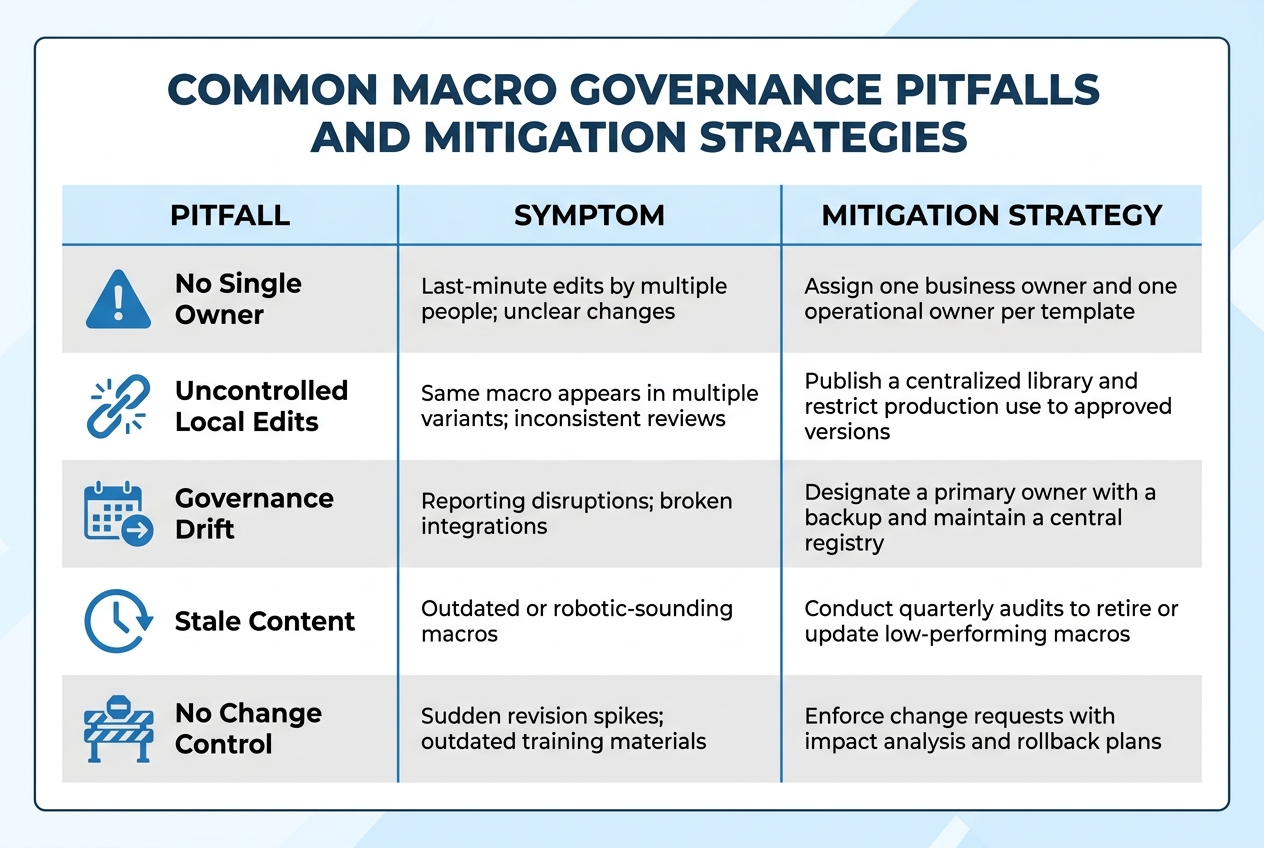
Common Macro Governance Pitfalls and Mitigation Strategies
Even with clear ownership and version control, governance can still falter. When no single person is accountable, conflicting edits pile up, and lapses in ownership can disrupt reporting. For example, a mid-market SaaS company with around 350 employees saw automation failures jump by 30% within two months of scaling AI-generated templates without clear ownership transitions [4]. This highlights the importance of having structured processes, as discussed earlier.
Uncontrolled local edits are another challenge. Agents often copy shared macros and tweak them for specific needs, creating four to eight variations of the same macro. This fragmentation complicates onboarding and makes supervisor reviews inconsistent [1]. A solution? Publish a centralized library of approved macros and limit production use to these versions. Assigning both a business owner and an operational owner to each high-usage macro ensures accountability [1].
Stale content is also a big risk. Macros that haven’t been reviewed for months may sound robotic or reference outdated product details. To prevent this, conduct quarterly audits to retire unused macros and revise those with low satisfaction scores [3]. Always assign a backup owner to ensure continuity and set an SLA – for instance, a 48-hour turnaround – for fixing malfunctioning macros [4]. Keeping a central registry with details like the macro’s purpose, owner, last modified date, and current status (e.g., draft, approved, or deprecated) can provide a reliable single source of truth [4].
When updates are needed, require a formal change request that includes a problem statement, impact analysis, and rollback plan [1]. This approach minimizes sudden spikes in revisions and safeguards reporting accuracy. Tracking metrics like first-pass approval rates and revision frequency can help identify recurring issues before they escalate [1]. In fact, organizations that introduced a central registry and implemented contract tests reduced automation failure rates by 65% within just 90 days [4].
To streamline macro governance and avoid these pitfalls, here’s a breakdown of common challenges and strategies for addressing them:
Pitfalls and Mitigation Strategies
| Pitfall | Symptom | Mitigation Strategy |
|---|---|---|
| No Single Owner | Last-minute edits by multiple people; unclear changes | Assign one business owner and one operational owner per template [1]. |
| Uncontrolled Local Edits | Same macro appears in multiple variants; inconsistent reviews | Publish a centralized library and restrict production use to approved versions [1]. |
| Governance Drift | Reporting disruptions; broken integrations | Designate a primary owner with a backup and maintain a central registry [4]. |
| Stale Content | Outdated or robotic-sounding macros | Conduct quarterly audits to retire or update low-performing macros [3]. |
| No Change Control | Sudden revision spikes; outdated training materials | Enforce change requests with impact analysis and rollback plans [1]. |
Addressing these issues is critical for running a smooth, AI-driven support operation. By implementing these strategies, you can maintain consistency, improve efficiency, and reduce errors.
Using AI for Governance in B2B Support Operations
Managing governance manually in B2B support can be a time sink, not to mention prone to errors. When dealing with hundreds of macros across multiple product lines, keeping track of who made changes, when, and why can quickly spiral out of control. AI steps in to handle these tedious tasks, letting your team focus on more impactful work. By building on established processes like version control, AI makes macro governance more efficient and less stressful.
AI-Driven Automation in Macro Management
AI takes over the repetitive tasks that often slow down governance. With natural language processing, it automatically sorts and routes tickets to the right teams, while sentiment analysis identifies critical issues before they escalate [18]. These systems also integrate seamlessly with version control practices, tracking every macro edit – who made it, when, and what was changed – providing a clear audit trail without the need for manual input [2]. This means you can trace the full history of any macro in just seconds.
"AI takes the headache out of support ticket management by sorting, prioritizing, and assigning incoming customer issues automatically." – Bryce Emley, Zapier [18]
Platforms like Supportbench come equipped with AI-driven automation, offering features such as auto-tagging, predictive reviews, and automatic versioning. These tools sync data across systems and trigger workflows based on predefined criteria, cutting down on the manual workload for agents [18]. For instance, Smith.ai saves 250 hours every week thanks to automation [18], while Learn It Live managed to lower its ticket volume by 40% after deploying AI-powered chatbots [18].
Reducing Manual Errors with AI
AI doesn’t just automate – it also reduces the likelihood of mistakes. By analyzing how macros are used and incorporating agent feedback, AI tools can identify outdated content or gaps in your support library [2]. If an AI-generated response contains an error, you can quickly trace it back to the original macro and make corrections [20].
Regular AI-driven audits ensure that your macros stay relevant and effective as your products evolve [2]. AI can also compare macros against your official "source of truth" to catch discrepancies or inaccuracies [20]. When prompting AI to review macros, it’s crucial to include version-specific details – like "for Product v3.1" – to avoid recommendations based on outdated information [19].
Conclusion
Clear governance – built on defined ownership, regular reviews, and effective version control – is the backbone of scalable, AI-driven B2B support operations. By assigning responsibility, conducting quarterly evaluations, and maintaining precise version control, you can sidestep the headaches of outdated templates, conflicting answers, and compliance risks. These steps turn your macro library into a powerful tool that minimizes mistakes and speeds up resolution times.
Supportbench takes much of the manual burden off your plate by automating tasks like tracking edits, identifying outdated content, and ensuring macros align with current product versions. This automation not only streamlines support operations but also supports a governance framework that prioritizes transparency, trust, and security. According to predictions, organizations embracing these principles could see AI outcomes improve by up to 50% by 2026 [21].
Treat governance as a system-wide challenge. Enforce essential field logic, standardize change requests, and leverage AI to base responses on reliable data. This approach helps prevent version confusion, reduces rework, and keeps your processes running smoothly [1].
The results speak for themselves. A global automotive company saved $73 million and shaved 23 months off manual review time using AI categorization [22]. Similarly, the State of Ohio cut one-third of its regulatory code, reclaimed 58,000 employee hours, and saved taxpayers $44 million [22]. While your organization may not operate on this scale, the principle remains the same: effective governance – especially when paired with AI – leads to measurable efficiency gains.
FAQs
Who should own each macro?
Ownership of macros should be clearly assigned to specific individuals or teams who can ensure their accuracy, relevance, and consistency over time. Typically, this responsibility falls to roles like content managers, support leads, or subject matter experts. These owners handle every stage of the macro’s lifecycle – creation, updates, regular reviews, and eventual retirement – while ensuring the macros align with company policies and branding guidelines. To keep responses consistent and high-quality across channels, implementing regular reviews and version control is essential.
How often should macros be reviewed?
Macros need regular reviews to stay accurate and relevant. It’s often suggested to go over them every few months to make sure they’re still current and effectively meeting customer needs.
How do we roll back a bad macro update?
To recover from a problematic macro update, follow these steps:
- Pinpoint the last stable version: Identify the most recent approved version of the macro to ensure you’re reverting to a reliable state.
- Restore using version control: Use your version control system to revert the macro to its previous, stable version.
- Inform stakeholders: Communicate with all relevant parties about the rollback and ensure the updated macro is implemented on the platform.
- Document and improve processes: Record the issue, analyze what went wrong, and update governance protocols to reduce the chances of similar issues happening again.






