



Support teams can’t resolve issues quickly if critical knowledge is buried in Slack threads, outdated PDFs, or someone’s memory. Poor documentation leads to slow resolutions, frustrated agents, and unnecessary escalations.
The solution? Organized, structured, and accessible documentation that empowers both human agents and AI systems. Companies with strong documentation practices cut support costs by 50% and resolve issues 70% faster.
Key takeaways:
- Structure matters: Organize content by features, goals, or personas for clarity.
- AI thrives on clean data: Well-structured knowledge boosts AI accuracy by 60–85%.
- Regular updates are critical: Review top articles monthly and audit your knowledge base quarterly.
- AI can scale your efforts: Automate article creation from resolved tickets and identify content gaps.
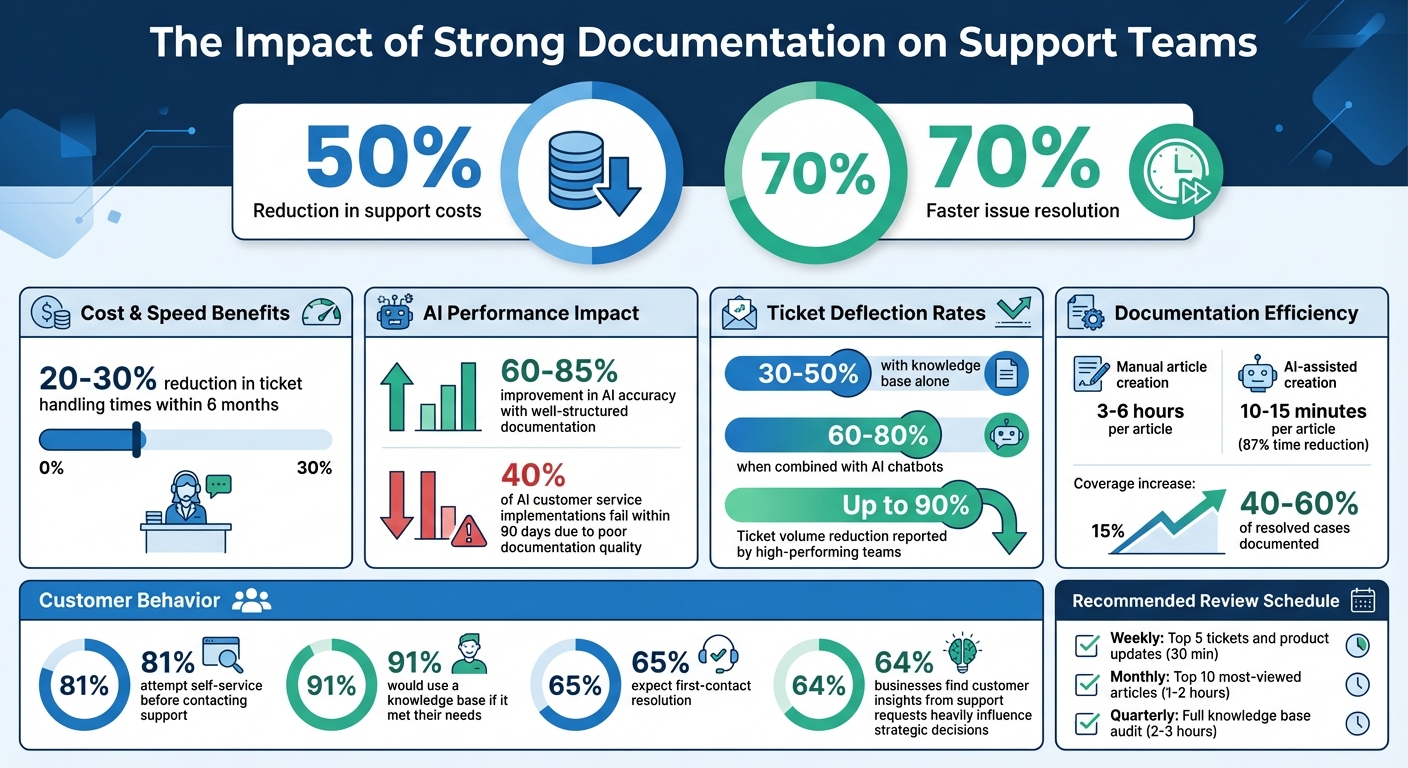
Key Documentation Metrics and Impact Statistics for Support Teams
How to Build an Internal Knowledge Base
sbb-itb-e60d259
Build Your Knowledge Documentation Strategy
Creating a strong knowledge documentation strategy is essential for keeping your support operations efficient and effective. By focusing on clear goals and structure, your documentation can serve as a reliable foundation for both human and AI-driven support systems.
Start by crafting a project brief that outlines the purpose, scope, and timeline of your documentation efforts [6]. This brief should define key objectives like reducing support tickets or improving onboarding speed. It should also identify your target audience – whether that’s support agents, customers, or AI systems – and establish measurable success metrics. Without this groundwork, your documentation risks becoming disorganized and reactive, making it harder to support agile and AI-driven operations.
Next, decide on a content structure that works for your audience. Here are three common approaches:
- Feature-based: Organizes content around product capabilities, such as billing, integrations, or reporting.
- Goal-oriented: Focuses on user tasks, like setting up SSO or exporting data.
- Persona-based: Tailors content to specific roles, such as admin guides versus end-user guides.
For many B2B support teams, a hybrid structure works best. For example, you could organize by feature while also including sections for common workflows and troubleshooting. The key is to align the structure with your audience’s needs.
It’s also important to tailor content for different users. Support agents need internal playbooks that cover edge cases, known bugs, and escalation paths. Customers, on the other hand, require straightforward workflows that guide them through the "happy path" [7]. AI systems need highly structured content with metadata and machine-readable steps to ensure they generate accurate, reliable responses [8]. As Typewise emphasizes, "Structure outperforms volume. A smaller, well-structured knowledge base can deliver better results than a larger, disorganized one" [8].
Assigning clear ownership is another critical step. For example, engineering teams should treat documentation updates as part of their "definition of done" before releasing new features [1]. A dedicated Knowledge Base Owner or Support Ops lead should oversee the system, ensuring taxonomy is maintained, tags are audited quarterly, and review schedules are followed [7][8]. Support agents should also play a role by flagging tickets that lack corresponding articles, helping to create a priority list for updates [7]. This shared responsibility ensures that both human agents and AI systems have access to current, actionable knowledge.
Finally, establish regular review cycles to keep your documentation fresh:
- Conduct a quarterly review of the entire knowledge base.
- Review the top 10 articles every month.
- Flag and update articles that haven’t been revised in 90 days.
These practices can lead to significant improvements, such as reducing ticket handling times by 20–30% within six months [7]. By staying proactive, you ensure your documentation remains a reliable resource for everyone involved.
Capture Product Knowledge From Multiple Sources
Once you have a solid plan, the next step is gathering knowledge from all available sources. Your support team already holds a treasure trove of product insights – hidden in resolved tickets, Slack threads, and team expertise. The challenge is pulling it all together before it becomes outdated or forgotten.
Extract Knowledge From Support Tickets
Support tickets are a direct window into what your customers struggle with and how your team resolves those issues. By analyzing closed cases, you can uncover valuable patterns and insights. Start by reviewing tickets from the past three to six months, grouping them by topic to identify 20–30 recurring themes that need to be addressed in your documentation [2]. Pay special attention to one-touch tickets, tickets with high handling times, and escalated cases – these are perfect for creating FAQs, detailed guides, and internal playbooks [10].
AI tools can make this process much easier. For example, Supportbench‘s AI KB Article Creation can analyze the entire communication history of a resolved case and automatically draft a knowledge base article. It includes a subject line, summary, and keywords, transforming problem-solution patterns into searchable documentation with minimal manual effort. Research shows that 64% of businesses find customer insights from support requests heavily influence their strategic decisions [9]. Teams that combine structured documentation with AI tools have even reported reducing ticket volumes by nearly 90% [1].
But tickets are just one piece of the puzzle. Insights from product teams and customers can take your documentation to the next level.
Gather Input From Product Teams and Customers
Your documentation shouldn’t be confined to the support team. Product teams understand the features they build and why they exist, while customers provide real-world insights into how those features are used – and where they fall short. Make documentation updates part of your product release checklist so engineering teams include them as part of the "definition of done" before launching a feature [5]. Assign subject matter experts (SMEs) to own specific articles based on their expertise. For example, a product manager might handle feature explanations, while a senior support engineer covers troubleshooting workflows [5].
To make your documentation resonate with users, review support tickets, sales inquiries, and search logs to capture natural phrases and synonyms your customers use. Avoid internal jargon and aim for language that reflects how users actually think and speak [2][8]. Use tools like thumbs up/down feedback within articles and track "zero-result searches" weekly to identify missing information [2][5]. It’s worth noting that 91% of customers say they would use a knowledge base if it addressed their specific needs [5]. But to meet that standard, your content must speak their language and solve their actual problems.
Store All Knowledge in One Central Location
Fragmented knowledge leads to wasted time and inconsistent information. Create a single source of truth where both support teams and customers can access the same documentation [1][11]. Organize this central knowledge base by product components and workflows, rather than long, standalone pages. This structure makes it easier for both people and AI systems to understand feature relationships [1].
Keep your navigation simple, with 2–3 levels and 5–8 top-level categories [2]. Follow the "one topic per article" rule – don’t mix unrelated tasks like "reset password" and "change email" in the same piece. This approach avoids confusing users and improves search accuracy [2]. Every troubleshooting article should also include clear escalation paths so agents know what to do when standard solutions don’t work [2]. A well-organized knowledge base can deflect 30%–50% of support tickets, and when paired with AI chatbots, that number can climb to 60%–80% [2].
Structure Documentation for Quick Access
Having all your information in one place is important, but being able to find it quickly is what truly makes a difference – especially for support teams working under pressure. We’ve already discussed the importance of capturing and centralizing knowledge, but the way you structure that knowledge is just as critical. A well-organized knowledge base can lead to impressive results, such as improving AI accuracy by 60–85% and reducing support tickets by 40–60% [3]. The key? Make sure both humans and AI systems can easily locate exactly what they need, exactly when they need it. Here’s how you can structure your documentation for fast access.
Make Knowledge Base Content Searchable
Think of your knowledge base articles as standardized data entries – they should follow a consistent format. Each article should include clear sections like Title, Problem Statement, Root Cause, Resolution Steps, Prerequisites, and Constraints [8]. For longer guides, break them down into smaller, focused sections of 150–300 words, each addressing a single issue [8]. Use clear H2 and H3 headings to create logical chunks of information that are easy to navigate and index, especially for AI-powered search tools. Always include the key answer or resolution within the first 100 words of the article – this makes it easier for both agents scanning quickly and AI systems prioritizing content [2].
To improve searchability, tag articles with metadata that mirrors how your team searches. Use tags for things like product area, version, region, audience type (agent or customer), and even specific error codes or feature names [8]. Regularly review search logs, especially zero-result searches, to identify and fill any gaps [2].
Separate Internal and Customer-Facing Content
While structuring content for searchability is important, tailoring it for specific audiences takes it a step further. Your support team and your customers have different needs. Internal documentation should include things like technical troubleshooting steps, escalation processes, meeting notes, and edge-case scenarios. On the other hand, customer-facing content should focus on easy-to-follow self-service guides, FAQs, and how-to articles written in plain, accessible language [12].
Use Role-Based Access Control (RBAC) to safely separate internal and external content without creating duplicate entries [4]. Tag each article by audience type (e.g., customer, agent, admin) and use permissions to ensure internal-only material doesn’t accidentally appear in public help centers. This approach allows you to maintain a single source of truth while delivering the right level of detail to the right audience – whether that’s a concise answer for an AI chatbot, a detailed guide for customers, or a private playbook for agents.
Keep your navigation structure simple with no more than 2–3 levels (e.g., Category > Article > Sub-section). Limit top-level categories to 5–8 options to keep navigation intuitive and fast [2]. Stick to one topic per article to avoid confusion [2].
Keep Documentation Current With Product Updates
Outdated documentation doesn’t just waste time – it damages trust and can lead AI systems to provide incorrect answers. To avoid this, make updating your documentation a standard part of your product release process [5]. Assign each article a specific owner and set mandatory review dates to ensure content stays relevant [8].
Here’s a practical maintenance schedule to follow:
- Weekly: Check unanswered search queries and update time-sensitive details like pricing or deadlines.
- Monthly: Audit your top 10 most-viewed articles for accuracy and address low-rated feedback.
- With every product update: Identify and update all affected articles before the new feature launches.
- Quarterly: Review your entire knowledge base and refresh any content older than six months [2].
Teams that stay on top of their documentation have reported ticket reductions of up to 90% [1].
"AI doesn’t fix messy content. It amplifies it. If your knowledge base is a mess, AI won’t clean it up. It’ll take that mess and serve it with complete confidence to your users." – Dana Hrušková, Product Fruits [3]
Think of your documentation as part of your infrastructure, not an afterthought. Quality beats quantity every time – a smaller, well-organized knowledge base will always outperform a massive, disorganized one [8].
Apply AI to Scale Documentation Efforts
Keeping documentation up-to-date is one challenge – scaling it without overwhelming your team is another. On average, creating a single article manually can take anywhere from three to six hours, yet most teams only document about 15% of their resolved cases [16]. AI shifts this balance. By automating the creation of articles, optimizing search functions, and identifying gaps in documentation, teams can boost their coverage to 40-60% while slashing creation time by 87% – reducing it from hours to just 10–15 minutes [16]. The secret lies in workflows that transform your support history into a dynamic, self-updating knowledge base. Let’s dive into how AI handles content creation, improves searchability, and identifies areas where documentation is lacking.
Generate Knowledge Base Articles From Resolved Cases
Resolved tickets are goldmines of verified product insights. AI can analyze these conversations – from the initial question to troubleshooting steps and the final resolution – and generate structured draft articles. These drafts typically include a title, a clear problem statement, and detailed, step-by-step instructions [13][14][16].
To ensure quality, you can apply filters to select only the most relevant tickets. For instance, you might choose tickets tagged as "documented solution" or those marked with "customer confirmed" status [14]. Once the AI generates these drafts, they are stored in your centralized knowledge base, ready for team review and publication [13][14][16].
"The bottleneck isn’t answering tickets. It’s converting resolved issues back into KB articles." – Inkeep Team [15]
Supportbench simplifies this process with AI KB Article Creation from Case History. It lets you choose any resolved case and instantly generate a knowledge base article, complete with subject, summary, and keywords – all without needing extra tools or add-ons.
Improve Search Results With AI-Powered Tools
Creating documentation is only half the battle – making it easy to find is just as critical. AI-powered search tools go beyond basic keyword matching by understanding the intent behind a query, ensuring users find the most relevant content even when phrasing differs [2][15]. Combining vector similarity with keyword matching ensures both agents and AI chatbots can quickly locate the answers they need [15]. With optimized search functionality, AI chatbots can deflect 60–80% of tickets, while support teams report a 35% reduction in overall ticket volume [15][2].
Supportbench’s AI Agent-Copilot takes this a step further by searching across past cases, internal documentation, and external knowledge bases. It suggests relevant answers in real time, helping agents resolve issues faster without sifting through multiple sources.
Find Documentation Gaps Using AI Analysis
Traditional documentation audits are often done quarterly and rely heavily on guesswork. AI changes the game by continuously analyzing support tickets and comparing them to your existing knowledge base. This process identifies questions that agents have answered but aren’t yet documented [17]. AI then prioritizes these gaps based on ticket volume, ensuring your team focuses on content that addresses the most pressing customer needs [17]. It also reviews unresolved or escalated tickets to pinpoint where existing documentation falls short [1]. Some platforms even offer real-time quality scores for your knowledge base, allowing you to track improvements as they happen [17].
This constant feedback loop sets high-performing teams apart, enabling them to refine their content in real time. With AI-driven gap analysis, you create a stronger foundation for efficient support operations. And it’s crucial – 40% of AI customer service implementations fail within 90 days due to poor documentation quality [15]. Gap analysis ensures your documentation supports AI success.
| Feature | Manual Documentation Review | AI-Driven Gap Analysis |
|---|---|---|
| Frequency | Periodic (e.g., Quarterly) | Continuous/Real-time |
| Data Source | Subjective assessment | Real support ticket history |
| Prioritization | Manual/Intuition-based | Automated by ticket volume |
| Output | List of tasks | Auto-generated article drafts |
| Scalability | Low (requires human hours) | High (automated scanning) |
"Gap Finder identifies questions your documentation does not answer and surfaces them so you can fill the gaps. Accuracy improves because documentation improves." – Helply [17]
Measure and Improve Documentation Performance
Creating documentation is only the first step – understanding if it’s actually effective is what sets successful teams apart. Here’s a key stat: 81% of customers attempt to solve their issues independently before contacting support [18]. This means your documentation is either saving your team time by preventing tickets or quietly failing in the background. To ensure your content is doing its job, you need to measure its performance. The right data can help you identify which articles are helping and which are creating more problems. Below, we’ll dive into the metrics, feedback strategies, and review practices that can help you refine your documentation.
Monitor Documentation Impact Metrics
Once your documentation is in place, tracking its performance ensures it stays relevant and useful for both your customers and your team. One vital metric is the ticket deflection rate – a well-maintained knowledge base can deflect 30-50% of tickets, and this can rise to 60-80% when AI is integrated [2]. Additionally, search metrics like search success rate and zero-result searches can uncover content gaps that frustrate users.
Efficiency metrics are just as crucial. For instance, a mature knowledge base can speed up issue resolution by 70% and cut support costs in half [5]. Also, keep an eye on the contact rate after viewing an article. If it’s high, it likely means the content is unclear, incomplete, or doesn’t address what customers are searching for. For AI-driven systems, tracking the AI resolution rate and the accuracy of AI-generated answers can reveal whether your documentation is structured well enough for AI to interpret it effectively.
| Metric Category | Key Metrics | Target/Benchmark |
|---|---|---|
| Impact | Ticket Deflection Rate | 30-50% (KB only); 60-80% (with AI) [2] |
| Search | Search Success Rate | > 70% [2] |
| Search | Zero-Result Search Rate | < 10% [2] |
| Feedback | Article Helpfulness Score | > 80% positive [2] |
| Efficiency | Time to Resolution | 70% faster with mature KB [5] |
Collect Feedback From Agents and Customers
Metrics show you what’s happening, but feedback explains why. Use tools like thumbs up/down ratings, in-article feedback forms, and post-resolution surveys to gauge how helpful specific pages are. Pay close attention to missed search queries – searches that return no results. These directly point to gaps in your content. As Arush Balyan from DevRev explains:
"Plugging these search gaps is likely the lowest-hanging fruit in terms of improving consumer self-serve!" [18]
Your support agents are another valuable source of feedback. They can flag errors, suggest updates, and share internal playbooks for complex edge cases they’ve resolved [19]. Linking customer tickets to specific articles can also highlight which content works and which leads to escalations. For AI-powered support, monitor the confidence ratings of automated answers – low confidence often means the source documentation needs refinement [1].
To close the loop, let customers and agents know when you’ve made updates based on their input. This builds trust and encourages continued feedback. After all, 65% of customers expect their issue to be resolved on the first attempt [19], so every piece of feedback is a chance to meet those expectations. Use these insights to guide your regular documentation reviews.
Run Regular Documentation Reviews
Documentation can become outdated quickly, especially in fast-changing B2B environments. That’s why regular reviews are essential. A tiered review schedule works well:
- Weekly reviews (30 minutes): Focus on the top five support tickets and any product updates from the past week. Fix minor issues (under two minutes) on the spot; defer larger updates to the monthly review [21].
- Monthly audits (1-2 hours): Prioritize the top 10 most-viewed articles, as these often account for 80% of your traffic [21][2].
- Quarterly reviews (2-3 hours): Handle bigger tasks like replacing outdated screenshots, removing articles with no traffic in 90 days, and checking API code samples for accuracy [21][2].
You might also consider using a Knowledge Freshness Index (KFI). This scoring system (0-100) evaluates documentation based on factors like recency (35%), accuracy (25%), coverage (20%), usage (10%), and localization parity (10%) [20]. Automate alerts for any content falling below your threshold (e.g., 85). As Typewise points out:
"Accuracy follows freshness. Consistently align your support knowledge base with the evolving state of your product." [20]
When a feature changes, update the related articles at the same time as the release [2]. Include an “If this doesn’t work” section in troubleshooting guides to provide clear next steps [2]. An outdated article is worse than no article at all – customers following incorrect instructions often end up more frustrated than those who find no information at all [21].
Conclusion
Documentation serves as the backbone that allows support teams to solve issues independently and efficiently. The key to success lies in three main principles: prioritizing structure over sheer volume, using AI as a tool to enhance capabilities, and committing to ongoing updates.
A well-organized knowledge base doesn’t just speed up resolutions – it also improves AI performance. Clear and structured documentation can boost AI accuracy by an impressive 60% to 85%, while disorganized content often leads to confident but incorrect responses [3]. Companies that master this approach report a 50% drop in support costs and resolve issues 70% faster [5]. This clarity forms the foundation for seamless AI integration and ensures documentation stays relevant over time.
However, the work doesn’t stop after the initial setup. Keeping documentation updated is essential to maintain its value. Every product update – whether it’s a new feature, bug fix, or workflow change – should prompt a corresponding update to the knowledge base. Assign clear ownership, set review schedules, and make documentation updates part of every release cycle. By pairing these efforts with AI-driven workflows, your support system remains adaptable and effective.
The ultimate goal is straightforward: empower your support team with quick access to the knowledge they need, minimizing the need for escalations. With 91% of customers saying they’d use a knowledge base if it met their needs [5], the message is clear. Build a strong, regularly updated system and harness AI to amplify its reach and effectiveness.
FAQs
Who should own the knowledge base?
Managing a knowledge base effectively requires a dedicated individual or team to ensure the information stays accurate and relevant. Assigning clear ownership – whether to a content owner, support manager, or knowledge manager – is key to keeping the content consistent and up to date. By implementing regular review cycles and leveraging AI tools, updates can be handled more efficiently. This approach allows support teams to access actionable information quickly, resolve customer issues faster, and maintain scalable, cost-effective operations.
What should each article template include?
Every article template should include structured fields to maintain uniformity and clarity. These fields might include:
- Owner: Identifies who is responsible for the content.
- Review Date: Ensures the information stays up-to-date.
- Error Codes: Provides quick access to troubleshooting details.
- Synonyms: Helps users find the article through alternative terms.
- Region: Specifies the geographical relevance of the content.
- Version: Tracks updates and changes over time.
- Product Area: Indicates the specific product or feature covered.
- Audience: Defines who the content is intended for.
Using a clear and predictable format is essential for seamless AI integration and for making the content easier to navigate. The article should include readable and actionable content, complete with version control and ownership details. This approach simplifies troubleshooting and ensures the content remains manageable over time.
Prioritize key elements like error codes and product-specific details to make the article a valuable resource for effective support.
How do we use AI without publishing wrong info?
To make sure AI doesn’t spread incorrect information, it’s crucial to keep your support documentation accurate, current, and well-structured. Regularly review and update your content, and consider using a "Knowledge Freshness Index" (KFI) to monitor how accurate and relevant your information is over time.
AI tools can help with automating updates and maintaining consistency across your documentation, which minimizes the chances of outdated or incorrect details slipping through. At the heart of it all, having structured and dependable data ensures AI provides responses that users can trust.
Related Blog Posts
- How do you create a knowledge base that deflects tickets (and doesn’t become outdated)?
- How do you convert solved tickets into knowledge base articles at scale?
- How do you manage knowledge governance (ownership, review cycles, and “KB debt”)?
- How do you create a “Known Issues” program that reduces tickets and escalations?






