


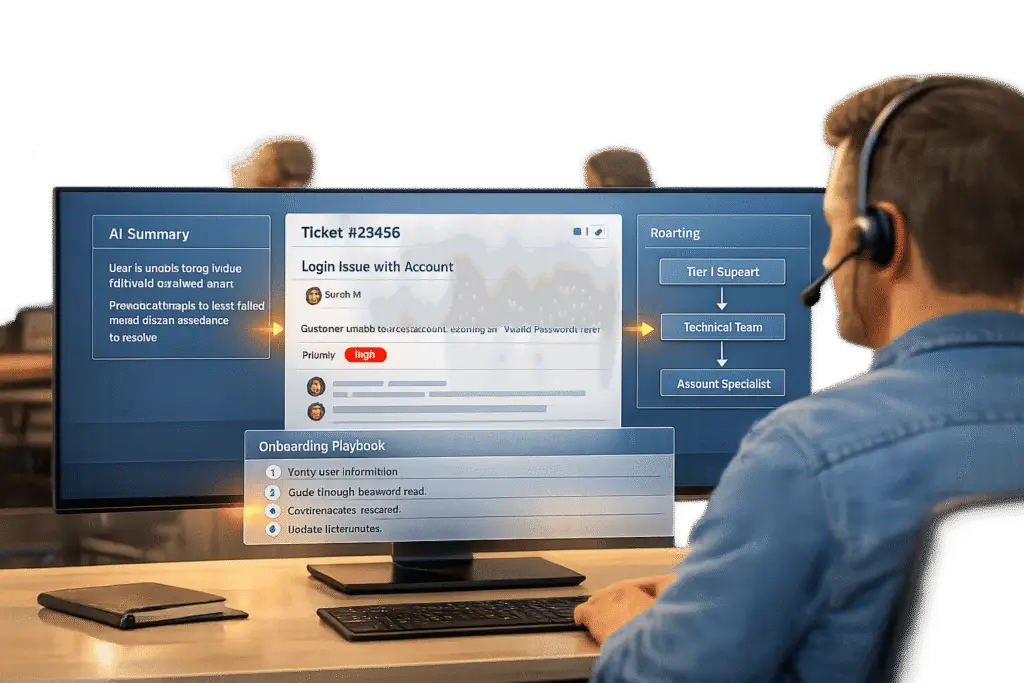
Reducing onboarding time is all about simplifying processes and improving communication. Here’s what works:
- Centralize ticket data: Agents waste hours switching between systems. Combine customer info like payment history, usage trends, and past tickets into one platform to save time and reduce delays.
- Use AI for ticket insights: AI tools summarize customer histories, classify ticket intent, and even draft responses. This cuts research time and ensures faster resolutions.
- Standardize onboarding with playbooks: Structured checklists ensure every customer gets the same reliable experience. Tailor these for different customer types (e.g., enterprise vs. SMB) while keeping them consistent.
- AI-driven automation: Automate ticket routing, enrich tickets with key details, and use AI copilots to assist agents in real time. This eliminates manual bottlenecks and speeds up resolutions.
- Track key metrics: Measure Time to First Value (TTFV), Customer Effort Score (CES), and onboarding rework rates to identify and fix inefficiencies.
Centralizing Ticket Data for Better Context
When a new customer submits a ticket during onboarding, your support team shouldn’t waste time hunting for information. On average, agents spend about 2 minutes per ticket switching between systems, which adds up to 3.3 hours a day for 100 tickets [5].
The fix is simple: centralize all customer data in one platform. With centralized ticket data, agents can instantly access critical details like customer tier (enterprise vs. self-serve), payment history, usage trends, and past support interactions – all without jumping between tabs. This streamlined approach matters because 70% of customers value connected processes, such as smooth handoffs between departments and contextual follow-ups based on prior interactions [1]. Centralization also cuts down on delays; in manual systems, about 30% of tickets need reassignment, causing an average delay of 15 minutes per ticket [5]. By pulling data automatically from sources like Salesforce, Stripe, and your product database, your ticketing platform can classify ticket intent (e.g., billing vs. technical) and route them to the right team immediately. This ensures high-priority onboarding issues for enterprise clients are addressed without delay. A unified view of customer data lays the foundation for seamless system integration.
Combining Customer Data from Multiple Systems
Once you’ve established a unified view, the next step is integrating data from all major systems. This means connecting your ticketing platform to tools housing customer data, such as CRMs (e.g., HubSpot or Salesforce), billing platforms (e.g., Stripe), and product analytics tools (e.g., Snowflake or Postgres). The objective is to maintain a comprehensive, continuously updated database that refreshes every 15 minutes, providing agents with near-real-time insights [5].
This automated system enriches tickets before they even reach an agent. It queries each connected platform to pull relevant data and prioritizes tickets based on factors like monthly recurring revenue (MRR), account tier, renewal dates, and whether the issue is recurring. Instead of spending valuable time gathering context, agents can instantly see key information such as the customer’s last payment date (to check if billing issues are stalling onboarding), feature adoption scores (to identify potential roadblocks), and previous tickets (to avoid repetitive questions). Additionally, centralized data can highlight trends – like multiple customers facing the same onboarding issue – allowing teams to tackle broader problems proactively.
Using AI to Summarize Tickets
Even with centralized data, B2B customers often have complex histories involving emails, chat logs, and support notes. AI-powered summarization tools simplify this by creating quick, easy-to-digest summaries that give agents the context they need in seconds.
These tools don’t just condense information – they also tag tickets by intent, ensuring agents focus on the most relevant details for the issue at hand. For instance, an AI assistant might flag that a customer previously struggled with API authentication and draft a response using approved documentation, freeing up agents to resolve the issue faster.
The effectiveness of these tools depends on having a single, reliable source of truth. Both customer-facing AI and internal assistive tools should pull from the same structured, up-to-date documentation to avoid conflicting answers. Fixing your documentation is essential – AI can’t deliver accurate results if the knowledge base is fragmented or outdated [3]. Once your documentation is solid, AI summarization becomes a game-changer, converting hours of manual research into seconds of actionable insights. This enriched data also supports adaptive playbooks, paving the way for smoother and more efficient onboarding workflows.
sbb-itb-e60d259
Creating Effective Onboarding Playbooks
Once you’ve centralized your ticket data, the next step is to standardize its application using structured playbooks. Without structure, onboarding can become inconsistent, leaving room for errors. Playbooks ensure that every account experiences a uniform and reliable onboarding process.
Why does this matter? Poor onboarding is the third most common reason customers churn – only behind lack of engagement and poor product fit. On the flip side, implementing standardized onboarding playbooks can reduce time-to-value by 30% and boost renewal rates by 20% [6][7]. Plus, 63% of customers say onboarding heavily influences their decision to subscribe [2], and 86% would stay loyal to a business that prioritizes onboarding and education [2].
Standardized playbooks also help minimize mistakes. When onboarding is left to improvisation, important steps can be overlooked, leading to delays and customer frustration. A structured approach guarantees every customer receives the same high-quality experience, no matter which Customer Success Manager is involved. As your business grows, these playbooks ensure consistency, even with a larger customer base.
By incorporating enriched ticket context into your playbooks, you can align the customer’s history with the onboarding process, making the experience even more seamless.
Building Playbooks with Step-by-Step Checklists
The best playbooks simplify the onboarding process by breaking it into manageable modules, each with clear objectives, assigned owners, and tools to track progress [6][7]. These modules should include step-by-step tasks that guide your team from the initial kickoff to the customer’s first measurable win.
A typical playbook might include stages like:
- Kickoff
- Technical setup
- Training
- Initial value delivery
- Handoff to the next team
Each stage should come with supporting materials – like videos, templates, or FAQs – to streamline execution [6][7]. For example, your Technical Setup module could include an email template for requesting API credentials, a video explaining the integration process, and a troubleshooting checklist for common issues.
It’s also important to define clear completion criteria for each stage. Avoid vague goals like "complete setup." Instead, aim for measurable outcomes such as "All user accounts provisioned, SSO configured and tested, and first data sync completed successfully." This level of clarity creates accountability and helps pinpoint any bottlenecks in the process. Automating CRM processes can save up to 23% of work time – around 18 hours per week – by eliminating manual follow-ups and status updates [6][7].
Once these checklists are in place, you can adapt your playbooks to tackle the complexities of B2B onboarding.
Adapting Playbooks for Complex B2B Scenarios
While standardized checklists are a great starting point, onboarding processes for B2B customers often require tailoring to meet unique needs. Unlike B2C, B2B onboarding involves multiple stakeholders, intricate technical integrations, role-based permissions, and industry-specific workflows [2]. To handle this, segment your playbooks based on customer tiers and use cases. For instance:
- Enterprise customers might need security reviews, custom integrations, and longer implementation timelines.
- SMB customers often focus on quick wins and self-service options [8].
Rather than creating entirely separate playbooks, build variations within your existing framework. This keeps your process consistent while allowing for necessary flexibility.
"A scalable, structured customer onboarding playbook fixes this problem at the root. It ensures that onboarding is consistent, predictable, and repeatable even as your firm grows." – Sam, Projetly [8]
Document these variations using a RACI model (Responsible, Accountable, Consulted, Informed) to align all teams involved [8]. For example, enterprise deals might require the Product team for custom feature requests, while standard implementations stay within the Customer Success team. Decision trees can also be useful. For instance: "If enterprise tier, add a security review step. If integration is required, assign an Implementation Lead as a secondary owner."
Finally, store all templates, kickoff decks, and checklists in a centralized location. This way, your team can access the right playbook variation quickly, reducing delays and ensuring a smooth onboarding experience – no matter how complex the scenario.
Speeding Up Onboarding with AI-Driven Tools
Structured playbooks are a great foundation, but AI takes things to the next level by automating repetitive tasks and delivering the right information when it’s needed. The results speak for themselves: AI-powered onboarding can slash the process by 62%, cutting it down from 21 days to just 8 days [4].
AI doesn’t just save time – it eliminates manual bottlenecks. As Roop Reddy from Documentation.AI explains:
"AI does not replace support teams. It amplifies the quality of the knowledge it is given." [3]
Here’s a closer look at three ways AI can speed up your onboarding process by reducing delays and improving support.
AI-Powered Playbook Creation and Refinement
AI can generate tailored onboarding checklists in seconds by pulling data from your CRM [4]. Tools like Claude can create customized setup guides, welcome emails, and configuration steps suited to each account.
Beyond creation, AI refines playbooks by analyzing where customers get stuck. For instance, if a particular step has low completion rates, it signals the need for simplification or adjustment [4]. One financial compliance platform cut its time-to-live from 45 days to 28 days (a 38% reduction) by automating setup documentation and communication sequences. They also introduced progress dashboards, which boosted transparency scores from 4.2/10 to 8.9/10 while reducing "status check" emails by 80% [4].
To get started, map out every step from "contract signed" to "go live." Identify who’s responsible for each task and how long it takes. Then, use conditional workflows to create different paths for various customer types – like a 15-step fast track for startups versus a 50-step comprehensive plan for enterprise clients [4].
Automated Ticket Routing and Prioritization
Manual ticket reassignment slows things down – 30% of tickets are reassigned, adding an average delay of 15 minutes per ticket [5]. During onboarding, when speed is critical, these delays can pile up fast.
AI-driven routing solves this by analyzing ticket content, customer data, and historical trends to assign tickets to the right agent instantly. It factors in account value, sentiment (like urgency or frustration), issue complexity, and SLA commitments [9]. For example, a technical API question goes to an integration expert, while a billing issue heads straight to the finance team [5].
In June 2025, Arooj Javed, a support automation engineer, implemented a Python-based system using JIRA webhooks and an SLA prediction model. This eliminated manual triage and reduced ticket routing times by 40%, boosting SLA compliance from 75% to 96% [10]. The system also flagged aging tickets after 4 hours of inactivity, ensuring nothing fell through the cracks.
AI adds even more efficiency by enriching tickets with key customer details – like MRR, plan tier, and usage history – before they reach an agent. This eliminates the 2 minutes agents usually spend gathering context manually [5].
To implement this, start by defining clear rules for urgency and impact that align with your business goals. Test AI routing on a subset of tickets, monitor its accuracy, and gather feedback from agents before scaling up [9]. Set automated alerts for tickets idle for more than 4 hours to prevent onboarding delays [10].
AI-Enabled First-Contact Resolution Detection
The fastest way to resolve an issue? Get it right the first time. AI improves first-contact resolution (FCR) by both deflecting repeatable questions and helping agents provide accurate answers on the first try.
AI copilots assist agents by surfacing relevant documentation and drafting responses, cutting down search time and ensuring precise replies [3]. Automated intent classification determines whether an issue is technical, billing-related, or a configuration request, routing it to the right agent and increasing the chances of resolving it in one interaction [5].
The benefits are huge. AI-powered ticket deflection and agent assistance can reduce onboarding-related tickets by 56%, and high-performing AI systems with up-to-date knowledge can push that reduction close to 90% [3][4].
But there’s a catch: your documentation must be well-organized. AI trained on unstructured help articles often produces unreliable answers. Organize your documentation by product features and workflows to avoid this pitfall [3]. As Roop Reddy warns:
"Humans can compensate for missing context. AI cannot. When documentation is incomplete or outdated, AI fills gaps with assumptions." [3]
Monitor reopened ticket rates to ensure first-contact resolutions are effective. Embedding AI assistants directly into your product UI or documentation pages can intercept questions at critical moments [3]. The ultimate goal is to move toward an asynchronous model, where customers progress through milestones as soon as tasks are completed – detected by AI – without waiting for human verification [4].
With AI streamlining the process, the next step is to measure how these tools translate into faster, more efficient onboarding.
Measuring and Improving Onboarding Efficiency
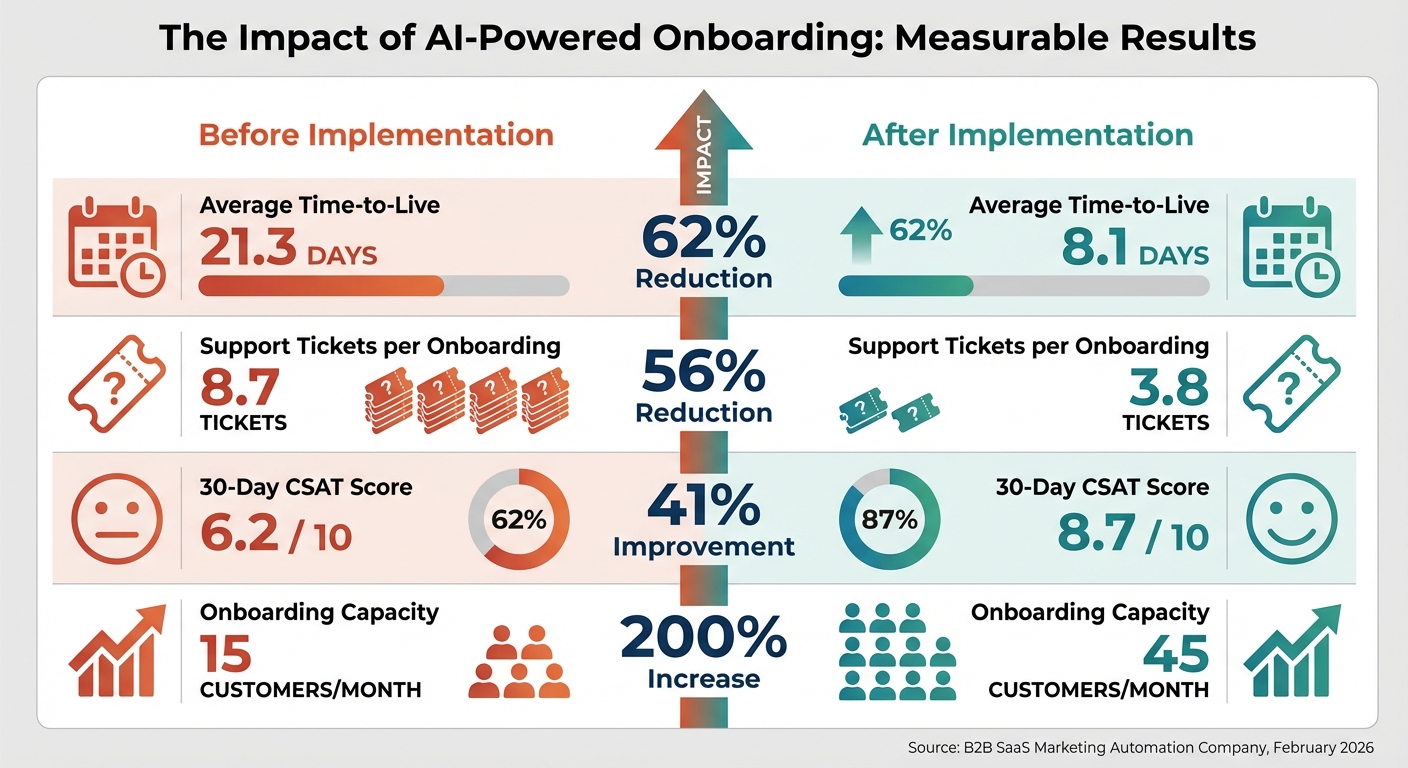
AI-Powered Onboarding Results: Before vs After Implementation
A lack of real-time visibility into onboarding processes leaves 62% of leaders navigating blindly [11]. Without tracking clear metrics, it’s nearly impossible to identify bottlenecks or prove the value of your playbooks and AI tools.
Key Metrics to Track
Start by monitoring Time to First Value (TTFV) – the time it takes from closing a deal to delivering the first "aha moment" for the customer. This metric is a strong predictor of retention [13][15]. Another vital measure is the Customer Effort Score (CES), which evaluates how easy it is for customers to complete onboarding tasks. High effort scores can act as early indicators of potential churn [11][12]. Additionally, keep an eye on your onboarding rework rate, which reflects how often tasks are redone due to errors, like incorrect account IDs [15].
For B2B teams, Time to Verified Access (TTVA) is particularly important. This metric tracks the time it takes to confirm all platform permissions – not just when a client submits a form, but when access is fully verified and your team is ready to move forward [15]. Also, monitor early-stage support ticket volume during the first 30 days. A high number of tickets could indicate inefficiencies or training gaps [11][14]. As Melissa Scatena from OnRamp emphasizes:
"What gets measured gets managed, and accurately tracking your customer onboarding metrics gives you visibility, helps you set targets, and enables your team to make data-driven decisions." [11]
By defining these metrics, you can compare performance before and after implementing new processes, providing clear insights into ROI.
Before-and-After KPI Comparison
Before introducing changes, establish a 30-day baseline to understand your current performance [15]. Once your playbooks or AI tools are in place, compare pre-implementation and post-implementation data to assess their impact. For instance, in February 2026, a B2B SaaS marketing automation company saw the following improvements after adopting AI-generated onboarding plans and workflow automation [4]:
| Metric | Pre-Implementation | Post-Implementation | Improvement |
|---|---|---|---|
| Average Time-to-Live | 21.3 days | 8.1 days | 62% Reduction |
| Support Tickets per Onboarding | 8.7 | 3.8 | 56% Reduction |
| 30-Day CSAT Score | 6.2 / 10 | 8.7 / 10 | 41% Improvement |
| Onboarding Capacity | 15 customers/mo | 45 customers/mo | 200% Increase |
To identify friction points, use median values and step completion rates. Balance speed with quality by tracking churn rates alongside onboarding time to ensure faster processes don’t lead to "regret-based churn" [4].
Continuous Improvement with Feedback Loops
To make the most of these metrics, build continuous feedback into your onboarding process. Feedback loops turn isolated improvements into ongoing optimization. Instead of relying solely on end-of-process surveys, use real-time triggers to collect input whenever a user or agent encounters an issue [16][17]. Set a weekly schedule for product, engineering, and customer success teams to review cohort metrics and discuss feedback from support tickets [17][18].
Unresolved tickets and escalations can guide updates to playbooks and documentation as part of your regular workflow [3]. Track median and 90th percentile completion times for onboarding steps, and set automated alerts when benchmarks are exceeded to ensure immediate intervention [17]. Share updates and fixes with both agents and customers to build trust and improve the overall experience [16].
Conclusion
Reducing onboarding time doesn’t mean compromising quality – it’s about cutting out the unnecessary. For example, manual context retrieval wastes about 2 minutes per ticket, which adds up fast – 3.3 hours for every 100 tickets [5]. By enriching ticket context through automated customer data integration, those hours are reclaimed, creating a seamless and efficient process.
Structured playbooks are another cornerstone of this approach. They ensure consistency across teams, regardless of size or experience, and are particularly helpful in managing tricky B2B edge cases [3]. Pair these playbooks with AI-powered copilots that can draft responses and surface relevant documents in real time, and you’ll see a noticeable boost in deflection rates.
Efficiency also depends on viewing documentation as a living system. Automated triage pipelines that can process, enrich, prioritize, and route tickets in seconds ensure critical enterprise issues don’t get lost in the shuffle [5]. This eliminates the delays and bottlenecks typical of manual processes, paving the way for smoother operations.
The final piece of the puzzle is continuous improvement. Feedback loops are essential to keep your playbooks and AI tools aligned with shifting customer needs and product updates. Companies that prioritize robust onboarding processes report an 82% improvement in customer retention and a 70% boost in productivity [19]. The secret lies in tracking key metrics – like Time to First Value and Customer Effort Score – and using real-time triggers to fine-tune workflows as you scale. By combining centralized data, structured playbooks, and AI-driven automation with ongoing refinement, businesses can create a foundation for long-term success.
FAQs
What ticket data should we centralize first?
Begin by organizing essential ticket metadata, such as tags, categories, priority levels, customer type, and issue type. Having this information in one place improves routing, automation, and reporting, making the entire support process smoother.
It’s also important to include customer context – details like historical tickets, usage patterns, and billing information. These insights allow support teams to quickly grasp the issue, prioritize tasks effectively, and resolve problems faster.
By focusing on these core elements, you can simplify workflows and cut down on onboarding time for your team.
How do we keep AI answers accurate during onboarding?
Maintaining accurate AI responses during onboarding requires a solid foundation of well-organized, current documentation. This ensures that AI tools can access precise and relevant information when needed.
To promote consistency, use standardized playbooks that outline clear and detailed procedures. These act as a reliable guide for AI systems, reducing the risk of errors. It’s equally important to regularly update knowledge bases to avoid inaccuracies caused by outdated content slipping into responses.
Incorporating real-time feedback and monitoring is another essential step. This allows teams to quickly spot and fix any issues, improving the dependability of AI outputs throughout the onboarding process. By combining these strategies, you can ensure AI remains a trustworthy tool during this critical phase.
Which onboarding metrics should we track first?
When evaluating the success of your onboarding process, it’s essential to monitor a few key metrics:
- Completion rates: This measures the percentage of customers who fully complete the onboarding process. A high completion rate often indicates a smooth and engaging experience.
- Time to value: This tracks how quickly customers reach a point where they see meaningful results or benefits from your product or service. The faster they achieve value, the stronger their connection to your offering.
- Churn risk: This helps identify customers who might be at risk of leaving, giving you an opportunity to address their concerns and improve long-term retention.
By focusing on these metrics, you can refine your onboarding processes and even incorporate AI tools to make the experience faster and more effective for your customers.






