



QA data can transform your onboarding and training programs. Instead of guessing skill gaps or relying on generic training, you can use QA insights to create targeted, effective learning strategies. Here’s how you can do it:
- Use QA metrics to pinpoint issues: Metrics like First Contact Resolution (FCR), Customer Satisfaction (CSAT), and compliance adherence highlight specific areas where agents need improvement.
- Identify skill gaps: Break down QA scores into actionable categories like communication, product knowledge, and process adherence. AI tools can help identify patterns and predict future needs.
- Incorporate QA insights into onboarding: Create checklists and provide live feedback to address common new-hire mistakes and ensure practical, hands-on learning.
- Design focused training plans: Build role-specific modules based on QA findings, using real scenarios and interactive exercises to address weaknesses.
- Automate the process: Link QA systems with training platforms for real-time updates and personalized coaching recommendations.
This approach eliminates guesswork, improves agent performance, and enhances customer satisfaction. By integrating QA with training, you create a continuous improvement loop that benefits both your team and your customers.
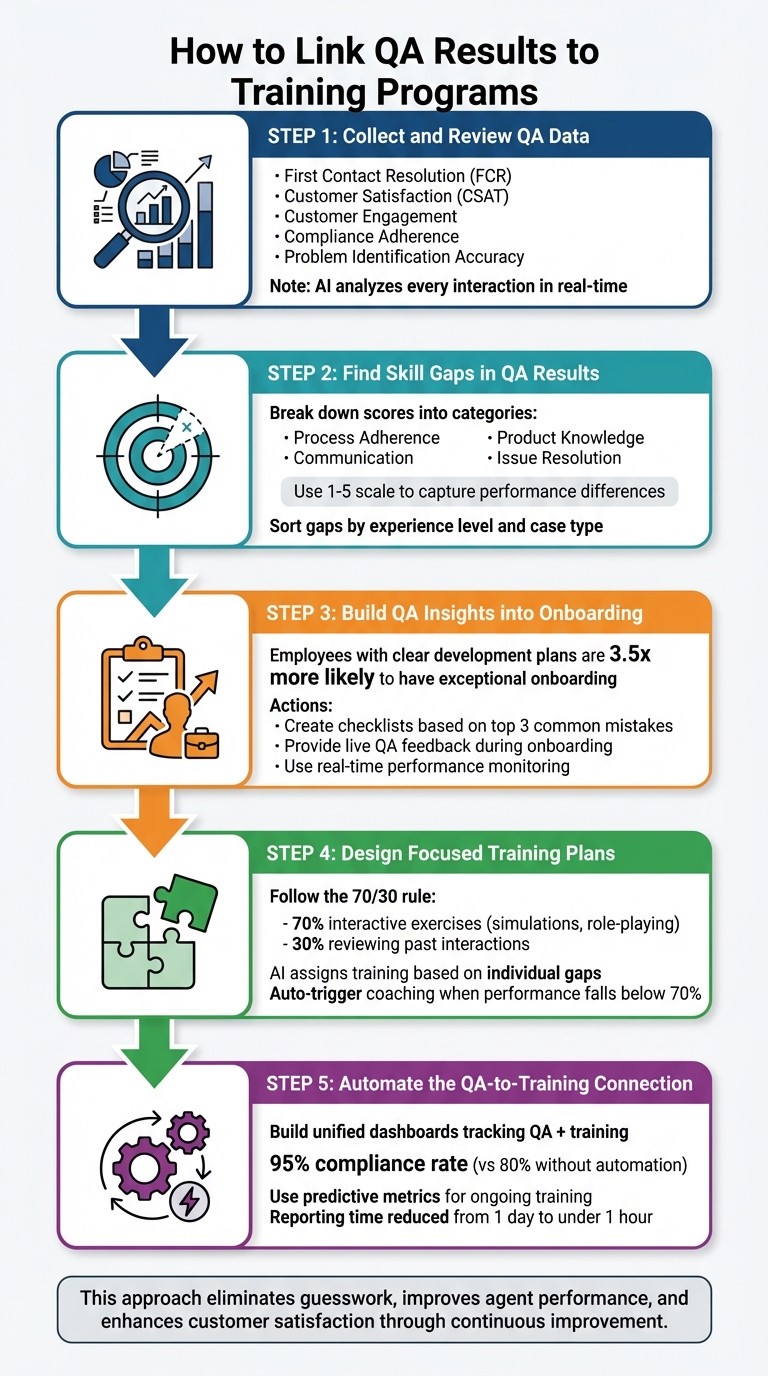
5-Step Process to Link QA Results to Training Programs
Webinar: Unlock the Power of Your QA Data: Turning Insights into Success
sbb-itb-e60d259
Step 1: Collect and Review QA Data
The first step to effective training is identifying the right QA metrics that highlight skill gaps. It’s not just about tracking ticket volume – it’s about understanding actual agent behavior during customer interactions. By zeroing in on these data points, you can create a solid foundation for evaluating performance.
Which QA Metrics to Track
Focus on metrics that tie directly to both agent performance and customer satisfaction. For example:
- First Contact Resolution (FCR): Measures whether agents resolve issues without follow-ups.
- Customer Satisfaction (CSAT): Reflects how customers feel about their experience.
- Customer Engagement: Assesses the agent’s ability to build rapport and address root problems effectively.
- Compliance Adherence: Ensures agents follow required protocols from the start.
Sentiment scores are another powerful tool. They help identify emotional trends by analyzing tone and volume, which may reveal recurring frustration points that agents might overlook [1][4].
Another key metric is problem identification accuracy – how well agents diagnose issues before offering solutions. This is especially valuable during onboarding, as it shows whether new hires grasp your product well enough to troubleshoot effectively [1]. As Bella Williams notes:
Quality assurance software plays a pivotal role in creating an efficient onboarding process for new agents [1].
How AI Finds Performance Patterns
Manual reviews can only cover so much, but AI can analyze every interaction in real time [4]. By transcribing calls and chats, tracking keyword use, and analyzing sentiment, AI detects trends and anomalies. For example, it might reveal that certain agents struggle with refund processing while others excel – patterns that could take weeks to uncover manually.
AI also offers predictive capabilities. By analyzing historical data, it forecasts future skill gaps, allowing you to assign training proactively – before issues arise [5]. This approach shifts quality assurance from reactive to predictive, speeding up onboarding and ensuring training resources are applied where they’re needed most [1]. These insights pave the way for identifying specific skill gaps in the next step.
Step 2: Find Skill Gaps in QA Results
Turn QA scores into actionable insights by identifying specific skill gaps, avoiding labels like "good" or "bad." This approach focuses on the exact areas where agents need support, streamlining training efforts for better results.
Connect QA Scores to Agent Actions
Break down QA scorecards into categories like process adherence, communication, product knowledge, and issue resolution [6]. This helps pinpoint where an agent struggles. For instance, if an agent has a low first-call resolution (FCR) rate, investigate whether they miss follow-up questions, provide outdated information, or fail to show empathy during high-pressure interactions.
Using a 1–5 scale can help capture subtle performance differences [8]. For example, a score of 2 on "Completeness" might mean the agent answered the main question but missed follow-up details. A 3 on "Tone" could indicate professionalism but a lack of empathy. As Anthony Galleran, Technical Support Manager at Front, explains:
At the Tier 2 support level, the inquiries are more technical and responses can easily slip into wordiness. Adding some warmth to responses can go a long way for even the most complex topics [8].
AI-powered tools can also help by categorizing interactions based on scenarios or intents, such as "Product Returns", to pinpoint performance dips in specific case types [7]. Additionally, sentiment tracking at the end of calls can reveal whether agents have the soft skills needed to turn frustrated customers into satisfied ones [7].
Sort Gaps by Experience Level and Case Type
Tailoring support to different experience levels is key. For example, a new hire might need more in-depth product training, while a seasoned agent may need help with concise communication. Sorting gaps this way ensures training efforts are focused where they will have the most impact.
A gap priority formula – multiplying the importance of a skill by how often it’s used – can help identify what needs immediate attention [9]. For example, if "Compliance Adherence" is both critical and used daily, it should take precedence over less frequent skills. Mapping these gaps to specific case types ensures training is targeted, which can cut training costs by up to 50% [9]. By prioritizing these gaps, you lay the groundwork for integrating QA insights into onboarding and ongoing training programs.
Step 3: Build QA Insights into Onboarding
Incorporate QA insights into your onboarding process to help new hires avoid repeating past mistakes. Using a data-driven approach ensures that onboarding improvements are targeted and measurable. Research shows that employees with a clear plan for professional development are 3.5 times more likely to describe their onboarding experience as exceptional [11].
Create Onboarding Checklists Based on QA Data
Leverage six months of QA data to identify the top three support metrics commonly missed by new hires. Use these insights to create detailed checkpoints for your onboarding checklist [26, 3]. For instance, if QA data reveals that new hires often struggle with Jira workflows or bug reporting templates, include step-by-step instructions on these topics [26, 27, 28]. As Andrios Robert puts it:
A strong QA testing onboarding process decides the quality of your releases before a single bug report is filed [10].
Your checklist should address critical areas like process adherence, defect management, and compliance protocols. These focus points should be directly informed by frequent failure points uncovered in QA evaluations [26, 27]. Additionally, provide new hires with standardized scripts and test data to give them immediate, practical experience [10].
Use Live QA Feedback During Onboarding
Beyond checklists, live QA feedback transforms onboarding into an interactive learning experience. Real-time performance monitoring allows for immediate adjustments, offering new hires guidance on tone, empathy, or technical precision [1]. Recording and transcribing live interactions can highlight specific performance gaps, such as script deviations or product knowledge issues [1].
Pairing new hires with experienced QA staff during live bug triage or sprint planning sessions provides hands-on learning and reinforces the standards outlined in the checklist [10]. This shadowing approach, combined with automated transcription tools, helps prevent bad habits from forming early. Structured templates that focus on customer engagement and issue resolution further ensure consistent evaluations [1]. This approach is especially important, given that only 52.5% of employees who joined companies post-pandemic report feeling highly engaged, emphasizing the need for more connected and engaging onboarding experiences [11].
Step 4: Design Focused Training Plans
Take insights from QA data and turn them into role-specific training programs that directly address weaknesses. By crafting modules around specific challenges and using AI to tailor training, you can create a highly effective and personalized learning experience. Here’s how to transform these insights into actionable training steps.
Build Training Modules by Topic
Start by organizing QA findings into clear categories, such as compliance, discovery, resolution speed, or communication quality. Focus on the three areas where an agent’s performance falls most behind the team average [12]. For instance, if data shows that some agents consistently score under 70% on compliance, create a dedicated module featuring real call examples and hands-on practice scenarios.
Follow the 70/30 rule: dedicate 70% of training time to interactive exercises – like simulations and role-playing – and 30% to reviewing past interactions [12]. To make this even more effective, curate libraries of "best-practice" call examples, organized into topic-specific playlists. These playlists, grouped by challenges or scenarios, allow agents to see real-world examples of success [12].
When building your training dataset, prioritize quality over quantity. A hybrid approach works best: combine manual curation with AI assistance [3]. Tao An emphasizes this point:
10,000 high-quality pairs outperform 100,000 mediocre ones every time [3].
Start small with a dataset of 1,000 high-quality QA pairs for quick validation, then scale up to 5,000–10,000 pairs for solid performance, and aim for 50,000+ pairs for optimal results [3]. To maintain high standards, manually curate 20% of your dataset as a premium core, while AI generates and verifies the remaining 80% [3]. Once your modules are ready, the next step is ensuring each agent gets the training they need most.
Use AI to Assign Training to Individual Agents
AI for customer service can be a game-changer when it comes to personalizing training. Use it to analyze performance data, pinpoint problem areas, and assign tailored training material based on individual gaps [13]. Configure your QA platform to automatically trigger coaching sessions when an agent’s performance falls below a 70% threshold on key metrics. This way, QA scoring integrates seamlessly with your training workflow [12].
AI tools can also identify recurring performance "anti-patterns" in real time, enabling proactive intervention instead of waiting for scheduled reviews [14]. Conversation intelligence tools are particularly powerful – they highlight specific call moments tied to performance issues and transform them into practice scenarios for coaching [12]. Akash Thakur from DevOps.com captures this shift perfectly:
We’re moving from finding problems to preventing them. It’s not just faster – it’s an entirely different philosophy of quality assurance [14].
To get started, pilot this approach by focusing on the behavioral area with the largest gap for a four-week period. Evaluate the results and expand as needed [12]. By combining AI-driven analysis with targeted training, you ensure that every QA insight leads to meaningful action.
Step 5: Automate the QA-to-Training Connection
Automating the connection between QA and training turns insights into immediate action. By integrating QA data directly with training systems, you eliminate the need for manual reviews, creating a continuous cycle where evaluations directly inform training interventions. This approach ensures that every insight leads to meaningful improvement.
Build Dashboards That Track QA and Training Together
Bringing together data from your QA platform, training management system, and case tracking tools into a single dashboard can save time and streamline processes. Using API integrations, you can consolidate data into a unified view, cutting reporting time from an entire day to under an hour [15][18]. Dashboards should feature role-based views, offering detailed analytics for some users and high-level summaries for others [15][16].
Set these dashboards to refresh automatically for real-time updates on QA and training metrics [15][18]. Filters – such as by feature, sprint, or agent – allow you to quickly identify performance gaps [16]. For instance, a "Defect Density by Module" widget could highlight areas needing retraining, triggering targeted interventions for agents working on those features [15][17]. Companies that use automated training reminders have reported compliance rates of 95%, compared to 80% in organizations without automation [18].
To encourage collaboration, share dashboards externally by generating links or embedding them into internal platforms like Confluence. This gives stakeholders outside the QA team visibility into trends and improvements [16]. As Marina Jordao, a QA Engineer, puts it:
Numbers without context are just numbers. Metrics with insight and application? That’s where transformation happens and the QA culture is built [17].
Focus on tracking three key areas: execution health (e.g., pass/fail ratios, planned vs. executed), training progress (e.g., completed items, competency scores), and predictive insights (e.g., trend forecasting, anomaly detection) [15][16][18]. Viewing these metrics together naturally supports proactive training strategies, setting the stage for the next step.
Use Predictive Metrics for Ongoing Training
Predictive metrics allow you to address potential issues before they impact customers. One example is monitoring performance drift, which refers to the gradual decline in quality over time due to changing customer behaviors or case types [19]. Another key metric is confidence calibration, which measures whether agents can accurately assess their own reliability. Agents who are well-calibrated know when to escalate uncertain cases rather than providing overly confident but incorrect answers [19].
AI-powered tools, like First Contact Resolution (FCR) detection, can further enhance training. These tools analyze case histories to identify whether issues were genuinely resolved on the first attempt. Unlike traditional FCR tracking, AI can flag patterns that reveal knowledge gaps, enabling targeted training without the need for manual case reviews. Supportbench, for example, includes predictive FCR detection in its AI capabilities, uncovering resolution trends automatically [2][19].
Latency variability is another critical metric to watch. Instead of focusing solely on average response times, look for inconsistent delays, which often indicate challenges with complex cases [19]. Charity Majors, CTO of Honeycomb, highlights the difference between precision and adaptability:
Traditional computers are really good at very precise things and very bad at fuzzy things, our LLMs are, like, really bad at pretty very precise things and really good at fuzzy things [19].
This insight is essential for prioritizing training efforts. Focus on areas where agents show high variability in response times rather than just targeting slow averages. By establishing statistical baselines for key metrics, you can distinguish between normal fluctuations and concerning trends that require immediate attention [19]. These predictive tools ensure training interventions are both timely and effective.
Common Mistakes in QA-Training Integration
When connecting QA results to training efforts, it’s easy to fall into traps that can derail progress. These missteps often stem from focusing on surface-level metrics instead of meaningful outcomes. For instance, tracking the number of completed training modules or test cases might look good on paper, but it fails to address deeper issues like bug escape rates or resolution speed – metrics that actually reflect performance improvement [20][21].
Another frequent issue is poor communication between QA teams and training leads. When these groups operate in silos, objectives can become misaligned, and mistakes are repeated. Lisa Crispin, an Agile Testing Author, highlights this point:
Agile success depends on testers and developers working together from day one [22].
Many organizations also make the mistake of treating QA as a final checkpoint rather than a continuous learning opportunity. This "QA crunch" mentality often leaves little time for analyzing results and incorporating them into training plans. The result? Agents are left without actionable insights. Additionally, focusing solely on technical skills in training – while ignoring soft skills like communication and problem-solving – misses critical gaps that QA data often reveals [20][21].
These pitfalls not only hinder performance but also come with a hefty price tag. Fixing defects after release can cost up to 100 times more than addressing them during development and training [22]. Alarmingly, nearly half of companies (48%) still rely heavily on manual testing, which creates bottlenecks and limits scalability [22]. As SQA Engineer Abdullah Hussain puts it:
You are not just finding bugs; you are holding the entire user experience in your hands [21].
Comparison: Manual QA vs. AI-Powered Workflows
| Factor | Manual QA Processes | AI-Powered Workflows |
|---|---|---|
| Time Required | High; creates bottlenecks in release cycles [22] | Low; reduces regression testing from days to hours [22] |
| Accuracy | Prone to human fatigue and missed edge cases [21] | High; uses pattern recognition to identify gaps [1] |
| Scalability | Limited across devices and platforms [22] | High; cloud-based tools handle diverse environments [22] |
| Feedback Loop | Delayed; results take weeks to reach agents [21] | Real-time; provides immediate, actionable insights [1] |
| Cost | High long-term costs due to late-stage fixes [22] | Higher initial investment, but significant ROI [22] |
The table highlights the clear advantages of AI-powered workflows, particularly in efficiency, accuracy, and scalability. Real-world examples further drive this point home.
In 2024, Pfizer adopted a QA framework that slashed regression testing time from five days to just one. By enabling business testers to automate processes without extensive coding knowledge, they accelerated testing cycles across more than 64 applications and reduced production defects [22]. Organizations that integrate QA into their "Definition of Done" catch integration issues 60% earlier than those that don’t [20]. Teams embracing automation have also reported up to an 80% improvement in developer feedback response times [22].
These results show how combining QA insights with smarter training and automation can transform operational efficiency.
Conclusion
Tying QA results directly to onboarding and training creates a feedback loop that can elevate the performance of your support team. By gathering the right QA data, pinpointing skill gaps, and incorporating those findings into your training plans, you can shift from broad, one-size-fits-all programs to targeted strategies that drive real improvement.
This integration doesn’t just streamline onboarding – it also builds agent confidence and enhances customer satisfaction. While traditional QA methods can slow things down, AI-powered workflows provide real-time insights that are easier to act on. This shift allows support leaders to address performance issues proactively, catching them before they affect the customer experience.
Key Points for Support Leaders
To implement this approach effectively, focus on these actionable steps:
- Align QA and training metrics: Choose shared KPIs like call resolution rates, customer satisfaction scores, or defect density. These metrics should connect directly to learning objectives, making it easier to evaluate whether training leads to better performance [2].
- Foster collaboration between QA and training teams: Schedule regular meetings to ensure that training goals align with the skills and behaviors flagged during evaluations. Avoid working in silos by leveraging AI tools that analyze customer interactions, identify patterns, and assign tailored training modules to individual agents based on their needs [1][2].
- Track progress and adapt continuously: The global AI software market is expected to hit $126 billion by 2025 [24], and early adopters will gain a competitive edge. Monitor metrics like agent progress, training pace, and exam scores to gauge engagement and retention. Use this data to refine QA standards and update training content, creating a system that evolves alongside your team’s needs [23].
FAQs
What QA score breakdown should we use to find training needs fast?
To identify training needs efficiently, keep an eye on key QA metrics like accuracy, adherence to procedures, and customer satisfaction. Set clear thresholds – such as scores falling below 80% – to flag potential gaps. Focus on metrics that align closely with critical KPIs, like resolution quality and communication clarity.
This method not only helps you quickly pinpoint areas needing improvement but also makes it easier to identify specific agents or teams that require targeted training. By doing so, you can turn QA insights into actionable development plans that drive better performance.
How can we link QA results to onboarding tasks without extra admin work?
Efficiently connect QA results to onboarding tasks by leveraging QA software to automate the process. These tools assess interactions, pinpoint skill gaps, and automatically create specific training tasks tailored to address those gaps. With AI-powered workflows, the process becomes even smoother – continuously analyzing QA data and updating training plans in real time. This ensures onboarding stays aligned with current performance insights while significantly reducing the need for manual intervention.
What’s the safest way to automate QA-to-training without hurting morale?
To make QA-to-training automation safe and morale-friendly, focus on transparency, employee involvement, and personal growth opportunities. Be clear that automation is there to support skill development, not to replace jobs. Engage the team by involving them in identifying skill gaps and designing training plans tailored to their needs.
Position automation as a way to take repetitive tasks off their plates and make onboarding smoother. This approach not only boosts positivity but also emphasizes how automation can contribute to their professional growth.






