



Backlog spikes in customer support can quickly spiral out of control, damaging customer satisfaction, team morale, and even revenue. Here’s what you need to know to stay ahead:
- Why backlogs happen: Seasonal trends, unexpected disruptions (like outages), or staffing gaps often cause ticket surges.
- Why they’re dangerous: Delays frustrate customers – 78% will choose the first company to respond, and each delay increases churn risk.
- What to do: Focus on high-priority tickets, improve triage speed, use AI for efficiency, adjust workflows, track leading metrics, and prevent future spikes with automation.
Key Takeaways:
- Prioritize smartly: Use a weighted scoring model to focus on tickets that impact revenue or loyalty.
- Speed up triage: Automate ticket routing with AI to cut delays and misroutes.
- Leverage AI: Summarize case histories, detect escalations, and create knowledge base articles to reduce workload.
- Track warning signs: Monitor recontact rates and time-to-first-meaningful-response to spot issues early.
- Prevent spikes: Deploy AI chatbots and self-service tools to deflect routine tickets before they hit the queue.
Ignoring backlogs isn’t an option – they compound quickly and harm your business. Address them with data, automation, and smarter workflows.
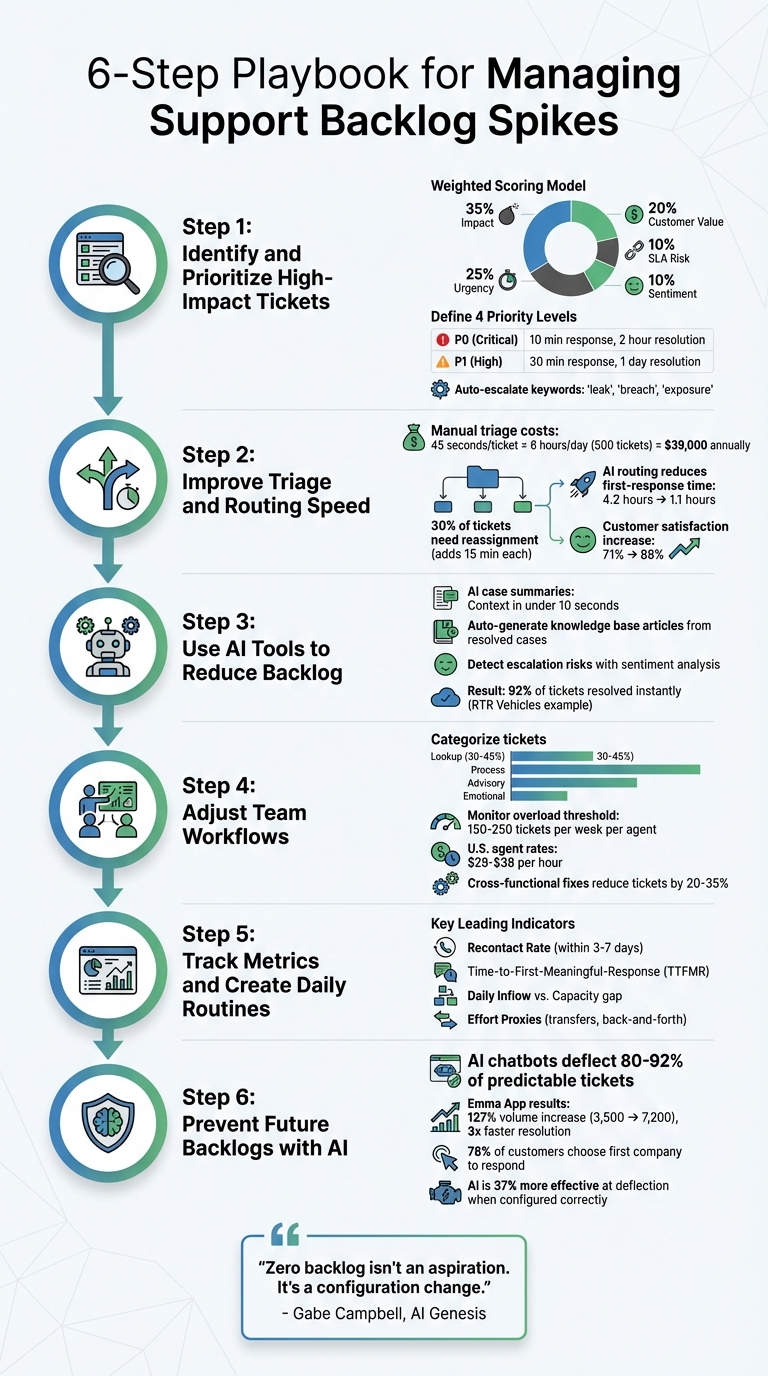
6-Step Playbook for Managing Support Backlog Spikes
Step 1: Identify and Prioritize High-Impact Tickets
When you’re dealing with a growing backlog, it’s clear that not all tickets demand the same level of urgency. If you treat every issue as equally critical, you risk wasting time and resources while the most pressing problems get buried. The first step to regaining control is figuring out which tickets truly need immediate attention and which ones can wait.
High-impact tickets are those that could directly affect revenue, customer loyalty, brand reputation, or compliance with regulations [7]. For instance, a billing error preventing a major contract renewal is a high-impact issue. On the other hand, a feature request from a free trial user isn’t. The trick is to set clear, objective criteria that your team can apply consistently – even when the pressure is on.
"Priority quality is queue quality. Teams that use AI to standardize priority levels can reduce confusion, protect SLA performance, and execute support work with far better consistency."
– Layer 8 Labs [6]
To move beyond the traditional "first in, first out" approach, consider using a weighted scoring model. This method assigns priority based on several factors: 35% for impact (number of users affected), 25% for urgency (how quickly it needs to be resolved), 20% for customer value (account tier), 10% for SLA risk (closeness to breach), and 10% for sentiment (level of customer frustration) [7]. This model transforms subjective decisions into a reliable, repeatable process, ensuring your most critical relationships get the attention they need. Once this framework is in place, AI can further streamline and automate the prioritization process.
How to Define High-Impact Tickets
Start by creating four priority levels, each with specific criteria and response targets. For example:
- P0 (Critical): Includes issues like security breaches, widespread outages, or blockers for key accounts. These require a response within 10 minutes and resolution within 2 hours [7].
- P1 (High): Covers significant feature failures or payment issues, with a 30-minute response time and resolution within 1 business day [7].
These predefined levels allow automation tools to accurately identify and flag high-impact tickets.
Automated systems can also instantly elevate priority based on specific signals. For example, keywords like "leak", "breach", or "exposure" should automatically mark a ticket as P0 [7]. Similarly, notifications about failed payments or tickets from VIP accounts should bypass the general queue entirely. In eCommerce, tasks like address changes or order cancellations must be prioritized before shipping updates, as delays can make resolution impossible [10].
The customer’s stage in their journey also matters. New trial users should get higher priority to ensure a positive first impression, while accounts flagged as at-risk for churn need immediate attention to prevent losses [7]. The goal is a system where urgency is tied to business impact – not just who shouts the loudest. With these priority levels in place, AI can take over the heavy lifting in ticket triage.
Use AI to Prioritize Tickets Faster
Manual triage often struggles to keep up during high-demand periods. AI can step in to analyze ticket content, detect frustration in tone, and predict priority based on past outcomes – all in seconds [6][7]. This eliminates human delays, ensuring critical issues are flagged right away.
Sentiment analysis is especially useful. AI tools can scan incoming messages for negative emotional tones and automatically upgrade tickets to "Urgent" if frustration is detected [9]. For example, Supportbench’s AI Predictive CSAT feature can identify customers likely to be dissatisfied based on their case history – even before they fill out a survey. Combined with automated tagging by product area and account tier, AI ensures that high-priority tickets are surfaced immediately, rather than getting lost in the queue [6][7].
"Zero backlog isn’t an aspiration. It’s a configuration change."
– Gabe Campbell, AI Genesis [2]
A real-world example: In February 2026, RTR Vehicles implemented an AI Digital Hire™ to manage their workload. The system resolved 92% of incoming tickets almost instantly, leaving just 8% of complex cases for a single part-time employee. This reduced their weekend backlog to zero and saved them substantial monthly costs [2].
To refine your system, track how often agents override AI-assigned priorities. Use that feedback to adjust automation rules weekly [6][8]. This ensures that while automation handles routine tasks, human judgment can still step in when needed.
sbb-itb-e60d259
Step 2: Improve Triage and Routing Speed
Once you’ve figured out which tickets need immediate attention, the next challenge is getting them to the right agent – and doing it quickly. Manual triage can eat up 45 seconds per ticket. If you’re handling 500 tickets a day, that adds up to 6 hours of work daily and $39,000 annually. To make matters worse, about 30% of tickets need reassignment, which adds 15 minutes per ticket. During busy periods, these delays can snowball, turning a manageable workload into a logistical nightmare.
The key is to eliminate guesswork. AI-powered routing can take unstructured customer messages and transform them into actionable decisions in seconds. It identifies the ticket’s intent, urgency, and the best next step – no need for your agents to sift through inboxes manually. Tickets are classified and assigned instantly, freeing up your team to focus on solving problems instead of sorting them. Pair this with a unified customer view to streamline the process even further.
"The difference between a well-routed ticket and a misrouted one is not just efficiency. It is the difference between a customer who gets helped in one interaction and a customer who gets bounced between three agents over two days."
– Shashwat Jain, AI Operations Expert
Here’s a real-world example: In March 2026, a B2B SaaS company with 45 agents managing 3,000 tickets a week implemented an AI-driven system. The results? The system resolved 35% of tickets automatically, reduced first-response time from 4.2 hours to 1.1 hours, cut escalation-to-resolution time from 18 hours to 6 hours, and increased customer satisfaction from 71% to 88%.
Build a Complete Customer View
Good routing requires context. For instance, is the ticket from a $500/month trial account or a $50,000/month enterprise customer? The problem is, customer data is often scattered across different systems – your CRM may have account details, the billing platform tracks payments, and product analytics show usage patterns. Gathering this information manually adds an extra 2 minutes per ticket.
The solution? Centralize all this data into a single, automatically updated view. By integrating your support platform with your CRM, billing system, and product analytics, every ticket can be enriched with key details like account tier, monthly recurring revenue (MRR), renewal dates, payment status, product usage trends, and past support history.
"Enrichment is foundational: Customer context makes everything else possible."
– Pylar.ai
For example, imagine receiving a ticket from an enterprise customer whose payment just failed and whose renewal is approaching. With enriched data, this ticket would be flagged for immediate attention and routed to a senior agent. Without it, the ticket might sit unnoticed in a general queue. Using tools like materialized views that refresh every 15 minutes – or triggering updates for critical tickets – ensures your data is always current.
This enriched context allows AI to assign tickets to the best agent, continuing the prioritization framework you’ve already established.
Automate Case Routing with AI
Once you’ve enriched tickets with customer data, AI can take over routing based on business priorities rather than just the order tickets arrive. Using natural language understanding, the system can identify intent, sentiment, and urgency. It then matches tickets to the best-fit agent by considering factors like skills, past resolution success, and current availability.
You can set up rules to handle specific scenarios automatically. For instance, if a ticket is flagged as a "Production Bug" from an enterprise customer, it can skip the general queue and go straight to a Tier 2 specialist. If sentiment analysis picks up frustration, the ticket can be escalated to a senior agent to reduce churn risk. Keywords like "refund" or "cancel" can trigger routing to retention teams immediately.
To minimize errors, configure the system to auto-route tickets with high confidence while sending uncertain cases for manual review. Tracking how often agents override AI decisions can help you refine the system over time, reducing misroutes and cutting down on the back-and-forth that drags out resolution times. This kind of automation is especially valuable during high-volume periods, helping you stay on top of surges and avoid a growing backlog.
Step 3: Use AI Tools to Reduce Backlog
Once you’ve prioritized tickets and improved routing, the next step is speeding up ticket resolution. The challenge isn’t always the sheer number of tickets – it’s the time agents spend sifting through lengthy threads, documenting solutions, and catching issues before they escalate. AI can shrink hours of manual effort into seconds, helping your team clear tickets faster and more efficiently.
The objective here is straightforward: shorten the time it takes to understand a ticket, resolve it, and prevent similar issues from recurring. AI tackles this by instantly summarizing case histories, transforming resolved cases into reusable knowledge, and identifying escalation risks before they become major problems. Each of these capabilities targets specific pain points in your workflow, and together, they can significantly reduce or even eliminate backlogs. Let’s explore how AI can streamline these processes.
AI Case Summaries Save Agent Time
Imagine an agent opening a ticket with 15 back-and-forth emails. Reading through every message to piece together the story wastes valuable time. AI summarization condenses lengthy threads into a few concise sentences, giving agents the context they need in under 10 seconds. It also helps organize the queue based on priority and urgency, which is especially critical during high-volume periods when every second counts [11].
By eliminating the need for manual review, AI allows agents to resolve more tickets each day. Tools like Supportbench already offer built-in AI summarization, generating overviews when tickets are opened and again when they’re closed [11].
"The backlog isn’t just a symptom of insufficient capacity. It actively worsens capacity by creating additional work and reducing team effectiveness." – Gabe Campbell, AI Genesis [2]
Once agents save time on understanding tickets, the next step is leveraging resolved cases to build a knowledge base.
Turn Case Resolutions into Knowledge Base Articles
Every ticket your team resolves has the potential to become a knowledge base article. The problem? Agents rarely have the time to write them. AI can step in by extracting the problem and solution from a closed case and drafting a complete article, complete with metadata. This transforms your backlog into a self-service resource, deflecting routine tickets before they even reach your team.
To make this process effective, standardize resolution codes and topics to ensure the AI-generated content is consistent and accurate [3]. Regularly audit a sample of these articles to verify the summaries are correct before publishing [3]. Closed-loop triggers, like recontact rates, can help identify recurring issues that need new content [3]. For instance, RTR Vehicles used an AI system to autonomously resolve 92% of incoming tickets in seconds, saving $15,000 per month. Resolved cases were then fed directly into their knowledge base [2].
While repurposing resolutions helps prevent future tickets, identifying and addressing escalation risks ensures that emerging problems don’t spiral out of control.
Detect Escalation Risk with AI
AI can spot tickets at risk of escalation by analyzing sentiment and patterns, enabling your team to step in before things escalate into a crisis [2]. Using natural language processing, these tools detect signs of frustration, urgency, or anger – going beyond simple keyword searches [12][13]. Metrics like recontact rates (follow-ups within 3–7 days) and the number of transfers or back-and-forth interactions help predict which tickets are likely to escalate.
This allows you to route high-risk tickets to senior agents before they become emergencies. It also reduces the likelihood of “fire drills” that pull your top agents away from clearing the backlog. Since 78% of customers tend to purchase from the first company that responds to their inquiry, catching escalation risks early not only speeds up resolutions but also protects your revenue [2].
These AI-powered tools lay the groundwork for the next phase of operational improvements.
Step 4: Adjust Team Workflows and Resource Allocation
AI can speed up ticket resolution, but when backlog spikes occur, it’s crucial to mobilize your team strategically. The goal is to make the most of your current resources while tackling the underlying issues that caused the surge. The key isn’t adding more people – it’s about assigning the right tasks to the right team members at the right time. Refining workflows ensures expertise is applied where it’s needed most.
Reallocate Staff During Volume Spikes
Start by categorizing your backlog to identify where ticket volumes are concentrated. Divide tickets into four categories: Lookup (e.g., order status, pricing), Process (e.g., returns, cancellations), Advisory (e.g., troubleshooting), and Emotional (e.g., complaints). Typically, Lookup and Process tickets make up 30–45% of queues and can be managed by junior staff or automation [14]. Advisory and Emotional tickets, however, require more experienced agents.
Once you’ve sorted the tickets, focus on targeted training for temporary or reallocated staff. Instead of overwhelming them with everything, train them on specific, manageable tasks, such as triaging Lookup tickets or handling simple Process requests [5]. This approach can make them effective in just a few days instead of weeks.
Use data-driven shift scheduling to align staffing with expected ticket volumes. For example, if Mondays consistently see ticket volumes 40% higher than the weekly average, shift agents from slower days like Fridays [15]. Overload often begins when agents handle 150 to 250 tickets per week, so keep a close eye on this threshold [14]. With U.S. agent rates ranging from $28–$38 per hour, these scheduling decisions directly impact costs [15].
"Support ticket overload doesn’t start when the queue is full – it starts when your team begins unconsciously triaging without telling anyone." – BotHero Team [14]
Coordinate with Product and Engineering Teams
Adjusting internal workflows is only part of the solution. To address the root causes of ticket surges, collaboration with product and engineering teams is essential. While reallocating staff tackles immediate symptoms, cross-functional efforts resolve the underlying issues.
For instance, in February 2026, The FDA Group supported a pharmaceutical company dealing with 20 new deviations daily. They categorized 150 investigations into six technical areas, including automation, upstream and downstream manufacturing, validation, utilities engineering, and microbial control. They assigned 10 resources to investigations and 7 to Corrective and Preventive Actions (CAPAs). After a week of training, the team began closing cases by the second week [17].
The takeaway here is that backlogs can prevent teams from addressing the very issues causing the backlog. Without engineering fixes for product defects, unclear policies, or broken automations, the same problems will keep generating new tickets. This creates a "treadmill effect", where the backlog grows faster than it can be resolved [17]. Collaborate with product and engineering teams to implement proactive solutions – like shipping notifications or onboarding sequences – that can reduce ticket creation by 20–35% [14].
To streamline this process, establish a Definition of Ready for tickets sent to engineering. This should include a quantified impact statement (e.g., "This bug wastes 12 developer hours per week") and linked logs to ensure the work is well-defined [4]. Schedule weekly 30-minute calls between support and engineering to share updates and adjust priorities [16]. This ongoing feedback loop helps direct engineering efforts toward the fixes that will have the greatest impact on your backlog.
Step 5: Track Metrics and Create Daily Routines
Metrics are like the pulse of your operations – they tell you what’s happening and, more importantly, what’s about to happen. Many teams focus on lagging indicators like SLA attainment or average handle time (AHT). The problem? These only reveal issues after the damage is done. By the time these metrics spike, your backlog is already spiraling out of control. A smarter strategy is to track leading indicators – the early signals that predict backlog growth 24–72 hours before it’s obvious in your open-ticket count [3]. These insights should guide daily routines that help you stay ahead of potential issues.
While AI-driven triage and routing can fine-tune ticket management, real-time tracking and consistent routines are the backbone of keeping backlog spikes under control. Without regular check-ins, your team might miss the warning signs until it’s too late.
Key Backlog Metrics to Monitor
To predict and prevent backlog growth, focus on these critical metrics:
- Recontact Rate: This is often the first sign that something’s off. If customers are following up on the same issue within 3–7 days, it means their problems weren’t solved the first time. Those recontacts pile up on top of new tickets, accelerating backlog growth [3].
- Time-to-First-Meaningful-Response (TTFMR): It’s not enough for customers to receive an automated acknowledgment. TTFMR measures when they actually get a response that lets them take the next step. This metric uncovers staffing gaps and routing errors before SLA breaches occur [3].
- Effort Proxies: For B2B support, track things like back-and-forth interactions, ticket transfers, or time spent "waiting for internal team." These friction points can frustrate customers and drive churn. As Teammates.ai puts it, “Effort is the hidden driver of churn in B2B: customers will tolerate time, they won’t tolerate thrash” [3].
- Daily Inflow vs. Capacity: If your team closes 180 tickets daily but receives 200, that 20-ticket gap quickly compounds. This is especially critical when 78% of customers buy from the first company to respond to their inquiry [2].
Here’s a quick breakdown of these metrics:
| Metric Type | Key Metric | Why It Matters for Backlog |
|---|---|---|
| Leading | Recontact Rate | Signals unresolved issues that stack on new volume [3]. |
| Leading | TTFMR | Highlights staffing and routing issues before SLA breaches [3]. |
| Leading | Effort Proxies | Identifies friction that slows resolution and drives churn [3]. |
| Lagging | SLA Attainment | Reflects damage after it’s already done [3]. |
Avoid focusing on AHT in isolation. Pair it with recontact rates and QA scores to ensure speed doesn’t come at the expense of quality. Agents rushing to hit AHT targets often create more follow-ups, which only feed the backlog they’re trying to reduce [3].
Run Daily Team Check-Ins
Metrics are only half the equation. The other half? Turning those insights into action through daily check-ins. These standups keep your team aligned and help you address small problems before they snowball into major crises. The focus should be on spotting early warning signs from leading indicators like recontact rates and TTFMR, allowing you to adjust priorities based on real-time data [3].
Keep these meetings brief and action-oriented. Review the current backlog, flag tickets nearing SLA deadlines, and reallocate resources to overloaded queues. These proactive adjustments help you avoid the “negative flywheel” effect, where backlog pressure leads to rushed, low-quality responses that generate even more follow-ups [2]. Analytics should guide real-time routing and policy tweaks to keep the queue in check [3].
Take a page from RTR Vehicles’ playbook. In February 2026, they eradicated their persistent support backlog by deploying an AI agent capable of resolving 92% of tickets in seconds. That left just 8% for a single part-time employee to handle. The result? Zero backlog and $15,000 in monthly savings [2]. The takeaway is clear: combining daily routines with AI-driven automation is a powerful way to prevent the structural issues that cause backlogs in the first place.
Step 6: Prevent Future Backlogs with AI
After establishing daily metrics and routine check-ins, the next step is leveraging AI tools to stop backlogs before they start. The aim isn’t just to clear backlogs but to prevent them from happening altogether. Many teams mistakenly treat backlog surges as a staffing issue, opting to hire more agents or extend working hours. But consider this: if your team resolves 180 tickets daily but receives 200, that 20-ticket surplus compounds rapidly into an overwhelming crisis. AI has the potential to intercept and resolve 80–92% of predictable tickets before they even reach a human agent’s queue [2].
The shift from reactive to predictive customer support is gaining momentum. Instead of simply managing ticket queues, modern teams are focusing on preventing them entirely by addressing issues proactively – before a ticket is ever created [18]. This approach doesn’t just provide instant responses to customers; it also frees up your team to tackle more complex and meaningful issues that contribute to customer loyalty.
Deflect Tickets with AI Chatbots and Self-Service
AI tools can eliminate tickets before they’re even created by offering proactive solutions. Success lies in using AI tailored to your specific support documentation and workflows, rather than relying on generic chatbots that risk frustrating customers.
Take Emma App, for instance. This fintech company, operating in the UK, US, and Canada, faced a 127% surge in monthly conversation volume – from 3,500 to 7,200 – between 2024 and 2026. Instead of hiring more staff, their five-person team implemented the Crisp AI Chatbot, training it on their helpdesk and payment dispute workflows. The results? Resolution times tripled in speed, weekend inquiries became fully automated, and Monday morning backlog spikes disappeared entirely [18].
Monitoring AI performance is just as important as deploying it. When configured correctly, AI bots are 37% more effective at deflecting issues from resolution. However, it’s critical to measure the real deflection rate – discounting cases where customers return within 48 hours – to ensure only genuinely resolved tickets are counted [19]. Setting proper confidence thresholds also ensures the AI escalates to a human agent when uncertain, avoiding frustrating loops for customers [19].
"The true return on AI investment is not how many tickets you resolve, it’s how many you never have to handle at all." – Crisp [18]
These strategies help lay the groundwork for ongoing workflow improvements.
Review and Improve Workflows Regularly
Just like with ticket prioritization and routing, keeping workflows optimized is essential to maintaining backlog prevention. AI implementation thrives on continuous, data-driven audits. Regularly reviewing 20–30 random bot interactions can uncover areas where the AI might be confidently incorrect or where your support documentation needs updates [19]. Additionally, analyzing closed tickets from your top-performing agents can help refine the AI’s understanding of tone, phrasing, and context [18].
To further refine workflows, categorize your last 500 tickets into four groups: Lookup (database information), Process (decision trees), Advisory (context-based cases), and Emotional (human-required cases). Typically, Lookup and Process tickets make up 55–65% of the queue and are prime candidates for automation [14]. However, if more than 15% of closed tickets are reopened within a week, it may signal that workflows are prioritizing speed over thorough resolution – potentially creating future backlogs [14].
Conclusion: Managing Support Operations During High Demand
Backlog spikes aren’t just temporary headaches – they point to deeper structural issues that need addressing. This guide’s six-step playbook tackles both the immediate chaos and the root causes. By focusing on key areas like identifying high-priority tickets, refining triage processes, integrating AI tools, optimizing team workflows, tracking predictive metrics, and automating where possible, you can build a more resilient support system.
Even a small daily backlog – say, just 20 tickets – can snowball into a full-blown crisis before you know it [2]. Traditional solutions like overtime or hiring temporary staff come with hefty costs, slow ramp-up times (training alone can take 4–8 weeks), and often arrive too late to make a difference [1]. AI, on the other hand, offers instant scalability without increasing marginal costs, handling routine tickets efficiently and addressing the root imbalance [2]. This approach doesn’t just fix today’s problem – it prepares your team to handle tomorrow’s demands.
"Zero backlog isn’t an aspiration. It’s a configuration change." – Gabe Campbell, AI Genesis [2]
Support leaders should shift their focus to leading indicators rather than relying on lagging metrics. Keep an eye on recontact rates and Time-to-First-Meaningful-Response (TTFMR) to spot backlog risks 24–72 hours before they spiral out of control [3]. For maximum impact, AI systems should be deployed and tested at least 6–8 weeks ahead of anticipated demand spikes [1]. Speed matters – 78% of customers stick with the first company to respond [2], turning fast response times into a direct driver of revenue.
FAQs
What should we do in the first hour of a backlog spike?
In the first hour of a backlog spike, zero in on pinpointing the root cause and sorting the incoming volume. Figure out what’s behind the surge and identify the key issues fueling it. From there, take specific actions – like shifting resources and setting up triage strategies. Make sure your team is ready to tackle high-priority tickets by fine-tuning their training and sharing critical knowledge. These steps can help steady things fast.
Which metrics predict a backlog spike before the queue grows?
Metrics that hint at a potential backlog spike often include support ticket volume forecasts derived from historical data. By examining daily ticket counts, teams can uncover patterns such as growth trends, seasonal fluctuations, or recurring cycles. These insights help anticipate surges and equip teams to handle demand more efficiently.
How do we use AI safely without hurting support quality?
To integrate AI safely into support operations, it’s crucial to focus on accuracy and clear boundaries. Always ensure that AI responses are based on verified, reliable data. To avoid mistakes like "AI hallucinations" (when AI generates incorrect or nonsensical information), steer clear of overly complex or ambiguous prompts. For more intricate issues, maintaining human oversight is non-negotiable.
Establishing quality assurance processes is also key. Regularly monitor AI outputs for accuracy and consistency to catch errors before they escalate. By combining these safeguards with AI’s efficiency, you can reduce risks while maintaining strong support standards.






