



Custom fields, forms, and dynamic routing rules are tools designed to improve ticket management in support workflows. Here’s a quick breakdown of when to use each:
- Custom Fields: Use these to store specific details like account tier or product version. They help organize data but don’t perform actions on their own.
- Forms: Use forms to collect structured information upfront during ticket creation. They ensure agents have the necessary details to start resolving issues.
- Dynamic Routing Rules: Use these to automatically assign tickets to the right team or agent based on conditions like ticket content, sentiment, or custom field values.
Key takeaway: Custom fields store data, forms gather it, and routing rules act on it. Together, they streamline workflows, reduce manual errors, and improve efficiency. Implementing these tools is a core part of optimizing your support workflows.
Quick Comparison
| Feature | Custom Fields | Forms | Dynamic Routing Rules |
|---|---|---|---|
| Purpose | Data storage | Structured data collection | Automating ticket assignments |
| Interaction | Agents/users input data | Users fill out grouped fields | Works automatically in the background |
| Complexity | Low | Medium | High |
| Automation Level | Low | Medium | High |
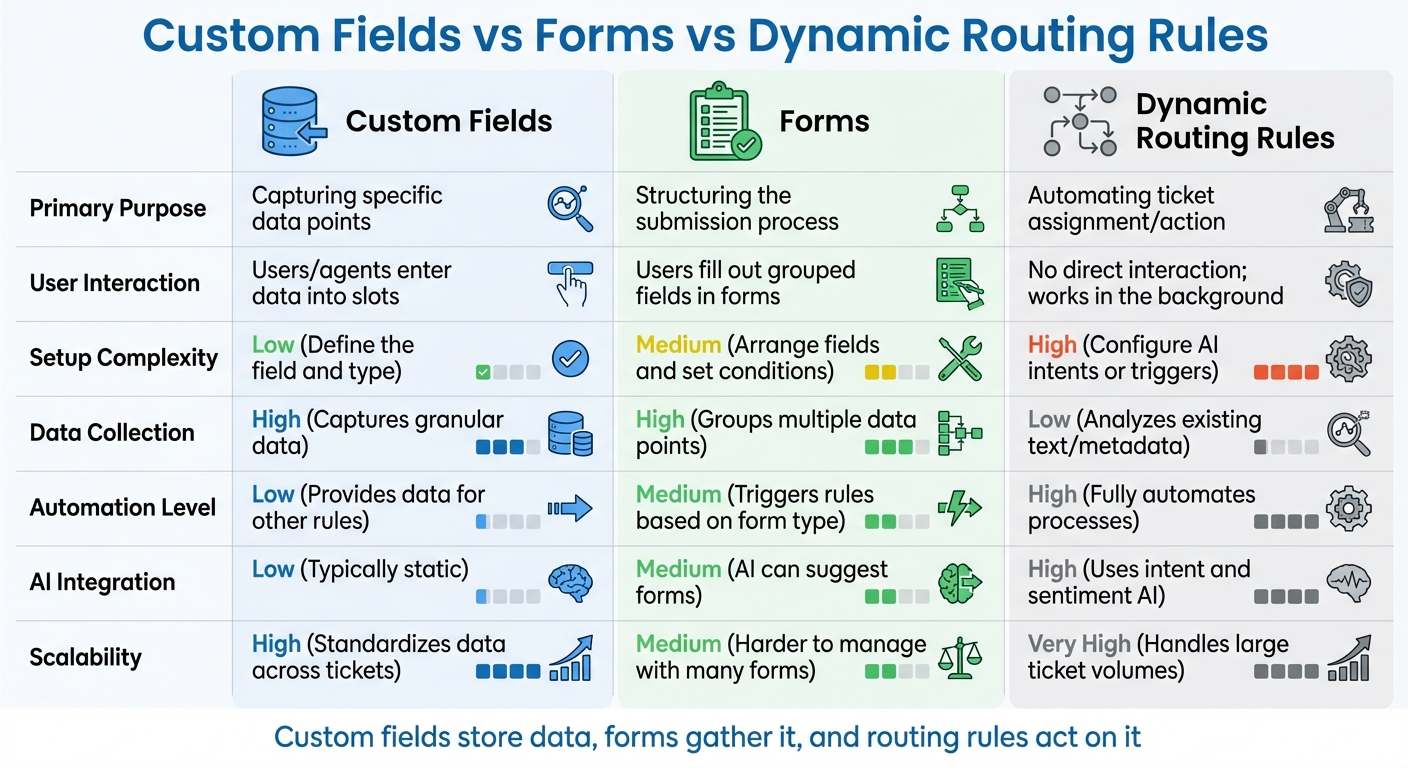
Custom Fields vs Forms vs Dynamic Routing Rules Comparison Chart
What Custom Fields, Forms, and Dynamic Routing Rules Do
Before diving into comparisons, it’s important to understand what each of these tools does. While they’re often mixed up or even used interchangeably, each plays a specific role in streamlining support workflows.
What Are Custom Fields?
Custom fields are like the extra compartments in your toolbox – they store specific, structured data that standard system fields don’t cover. These fields help track details such as product type, account tier, software version, or even purchase date. Depending on the platform, custom fields might include dropdown menus, multi-select lists, text boxes, checkboxes, date pickers, or numeric fields.
One key distinction is visibility. Some fields are agent-only, like an "Escalation Reason", while others, such as an "Account Number", are visible to customers. In many systems, selecting a value in a dropdown or checkbox can even trigger automated workflows by tagging tickets.
Now that you know what custom fields do, let’s look at how forms use them.
What Are Forms?
Forms are the blueprints for collecting structured data during ticket creation [1]. While custom fields define what data you capture, forms decide how and when that data is gathered. A thoughtfully designed form ensures that every ticket starts with the right information, reducing delays caused by incomplete details.
Forms can also include conditional logic to tailor the experience. For instance, if a customer selects "Bug Report" as their issue type, a "Software Version" field might appear. This keeps forms clean and avoids overwhelming users with unnecessary questions.
Once the data is collected, dynamic routing rules step in to make sure it’s used effectively.
What Are Dynamic Routing Rules?
Dynamic routing rules are automation tools that assign tickets to the right teams or agents based on specific conditions. These rules evaluate factors like intent, language, sentiment, or custom field values to determine where a ticket should go. For example, a ticket tagged with "Hardware" might automatically route to your Tier 2 Tech team, while one flagged with negative sentiment could escalate to a manager.
The success of these rules depends on the data gathered through custom fields and forms. Without well-organized information, routing becomes a guessing game. The best routing strategies combine multiple conditions – like intent (topic detected), language (requester’s language), sentiment (emotional tone), and field data (custom field values) – to ensure tickets are assigned accurately. This level of automation is central to modern, efficient, AI-driven support systems.
sbb-itb-e60d259
Custom Fields vs Forms vs Dynamic Routing Rules
When deciding how to optimize your support operations, it’s important to understand the specific roles of custom fields, forms, and dynamic routing rules. While these tools often complement one another, each serves a distinct purpose, making it better suited for certain tasks.
Custom fields act as your data storage units. They hold specific details like account tier, product version, or priority level. However, on their own, they don’t do much without being part of a larger system. Forms take these fields and organize them into a structured format, guiding users or agents on how to submit information. Meanwhile, dynamic routing rules use the data from fields and forms to automate ticket assignments and prioritization.
The difference lies in their levels of activity: custom fields are passive (they store data), forms are semi-active (they collect and organize data), and routing rules are fully active (they make decisions and execute actions). Kenneth Pangan from eesel AI highlights the importance of this process:
"The secret to good data is consistency" [2].
Without consistent and well-structured data from custom fields, the entire automation system can fall apart. Below is a quick comparison of their key attributes:
Comparison Table
| Feature | Custom Fields | Forms | Dynamic Routing Rules |
|---|---|---|---|
| Primary Purpose | Capturing specific data points | Structuring the submission process | Automating ticket assignment/action |
| User Interaction | Users/agents enter data into slots | Users fill out grouped fields in forms | No direct interaction; works in the background |
| Setup Complexity | Low: Define the field and type | Medium: Arrange fields and set conditions | High: Configure AI intents or triggers |
| Data Collection | High: Captures granular data | High: Groups multiple data points | Low: Analyzes existing text/metadata |
| Automation Level | Low: Provides data for other rules | Medium: Triggers rules based on form type | High: Fully automates processes |
| AI Integration | Low: Typically static (e.g., text) | Medium: AI can suggest forms | High: Uses intent and sentiment AI |
| Scalability | High: Standardizes data across tickets | Medium: Harder to manage with many forms | Very High: Handles large ticket volumes |
When used together, these tools create a streamlined, AI-powered support workflow. Each component plays a role in building a system that can scale and adapt to meet growing demands.
When to Use Each Tool
Optimizing B2B support operations means choosing the right tools for specific scenarios. Here’s how to align your tools with common support needs.
Triaging Complex Tickets
Custom fields and routing rules are your go-to tools for managing complex tickets. For example, using drop-down fields instead of free-text inputs can make categorization more consistent. This consistency helps triggers work effectively by eliminating ambiguity. Imagine a "Product" drop-down field that automatically assigns a ticket to the correct engineering team based on the selected product – no manual intervention required.
To dig deeper into internal trends without cluttering the customer’s view, use agent-only fields. These fields allow agents to capture granular details that are invisible to the customer but invaluable for analysis.
For products with lots of sub-categories, conditional fields can simplify the process. These fields adapt based on earlier selections, guiding users to relevant options and avoiding mismatched inputs. This structured approach ensures routing rules receive clean, usable data. In short, custom fields and well-designed forms are the backbone of precise ticket categorization.
Streamlining Data Collection
Forms are essential for cutting down on unnecessary back-and-forth communication. A 2025 report found that 76% of organizations admit less than half of their CRM data is accurate or complete [4]. That kind of poor data quality can cost businesses up to 16 lost deals per quarter [4].
To avoid this, make sure your forms include required fields for critical information like Account ID or Product Version. By doing so, you ensure your team has what they need to start solving the issue right away – no follow-up questions required.
Another key feature is inline validation, which flags errors in real-time. This ensures users submit accurate, properly formatted data. Inline validation has been shown to boost form success rates by 22% and improve user satisfaction by 31% [3].
Keep your forms simple. Research shows that websites can reduce form fields by 20–60% without sacrificing necessary details [3]. Start with 5–10 essential fields, and use display logic to reveal additional fields only when relevant to the issue. Clean, complete data ensures smoother routing and faster resolutions.
Automating Routing Decisions
When ticket volumes grow beyond manual handling, dynamic routing rules become a necessity. Emily Carter, a Ticketing Software Expert at EasyDesk, puts it this way:
"Automated ticket assignment becomes essential, not as a nice-to-have feature, but as a foundation for reliable customer support." [6]
For B2B support, skill-based routing is particularly useful. It assigns tickets based on specific agent expertise, like language skills, product knowledge, or technical specialization. This approach reduces handoffs and improves resolution accuracy [5][6].
Dynamic routing also plays a critical role in SLA compliance. For example, urgent tickets – such as those concerning system outages or payment issues – can be flagged and prioritized automatically, ensuring they get immediate attention. For global teams, availability-based routing ensures tickets are assigned to agents who are online, avoiding delays caused by routing to unavailable team members [6].
Finally, load-balanced routing helps distribute tickets evenly across agents, preventing anyone from being overwhelmed during peak times. It’s all about using automation to keep your team efficient and your customers happy.
How to Choose the Right Tool
When cluttered fields and misrouted tickets slow down your support operations, the right tool can make all the difference. Selecting the best option depends on factors like your team size, the complexity of your tickets, and your operational objectives. Start by identifying the core problem you’re trying to solve.
For instance:
- Need to capture specific data like Account ID or Product Version? Custom fields are your go-to.
- Handling multiple request types across teams like HR, IT, or Sales? Use forms to structure ticket submissions.
- Managing a large volume of tickets that require immediate categorization? Dynamic routing rules can automate the triage process.
By clearly defining your goals, you can determine how each tool fits into your workflow and improves efficiency.
Kenneth Pangan from eesel AI highlights the importance of context in ticket management:
"A ticket field is an excellent label. To take it to the next level, you can use integrations to bring more context into [the helpdesk]" [2].
This means custom fields work best when integrated with your system, enabling better triggers and detailed reporting and analytics. Combining these tools effectively can streamline even the most complex workflows.
For example, teams managing intricate workflows often benefit from using all three tools together. Andersen Yu, Head of Solutions Engineering & Architecture at Front, stresses the importance of precision:
"One of our best practices when it comes to creating automations is refining your rule conditions so it’s as specific as possible so it won’t accidentally apply to conversations it wasn’t intended for" [8].
Take a technical support team managing server incidents: they can use a form to collect key details, a custom field to extract error codes, and a dynamic routing rule to assign tickets or trigger an automated server restart [7]. This level of automation eliminates manual steps and speeds up resolutions.
One essential tip: always set up a "catch-all" rule when using dynamic routing. This ensures that any submission not meeting your specific criteria is still addressed – so nothing is missed [7]. Since routing rules are executed in order, thoroughly test your setup to avoid unexpected outcomes. By aligning your tool choices with clear goals, you can prevent ticket management gaps and maintain smooth support workflows. Following helpdesk rollout best practices can further ensure long-term success.
Common Mistakes and How AI Can Help
Support teams, even with the best intentions, often stumble when implementing custom fields, forms, and dynamic routing rules. One of the biggest pitfalls? Asking for too much information upfront. Over-collecting data can overwhelm users, leading to abandonment. In fact, about 80% of users abandon digital forms before completing them [9]. Cutting down the number of form fields can boost conversion rates by up to 160% [9]. Aim to keep forms concise – 10 to 12 fields max – and use conditional logic to reveal additional fields only when absolutely necessary. This keeps forms manageable and reduces the chances of users feeling frustrated.
Another frequent issue is misinterpreting keywords in routing rules. For instance, routing tickets tagged with "US" to United States-based agents might seem logical. But what happens when a customer types "help us" in their message? Misrouting like this can derail workflows. The solution? Replace basic keyword matching with dynamic variable extraction. For example, capture specific text following labels like "Country:" to ensure tickets go to the right place.
Custom field sprawl is another headache. Teams often create new custom fields for every form, leading to fragmented data. This means information like "Company Name" might get stored in multiple places, making reporting a nightmare. To avoid this, standardize field names and use consistent technical identifiers (field IDs) across all forms. Similarly, data type mismatches – like pairing a text-based field with a structured CRM date field – can cause integration failures unless proper transformation logic is in place.
AI-powered tools can address these challenges by making forms smarter and more adaptive. Instead of static fields, machine learning models analyze user navigation and past interactions to predict what information is needed next, displaying relevant fields in real time [11]. While traditional forms handle up to three criteria well, AI-powered forms can manage eight or more criteria using advanced conditional logic [10]. For high-growth teams, the labor savings from automated AI qualification often outweigh platform costs once they’re processing over 50–100 leads a month [10].
Before rolling out AI for ticket tagging or routing, test it in a simulation mode using historical data to gauge accuracy and efficiency [2]. Use analytics to spot where users drop off during forms, then swap static fields for AI-driven dynamic questioning to smooth the process [10]. Always include fallback logic so forms have a default state if AI data isn’t available – this ensures submissions don’t fail entirely [11]. By combining standardized field structures with AI-driven adaptability, teams can reduce manual errors, streamline workflows with knowledge-centric support solutions, and only collect the data they truly need. These improvements not only tackle common mistakes but also set the stage for more efficient and effective support operations.
Conclusion
Pick the tool that matches your specific needs. Custom fields help capture structured data for better reporting and automation. Forms gather upfront information to cut down on unnecessary back-and-forth, while dynamic routing rules ensure tickets land with the right person based on real-time criteria. When these tools align with your workflow, you’ll see faster resolutions, cleaner data, and happier customers.
Think of these tools as the backbone of your workflow, integrating seamlessly with your CRM and analytics systems. This setup reduces ticket triage time and prevents reporting headaches. As NoteForms explains:
"Dynamic forms aren’t ‘nice-to-have UX.’ They’re workflow infrastructure." [12]
This mindset pushes you to look beyond convenience and focus on how each tool fits into your broader operations. For example, smart routing rules eliminate manual sorting, ensuring customers connect with the right expert immediately. This integrated strategy helps avoid common setup mistakes.
To keep things efficient, avoid over-collecting data, creating duplicate fields, or using overly complex routing logic. Stick to standardized field names, use drop-down menus instead of free text, and version your forms (e.g., v1.0 to v2.0) to maintain clarity in analytics. Always test conditional branches to catch potential issues before they affect customers.
On top of these best practices, AI-powered tools can further refine your workflow. They can adapt forms in real time, auto-fill fields from ticket content, and handle complex logic. However, technology won’t fix a flawed process. Start with clear business goals, choose the simplest tool that meets your needs, and then add AI to boost efficiency.
When everything is set up correctly, your support team operates smoothly: agents spend less time hunting for information, resolutions happen faster, and your team builds a scalable system that avoids unnecessary chaos.
FAQs
Do I need all three tools, or can I start with just one?
You don’t have to use all three tools – custom fields, forms, and dynamic routing rules – right away to streamline your workflows. Start with just one or two, depending on what fits your current needs. For instance, you can begin by leveraging custom fields and forms to gather data and organize tickets effectively. As your processes become more intricate, you can introduce dynamic routing rules to enable advanced automation, pairing them with the fields and forms you’ve already set up.
What data should I capture in custom fields versus leaving in the ticket text?
When managing tickets, use custom fields for structured and essential data like product versions, customer IDs, issue categories, or priority levels. This approach supports automation, improves reporting, and ensures efficient routing of tickets.
For more detailed, context-specific information – like customer comments or in-depth descriptions – rely on the ticket text. This method keeps custom fields concise and easily searchable while allowing agents to access the context they need to handle complex or nuanced issues effectively.
How do I prevent routing rules from misrouting tickets as my workflow scales?
To prevent tickets from being misrouted as your workflow expands, it’s crucial to set up clear and well-defined routing rules. Base these rules on ticket attributes such as custom fields or specific forms. Leverage conditional routing to add flexibility, allowing tickets to be directed based on varying criteria. Regularly review and update these rules to catch any overlaps or mistakes that might arise.
You can also integrate AI-powered tools to enhance your routing process. These tools can analyze patterns and help fine-tune decisions over time. By combining detailed rules, adaptable strategies, and routine audits, you’ll ensure your routing stays accurate, even as your operations grow.






