


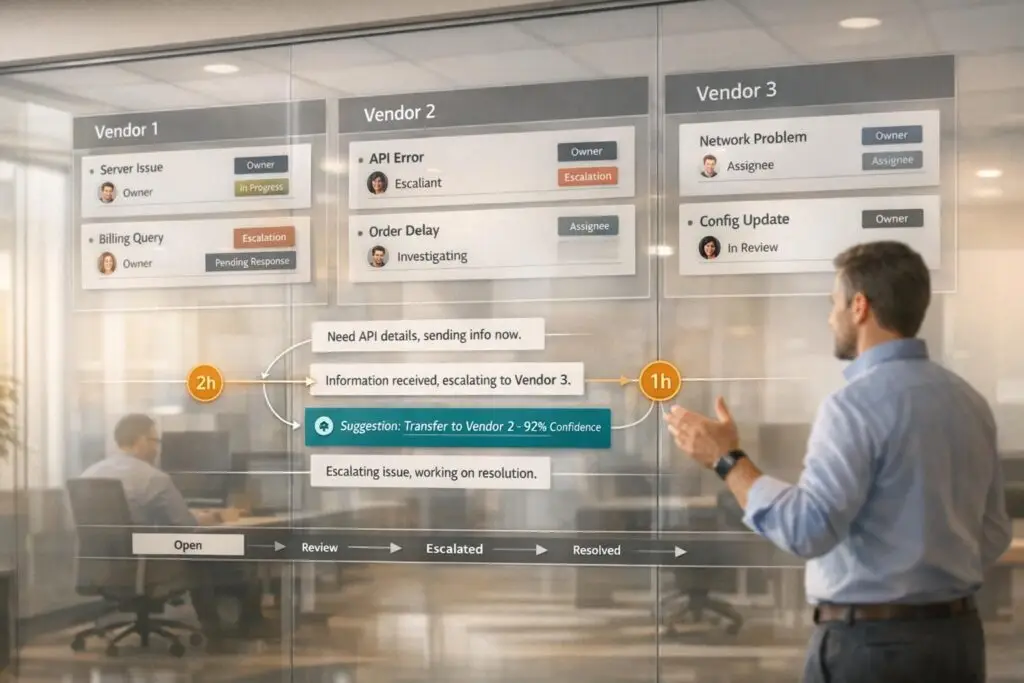
In B2B2B operations, managing vendor-to-vendor support can be complex. It involves multiple organizations – like manufacturers, distributors, and wholesalers – working together to meet customer needs. The challenge? Miscommunication, unclear accountability, and delays during handoffs between vendors. These issues can slow down processes, breach SLAs, and frustrate customers.
The solution lies in using shared portals to centralize communication, automate workflows, and clarify responsibilities. AI tools can further improve efficiency by automating case routing, predicting SLA risks, and creating knowledge bases from past cases. Key steps include:
- Centralizing communication: Use a single platform for all vendor interactions.
- Defining roles: Assign clear responsibilities to avoid confusion.
- Automating workflows: Implement triggers, reminders, and ticket routing.
- Leveraging AI: Automate case summaries, predict risks, and improve escalations.
- Monitoring performance: Use KPIs to track order accuracy, delays, and SLA compliance.
When done right, these strategies reduce delays, improve accountability, and enhance customer satisfaction. However, regular reviews and vendor training are essential to keep workflows efficient as demands grow.
Main Challenges in Vendor-to-Vendor Support
When vendors work together through a shared portal, several hurdles can arise, including communication breakdowns, unclear responsibilities, and delays in routing. These challenges not only slow down issue resolution but also expose businesses to compliance risks and damage their reputation [6].
Poor Communication Between Vendors
Without a centralized system, communication between vendors often becomes scattered across emails, phone calls, and various platforms. This lack of organization removes the ability to track conversations effectively, leading to delays and confusion about responsibilities [6]. As Panorays points out:
"Without a structured plan, vendor communication can become inconsistent and fragmented. That’s when issues arise – missed deadlines, security vulnerabilities, compliance gaps, and unclear accountability." [6]
Instead of addressing issues proactively, vendors often wait until problems escalate before reaching out. Differing priorities between vendors add to the friction, while delays in reporting incidents prolong risks and downtime [9, 10].
These communication challenges often lead directly to accountability problems, which are discussed next.
Tracking Accountability and SLA Compliance
Accountability issues frequently stem from fragmented workflows, which create data silos and require manual handoffs. These inefficiencies increase the likelihood of delays, errors, and missed deadlines [3]. Without real-time insight into order statuses – whether for fulfillment or shipment – both vendors and buyers face uncertainties that can lead to breaches of Service Level Agreements (SLAs). When users cannot find the information they need within the portal, they often resort to external emails or phone calls, reducing the portal’s usefulness [4]. Additionally, the lack of detailed audit trails makes it harder to identify process bottlenecks, often resulting in disputes over who is responsible [3].
| Accountability KPI | What It Measures |
|---|---|
| Order Processing Time | Time taken from order placement to fulfillment or shipment [3] |
| Order Accuracy Rate | Percentage of orders processed without errors such as incorrect pricing or items [3] |
| Approval Cycle Time | Average time from submission to final approval, highlighting bottlenecks [3] |
| Quote Turnaround Time | Speed at which quotes are generated and converted into orders [3] |
| Average Delay | Time by which a purchase order exceeds its expected execution date [5] |
These accountability gaps often set the stage for escalation and routing challenges, explored below.
Multi-Vendor Escalation and Routing Problems
Escalation delays often result from manual data transfers between disconnected vendor systems. One common issue is the differing definitions of terms like "maintenance" and "support" among vendors. For instance, one vendor might include free consulting as part of their service, while another might only cover fixes for software bugs [7]. In highly customized environments, support often depends on specific consultants who handled the implementation. If those individuals are unavailable, resolution times can stretch significantly [7].
A real-world example comes from January 2025, when DHL Group tackled these issues by enhancing its Vendor Master Data Management portal. This portal manages over 1,000 vendors and 320,000 employees. By integrating Bizagi to coordinate tasks between their ERP (SAP) system and RPA bots, they eliminated manual data validation gaps [9].
Alex Zuckerman, Business Development Director at Bizagi, highlights the risks of poor vendor oversight:
"Poor supplier oversight can result in delays, inflated costs, non-sustainable multi-sourcing, reputational harm, and ultimately profit loss." [9]
Without centralized coordination, tracking who owns a case becomes difficult. This often leads to delays as vendors wait for others to act. Additionally, the lack of real-time analytics and shared data means that problems are sometimes discovered only after SLAs are breached [8].
sbb-itb-e60d259
How to Set Up Vendor-to-Vendor Support Workflows
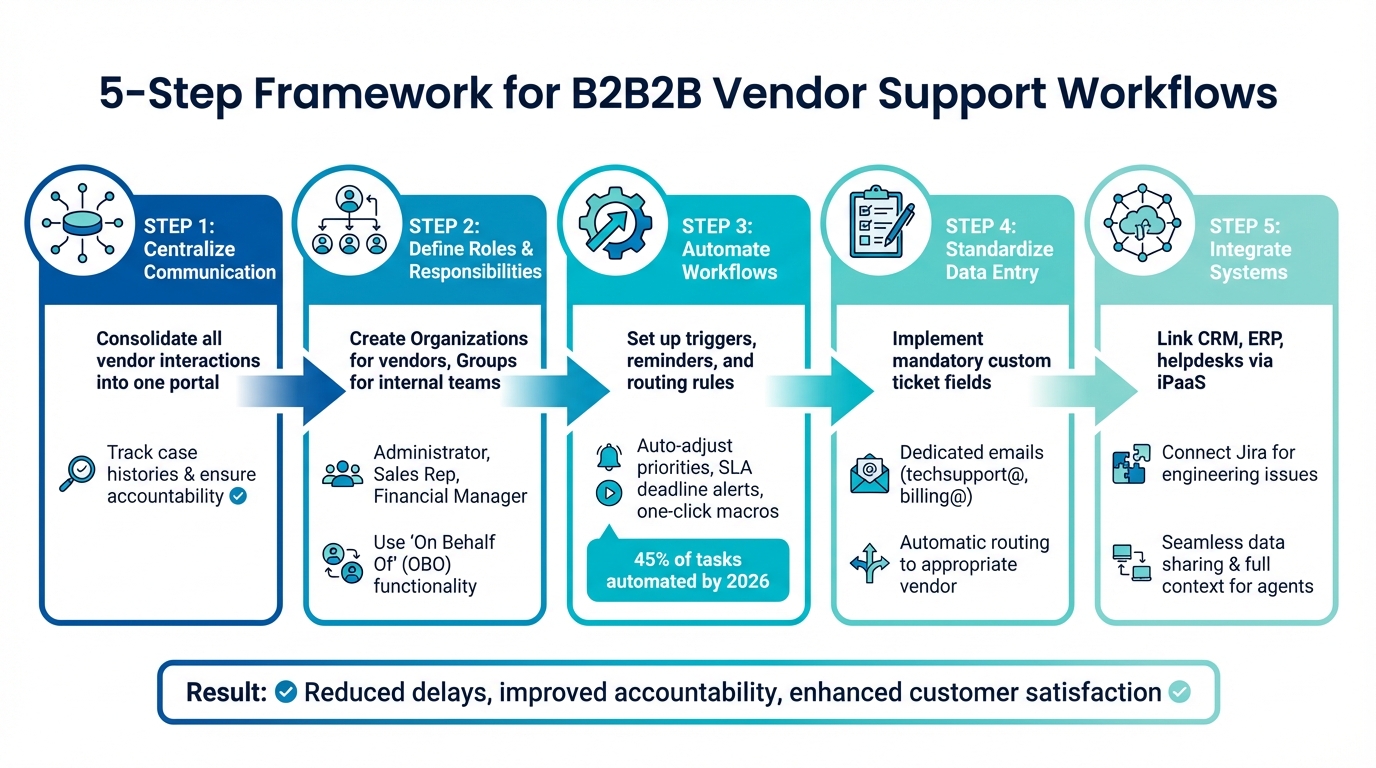
5-Step Framework for Setting Up B2B2B Vendor-to-Vendor Support Workflows
To address the common challenges in vendor-to-vendor workflows, follow these streamlined steps to create an efficient and transparent system.
Start by consolidating all vendor interactions into a single portal. This approach centralizes communication, making it easier to track case histories and clarify ownership. When all vendors operate within the same platform, everyone has access to the same information, ensuring accountability and reducing misunderstandings.
Next, define roles and responsibilities in detail. Use the platform to create distinct "Organizations" for external vendors and "Groups" for internal teams like Engineering or Legal. Assign specific roles such as "Administrator" for comprehensive access, "Sales Rep" for managing client accounts, and "Financial Manager" for handling invoices. Leverage "On Behalf Of" (OBO) functionality to allow manufacturer representatives to manage tasks or place orders for vendors. This setup not only enhances accountability but also creates a clear audit trail, which is crucial for resolving disputes.
To simplify operations further, automate repetitive and complex workflows. For instance, set up triggers to adjust ticket priorities or assign agents based on factors like "Plan Type" (e.g., Platinum vs. Silver) or specific error codes. Automate reminders for overdue reviews, pending approvals, or SLA deadlines. Use macros to provide one-click, standardized replies to frequent vendor queries. According to projections, nearly 45% of procurement and support tasks will be fully automated in top-performing companies by 2026 [12].
Ensure accurate categorization of support requests by implementing mandatory custom ticket fields like "About" or "Product." Additionally, create dedicated email addresses – such as techsupport@ or billing@ – to standardize data entry and automatically route requests to the appropriate vendor.
Finally, integrate tools like Jira to connect support tickets with engineering issues. This enables technical teams to track progress and collaborate without needing to switch platforms. Use an Integration Platform as a Service (iPaaS) to link systems like CRM, ERP, and helpdesks. This ensures seamless data sharing, giving agents the full context they need for quicker resolutions [2][11]. Beyond unifying data, these integrations pave the way for AI-driven insights, further enhancing B2B support efficiency. This shift is largely driven by the transformative role of AI in B2B support, which streamlines complex multi-vendor interactions.
Using AI to Improve Vendor-to-Vendor Support
AI takes vendor workflows to the next level by addressing communication bottlenecks and accountability challenges. Once workflows are set up, AI acts as a powerful tool to automate manual processes, predict potential issues, and build a shared knowledge base that benefits everyone in the vendor network. These tools fit seamlessly into existing workflows, improving vendor support at every step.
AI-Driven Case Routing and Prioritization
AI can automatically route cases by analyzing ticket details, past data, and customer behavior, removing the need for manual triage. Using Natural Language Processing (NLP), it interprets unstructured text like emails or chat messages to determine intent. This enables the system to assign cases based on urgency, priority, and historical resolution patterns [16]. For instance, if an email frequently mentions "delays" or "shortages", NLP flags it as critical and escalates the case before it impacts performance metrics [13].
Real-time tagging and automated prioritization ensure that urgent issues are handled immediately, while routine tasks move through automated processes smoothly.
"Our agents can now effortlessly manage thousands of emails daily, thanks to the platform’s ease of use and accuracy."
This sentiment from Eilis Byrnes, Customer Service Manager at Wolseley, highlights the transformative impact of AI [16]. By March 2026, 94% of procurement teams were using Generative AI tools weekly, achieving workflow efficiencies of 25–40% [14][15]. Beyond routing, AI simplifies information sharing by creating concise case summaries.
Automated Case Summaries and Knowledge Base Creation
AI takes the lead in generating conversation summaries that maintain context during vendor handoffs, ensuring everyone stays aligned on case history. It also identifies gaps in knowledge and creates or updates articles based on resolved cases. This converts one-time solutions into reusable resources available to all vendors [19][20].
Through a Knowledge-Centered Service (KCS) approach, AI integrates knowledge management into daily operations. For example, when a vendor resolves a complex issue, AI can summarize the problem and solution, add relevant keywords, and draft an article for the knowledge base. This central repository of information allows vendors to address similar issues quickly, cutting average resolution times by 30–40% and boosting CSAT scores by 15–25% [20].
Predicting SLA Breaches and Customer Satisfaction
AI combines historical data with real-time insights to predict SLA breaches and customer satisfaction levels. Predictive models can flag potential SLA violations 7–14 days in advance, giving teams time to reallocate resources, escalate cases, or notify customers before deadlines are missed [18].
For example, Telecom Solutions Ltd., serving 2.3 million customers in North America, reduced its annual penalty payments from $4.2 million to $1.8 million – a 57% drop – by using predictive AI. The system monitored 15,000 active contracts and improved proactive breach prevention rates from 15% to 78% within a year [18].
The platform also uses multi-tiered alerts to notify stakeholders based on the likelihood of a breach. For instance:
- Tier 1 alerts (30–50% risk): Automated notifications to relevant teams.
- Tier 2 alerts (51–75% risk): Escalations to directors.
- Tier 3 alerts (76%+ risk): Activation of emergency response teams [18].
This proactive approach has led to 81% faster breach detection and 65% quicker incident responses compared to manual monitoring [17][18].
Common Mistakes and How to Avoid Them
Even the most advanced systems can falter if key practices are overlooked. Skipping essential steps often leads to confusion, inefficiency, and accountability issues. Addressing these pitfalls early can ensure smoother collaboration with vendors.
Skipping Detailed Documentation
Incomplete or scattered documentation can make it difficult to maintain accountability. This problem often arises during manual data collection, especially when vendors rely on platforms that don’t integrate well. Email-based negotiations and support requests further compound the issue, creating fragmented communication and unclear ownership of cases.
Some major companies have resolved these challenges by centralizing their documentation processes and automating data validation tasks [9].
To avoid this, centralize all vendor-related documents, including RFX responses, compliance records, and case updates. Automate onboarding processes to ensure legal and compliance requirements are consistently documented. Implement automated alerts for both internal teams and vendors, creating a clear audit trail and reducing the need for constant follow-ups. These measures not only improve accountability but also lay the groundwork for effective use of vendor portals.
Not Training Vendors on the Portal
A portal is only as effective as the training provided to its users. Without proper guidance, vendors may struggle to navigate the system, leading to inefficiencies and an uptick in support tickets. While 83% of B2B customers prefer self-service options, only 15% succeed in resolving their issues independently – a clear indication of inadequate user support [22].
Visa faced this challenge with its initial developer portal, which users found difficult to navigate. After redesigning the portal and adding training-focused resources, the company saw a 124% increase in user engagement [21].
To ensure your vendors can fully utilize the portal, schedule monthly training sessions tailored to their needs. Include roleplay exercises that simulate real-world scenarios across all communication platforms used in the portal, such as email, instant messaging, and case management tools. Supplement these sessions with short video tutorials or digital guides to streamline onboarding. Consider integrating AI-powered search tools and smart recommendations to provide real-time assistance, reducing confusion and support requests.
Ignoring Workflow Performance Data
Beyond documentation and training, monitoring workflow performance is essential. Setting up workflows is just the beginning; without regular reviews, inefficiencies and bottlenecks can go unnoticed as business needs evolve.
To stay on top of performance, use KPI dashboards that combine automated data collection with clear visualizations. These dashboards can help you track SLAs and other contractual metrics in real-time. Schedule monthly one-on-one meetings with vendors to review performance data, address customer feedback, and identify areas for improvement. Adjust routing rules, escalation procedures, and resource allocation based on actual performance data rather than assumptions.
High-performing businesses are far more likely to offer effective self-service options (80%) compared to their lower-performing counterparts (56%) [11]. This difference underscores the importance of continuously refining workflows based on data insights, ensuring both vendors and customers benefit from a well-optimized system.
Conclusion
Managing vendor-to-vendor support in a B2B2B environment demands a fresh approach to structuring handoffs, automating routine tasks, and keeping a close eye on performance. The breakdown in workflows often happens not because of poor decisions but because tasks stall between those decisions [1].
The most effective strategy relies on three key components: a centralized portal for all vendor communication, AI-powered automation to handle task routing and exceptions, and ongoing performance monitoring to spot and address bottlenecks early. As The Moxo Team aptly put it:
"Workflow automation fails when it tries to automate decisions instead of execution" [1].
This highlights why successful systems focus on improving handoffs and coordination rather than attempting to replace human judgment entirely.
Organizations that embrace this approach are seeing real results. With AI-driven vendor management, companies have reported a 70% reduction in manual effort and an 80% boost in Net Promoter Score [23]. Automated workflows have also led to a 16% drop in order errors and an 11% increase in customer retention [10]. These improvements come from leveraging AI for repetitive tasks while leaving more complex relationship management to people.
However, challenges remain. Over one-third of buyers feel that current processes fall short of their expectations [3]. Vendor-to-vendor workflows need to be treated as dynamic systems that evolve with demand. A process that works smoothly at 100 orders per day might create bottlenecks at 500 [3]. Regular reviews of metrics like approval cycle times, order accuracy, and SLA compliance are essential to ensure scalability.
Accountability is another critical piece of the puzzle. Detailed audit trails, transparent performance dashboards, and structured escalation rules turn vendor relationships into proactive partnerships rather than reactive problem-solving. Real-time metrics and clearly defined responsibilities build trust and reduce conflicts. By combining centralized communication with automated handoffs, you create a foundation that can adapt and grow with your network, ensuring your B2B2B operations scale efficiently rather than buckle under complexity.
FAQs
How do we decide which vendor owns a ticket?
Determining who owns a ticket in vendor-to-vendor workflows requires setting up clear roles and responsibilities. One way to do this is by using specific ticket fields to capture ownership details, such as the vendor’s role or the escalation level. Automating the workflow can further simplify this process. For example, tickets can be routed automatically based on criteria like the type of vendor or the category of the issue. These strategies help ensure tickets reach the right vendor quickly and make accountability clearer in multi-vendor support setups.
What data fields should every vendor ticket require?
To keep things running smoothly and ensure vendor issues are handled efficiently, every vendor ticket should include some essential details:
- Vendor ID: This serves as the unique identifier for the vendor.
- Contact Information: Names and contact details of key individuals.
- Financial Details: Information like payment terms, currency preferences, and tax-related data.
- Communication Data: Email addresses for sending updates or correspondence.
- Order and Transaction Data: Specifics needed for processing purchase orders.
Including these fields helps simplify workflows and keeps vendor records accurate and up to date.
How can AI predict and prevent SLA breaches?
AI plays a crucial role in predicting and preventing SLA breaches by analyzing both real-time data and historical request trends. By identifying risks early, it can estimate resolution times based on SLA rules and past performance. This enables teams to make proactive adjustments to workloads and automate escalations when necessary. These tools help teams spot potential delays, prioritize tasks more efficiently, and take timely action to minimize the chances of SLA violations.






