


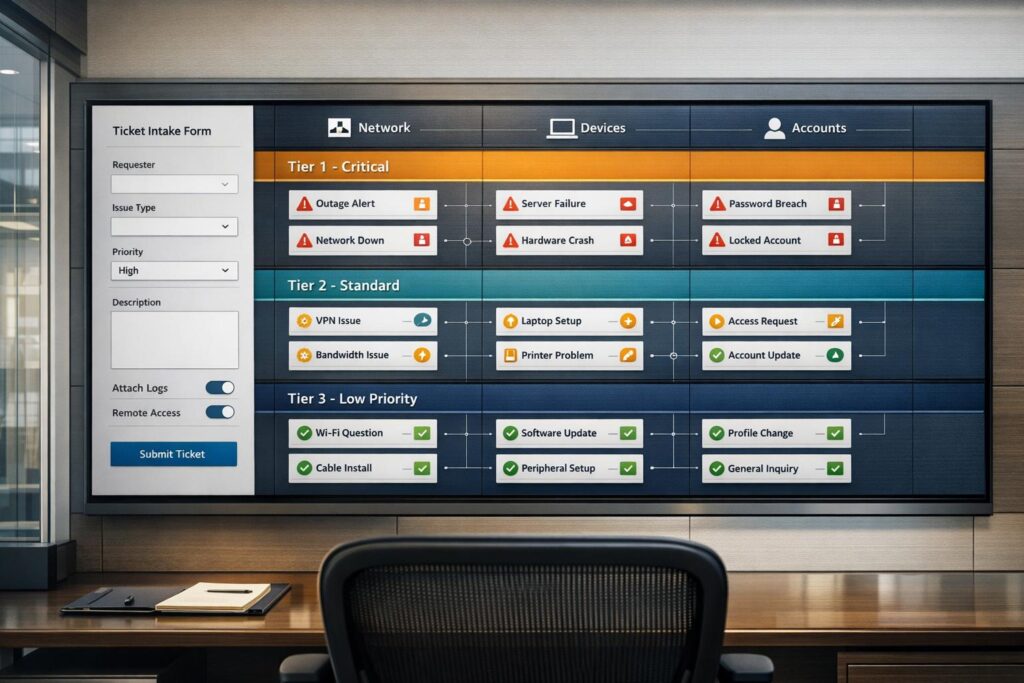
Ticket intake is the first step in handling support requests for MSPs, and it’s where inefficiencies often arise. Delays in triage, misrouted tickets, and manual processes can waste time, increase costs, and frustrate both customers and technicians. Here’s how to fix it:
- Streamline Forms: Use simple intake forms with core fields like Issue Type, Category, and Subcategory. Avoid letting users set priority manually – use an impact-urgency matrix instead.
- Accurate Categorization: Implement a clear, multi-level category structure and use AI for auto-categorization and routing to reduce errors and speed up routing.
- Effective SLA Tiers: Define SLA tiers based on impact and urgency, ensuring response times align with your team’s capacity.
- Leverage Automation: Use AI to enrich tickets, route them intelligently, and send automated updates to customers.
Automating Ticket Triage for MSPs | Office Hours Deep Dive with Pia
sbb-itb-e60d259
How to Design Intake Forms That Work
MSP Ticket Priority Matrix: Impact vs Urgency SLA Assignment Guide
An intake form is your first line of defense against chaos. If it’s poorly designed, you’ll waste time chasing down missing information. But when done right, it empowers technicians to jump straight into problem-solving.
Start by defining the core fields: Issue Type, Category, and Subcategory. These fields are the backbone of accurate ticket routing and operational efficiency. Here’s how they work:
- Issue Type: Identifies whether the request is an Incident, Service Request, or Problem.
- Category: Specifies the domain, such as Hardware, Software, or Network.
- Subcategory: Drills down further, like VPN, Email, or Laptop.
These fields ensure tickets are directed to the right person or team without delays. Without them, technicians waste time tracking down missing details before they can even start troubleshooting [5].
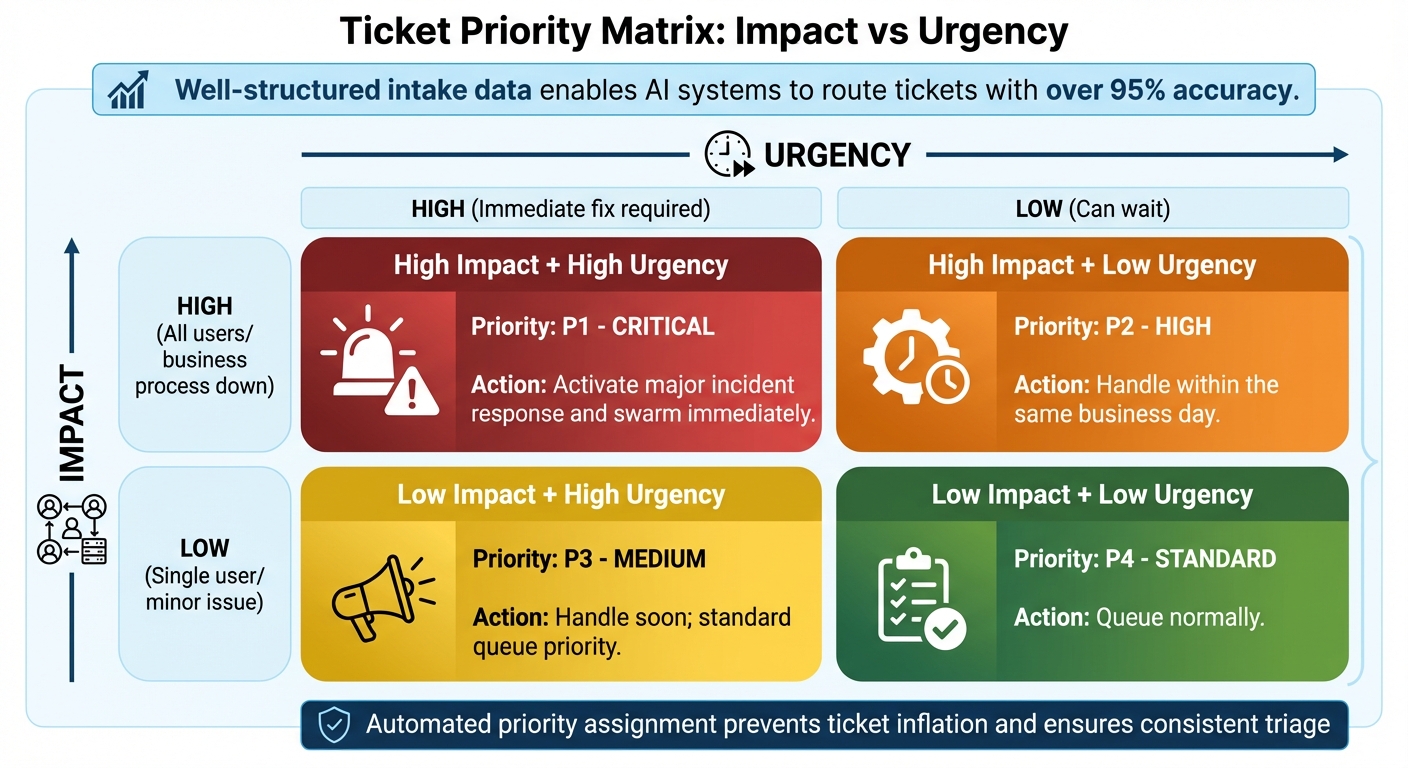
One common pitfall is letting users assign their own priority. Instead, use dropdowns for Impact (how many users or processes are affected) and Urgency (how time-sensitive the issue is). The system should then calculate the priority automatically using a matrix like this:
| Priority Level | Impact | Urgency | Handling Guidance |
|---|---|---|---|
| P1 – Critical | High (all users/business process down) | High (immediate fix required) | Activate major incident response and swarm immediately |
| P2 – High | High | Low | Handle within the same business day |
| P3 – Medium | Low | High | Handle soon; standard queue priority |
| P4 – Standard | Low | Low | Queue normally |
Allowing users to set their own priority often results in every ticket being marked as "Critical", which disrupts triage and slows everything down [1][5].
Dynamic forms can take things a step further. These forms adapt based on user input, prompting for additional details like an Asset Tag for hardware issues. This targeted approach not only speeds up troubleshooting but also improves ticket categorization by capturing the right data upfront [5][6].
Striking the right balance between required and optional fields is crucial. Overloading users with too many fields can be overwhelming, but skipping essential details slows down resolution. Well-structured intake data enables AI systems to use AI-powered ticket routing to achieve over 95% accuracy [3].
Finally, keep an eye on tickets falling into generic categories like "Other" or "General." If these make up a large chunk of your volume, it might be a sign that your taxonomy needs tweaking. Reviewing these weekly can help refine your categories for better accuracy [1][5].
In short, focus on gathering only the data technicians truly need. A well-designed intake form sets the stage for efficient ticket management and smooth operations.
Ticket Categorization Methods
Once you’ve gathered essential data through optimized forms, the next step is ensuring tickets are categorized accurately. Proper categorization helps route each issue to the right resolution channel, creating a smoother workflow for technicians.
Categorization by Service Type and Complexity
A multi-level hierarchy is key for effective categorization. Start with a Primary Category – such as Hardware, Software, or Network. Then, refine it with a Subcategory like Laptop, Server, or Switch, and finish with the Issue Type (e.g., Failure, Performance Issue, or Request) [3]. For Managed Service Providers (MSPs), common categories include:
- General Customer Service
- Technical Support
- Emergency
- Problem (e.g., bugs)
- Change Requests
- Feature Requests
- Feedback/Complaints [7]
To avoid confusion, categories should be mutually exclusive, with clear definitions. If you find a generic "Other" bucket holding 40% of your tickets, it’s a sign your system needs adjustment. Conduct quarterly reviews to refine categories and ensure they remain effective. Keep the total number of categories under 20 to simplify routing [7].
Once structured categorization is in place, automated tools can take it a step further by speeding up ticket processing.
Using AI to Auto-Categorize Tickets
AI brings speed and precision to ticket categorization using Natural Language Processing (NLP). It scans ticket content for key details – such as error messages, symptoms, and context – and assigns categories in less than two seconds, with an accuracy rate exceeding 95% [3].
AI systems assign a confidence score to each classification. Tickets with scores above 85% are processed automatically, while those below that threshold are flagged for human review. Additionally, AI enriches tickets by linking them to customer profiles, asset details, and historical trends, which further improves routing accuracy [3].
"AI can only classify into the categories you define. Ensure your categories are mutually exclusive and collectively exhaustive." – Mathieu Tougas, Mizo [3]
With AI, misrouting errors can drop by 50–60%, and ticket reassignment rates can decrease from 20–25% to as low as 5% [1][3].
How Categorization Affects Routing and Productivity
Accurate categorization – whether manually refined or AI-driven – makes routing much more efficient. Defined categories enable skills-based routing, which matches tickets to technicians based on their expertise, workload, and track record with similar issues [3].
This precision matters because even one misrouted ticket can cost over $22 in handling fees – not to mention the impact on customer trust, team morale, and overall relationship quality [1]. When combined with an impact-urgency matrix, categorization can automate SLA assignments. For instance:
- A ticket marked as High Impact and High Urgency is treated as Critical and addressed immediately.
- A Low Impact, Low Urgency ticket is queued for normal processing [1][3].
Ultimately, the difference between struggling support teams and thriving ones often boils down to the strength of their systems, not individual effort [1].
Setting Up SLA Tiers That Match Business Needs
With well-designed forms and accurate ticket categorization streamlining the intake process, the next step to ensure timely issue resolution is establishing SLA tiers. These tiers determine how quickly tickets need to be addressed after they’ve been routed to the appropriate team. The goal? Balancing customer expectations with your team’s actual capacity so that SLA targets are both realistic and achievable.
Impact-Urgency Matrices for SLA Definition
An effective way to define SLA tiers is by using an impact-urgency matrix that evaluates both the business risk and the technical urgency of an issue. Here’s an example:
| Impact Level | Urgency: High (System Down) | Urgency: Medium (Degraded) | Urgency: Low (Request/Minor) |
|---|---|---|---|
| High (All Users/Site) | P1 – Critical (Immediate) | P2 – High | P3 – Medium |
| Medium (Department) | P2 – High | P3 – Medium | P4 – Low |
| Low (Single User) | P3 – Medium | P4 – Low | P5 – Planned |
This matrix ensures consistent prioritization no matter who reviews the ticket or when it’s submitted [3]. While creating your matrix, consider customer segmentation. For instance, VIP or premium-tier clients might require faster response times, even for lower-impact issues, while standard customers follow the baseline SLA structure [3][8].
Having clearly defined tiers like these lays the groundwork for automated ticket routing and precise SLA enforcement.
Service-Based Queues and Automated SLA Assignment
Once tickets are categorized accurately, automation ensures they’re routed to the right service queues and assigned the appropriate SLA tier. Modern ticketing systems leverage keyword tags and AI tools to analyze tickets and make these assignments. For example, if a ticket includes phrases like "system crashed", it can automatically be flagged as P1 and routed to the emergency response team [3][8].
Automation applies the SLA matrix by using confidence scores to classify tickets, with any uncertain cases flagged for manual review. Additionally, automated alerts notify teams of idle or overdue tickets, helping prevent SLA breaches that could negatively affect the customer experience [8].
Setting Response and Resolution Times That Work
Your SLA targets need to reflect your team’s capacity – this includes their size, skills, and workload. Unrealistic targets, like a 15-minute response time for P1 tickets, can lead to missed deadlines and frustration for both staff and customers [8]. Instead, use historical data to set achievable goals. For example, if your internal target for resolving P3 tickets is 12 hours, you could set the SLA commitment at 24 hours, creating a buffer for unexpected delays [8].
It’s also important to differentiate between SLAs and KPIs. SLAs are the promises you make to customers about service quality, such as maximum wait times. KPIs, on the other hand, are internal metrics that help you monitor and improve performance.
"SLAs establish the basic conditions of your support services… designating the maximum amount of wait time that is acceptable to be considered good quality of service." – N-able [8]
Using Automation and AI to Improve Intake
Once you’ve established clear SLA tiers and streamlined routing, it’s time to let automation take the wheel. By eliminating manual ticket sorting, you can free up valuable time for your service desk teams. Did you know they spend up to 30% of their time manually sorting and assigning tickets? That’s a huge chunk of productivity lost [9]. With AI-driven automation, this bottleneck disappears. Tickets are enriched with contextual data, routed intelligently, and customers stay informed – all without lifting a finger.
AI-Driven Ticket Enrichment
AI tools can analyze incoming tickets and automatically enhance them with critical context before technicians even begin their work. This includes data like device health, patch status, historical ticket trends, and even sentiment analysis based on the ticket’s language [9][11]. For example, Pia’s "AutoStart" diagnostics kick in as soon as a ticket is logged. The system connects directly to the affected device, runs automated checks, and provides technical data such as CPU usage, disk space, and network connectivity [10]. This means technicians can skip the initial triage phase and dive straight into solving the problem.
Sentiment analysis adds another layer of intelligence. Using natural language processing, AI scans ticket descriptions for signs of frustration or urgency. Based on the detected emotions, it can adjust the ticket’s priority and severity. In December 2024, Relentless Solutions used Rewst‘s OpenAI Sentiment Analysis Crate to identify and escalate tickets with negative sentiment. The result? A 30% reduction in resolution times [11]. AI can even suggest remediation steps, giving technicians a head start with actionable solutions [10][11]. These advancements not only cut costs but also let technicians focus on resolving issues faster.
Automated Routing and Prioritization
Modern AI systems take ticket routing to the next level. Instead of relying on basic keyword matching, AI evaluates the intent behind a ticket, considers the customer’s SLA tier, and matches it with technicians based on their skills, past performance, and the urgency of the issue [12][13]. This smarter approach eliminates common problems like "cherry-picking" (where technicians choose easier tickets) and "recency bias" (favoring newer tickets over more critical, older ones).
"Next Ticket is the one that takes care of the prioritization for the technicians. So no matter if the dispatcher is on a day off, no matter if the dispatcher is having lunch, the system will still run, and everyone will get their tickets assigned." – Mauro Cretari, CIO Landing [12]
ThrottleNet offers a great example. Kevin Cowgur implemented a custom workflow using Rewst and OpenAI to automate ticket creation from LogMeIn Rescue sessions. The system captured session data, categorized tickets dynamically, and saved the company $50,000 annually in administrative costs [11]. With routing handled efficiently, the next piece of the puzzle is keeping customers in the loop.
Automated Acknowledgments and Status Updates
Customers expect acknowledgment when they submit a ticket – and timely updates go a long way in building trust. AI-powered systems can handle this effortlessly. Take Pia’s "AI AutoReply" feature, for instance. It sends instant responses to email-based tickets, confirming receipt and encouraging users to fill out structured "SmartForms" for better data collection during intake [10]. For MSPs managing outages, OnCallClerk’s AI phone agent provides 24/7 real-time status updates to callers, logs issue details, and creates tickets automatically – no human intervention required [14].
AI can also step in when tickets show signs of negative sentiment. It can trigger immediate escalation or send a tailored automated response to ease client concerns [4][11]. Rewst’s "Suggest Responses Crate" uses OpenAI to generate ready-to-send replies for new tickets, saving technicians time and ensuring consistent communication [11]. These small automations add up. MSP technicians spend an average of 4 to 6 hours per week on manual reporting tasks – time that could be better spent solving problems [4].
Common Ticket Intake Mistakes and How to Fix Them
Even with the best intentions, MSPs often fall into the same traps when handling ticket intake. These errors don’t just slow operations – they can cost money and strain customer relationships. The upside? Most of these problems are easily fixable.
Too Many Fields in Forms
Overloading intake forms with unnecessary fields can frustrate users and delay ticket submissions. When forms demand excessive information upfront, users either abandon them or input incorrect data just to move forward. Many MSPs create overly complex systems with too many dropdown menus and required fields [1]. The result? Frustrated users and unreliable data.
The solution is straightforward: start simple. Use broad categories to begin with and add subcategories only when data trends justify them [1]. Smart tags are a great alternative – they provide context without being mandatory. Focus required fields on essentials like contact details, a clear problem description, and the affected system or service. Optional fields or automated enrichment can handle the rest. This approach reduces friction and improves submission accuracy.
Inconsistent Categorization
When ticket categorization isn’t standardized, it often leads to a mess. Categories like "Other" or "General" can end up holding as much as 40% of tickets, making trend analysis nearly impossible. Manual classification only achieves 60-70% accuracy, leading to further inefficiencies [3]. The complexity of categorization systems often causes agents to bypass them altogether.
"A single misrouted ticket costs more than the $22 average handling fee. It costs you customer trust, team morale, and sometimes the whole relationship." – SupportBee [1]
To address this, simplify your category structure. Ensure categories are mutually exclusive to avoid overlaps [3]. AI-powered triage tools, using Natural Language Processing, can analyze ticket content and auto-assign categories based on keywords and symptoms. Set confidence thresholds (e.g., 85%+) for auto-classifying high-confidence tickets while flagging uncertain ones for human review [3]. Regularly audit your system – prune unused categories quarterly and review misclassifications weekly. A streamlined categorization system ensures accurate SLA assignments and better overall efficiency.
Incorrect SLA Assignments
Accurate SLA assignment is critical for aligning support responses with business priorities. Missteps here can lead to problems on both ends – treating every ticket as high priority burns out technicians, while ignoring urgent issues angers customers. Manual priority assignments are often inconsistent, varying by dispatcher, and can lead to unpredictable service levels [1][3]. For instance, a disk space warning classified with low urgency could escalate into a full server outage if not addressed promptly [2].
Automation is the key here. Use predefined impact-urgency matrices to assign priority levels objectively, rather than relying on subjective judgment [1][3]. AI tools can analyze ticket content in seconds, detecting urgency signals and linking tickets to customer profiles to identify VIP clients or critical systems [3]. This ensures that high-value customers always receive the appropriate SLA assignment. Additionally, set realistic SLAs based on your team’s capacity – it’s better to promise a 24-hour response and deliver in 12 than to miss a 4-hour commitment [1].
Conclusion
The difference between MSPs that thrive and those that struggle often comes down to having efficient systems in place rather than relying on manual processes. A well-designed ticket intake process respects customer time from the moment a request is submitted.
By using forms that gather the right information upfront, combined with clear categorization and defined SLA tiers, MSPs can prioritize tasks objectively. Start with simple intake forms that capture essential details and broader categories, only diving into subcategories when the data supports it.
Incorporating tools like impact-urgency matrices for SLA assignments removes the need for guesswork. This not only lightens the load on technicians but also improves customer satisfaction by ensuring timely responses.
AI-powered triage systems take efficiency a step further by routing tickets in less than 2 seconds with over 95% accuracy. This allows senior technicians to focus on more complex tasks while routine issues are handled automatically and consistently, even outside of regular business hours [3].
MSPs that have embraced these streamlined strategies have seen impressive results, with some reporting up to a 91% increase in year-over-year customer retention [1]. An automated and intelligently organized intake system is essential for long-term growth. By combining smart forms, accurate categorization, and AI-driven automation, MSPs can create efficient, scalable, and customer-centric support operations. These practices not only improve operational efficiency but also enhance the overall customer experience.
FAQs
What fields should every MSP intake form require?
Every MSP intake form needs to gather essential details to ensure smooth ticket handling and quick resolution. Here are the key fields to include:
- Customer Information: Collect the name, contact details, and company name to identify and communicate with the client efficiently.
- Issue Description: Provide space for a clear and detailed explanation of the problem or request.
- Category/Type: Use this field to classify the issue, which helps in prioritizing and routing it to the right team.
- Priority Level: Indicate the urgency of the issue to align with service level agreements (SLAs).
- Additional Details: Include optional fields for device information, client preferences, or other specifics that might aid in resolution.
This structure ensures all necessary information is captured right from the start.
How can I create a ticket category taxonomy that stays usable?
Creating a ticket category taxonomy requires striking the right balance between detail and simplicity. Start with broad, general categories to cover common issues without overwhelming users with overly specific subcategories. A well-structured hierarchy allows for flexibility, making it easier to navigate and adapt as needed. Regular reviews, especially with input from agents, ensure the taxonomy remains relevant and user-friendly. This approach makes triaging and reporting more efficient and keeps the system manageable.
How do I set SLA response times that customers accept and my team can hit?
To create SLA response times that work for both your customers and your team, it’s all about finding the right balance between what customers expect and what your team can realistically deliver. Start by digging into your historical response data – this helps you set achievable targets based on past performance.
Consider implementing tiered SLA levels. These can be based on factors like urgency or the complexity of the issue, allowing you to prioritize effectively without overwhelming your team. Regularly review and tweak these policies to make sure they stay aligned with both customer needs and your team’s capacity.
You can also leverage AI-powered automation to streamline processes. AI tools can help route tickets, prioritize tasks, and even handle simpler queries automatically. This not only boosts efficiency but also helps reduce the risk of team burnout while keeping customer satisfaction high.
Related Blog Posts
- How do you standardize ticket categorization so reporting is accurate (and consistent)?
- Moving Beyond “Chat”: Why Asynchronous Ticketing Wins for Complex B2B Issues
- Omnichannel Routing Logic: Balancing Chat, Email, and Portal Loads
- How to build a “guided intake” portal form that routes tickets correctly






