


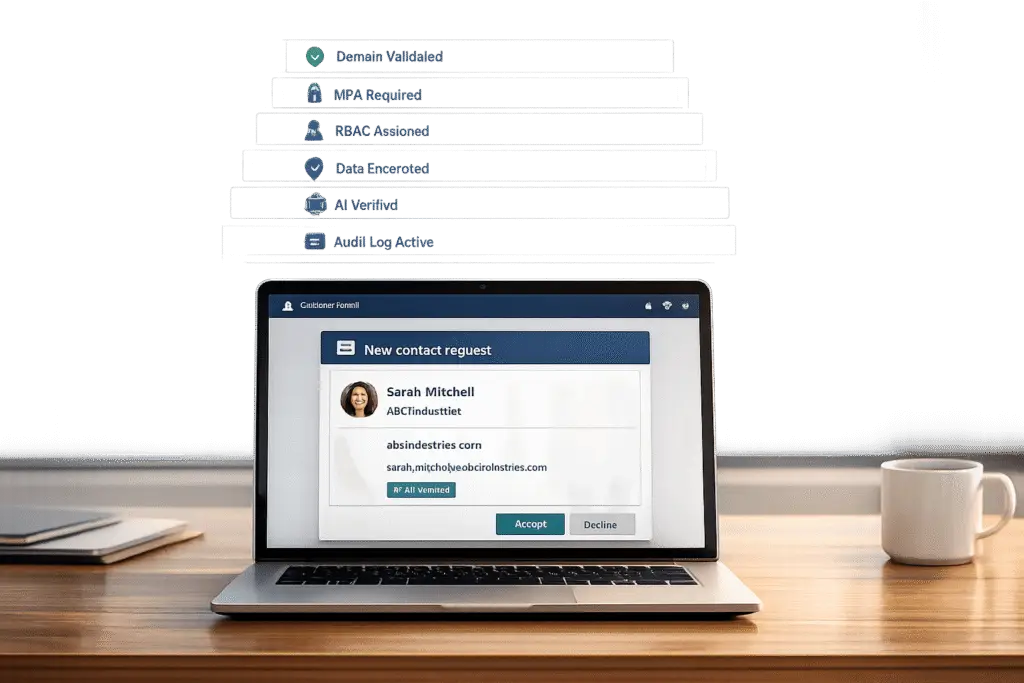
When managing new contact requests in a B2B portal, the stakes are high. Mishandling these requests can lead to data breaches, spam overload, and lost productivity. Here’s how to protect your portal and streamline the process:
- Use Multi-Factor Authentication (MFA): Add extra layers of security to prevent unauthorized access.
- Validate Email Domains: Block free email domains (e.g., Gmail) and prioritize business domains to reduce spam.
- Leverage AI for Verification: Automate contact scoring, flagging risky requests, and routing high-value leads to the right team.
- Encrypt Data: Secure sensitive information during transmission (TLS 1.3) and at rest (AES-256 encryption).
- Follow Regulations: Ensure compliance with GDPR, CCPA, SOC 2, and other data privacy laws to avoid fines and maintain trust.
- Regular Audits: Monitor access logs, update systems, and conduct security reviews to address vulnerabilities.
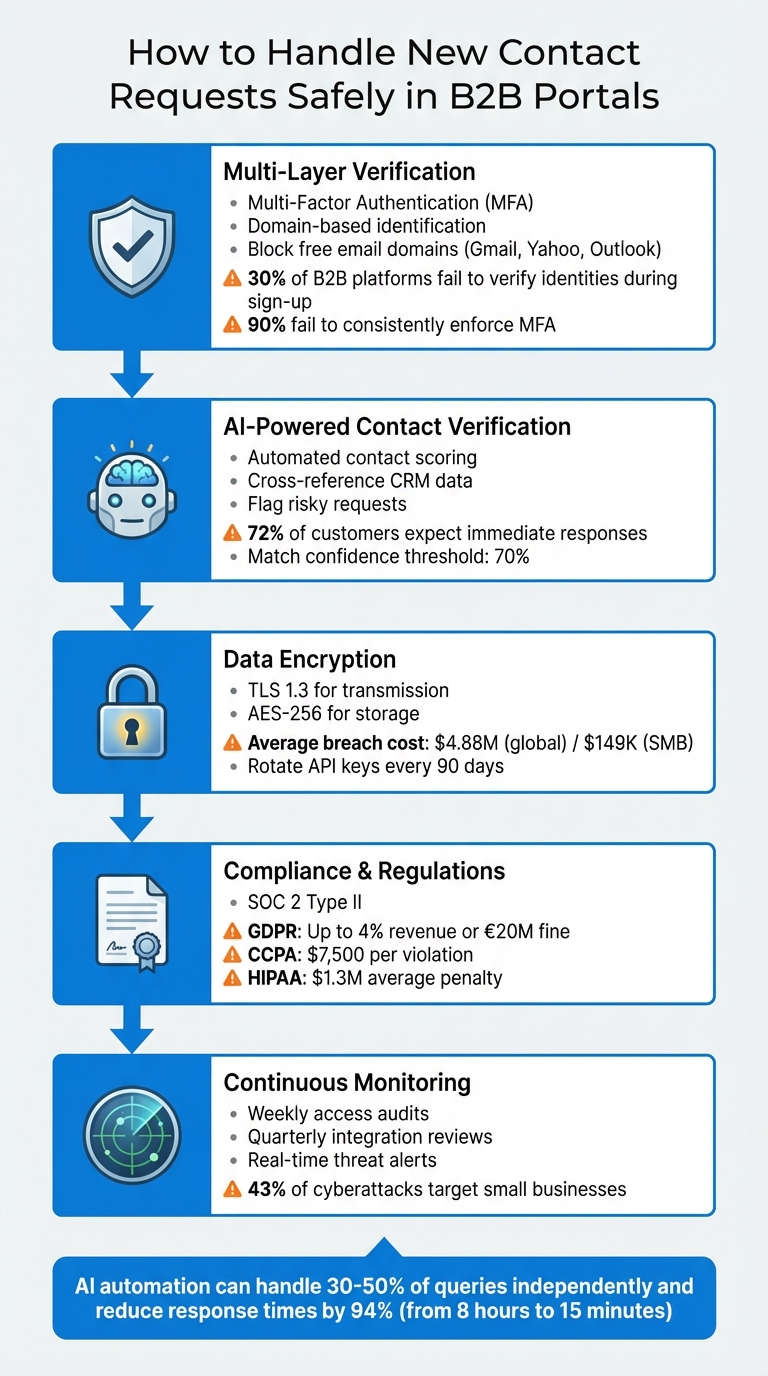
5-Step Process for Secure B2B Contact Request Management
Entra ID B2B Self-Service Sign-Up: A Step-by-Step Guide and Testing Tutorial
sbb-itb-e60d259
Building a Secure Verification Process
Creating a multi-layer verification process is essential to secure access to your portal. Shockingly, about 30% of B2B platforms fail to verify user identities during sign-up [7]. To address this, combining automated checks with human oversight is key. This layered approach helps catch fraudulent requests before they lead to breaches.
Domain-Based Identification: The First Line of Defense
Start with domain-based identification. When a request comes in, your system should automatically validate the email domain against your customer records. Business domains (like @acmecorp.com) should be mapped to the correct account, while free email domains (e.g., Gmail, Yahoo, Outlook) should raise flags or even block automatic account creation [8]. This simple step filters out a large portion of spam and low-quality requests early in the process.
Pair this with domain verification to further refine access control. By focusing on business domains, you reduce the risk of fraudulent or irrelevant sign-ups.
Combining MFA and Role-Based Access Control (RBAC)
Multi-Factor Authentication (MFA) is a must for creating adaptive, conditional access. Yet, over 90% of B2B platforms fail to consistently enforce MFA for external users, leaving them vulnerable to credential theft [7]. By using methods like push notifications, time-based one-time passwords (TOTP), SMS codes, or biometrics, you ensure that even if a password is compromised, unauthorized users are locked out [7].
"External users need more than just a username and password to access your resources" [9].
Implement MFA policies at various levels – tenant, application, or individual guest – to meet specific security needs [9]. Use simulation tools, like "What If" features, to predict how these policies will impact external users before rolling them out [9]. This helps avoid accidental lockouts of legitimate users.
You can also streamline the process by trusting the guest’s home tenant authentication. If a user has already completed MFA through their own organization, cross-tenant access settings can accept that verification [9]. This reduces user friction while maintaining strong security – provided the tenant follows rigorous security practices.
RBAC adds another layer of protection by ensuring users only access data relevant to their role. For example, while a finance contact may need access to invoices, they shouldn’t see technical support tickets. Start with minimal permissions and expand only as necessary. Document these roles carefully and review them periodically to ensure they align with current business needs.
Validating Contact Details Against CRM Data
Once access controls are in place, focus on verifying contact details. AI tools can compare user-provided information – like name, email, phone number, and ZIP code – against your CRM records using phonetic and string matching [6]. This helps identify potential fraud or errors.
Normalize data inputs to avoid mismatches caused by formatting differences (e.g., dots in email usernames or country codes in phone numbers) [6]. A similarity scoring system can categorize matches into tiers: exact, strong, weak, or no match. Below is a guide for handling each match type:
| Match Type | Description | Recommended Action |
|---|---|---|
| Exact/Strong Match | High confidence in data match | Proceed with workflow and grant access |
| Weak Match | Minor discrepancies | Reconfirm information or use a secondary method |
| No Match | No alignment with records | Retry, switch methods, or escalate to manual review |
Data adapted from [6].
A key rule: never reveal stored values during verification. For example, if a user provides an incorrect phone number, do not disclose the correct one. This prevents attackers from phishing for accurate data. AI systems should handle results discreetly, without exposing specific scores or thresholds.
For high-security scenarios – like granting access to financial data or intellectual property – use Verified ID and Face Check technology. This involves comparing a real-time photo of the user to a verified credential or government ID stored in your system [10]. A match confidence threshold, such as 70%, can determine successful identity verification [10].
"Traditional methods such as personally identifiable information (PII) and knowledge-based authentication are no match for today’s sophisticated attackers, who use phishing, social engineering, and even AI-powered voice cloning to bypass defenses" [10].
Identifying and Flagging High-Risk Requests
Beyond domain and CRM checks, your system should flag high-risk requests based on specific warning signs. For example, incomplete forms or vague details should trigger manual reviews. Similarly, requests from domains with little online presence should be flagged immediately [8].
Be on the lookout for unusual patterns. Multiple requests from the same IP address in a short time or claims from organizations outside your typical customer profile should raise alerts. Use rate limiting and bot protection (like CAPTCHA) to block automated, high-risk requests [7].
Flagged requests should go through manual review rather than receiving automatic approval. Define clear escalation criteria to prioritize cases. For instance, a weak match from a known customer domain might be low priority, while a request from an unknown domain seeking sensitive data should be escalated immediately.
Data enrichment can also help. If a request comes from a recognized business domain, your system can append relevant company details – like industry or location – to the profile [8]. This context helps reviewers quickly assess legitimacy.
Always have a fallback plan for weak or no matches. Options include sending a verification email to an existing contact, requesting additional documentation, or scheduling a phone call to confirm identity. The goal is to block unauthorized access while assisting legitimate users with outdated CRM data.
Lastly, configure internal domain filters to prevent employee email addresses from triggering new customer record creation [8]. This avoids unnecessary confusion and ensures employee access is managed through internal systems, not the customer portal.
Protecting Data During Transmission and Storage
Once you’ve verified who’s requesting access, the next step is safeguarding the data itself. Encryption is a key tool to shield sensitive information – like contact details, business data, and credentials – from being intercepted or stolen. The stakes are high: in 2024, the average cost of a data breach hit $4.88 million globally, while small businesses faced an average loss of $149,000 per incident [12]. These aren’t just numbers – they’re potential financial disasters that can disrupt or even shut down operations. By pairing strong contact verification with robust encryption practices, you can protect data every step of the way.
Using SSL/TLS for Encrypted Data Transfer
Every piece of data exchanged between a user’s browser and your portal should be encrypted. Make sure all portal URLs use HTTPS and implement TLS 1.3, the latest standard for Transport Layer Security. This applies to everything – API calls, websocket connections, and data transfers – to prevent attackers from intercepting sensitive information as it moves across the internet [11].
Don’t stop there. Integration points like CRMs and ERPs must also enforce the same encryption standards as the initial data submissions. Strengthen these connections further by using webhook signature verification, IP allowlisting, and rotating API keys every 90 days. Store credentials securely in tools like AWS Secrets Manager [11][4].
A common pitfall is assuming that SSL/TLS alone is enough. While it protects data during transit, it doesn’t validate the content being transmitted. That’s why server-side validation is critical to ensure attackers aren’t sneaking in malicious code [4]. Additionally, enable HTTP Strict Transport Security (HSTS) to force browsers to communicate only over HTTPS, blocking downgrade attacks.
Encrypting Stored Data with Industry Standards
Once data arrives at your servers, it needs protection at rest. Use AES-256 encryption for all stored information, including contact logs, databases, and knowledge bases. This ensures that even if someone gains access to your storage systems, the data remains unreadable without the encryption keys [11].
To further secure stored data, implement tenant isolation to prevent data from being accessed across accounts [11]. Combine this with Role-Based Access Control (RBAC) and Multi-Factor Authentication (MFA) to limit access to authorized personnel only [11][12].
For especially sensitive information – such as payment or health data – consider end-to-end encryption, where data is encrypted in the user’s browser and stays encrypted until it reaches its final destination [4]. When processing payments, use tokenization to meet PCI DSS standards without storing actual card numbers [13].
These storage encryption practices not only protect your data but also help you meet stringent regulatory requirements.
Meeting Data Privacy Regulations
Securing data transfer and storage is just one piece of the puzzle. Compliance with data privacy regulations is equally important – not just to avoid fines but to earn user trust. In the U.S., SOC 2 Type II is the benchmark for cloud service providers. It evaluates security controls over a 6–12 month period, providing a more thorough assessment than a one-time audit. Always request a provider’s SOC 2 Type II audit report to confirm compliance [11][14][15].
If your portal serves California residents, you must comply with CCPA/CPRA, which mandates transparency in data collection and gives users the right to opt out. Noncompliance can cost you $7,500 per violation [4][12]. For businesses handling Protected Health Information (PHI) – even in something as simple as a support chat – HIPAA compliance is required. This involves signing a Business Associate Agreement (BAA) and maintaining strict audit logs. HIPAA violations average $1.3 million in penalties [14].
Even if you’re based in the U.S., GDPR applies if you handle data from even one EU resident [14][4]. GDPR demands that you support the "right to be forgotten" (deleting data within 30 days) and "data portability" (providing data in a machine-readable format). Noncompliance can lead to fines of up to 4% of global annual revenue or €20 million [14][4].
"Most SMBs are probably not focused on security. They’re more focused on profit and just developing their business. And now we as cybersecurity professionals need to translate the risk of cybersecurity and get small businesses to understand that there’s financial impact that could happen if they do have to, or if they realize a risk and suffer a data breach or a cyber attack." – Bruno Aburto, Booz Allen Hamilton [12]
To stay compliant, maintain detailed audit logs of all data access and system interactions – for HIPAA, these logs must be kept for six years [11]. Regularly schedule third-party penetration testing and vulnerability scans to identify and fix weaknesses before they’re exploited [12]. Lastly, practice data minimization by collecting only the information absolutely necessary for each interaction [11]. Together, these measures create a solid foundation for a secure and compliant portal.
Using AI to Automate Triage and Verification
Once your data is secure, AI can step in to speed up and improve contact verification. Relying on manual reviews for every new contact request is slow, prone to errors, and costly – especially when 72% of customers expect immediate responses [17]. AI takes over the heavy lifting by verifying authenticity, directing requests to the correct teams, and flagging high-risk submissions in real-time. This approach not only strengthens security but also slashes response times significantly.
AI-Powered Contact Verification
AI simplifies the process of verifying contact authenticity by cross-referencing multiple data sources at once. Instead of manually checking platforms like LinkedIn, your CRM, or company websites, AI gathers data from all these places simultaneously. Using techniques like phonetic and string matching, it compares names, job titles, email domains, and phone numbers against known patterns – handling tricky variations like "dot" versus "." in email addresses [16][6].
But it doesn’t stop at basic matching. AI adds a layer of technical validation by running SMTP pings to confirm email deliverability, verifying MX records, and performing phone carrier lookups to ensure contacts are active and reachable [16]. It can even catch subtle inconsistencies, like a mismatched job title on LinkedIn or a dormant domain that otherwise appears legitimate [16]. On top of that, AI analyzes the language used in request forms to pick up on signals like urgency, authority, or buying intent, helping distinguish genuine inquiries from spam [5].
In 2023, RevTech – a SaaS firm with $25M ARR based in Austin, TX – switched from manually triaging 150 weekly leads using spreadsheets to an AI-driven system. By identifying intent phrases like "POC timeline" and integrating routing through Salesforce API, they cut response times to 45 seconds and boosted their SQL rate to 34%. This change added $1.2M to their pipeline in just 90 days [21].
While AI handles the bulk of verification tasks, it’s essential to have a manual escalation process for edge cases where the system isn’t confident about a contact’s authenticity [6].
Automated Routing and Escalation
Once a contact is verified, AI determines the next steps based on urgency and context. Requests are prioritized using a three-axis system: urgency (time sensitivity), sentiment (emotional tone), and business importance (e.g., VIP or high-value accounts) [19]. For instance, a billing issue from a high-value account with negative sentiment is escalated immediately, while a low-priority inquiry from a researcher might be sent to a nurture queue.
AI also keeps track of conversation history and frequency. Follow-up responses are automatically routed back to the original assignee, and users who repeatedly contact support are flagged for escalation [20]. When escalating to a human agent, AI provides a detailed handoff package. This includes a summary of the issue, intent analysis, sentiment data, and relevant past interactions – saving agents from time-consuming research [18][20].
FinServ Corp, a financial services firm in Chicago, used AI to triage 300 webinar leads monthly by integrating HubSpot and LinkedIn Sales Navigator. The system prioritized companies with over $100M ARR and filtered out spam, saving 22 SDR hours weekly and increasing SQL rates by 52%. One $750K deal closed within 48 hours of an AI-triggered alert [21].
This example highlights how AI-driven routing not only makes B2B portals safer but also improves operational efficiency by ensuring high-value contacts are prioritized while filtering out low-value or risky submissions.
Reducing Manual Work with AI Automation
AI dramatically cuts down on repetitive tasks, freeing up valuable time for your team. It scores leads on a 0–100 scale using behavioral signals like "budget approved" or "urgent rollout" [21][5]. It also identifies and rejects spam, including vendor pitches and bot-generated submissions, which can make up as much as 30% of inbound volume [21]. Additionally, AI uses automated macros to send pre-written responses and close tickets simultaneously, with a target of auto-closing 60% of common requests [19].
These efficiencies add up. AI triage can reduce the manual workload from 15 hours per week per representative to just 2 hours [21]. AI-powered routing achieves 92% accuracy compared to 68% with manual processes [21], allowing your team to focus on tasks that require judgment, empathy, and creative problem-solving [17].
It’s important to have a manual escalation process for cases where AI cannot confidently verify a contact’s authenticity [6]. Also, avoid revealing stored values (like the email on file) during verification to protect against social engineering attacks [6].
Creating Manual Review and Escalation Protocols
AI can handle a lot of verification work, but there are times when human judgment is essential – especially when dealing with risk or compliance issues. Without clear guidelines for escalation, you risk wasting resources or missing critical security threats. The solution? Lay out exactly when and how a human should step in. By documenting decisions and training your team, you can handle escalations efficiently and securely. These protocols act as a safety net, ensuring no important requests slip through.
Defining When to Escalate Requests
Set clear triggers for when a request needs human review. These might include:
- Explicit customer requests: When someone types "talk to a person" or "agent."
- Low AI confidence: If the AI’s confidence drops below 70% [23].
- Loop detection: When a customer repeats the same query three or more times without resolution [23].
- High-value accounts: For accounts generating over twice the average MRR or those at risk of revenue loss [22][23].
Some situations inherently require manual oversight, like high-risk security or compliance cases. Examples include requests for sensitive account access, fraud detection (e.g., suspicious card activity), or legal liability concerns [22][24][25]. Time-sensitive issues that could breach Service Level Agreements (SLAs) also demand immediate attention [22][24]. Additionally, policy-based triggers, like spending limits that need "Delegation of Authority" approvals, should automatically route to a reviewer [13][25].
| Escalation Trigger | Description | Action Level |
|---|---|---|
| Explicit Request | Customer asks for a human or agent | Immediate Manual Review |
| Confidence Floor | AI certainty falls below 70% | Manual Review |
| Sentiment Peak | Words like "cancel" or "unacceptable" detected | Immediate Escalation |
| Loop Detection | Query repeated 3+ times without resolution | Manual Review |
| High Value | Account with >2x average MRR | Priority Escalation |
| SLA Breach | Resolution exceeds SLA limits | Automatic Escalation |
Documenting the Review Process
Every manual review needs a detailed record. This includes who approved the request, when it was handled, and what changes were made [13][24]. Logs should show the trigger for escalation, the assigned reviewer, and a timestamp of the event.
"The chain is only as strong as its weakest link. If there are gaps in your customer support plan, you may find yourself scrambling to fill them at the last minute." – Happy Das, ClearFeed [22]
For compliance, ensure Personally Identifiable Information (PII) is redacted, and track who accessed sensitive data during reviews. Monthly audits of escalated cases can reveal recurring problems – like product bugs or gaps in your knowledge base – that can be addressed to prevent future escalations. Also, monitor Customer Satisfaction (CSAT) scores separately for AI-resolved and human-escalated tickets. If escalated CSAT scores are lower, consider refining your handoff process [23].
Training Teams for Escalation Handling
Your support team isn’t just closing tickets anymore – they’re managing AI systems and building relationships. Equip them with a concise context brief (about 200 words) that outlines the customer’s history, plan, MRR, AI actions, and emotional state [23]. This prevents customers from having to repeat themselves.
Train agents using a three-level sentiment model:
- Level 1 (Neutral/Positive): AI manages the interaction.
- Level 2 (Mild Frustration): Monitor the situation and offer a human option.
- Level 3 (Active Frustration): Escalate immediately [23].
When handling escalations, agents should reference specific details – like, "I see you tried updating your billing twice" – instead of generic apologies [23]. Set response time goals: 15 minutes for high-value or urgent escalations, and 30 minutes for cases involving active frustration [23].
Automated alerts via tools like Slack or SMS can notify the team of high-priority escalations, including the context brief in the notification [23]. Before giving full autonomy to the team, run them through a "draft mode" where AI-generated responses are reviewed manually. This ensures standardized communication and compliance before responses are sent.
Running Regular Security Audits and Monitoring
Keeping your B2B customer portal secure requires more than just a one-time setup. Over time, even the most secure systems can weaken – new vulnerabilities appear, employees leave, and integrations grow more complex. Regular security audits and ongoing monitoring are essential to catch these issues before they become major problems. Here’s why it matters: 43% of cyberattacks target small businesses, and the global average cost of a data breach is $4.88 million (or $149,000 for small businesses) [12]. Security isn’t something you can set and forget. It’s an ongoing process.
Scheduling Routine System Audits
To stay ahead of potential vulnerabilities, establish a clear audit schedule. For example:
- Weekly audits: Review how agents are using the system. Who’s logging in? What data are they accessing? Does their activity align with their role? [29]
- Quarterly reviews: Focus on third-party integrations and API connections. These can be weak points if left unchecked. Rotate API keys every 90 days to minimize exposure [29].
During audits, verify compliance with standards like SOC 2 Type II, ISO 27001, or GDPR, and test your disaster recovery plans [26][15]. If you’re using a SaaS portal, your provider should handle infrastructure security and penetration testing. But if you’re self-hosting, you’ll need to hire experts to simulate attacks and identify weak spots [12].
"Most SMBs are probably not focused on security. They’re more focused on profit and just developing their business. And now we as cybersecurity professionals need to translate the risk of cybersecurity and get small businesses to understand that there’s financial impact that could happen."
– Bruno Aburto, Booz Allen Hamilton [12]
Tracking Activity with Audit Logs
While audits give you a snapshot of your system’s security, audit logs provide ongoing oversight. These logs record user actions, such as logins, file downloads, password changes, and administrative actions like account suspensions [12][28]. They’re critical for investigating incidents and meeting regulatory or insurance requirements [27].
Real-time alerts make these logs even more effective. Instead of waiting for a breach to review records, set up notifications for unusual activity. For example, if a user suddenly accesses a system they’ve never used before, you’ll be alerted immediately [27]. AI tools can enhance this process by identifying patterns that might go unnoticed during manual reviews [27].
A real-world example: In 2024, a marketing agency faced a phishing attack that compromised their email database. Thanks to detailed audit logs and quick action, they responded within four hours. Their insurance covered about $17,900 in costs, including $2,300 for client notifications, $11,050 for legal guidance, and $4,550 for public relations management [12].
Monitoring Threats and Updating Systems
Security threats evolve constantly, and outdated software is a common entry point for attackers. If you’re using a SaaS portal, updates are applied automatically, keeping your system protected with minimal effort [12]. But if you’re self-hosting (like on WordPress), you’ll need to manually update the core system, plugins, and themes [12].
Here are some additional steps to strengthen your defenses:
- Rate limiting and bot protection: These measures prevent automated attacks, like credential stuffing or spam submissions on contact forms [7].
- Intrusion detection systems: Think of these as digital security cameras, alerting you to suspicious activity in real time [12].
- Clickwrap NDAs: For sensitive documents, use clickwrap agreements to grant access while maintaining a legal trail [15].
- Kill switch functionality: Include a feature that can immediately halt automated processes if monitoring detects suspicious behavior [29].
| Audit Component | Recommended Frequency | Tool or Method |
|---|---|---|
| Agent Access Patterns | Weekly | Audit Log Analysis [29] |
| Third-Party Integrations | Quarterly | Vendor Risk Assessment [29] |
| API Key Rotation | Every 90 Days | Automated Secret Management [29] |
| Vulnerability Scanning | Continuous | SaaS Provider or Pen Testing Firm [12] |
Conclusion
Managing new contact requests in a B2B customer portal goes beyond safeguarding data – it’s about fostering trust while keeping operations running smoothly. By implementing robust security measures like multi-factor authentication, role-based access controls, and SSL/TLS encryption alongside AI-driven automation and routine audits, you can protect sensitive information without creating bottlenecks for your team or frustrating your customers.
AI tools are transforming customer support. For instance, modern AI support agents can handle 30% to 50% of queries on their own [31], and automation can slash first response times by 94%, often reducing an 8-hour wait to just 15 minutes [30]. Plus, 75% of B2B customers now favor a sales and service experience that doesn’t require direct interaction with a representative [1]. By automating repetitive tasks like password resets, invoice requests, and contact verifications, your team can focus on more strategic work that needs human expertise.
That said, automation must be implemented thoughtfully. A three-tier approach strikes the right balance: let AI handle straightforward tasks, use it to draft responses for human review on more nuanced issues, and escalate high-stakes situations to specialists. As Anna Jey aptly puts it: “Use automation to prepare the work. Use a human to approve the work. That is the golden rule of AI implementation in 2026” [3].
Security is never a one-and-done effort. Regular access reviews, integration audits, and ongoing monitoring are essential to keep your portal secure as threats evolve. Integrating your portal with ERP and CRM systems not only eliminates data silos but also ensures contact details remain accurate by referencing a single, reliable source.
The benefits are undeniable: reduced costs, faster response times, and stronger customer relationships. Companies that implement these practices can save over $25,000 annually in post-order costs alone [1], and 77% of customers report viewing brands more favorably when self-service options are available [2]. A well-secured portal doesn’t just safeguard information – it lays the groundwork for scalable, efficient B2B support.
FAQs
What’s the safest way to approve a new contact without slowing onboarding?
The best way to quickly and securely approve a new contact is by using AI-driven authentication. This approach compares details like an email address, phone number, or last name with existing records. Automated verification ensures that the information is authentic, providing clear outcomes such as exact or strong matches. This method keeps the onboarding process both efficient and secure, avoiding unnecessary delays while prioritizing safety.
How do we verify a contact when their CRM data is outdated or incomplete?
When dealing with outdated or incomplete CRM data, AI-driven tools can be a game-changer. These tools compare the provided contact details against real-time, verified data sources, ensuring accuracy. By analyzing multiple data points, they help confirm authenticity without relying on old or incomplete records. Incorporating AI-powered workflows not only improves verification processes but also safeguards data security and integrity, even when CRM information falls short.
When should AI auto-approve vs send a request to manual review?
When contact requests meet clear, high-confidence criteria – like being from verified sources or showing consistent data patterns from trusted entities – AI should automatically approve them. On the other hand, requests flagged with unclear or potentially risky information, or when the AI’s confidence level is low, should be routed for manual review. This approach maintains a balance, streamlining routine approvals while ensuring that more complex or uncertain cases receive proper human oversight.
Related Blog Posts
- How do you set up a customer portal that supports role-based access and multiple customer teams?
- How do you design role-based customer portals for B2B (multiple users, permissions, reporting)?
- Customer portal authentication options: SSO, magic links, and invite-only access
- How to build a portal that supports multiple contacts per customer account






