


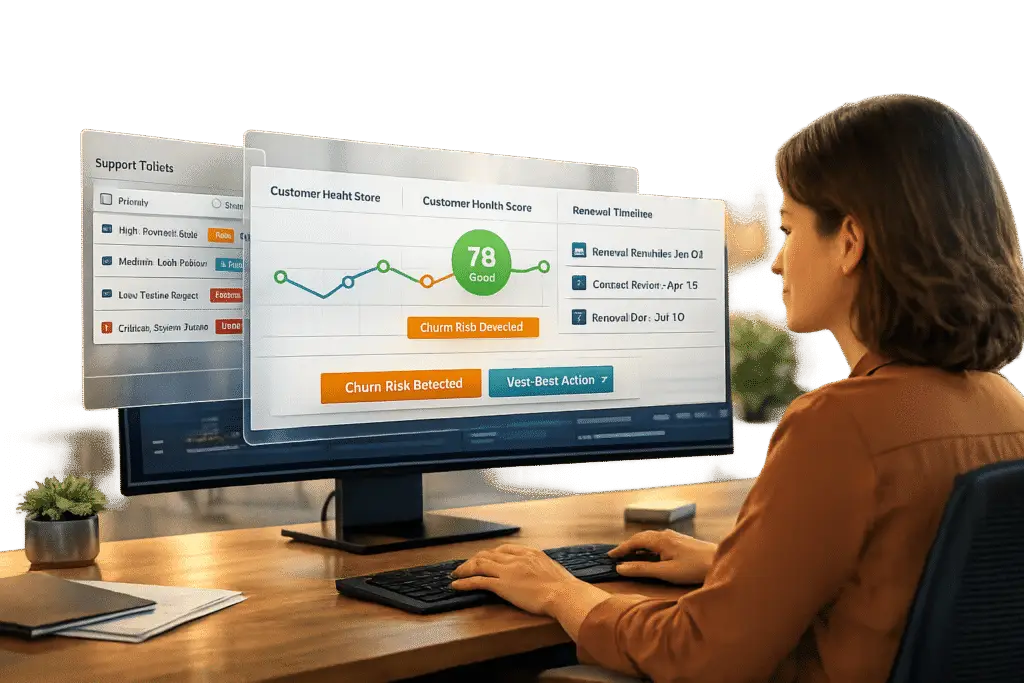
Customer Success teams often lack access to support ticket data, which creates blind spots in understanding customer challenges. This disconnect can lead to missed churn signals, ineffective communication, and lost opportunities for renewals. Here’s why ticket visibility matters and how it helps:
- Early Risk Detection: Support tickets reveal customer frustrations before they escalate into churn. Trends like increased ticket volume or unresolved issues can act as early warnings.
- Better Collaboration: Shared data between support and success teams ensures smoother handoffs and faster issue resolution.
- Informed Renewals: Access to ticket data allows Customer Success Managers (CSMs) to address technical challenges before renewal discussions, improving retention.
- Improved Metrics: Companies integrating ticket data report higher customer satisfaction (15-20%) and retention rates (10-15%).
To fix this, organizations can use integrated dashboards, AI-driven insights, and cross-functional workflows. These tools centralize data, automate alerts, and align team efforts, leading to stronger customer relationships and measurable outcomes.
Integration for Customer Success: Connecting Platforms for Better Workflows
sbb-itb-e60d259
The Problem: Data Silos Between Support and Customer Success
When Support and Customer Success teams work in isolation, crucial information gets trapped in separate systems. This lack of shared visibility leaves Customer Success Managers (CSMs) and support agents out of sync, creating a fragmented view of customer accounts. As a result, opportunities to address concerns early are missed, putting renewals and retention at risk. These silos also block teams from providing proactive and seamless support.
How Data Silos Hurt Customer Success Results
Imagine this: a customer seems to be thriving based on CRM data – great customer satisfaction scores, regular logins, and glowing quarterly business reviews. But behind the scenes, their support tickets tell a different story, full of unresolved technical frustrations. Without access to this support data, the CSM remains unaware of deeper issues brewing beneath the surface.
KNOCCS research highlights the impact of this divide:
"The artificial divide between customer support and customer success teams creates significant friction in the customer experience" [2].
This disconnect forces customers to repeat their concerns to different teams, creating a disjointed experience that erodes trust. It also makes the company seem unorganized and reactive. On the flip side, organizations that integrate support and success data report measurable benefits, including a 10% to 15% boost in net retention rates and a 15% to 20% improvement in customer satisfaction scores [2]. Companies that fail to bridge these silos lose out on these advantages, relying instead on incomplete and inconsistent data.
Common Problems Caused by Limited Ticket Access
When CSMs lack access to support ticket data, several challenges emerge. They miss critical patterns and signals, such as recurring issues or long periods of customer inactivity – both of which can indicate disengagement. For example, if a customer repeatedly reports the same technical issue and support marks it as "resolved" each time, the CSM might remain unaware of the larger, unresolved problem that needs a permanent fix. Similarly, an account that hasn’t submitted a support ticket in over 60 days might seem like they’ve mastered the product. In reality, they could be disengaging and quietly exploring alternatives [1].
Handoffs between teams also suffer when systems are disconnected. A technical issue with strategic implications – like a failed integration blocking a key use case – might be resolved by support without the CSM realizing the broader impact on the customer’s goals. These gaps slow down resolution and prevent teams from addressing the root causes of dissatisfaction. Closing these gaps is essential to using ticket data effectively for stronger renewals and improved customer satisfaction.
Benefits of Giving Customer Success Teams Access to Support Tickets
Giving Customer Success Managers (CSMs) direct access to support ticket data provides a real-time understanding of customer health, far surpassing the delayed insights of quarterly reviews.
Identifying At-Risk Accounts Before They Churn
Support ticket trends often act as early warning signs for potential customer churn. For instance, AI-driven sentiment analysis can flag changes in tone or rising frustration levels in customer interactions. A sudden surge – like a threefold increase in tickets over a week – might point to onboarding challenges or product issues. On the flip side, a lack of engagement, such as no ticket activity for over 60 days, could signal disengagement rather than contentment, especially if the customer was previously active.
By consolidating these indicators into a comprehensive health score, CSMs can act preemptively. Metrics such as ticket volume spikes, unresolved critical issues, and time-to-resolution trends feed into this score, enabling well-timed and targeted interventions. For high-value accounts, sentiment analysis weighted by Annual Recurring Revenue (ARR) can help prioritize executive attention, while smaller accounts may follow standard protocols. Monitoring a 30-day sentiment average and its variations – rather than isolated incidents – helps detect and address deteriorating relationships before they escalate.
This kind of proactive risk management naturally fosters better collaboration across departments.
Improving Collaboration Between Support and Customer Success
When support and customer success teams share the same data, they eliminate the common pitfalls of siloed communication. This shared visibility allows both teams to tackle complex issues that require both technical problem-solving and strategic relationship management.
Organizations that align these teams often see tangible results, such as a 25% to 30% reduction in resolution times for complicated cases. Additionally, team collaboration scores improve by 30% to 40% [2]. The secret lies in adopting shared metrics, like Customer Effort Score and Net Retention Rate, instead of relying on separate KPIs that can create conflicting priorities. Automated workflows further enhance collaboration by alerting CSMs to high-priority tickets or unresolved issues that exceed a set threshold, allowing them to step in before minor problems escalate into major account risks.
This seamless teamwork also enhances renewal strategies.
Using Ticket Data to Improve Renewals and Satisfaction
Access to support ticket data ensures that renewal discussions are informed and effective. Blind renewal conversations, where CSMs are unaware of ongoing technical issues, can be avoided. For example, prioritizing tickets based on contract renewal dates ensures that customers nearing renewal deadlines receive swift and efficient support. A customer grappling with unresolved issues 30 days before renewal doesn’t belong in the standard queue – they need immediate attention.
Recurring patterns in support tickets can also highlight broader onboarding or adoption challenges. Armed with this knowledge, customer success teams can offer tailored training sessions, addressing specific pain points. This integrated approach not only resolves issues faster but also strengthens renewal conversations, fostering long-term loyalty. Companies that align support and customer success teams often achieve a 10% to 15% boost in net retention rates and a 15% to 20% increase in customer satisfaction scores [2]. These gains come from weaving support metrics – such as resolution times, ticket frequency, and sentiment scores – into a holistic customer health model, creating a true 360-degree view of each account.
How to Enable Cross-Team Visibility into Support Tickets
Breaking down silos between teams requires tools like unified dashboards, AI-driven automation, and collaborative workflows.
Using Integrated Dashboards to Connect Support and CS Data
A 360-degree customer dashboard brings together all interactions – emails, chats, Slack messages – into one accessible interface for both support agents and customer success managers. This eliminates the hassle of jumping between systems. For example, when Wolseley adopted Supportbench‘s Customer 360 view in May 2025, their agents could seamlessly manage thousands of emails daily while gaining instant access to account history and service levels. Eilis Byrnes, Wolseley’s Customer Service Manager, shared:
"Supportbench has significantly improved our customer satisfaction rates. Our agents can now effortlessly manage thousands of emails daily, thanks to the platform’s ease of use and accuracy" [4].
With dashboards like these, escalation trends, customer health scores, and detailed interaction histories are all available in one place. This means a customer success manager preparing for a renewal call can easily review ticket volumes, resolution times, sentiment data, and even contract details – all without switching tabs. This unified approach ensures strategic discussions are grounded in a complete understanding of the customer’s experience.
Once this data is centralized, AI can take it even further by simplifying reporting and generating actionable insights.
Automating Reports and Insights with AI
Manually creating reports eats up valuable time that could be better spent engaging with customers. AI-powered platforms solve this by automatically generating predictive metrics like CSAT, CES, and sentiment scores [3]. Instead of waiting for survey results, customer success managers can view real-time satisfaction predictions and intervene early to prevent minor frustrations from escalating into churn.
AI also uncovers patterns that might otherwise go unnoticed. For instance, automated ticket summaries provide quick context without the need to sift through endless email threads. Natural language processing (NLP) identifies recurring issues across accounts, flagging larger problems that may need attention from the product team. If a customer submits the same issue multiple times, automated workflows can escalate it to engineering within 48 hours [4]. This proactive approach helps improve renewals while reducing churn.
Creating Cross-Functional Workflows to Align Teams
Centralized data and AI-driven insights lay the groundwork for workflows that keep support and customer success teams aligned. Automated workflows minimize the risk of issues falling through the cracks during team handoffs. For example, you can set up triggers to notify a customer success manager when a high-priority event occurs, like an executive raising a ticket or a resolution delay exceeding predefined limits [2].
Some organizations take this further by adopting "pod structures", where support and customer success teams collaborate closely with shared accountability [2]. A phased rollout can help refine these workflows: start with a specific customer segment, test the process, and then expand it across the organization [2]. To ensure alignment, focus on shared metrics like Net Retention Rate and Customer Effort Score instead of team-specific measures [2]. This approach strengthens collaboration and leads to better retention outcomes.
Measuring the Impact of Support Ticket Visibility
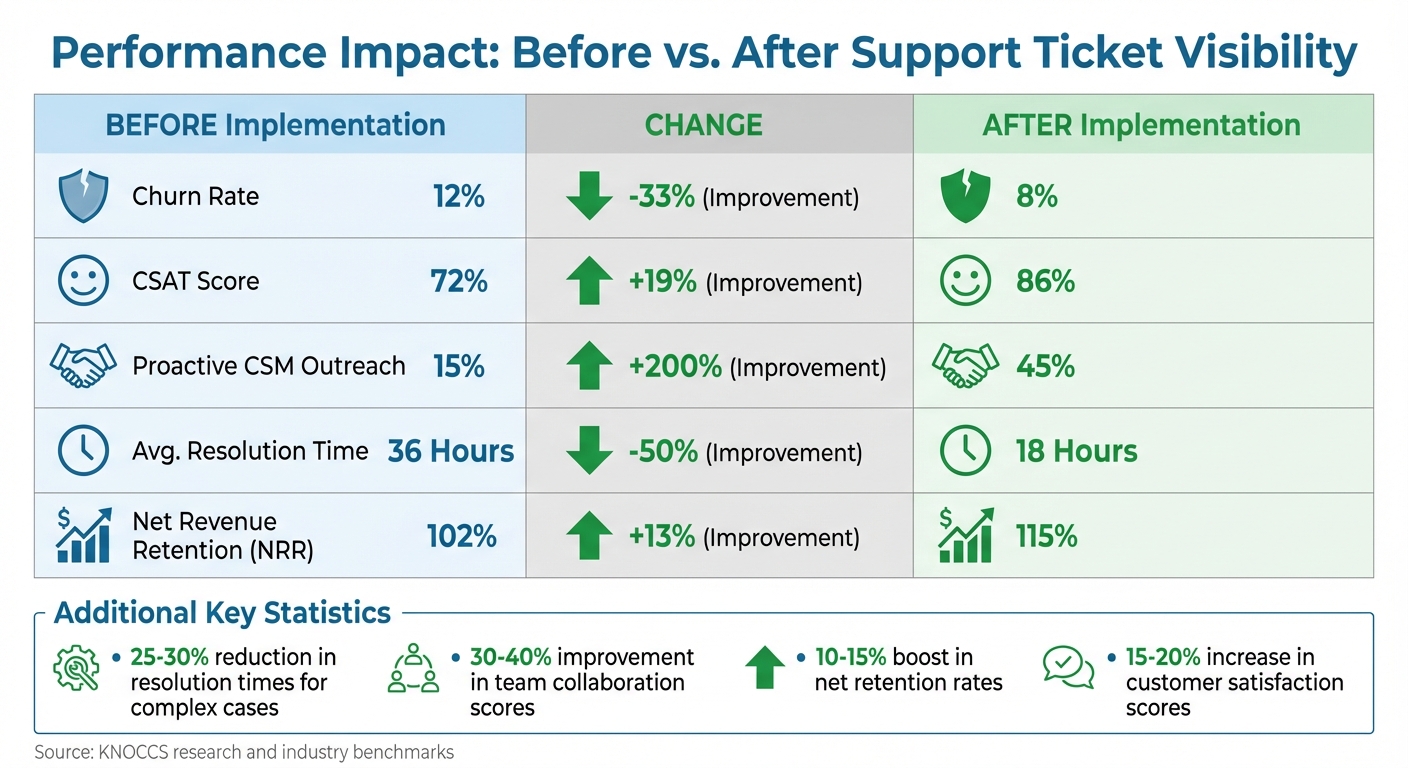
Impact of Support-CS Integration on Customer Retention and Satisfaction
When you improve cross-team visibility for support tickets, it’s essential to track the right metrics to confirm the impact on customer success. By focusing on specific data points, you can see if your teams are collaborating effectively and whether customers are experiencing better outcomes. As Eric Klimuk, Founder and CTO of Supportbench, explains:
"The best metrics don’t just track history – they change what happens next." [5]
Key Metrics to Track
Instead of simply counting tickets, focus on metrics that reveal outcomes. For example, integrating support metrics into customer health scoring can provide early warnings about customer dissatisfaction. Metrics like sentiment trends, ticket volume spikes, and critical issue counts can help you identify potential problems before they escalate into churn.
- Sentiment Trajectory: Track the 30-day average sentiment and its variation. One negative interaction might not mean much, but a steady decline in sentiment across multiple tickets could signal a serious issue. For instance, a threefold increase in tickets within seven days should prompt an executive-level review within 24 hours. On the flip side, zero tickets for over 60 days might indicate disengagement rather than satisfaction, calling for proactive outreach.
- Escalation Frequency: High escalation rates often point to issues with triage or documentation. Top-performing teams usually keep escalation rates under 5%, while rates exceeding 20% suggest deeper problems.
- Other Metrics: Keep an eye on First Contact Resolution (FCR), which should range between 70–79%, SLA compliance at 75–100%, Customer Satisfaction (CSAT) scores between 75–85%, and a Net Promoter Score (NPS) above 50. Scores above 70 are considered exceptional [5].
Additionally, weigh sentiment by account value to prioritize responses. For instance, a negative sentiment from a $500,000 account demands immediate attention, while the same sentiment from a $5,000 account might follow standard escalation protocols. These metrics provide a clear, data-driven foundation for evaluating and improving customer support.
Comparing Performance Before and After Implementation
Comparing key metrics before and after implementing ticket visibility can highlight areas of improvement. Here’s an example of typical results:
| Metric | Before Implementation | After Implementation | Change % |
|---|---|---|---|
| Churn Rate | 12% | 8% | -33% |
| CSAT Score | 72% | 86% | +19% |
| Proactive CSM Outreach | 15% | 45% | +200% |
| Avg. Resolution Time | 36 Hours | 18 Hours | -50% |
| Net Revenue Retention (NRR) | 102% | 115% | +13% |
With AI-powered insights, these metrics can shift from static weekly reports to dynamic, real-time dashboards. This allows customer success managers to act before SLA breaches occur. Segmenting metrics by customer group, product, or workflow can also help pinpoint where ticket visibility delivers the most value. This level of detail ensures resources are directed where they’ll have the greatest impact on retention and renewals [5].
Conclusion
Key Takeaways for CS and Support Leaders
Bringing support and customer success teams together can have a big impact on customer retention and growth. When customer success (CS) teams have access to support ticket data, they can identify potential churn risks, conduct more meaningful quarterly business reviews, and ensure technical issues don’t disrupt the value customers expect. The results? Faster resolutions – up to 25-30% quicker – along with a 15-20% boost in CSAT and a 10-15% improvement in net retention rates [2].
The secret lies in using a shared data source to create real, measurable outcomes. This approach prevents the frustrating context gaps that waste time and annoy customers. Majida Malik from KNOCCS sums it up perfectly:
"Customers see just one company – and they expect a seamless experience regardless of which team they’re interacting with" [2].
Aligning your teams around shared customer service metrics like Net Retention Rate and Customer Effort Score ensures everyone’s working toward the same goals, not competing ones. These strategies set the stage for immediate improvements.
Next Steps to Get Started
Now that you understand the benefits, it’s time to take action. Begin by conducting a data audit to map out where your customer data resides and how it’s currently shared between support and success teams. Pinpoint areas where data flow is disconnected, as these gaps often highlight your biggest opportunities for improvement [2].
To ease into this transition, consider starting with a pilot program. Focus on a specific customer segment and pair dedicated support and success team members to manage the same accounts. Use tools like automated alerts to notify customer success managers (CSMs) about unresolved high-priority issues. Modern AI-powered platforms can simplify this process by offering integrated dashboards and real-time insights, eliminating the need for manual tracking [2].
Finally, secure buy-in from leadership early on. As noted earlier, aligning support and CS requires strong executive backing to address internal pushback and ensure both teams have the resources they need to succeed [2]. The payoff? Better retention, happier customers, and stronger collaboration across teams.
FAQs
What support ticket signals best predict churn?
Key signals from support tickets that can help predict churn include high effort scores (CES), frequent escalations, negative sentiment, noticeable behavioral changes (like slower response times or canceled meetings), and payment-related issues. These signs often point to friction, dissatisfaction, or disengagement, giving teams the opportunity to step in early and resolve concerns before they grow into bigger problems.
How do we share ticket access without risking customer data?
To share support tickets securely, it’s essential to use controlled access methods. Techniques like role-based permissions, data masking, and filtered views ensure that only the necessary details are visible to authorized team members. Additionally, automated reporting tools can create anonymized summaries that focus on trends and key metrics without revealing sensitive information. By combining these approaches, you can maintain effective ticket visibility while prioritizing data privacy.
What’s the fastest way to pilot Support–CS visibility?
To quickly improve visibility between support and customer success (CS) teams, AI-powered reporting tools are your best bet. These tools make it easy to bring support data into one centralized dashboard. Key metrics to focus on include ticket volume, resolution times, customer sentiment, and health scores.
With real-time dashboards and automated data analysis, teams can spot at-risk accounts, work together more effectively, and take quick action to boost customer satisfaction – all without a complicated setup process.
Related Blog Posts
- How do you report on renewals risk using support data (and what metrics matter most)?
- How do you decide what belongs in Support vs Customer Success?
- How do you detect “silent churn” using support signals (before Success notices)?
- How do you run renewal-risk reviews using support data (without annoying CS)?






