


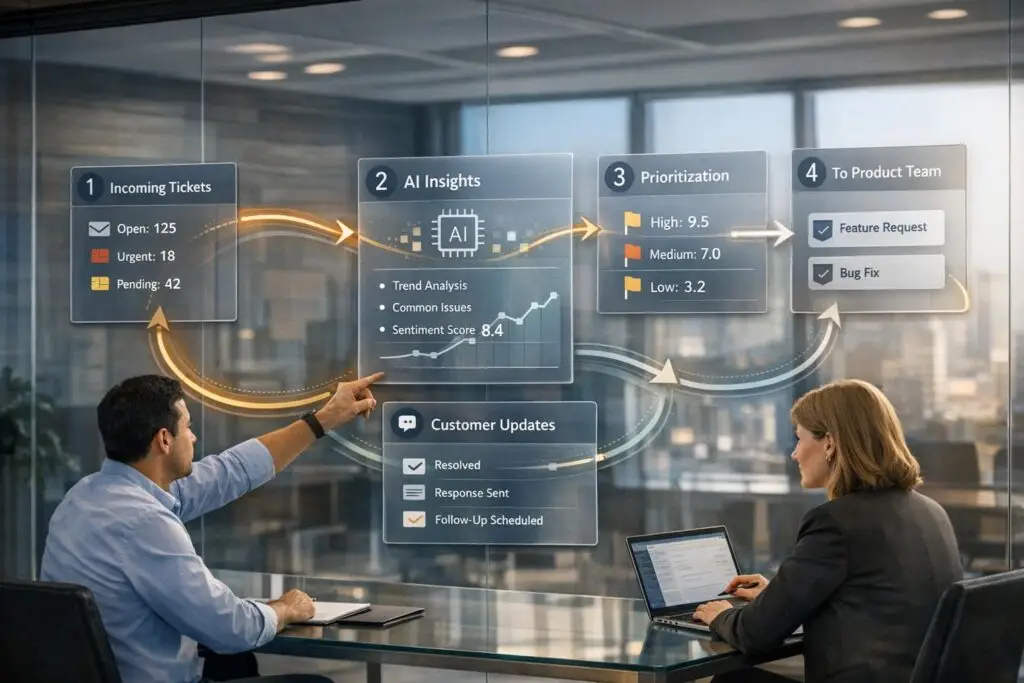
When customer support and product teams operate in silos, critical insights from user feedback often get lost. This disconnect leads to unresolved issues, wasted time, and missed opportunities to improve your product. A structured feedback loop bridges this gap by turning support tickets into actionable data for your product team. Here’s how it works:
- Centralize Feedback: Gather input from all channels (emails, chats, social media) into one system for a unified view.
- Organize and Analyze: Use AI tools to categorize and prioritize issues by frequency, severity, and revenue impact.
- Route Feedback Efficiently: Automate workflows to ensure the right teams get the right data quickly.
- Close the Loop: Notify customers when their feedback leads to updates, boosting trust and loyalty.
This process saves time, reduces support costs, and ensures your product roadmap aligns with what users truly need. By following these steps, you can transform your feedback system into a powerful tool for driving product improvements and customer satisfaction.
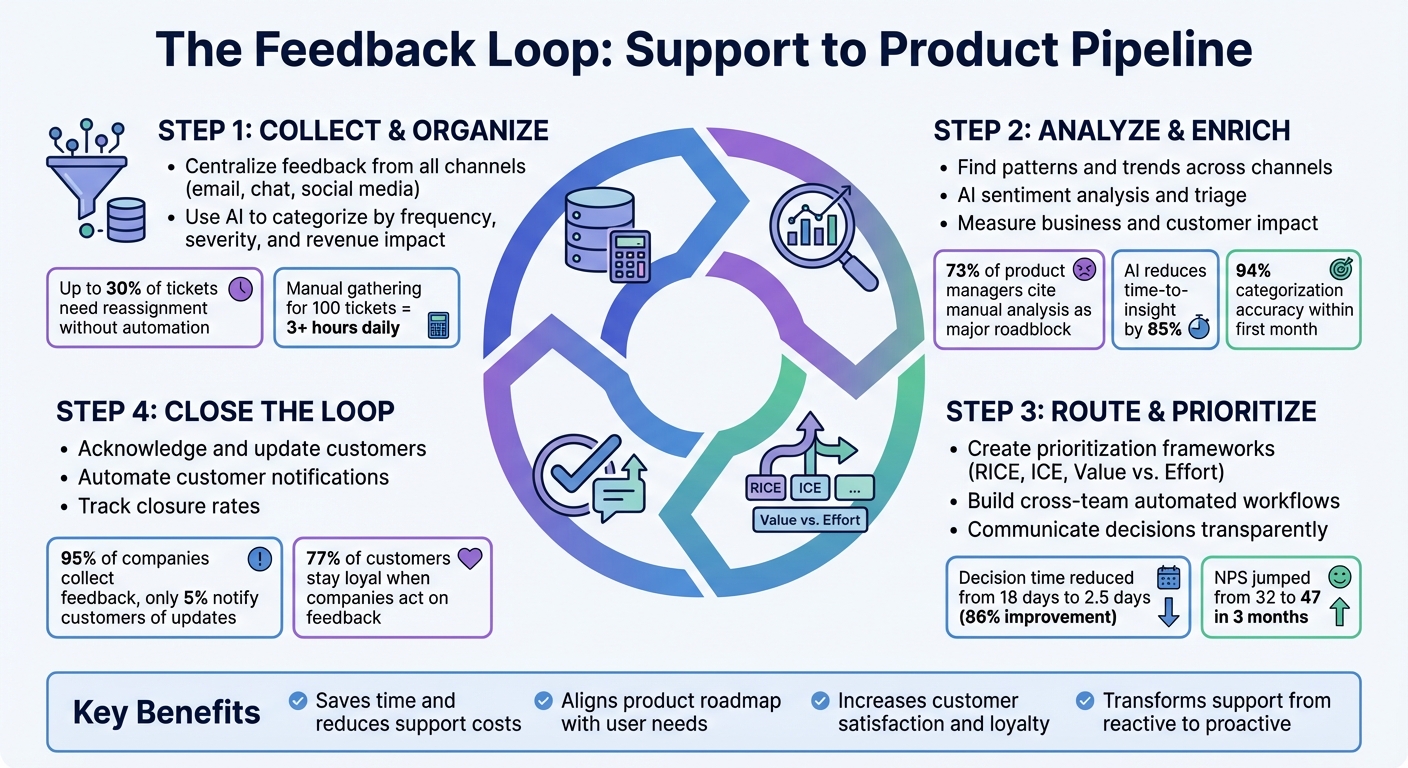
4-Step Feedback Loop Process: From Support Tickets to Product Improvements
Step 1: Collect and Organize Support Feedback
Centralize Feedback from All Channels
Customer feedback often lives in silos – email threads, chat logs, social media mentions, and escalation tickets – making it hard to see the bigger picture. The first step to solving this is consolidating all feedback into a single platform. Using a ticket ingestion system, you can pull data from your support platform, chat tools, community forums, and social channels, then standardize the formats for consistency [6][3]. This gives your team a unified view of every customer interaction. To add even more context, you can integrate CRM, billing, and product analytics. This way, you can connect feedback to details like subscription tier, monthly recurring revenue (MRR), and usage patterns [3].
For instance, instead of just seeing a generic complaint, you might identify that a $50,000 MRR enterprise customer has reported payment issues three times in a single month. That kind of insight is invaluable when deciding what to prioritize.
Once your data is centralized, the next step is to make sense of it through consistent classification.
Tag and Categorize Issues
Centralizing data is only the beginning – you also need to organize it. Simple keyword searches won’t cut it. Instead, use semantic categorization to group feedback by intent rather than just specific words [6]. Common categories might include bugs, feature requests, usability issues, billing problems, or account access questions [3][9].
AI-powered tools, like Natural Language Processing (NLP), can make this process more efficient by analyzing both the content and sentiment of tickets. This ensures consistent and accurate classifications.
"AI ensures that tickets are classified based on their actual content, leading to much cleaner and more reliable data for reporting, trend analysis, and identifying areas for product or process improvement." – Nooshin Alibhai, Founder and CEO of Supportbench [8]
To keep things manageable, stick to 3–5 tag types, such as:
- Theme: API, Dashboard, Onboarding
- Customer Segment: Enterprise, SMB
- Priority: Quick Win, Strategic [9]
When you find duplicate requests, track how often they occur by incrementing a vote count. This helps quantify demand. Without proper automation, up to 30% of tickets may need reassignment, causing an average delay of 15 minutes per ticket [3]. By organizing feedback this way, you turn raw data into actionable insights that can guide product decisions.
Prevent Data Fragmentation
Even after categorizing feedback, fragmented systems can still keep you from seeing the full picture. If feedback is scattered across tools, identifying patterns becomes a time-consuming task. For example, manually gathering context for 100 tickets can take over three hours each day [3].
The solution? Create a unified view of your data. This can be done by building dashboards or materialized views that combine support tickets with CRM data, billing information, and product usage metrics [3]. With this setup, you can instantly tell whether an issue is affecting a high-value enterprise customer or someone on a free trial. That context is critical for making prioritization decisions.
Companies that centralize their data like this are 2.5 times more likely to deliver features that users actually want [10]. A unified view not only saves time but also ensures that your product strategy aligns with customer needs, especially for your most important users.
How to Leverage the Customer Feedback Loop for Your Product’s Roadmap
Step 2: Analyze and Enrich Feedback Data
Once feedback is organized, the next step is turning that data into actionable insights that guide smarter product decisions.
Find Patterns and Trends
By aggregating feedback across channels, you can uncover recurring issues that might otherwise go unnoticed. For instance, complaints about "slow performance" in email tickets might correlate with mentions of "app lag" in App Store reviews – but only if you analyze the data holistically [12][5].
To make sense of the data, normalize it by standardizing text (like removing special characters) to group related issues. AI tools can help by clustering similar feedback – such as "App is slow" and "Performance issues" – saving time and effort [12]. This is crucial since 73% of product managers cite manual feedback analysis as a major roadblock to timely decisions [12].
Set clear thresholds to identify problems. For example, you might flag any category with more than 15 tickets per week or prioritize high-severity issues affecting enterprise customers [5]. Track deviations by comparing current ticket volumes to a three-week rolling average. A spike of 20-30% or more is a clear signal to dig deeper [1].
To streamline this process, leverage pre-aggregated analytics views. These automatically compute metrics like ticket volume, resolution times, and satisfaction scores on a daily or weekly basis, eliminating the need for manual exports. This allows you to spot trends – like a sudden 340% jump in API error mentions – within hours instead of days [12].
Once a trend is identified, conduct a root cause analysis to separate symptoms (what customers experience) from the underlying problem. This ensures long-term fixes rather than quick patches [5]. Include specific ticket IDs and customer quotes to clarify the issue at its core [5]. These insights also enable faster, AI-driven triage.
Use AI for Sentiment Analysis and Triage
Manual triage is time-consuming. On average, agents spend two minutes per ticket, which adds up to 3.3 hours daily for just 100 tickets [3]. AI can eliminate this bottleneck by enriching tickets with essential data upfront.
Sentiment and intent detection powered by AI goes beyond simple keyword matching. It can interpret emotions like frustration or urgency, detect sarcasm, and identify specific intents such as billing questions, technical issues, or feature requests [12][3]. This level of nuance ensures accurate triage and prioritization.
AI also generates priority scores by analyzing factors like keywords ("critical", "broken"), customer value (enterprise tier or high MRR), historical data (repeat issues, low satisfaction), and system status (ongoing outages) [3]. These scores help teams focus on high-value customers with pressing problems.
"Early detection of patterns could prevent 80% of escalations, but manual triage makes pattern detection impossible." – Pylar [3]
AI’s categorization accuracy can hit 94% within the first month, and teams using AI for feedback analysis reduce their time-to-insight by 85%, cutting weeks down to hours [12]. Statistical anomaly detection further enhances this process by identifying spikes in specific issues – like API timeout errors jumping from 5 to 30 tickets per day – before they escalate into major crises [1].
AI also enriches tickets with contextual data from CRM and billing systems. This means agents can instantly see a customer’s plan, MRR, usage history, and satisfaction scores, removing the need for manual lookups [3]. With this full context, teams can quickly address issues that matter most.
Measure Business and Customer Impact
To prioritize effectively, assess both financial and customer impacts. Start by tracking revenue at risk – the MRR or ARR tied to customers reporting issues or showing churn signals [12][1]. For instance, if five enterprise customers with a combined MRR of $150,000 report the same bug, that issue should take precedence.
Calculate support cost savings to justify product updates. In one example, Front, a customer operations platform, noticed an 85% rise in manual requests for inbox ownership transfers over a quarter. A proposed self-serve UI feature saved the company between $30,000 and $57,000 annually while improving customer efficiency [2].
On the customer side, track issue frequency and volume to identify widespread pain points. If 45% of users report the same problem, it’s a clear signal to act [13]. Monitor NPS and CSAT changes after updates to see if satisfaction improves [12][4]. Use sentiment and urgency scores to flag at-risk customers who might need immediate attention [12][3].
Develop an impact scoring framework to prioritize issues. For example, classify them as Critical (Score 60+), High (40-59), Medium (20-39), or Low (<20) based on customer value, severity, and frequency [3]. This ensures your roadmap aligns with both business goals and user needs.
In early 2026, a mid-market SaaS company with eight product managers adopted an AI feedback analysis system to handle 2,500 feedback items monthly. Within three months, they cut decision-making time from 18 days to 2.5 days – an 86% improvement. During the same period, their NPS jumped from 32 to 47, and the team reported a 40% reduction in burnout [12].
Step 3: Route and Prioritize Feedback for Product Teams
After analyzing feedback and spotting trends, the next step is to ensure that this information gets to the right teams quickly and efficiently. Without a clear system, important insights can vanish into email chains, Slack messages, or endless spreadsheets. This step focuses on delivering prioritized feedback to product teams with all the necessary context. By automating routing and prioritization, you can save time and improve responsiveness in AI-driven support workflows.
Create Prioritization Frameworks
To help product teams decide what demands immediate action and what can wait, establish a consistent prioritization method. A weighted scoring model works well here. For example:
- Impact: 35%
- Urgency: 25%
- Customer Value: 20%
- SLA Risk: 10%
- Sentiment: 10%
Each factor gets a score from 1 to 5, which is then multiplied by its assigned weight to generate an overall priority score.
Alternatively, you can use frameworks like the Value vs. Effort Matrix, which divides feedback into four categories:
- Quick Wins (high value, low effort)
- Big Bets (high value, high effort)
- Fill-ins (low value, low effort)
- Money Pits (low value, high effort)
For teams that prefer numbers, the RICE framework evaluates feedback based on Reach (how many customers it impacts), Impact, Confidence, and Effort. The simpler ICE framework skips the Reach element for a leaner approach.
Once you’ve scored the feedback, define priority levels with clear response timelines. For instance:
- P0 Critical issues (e.g., security vulnerabilities or blockers for key accounts) might require a 10-minute response and a 2-hour resolution.
- P3 Low-priority issues (general suggestions or minor bugs) could allow for a 1-day reply and up to 5 days for resolution [14].
Clear guidelines like these ensure teams act consistently and avoid unnecessary delays.
"Consistency beats heroics. A clear, daily-applied prioritization rubric keeps customers satisfied and loyal." – Typewise [14]
Build Cross-Team Workflows
Manual handoffs between support and product teams can lead to miscommunication and lost feedback. An automated triage pipeline simplifies this process by moving feedback through four critical stages:
- Ingestion: Collecting tickets from various sources.
- Enrichment: Adding extra details, such as CRM data or billing info.
- Scoring: Applying your prioritization model to rank issues.
- Routing: Assigning tickets to the correct team [3].
Accurate routing depends on intent classification. Using AI tools or SQL-based logic, tickets can be categorized into groups like billing issues, technical bugs, feature requests, or account problems. This ensures that each issue reaches the right team quickly, cutting support costs while improving efficiency.
To avoid losing details during handoffs, enable bidirectional synchronization between tools. For example, updates like status changes and comments should flow seamlessly between platforms without manual intervention [11]. This allows support teams to track progress without leaving their primary workspace.
Finally, link feedback directly to delivery artifacts. Every bug report or feature request should connect to a specific Epic, PRD, or ticket in your project management system [4]. This ensures product teams can trace each action back to customer input, keeping insights actionable and relevant.
Communicate Prioritization Decisions
Once workflows are in place, clear communication about prioritization decisions keeps everyone on the same page and builds trust. Set up a feedback river – a central hub where all inputs (support tickets, sales notes, NPS responses) are aggregated and tracked with transparent statuses [4].
Hold a weekly 30-minute triage meeting with representatives from product, support, and engineering. This gives support teams a chance to ask questions, understand why certain issues are prioritized, and stay informed about upcoming updates [4].
Implement a 72-hour triage SLA for new feedback. This doesn’t mean every issue will be resolved in three days. Instead, it ensures that each ticket is reviewed, prioritized, and a decision is shared within that window. For more complex issues, aim for a two-week review cycle.
When a new feature ships, follow up with the customer who provided the original feedback. Share a link to the new functionality and ask if it solves their problem. This small gesture demonstrates that their input matters. In one case study, this approach reduced churn by 25% and boosted NPS scores by 15% in just two months [7].
sbb-itb-e60d259
Step 4: Close the Loop with Customers
After using feedback to improve your product, the final – and often overlooked – step is reconnecting with your customers. Letting them know their input resulted in changes isn’t just courteous; it’s a way to stand out. While 95% of companies have a feedback system in place, only 5% actually inform customers when their suggestions lead to product updates [15]. That gap is a golden opportunity to build trust and loyalty. This step not only completes the feedback loop but also strengthens your relationship with customers.
Acknowledge and Update Customers
Keep customers in the loop at three critical points: when their feedback is received, when it’s prioritized for development, and when the update is live. These touchpoints reinforce that you value their input. When notifying customers about a shipped update, include the specific feedback they provided, a link or screenshot of the new feature, a thank-you message, and an invitation to try it out [15].
Not every suggestion will make it into the product, and that’s okay. When declining a feature request, be upfront about why. Share the reasoning, whether it’s due to trade-offs, alignment with your product vision, or other priorities [16]. Customers value honesty more than silence. In fact, 77% of customers stay loyal to companies that act on their feedback [7]. Even when the answer is "no", clear communication builds trust.
"Closing the loop shows customers that you’ve heard them and built what they asked for." – Kareem Mayan, Co-founder, Savio [15]
Automate Customer Updates
After acknowledging feedback, use automation to ensure consistent communication. Manually following up can lead to errors and inefficiencies, like copying emails from spreadsheets. Instead, set up status-based triggers in tools like Jira or Linear. For example, when a feature is marked as "Shipped", automatically notify the person handling customer communication [15]. This ensures no updates slip through the cracks.
Automated emails can still feel personal. Include details like the customer’s name and the specific request they made. Routine confirmations should go out within 24 hours of receiving feedback [15] [17], so customers aren’t left wondering if their input was acknowledged. For high-priority accounts, consider sending a tailored note that directly references their feedback and explains how the update addresses their needs [17].
To keep everyone aligned, BCC your CRM system on automated updates [15]. This prevents duplicate messages and ensures all teams are on the same page. By blending automation with thoughtful personalization, you can efficiently close the loop while maintaining the human touch that fosters loyalty.
Use AI to Automate the Feedback Pipeline
Integrating AI into your feedback pipeline can transform how data is processed, making it possible to handle vast amounts of feedback almost instantly. While manual reviews typically cover just 1% of support tickets, AI can analyze 100% of feedback in minutes. For teams managing thousands of tickets weekly, this means faster triage, smarter prioritization, and a more complete picture for product teams to work with [19][21].
AI-Powered Categorization and Summaries
AI leverages Natural Language Processing (NLP) to classify unstructured feedback into categories like Bugs, Feature Requests, UX Issues, or Pricing. It can even detect subtle emotions and assign urgency levels, helping teams quickly identify critical issues or high-risk customers [21][22]. For instance, one SaaS company found that 30% of its negative feedback stemmed from a single UI element. Fixing that issue led to a 30% increase in user satisfaction scores [19].
AI also eliminates the need to manually sift through long support tickets by summarizing thousands of interactions [20][21]. In July 2025, Tinybird engineers created a system that grouped support events into threads, ranked the top 20 by reply count, and used a language model to generate a weekly Slack report. The report highlighted the top five customer issues by severity and included links to the most critical threads. This setup saved product managers from digging through Slack and emails, aligning support insights directly with strategic decisions. Categorized feedback is then routed to the right teams – bugs to Engineering, feature requests to Product Management, and so on [18][20].
"AI in feedback analysis is the key to unlocking the true value hidden within your customer conversations." – Nitin Agarwal, Managing Director, WildnetEdge [19]
By automating these processes, AI strengthens the feedback loop, turning raw data into actionable insights.
Automated Reporting and Dashboards
Real-time dashboards powered by AI bridge the gap between feedback collection and action. Tools like Pylar use language models to create executive summaries that highlight trends, patterns, and recommendations for leadership [1]. Similarly, SenseFeedback provides instant insights into sentiment and trends across channels, processing feedback 95% faster than manual methods [23]. ClosedLoop AI offers "Intelligence Briefs" that track trends over time, helping teams monitor whether issues are escalating or subsiding [24].
These tools make it easier to act on feedback. For example, in 2025, ezCater implemented Level AI‘s Real-Time Agent and Manager Assist, enabling agents to quickly access over 1,000 knowledge base articles. This reduced call handling time by 13%, cut hold times by 23% during peak hours, and ensured 94% of calls were answered within 30 seconds [22]. Similarly, a buy-now-pay-later provider used Level AI‘s Voice of the Customer insights to prepare for Black Friday. By deflecting an estimated 500,000 calls, they limited their call volume increase to just 6%, compared to the usual 150% surge during the holiday season [22].
Pre-computed aggregations and webhook-based workflows keep dashboards running smoothly, even with large datasets. These workflows can trigger immediate alerts for urgent issues like churn risks or blocking bugs [25]. The goal isn’t to replace human decision-making but to arm teams with the tools and speed they need to make better, faster decisions.
Common Mistakes and How to Avoid Them
Building a feedback loop is one thing – keeping it effective is another. Several common missteps can derail the process, wasting time and eroding trust in the system. Issues like scattered feedback, inconsistent tagging, and failing to follow up with customers can leave teams frustrated and disengaged.
Fragmented Feedback Sources
When feedback is scattered across different platforms – Slack, email, CRM notes, support tickets – it’s like trying to solve a puzzle with missing pieces. Important trends get lost, and teams waste hours piecing together context from multiple systems. The fix? Centralize your feedback. Create a unified "feedback river" – a single, searchable stream where all input flows together. Whether through a dedicated tool or a custom setup, this approach lets product managers quickly access and analyze customer insights without digging through multiple platforms [9].
Inconsistent Categorization
If feedback isn’t categorized consistently, even the best insights can lose their value. For example, when one agent marks an issue as "low priority" while another flags the same issue as "critical", important problems can slip through the cracks [3][26]. To prevent this, start with a small, clearly defined set of categories – 5 to 7 insight types and 8 to 12 product areas. Document each category with examples, and use decision trees to handle ambiguous cases. For instance, label broken functionality as a "bug" and missing features as a "feature request." This ensures everyone on the team speaks the same language when tagging feedback.
"Inconsistent categorization destroys usefulness." – Pelin Blog [26]
Failing to Close the Loop
Nothing frustrates customers more than feeling like their feedback disappears into a void. Ignoring feedback not only disengages customers but also hinders support teams from properly following up [9]. A great example comes from Front in April 2025. Lemuel Chan, a Support Operations Analyst, noticed an 85% spike in requests for manual inbox ownership transfers within one quarter. In response, the team launched a self-service UI feature, saving the company an estimated $30,000 to $57,000 annually in support costs [2]. But what made the difference? They went beyond just launching the feature – they proactively notified every customer who had requested it.
To maintain engagement, set up automated notifications to inform customers when their feedback is marked as "Planned" or "Shipped." Aim for a closure rate above 90% to show customers their input matters and to keep the feedback loop alive [9].
Addressing these challenges will help you build a feedback pipeline that not only collects insights but also turns them into meaningful product improvements.
Conclusion
A structured feedback loop transforms support feedback into actionable product improvements. By centralizing input from all channels, applying AI-driven analysis, and prioritizing through clear frameworks, you shift from guessing customer needs to building a roadmap grounded in real insights [4]. This approach improves CSAT scores, reduces duplicate requests, and significantly shortens resolution times [4].
The real game-changer lies in early pattern detection. Automated systems allow teams to address issues proactively, evolving your support team from a reactive unit into a forward-thinking intelligence hub [1][3]. While AI handles triage and sentiment analysis, product managers can focus on strategic planning [1].
For these efforts to resonate, the feedback loop must deliver visible results to customers. Closing the loop is critical. When customers see their suggestions lead to actual features – and receive direct updates about it – you foster trust that drives loyalty. High-performing teams aim for a closure rate exceeding 90% and inform requesters within seven days of a product release [4][9].
"A resilient product operations feedback loop keeps your roadmap tethered to real customer needs. Without it, teams ship in the dark and chase noise." – Lauren, Sleekplan [4]
The distinction between guessing and knowing what customers want boils down to having the right infrastructure. By following the four key stages – Collect, Analyze, Implement, and Follow Up – you turn ticket data from a challenge into a strategic advantage [4]. Support teams become more effective, product teams gain clarity, and customers feel heard and valued.
Start with a focused pilot program, scale efficiently with automation, and ensure every customer input receives acknowledgment. An AI-powered feedback pipeline sets the stage for continuous, customer-driven innovation.
FAQs
What’s the simplest way to start a feedback pipeline without new tools?
The easiest method is to tap into the channels you already use, such as support tickets, emails, chats, and surveys. Regularly gather feedback from these sources and analyze it, either manually or with basic automation. For example, you can use AI tools to summarize the data or implement simple automated surveys (like CSAT scores) right after resolving a ticket. This lets you build a feedback loop using your existing systems, avoiding the need to invest in new platforms.
How do we fairly score support issues for product priority?
Fairly scoring support issues to determine product priority requires a balanced approach that considers multiple factors like customer satisfaction, revenue implications, and alignment with business goals. AI tools can play a key role here by automating the prioritization process. For instance, they can analyze ticket volume, customer sentiment, and the overall impact on users.
To make the process even more effective, issues should be categorized based on their recurrence, urgency, and severity. This method assigns priority levels using measurable data rather than subjective opinions, ensuring a more impartial and consistent approach. By doing so, support teams can align their efforts with broader strategic objectives while maintaining fairness and efficiency.
How can we close the loop at scale without spamming customers?
To manage the feedback loop effectively and avoid overwhelming customers, leverage automated processes to focus on actionable insights while keeping the customer experience in mind. AI-powered tools can streamline tasks like ticket tagging, summarizing, and prioritizing, ensuring that only the most relevant issues are addressed. By maintaining regular and targeted communication based on the impact on customers, you can foster meaningful interactions without overloading them. This approach encourages valuable feedback while avoiding excessive outreach. Automation and segmentation play a crucial role in sustaining a well-functioning feedback loop.
Related Blog Posts
- How to Manage Customer Support Across Multiple Products with Different Complexity Levels
- Customer Feedback Loop: How to Collect, Analyze, and Act on Feedback
- How do you identify the top ticket drivers and turn them into a Product backlog?
- How do you build a “Customer Issues to Product” pipeline that Product actually uses?






