


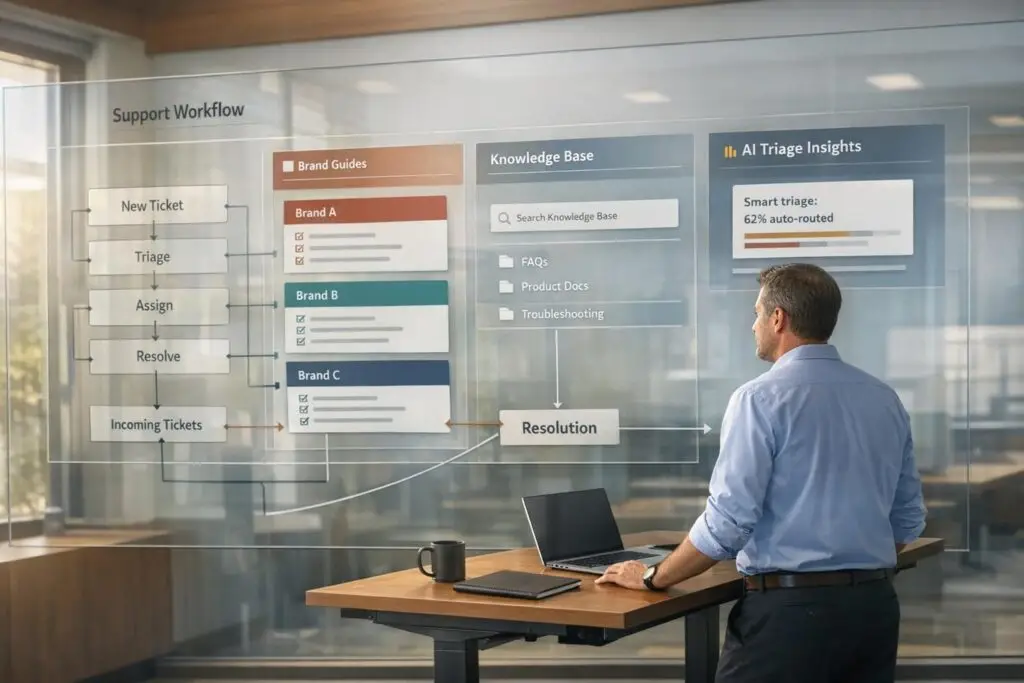
Supporting multiple brands under one organization is challenging but manageable with the right approach. The key lies in balancing efficiency with maintaining each brand’s unique identity. Here’s how you can do it:
- Standardize core workflows: Processes like ticket routing, escalation, and performance tracking can be streamlined across all brands.
- Customize for each brand: Tailor service level agreements (SLAs), communication styles, and customer preferences to match individual brand identities.
- Leverage AI tools: Automate repetitive tasks like ticket triaging, routing, and knowledge base suggestions to save time and improve accuracy.
- Centralize data: Consolidate customer information into a single system to eliminate silos and improve decision-making.
- Organize knowledge bases: Create brand-specific content while keeping management centralized for easy updates and access.
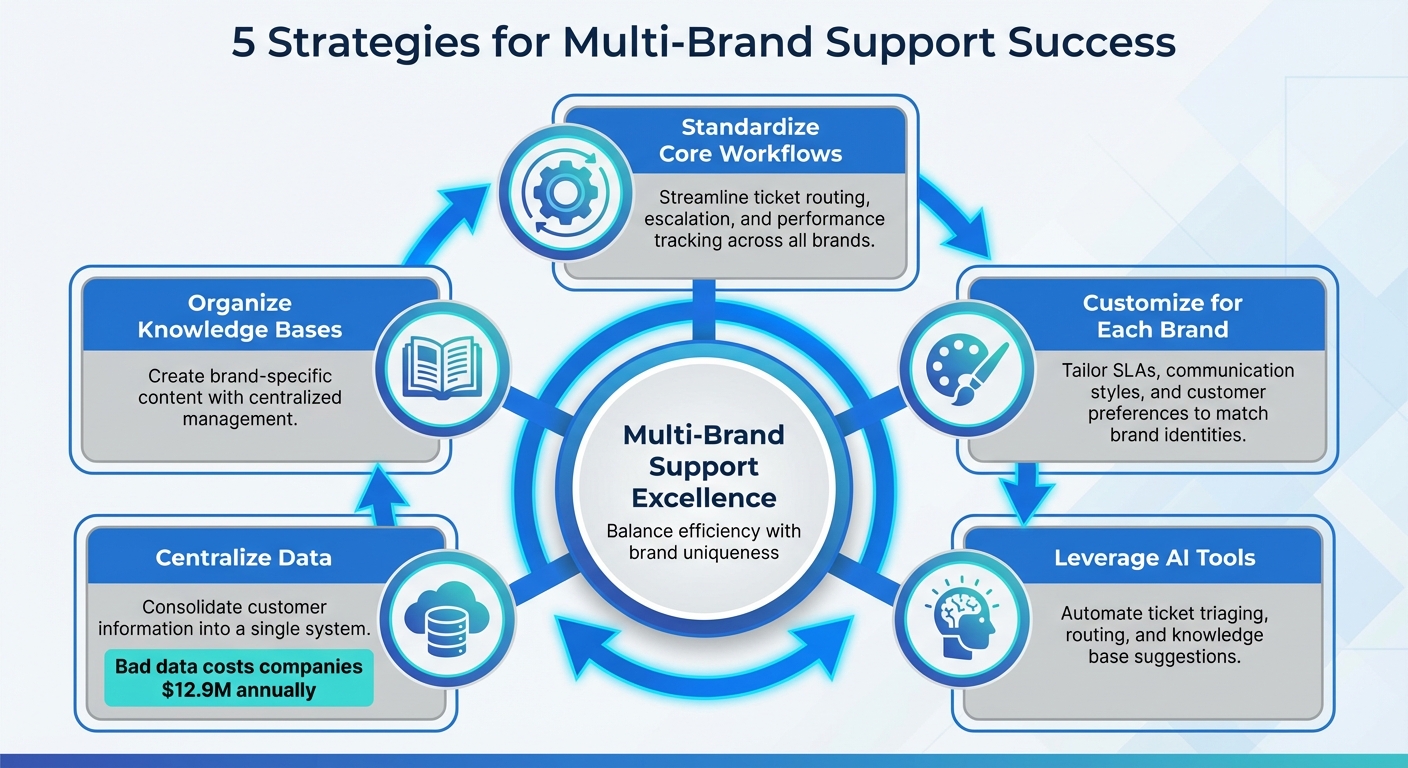
5-Step Multi-Brand Support Strategy Framework
Evaluating Your Current Multi-Brand Support Setup
Before making improvements to your multi-brand support system, it’s crucial to take a step back and assess how things are currently running. This means identifying where processes can be standardized and where customization is necessary. Doing so helps you pinpoint inefficiencies, like duplicated efforts, and understand where tailoring processes actually benefits your brands.
The goal here isn’t to make everything identical. Instead, it’s about finding the sweet spot between operational efficiency and maintaining each brand’s unique identity. Skipping this step can lead to rigid systems that frustrate customers or disorganized workflows that overwhelm your support teams.
Find Common Workflows Across All Brands
The truth is, most support operations share a lot of similarities. Core processes like ticket routing, escalation protocols, and performance reporting tend to follow the same general structure across brands, even if the finer details vary [5]. By standardizing these core elements, you can streamline operations while still allowing for brand-specific adjustments.
For instance, you can automate ticket routing using brand-specific email tags. Similarly, while service level agreements (SLAs) might differ between brands, the underlying escalation process – such as moving tickets between tiers or flagging SLA breaches – can rely on a unified set of business rules [4].
Metrics like ticket volume, first response time, and CSAT, CES, and NPS scores should also be standardized. These provide a consistent way to measure the overall health of your support operations [4][2].
Once you’ve nailed down the shared workflows, it’s time to focus on what sets each brand apart.
Document Brand-Specific Needs
Every brand has its own personality and customer expectations. Factors like SLAs, communication styles, and customer preferences can differ significantly, especially if your brands cater to different market segments [4]. Documenting these unique elements ensures your agents are equipped to deliver the right experience for each brand.
"If you don’t have someone already, assign someone to act as admin for the brands, someone who can liaison between multiple stakeholders while also performing the more operational tasks needed." – Hilary Dudek, Head of Customer Experience, Gamma [1]
To keep everything organized, create internal Brand Guidelines. These should outline each brand’s tone of voice, escalation thresholds, and any special handling requirements [4]. Store these guidelines in a centralized knowledge base that all agents can access easily – don’t let them get lost in emails or scattered across messaging platforms. Assign a dedicated brand admin to manage these resources and serve as the go-to person for brand-specific questions [1].
With workflows standardized and brand-specific needs documented, the next step is to address gaps in your operational data.
Identify Operational Gaps and Data Silos
After mapping workflows and brand-specific requirements, take a close look at your data infrastructure. Data silos – where information is stored in separate, disconnected systems – can block your ability to see the full picture.
Data silos are a costly problem. In fact, bad data costs companies an average of $12.9 million annually [7]. And 69% of professionals believe that software centralization is the key to resolving these issues [7].
Start by conducting a data audit. Identify where customer data is stored, who owns it, and which teams are struggling due to limited access to critical information [6]. Pay attention to situations where different departments are pulling conflicting reports because they rely on isolated data sources – what some call "dueling dashboards" [7].
Moving to a Single Source of Truth (SSOT) isn’t just about adopting new tools. It also requires strong data governance and clear accountability for data sharing [6][7]. Use ETL (Extract, Transform, Load) pipelines to automatically gather, clean, and integrate data from various brand-specific systems into a central repository [6][7].
"With Improvado, we now trust the data. If anything is wrong, it’s how someone on the team is viewing it, not the data itself. It’s 99.9% accurate." – Tyler Corcoran, Marketing Analytics Manager, Booyah Advertising [6]
sbb-itb-e60d259
Building Standard Processes That Respect Brand Differences
After mapping out your workflows and pinpointing what sets each brand apart, the next step is crafting processes that work across all brands while preserving their individuality. The aim is to establish a standardized operational framework that can adapt to the specific needs of each brand.
Standardized processes help streamline operations, while thoughtful customizations maintain the distinct customer experience each brand offers. While core support processes remain consistent, customer-facing elements are tailored to reflect the unique identity of each brand.
This approach delivers two major advantages: your support team becomes more efficient by avoiding entirely different systems for each brand, and customers continue to enjoy the authentic brand experience they expect. The challenge lies in striking the right balance between standardization and customization.
Set Up Unified Ticket Intake and Escalation Rules
A unified ticket intake system can automatically identify and route requests by brand. While the underlying routing logic remains the same, the outcomes are tailored to each brand.
- Automated triage by channel ensures tickets are tagged and assigned accurately using routing rules [5]. For instance, emails sent to support@brand-a.com are tagged as "Brand A" and routed to its queue, while support@brand-b.com follows the same logic for Brand B. This automation guarantees prompt and precise ticket handling.
- Brand-specific SLAs align service levels with each brand’s customer expectations [4]. For example, Brand A might offer a 2-hour first response time for premium customers, while Brand B provides a 24-hour standard. The SLA engine stays consistent across brands, but the targets and escalation thresholds vary.
- AI-powered triage analyzes ticket context and intent, accurately routing inquiries even if customers don’t use brand-specific keywords [5][3]. This is especially useful when customers contact a general support address or interact with multiple brands under your organization.
- Custom ticket forms capture brand-specific data points [4]. For example, a software brand may need version numbers and error codes, while a consulting brand might require project IDs and contract details. This eliminates the need for agents to ask follow-up questions for basic information.
The escalation process should follow a unified structure – moving tickets between tiers, flagging SLA breaches, and notifying managers – while accommodating each brand’s unique escalation thresholds and routing paths.
Create Brand-Specific Response Guidelines
Standardized workflows alone won’t cut it. Your agents must respond in a way that aligns with the tone and style of each brand. A luxury brand customer shouldn’t receive the same casual tone used for a budget-friendly product.
- Develop comprehensive Brand Guidelines for each brand [4]. These guidelines should go beyond vague advice like "be friendly." Instead, provide clear examples. Show how Brand A handles apologies compared to Brand B. Include sample responses for common scenarios to illustrate each brand’s personality.
- Use brand-specific macros to ensure agents respond with the correct tone, terminology, and signatures [5][4]. For example, a tech brand might rely on precise technical jargon, while a consumer brand opts for more conversational language. These templates speed up responses while maintaining consistency.
- Create an internal-only knowledge base dedicated to brand guidelines [4]. This searchable resource allows agents to quickly reference brand-specific voices, escalation policies, and handling requirements – all without leaving their support dashboard.
Organize Your Knowledge Base for Multiple Brands
Your knowledge base serves two groups: customers seeking self-service answers and agents needing quick reference materials. Both need brand-specific content without sifting through irrelevant information.
- Content segmentation allows for distinct support portals for each brand [8][9]. Customers only see information relevant to their brand, reducing confusion and improving their self-service experience. For instance, an IT product user wouldn’t need HR policy guides.
- Use a hierarchical structure to organize content: Categories form the main framework, Folders create subdivisions, and Articles provide detailed information [8]. This structure simplifies navigation for both customers and agents. Plan this structure upfront by identifying unique support categories for each brand.
- Tailor article tone to fit each brand’s identity [8]. For example, use technical language for professional tools and simpler, more visual guides for consumer products. The same knowledge base platform can deliver entirely different experiences depending on the brand portal accessed.
- Implement access and visibility controls to protect sensitive or brand-specific information [8]. While agents can access all brand content from one dashboard, customers only see materials relevant to them.
Modern AI tools can help bridge multiple knowledge sources – such as internal wikis, Google Docs, and your formal knowledge base – to identify the brand context and suggest accurate responses for agents automatically [2]. This eliminates the need for agents to manually search across various systems, as the AI delivers the right information based on the brand they’re supporting.
| Feature | Multi-Brand Knowledge Base Benefit |
|---|---|
| Personalization | Customers only access content relevant to their brand [8] |
| Navigation | Brand-specific categories simplify finding information [8] |
| Maintenance | Centralized updates streamline management across brands [8] |
| Security | Restricted access protects proprietary information [8] |
Using AI to Manage Multi-Brand Support at Scale
Once you’ve set up standardized processes and organized your knowledge base, AI becomes the game-changer that makes managing multi-brand support scalable. Traditional systems often struggle when customer communication is unclear or off-script. AI steps in by interpreting intent, sentiment, and context, even when messages lack clarity.
What sets AI apart is its ability to go beyond exact keywords or rigid "if-then" rules. It understands the meaning behind messages, determines which brand a ticket belongs to, and sends it to the right specialist – all without manual input. This eliminates the bottlenecks that can slow down multi-brand operations as they grow.
"The moment a customer support request arrives, a clock starts ticking. Getting that request accurately categorized, prioritized, and into the hands of the right agent swiftly is fundamental to efficient operations." – Nooshin Alibhai, Founder and CEO of Supportbench [10]
AI also adapts automated responses to reflect brand-specific personas. For instance, a casual retail brand and a formal enterprise software brand can share the same platform but deliver completely distinct customer experiences. The AI adjusts tone, language, and style to match the brand it’s supporting [2][3].
By combining aligned workflows with AI, you create a system that balances efficiency with brand differentiation. Building on your existing processes, AI enhances routing, empowers your team, and delivers precise analytics.
Set Up AI-Powered Ticket Triage and Routing
AI-powered triage takes ticket routing to the next level. Instead of relying on simple email detection, it analyzes the content of each message to determine the brand, intent, and urgency – even for vague inquiries.
Using Natural Language Processing (NLP), AI identifies what the customer actually needs. For example, if a customer reports a crash without mentioning the product, AI can use account history to route the ticket accurately [10][5].
Context-aware prioritization ensures critical issues and high-value customers are addressed quickly. AI can pick up on frustration hidden in polite language, detect system outages from vague subject lines, and cross-reference CRM data to escalate tickets for premier-tier accounts [10]. This prevents urgent issues from getting lost in general queues simply because they weren’t explicitly marked as "urgent."
Before going live, use simulation modes to test how AI would handle historical tickets. This allows you to verify tagging accuracy and routing logic without affecting active customer interactions [5][2]. Start small – perhaps with one brand or ticket type – and gradually expand as you monitor performance.
| AI Capability | Benefit for Multi-Brand Support |
|---|---|
| Sentiment Analysis | Detects frustration across brands to escalate urgent cases [10] |
| Skill-Based Routing | Automatically assigns Brand A tickets to Brand A specialists [10][5] |
| Intent Detection | Identifies ticket types like "shipping inquiry" or "bug report" [5] |
| Persona Configuration | Adapts tone and style for each brand’s automated responses [2][3] |
Give Agents AI Tools to Work Faster
AI-powered tools help agents manage the complexities of multi-brand support. For instance, when an agent opens a ticket, the AI can generate a case summary from lengthy email threads, pull in external details like order history, and suggest response templates tailored to the brand’s tone [5][2].
These tools also integrate multiple knowledge sources – like internal wikis, Google Docs, and help centers – so agents don’t have to waste time searching across platforms. The AI instantly identifies the brand context and delivers the relevant information [2][5].
Automated admin tasks like ticket tagging and data lookups happen in the background, freeing agents to focus on solving customer issues. This is especially helpful when supporting multiple brands, each with its own tagging rules and integrations.
"AI isn’t ‘set it and forget it.’ Monitor the accuracy of AI-driven categorization, prioritization, and routing. Provide feedback to the system… and refine configurations based on performance and changing business needs." – Nooshin Alibhai, Founder and CEO of Supportbench [10]
Think of AI as a system that evolves over time. Regularly review its performance, refine its settings, and ensure it keeps pace with changes in your products and brands. This ongoing calibration ensures AI continues to align with your support needs.
Track Performance Across Brands with AI Analytics
AI-powered analytics provide a comprehensive view of support performance across all your brands. Instead of manually piecing together reports, AI automatically tags and categorizes tickets, creating cleaner data for metrics like CSAT, first contact resolution (FCR), and response times [5][3].
Predictive analytics take things a step further by spotting patterns before they escalate. By analyzing trends in ticket volume, sentiment, and resolution times, AI can forecast potential spikes in demand or emerging satisfaction issues. This allows you to adjust staffing or address product concerns proactively [5][4].
AI also provides a more accurate picture of first contact resolution by analyzing case histories – even when tickets are reopened or customers follow up later. This ensures you’re measuring the true quality of your support efforts across brands [10].
To ensure reliable analytics, use simulation features on historical data before deploying new configurations. This helps verify that the AI is correctly identifying brand-specific intents and applying consistent tagging across your portfolio [5][2]. Standardized tags across brands make cross-brand comparisons not only possible but meaningful.
Solving Common Multi-Brand Support Problems
Handling support for multiple brands comes with its own set of challenges. Even with advanced processes and AI, issues like fragmented customer context, uneven workload distribution, and inconsistent service quality can creep in, impacting both efficiency and customer satisfaction. Let’s dive into practical strategies to tackle these problems effectively.
Maintain Customer Context Across Brands
Keeping track of customer interactions across multiple brands is no small feat. Using unified workflows and AI-driven insights, you can ensure that customer context remains intact throughout their journey. A centralized CRM system is key here, as it consolidates all interactions across channels, preventing customers from having to repeat their concerns.
"A unified CRM system is a central hub for all customer interactions, regardless of the channel. This allows your support team to quickly access customer data and history, providing them with the context needed to resolve issues efficiently." – CustomerThink [11]
AI tools can also play a huge role. For example, sentiment analysis can flag customers who’ve had negative experiences, allowing agents to approach these interactions with the right level of empathy. Mapping out the customer journey further ensures that critical touchpoints are identified and safeguarded [12].
Distribute Work Evenly Across Support Teams
Workload imbalance can lead to two major problems: burnout for some agents and underutilization for others. To avoid this, it’s important to evaluate workloads based on more than just ticket volume. Consider factors like case priority, complexity, and status. After all, a single complex technical issue can take far more time than several straightforward inquiries [13].
"Put the wrong person on the wrong case and you get slower resolution, more transfers, and frustrated customers. Put too much work on a few ‘heroes’ and you burn them out while others sit underutilized." – Ryan Radcliff, Director of Product Marketing, SupportLogic [13]
To manage this, set capacity limits for agents – especially newer ones – to prevent overload. Use round-robin ticket distribution as a starting point, then enhance it with AI-driven tools that account for real-time capacity and agent expertise. Before rolling out any changes, test your routing rules using historical data to ensure they distribute tasks evenly and don’t lead to bottlenecks [5].
Tailoring service level agreements (SLAs) to each brand’s market positioning is another essential step. For example, a premium brand might need faster response times compared to a budget-focused one. This ensures that workload distribution aligns with each brand’s business goals [4].
Keep Service Quality Consistent Across All Brands
Consistency is crucial when managing support across multiple brands. Standardized processes and AI tools can help maintain uniform service quality. Regular audits, paired with AI-driven quality assurance systems, can identify issues like incomplete resolutions, tone mismatches, or missed escalation opportunities [2].
Brand-specific response guidelines are another way to ensure consistency. When agents switch between brands during their shifts, these guidelines – along with updated internal knowledge base articles – help them strike the right tone and approach. AI tools can further assist by suggesting brand-appropriate responses based on ticket context, reducing the chances of an agent slipping into the wrong brand voice [2].
First contact resolution (FCR) is a key metric for measuring quality. AI can analyze case histories to determine whether issues were genuinely resolved during the first interaction, even if follow-ups occur later. This insight can highlight training gaps or process inefficiencies for specific brands or issue types [10].
Conclusion
Supporting multiple brands successfully requires a careful mix of streamlined workflows for efficiency and customized processes that reflect each brand’s individuality. By using a unified dashboard for centralized management alongside distinct customer-facing portals, you can achieve a balance: smooth operations behind the scenes and genuine, brand-specific interactions for your customers.
AI tools take this a step further by simplifying ticket management. These tools can automatically identify the brand context of inquiries, triage tickets, and route them to the appropriate experts. This not only removes the hassle of manual coordination but also ensures customers are always connected with agents who truly understand their brand. The result? Faster response times, reduced administrative effort, and noticeable cost savings.
Centralized systems also cut down on support overhead, while AI-powered knowledge bases speed up resolutions and help lower expenses. Some platforms even offer flat-rate pricing, providing budget stability during high-ticket periods – an advantage over traditional tiered models that increase costs as ticket volumes rise [5].
FAQs
How do I standardize workflows without losing each brand’s voice?
To streamline workflows while maintaining each brand’s unique identity, consider implementing a unified support system with customizable features. Shared tools can handle tickets and reporting across brands, while brand-specific portals, help centers, and self-service options ensure each brand’s personality shines through. Customizing SLAs and support tiers helps deliver consistent service without losing individuality. AI-driven tools can also enhance efficiency by automating tasks and routing inquiries, striking a balance between operational effectiveness and brand differentiation.
What’s the fastest way to eliminate data silos across brands?
The quickest way to break down data silos across brands is by leveraging AI to bring together scattered data sources and establish a unified customer view. AI links signals from marketing, sales, product, and service departments, effectively eliminating fragmentation. This approach not only cuts down on manual tasks but also delivers real-time, in-depth insights, empowering teams to make informed decisions while staying efficient and consistent.
How can I roll out AI routing safely without breaking SLAs?
To implement AI routing in a way that ensures safety and keeps SLA compliance intact, leverage AI tools to keep a close eye on response times, rank tickets by priority, and automatically escalate those edging close to SLA thresholds. AI can also assess ticket content and context to route them accurately, cutting down on unnecessary delays. By integrating real-time monitoring, predictive analytics, and automated workflows, you can stay on top of timely resolutions and sidestep SLA violations.
Related Blog Posts
- How to Manage Customer Support Across Multiple Products with Different Complexity Levels
- How do you design a multi-brand support setup (portals, inboxes, and reporting)?
- Pylon vs full helpdesk: what features do teams need next (and why)?
- Why Pylon’s “Slack Wrapper” Approach Breaks Down for Tier 2 Support






