


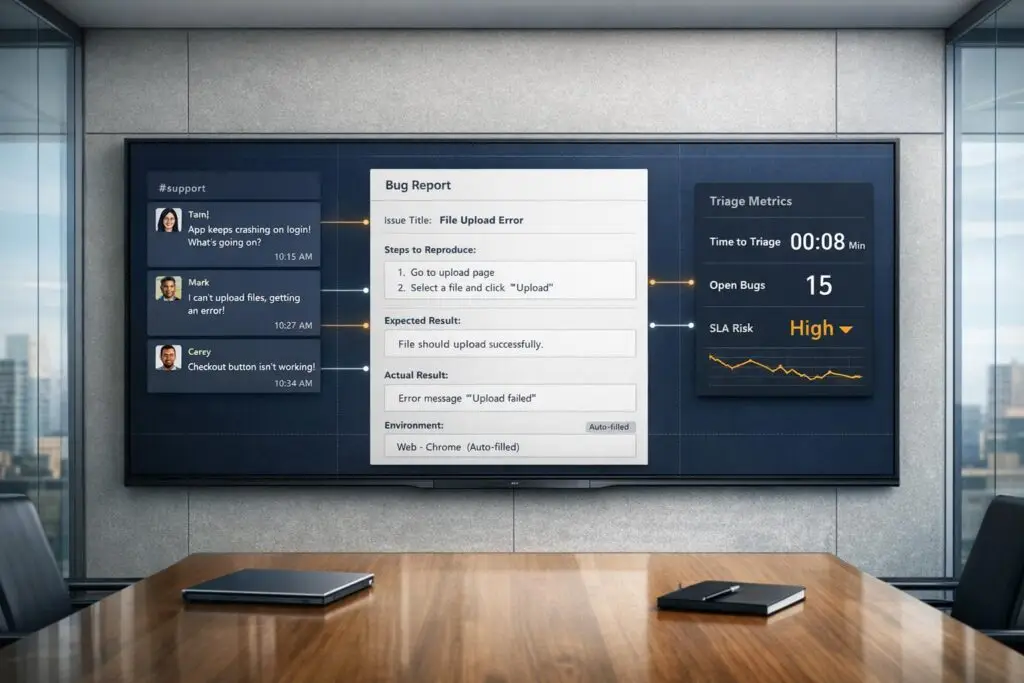
Slack isn’t built for managing bugs. Engineering teams often waste time digging through chaotic Slack threads to find incomplete bug reports. Vague messages like "the button is broken" lead to endless back-and-forths, costing time and money. Poor bug reporting can drain 40% of an engineer’s productivity and cost mid-sized teams $85,000 annually.
Here’s how to fix it:
- Use a structured bug report template: Include a clear title, reproduction steps, expected vs. actual behavior, and environment details.
- Automate workflows: Use Slack tools to route issues, assign priorities, and convert messages into tickets.
- Track metrics: Focus on Time to Acknowledge (TTA), Time to Resolution (TTR), and escalation rates to improve efficiency.
- Reduce noise: Avoid unstructured chatter and ensure critical updates are easy to find.
Efficient bug reporting saves time, reduces frustration, and improves collaboration between support and engineering teams.
Bug Report To Make Your Developers Happy | Bug Reporting As Software Tester
sbb-itb-e60d259
Why Slack-Based Bug Reporting Fails

Slack works great for conversations, but it wasn’t designed to handle incident management. At its core, Slack is a linear, chat-based tool. It’s perfect for real-time discussions but falls short when dealing with bugs that need structured updates, defined priorities, and clear ownership. Bugs require detailed records with fields like severity, assignee, and resolution status. This fundamental mismatch creates several challenges, which are detailed below.
Missing Structure in Bug Reports
Imagine someone posts in Slack: "The checkout button isn’t working." Sounds straightforward, right? But engineers are left scrambling for details. What browser was used? Was this in staging or production? Is it reproducible? What’s the expected behavior versus what’s actually happening? Without structured fields to guide the reporting process, bug reports turn into a guessing game.
"Our #bug-reports channel was a Wild West… it had no structure. Bugs, outages, and other production issues were reported… often with a dreaded @channel or @here, but with no consistency" – Shaun Gallagher, Engineering Manager [6]
This lack of structure forces engineers to waste time chasing basic but essential information.
Too Much Noise and Lost Context
Slack channels can be chaotic during active incidents – some generate over 500 messages per hour [1]. For engineers jumping in to help, this creates the "scroll back problem." They’re left scrolling through a flood of messages, including unrelated chatter like "grabbing coffee" or "back in 5", just to piece together what’s going on. Important updates often get buried in threads, which don’t always show up in the main channel view.
On top of that, responders frequently have to jump between Slack, dashboards, and documentation – a phenomenon called the "Toggle Tax." Studies show this constant switching drains about 40% of productivity [1]. All this fragmented information demands significant mental effort, making it harder to resolve issues efficiently.
Poor Prioritization
Unstructured bug reports also make it tough to determine urgency. In Slack, severity levels are often inconsistent. One person’s "SEV1!!" might be another’s minor annoyance. Without a clear framework to define what constitutes a critical issue versus a low-priority one, triaging becomes a guessing game.
It gets worse when key impact details – like the number of affected users or whether revenue is at risk – are missing. Analyses show that severity assessments in Slack are often subjective and hard to search [1]. This inconsistency leaves support teams unsure of what’s urgent, while engineers struggle to prioritize their work. In crowded channels, responsibility becomes so diffused that critical bugs can be overlooked entirely, a phenomenon known as the bystander effect [1].
These issues highlight why Slack’s design doesn’t align with the structured workflows needed for effective bug reporting.
What Every Bug Report Needs
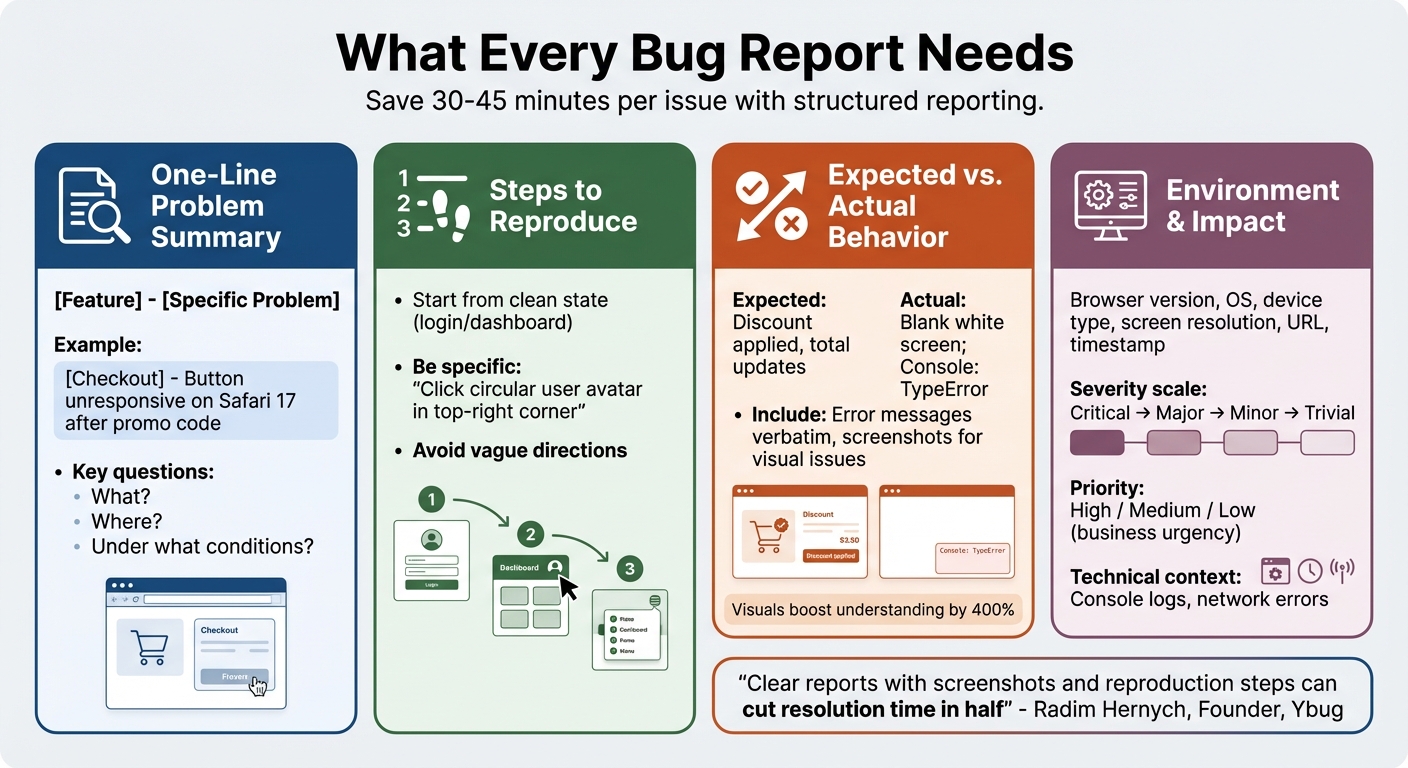
4-Step Bug Report Template: Essential Elements for Faster Resolution
A well-structured bug report can save up to 30–45 minutes per issue by providing all the necessary details upfront [10].
"Most teams don’t have a bug quality problem – they have a communication problem. A clear report with a screenshot and reproduction steps can cut resolution time in half." – Radim Hernych, Founder, Ybug [4]
To make your bug report effective, it should include four key elements: a concise one-line summary, clear steps to reproduce the issue, a comparison of expected versus actual behavior, and detailed environment information paired with impact assessment. Let’s break these down.
One-Line Problem Summary
The summary should immediately answer three key questions: What happened? Where did it happen? Under what conditions? Use a specific format like "[Feature] – [Specific Problem]" to provide instant clarity. For instance, instead of writing "Checkout broken", opt for something like "[Checkout] – Button unresponsive on Safari 17 after promo code" [4]. This approach gives engineers a quick understanding of the issue’s context without needing to dig further.
Steps to Reproduce
This is the heart of any bug report. Engineers rely on clear, step-by-step instructions to replicate the issue. Start from a clean state, such as the login screen or main dashboard, and avoid vague directions. Instead of saying, "Click the icon", specify, "Click the circular user avatar in the top-right corner." Clarity here ensures engineers spend less time guessing and more time fixing.
Expected vs. Actual Behavior
Clearly outline what should happen versus what actually happens. If there’s an error message, include it verbatim or note if no response is returned.
- Expected: "Discount is applied, and the total updates."
- Actual: "Page shows a blank white screen; Console: TypeError" [4]
For visual issues like layout problems or typos, attach labeled screenshots. For interactive bugs, screen recordings are invaluable. Studies show that visuals can boost understanding by up to 400% [10].
Environment and Impact Information
Since many bugs are specific to certain environments, include details like the browser (with version), operating system, device type, and screen resolution. For web-based issues, adding the exact URL and a timestamp helps developers cross-reference server logs.
Defining the bug’s impact is equally important. Differentiate between severity (technical impact, like a crash) and priority (business urgency, like a typo on a pricing page). Use a consistent severity scale – Critical, Major, Minor, Trivial – to help teams prioritize effectively.
| Component | Details to Include | Why It Matters |
|---|---|---|
| Environment | OS version, Browser version, Device type, Resolution | Reduces "cannot reproduce" errors by pinpointing platform-specific problems. |
| Severity | Critical, Major, Minor, Trivial | Indicates how much the bug affects functionality. |
| Priority | High, Medium, Low | Helps teams prioritize fixes based on business needs. |
| Technical Context | Console logs, Network errors, Error messages | Points engineers directly to potential root causes. |
Bug Report Template and Tools for Slack
Having a standardized process for bug reporting is essential to keep things running smoothly. A clear, consistent method ensures your team provides all the details engineering needs without wasting time. A simple copy-paste template can eliminate confusion and make bug reporting straightforward for everyone.
Copy-Paste Bug Report Template
A well-structured template ensures every report includes the necessary details while being quick to fill out and review. Here’s a ready-to-use bug report template your team can copy and use directly in Slack:
*Bug Report* • *Title:* [Short, descriptive title] • *Environment:* [e.g., Production, Staging, Browser/OS] • *Steps to Reproduce:* 1. [Step 1] 2. [Step 2] • *Expected Behavior:* [What should happen] • *Actual Behavior:* [What is happening] • *Severity:* [🔴 Critical / 🔵 Medium / ⚪ Low] • *Attachments:* [Screenshots/Video links] This format is designed for simplicity and efficiency. The severity emojis make it easy for engineers to prioritize issues at a glance. To ensure the template is always accessible, pin it to your triage channel using Slack’s "Pin to channel" feature. This way, new team members can quickly find it without needing to search.
For an even more streamlined approach, consider using Slack’s Workflow Builder. With this tool, you can create a "Report a Bug" form that automatically prompts users to fill in specific fields and formats the output. Slack’s Customer Experience team provides a great example of this in action. In 2025, under the leadership of Senior Director Kevin Albers, they developed a custom app (#help-ce bot) that routed issues to specialized channels like #ce-money for billing or #ce-identity-data for login issues. This system reduced technical escalations to engineering by over 60%, as specialists could resolve many issues directly [3].
"Our first goal was to reduce the number of escalations that go from the CE team to our software engineering team. We found more than half could be resolved by CE ourselves if they were routed to the correct people." – Kevin Albers, Senior Director of Customer Experience, Slack [3]
These tools save time and ensure that engineering teams can focus on the most critical fixes.
Using Slack Canvas for Templates

Slack Canvas offers a fantastic way to maintain a persistent guide for bug reporting. Unlike pinned messages that can get lost over time, a Canvas stays visible and provides detailed, step-by-step instructions on how to submit a bug report.
With Slack Canvas, you can outline each field in your template, define severity levels (e.g., when to mark an issue as Critical versus Medium), and include examples of well-formatted bug reports. You can even document your review process, like requiring a second team member to verify submissions before escalating them to engineering.
Pin this Canvas to relevant channels, such as #triage-platform or #triage-it, to ensure everyone has easy access to the guidelines. This approach helps minimize incomplete submissions and keeps the process clear for everyone involved.
Bug Triage Workflow for Slack
Once you’ve set up a bug report template, the next step is creating a workflow that transforms Slack messages into structured tickets. This ensures no bug report gets overlooked while keeping the process efficient and aligned with your reporting structure.
Flag and Convert Bugs to Tickets
Turn Slack messages into tickets using emoji reactions. For instance, applying the 🎫 emoji can automatically trigger a ticket creation. Slack Workflow Builder can enhance this process by launching a /form command to gather all necessary details. AI tools can further refine this by parsing the Slack thread to pull in screenshots, error logs, and steps to reproduce, producing a well-structured ticket automatically [12][5]. This method reduces the risk of incomplete reports reaching engineers and keeps your triage channel tidy [7][11].
Set Priorities with Emoji Reactions
Once a ticket is created, you can use emoji reactions to define its urgency at a glance. A simple three-tier system works well:
- 🔴 for critical issues that need immediate attention.
- 🔵 for medium-priority problems requiring action within 24 hours.
- ⚪ for low-priority questions or clarifications [2].
Status emojis can further streamline communication. For example, 👀 indicates that someone has taken ownership of the issue and is investigating, while ✅ signals that the issue has been resolved and the customer can be updated [2][5].
Route Issues to the Right Team
With structured reports in place, automation can ensure that issues are routed to the appropriate team without delay. Slack Workflow Builder can handle this by routing issues based on the product area specified in the bug report form. For instance, selecting "Billing" might route the issue to #ce-billing, while "Login Issues" could go to #ce-identity-data [3].
Slack’s Customer Experience team has successfully implemented a similar system. They use a custom #help-ce bot that employs emoji-triggered routing (e.g., :team-product-specialists:) to direct reports to specialized channels. This approach has reduced the number of technical escalations to engineering by over 60%, resolving many issues within the support team itself [3].
Create Escalation Rules
Even with effective routing, some issues may remain unresolved. Automated escalation workflows ensure these don’t fall through the cracks. For instance, a triage bot can monitor messages tagged with priority emojis that lack 👀 or ✅ reactions and send reminders to the team [2].
For critical issues marked with 🔴, you can integrate Slack forms with alerting tools like PagerDuty to immediately notify on-call engineers [11]. Conditional logic in forms can also require additional approvals or assessments when issues are flagged as "Critical" or involve production environments [11].
Update Support When Fixes Deploy
The final step in this workflow is keeping your support team informed when fixes are deployed. Configure your tracking system to post updates directly to the original Slack thread as developers investigate, code, and deploy solutions [5]. These real-time updates enable support teams to promptly communicate progress to customers.
ClearFeed’s Slack-integrated approach demonstrates the effectiveness of this system, achieving an average first response time of just 5 minutes. By ensuring all status updates flow back to the initial Slack thread, teams can maintain a complete audit trail and avoid switching between multiple tools [5].
Tracking Results and Making Improvements
After setting up a streamlined bug reporting process in Slack, the next step is to measure its success using clear metrics and regular reviews.
Metrics to Track
To ensure your bug reporting process is effective, focus on measurable outcomes. Start with Time to Acknowledgement (TTA) – the time it takes for an engineer to claim a bug, often marked with the 👀 emoji. Pair this with Time to Resolution (TTR), which tracks the entire cycle from the initial report to the deployed fix [6]. For example, in 2023, a healthcare technology provider cut its bug resolution time from 13 days to just 4 days by standardizing templates and consistently tracking metrics [8].
Keep an eye on your escalation rate, which shows what percentage of support issues require engineering involvement. Slack’s Customer Experience team reduced escalations to their engineering team by 60% after introducing a Product Specialist workflow with structured triage [3]. If this rate remains high, it could signal a need for better self-service tools or improvements to your bug report template.
Other important metrics include reassignment frequency and clarification rate, which can highlight routing issues or missing details [9]. For instance, one healthcare provider reduced their clarification rate from 40% to 12% by updating their bug report template to include environment details upfront [8].
Once you’ve established these metrics, gather targeted feedback from your engineering teams to refine the process further.
Getting Feedback from Engineering
Engineering feedback is vital for improving your bug reporting workflow. Schedule weekly support-engineering meetings to review cases where follow-up information was needed [5]. If developers frequently request specific details like browser versions or user IDs, it’s a clear sign those fields should be added to your template.
Pay close attention to your "cannot reproduce" rate. Bugs that are returned because engineers can’t replicate the issue indicate gaps in your reporting structure [4]. A vague bug report can waste 30-45 minutes of a developer’s time, and if your team receives 20 such reports in a sprint, that’s over 10 hours lost on clarification alone [10].
Quarterly Process Reviews
Every three months, conduct a review of your metrics to compare current performance against your baseline. For instance, a FinTech company reduced its resolution time by 60% within three months by standardizing templates and conducting regular audits [8]. During these reviews, check whether severity ratings (technical impact) and priority levels (business urgency) align with your engineering team’s capacity and product roadmap [4][8].
Use these reviews to identify recurring problem patterns in specific areas of your product that generate a high volume of reports [5]. These patterns often point to systemic issues that require broader fixes rather than one-off solutions. Also, evaluate whether Slack automations, such as "Claim" and "Resolve" buttons, are being used consistently to ensure accurate tracking data [6].
Consider this: 25% of an average developer’s time is spent fixing software defects, and poor bug reporting can cost mid-sized engineering teams around $85,000 annually [8]. Regular reviews and process adjustments can help minimize these costs while improving overall efficiency.
Conclusion: Better Bug Reports, Better Collaboration
Structured bug reports do more than just clean up Slack channels – they create a bridge between support teams and engineers. Templates serve as a kind of universal translator, transforming vague customer complaints into clear, actionable tasks that developers can tackle right away [10]. Including key details like environment specifics, step-by-step reproduction instructions, and visual evidence allows developers to replicate issues in minutes instead of wasting 30–45 minutes hunting for missing information [10].
The impact is tangible: Streamlined reporting can cut resolution times by up to 60%, saving mid-sized teams from significant financial setbacks [8]. For example, a financial services app saw its first-time resolution rate jump from 32% to 78% after requiring technical details and environment documentation in every bug report [8]. This means fewer back-and-forth messages, quicker fixes, and more satisfied customers.
"The difference between fixing a bug in hours and weeks often isn’t technical complexity – it’s how it was reported." – Full Scale [8]
This quote highlights the operational and financial advantages of standardized bug reports. Beyond saving time and money, structured workflows maintain context during handoffs and avoid the information gaps that often arise when tickets pass through multiple systems. Developers get the full picture upfront, support teams receive clear updates through simple emoji reactions, and the frustration of unreproducible bugs is minimized [10].
FAQs
What’s the fastest way to turn a Slack message into a usable bug ticket?
The fastest way to streamline bug reporting is by leveraging AI tools that can pull key details directly from Slack messages. For instance, using a 🎫 emoji reaction could automatically prompt AI to analyze screenshots, logs, and text, generating a comprehensive bug report on the spot. Additionally, Slack templates can guide users to provide critical information, ensuring reports are thorough and easy to act on – all without interrupting day-to-day workflows.
How do we define severity vs. priority so everyone triages the same way?
Severity refers to the technical impact or harm caused by an issue, such as disrupting business operations or posing a risk to revenue. On the other hand, priority determines the urgency of addressing the issue, based on factors like business goals or customer needs. By aligning these two concepts, teams can triage issues more consistently: severity highlights the scale of technical impact, while priority ensures timely action. Clear definitions for both are essential to help teams focus on what matters most and avoid misunderstandings.
Which metrics prove our bug-report process is actually improving?
Metrics that highlight progress in the bug-report process include reducing the time it takes to resolve issues, measured by Time to Resolution and Time to Acknowledgment, and boosting developer productivity, shown by fewer comments per bug report and higher closure rates. These gains are often achieved by implementing structured bug report templates and workflows, which help simplify communication and minimize inefficiencies.
Related Blog Posts
- How do you run a weekly “Support–Product” triage meeting that actually ships fixes?
- How do you create an “Engineering handoff” template that speeds up bug fixes?
- Slack Channel Fatigue: Why Your Support Agents Are Burning Out
- Visibility Gaps in Slack Support: What VPs Miss When Data Stays in Channels
Evaluating help desks for a B2B team?
Supportbench is all-inclusive from $32 per agent per month, with migration and onboarding included. See pricing or book a 20-minute demo.






