


Can Slack-first support handle complex customer needs? Not always. While Slack-first tools like Pylon streamline real-time communication and improve response times, they often struggle with long-term case management, multi-stakeholder coordination, and performance tracking.
Key Takeaways:
- Where Slack-first excels: Fast responses (e.g., 6-minute median), easy onboarding, and transparency via shared channels.
- Where it falls short: Managing long-term cases, handling complex B2B scenarios, and tracking key metrics like CSAT and SLA compliance.
- Alternatives: Dedicated platforms offer structured tools for tracking, collaboration, and automation, reducing inefficiencies.
Quick Overview:
- Pros of Slack-first: Real-time updates, familiar tools, and faster onboarding.
- Cons: Fragmented communication, no built-in analytics, and struggles with scalability.
Is Slack-first right for your team? It depends on your case complexity and support volume. For simple, fast interactions, Slack-first works. For larger teams and complex cases, you may need a more structured platform.
Where Slack-First Works Well
Real-Time Communication with Customers
Slack-first platforms excel at enabling quick, two-way communication between teams and customers. With tools like Slack, sharing screenshots, logs, and troubleshooting steps happens instantly. The data backs this up: 60% of customers now expect a response within 10 minutes, and top-performing Slack support teams average a 6-minute median first response time. For example, Intuit leveraged Slack in 2020 to improve customer support, cutting resolution times by 36% and increasing CSAT scores by 12%.
For B2B interactions, Slack Connect takes things further. It allows customers to stay in their own secure workspace, avoiding the hassle of portals or guest accounts. Fastly describes this setup as creating an "extension of their team", offering a premium service experience that traditional ticketing systems often can’t match.
This instant communication style works seamlessly alongside user-friendly tools, making onboarding a breeze – more on that next.
Easier Onboarding with Familiar Tools
A major advantage of Slack-first support is that many users are already comfortable with Slack. With 47.2 million daily active users, support agents can rely on familiar features like threads, emoji reactions, and slash commands, skipping the need to master a complex helpdesk interface. Slack-native tools boast quick training (1–2 weeks) and setup times (2–5 days), far outpacing traditional systems. As a result, these tools see over 90% adoption rates, compared to just 70% for older systems.
Better Visibility into Customer Conversations
Slack-first strategies also shine when it comes to transparency and collaboration. Shared channels in Slack provide a searchable, comprehensive history of customer interactions, ensuring that context isn’t lost in scattered emails or across multiple tools. This makes it easier for teams to stay aligned and informed.
Salesforce highlights an approach called "swarming", where the right experts are brought into a case at the right moment, avoiding the delays of formal escalation processes. As Salesforce explains:
"By swarming issues in Slack, we can bring the right experts into the case at the right time, eliminate tiers and escalations, and ultimately find the best person available to help troubleshoot the issue quickly."
This collaborative method not only speeds up resolutions but also ensures that every case benefits from the collective expertise of the team.
The results speak for themselves: companies using Slack for customer success report a 60% reduction in response times and a 50% decrease in the number of customer meetings needed for account management. Additionally, managing support entirely within Slack helps eliminate the 25% productivity loss caused by constant context switching.
sbb-itb-e60d259
The Role of Slack in Customer Success & Support
Where Slack-First Falls Short for Complex B2B Support
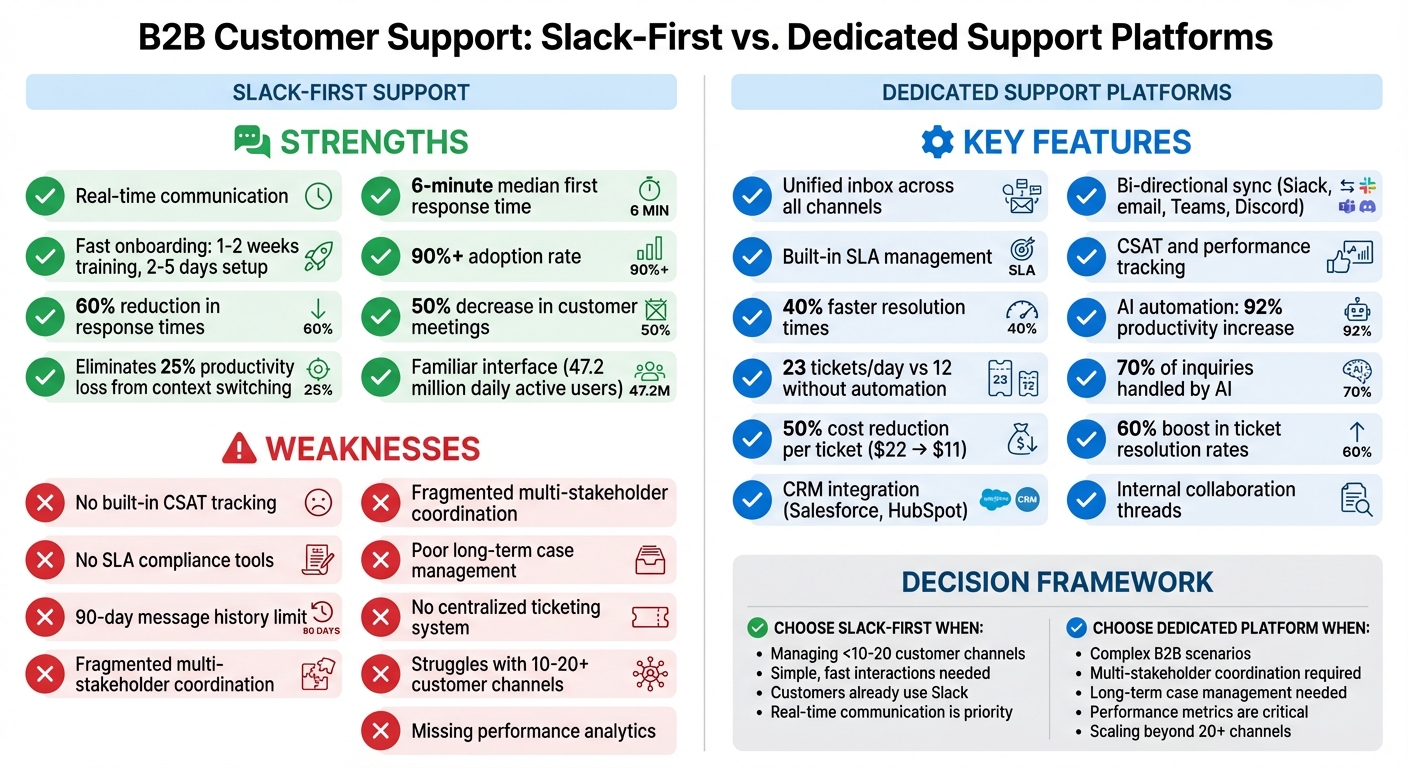
Slack-First vs Dedicated Support Platforms: Feature Comparison
Slack-first approaches shine when it comes to quick, real-time communication. But when dealing with complex B2B support scenarios – especially those involving multiple teams or long-term case management – they often hit serious roadblocks.
Problems with Multi-Stakeholder Coordination
When a support issue spans departments like engineering, product, sales, and customer success, Slack can quickly turn into an overwhelming maze. Conversations scatter across multiple channels: customer-facing threads, internal triage discussions, and engineering escalations. This fragmentation makes it nearly impossible to maintain a single, reliable source of truth. Important support requests often get buried in endless message threads or lost among general announcements and casual chats.
The problem only grows as teams scale. Managers find it harder to track cross-department efforts, while new agents spend hours just trying to figure out who to contact or where to find the right information. Will Stewart, CEO of Northflank, described his team’s pre-solution days as pure "chaos", where conversations were constantly misplaced, and escalating issues to engineering was a major challenge. Even using swarming workflows, teams must meticulously manage internal threads to prevent Slack from becoming an unmanageable clutter.
Another major pain point is the constant switching between Slack, CRMs, and engineering tools. Agents and engineers waste time hunting for customer history or logging bugs. Meanwhile, critical technical insights often stay trapped in private messages or isolated threads, instead of being documented in a searchable, centralized knowledge base.
Difficulty Managing Long-Running Cases
Slack’s real-time capabilities make it great for quick updates, but it struggles with long-term case management. Marty Kausas, CEO of Pylon, sums it up well:
"Slack is great for visibility but terrible for long-term tracking."
Without a proper ticketing system, issues can go untracked, get duplicated, or even be forgotten. As customer channels multiply, the Slack sidebar becomes a cluttered mess, making it hard to focus on urgent issues. Agents frequently waste time switching between tools to find details like plan tiers, previous issues, or customer health scores. This is especially problematic for cases that require multiple steps, technical resolutions, or approvals across departments. Teams using integrated support platforms, on the other hand, often resolve issues up to 40% faster.
Missing Tools for CSAT and Performance Metrics
One of Slack’s biggest shortcomings is its lack of built-in tools for support analytics. Metrics like First Response Time, resolution tracking, and SLA compliance are absent unless you bring in third-party integrations. Without these, managers have no clear way to measure how much time agents or developers spend on specific issues, making performance tracking a guessing game.
Slack also doesn’t offer a way to automate Customer Satisfaction (CSAT) surveys once an issue is resolved. This leaves a gap between informal Slack messages and the structured data you’d get from formal ticketing systems. On top of that, Slack’s 90-day message history limit risks losing critical context unless you pay for additional storage. While Slack claims its platform can boost CSAT by 11% and cut resolution times by 9.3%, these benefits rely heavily on external tools to track and verify.
These challenges highlight why many teams need a platform that combines Slack’s real-time flexibility with the structured tools necessary for long-term tracking and multi-team collaboration.
What to Look for in Customer-First Support Platforms
When choosing a customer-first support platform, it’s essential to identify features that align with your team’s size, budget, and growth plans. While specifics may vary, certain capabilities are must-haves for B2B support teams managing complex cases and long-term client relationships.
Core Features of Customer-First Platforms
A customer-first platform should bring all communication channels – like Slack, Teams, email, Discord, and in-app chat – into a single, unified inbox. This ensures agents maintain context across long-running cases without wasting time switching tools or losing important details.
Bi-directional synchronization is another critical feature. Replies should update instantly across all customer channels, whether it’s Slack, email, or Teams. This eliminates data silos and keeps everyone on the same page. One-way notifications, by contrast, disrupt workflows and create inefficiencies.
Pulling data from CRMs like Salesforce or HubSpot is vital for prioritizing high-value accounts and spotting early signs of churn. This is especially important given that 60% of B2B customers expect "immediate" responses within 10 minutes.
Internal collaboration tools, like private threads, allow support teams to involve engineers or product experts without exposing those discussions to customers. Combined with dynamic SLA management, which automates escalations based on customer tiers, these tools help teams scale effectively as they grow.
AI also plays a pivotal role by automating tasks like triaging, categorizing, and prioritizing tickets before customers even report them. AI-driven ticketing systems can increase productivity by up to 92%, enabling agents to handle 23 tickets per day compared to 12 without automation.
These features create a robust support system that goes beyond basic Slack integrations, offering scalability and deeper functionality.
Slack-First vs. Dedicated Support Platforms
While Slack-first tools excel in real-time communication, they often lack the structure and accountability needed for long-term case management. For example, teams using Slack for support typically achieve first response times between 15–30 minutes, much faster than the 4–6 hours seen with traditional email-based ticketing systems. However, Slack-first tools struggle with features like SLA tracking, comprehensive reporting, and case management.
Dedicated support platforms bridge this gap, offering up to 40% faster resolution times compared to teams juggling multiple tools. This efficiency stems from features like true bi-directional sync, which allows agents to work seamlessly within Slack or a unified interface without switching contexts. In contrast, traditional platforms often rely on limited Slack integrations that push notifications but require agents to leave Slack for more complex tasks.
These platforms also include built-in tools for tracking metrics like CSAT, first response times, and SLA compliance. By incorporating AI and automation, they can cut the average cost per ticket by 50%, dropping it from $22 to $11. Automation alone can boost ticket resolution rates by up to 60%, all without increasing headcount.
Budget-Friendly AI Options for B2B Support
Affordability and AI capabilities are key considerations for B2B teams, especially those working with limited budgets. Thankfully, modern AI solutions can independently handle up to 70% of customer inquiries, and 61% of customers prefer self-service options for simpler issues.
To maximize value, choose platforms that integrate AI natively rather than as an afterthought. Look for AI features like automatic triage, routing, and knowledge management. These tools can identify frequently asked questions that lack documentation, improving self-service options and deflecting routine inquiries. Start with high-volume tasks like routing or FAQs before expanding to more complex workflows.
When evaluating budget-friendly platforms, prioritize those with reliable bi-directional sync for Slack-based support. This enables agents to respond directly within Slack without switching tools. Focus on platforms tailored to your customers’ preferred communication channels – B2B teams often find Slack and email more critical than social media. Smart deflection and automated ticketing can further lower costs, reducing the average cost per ticket by 50% from $22 to $11.
The aim isn’t to replace your team but to handle more inquiries without adding headcount. AI-powered tools can reduce staffing needs by up to 45.8%, freeing agents to focus on complex, high-value issues that require human expertise. Ensure the platform meets compliance standards like SOC 2 Type II and GDPR and uses enterprise-grade encryption to protect sensitive data.
Is Slack-First Right for Your Team?
Slack-first works well for real-time communication and quick onboarding, especially when customers are already using Slack. But as your team grows to manage more than 10–20 customer channels, challenges start to surface. Managing queues becomes messy, accountability can slip, and tracking important customer experience metrics like CSAT or first response times becomes nearly impossible unless you add extra tools. These hurdles make it crucial to assess your support volume and the complexity of your cases before fully committing to Slack-first.
What to Consider Before Choosing Slack-First
Scaling with Slack-first comes with its own set of challenges, particularly when it comes to handling larger support volumes and integrating data. For instance, if your team deals with multi-stakeholder relationships or long-term technical issues, Slack’s native setup may lack the structure you need. As the number of customer channels grows from 10 to over 100, the Slack sidebar becomes overwhelming, making it hard to prioritize urgent issues or track unassigned tasks.
Here are some risks to keep in mind:
- Notification overload and fragmented context across multiple channels
- Lack of integrated customer data, requiring agents to jump between tools to find ARR, plan tiers, or health scores
- Without a formal ticketing system, messages can easily be missed, and team members might accidentally duplicate efforts on the same thread
- Limited audit trails and data retention, which can create compliance issues
It’s also important to factor in the total cost of ownership. This includes setup time (1–2 weeks for Slack-native tools versus 4–8 weeks for traditional platforms), training, and potential AI fees for each resolution. To truly gauge a platform’s suitability, test it using realistic, complex B2B scenarios – like technical issues that require engineering escalation – to see how well it supports cross-functional collaboration.
Putting Customers First in Platform Selection
While internal efficiency is important, your choice of platform should ultimately prioritize the customer experience. Speed and accountability must align with what your customers expect. For example, if customers define "immediate" responses as within 10 minutes (and 60% do), your platform must enable quick replies without sacrificing accountability or visibility.
Look for platforms that offer features like bidirectional sync across communication channels (Slack, email, Microsoft Teams, Discord), account-focused tools for long-term relationship management, and options like dynamic SLA management, internal collaboration threads, and AI-powered triage. These capabilities help scale your support operations while maintaining the personal, responsive service that B2B customers value.
FAQs
When should a team move beyond Slack-first support?
When a team finds it challenging to manage complex customer needs, scale its operations, or sustain efficiency and satisfaction, it might be time to reconsider relying solely on Slack for support. Some clear warning signs include:
- Fragmented account views: When customer information is scattered, making it hard to get a full picture of their needs.
- Overwhelmed channels: Slack channels becoming noisy and unmanageable, leading to missed messages or slower response times.
- Limited automation tools: A lack of advanced automation or AI features to streamline workflows and improve response efficiency.
At this stage, transitioning to a more integrated platform with structured ticketing and omnichannel support can help teams meet growing demands while maintaining a customer-focused approach.
How can we track SLAs and CSAT if support runs in Slack?
Tracking SLAs (Service Level Agreements) and CSAT (Customer Satisfaction) in Slack works best when you integrate dedicated support tools. These platforms handle the heavy lifting by automating SLA tracking, keeping tabs on response times, and transforming Slack conversations into trackable tickets for CSAT assessments. They also streamline the process of gathering customer feedback through surveys and provide detailed dashboards packed with performance metrics. This ensures precise SLA and CSAT monitoring while helping maintain top-notch service in a fast-paced, chat-driven environment.
What does “bi-directional sync” mean for B2B support?
"Bi-directional sync" refers to the process where data is automatically updated and mirrored between two systems, flowing seamlessly in both directions. Whenever a change happens in one system, it’s reflected in the other – either instantly in real-time or during scheduled updates.
This approach ensures consistent data across platforms, making collaboration smoother, reducing errors, and cutting down the need for manual updates in customer support operations. It’s a game-changer for teams looking to save time and improve accuracy in managing their workflows.






