


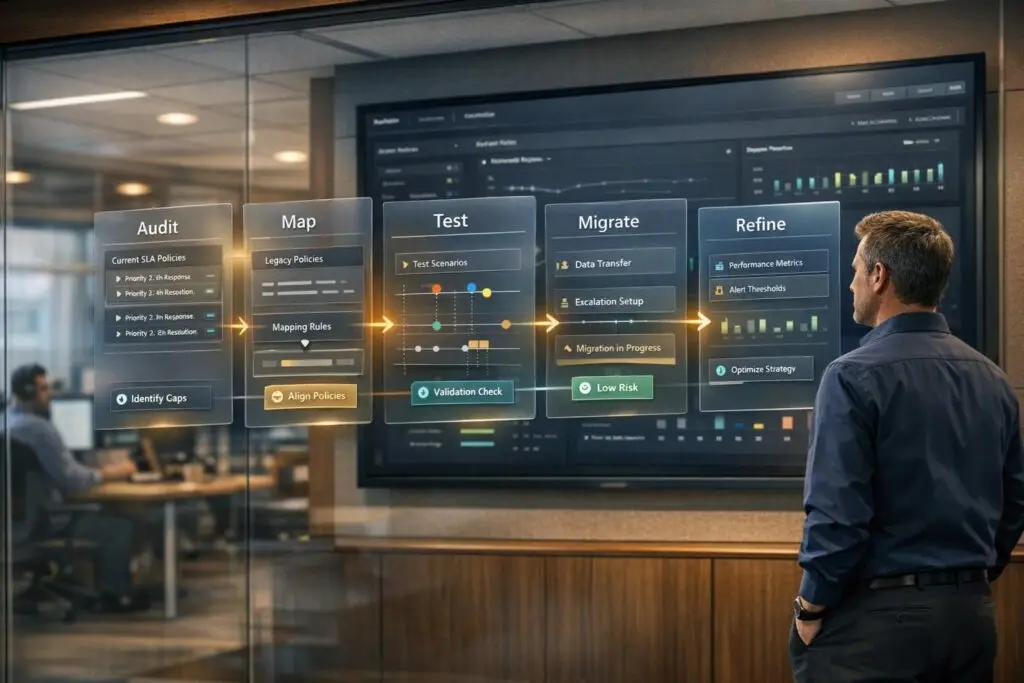
Migrating SLA policies and escalation rules from HappyFox to another system requires precision to avoid service disruptions and SLA breaches. Here’s how to ensure a smooth process:
- Audit Current SLA Policies: Document all SLA objectives, conditions, time thresholds, exclusion statuses, work schedules, and category associations. Ensure no details are missed.
- Map SLA Settings to the New System: Align HappyFox objectives, timers, and conditions with your new platform. Address differences like custom configurations or conditional timer starts.
- Test Thoroughly: Use sample data to validate SLA timers, exclusion statuses, and escalation management system. Compare results between systems to identify and fix inconsistencies.
- Execute Migration During Low-Traffic Periods: Schedule the migration during downtime, freeze changes in HappyFox, and validate workflows post-migration.
- Refine Post-Migration: Analyze performance data to tweak SLA policies and escalation rules for better alignment with your operational needs.
Following these steps ensures SLA accuracy, maintains service quality, and prevents disruptions during the transition.
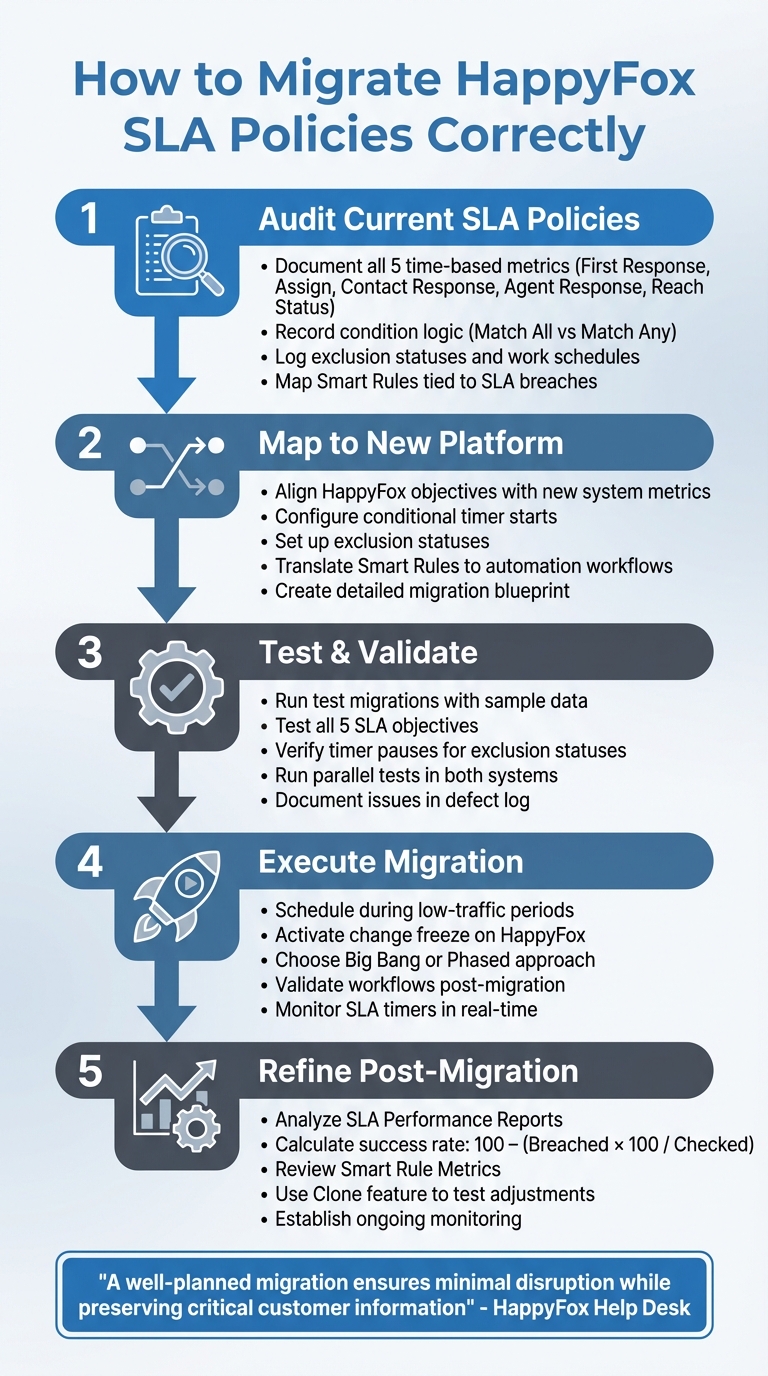
5-Step Process for Migrating HappyFox SLA Policies and Escalation Rules
Step 1: Audit Your Current SLA Policies and Escalation Rules
Before migrating, take a thorough inventory of your SLA settings. HappyFox structures SLAs around four key elements: objectives, conditions, work schedules, and category associations. Missing any of these during your review could lead to SLA breaches right after migration. Carefully document each policy and map out escalation rules to avoid disruptions.
Document All Active SLA Policies
Start by identifying which of HappyFox’s five time-based metrics each SLA policy uses. These metrics include:
- Time to first response
- Time to assign
- Time to respond to a contact
- Time to respond to an agent response
- Time to reach a specific ticket status
For each metric, note the exact time thresholds and target percentages. These percentages are critical for maintaining consistent performance reporting in your new system.
Next, detail the condition logic for each SLA. HappyFox allows you to base conditions on ticket properties like Status, Priority, Contact Group, Subject, or Custom Fields. SLAs can use either "Match All" or "Match Any" logic, so make sure to record which logic applies. Additionally, note whether the SLA timer starts at ticket creation or only after all conditions are met – this distinction impacts how breach times are calculated.
Don’t forget to log exclusion statuses and the work schedule tied to each SLA. These determine when the SLA clock runs and when it pauses. If your current system uses email alerts for SLA breaches, confirm that these notifications are enabled under the right licensing tier. This ensures you can replicate the alert configurations in your new platform.
Map Escalation Rules and Workflow Dependencies
Once you’ve documented all SLA policies, turn your attention to related escalation rules and support workflows. This step is crucial for maintaining seamless workflows during migration.
HappyFox uses Smart Rules for escalation logic. These rules trigger actions – like sending emails, adding tags, or reassigning tickets – when an SLA is close to or has already been breached. Review all Smart Rules tied to "SLA Breach" or "Nearing SLA" statuses. Use the metrics feature to track how frequently each rule is triggered. This data helps you prioritize which rules are most critical for migration.
Category associations can introduce hidden complexities. For instance, if an L1 support category has a four-hour SLA and an L2 category has a two-hour SLA, moving a three-hour-old ticket from L1 to L2 could instantly breach the SLA. Document which SLAs are tied to specific categories and how category changes affect SLA calculations. Also, verify team associations in HappyFox Service Desk, as only admins or agents within assigned teams can manage or be impacted by certain SLAs. Replicating these permissions in your new system is essential for maintaining workflow consistency.
| SLA Component | What to Document |
|---|---|
| Objective | The metric being tracked and when the timer starts/stops |
| Target Goals | Time thresholds and goal percentages for each SLA |
| Conditions | Ticket properties that trigger the SLA and whether "Match All" or "Match Any" logic is used |
| Exclusion Statuses | Specific statuses that pause the SLA timer |
| Work Schedule | The calendar assigned, including business hours, holidays, and time zones |
| Category Scope | Departments or ticket types monitored by the SLA |
| Smart Rules | Actions triggered by SLA breaches or nearing breach statuses |
sbb-itb-e60d259
Step 2: Map SLA Fields and Escalation Logic to Your New Platform
Take your detailed HappyFox configuration and turn it into a fully functional setup on your new platform. This step is crucial because it ensures your SLAs work as intended right from the start, avoiding issues like false SLA breaches that could harm customer trust. However, this isn’t a simple copy-paste job – it requires a clear understanding of how HappyFox’s logic translates into the framework of your new system.
Identify Matching Fields and Custom Logic
Begin by identifying how HappyFox’s five SLA objectives align with metrics in your target platform. Objectives like time to first response and time to assign are fairly standard and should map easily. But more specific goals, such as time taken to add a response to an existing agent response or time to reach a specific ticket status, might need custom configurations. If your new platform doesn’t offer native support for these, you’ll need to create them using workflow triggers or custom fields.
Pay close attention to the evaluation toggle. In HappyFox, the "Start SLA evaluation only when all applicable conditions are met" setting determines whether the timer begins at ticket creation (absolute) or only after specific conditions – like "Priority: Critical" – are fulfilled (relative). Ensure your new platform supports conditional timer starts to avoid miscalculations that could lead to SLA breaches.
Another critical element is configuring exclusion statuses. In HappyFox, the SLA clock pauses when tickets are in statuses like "On Hold" or "Pending Customer." Some platforms might use global "Pending" categories, while others will require manual configuration for each pause condition. Confirm that your new system recalculates breach times accurately by adding the paused duration once a ticket exits an excluded status.
Once you’ve aligned timers and conditions, tackle escalation automation. Translate HappyFox’s Smart Rule actions into equivalent automation rules. These rules might include sending notifications (via email, SMS, or Slack), updating ticket properties (like priority or category), reassigning tickets, or triggering webhooks. If your new platform separates SLA breach notifications from escalation workflows, set them up as distinct automation rules instead of bundling them into one policy.
With these mappings complete, you’re ready to formalize your migration strategy.
Build a Migration Blueprint
Using the audit you conducted in Step 1, create a detailed migration blueprint that matches every HappyFox feature to its counterpart in the new system. This document should outline each SLA policy, including its objective, target percentage, work schedule (factoring in time zones and holidays), exclusion statuses, and the Boolean logic used in conditions (e.g., "Match All" or "Match Any"). Also, note any category or team associations, as HappyFox can tie SLAs to specific departments – even if your new platform uses tags, queues, or folders instead.
For Smart Rules, document their triggers (e.g., "Nearing SLA" or "SLA Breached") and the actions they perform (e.g., "Assign to Admin"). Focus on high-frequency rules to ensure critical workflows stay operational after the migration.
Don’t forget to address timer resets. Some HappyFox SLAs, such as those tracking "Time to reach ticket status", restart the clock when a customer responds. If your new platform doesn’t handle this automatically, set up additional rules to manage these interactions. Also, document how category changes impact SLA timers to avoid unexpected disruptions.
Before finalizing your blueprint, clean up your data and verify that all custom fields and ticket properties exist in the new platform. This step ensures that your policies not only appear correct but actually function as intended, preventing silent failures.
Step 3: Test and Validate the Migration Process
Once your migration blueprint is ready, it’s time to ensure everything works as planned. Testing is crucial to confirm that your new setup aligns with the SLA policies you’ve defined. This step helps catch configuration errors before they cause disruptions. A failed SLA migration can lead to incorrect escalations and breach notifications – something no one wants. HappyFox’s Clone feature makes it easier to duplicate SLA policies for testing purposes.
Run Test Migrations with Sample Data
Start by using date filters, such as "Ticket Created After 2/10/2026", to focus on test data. This ensures your testing doesn’t interfere with existing tickets or active customer workflows. Create a set of sample tickets that include high-, medium-, and complex-priority scenarios.
Test all five SLA objectives – First Response, Assignment, Contact Response, Agent Response, and Reach Status – under conditions that mimic real-world situations. For example, if your "Time to First Response" policy requires a high percentage of tickets to be addressed within a specific time during business hours, create a batch of tickets to validate that the timer starts when a ticket is created and stops when an agent responds. Pay close attention to the "Start SLA evaluation only when all applicable conditions are met" toggle. If this setting is enabled, the timer should only begin when certain conditions, like a "Priority: Critical" tag, are met. Test both scenarios to ensure the platform processes conditional starts correctly.
To test SLA pauses, move sample tickets into Exclusion Statuses such as "On Hold" or "Waiting for Customer." Confirm that the SLA timer pauses as expected and recalculates breach times accurately when the ticket resumes. Also, test this functionality during off-hours or holidays based on your work schedule.
Once you’re confident that sample data behaves as it should, proceed to validate SLA calculations and escalation triggers.
Verify SLA Calculations and Escalation Triggers
Enable the SLA Timer in the ticket details panel to monitor events in real time. Adjust a ticket’s priority – for instance, changing it from Medium to High – and confirm that the SLA target updates instantly.
Test your Smart Rules by pushing tickets close to breach thresholds. Check if automated actions, such as AI-powered ticket routing and prioritization, adding tags, or sending admin alerts, are triggered as expected. For category-specific SLAs, try moving tickets between categories. According to HappyFox, "SLA enforcement gets reset everytime applicable conditions change". This means that moving a ticket into a stricter category could result in an immediate breach if the time already spent exceeds the new category’s threshold. Test this thoroughly to avoid surprises after migration.
For added confidence, run parallel tests by processing identical sample tickets in both the old and new systems. Compare the results. Any mismatches could point to mapping issues that need immediate attention. Document all problems in a defect log and categorize them by severity. Critical issues, like incorrect breach calculations, must be fixed before the full migration. Less urgent, cosmetic issues can be addressed later.
Step 4: Execute the Full Migration and Maintain Service Continuity
After completing rigorous testing in Step 3, it’s time to carry out the full migration. The goal here is simple: transition smoothly while keeping your support team fully operational. As Eric Klimuk, Founder and CTO at Supportbench, explains:
"Data migration is more than copying files – it affects daily operations and long-term compliance".
Schedule Migration During Low-Traffic Periods
Timing is everything. Plan your migration during periods of low activity, like weekends or late nights. This reduces the risk of disrupting active tickets during the transfer. Depending on your needs, you might choose a Big Bang migration for speed or a Phased Migration to make troubleshooting easier.
During the migration, activate a change freeze on your HappyFox system. This ensures no new tickets are created or updated, preventing mismatches between the old and new platforms. To mitigate risks, consider running a Pilot Migration first. Use a small set of real tickets to test the process, ensuring workflows – especially AI-driven ones – function as expected. This step allows you to identify and fix potential bugs before scaling up.
A great example of a successful migration is Rossi Residencial’s move in July 2025. The construction company transitioned four SAP environments to a scalable cloud platform using a phased rollout. Thanks to thorough pre-migration assessments and testing, they achieved a zero-downtime migration with no service interruptions and cut infrastructure costs by 50%.
Once the migration is underway, your next priority is post-transfer validation.
Validate Data and Fix Issues After Migration
Post-migration, it’s crucial to test all key workflows – like ticket creation, assignment, and closure – to ensure everything runs smoothly. Pay special attention to the SLA Timer. Confirm it calculates live ticket times accurately, pauses for exclusion statuses like "On Hold" or "Waiting for Customer", and properly extends breach times over weekends or non-business hours based on your work schedule.
Set up an internal reporting channel for agents to flag broken links, missing attachments, or mislabeled fields in real time. Additionally, use post-migration dashboards to monitor ticket resolution times and customer experience metrics like CSAT, CES, and NPS. If you notice sudden dips or spikes, these could indicate configuration issues that need immediate attention.
Step 5: Refine SLA Policies and Escalation Rules After Migration
Migration doesn’t end with just transferring data; it’s the starting point for ongoing adjustments. Your previous HappyFox configurations might not perfectly match your current operational needs, so refining these settings post-migration is crucial to maintain efficiency and service quality. Think of this phase as the bridge between your initial setup and continuous optimization.
Use Performance Data to Fine-Tune Configurations
Begin by analyzing SLA Performance Reports. These reports reveal the total number of tickets monitored and how many breached SLA policies. Use this formula to calculate your success rate: 100 – (Tickets Breached * 100 / Tickets Checked). This helps identify policies that aren’t meeting expectations. For deeper insights, export the data to CSV or Microsoft Excel, where you can sort and filter by agent or category to pinpoint specific problem areas.
Next, revisit the "Start SLA evaluation only when all applicable conditions are met" setting. If enabled, it resets the SLA timer every time ticket conditions change. While this might suit some workflows, it could skew performance data if it doesn’t align with your team’s processes. Also, review category associations to ensure monitoring is accurate and metrics aren’t being misrepresented.
Armed with this performance data, you’re ready to focus on ongoing monitoring and adjustments to maintain improvements.
Establish Regular Monitoring and Make Adjustments
Building on insights from migration tests, activate real-time SLA timers and dashboards to keep an eye on tickets approaching breach. Use Smart Rule Metrics to evaluate whether escalation rules need tweaking. As HappyFox explains:
"With the Smart Rule Metrics, you can monitor the rules that require improvement and target to deliver a refined and thorough customer service experience".
If certain rules are triggering too frequently, it may signal that your SLA targets are overly ambitious or that there are deeper process inefficiencies to address. To test adjustments without disrupting operations, use the Clone feature to apply modified SLA targets to specific categories before implementing them across the board.
Conclusion: Ensuring a Successful SLA and Escalation Migration
Solidifying your migration success hinges on careful preparation, thorough testing, and ongoing fine-tuning.
Migrating SLA policies and escalation rules from HappyFox isn’t just about moving data – it’s about ensuring uninterrupted service and meeting your commitments without fail. As HappyFox Help Desk puts it:
"A well-planned migration ensures minimal disruption to your team’s productivity while preserving critical customer information and setting the stage for improved customer service."
The groundwork for success starts with a detailed audit and precise logic mapping. Double-check your documented SLA components for accuracy before proceeding. Even minor settings, like the "Start SLA evaluation only when all applicable conditions are met" option, can significantly affect breach time calculations. Overlooking these details could lead to reporting errors and jeopardize service reliability.
When it’s time to execute, schedule the migration during off-peak hours and have a robust rollback plan ready for any unexpected challenges.
Use insights from your earlier testing to confirm everything works as expected on launch day. Monitor systems closely to ensure ticket sources, SLA trackers, and escalation rules are functioning properly. Eric Klimuk, Founder and CTO of Supportbench, highlights the importance of this step:
"A well-executed launch day builds confidence across your team and helps maintain service continuity."
Immediately after migration, check for duplicate tickets or missed communications to quickly resolve routing issues. Automated monitoring tools and AI-powered alerts can help maintain service continuity during this critical phase.
Post-migration, the focus shifts to refining operations. Compare response and resolution times against your benchmarks. Continuous monitoring, combined with feedback from your team, ensures the system adapts to your evolving needs. As Supportbench advises:
"A high-performing helpdesk doesn’t stay that way by accident. Ongoing review, iteration, and user collaboration ensure it stays fit for purpose as your business evolves."
FAQs
Which SLA settings are easiest to miss in HappyFox?
The Handoff Times and Work Schedule assignments in HappyFox are two settings that often get overlooked. Yet, they play a crucial role in ensuring accurate SLA tracking. Missing these during setup can lead to unreliable SLA enforcement and disrupt escalation workflows. To keep everything running smoothly, take the time to review and configure these settings properly.
How do I handle category changes that reset SLAs during migration?
To manage category changes that might reset SLAs during migration, start by thoroughly mapping your current categories to the new ones. This step helps ensure that SLA conditions are updated correctly, avoiding accidental resets. Implement automation workflows to dynamically adjust SLAs whenever a category changes. Additionally, leveraging AI-driven insights can help anticipate and address potential SLA breaches, maintaining service levels without disruption. With careful planning and the right automation tools, you can keep SLA enforcement consistent throughout the migration process.
What’s the best way to validate SLA timers before going live?
To make sure SLA timers are accurate before going live, take advantage of tools that let you review SLA definitions and test how they work. Open the relevant tasks, look at the remaining times, and verify that the timers match your expectations. This step ensures everything is set up correctly for a smooth rollout.
Related Blog Posts
- How do you migrate Freshdesk automations (rules, triggers, SLAs) to a new platform?
- How do you map Kayako statuses, priorities, and custom fields to a new helpdesk?
- How do you migrate away from HappyFox without losing ticket history or attachments?
- How do you map HappyFox categories, custom fields, and statuses to a new system?






