


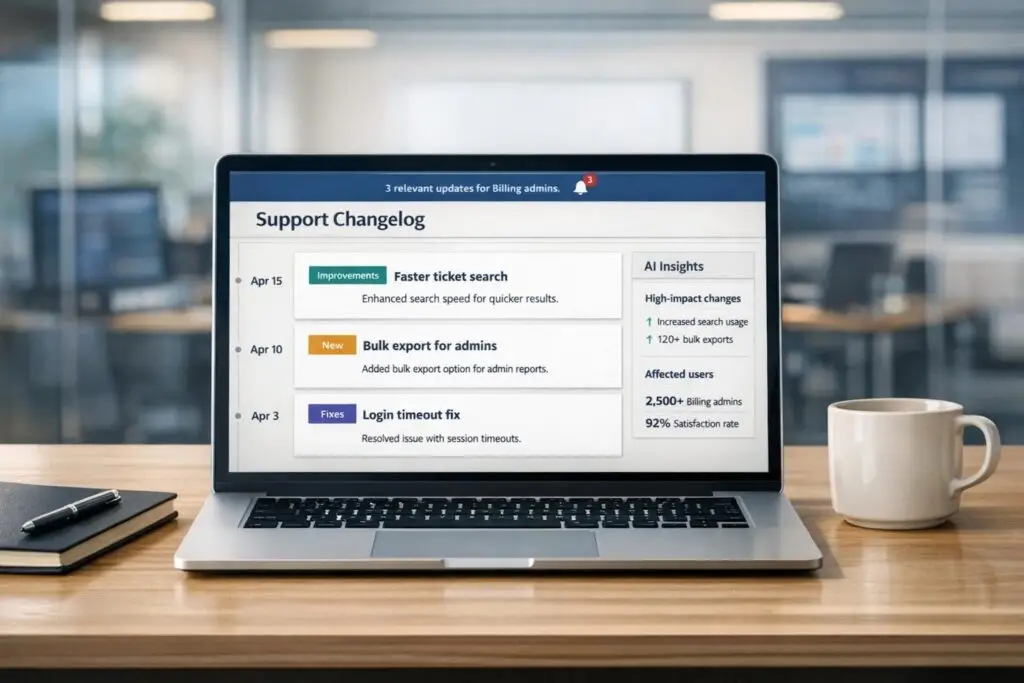
Most change logs fail because they’re written for engineers, not customers. They’re filled with jargon like “refactored authentication subsystem,” which confuses users and fails to highlight the real benefits. A clear, customer-focused change log can improve feature adoption by up to 4x and reduce support tickets by 15-30%. Here’s how to create one that works:
- Define your audience: Tailor updates for different user groups (admins vs. end-users) and lifecycle stages (new vs. experienced users).
- Use a clear format: Organize updates with categories like Added, Fixed, Improved, and Deprecated. Use action-oriented language (e.g., “Dashboard loads 3x faster”).
- Make it scannable: Use bullet points, bold text, and emojis (e.g., 🚀 for new features). Include visuals like screenshots or videos.
- Leverage AI tools: Automate summaries, personalize updates for different users, and ensure consistency across releases.
- Promote updates: Add a “What’s New” section in dashboards and send targeted notifications for critical changes.
Avoid common mistakes: Skip technical jargon, vague phrases like “bug fixes,” and irregular updates. Instead, focus on how changes benefit users and stick to a regular schedule. A great change log builds trust, reduces churn, and shows customers you’re actively improving your product.
Step 1: Define Your Change Log’s Purpose and Audience
Identify Your Key Stakeholders and Use Cases
Before you start drafting updates, it’s crucial to understand who you’re writing for. A one-size-fits-all approach won’t work – your audience is diverse, and lumping everyone together risks losing engagement. Start by segmenting users based on how they interact with your product.
For instance, admins and end-users have very different needs. Admins are often looking for technical details – things like security updates, permission changes, or billing adjustments. On the other hand, end-users are more focused on how updates affect their daily tasks, such as workflow improvements or usability tweaks. Think about it this way: a finance manager might care about improved reporting accuracy, while a sales rep is more interested in faster, smoother processes.
You can also segment your audience by their lifecycle stage or the features they use. New customers will benefit from updates that assist with onboarding and getting started, while experienced users are likely more interested in advanced features or performance upgrades. If your product includes multiple tools – like lead capture and messaging – don’t overwhelm users of one tool with irrelevant updates about another.
Don’t forget your internal teams – they’re key stakeholders too. Support teams need to be looped in early so they can proactively address customer questions, rather than just reacting to complaints. Similarly, sales teams must be aware of new features to better position the product, and product marketing can use the updates to showcase ongoing improvements and value.
Set Clear Goals for Your Change Log
Without a clear purpose, a change log can easily turn into a cluttered list of technical jargon that no one reads. Your goal should be to bridge what Brian Sierakowski refers to as the "credit gap" – the disconnect where your team is constantly rolling out new features, but customers feel like nothing has changed in months.
A well-crafted change log can achieve several objectives. For one, it can reduce support tickets – by as much as 15% to 30% – by proactively answering questions like “What changed?” and “How do I use this?”. It can also encourage customers to adopt new features and provide the evidence you need to justify pricing adjustments. Keeping a consistent record of updates ensures customers see the value you’re delivering, especially when pricing discussions arise.
Beyond that, your change log can be a powerful tool for boosting retention and driving revenue growth. Regularly reminding customers of product improvements can increase retention rates by 10% to 20%, while showcasing features in higher-tier plans can encourage upgrades and expansion. The key is to go beyond listing updates – focus on explaining why these changes matter and how they benefit the user.
Once you’ve defined your audience and set clear goals, you’re ready to create a structured, easy-to-scan change log. This foundation not only supports AI-driven personalization but also ensures your updates are delivered efficiently, helping you maintain a modern and cost-effective B2B support system.
Step 2: Choose a Clear Structure and Format
Use Version Numbers and Categories
Semantic versioning is a straightforward way to communicate updates using the MAJOR.MINOR.PATCH format (e.g., 2.5.1). Here’s how it works:
- Major updates: Indicate big changes that might require user action.
- Minor updates: Introduce new features without disrupting existing functionality.
- Patch releases: Focus on bug fixes and stability improvements.
If your audience finds semantic versioning too technical, consider using date-based versioning (e.g., 02/06/2026). This approach creates a clear timeline and sets expectations for regular updates. Whichever method you choose, combine it with action-oriented categories like:
- Added: New features and functionality.
- Fixed: Bug resolutions.
- Improved: Enhancements to existing features.
- Security: Critical patches or updates.
- Deprecated: Features being phased out.
These categories make it easy for users to skim and find the updates that matter to them.
"Deciding on a versioning strategy is not just about numbers. It provides a structured way to convey information about the evolution and changes in the software to both internal teams and users." – Jen Chin, Product Marketing Lead, Beamer
Design for Easy Scanning
Make your changelog user-friendly by keeping sentences short – ideally under 20 words – and using bullet points for clarity. Highlight the key benefit or feature in bold so readers can quickly grasp the main idea in seconds.
For breaking changes, place them at the very top with clear symbols like ⚠️ and bold warnings to grab attention. For everything else, prioritize updates based on their importance or impact, rather than sticking to a strict chronological order. Adding emojis like 🚀 (new features), 🛠️ (improvements), or 🐞 (bug fixes) provides visual cues that make scanning even faster.
Include Customer-Focused Details
Every update should answer, "How does this help the customer?" For example:
- Instead of "Refactored authentication subsystem to use JWT tokens", say: "Stay logged in longer without repeated password prompts."
- Instead of "Implemented lazy loading for dashboard", say: "Dashboard loads 3x faster on slow connections."
Whenever possible, include specific metrics like "30% faster" to make the benefits tangible.
Visuals like screenshots or short videos can also make a big difference. Changelogs with visuals often see a 50% higher click-through rate to supporting documentation.
Finally, wrap up each update with a clear call-to-action, such as:
- "Try it now"
- "Read the guide"
- "Give feedback"
For breaking changes, provide step-by-step migration instructions or direct links to detailed documentation to help users implement necessary fixes without frustration.
Step 3: Use AI to Automate and Personalize Updates
Automate Change Summaries and Formatting
AI tools can keep an eye on internal systems like GitHub or Jira, pulling out key updates and turning them into drafts in just seconds. Instead of wading through commit hashes, PR IDs, or technical notes, AI simplifies the process by transforming these into updates that highlight customer benefits – saving teams hours of effort.
What’s more, AI can take raw developer notes or bullet points and expand them into polished changelogs. These come complete with headings, highlights, and even upgrade tips. It also applies smart tags like "Feature", "Fix", or "Improvement", making it easier for users to filter through updates. The better the initial input you provide, the more precise and useful the AI-generated output becomes.
"The gap between raw changelog and customer-friendly story is where AI quietly shines." – Modexa
Teams using AI for this purpose often see a 4× increase in feature adoption because updates are ready to go as soon as the code is shipped. Once automated summaries are in place, the next step is customizing updates for specific audiences.
Personalize Updates for Different Customer Segments
Personalized updates do more than just inform – they actively engage users. AI tools can adjust the level of technical detail in your changelog based on who’s reading it. For example, developers might get in-depth API changes and code snippets, while end users see quick summaries that focus on the benefits. All you need to do is specify the audience, and the AI assistant adapts the content accordingly.
AI can also mimic your brand’s tone – whether it’s formal, casual, or highly technical – and even translate release notes instantly for global audiences, eliminating the need for separate translation workflows.
"Writing a clear, engaging changelog should never be the bottleneck that slows a release – or worse, gets skipped entirely." – ChangeCrab
The results speak for themselves: 60% of users miss out on new features if updates aren’t communicated clearly, but personalized changelogs can achieve engagement rates as high as 45%, compared to the usual 8% average.
Maintain Consistency with AI-Driven Workflows
AI-driven workflows help ensure updates are consistent and timely by constantly monitoring your development pipeline. Updates are generated automatically as changes happen, which builds trust with customers by maintaining a steady flow of communication and reinforcing the transparency they value.
Accuracy is another big win here. Since AI pulls data directly from the source code, it minimizes errors. At the same time, a human review process can add those final touches, ensuring the updates align with your brand’s voice and quality standards. This combination of AI efficiency and human input delivers reliable results without sacrificing precision.
On top of that, AI can create internal summaries for teams like support, sales, and marketing. This keeps everyone in the loop about new developments as they happen, instead of leaving them to play catch-up later. When your entire organization is informed, they’re better equipped to communicate updates confidently to customers.
Step 4: Deliver and Promote Your Change Log
Embed Change Logs in Customer Portals and Dashboards
"Writing the update is only half the battle. The real challenge? Getting them where they need to go." – Brian Sierakowski, Founder of Changebot
A change log is only effective if customers can easily find and use it. It shouldn’t be hidden away or hard to access. Instead, place it where users naturally spend their time.
One effective approach is adding a "What’s New" notification directly within your product dashboard. This ensures the 60% of users who might otherwise miss updates will see them while actively using your product. You can also include a sidebar widget or a persistent link in your main navigation, making the full change log accessible without disrupting workflow. To highlight major updates, some teams create a "Best Of" section at the top of their portal, ensuring key improvements don’t get lost among smaller bug fixes.
Visuals like annotated screenshots, GIFs, or short videos are game-changers. They not only make updates more engaging but also boost click-through rates by 50% and help users understand complex changes more quickly. To further enhance usability, add tags like "Feature", "Fix", or "Improvement", allowing customers to filter updates and focus on what’s relevant to them. Don’t forget to include a clear call-to-action for each entry – links like "Try it now" can increase feature adoption by 60%.
Once your change log is accessible, take the next step: proactively notifying users about important updates.
Send Proactive Notifications
Even with a well-placed change log, proactive notifications ensure no critical updates go unnoticed. However, not every change needs an announcement – focus on updates that directly impact users. Internal technical tweaks, like database adjustments, are irrelevant to most customers and should be left out.
Segment your notifications based on user roles or lifecycle stages. For example, admins might need details about new permission settings, while end users benefit more from interface updates. Use a "What/Why/How" framework to clearly explain the change, its impact, and what users should do next.
Timing is key. Schedule updates for maximum engagement – Tuesday through Thursday at around 10:00 AM in your customers’ primary time zones is often ideal. For fast-moving SaaS products, weekly updates keep users informed without overwhelming them, while enterprise software teams may find bi-weekly or monthly updates more effective. To avoid notification fatigue, group minor fixes into periodic summaries instead of sending alerts for every small change. Teams that follow a consistent notification strategy often see up to 4x higher feature adoption rates and a 15% to 30% reduction in support tickets.
sbb-itb-e60d259
5 SaaS Changelog Best Practices to Boost Feature Adoption & User Engagement
Step 5: Avoid Common Mistakes
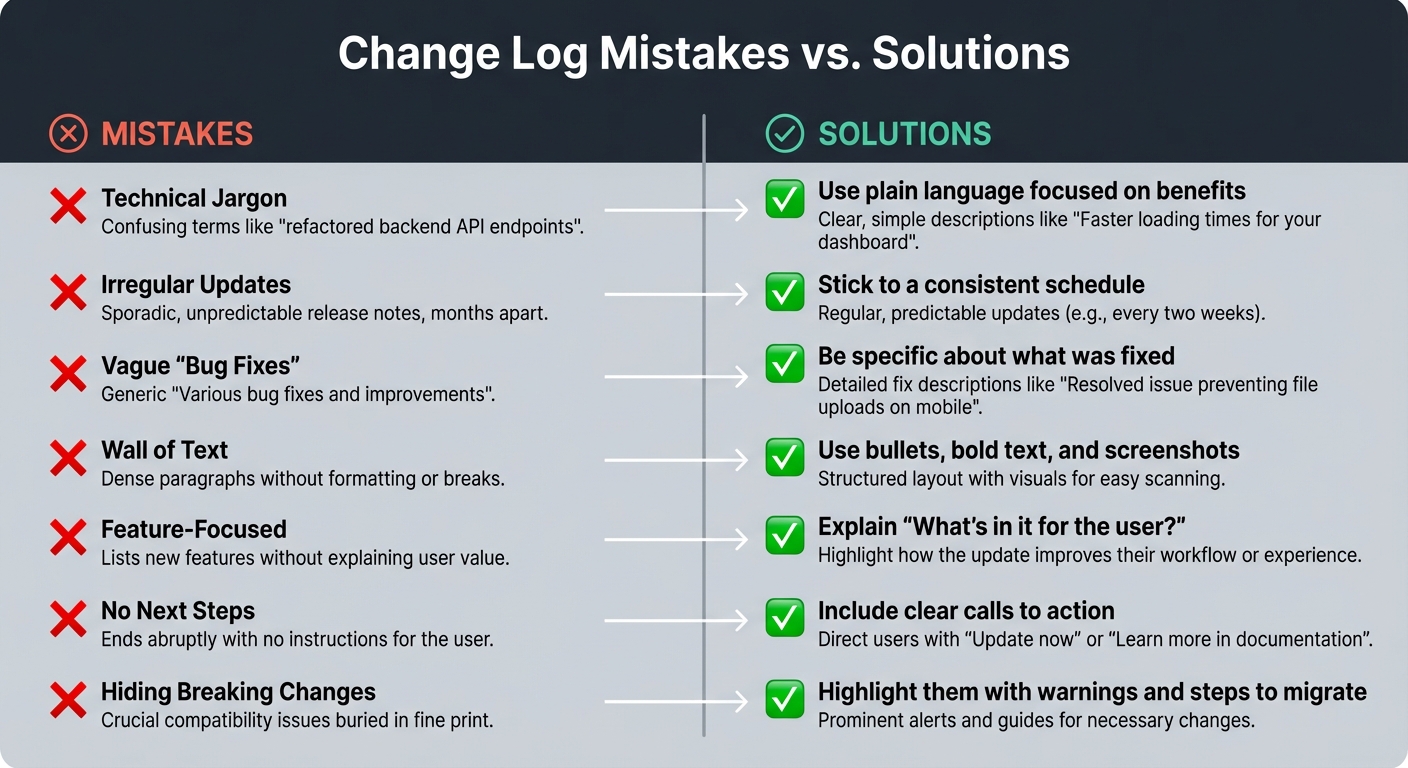
Common Change Log Mistakes vs. Best Practice Solutions
Use Plain Language
Keep your audience engaged by steering clear of technical jargon. For example, instead of saying "refactored authentication subsystem", say something like "sign-in is now 2x faster." The latter is easier to understand and highlights the benefit clearly.
A helpful tip is to apply the "Grandmother Test": if someone without technical expertise wouldn’t understand the improvement, rewrite it. Customers don’t care about behind-the-scenes updates like database tweaks or JWT migrations – they care about how these changes improve their experience. Avoid vague phrases like "bug fixes and improvements." Instead, be specific: "Fixed bug where CSV exports over 10MB would fail".
Whenever possible, use numbers to quantify improvements. For instance, "pages load 50% faster" or "save 10 clicks per task" is far more compelling than generic claims. And don’t forget to frame updates around the user’s perspective. Use "you" language, such as "Now you can schedule automated check-ins", rather than focusing solely on the feature itself.
Clear, straightforward language ensures your updates are understood and keeps your communication with customers smooth and effective.
Maintain a Regular Update Schedule
Consistency is key when it comes to product updates. A regular schedule builds trust and reinforces the transparency you’ve worked hard to establish. Inconsistent updates can give the impression of stagnation. If customers go too long without hearing from you, they might question whether the product is still being improved – and whether their subscription is worth keeping. Shockingly, 90% of companies fail to publish updates regularly, leaving 60% of users unaware of new features.
Pick an update rhythm that aligns with your product. For fast-paced SaaS tools, weekly updates often work best. For enterprise software, bi-weekly or monthly updates may be more practical. Leverage AI tools to automate reminders and draft summaries based on code changes or tickets. Document updates as they happen instead of waiting until the end of the month to compile them.
"You need to get credit for your code. Without updates, customers cannot see your hard effort, and most products appear to stagnate."
- Brian Sierakowski, Founder, Changebot
Common Mistakes vs. Solutions
Avoiding common pitfalls is essential to maintaining the customer-first approach outlined earlier. Here’s a quick guide to help you sidestep these mistakes and keep your updates effective:
| Common Mistake | Practical Solution |
|---|---|
| Technical Jargon | Use plain language focused on benefits |
| Irregular Updates | Stick to a consistent schedule |
| Vague "Bug Fixes" | Be specific about what was fixed |
| Wall of Text | Use bullets, bold text, and screenshots |
| Feature-Focused | Explain "What’s in it for the user?" |
| No Next Steps | Include clear calls to action |
| Hiding Breaking Changes | Highlight them with warnings and steps to migrate |
Conclusion
Summary of Best Practices
Creating a change log that works effectively requires a focus on clarity, consistency, and customer needs. Start by identifying your audience and setting clear objectives for your updates. Use a structured format with version numbers and categories like "Added" and "Fixed", and make it easy to read by incorporating bold text and bullet points. AI tools can help by automating summaries, tailoring content for specific customer segments, and ensuring workflows stay consistent – saving time and improving accuracy.
To maximize impact, embed updates into customer portals, send proactive notifications, and share them across channels. This approach not only encourages feature adoption but also reduces support costs – by as much as 30% in some cases. Use plain, straightforward language to emphasize benefits, and stick to a regular update schedule to build trust. Together, these practices form the backbone of effective, customer-focused communication.
Final Thoughts on Customer Communication
A change log is more than just a record of updates – it’s a powerful tool for engaging with your customers. It serves as a clear signal that you’re listening, improving, and respecting their time. In B2B environments, where every invoice is a chance to either retain or lose a customer, showing progress is essential. As Brian Sierakowski, Founder of Changebot, aptly states:
"You need to get credit for your code. Without updates, customers cannot see your hard effort, and most products appear to stagnate".
The key to a successful change log lies in treating it as a communication tool rather than a mere formality. By integrating AI-driven processes, you can ensure updates are timely, accurate, and tailored to customer needs. When done well, a change log can alleviate support demands, reduce churn, and highlight the ongoing value of your product. Keep it clear, consistent, and customer-centered – this approach not only builds trust but also strengthens the long-term relationship with your audience.
FAQs
How can AI make support change logs more effective and engaging?
AI tools can streamline the process of creating support change logs, making updates clearer, more concise, and tailored to suit different audiences. They can take complex technical details and turn them into updates that are easy for customers, developers, or stakeholders to understand. Plus, by adapting the tone and style to fit your brand’s voice, AI ensures your updates connect with your audience in a meaningful way.
These tools can also summarize detailed updates, spotlight key features, and even customize content for specific customer groups. This approach not only saves time but also boosts transparency and engagement. By automating tasks like tracking updates and distributing logs across various channels, AI reduces manual work, cuts down errors, and delivers a smoother, more user-friendly experience.
How can I segment my change log to make it more relevant for customers?
Segmenting your change log helps customers focus on updates that are relevant to them, boosting both clarity and engagement. To do this, group updates based on factors like user roles, how customers use your product, or their specific preferences. For example, developers might appreciate technical details, while end-users benefit from simplified summaries that highlight the advantages.
You can also tag updates by category – like new features, bug fixes, or improvements – making it easier for users to find what matters most. Incorporating AI tools into this process can save time by automating the tagging and even tailoring updates dynamically to match user behavior or preferences. The goal is to present updates in a way that’s concise, well-organized, and tailored to your audience, minimizing confusion and keeping everyone informed.
How often should we update our change log to keep customers informed and maintain their trust?
Consistency is crucial for maintaining customer trust when it comes to your change log. The update frequency largely depends on the type of product you offer:
- Fast-moving SaaS products: Weekly updates are ideal to keep up with rapid changes.
- Enterprise software: A bi-weekly schedule often works better for these systems.
- Complex or regulated products: Monthly updates are typically more appropriate due to their nature.
The most important thing is to establish a predictable rhythm. Make sure your updates are easy to understand, relevant to your users, and readily accessible.
Related Blog Posts
- AI Prompts for Customer Support: 25 Copy-Paste Prompts for Faster Replies
- How do you convert solved tickets into knowledge base articles at scale?
- How do you report on renewals risk using support data (and what metrics matter most)?
- How do you identify the top ticket drivers and turn them into a Product backlog?






