


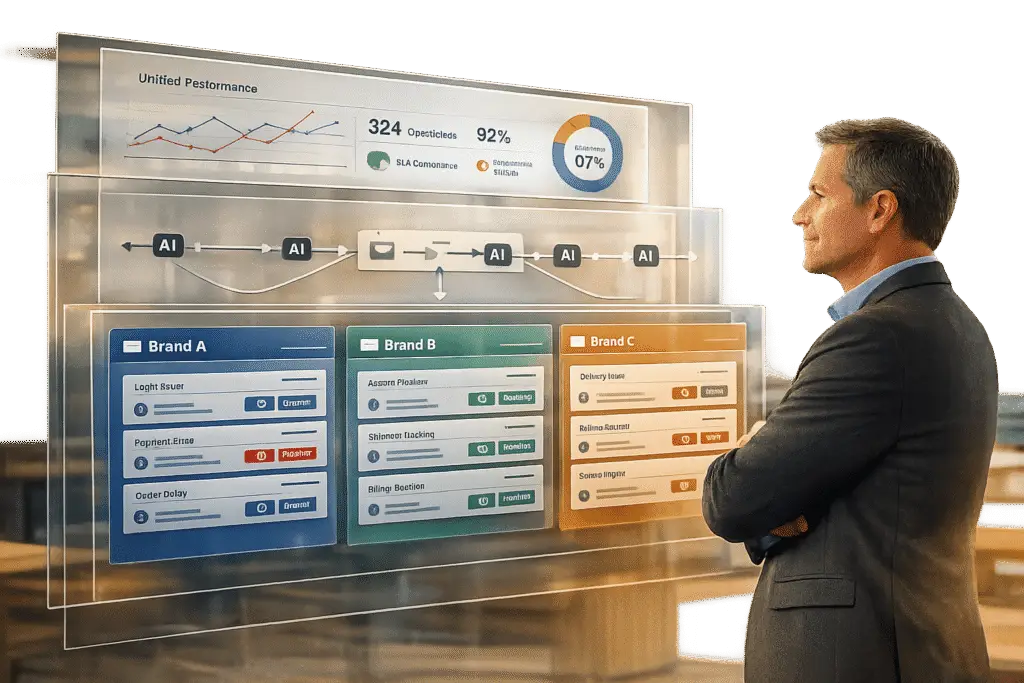
Managing customer support for multiple brands can be complex, but a unified system simplifies operations while maintaining distinct brand identities. Here’s a quick summary of how to set up a multi-brand support system:
- Unified Tools: Use a single platform for managing tickets, reporting, and customer interactions across all brands.
- Brand-Specific Portals: Create separate help centers with unique designs, domains, and content tailored to each brand.
- Shared Inboxes: Centralize ticket management while using rules to route issues to the right brand team.
- AI Integration: Automate ticket routing, prioritize issues, and predict escalations to save time and improve response quality.
- Custom SLAs and KPIs: Align response times and metrics with each brand’s goals and customer expectations.
- Unified Reporting: Use dashboards with brand filters to track performance across all brands while allowing detailed brand-specific insights.
The goal is to deliver personalized customer experiences for each brand while keeping operations efficient and scalable.
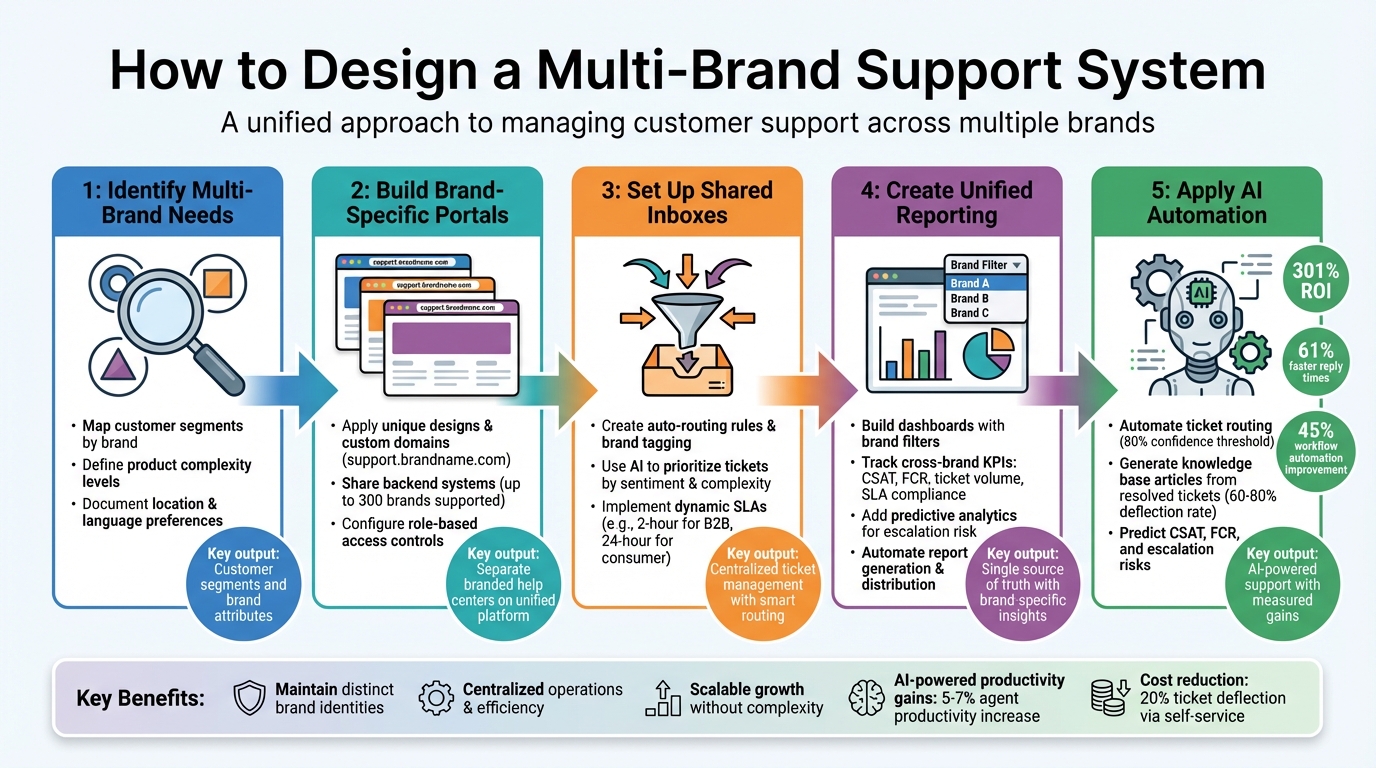
5-Step Multi-Brand Support System Setup Guide
Ep. 29: Setting up a multibrand customer support team (Feat. Fabrice Dowling, Head of Customer Care)
Identify Your Multi-Brand Support Needs
Every brand has its own identity and caters to different customer groups, which means their support needs won’t be identical. It’s not just about slapping different logos on the same system. For instance, a fun, consumer-focused brand might rely on emojis and a casual tone, while a technical B2B product line might demand formal and detailed communication styles. Missing these nuances can frustrate customers who expect a personalized experience. This initial step of understanding each brand’s needs is crucial for creating effective workflows and KPIs.
Map Customer Segments by Brand
Start by documenting how customers interact with each brand to identify their distinct needs. Product complexity is a key factor – high-tech wearables, for example, might require agents with specialized knowledge, unlike simpler retail items. Location and language preferences also vary, depending on where your customers are based.
Use data to create reusable customer segments. For example, you could group users by attributes like "Plan = Premium" or "Country = Italy" to deliver tailored content and AI-driven guidance. Manage segmentation through ticket attributes, such as plan type or location. Additionally, assign specific support channels – like dedicated email addresses, Facebook pages, or X accounts – to each segment. This setup ensures tickets land in the right queues and agents respond with the appropriate tone.
Set Up Brand-Specific SLAs and Workflows
Each brand should have service level agreements (SLAs) that align with its goals and customer expectations. For instance, a premium B2B brand might promise a 2-hour response time, whereas a consumer-focused brand could operate with a 24-hour SLA. Use brand-specific conditions in your business rules to ensure triggers, automations, and macros recognize which brand a ticket belongs to. This allows you to route technical issues to specialized teams or escalate high-priority client requests more efficiently.
Create filtered views so agents can prioritize tickets based on SLA requirements. Additionally, configure unique agent signatures for each brand to maintain a consistent, professional identity in email communications.
Define Cross-Brand KPIs
To ensure consistency while accommodating brand-specific needs, align your KPIs with the established SLAs. Measure ticket volume for each brand to identify those requiring more resources or facing recurring issues. Use a single dashboard to monitor agent performance across all product lines, ensuring productivity stays high regardless of the brand being supported. Instead of applying uniform metrics, track SLA compliance against the specific targets set for each brand.
Set up unified reports with brand filters to access both high-level overviews and detailed insights. Automate CSAT surveys that are triggered after ticket resolution, customizing them to match each brand’s tone and customer expectations. Use these KPIs to spot resource gaps and adjust staffing or content strategies as needed. With the right metrics in place, you’ll gain the operational visibility needed to fine-tune your portal, inbox, and reporting systems to meet each brand’s unique demands effectively.
Build Separate Customer Portals for Each Brand
Once you’ve mapped out your multi-brand requirements, the next step is creating individual portals that reflect each brand’s identity while operating on a shared backend system. The idea is to provide customers with a seamless, brand-specific experience while keeping your backend unified for easier management. A one-size-fits-all approach to support often falls short – customers expect interactions that align with the brands they know and trust. Here’s how you can achieve this balance using tailored design, a shared backend, and precise access controls.
Apply Brand-Specific Design and Domains
Each portal should look and feel like an extension of its brand’s main website. This means incorporating the brand’s unique colors, logos, and navigation elements to maintain its visual identity. Use custom host-mapped URLs, such as support.brandname.com, instead of generic subdomains to ensure a smooth transition from the main site to the support portal. This approach reinforces brand integrity and builds customer trust.
To enhance security, ensure SSL certificates are updated whenever new custom domains are added. Techniques like SubjectAltName or wildcard certificates can simplify this process. Keeping the design consistent reassures users that they’re still within the trusted environment of the brand.
Share Backend Systems Across Portals
Managing multiple brand portals doesn’t have to mean juggling separate systems. A unified backend allows for centralized ticket management, shared knowledge bases, and streamlined reporting, eliminating redundant work . For example, you can create a single knowledge base article and distribute it across all your help centers.
This setup also enables managers to analyze performance across different brands and identify trends using a single dashboard . Some platforms even support up to 300 distinct brands within one account on enterprise plans, showing that scaling doesn’t have to complicate operations .
Configure Role-Based Access Controls
To maintain security and efficiency, restrict agent access to only the tickets and data related to their assigned brand. Set up permissions so agents can only view content relevant to their role and brand. For instance, you can organize agents into brand-specific groups like "Support_BrandA" or "Returns_BrandB".
On enterprise plans, custom roles can further limit agents to viewing tickets only within their designated groups. Administrators should explicitly assign team members to specific brands – agents won’t be able to access tickets for a brand unless they’ve been added to it. Additionally, restricted views can be created so agents only see ticket queues for their assigned brands, while global administrators retain full visibility for comprehensive oversight and reporting .
Set Up Shared Inboxes with Brand Routing
Managing shared inboxes effectively is crucial for keeping multi-brand support seamless. By centralizing your inbox system, your team can handle all tickets from one workspace while ensuring every issue is routed to the correct team and handled according to the appropriate brand’s guidelines. Automating ticket identification, routing, and prioritization based on brand context simplifies the process and keeps things running smoothly.
Create Routing Rules and Auto-Tagging
In a multi-brand setup, every ticket should include a brand identifier. This is typically determined by the entry point – like an email sent to a brand-specific support address or a ticket submitted through a particular help center. Once the system identifies the brand, pre-configured triggers automatically assign tickets to the relevant agent group, such as "Support_BrandA" or "Returns_BrandB".
For more complex workflows, consider routing tickets to a central triage group first. This team can evaluate and direct tickets to the correct brand-specific team, reducing the chances of misrouted issues. To enhance reporting and streamline workflows, apply brand-specific tags to tickets as they’re created. With these automated systems in place, AI can step in to further optimize prioritization and escalation processes.
"The Multibrand feature in Support is configured by default to allow all agents to access tickets for all brands. This allows your support team to seamlessly move between requests from all of your brands and provide faster support." – Bob Novak, Zendesk
Use AI to Prioritize and Predict Escalations
AI tools can go beyond simple brand-based routing by analyzing ticket content and customer history to set priority levels. For example, AI might flag tickets based on factors like technical complexity, customer sentiment, or a high-value account status. This ensures pressing issues are addressed quickly while routine requests follow standard workflows. You can test AI routing in a simulation mode using historical tickets, refining your rules as you identify patterns.
AI can also detect customer intent – whether it’s a refund request, a bug report, or an account change – and route tickets to the appropriate team without manual intervention. Pairing this with dynamic SLAs ensures that urgent tickets are handled promptly and according to each brand’s unique needs.
Implement Dynamic SLAs
Instead of applying a blanket SLA policy, dynamic service level agreements let you tailor response times to each brand and ticket category. For instance, triggers can apply brand-specific SLA policies as tickets arrive. If a ticket isn’t addressed within a set timeframe, dynamic SLAs can escalate the issue by notifying a supervisor or reassigning the ticket.
To help agents stay on top of these SLAs, create separate views for each brand. This allows your team to monitor SLA deadlines and differentiate between varying service expectations across brands. With dynamic SLAs in place, your team is better equipped to meet each brand’s unique requirements while maintaining efficiency.
sbb-itb-e60d259
Create Unified Reporting Across Brands
To wrap up your AI-native multi-brand support system, it’s essential to integrate unified reporting that aligns with your customized portals and dynamic inbox routing. A unified reporting framework provides a comprehensive view of performance across all brands, with the flexibility to drill down into brand-specific data. This setup ensures a seamless flow of actionable insights by automating data consolidation into a single source of truth.
Build Dashboards with Brand Filters
Design dashboards that bring together key metrics – like response times, CSAT scores, resolution rates, and ticket volume – across all brands. Make "Brand" a core filter, so stakeholders can easily segment and search data by individual brand identity. This structure gives executives a bird’s-eye view of overall support performance while enabling brand managers to focus on specific data with just one click.
When organizing your dashboard, place headline metrics in the top-left corner to align with natural reading patterns, ensuring critical data is immediately visible. You can also create role-specific views to cater to different needs. For example:
- Executives might focus on high-level metrics like customer lifetime value (CLV) and churn rates.
- Support managers may prioritize operational metrics like first contact resolution (FCR) and average handle time (AHT).
Here’s an example of how to structure your metrics:
| Metric Category | Cross-Brand (Aggregate) KPIs | Individual Brand (Filtered) KPIs |
|---|---|---|
| Volume | Total Ticket Volume across portfolio | Brand-specific Ticket Volume |
| Speed | Average First Response Time (Global) | Brand-specific SLA Compliance |
| Quality | Average CSAT across all brands | Brand-specific CSAT & Sentiment |
| Efficiency | Total Deflection Rate (AI/Self-Service) | Knowledge Base Article Views per Brand |
| Risk | Global Escalation Rate | Brand-specific Escalation Trends |
| Productivity | Agent Utilization | Brand Agent Performance |
Dashboards should also include drill-down features, allowing users to click on high-level metrics to access detailed data or even individual tickets. This functionality ensures every stakeholder gets the insights they need to fine-tune operations for their specific brand.
Add Predictive Analytics
Modern reporting tools now incorporate AI-driven predictive analytics to provide a forward-looking perspective. These metrics can identify patterns, such as customers likely to become dissatisfied or tickets at risk of escalation, enabling your team to act before problems escalate. Some platforms even offer "what-if" modeling to show how changes in specific metrics could impact CSAT or revenue.
For instance, in 2024, Swedish neobank Northmill used AI-powered dashboards to analyze onboarding data for its digital services. By pinpointing drop-off points in real time, they introduced targeted solutions that increased conversion rates by 30%.
"It is all about being as relevant and personal as possible so users’ personal finance can benefit from the insights." – Northmill Representative
To take it further, link predictive metrics to real-time alerts and next-best-action recommendations. This ensures supervisors are notified when metrics deviate from expected levels, turning your reporting system into a proactive management tool that drives continuous improvement across brands.
Automate Report Generation and Distribution
Managing multiple brands often makes manual reporting cumbersome and error-prone. Automating report generation simplifies this process by scheduling performance data to be compiled and distributed to stakeholders without manual intervention. Exception-based reporting can also alert managers when metrics fall outside acceptable thresholds.
Take Canadian Tire as an example. During the early COVID-19 pandemic, they used centralized analytics to uncover new opportunities in their pets department. By analyzing cross-brand purchasing data, they developed upselling strategies that increased sales by 20%, even with 40% of their stores closed.
Bringing together data from multiple sources – like CRM systems, VoIP, social media, and customer feedback – into a unified view ensures accurate cross-brand comparisons. Automated distribution ensures insights are delivered to the right people at the right time, enabling quicker decisions and more proactive management. This automation frees your team to focus on strategic goals rather than being bogged down by manual tasks.
Apply AI to Multi-Brand Operations
Once you’ve established a unified reporting framework, the next step is to integrate AI into your daily operations. This can help minimize manual tasks and ensure consistency across all brands. By using AI-native platforms, you can automate processes like ticket routing, content creation, and performance forecasting, allowing your team to concentrate on more complex challenges. Additionally, resolved cases can be transformed into detailed self-service articles, extending the benefits of AI even further.
Automate Ticket Routing and Prioritization
AI isn’t just about routing tickets – it’s about doing so intelligently. AI can analyze incoming tickets for intent, language, and sentiment, ensuring they’re routed to the correct team with the right priority. For example, a refund request with negative sentiment could be flagged for immediate escalation to a senior agent, helping to address potential customer churn quickly.
"Intelligent triage is an AI-powered feature that automatically detects what a ticket is about (its intent), what language it’s written in, and whether the customer’s message is positive or negative (its sentiment)." – Jake Bantz, Product Manager, Zendesk
AI can also proactively request missing details before an agent even steps in. If a customer submits a return request without including a purchase order number, the system can prompt them to provide it. This improves first-contact resolution rates. To avoid unnecessary actions, set an 80% confidence threshold so the system only acts on high-certainty intents. Simulation testing with historical data can refine these workflows.
Beyond ticket routing, AI adds another layer of efficiency by turning successful resolutions into reusable content.
Generate Knowledge Base Articles from Tickets
AI can take resolved support cases and transform them into self-service articles, significantly reducing ticket volumes over time. To ensure clarity and usability, it’s important to follow a standardized template. This template might include an action-oriented title, a chatbot-friendly summary, step-by-step instructions, expected outcomes, and potential exceptions. Proper tagging with metadata – such as product, version, brand, and locale – prevents confusion or cross-brand content overlap.
Start by analyzing six months of ticket data to uncover the 20% of issues responsible for 80% of support costs. These high-impact issues should be prioritized for AI-generated articles. Implement a workflow where AI drafts the article, and an expert reviews it to ensure accuracy and alignment with the brand’s voice. A well-structured knowledge base can cut Average Handle Time (AHT) by 20–30%, while addressing high-volume intents with self-service options can achieve a deflection rate of 60–80%.
Predict CSAT, FCR, and Escalation Risk
AI models can predict Customer Satisfaction (CSAT), First Contact Resolution (FCR) rates, and escalation risks using sentiment analysis. For instance, tickets with negative sentiment can be flagged for immediate action. By examining historical ticket data, AI can identify intents that frequently lead to escalations, enabling you to create triggers that route these cases to specialized teams right away.
In multi-brand operations, AI can adapt to the tone and style specific to each brand. For example, one brand might use a playful tone with emojis, while another opts for a more formal approach. This ensures a consistent and cohesive customer experience, helping maintain high CSAT scores. Intelligent triage reporting can also highlight patterns – if a specific intent shows high ticket volume but poor FCR, it’s a clear signal to create a new self-service article.
Conclusion
Creating a multi-brand support system involves finding the right balance between tailoring experiences for individual brands and maintaining efficient operations. The key steps – identifying customer segments, setting up dedicated portals, utilizing shared inboxes with smart routing, and employing unified reporting – help preserve each brand’s unique identity while reducing unnecessary complexity.
Once operations are optimized, advanced AI tools take support management to the next level. AI connects customization with efficiency. Features like intelligent routing eliminate manual case sorting, while automated tagging and prioritization ensure cases reach the right agents instantly. AI tools can deliver an impressive average ROI of 301% over three years, with reply times improving by 61% thanks to real-time context and insights. By automating routine tasks, your team can focus on resolving more complex customer concerns.
These improvements in efficiency directly impact your bottom line. AI-powered systems enhance workflow automation by 45% and increase agent productivity by 5–7%. With predictive analytics for key metrics like CSAT, FCR, and escalation risks, you’re not just solving problems – you’re anticipating them. Additionally, self-service knowledge bases can deflect up to 20% of support requests, cutting costs while boosting customer satisfaction.
A thoughtfully designed multi-brand support system doesn’t just reduce expenses – it lays the groundwork for growth. By maintaining high-quality support at scale, such a system ensures your business can expand without compromising on customer experience or operational efficiency.
FAQs
How does AI improve ticket routing and prioritization in multi-brand customer support?
AI takes ticket routing and prioritization to the next level by using smart automation to process incoming tickets in real time. It evaluates key factors like the type of issue, customer history, sentiment, and urgency. This allows tickets to be automatically assigned to the most qualified agents or teams, cutting down on manual work and reducing mistakes. The result? Faster resolutions for critical issues and happier customers.
What makes this even better is AI’s ability to understand intent, language, and sentiment. This means it can route tickets based on context – like predicting when a situation might escalate or spotting urgent customer needs. With this level of precision, support teams can focus on what matters most, ensuring high-priority issues get the attention they deserve.
By streamlining workflows across multiple brands, AI helps distribute resources more effectively, shorten response times, and elevate the quality of customer support. It’s a game-changer for managing complex, multi-brand operations.
What are the advantages of using customized SLAs and KPIs for each brand in multi-brand support?
Using customized SLAs (Service Level Agreements) and KPIs (Key Performance Indicators) in a multi-brand support setup brings a range of benefits. It allows you to align performance standards with each brand’s unique customer expectations, service priorities, and goals. This ensures every brand delivers a distinct and consistent experience tailored to its audience.
Custom SLAs and KPIs also make performance tracking more precise and actionable. By focusing on metrics that matter most to each brand, support teams can pinpoint areas for improvement, refine processes, and make decisions based on solid data. This approach ensures resources are used efficiently to meet the specific needs of each brand.
Another advantage is the ability to prioritize tickets based on what each brand values most. For example, a premium brand might demand faster response times and stricter resolution standards than a budget-focused brand. Customized SLAs help meet these varied expectations while maintaining service quality across the board. This strategy boosts efficiency, strengthens accountability, and improves customer satisfaction in multi-brand support systems.
How can a unified reporting system improve performance tracking for multiple brands?
A unified reporting system simplifies performance tracking by bringing together essential metrics from all your brands into one centralized dashboard. This setup makes it easier for support teams to compare performance, spot trends, and address issues – whether for individual brands or the entire operation.
By providing clear and actionable insights, such a system helps your team refine workflows, speed up response times, and maintain consistent service quality. The result? Improved efficiency and happier customers across all your brands.






