



Onboarding B2B support agents requires a structured plan to prepare them for high-stakes responsibilities. A 30/60/90-day framework helps new hires gradually build skills, avoid overwhelm, and deliver consistent results. Here’s a quick breakdown:
- Days 1–30: Focus on core training – product basics, tool setup, and B2B communication standards. New agents shadow experienced team members and practice in safe environments like sandbox accounts.
- Days 31–60: Shift to hands-on work – handling simple cases, learning escalation protocols, and using AI tools for efficiency. Performance metrics like CSAT and FCR are introduced for tracking progress.
- Days 61–90: Emphasize independence – agents tackle complex cases, contribute to the knowledge base, and master predictive analytics to anticipate client needs.
This phased approach ensures agents are confident and effective by the end of their first 90 days, reducing errors and improving customer satisfaction.
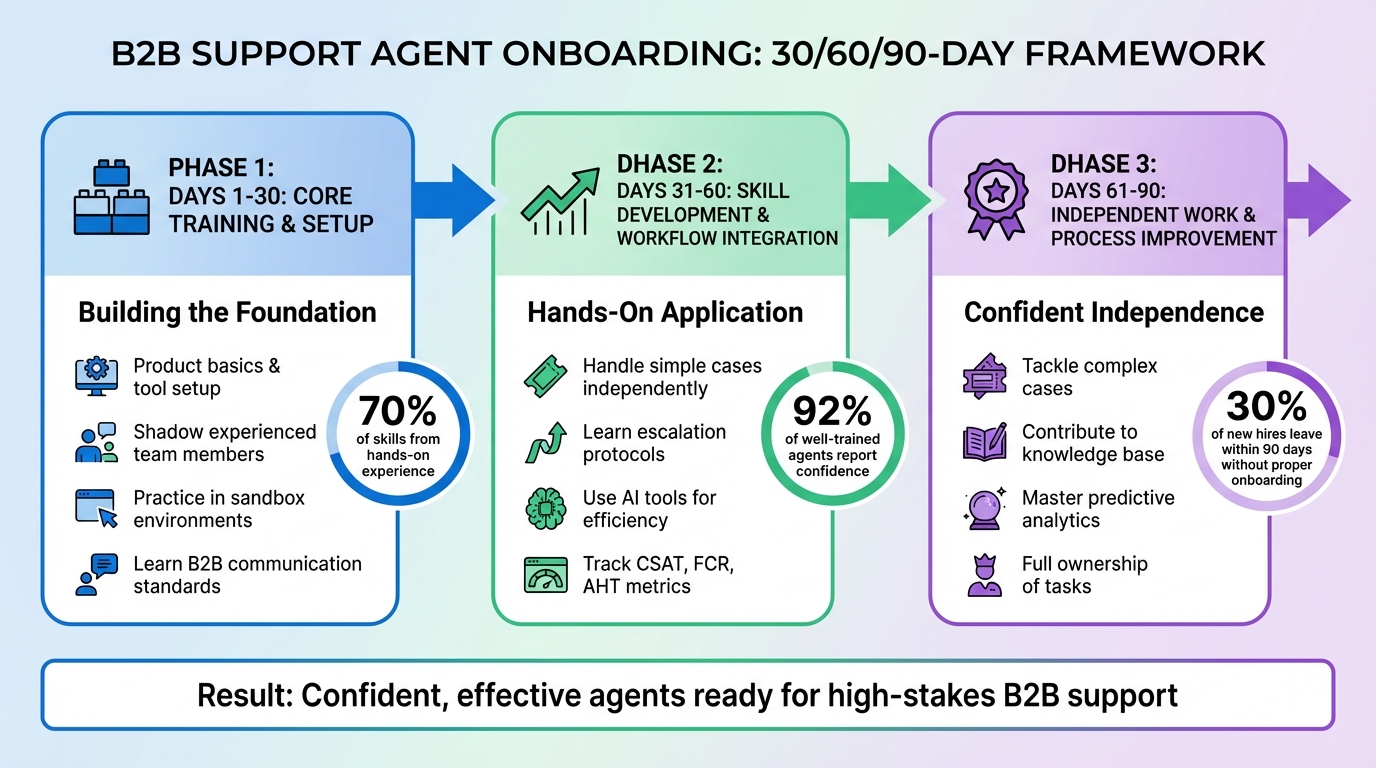
B2B Support Agent 30/60/90-Day Onboarding Framework
Days 1-30: Core Training and Setup
This phase lays the groundwork for the advanced skills agents will build later.
Product and Service Training
The goal here is to deepen agents’ understanding of the product’s functionality, the value it brings to B2B clients, and the types of issues the support team handles. Training should focus on the top 20–30 reasons customers typically reach out, such as billing disputes, account setup, or integration troubleshooting. For each scenario, map out the "happy path" that leads to a resolution.
Hands-on practice is key. Use sandbox accounts with mock data so agents can explore features without risking customer information. Pair new hires with experienced mentors who can share tips and undocumented insights. Encourage them to review past sales calls and support cases to understand how the team explains product value and handles objections. Studies indicate that 70% of skills are developed through hands-on experience, while only 30% come from formal instruction.
"It’s important to keep your onboarding and training information accurate and updated as your product, services, or processes change." – PartnerHero
Platform and Tool Setup
Ensure agents have all necessary access within their first week to avoid delays. This includes logins for the case management platform, AI-driven support tools, knowledge bases, and internal communication channels. Provide test environments where they can practice without affecting live tickets.
Training on AI tools should include using RAG (retrieval-augmented generation) to connect responses directly to current internal documentation. Break platform training into short, focused modules for better retention. Among agents who feel their training has prepared them well, 92% report being confident in their ability to assist customers effectively.
B2B Communication Standards
Supporting B2B clients requires a communication style that’s more formal and precise than consumer support. Agents must learn to identify key client stakeholders – such as end users, procurement teams, or executive sponsors – each with their own priorities. In these interactions, thorough and accurate responses are more valued than quick but incomplete ones.
Set clear guidelines for professional communication across various channels like email, Slack Connect, Microsoft Teams, and in-app chats. Agents should also be trained to leave detailed account notes, ensuring seamless handoffs between team members. Early training on escalation protocols is crucial so agents know when and how to route high-priority issues tied to major contracts. Keep in mind that 63% of customers consider onboarding quality a major factor in their purchasing decisions, making effective communication a vital part of the overall experience.
| Communication Channel | Best Use Case in B2B | Standard Expectation |
|---|---|---|
| Slack / Teams | Quick answers, real-time collaboration | High speed, conversational but professional |
| Record-keeping, structured updates | Clear CTAs, documented next steps | |
| Video Calls | Complex troubleshooting, QBRs | Scheduled, agenda-driven |
| Knowledge Base | Self-service, common workflows | Searchable, scannable, regularly updated |
Mastering these communication standards equips agents to handle the complex case management tasks that come in later phases.
Days 31-60: Skill Development and Workflow Integration
In the second month, agents transition from learning the basics to managing cases independently. This stage focuses on applying earlier training in real-world scenarios, honing skills through independent ticket handling, AI tool usage, and performance tracking. The goal is to navigate the complex workflows typical of B2B support environments. Here’s a closer look at how agents tackle intricate cases, improve AI proficiency, and use metrics to refine their abilities.
Complex Case Management
Building on the communication and escalation techniques learned earlier, agents now handle multi-stakeholder cases with more autonomy. Key areas of focus include escalation protocols, meeting SLA expectations, and resolving multi-step issues.
Agents gain hands-on experience by shadowing senior team members and working in sandbox environments that simulate real B2B scenarios, such as billing disputes or integration failures. To ensure readiness, senior staff review agents’ live responses before they’re sent to customers. This asynchronous review process helps catch mistakes early while boosting confidence.
To streamline decision-making, create clear guidelines for agents. For example, map out "happy paths" for common customer intents and define "stop-and-escalate" points where senior staff should step in.
AI Tool Training
Agents progress from basic familiarity with AI tools to actively using them for tasks like case summaries, auto-response drafts, and predictive analytics. Initially, they work with internal-only AI features, such as tools that summarize cases or suggest solutions based on past resolved issues.
Teach agents to navigate confidence-gated automation, where high-confidence AI responses are sent automatically, medium-confidence drafts require human review, and low-confidence cases are escalated immediately. This approach ensures accuracy while maintaining efficiency.
One key strategy is leveraging Retrieval-Augmented Generation (RAG), which allows AI to access the most up-to-date knowledge from source systems instead of relying on outdated training data. As Ameya Deshmukh of EverWorker explains:
"The fastest path is retrieval-augmented generation (RAG): keep your knowledge in source systems and let AI retrieve and reason over the latest versions, instead of brittle, one-off fine-tuning".
Before enabling AI to handle cases autonomously, validate its accuracy and adherence to policy through advanced proficiency tests. Set clear boundaries, such as "Never process refunds over $100" or "Always verify identity before making account changes". Weekly quality reviews of 20–50 AI-assisted interactions help identify areas for improvement and prevent drift.
Most teams can achieve stable automation for basic (Tier 0) and intermediate (Tier 1) tasks within 60 to 90 days of introducing AI training.
Performance Metrics and Feedback
As agents begin working independently, tracking performance metrics becomes essential for identifying strengths and areas for improvement. Focus on key indicators like First Contact Resolution (FCR), Customer Satisfaction (CSAT), Average Handle Time (AHT), and Quality Assurance (QA) scores. These metrics should be reviewed weekly during this phase to pinpoint any struggles with workflows or tools.
- FCR evaluates whether agents have mastered product knowledge enough to resolve issues without escalation.
- CSAT measures how well agents apply soft skills and empathy during customer interactions.
- AHT highlights whether agents are having difficulty navigating complex workflows or need more tool training.
- Deflection Rate and refusal accuracy (recognizing when escalation is necessary) are added metrics for agents using AI tools.
At the 60-day mark, conduct formal evaluations using a mix of testing and practical exercises. This feedback loop helps address recurring challenges and optimize workflows before agents reach full integration at 90 days. Notably, 92% of agents who feel well-prepared by their training report confidence in assisting customers effectively.
| Metric | Purpose in Days 31-60 |
|---|---|
| FCR (First Contact Resolution) | Measures whether agents can resolve issues independently without escalating. |
| CSAT (Customer Satisfaction) | Evaluates the quality of agents’ empathy and soft skills. |
| AHT (Average Handle Time) | Identifies struggles with workflows or tool proficiency. |
| QA Score | Tracks adherence to brand voice and technical accuracy. |
| Deflection Rate | Assesses efficiency gains from AI tools like case summaries and auto-responses. |
Days 61-90: Independent Work and Process Improvement
By the third month, agents transition to full ownership of their tasks, moving from guided learning to independent problem-solving. This phase is all about taking responsibility, creating knowledge, and using predictive analytics to address potential issues before they escalate. Agents are expected to own their decisions and outcomes, which strengthens the team as a whole. This stage builds naturally on earlier training, shifting focus from supervised practice to confident, independent performance.
Complex Issue Resolution Practice
During this phase, agents take on high-value, multi-stakeholder cases without direct supervision, applying the skills they developed in the previous stage. Populate the helpdesk with standardized test tickets that cover scenarios like billing disputes, integration failures, and escalations. Agents resolve these cases independently, then review their work with mentors to pinpoint and address any gaps.
To ensure agents feel supported, provide access to experienced peers through dedicated channels or in-person assistance for quick troubleshooting. This mix of independence and support allows agents to handle complex cases while knowing help is available if needed.
Knowledge Base Contributions
At this stage, agents move from simply using the knowledge base to actively maintaining and improving it. They update recurring explanations, flag outdated content, and identify inefficiencies in workflows. The 90-day mark is an ideal time for this, as agents bring fresh perspectives before becoming entrenched in existing processes.
Train agents to use AI tools that draft structured articles based on resolved cases, with agents reviewing and refining the content. Emphasize creating articles with clear titles, step-by-step instructions, and tables to enhance Retrieval-Augmented Generation (RAG) accuracy. Ameya Deshmukh of EverWorker highlights the importance of this process:
"Outdated content is the top cause of incorrect AI answers. A simple update workflow protects CSAT and trust".
Incorporate a feedback loop where agents flag incorrect AI suggestions or signs of "knowledge drift" during their daily work. This feedback directly improves the AI model. To wrap up the 90-day period, schedule a formal review where agents present their ideas for updating the knowledge base and refining workflows.
Predictive AI Tool Mastery
With a solid knowledge base in place, agents can now focus on mastering predictive tools to anticipate issues and improve customer outcomes. Building on earlier AI training, these tools help agents flag trends in CSAT, CES, and FCR before problems arise. Predictive analytics monitors usage patterns and account data, alerting agents to potential issues like service disruptions or billing concerns before they escalate.
Run these tools in shadow mode for 2-3 weeks to validate their accuracy against agents’ own insights before allowing them to act independently. Training should focus on helping agents understand the metrics driving predictions. For instance, if predictive CSAT identifies a high-risk interaction, agents should analyze sentiment trends to decide whether to adjust their approach or offer personalized solutions.
This phase elevates agents from problem-solvers to trusted advisors, enabling them to provide proactive recommendations based on historical data and customer preferences. Eric Klimuk, Founder and CTO of Supportbench, sums it up perfectly:
"The future belongs to agents who embrace collaboration with AI, hone their critical thinking and interpersonal skills, and leverage data to become true customer advocates and strategic advisors".
sbb-itb-e60d259
Tracking Progress and Measuring Success
Having a well-structured tracking system is key to ensuring your onboarding efforts lead to high retention and productivity. Without clear milestones and KPIs, you risk increased retention costs. In fact, replacing a single employee can cost up to three to four times their salary, and poor onboarding results in 30% of new hires leaving within their first 90 days. Monitoring progress not only protects retention but also ensures productivity stays on track. This framework aligns seamlessly with the onboarding phases outlined earlier.
Milestone Tracking by Phase
Each phase of the 90-day onboarding plan comes with its own set of milestones and KPIs. Here’s how it breaks down:
- Days 1-30: Focus on foundational goals like completing training modules, achieving accuracy during shadowing, and reviewing internal materials.
- Days 31-60: Shift to workflow integration metrics, including customer satisfaction (CSAT) scores, ticket volume, and adherence to company policies.
- Days 61-90: Measure independent performance through metrics such as First Contact Resolution (FCR), SLA adherence, Average Handle Time (AHT), and Quality Assurance (QA) scores.
| Phase | Key Milestones | Primary KPIs |
|---|---|---|
| Days 1-30 | Completion of training; handling supervised tickets | Training scores; shadow mode accuracy |
| Days 31-60 | Handling Tier 1 tickets; identifying weaknesses; career goals | CSAT; FCR; ticket volume |
| Days 61-90 | Resolving complex issues; contributing to Knowledge Base | AHT; QA scores; time-to-productivity; policy adherence |
In addition to these numerical KPIs, qualitative metrics play a vital role. These include tone, empathy, and "refusal accuracy", which measures an agent’s ability to appropriately decline disallowed actions or escalate issues. Regular reviews – at 30, 60, and 90 days – combined with daily check-ins during the first week and weekly sessions afterward, help reinforce expectations and encourage growth. Combining these milestones with advanced analytics creates a path for continuous improvement.
Using Analytics to Monitor Agent Development
Once the milestones are established, advanced analytics can provide deeper insights into agent performance. Modern analytics tools go beyond counting tickets – they use Natural Language Processing (NLP) and Machine Learning (ML) to analyze the context and sentiment behind agent–customer interactions. This approach delivers insights that rule-based systems can’t match. Automated tagging ensures consistent and reliable data for reporting.
"AI ensures that tickets are classified based on their actual content, leading to much cleaner and more reliable data for reporting [and] identifying areas for product or process improvement".
Metrics like refusal accuracy and policy adherence can also be tracked automatically when AI tools assist agents. Sentiment analysis, for example, can flag whether an agent struggles with frustrated customers or if their tone aligns with the company’s empathy standards. Research shows that top-performing support teams are nearly 10 times more likely to have leaders who regularly monitor performance metrics. Conducting weekly QA reviews of 20–50 interactions helps catch performance issues early and allows for data-driven coaching.
Phase-specific metrics ensure realistic expectations. For the first 30 days, keep goals simple – like reading key documents or managing basic conversations. Over time, introduce more advanced KPIs, such as CSAT and FCR. At the 90-day mark, ask agents for feedback on the onboarding process itself. As Help Scout highlights:
"Fresh eyes are often the best at providing insights on any lasting practices that have stuck around just because they are familiar".
This two-way feedback loop not only improves agent performance but also strengthens the onboarding program as a whole.
Common Mistakes and How to Avoid Them
In the 30/60/90-day plan, steering clear of common onboarding missteps is key to keeping agents engaged and performing well. Many of these errors can be avoided with a structured process and smart use of AI tools. Here’s how to navigate these challenges effectively.
Preventing Information Overload
Bombarding new agents with an avalanche of product details, policies, and system training can quickly derail onboarding efforts. It’s no surprise that 30% of new hires leave within their first 90 days, often because they feel overwhelmed or unprepared. To combat this, break the training into smaller, digestible phases that align with the 30/60/90-day timeline. Focus on essential knowledge upfront, and save more intricate workflows for later stages.
AI tools like Retrieval-Augmented Generation (RAG) can help by delivering relevant articles and policies exactly when agents need them. This just-in-time approach keeps things manageable and prevents cognitive overload.
Simulated environments are another game-changer. By using test accounts and sample tickets, agents can practice in a safe space before handling real customer interactions. Stephanie Kemp, Enterprise Accounts Director at Bridge, emphasizes this point:
"Product knowledge plays a huge role in customer support success. Customer support employees must be experts in your products and services with the communication skills to translate their understanding to customers".
The goal is to create a balance between delivering information and maintaining a pace that keeps agents engaged without overwhelming them.
Using AI to Support, Not Replace, Agents
A common mistake is treating AI as a substitute for human decision-making rather than a tool to enhance agent performance. When AI’s role is unclear, it can frustrate both agents and customers.
To avoid this, treat AI as part of the team. Define its role, establish clear boundaries, and provide data-driven coaching to ensure proper integration. Use AI for repetitive tasks like password resets, order tracking, or answering FAQs. This frees up agents to focus on complex workflows and building customer relationships.
Set limits to ensure AI doesn’t overstep. For example, cap AI-approved refunds at $50 or require human oversight for compliance-sensitive actions. These "trust layers" protect both agents and customers. When AI is seen as a dependable copilot – offering case histories, suggesting responses, and automating research – agents are more likely to embrace it. In fact, AI tools like one-click answers and smarter search features can boost agent efficiency by up to 35%.
Keeping Training Consistent Across Teams
Even with well-managed content and AI integration, consistency in training is critical. Inconsistent practices lead to uneven performance, and disorganized materials can confuse new hires. This "knowledge sprawl" slows productivity and creates unnecessary hurdles.
The solution? Start with a centralized knowledge base that serves as the single source of truth. Before onboarding begins, audit your materials – streamline help center articles, macros, and policy documents into one system. This ensures that both agents and AI tools rely on the same up-to-date content.
Standardize onboarding with clear KPIs, such as daily issue resolution rates, CSAT scores, and accuracy metrics. Convert standard operating procedures (SOPs) into Agent Operating Procedures (AOPs) to define workflows, tools, and policy limits for both agents and AI. Use consistent simulated tickets during training so every new hire encounters the same scenarios. Finally, conduct weekly QA reviews of 20–50 interactions to catch inconsistencies early and provide actionable feedback to keep everyone aligned.
Conclusion: Setting Agents Up for Long-Term Success
A well-organized 30/60/90-day onboarding plan lays the groundwork for strong performance and retention. By dividing training into distinct phases, leveraging AI to complement human expertise, and focusing on measurable milestones, you create a system that benefits both agents and the organization. And the impact is clear: 67% of HR leaders report higher engagement when AI-personalized onboarding is implemented.
Beyond engagement, the financial advantages are hard to ignore. Automated training reduces onboarding time by 38%, improves agent efficiency, and lowers costs tied to replacements and training. These savings allow teams to handle more tickets without needing additional staff.
This structured approach also elevates the role of the support agent. Automating routine Tier 0 and Tier 1 tasks during onboarding frees agents to focus on more complex challenges – like solving intricate problems, showing empathy, and offering strategic advice. As Eric Klimuk, Founder and CTO of Supportbench, explains:
"The support agent of the future isn’t obsolete; they are augmented, empowered, and more critical than ever, provided they cultivate the right skills".
Consistency in training and centralized resources further enhance agent readiness. Tools like shared knowledge bases, standardized KPIs, and regular QA reviews ensure every agent receives top-tier training. This approach positions agents as stewards of knowledge, ensuring long-term quality for both human-led and AI-assisted interactions. It’s especially vital for scaling organizations that want to maintain high standards without overburdening current staff.
The 30/60/90-day framework goes beyond being a simple onboarding checklist – it’s a scalable system that prepares agents for success from day one and supports their growth well beyond the first quarter. By investing in structured training, AI tools, and clear goals, you can build a team capable of tackling complex B2B challenges and driving sustained success.
FAQs
What are the benefits of a 30/60/90-day onboarding plan for B2B support agents?
A 30/60/90-day onboarding plan offers clear guidance and structure for new B2B support agents, helping them gradually develop the skills required to handle complex accounts and navigate multi-stakeholder environments. By dividing the onboarding process into smaller, focused phases, it allows agents to build confidence, stay motivated, and achieve specific milestones along the way.
This phased approach also trims onboarding time and expenses by concentrating on practical, role-specific training. The result? Agents are set up to provide outstanding support right from the start.
How can AI improve onboarding for new B2B support agents?
AI can make onboarding for new B2B support agents much smoother by delivering real-time guidance, automating routine tasks, and tailoring training to individual needs. With AI-powered tools integrated into their daily workflows, agents can quickly access the information they need, helping them feel more confident and capable right from the start. These tools also provide instant feedback by analyzing interactions, which helps speed up skill-building.
By automating tasks like updating knowledge bases, mapping processes, and performing compliance checks, AI can cut onboarding times significantly – turning what used to take months into just a few weeks. Plus, features like adaptive training paths and sentiment analysis ensure agents are better equipped to handle complex accounts and collaborate with multiple stakeholders. In short, AI not only accelerates readiness and improves performance but also reduces onboarding costs, making it a game-changer for modern B2B support teams.
What are the key metrics to track during a B2B support agent’s onboarding process?
To gauge how well B2B support agents are progressing during onboarding, it’s important to track a handful of key metrics that highlight their growth and readiness. Start with first call resolution (FCR), customer satisfaction (CSAT), and average handle time (AHT) – these indicators show how effectively agents are solving problems and meeting customer needs.
You should also keep an eye on time to proficiency, which measures how quickly agents become fully productive. Metrics like training completion rates and knowledge retention scores help ensure they’re absorbing the essential information. Feedback from coaching sessions and evaluations of interaction quality can offer additional insight into how well agents handle complex issues and manage multi-stakeholder accounts. By focusing on these areas, you can pinpoint gaps, refine onboarding processes, and give agents the tools they need to succeed in the long run.






