


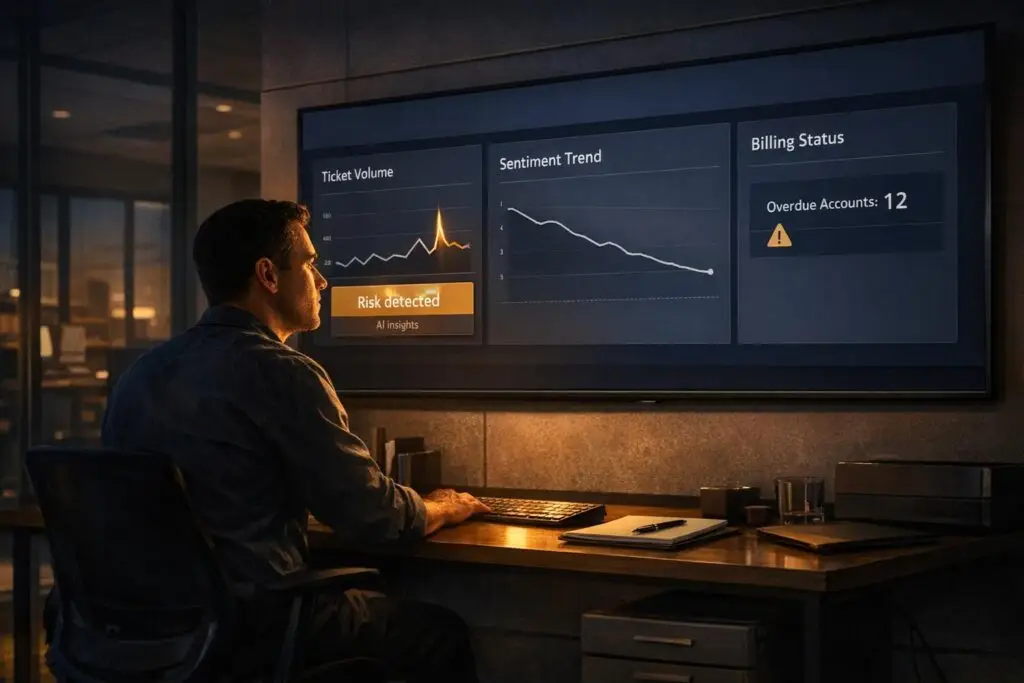
Silent churn is when customers disengage gradually without explicitly canceling or complaining. It’s a quiet, costly problem – U.S. companies lose $136 billion annually to it. The good news? Support teams can often spot early warning signs before Customer Success teams notice declining health scores. Here’s how:
Key Signals of Silent Churn:
- Ticket Volume Changes: A 3x spike in 7 days may indicate onboarding trouble, while zero tickets for 60+ days could mean disengagement.
- Negative Sentiment: Declining tone in tickets or phrases like “fed up” and “impossible to work with” signal dissatisfaction.
- Behavioral Shifts: Slower responses, canceled meetings, or formal language shifts suggest disengagement.
- Payment Issues: Failed payments or questions about downgrades often indicate churn risk.
How AI Helps:
- AI-driven sentiment analysis: Tracks tone and keywords to predict dissatisfaction with 85–92% accuracy.
- Automated Alerts: Flags risky accounts based on support patterns and usage drops.
- Dashboards: Combines support and product data to provide a clear view of customer health.
Why It Matters:
- Retaining customers is 5–25x cheaper than acquiring new ones.
- Acting on early signals can reduce churn by 15–30% and boost profitability by over 25%.
To prevent silent churn, support teams should monitor these signals, use AI tools for real-time insights, and act swiftly when risks arise. Ignoring these signs can result in lost customers and revenue.
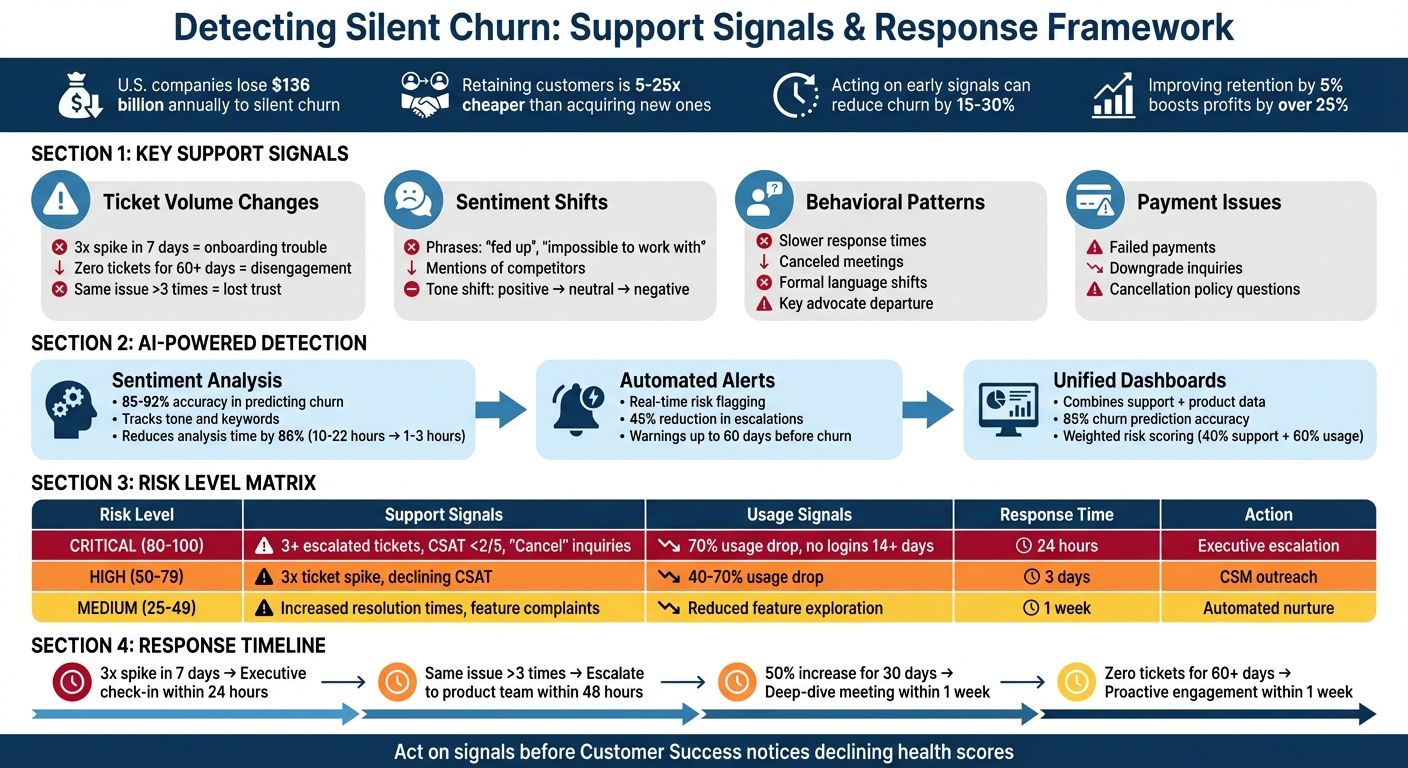
Silent Churn Detection: Support Signals, Risk Levels, and Response Actions
How I Identify At-Risk Churn Accounts in Under 2 Minutes (and Take Action Automatically)
sbb-itb-e60d259
Support Signals That Indicate Silent Churn
Identifying silent churn requires careful observation of customer behavior and support interactions. Here’s how you can spot the warning signs.
Changes in Ticket Volume and Trends
Fluctuations in ticket activity can reveal potential churn risks. For example, a 3x increase in tickets over seven days often points to onboarding challenges or a product issue disrupting key workflows. Meanwhile, a steady 50% rise in tickets over 30 days might highlight ongoing friction or a lack of proper training. On the flip side, no tickets for over 60 days could indicate disengagement. In B2B settings, customers typically interact with support to extract value, so complete silence may suggest they’ve stopped engaging and could be exploring alternatives.
Recurring issues are another red flag. If a customer reports the same problem more than three times, it often signals a loss of trust in the support team’s ability to resolve the issue. Similarly, high ticket reopen rates, frequent transfers between agents, and unresolved backlogs can amplify frustration, increasing the likelihood of churn.
Sentiment and Emotional Changes
While one negative ticket might not be alarming, a pattern of declining sentiment over 30 days is a strong indicator of potential churn. For instance, when a customer’s tone shifts from positive to neutral – or worse, from neutral to negative – it’s a clear warning sign. AI-powered sentiment analysis tools can track these changes, achieving 85–92% accuracy in predicting churn.
Pay attention to specific language cues. Phrases like "fed up" or "impossible to work with", as well as mentions of competitors (e.g., "We’re evaluating [Competitor Name]"), should trigger immediate follow-up. Comments about missing features, unresolved bugs, or dissatisfaction with pricing are also critical to flag, as they often precede a decision to leave.
The most concerning shift occurs when communication becomes cold and detached. If conversations transition from friendly and collaborative to short and formal, it’s a sign the customer is mentally checking out. Monitoring sentiment volatility – whether through erratic swings or a steady decline across the last 3–5 interactions – can help you identify instability in the relationship.
Behavioral Patterns in Support Interactions
Changes in how customers engage with support can also signal silent churn. For example, if a customer’s response times suddenly stretch from hours to days, or if they start canceling scheduled calls and declining meeting invites, it’s a sign of disengagement. Instead of comparing these behaviors to general benchmarks, it’s more effective to analyze the customer’s historical interaction patterns.
Linguistic changes are equally telling. A shift toward more formal, curt responses or a move from collaborative problem-solving to transactional exchanges often indicates that the relationship is weakening. Another major red flag is the departure of a key internal advocate, which might be revealed through email bounce-backs or LinkedIn updates.
Payment issues are another critical indicator. When failed payments coincide with reduced usage or negative support interactions, it’s often a sign that the customer has already decided to leave. Additionally, inquiries about cancellation policies, requests for downgraded plans, or procurement-related questions can signal financial stress, requiring immediate attention.
The table below summarizes key ticket volume patterns and recommended actions to address these risks:
| Volume Pattern | Potential Risk | Recommended Action | Timeline |
|---|---|---|---|
| 3x spike in 7 days | Onboarding/Product failure | Executive sponsor check-in | Within 24 hours |
| 50% increase for 30 days | Chronic friction/Training gap | Deep-dive meeting to identify root causes | Within 1 week |
| Zero tickets for 60+ days | Total disengagement | Proactive engagement campaign | Within 1 week |
| Same issue >3 times | Unresolved product gap | Escalate to product team for a permanent fix | Within 48 hours |
These patterns provide a foundation for leveraging AI tools to detect and address churn risks effectively, as discussed in the next section.
How to Detect Silent Churn Using AI
AI helps tackle silent churn by keeping a close eye on customer interactions. Unlike traditional CSAT surveys, which often struggle with response rates below 20%, AI dives into the behavior of the 80% of customers who don’t respond. This sheds light on their sentiment, behavior, and potential risks that might otherwise remain hidden. By seamlessly integrating AI into support operations, businesses can bridge the gap between raw data and proactive steps to reduce churn.
Using AI for Sentiment Analysis and Predictive Scoring
AI-powered sentiment analysis goes beyond surveys, analyzing both the content and metadata of customer interactions to improve customer support with AI-driven sentiment. Machine learning tools assess tone, keywords, response times, escalations, and more to estimate satisfaction levels. This generates Predictive CSAT and CES scores with an impressive 85–92% accuracy.
"Customers who take the time to respond are typically either delighted or deeply frustrated, leaving the vast middle ground – the lukewarm, the mildly inconvenienced, the quietly dissatisfied – largely unheard."
– Eric Klimuk, Founder and CTO, Supportbench
These predictive scores can be integrated directly into helpdesk systems, allowing agents to instantly gauge customer sentiment. For instance, when AI flags a "Predicted Dissatisfied" score, it also provides a summary of the issues causing dissatisfaction. This eliminates the need to dig through lengthy ticket histories. AI can even uncover patterns like how certain negative keywords correlate with extended resolution times – insights that might be missed through manual reviews.
The time savings are significant. What used to take 8–12 hours of manual analysis can now be done in just 30–60 minutes. Plus, predictive models help reduce support escalations by up to 45% by identifying high-risk cases early on.
Beyond just scoring sentiment, AI also automates alerts, making churn detection even more efficient.
Automating Detection with AI Workflows
AI workflows eliminate the need for constant manual monitoring by scanning all customer interactions for subtle changes or "silent drift". These workflows can tag tickets as "Churn Risk" and send real-time alerts to Customer Success teams through tools like Slack or Microsoft Teams when specific triggers appear.
To set this up, connect AI tools to all customer touchpoints. Set up triggers for phrases like "How do I cancel?", "Competitor [Name] offers this", or "The reporting feature is frustrating". Additionally, flag accounts with no support activity for 60+ days – this often signals disengagement rather than self-sufficiency.
"The warning signs are usually sitting right there in your daily support conversations."
– Stevia Putri, Marketing Generalist, eesel AI
AI can also monitor informal spaces like Slack channels or community forums, where early churn signals may emerge before formal support tickets. It’s crucial to weigh alerts by account value – a negative sentiment from a high-ARR account warrants faster action than one from a smaller account. Before implementing live alerts, run simulations on historical data to fine-tune accuracy.
Adding Silent Churn Signals to Dashboards
Real-time dashboards bring all churn signals together in one place, making it easier to respond quickly and prioritize effectively. To build a functional dashboard, pull data from your helpdesk, product analytics, and CRM into a unified "Customer Master Table". Use a weighted risk formula – such as 40% for support-related factors and 60% for product usage decline – to get a clearer picture of customer health. Automated alerts for "Predicted Dissatisfied" scores can notify Customer Success Managers even when no formal complaint has been filed.
Segmenting dashboard views by ARR ensures high-value accounts get the attention they deserve. When a high-risk account is flagged, AI-generated summaries help pinpoint the exact issues without the need to comb through months of tickets. By combining data and automating alerts, support teams can act on early warning signs, helping to prevent churn. Companies using this proactive approach have seen churn rates drop by 15–30% and customer lifetime value increase by 25–40%. When both support and usage data are considered, churn prediction accuracy can reach 85%, with warnings up to 60 days before churn occurs.
| Risk Level | Support Signals | Usage Signals | Recommended Action |
|---|---|---|---|
| Critical (80-100) | 3+ escalated tickets; CSAT < 2/5; "Cancel" inquiries | 70% drop in usage; no logins for 14+ days | Immediate executive escalation (24h) |
| High (50-79) | 3× ticket volume spike; declining CSAT trend | 40–70% drop in monthly usage | CSM outreach and coaching (3 days) |
| Medium (25-49) | Increased resolution times; feature complaints | Reduced feature exploration | Automated nurture/educational content |
For predictions with low confidence, involve a Customer Success Manager to review the situation. This human oversight ensures interventions are both precise and appropriate for each case.
Mistakes to Avoid When Detecting Silent Churn
Waiting for Customer Success to Notice Problems
AI tools can be incredibly helpful for identifying churn risks, but relying on them without taking proactive steps is a big mistake. Many support teams assume that Customer Success (CS) will catch potential churn issues during their scheduled check-ins or quarterly reviews. By the time those meetings happen, however, customers may have already disengaged or started exploring other options. CS teams simply don’t have the capacity to monitor every account closely, which means they often only notice problems when renewal discussions uncover months of unresolved friction.
Support teams, on the other hand, have a front-row seat to customer frustrations. Whether it’s a feature that’s causing confusion or a bug that’s pushing users to their limits, these issues often show up in support interactions long before they appear in broader success metrics. AI tools can flag these problems in real time, but if support teams don’t act on these alerts and instead wait for CS to step in, they risk missing critical early warning signs buried in their ticket queues.
Missing Small Changes in Support Data
One of the trickiest challenges in detecting silent churn is spotting gradual shifts – what some call the "silent drift." For example, a customer might reduce their logins from 50 per month to just 20 over two months. That’s a 60% drop in usage, but because it happens slowly, it doesn’t trigger any immediate alarms. Similarly, support teams often focus on individual tickets – a bug report today, a feature question tomorrow – without noticing that the overall ticket volume has quietly tripled over a few months.
"The silent drift is what kills you. … Nothing triggers an alarm because there’s no single catastrophic moment. But over eight weeks, that’s a 60% drop in usage, a massive red flag you never saw coming."
– Datagrid Team
Another common misstep is misinterpreting a lack of support interactions as a sign that everything is fine. If a customer hasn’t reached out for 60 days or more, it’s easy to assume they’re self-sufficient. In reality, this could indicate disengagement. Other subtle warning signs, like a shift toward more formal language, shorter replies, or even passive-aggressive tones, can get lost in the shuffle of day-to-day conversations. Even something as seemingly minor as a payment failure might be dismissed as a billing issue, rather than recognized as the culmination of a long-term disengagement pattern. Overlooking these gradual changes means missing opportunities to step in early.
Not Acting on Detected Signals
Spotting churn signals is only half the battle – what really matters is how quickly and effectively your team responds. If AI flags a high-risk account or sentiment scores take a sudden dive, the window for action is often very short. Ignoring these signals or delaying a response can lead to avoidable customer losses.
To address this, teams need clear playbooks that outline exactly how to respond to different scenarios. For instance, if ticket volume spikes threefold within a week, an executive sponsor should reach out to the customer within 24 hours. Similarly, if a high-value account’s sentiment score drops below a certain threshold, a Customer Success Manager (CSM) should immediately follow up with a summary of the issues, rather than waiting for the next scheduled meeting. Automated alerts sent to designated channels – like a #churn-alerts Slack channel – can help ensure these warnings don’t slip through the cracks.
The stakes are high: improving customer retention by just 5% can boost profits by over 25%. Acting quickly on detected churn signals is one of the most impactful things a support team can do to protect the bottom line.
Conclusion
Silent churn doesn’t announce itself – it quietly lurks in ticket trends, sentiment changes, and subtle behavioral shifts that often go unnoticed until it’s too late. Support teams, however, are uniquely positioned to spot these early warning signs – often weeks or months before Customer Success metrics catch up. The challenge lies in turning these insights into swift, effective action. AI can play a crucial role here, consolidating data, tracking sentiment, and triggering timely alerts.
The numbers speak volumes about the stakes. Modern AI tools have slashed escalation analysis time by 86%, reducing it from 10–22 hours to just 1–3 hours, all while maintaining an 88% prediction accuracy. But relying on technology alone won’t cut it. Teams need well-defined thresholds to identify high-risk signals, automated workflows to ensure alerts reach the right people immediately, and playbooks to guide consistent and effective responses.
Support leaders should take these insights as a call to action. Start by auditing your systems: unify data from email, chat, and ticket platforms, and set clear thresholds for high-risk accounts. Speed is critical – when AI flags a potential issue, does someone respond within 24 hours, or does the alert sit idle until the next scheduled review? This difference can mean the line between retaining a customer and losing them for good.
Silent churn, if ignored, leads to inevitable customer loss. Begin monitoring for it now – long before Customer Success realizes there’s a problem waiting to be solved.
FAQs
How can AI help identify silent churn in customer support?
AI tools are game-changers when it comes to spotting silent churn – those moments when customers quietly disengage without raising any concerns. By analyzing support data like emails, tickets, and chat logs, AI can uncover patterns that might otherwise go unnoticed. For example, it can pick up on shifts in sentiment, unresolved issues, or recurring feature requests. This automated analysis helps identify at-risk customers before dissatisfaction becomes obvious.
Beyond support data, AI also examines behavioral trends, such as how often a product is used or whether activity levels are dropping. These insights feed into customer health scores, giving businesses a heads-up about potential churn risks. Even red flags like late payments or delays in renewals can be detected early, allowing support teams to step in proactively. Addressing these issues early makes it easier to keep customers engaged and loyal.
What are the early signs that a customer might silently churn?
Silent churn doesn’t usually announce itself loudly – it sneaks in through small, easily overlooked changes. For instance, you might notice declining product usage: fewer logins, less engagement with key features, or workflows left incomplete. Another red flag? A spike in support activity – like more tickets, unresolved issues piling up, or the same complaints coming up repeatedly.
Keep an eye on sentiment shifts in customer interactions, too. Frustration or negativity can creep into conversations, even if the word “churn” isn’t explicitly mentioned. Watch for other subtle clues, such as payment delays, customers downgrading their subscriptions, or asking about cancellation policies. Even behavioral changes, like a key contact leaving or fewer check-ins, can point to disengagement.
The good news? By actively tracking these patterns – especially with AI tools – your support team can step in early, tackle concerns head-on, and keep those at-risk customers on board.
Why should support teams address silent churn signals before Customer Success gets involved?
Support teams are essential in tackling silent churn – that tricky situation where customers quietly disengage or grow dissatisfied without voicing complaints. Catching these issues early gives support teams the chance to address problems head-on, often preventing them from snowballing into bigger challenges that require Customer Success to step in. This approach not only safeguards revenue but also fosters stronger trust and loyalty among customers.
By keeping an eye out for warning signs – like a spike in ticket volumes, noticeable changes in customer sentiment, or lingering unresolved issues – support teams can step in at the right moment to re-engage customers. Acting quickly minimizes the risk of churn and ensures customers enjoy a smoother, more satisfying experience.
Related Blog Posts
- 5 Ways Sentiment Analysis Predicts Churn
- How to Improve Customer Service: 15 Changes You Can Make This Month
- How do you report on renewals risk using support data (and what metrics matter most)?
- What CX metrics actually predict churn in B2B support (and how do you track them)?
Evaluating help desks for a B2B team?
Supportbench is all-inclusive from $32 per agent per month, with migration and onboarding included. See pricing or book a 20-minute demo.






