



Big enterprise deals can quickly turn into problems without proper support preparation. Here’s what you need to ensure your team is ready to handle enterprise clients:
- Team Capacity: Assess staffing levels, train for specialized roles, and implement role-based access controls for security.
- Technology: Test system performance, ensure integrations with enterprise tools, and set up automated workflows.
- Security & Compliance: Meet standards like SOC 2 Type II, GDPR, and CCPA. Use tools like SSO and audit logs for data security.
- AI Readiness: Use AI for ticket routing, analytics, and knowledge bases. Focus on automating simple tasks first.
- SLAs and Escalation: Create custom SLAs, document escalation paths, and track key metrics like CSAT and resolution time.
Key takeaway: Enterprise clients expect reliable support. Build scalable systems, train your team, and prioritize security and AI readiness to protect revenue and reduce churn.
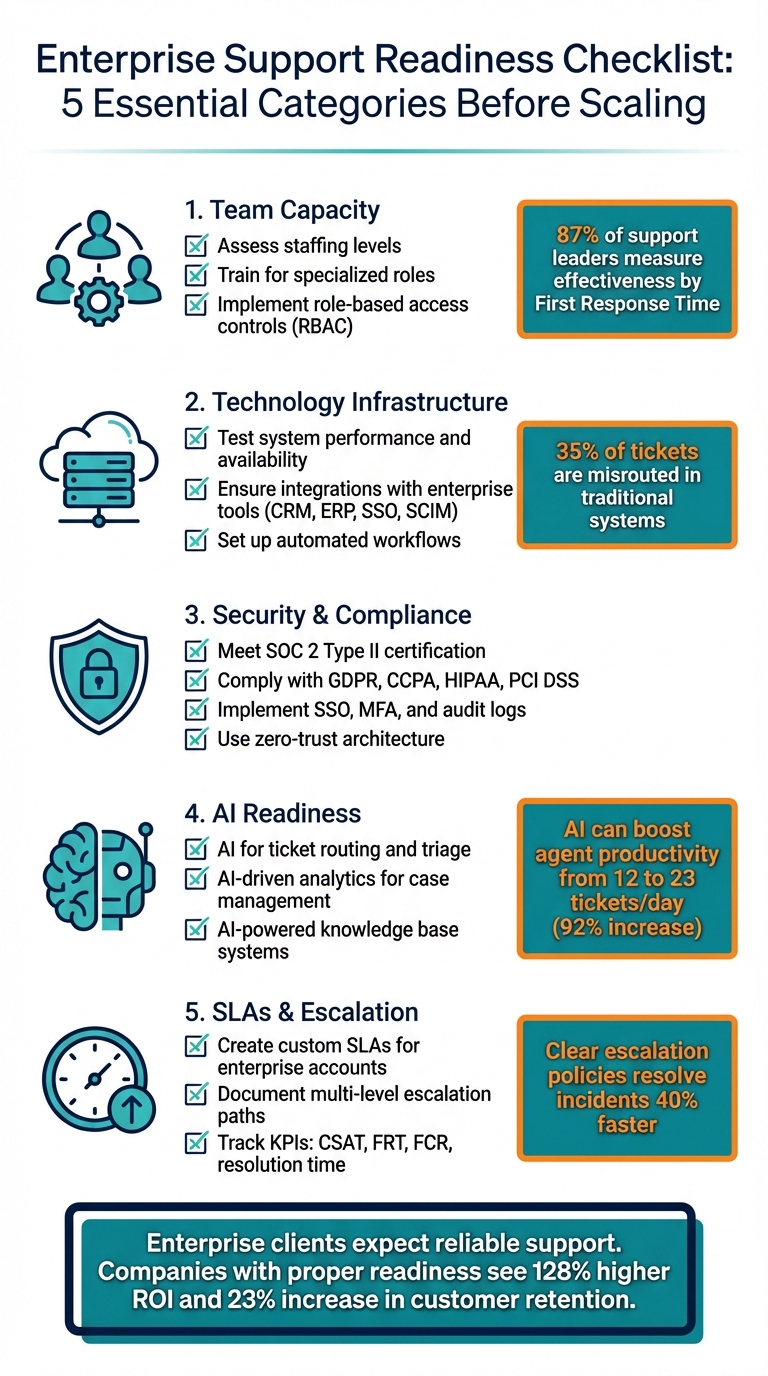
Enterprise Support Readiness Checklist: 5 Essential Categories Before Scaling
1. Review Team Capacity and Staffing Requirements
Before committing to enterprise-level support, it’s crucial to evaluate if your team is equipped to deliver. This isn’t just about having enough people – it’s about understanding how efficiently your team handles tickets and whether your current setup can manage the complexities of multi-stakeholder accounts. Below, we’ll break down how to assess capacity, train for specialized roles, and ensure secure data access.
Calculate Current Team Size Against Expected Workload
Take a close look at your ticket interactions. Are your agents spending more time on each ticket, or are they managing shorter interactions that stretch over longer periods? This distinction plays a big role in forecasting staffing needs. AI-powered Workforce Management (WFM) tools can help you predict staffing demands by factoring in peak times, breaks, shifts, and specific customer requirements.
Pay attention to key metrics like First Response Time (FRT) and Customer Satisfaction (CSAT). If these numbers are slipping, it’s a red flag that your team might be understaffed. In fact, 87% of support leaders measure team effectiveness by how quickly they provide initial responses. Enterprise clients won’t tolerate delays, so this is critical. Also, keep in mind that agents spend around 20% of their time searching for information, which adds unnecessary strain to your team’s workload. Observing workflows can help you identify and address inefficiencies.
Once you have a clear picture of your team’s capacity, focus on upgrading skills through targeted training.
Provide Training for Enterprise-Level Support
Supporting enterprise clients demands a higher level of expertise, especially when managing multi-stakeholder accounts. Create a structured support operations team with specialized roles like Support Trainers, Quality Assurance Managers, Knowledge Managers, and Workflow Coordinators. Training should cover three main areas:
- Technical skills: Familiarity with internal systems and staying updated on product changes.
- Soft skills: Empathy, clear communication, and handling complex client interactions.
- Enterprise workflows: Processes like multi-stakeholder management and escalation protocols.
"Admins will be the surgeons in your operating room – you will get equal value out from the investment put in."
As industry experts suggest, once your team grows beyond 10 agents, it’s time to hire a full-time administrator to oversee workflows and manage transitions. Additionally, when rolling out new support models – like asynchronous messaging – phase the rollout to give your team time to adjust.
Set Up Role-Based Access Controls
Enterprise clients demand strong data security, so implementing role-based access controls (RBAC) is non-negotiable. Limit administrative access to only those managing critical workflows. Use workflow coordinators to assign tickets based on agent expertise, ensuring agents only see data relevant to their tasks. This approach minimizes risks and keeps operations secure.
Make sure ticket handoffs are seamless, transferring full context – such as customer identity, issue details, and history – without manual effort. For instance, in January 2026, Liberty London introduced AI to route conversations based on agent skills and customer intent. This led to a 73% drop in first reply time and a 9% boost in customer satisfaction. The success came from giving agents instant, authorized access to the exact information they needed – no more, no less.
2. Evaluate Technology Infrastructure and Scaling Capacity
A strong technology foundation is crucial for handling larger enterprise deals while ensuring customer satisfaction. Before diving into bigger commitments, it’s important to confirm that your systems can scale effectively, integrate with your clients’ essential tools, and automate workflows efficiently. Here’s how to prepare.
Check System Performance and Availability
Start by load-testing your systems. Can your platform handle sudden surges in ticket volume without slowing down? Enterprise clients demand high uptime and redundancy – downtime isn’t just inconvenient; it’s a deal-breaker. Metrics like First Response Time (FRT) and Average Handle Time (AHT) are helpful, but the real test lies in how your infrastructure performs under sustained pressure and complex scenarios.
Pay attention to the time agents spend on each ticket, often referred to as "toil." While AI can easily handle straightforward tasks like password resets or basic account inquiries, human agents are left to tackle the more intricate, time-consuming cases. This is where the "3:1 Paradox" comes into play: automating 30–40% of ticket volume often results in only a 10–20% reduction in actual workload because the remaining cases are much more complex.
"You’ll save 30-40% of your ticket volume, but only 10-20% of your time."
Another key indicator is escalation rates. If more than 40% of tickets in a certain category escalate to human agents after AI intervention, it’s a sign that your infrastructure – or the documentation supporting it – needs improvement. Fix these issues before scaling to avoid bottlenecks. Once your system’s performance is stable, ensure it integrates seamlessly with critical business tools.
Confirm Integration with Key Business Systems
Enterprise clients expect your platform to connect effortlessly with their core systems, including CRMs, ERPs, and other essential tools. Confirm that your platform supports enterprise-grade protocols like Single Sign-On (SSO) via SAML or OIDC and SCIM for automated user provisioning.
Test these integrations in a sandbox environment using historical ticket data to ensure smooth data flow – whether it’s retrieving order statuses or creating tickets – without disrupting live operations. Involving your security and legal teams early can help avoid compliance headaches.
Modern platforms should also consolidate data from tools like Slack, Microsoft Teams, and email into a single dashboard that syncs directly with your CRM. This unified view is critical for managing complex, multi-stakeholder enterprise accounts.
Configure Dynamic SLAs and Automated Workflows
Once your systems are stable and integrated, focus on tailoring your SLAs and workflows to meet enterprise needs. Static SLAs won’t cut it for large clients. Instead, implement frameworks that adapt to real-time business priorities. For instance, a "medium priority" issue might escalate to "critical" if it impacts quarterly reporting or occurs during peak business hours.
"Designing scalable SLAs means accepting that modern enterprise support operates as an interconnected ecosystem." – BayOne
Leverage AI-powered tools to triage tickets, analyzing content, customer history, and account value to automatically categorize, prioritize, and route them to the most qualified agents. For example, NEXT improved its customer experience by equipping agents with AI for email support, reducing average handle time by 11% and boosting service quality by 4 points.
Set up escalation triggers for scenarios like negative sentiment, potential VIP churn, or legally sensitive disputes. Start by automating simple, high-frequency workflows – like account updates or Tier-1 troubleshooting – to establish "AI credibility." Once proven, you can move on to more intricate enterprise integrations. These technical advancements align with the operational strategies discussed earlier.
3. Verify Security, Compliance, and Data Management Standards
When it comes to enterprise buyers, security and compliance are non-negotiable. Achieving SOC 2 Type II certification is now an industry baseline – many large companies won’t even consider vendors without it. SOC 2 Type I, by contrast, only provides a limited view of your security controls.
"SOC 2 has become table stakes for winning enterprise contracts – many big companies won’t even consider a provider without it."
– Sprinto
Your platform should deliver robust security measures, including Single Sign-On (SSO) and Multi-Factor Authentication (MFA) for secure access. Incorporating Role-Based Access Control (RBAC) ensures granular permission management, while automating user provisioning with SCIM streamlines access management. Beyond these, meeting stringent security standards is essential.
Secure Enterprise Compliance
Compliance with key regulations is critical. This includes adhering to GDPR for European users, CCPA for California residents, HIPAA for healthcare data, and PCI DSS for payment processing. Implement immutable audit logs for full transparency into data access and activity.
Adopt a zero-trust architecture, which operates on the "never trust, always verify" principle. This involves measures like continuous session validation, network segmentation, least privilege access, and just-in-time access controls. For sensitive system changes, integrate approval workflows to ensure heightened security.
Review Vendor Contracts and Licensing Terms
Technical safeguards are just one side of the coin – your vendor relationships need scrutiny too. If your platform uses AI tools, involve your security and legal teams early to evaluate middleware that bridges AI with business systems. This helps prevent risks like data compromise.
Make sure licensing agreements align with your expected agent volume and data requirements, including data residency and sovereignty considerations. Vendors must also be able to deliver compliance documentation quickly – automated tools can generate detailed artifacts in hours, saving time and effort.
Create Monitoring and Business Continuity Plans
Use SIEM solutions to monitor security data and detect potential threats quickly. For AI-driven workflows, review AI-generated responses daily to ensure they meet policy standards and maintain accuracy.
Establish Business Continuity Plans (BCP) and Disaster Recovery (DR) protocols with clearly defined Recovery Time Objectives (RTOs). Regularly test your recovery processes to confirm that data can be restored within the specified timeframes. Enterprise clients often expect "five nines" (99.999%) reliability, so your monitoring systems must support this level of uptime and performance.
"Operating a SaaS solution means that you are your customers’ 24×7 IT and operations department."
– Microsoft Azure Well-Architected Framework
Set up automated escalation triggers for AI systems to ensure seamless handoffs to human agents. For instance, when sentiment analysis detects frustration, AI confidence scores are low, or sensitive legal or safety issues arise, these triggers can activate immediate intervention. Such measures ensure your platform is prepared to meet the demands of enterprise clients effectively.
4. Use AI to Improve Enterprise Support Operations
AI tools have become essential for enterprise support, acting as the key to managing ticket volume effectively. With the right AI setup, companies can boost agent productivity from handling 12 tickets a day to 23 – a 92% increase – while cutting the average cost per ticket from $22 to $11. But success requires moving beyond simple chatbots. Advanced AI workflows, capable of solving complex problems and handling multi-step tasks, are what truly prepare support operations to meet enterprise-level demands.
Automate Ticket Triage and Routing with AI
Manual ticket routing is a common bottleneck. Studies show that 35% of tickets are misrouted in traditional systems, and categorization alone can take 30–45 minutes per ticket. AI routing engines eliminate these inefficiencies by instantly analyzing ticket content, customer history, and agent expertise to assign issues to the best-suited team member.
Some systems even include sentiment-aware routing, which escalates tickets to senior agents when signs of customer frustration are detected. To start, review six months of ticket data to identify patterns in complexity and "toil" (time spent). Focus AI efforts on low-toil, single-touch tasks like password resets or billing updates to establish credibility before tackling more challenging categories. Additionally, set clear escalation rules: AI should immediately transfer tickets when confidence scores drop, frustration is detected, or legal and security concerns arise.
AI-driven routing is just the beginning. Adding advanced analytics can help your team anticipate issues and address them before they escalate.
Apply AI-Driven Analytics to Case Management
AI analytics shift support from a reactive to a proactive approach. For example, anomaly detection can spot widespread issues affecting multiple customers, enabling you to address systemic problems early. Predictive scoring goes a step further, analyzing interaction patterns to forecast metrics like CSAT, Customer Effort Scores (CES), and churn risk, allowing teams to intervene before dissatisfaction grows.
AI tools also generate concise case summaries, saving agents, Sales, and Customer Success Managers the time of combing through lengthy transcripts. In January 2026, NEXT introduced AI tools for email support, achieving an 11% reduction in average handle time and a 4-point improvement in service quality.
Integrating AI with CRM systems like Salesforce gives agents a complete view of accounts, including tiers, entitlements, and recent activity. This integration lets AI prioritize tickets from high-value accounts or those at risk of churn. To maximize impact, break down satisfaction scores by category before rolling out AI. Target areas with "experiment zones" (80–89% CSAT) for improvements, while proceeding cautiously in high-risk areas (above 90% CSAT).
AI analytics work best when paired with an AI-powered knowledge base, which helps deflect routine tickets and enhances agent efficiency.
Build AI-Powered Knowledge Base Systems
An AI-powered knowledge base serves two main purposes: enabling self-service for customers and speeding up agent workflows. When connected to an AI agent, such a system can automate over 10% of support interactions. However, its success depends on having up-to-date and well-structured documentation.
Start by auditing your top 50 help articles. If more than 10% need major updates, address these gaps before launching the AI system. Consolidate knowledge from various sources – help desk platforms, CRMs, messaging tools, and documentation repositories – into a single, unified platform that acts as the "source of truth" for your AI agent.
Run internal pilot tests before going live. For example, have the AI post answers internally for QA teams to compare against human responses until they are indistinguishable. A great case study: In 2025, Cynet used generative AI to provide instant answers, achieving a 14-point CSAT increase (from 79 to 93) and a 47% ticket deflection rate for Tier 1 issues.
Maintaining an AI-powered knowledge base requires dedicated resources. Consider forming an AI Ops team with roles like a Documentation Writer (to create AI-friendly content), a QA Specialist (to review daily responses), and an AI Architect (to expand topic coverage). Set strict rules for escalation: if a customer responds to an AI-generated answer, if frustration is detected, or if the issue involves sensitive topics like billing disputes, the system should immediately hand off to a human agent.
sbb-itb-e60d259
5. Establish SLAs, Escalation Procedures, and Performance Metrics
When working with enterprise clients, you need to provide clear expectations around response times, resolution targets, and accountability. Without structured SLAs (Service Level Agreements) and well-documented escalation procedures, managing critical issues can become chaotic – and expensive. Companies with clear escalation policies resolve incidents 40% faster, as team members know exactly when and how to escalate issues. Considering the average cost of downtime for enterprises is about $540,000 per hour, having these systems in place isn’t just helpful – it’s necessary.
Create Custom SLAs for Enterprise Accounts
One-size-fits-all SLAs simply don’t work for enterprise customers. Modern SLAs should adjust based on the real-world business impact of an issue, not just its technical severity. For example, you might use a four-tier severity system:
- SEV1 (Critical outages): Affecting over 50% of users, requiring a response within 15 minutes and resolution within 2 hours.
- SEV4 (Low-impact issues): Cosmetic problems or feature requests that can wait until the next business day.
Additionally, for high-value accounts nearing renewal, your system could automatically tighten SLAs, even for less severe issues. This kind of account-level intelligence helps identify churn risks before they escalate. Some platforms use machine learning to refine SLA parameters based on historical performance and business needs, ensuring response times are always optimized.
Clearly defining support tiers is just as important. Here’s a typical breakdown:
- Level 1: Handles basic troubleshooting and service restarts, resolving about 80% of inquiries.
- Level 2: Manages complex configurations and technical issues, covering 15-20% of inquiries.
- Level 3: Expert engineers who address architecture problems and approve emergency changes (around 5% of inquiries).
- Level 4: Management-level decision-makers who allocate resources for critical business needs.
This structure ensures everyone knows their role, reducing delays and confusion.
Document Multi-Level Escalation Paths
A well-documented escalation matrix is essential. It should outline who to contact based on issue type and severity, with contact details easily accessible in your ticketing system. Escalation triggers might include:
- Time-based rules: For example, unacknowledged tickets after 15 minutes.
- Impact thresholds: Such as incidents affecting more than 1,000 users.
- Customer-driven triggers: Like VIP requests.
To avoid delays, set up systems that auto-escalate tickets when 80% of the response time has elapsed. This approach can improve Mean Time To Resolution (MTTR) by 30-50%. For critical incidents, assign a scribe to document the timeline and ensure accurate communication during high-pressure situations.
For global enterprises, consider a "follow-the-sun" model, distributing escalation responsibilities across time zones (Americas, EMEA, APAC) to maintain 24/7 coverage. For particularly complex issues, you might also implement a "swarming" approach, where multiple experts collaborate simultaneously rather than following a linear escalation process. Post-incident debriefs are crucial for identifying what went well and updating documentation to prevent similar issues in the future.
Monitor Key Performance Indicators
Tracking the right metrics transforms support from reactive to proactive. Focus on:
- First Contact Resolution (FCR)
- First Response Time (FRT)
- Average Resolution Time
For enterprise accounts, Customer Satisfaction Score (CSAT) and Customer Effort Score (CES) are especially important. Research shows 87% of customers are willing to pay more for excellent service, and 82% believe a business is only as good as its service. When using AI-powered tools, keep an eye on ticket deflection rates and AI confidence scores to ensure automation enhances the customer experience rather than detracting from it.
Dashboards can help provide real-time visibility into these metrics. Break down data by account tier, severity level, and support channel. For example, establish CSAT baselines by ticket category – accounts with scores above 90% should undergo rigorous automation testing. If escalation rates for an automated category exceed 40%, it’s a clear sign that the system isn’t ready for that topic. Finally, track "after-hours pages per week" to prevent engineer burnout, which can directly affect resolution times.
6. Complete a Final Readiness Assessment
This step pulls together insights on staffing, technology, compliance, AI, and documentation to ensure your support operations are prepared to handle enterprise-level demands. Before pursuing larger enterprise deals, conduct a thorough review to confirm every requirement has been met.
Rate Readiness Across All Categories
Evaluate each category using measurable standards. For staffing, confirm that a specialized AI operations team is in place, which might include roles like a documentation writer, QA specialist, and AI architect. This team typically costs about five to six times the expense of regular agents. On the technology side, ensure your systems support critical enterprise features like Single Sign-On (SSO), SCIM user provisioning, audit logs, and Role-Based Access Control (RBAC).
For compliance, verify that you meet essential certifications such as SOC 2 Type 2, and if applicable, HIPAA for healthcare data. Additionally, ensure adherence to data privacy regulations like GDPR and CCPA. When assessing AI capabilities, categorize tickets into three groups: single-touch/low-toil (ideal for AI), single-touch/high-toil (AI with oversight), and multi-touch (human-led). To justify AI investment, aim for more than 20% of your ticket volume to fall under the single-touch/low-toil category.
Documentation is another critical area. If over 10% of your top 50 help articles need major updates, pause AI implementation for 3–6 months to address these gaps. Conduct a dry run by having AI process tickets using current documentation to identify weak spots. Testing has shown that GPT-3.5 had a 39.6% hallucination rate when documentation was inadequate, highlighting the importance of a robust knowledge base.
| Readiness Category | Key Evaluation Metric | Target Standard |
|---|---|---|
| Staffing | AI Ops Team Ratio | 3 specialized roles per 20+ agents |
| AI Capability | Single-touch/Low-toil % | >20% of total ticket volume |
| Compliance | Security Certification | SOC 2 Type 2 |
| Documentation | Article Accuracy Rate | <10% of top articles needing updates |
| Performance | CSAT Experiment Zone | 80–89% current satisfaction |
This readiness scoring creates a solid foundation for engaging final decision-makers.
Get Approval from Key Stakeholders
Once readiness is rated, the next step is to secure approval from key stakeholders. The Head of Customer Support or CX should take responsibility for aligning strategic goals across the company. Security and legal teams must review compliance, data privacy, and middleware integrations early to avoid delays. Engineering and integration teams should confirm that the infrastructure is scalable and that backend systems provide the necessary data access. CRM/Ops administrators need to validate the technical setup of support tools. Meanwhile, the marketing team should ensure that both automated and human interactions reflect the brand’s tone and standards. The AI operations team should present detailed reports on documentation accuracy and AI performance metrics. Finally, sales and marketing leadership must verify that support protocols meet the expectations of enterprise clients.
"The problem isn’t AI capability. It’s readiness." – Samir Said, LTVplus
Before gaining final approval, establish clear KPI baselines with stakeholders. These should include metrics like resolution rates, Average Handle Time (AHT), and First Response Time (FRT). Additionally, define escalation triggers for human intervention, such as when sentiment analysis detects customer frustration or when high-value billing disputes arise. This structured framework ensures everyone is aligned on what "ready" truly means before advancing to larger enterprise deals.
Conclusion: Building Support Operations Ready for Enterprise Growth
Scaling support operations for enterprise growth takes more than just adding staff or upgrading software. The checklist outlined here – team capacity, technology infrastructure, security compliance, AI readiness, and SLAs – lays the groundwork for success. These elements are critical to achieving measurable improvements in ROI and customer retention.
Here’s the reality: companies that adopt AI early report 128% higher ROI, and those that track metrics effectively see a 23% increase in customer retention. But these benefits only come when the groundwork is in place. Without preparation, even the best AI tools can fall short.
Start by auditing your current setup. For example, if low-effort, single-touch tickets make up less than 20% of your volume, AI tools will likely underperform. Similarly, if over 10% of your top 50 help articles require major revisions, focus on fixing your documentation before automating. These steps ensure smoother onboarding and help avoid costly missteps.
The shift from reactive ticket handling to proactive support models is now the standard. Companies like Liberty London saw a 73% drop in first reply time and a 9% increase in customer satisfaction by using AI-driven routing. NEXT reduced average handle time by 11% after running a focused proof of concept. These results weren’t accidental – they came from careful planning and execution.
Before chasing larger enterprise deals, ensure your team is ready. Engage stakeholders from security, legal, engineering, and operations. Define escalation processes, set CSAT benchmarks, and test your systems with historical ticket data. Enterprise clients expect scalable, reliable support, and being prepared can mean the difference between winning the deal or losing it to a competitor. Proper readiness not only secures enterprise opportunities but also sets the stage for long-term success.
FAQs
How can AI improve enterprise customer support operations?
AI is changing the game for enterprise customer support by improving efficiency, scalability, and the overall customer experience. Take conversational AI, for example – it speeds up interactions while improving accuracy, cutting down response times and leaving customers more satisfied. On top of that, AI-powered automation tools can sort, prioritize, and route tickets to the right agents, ensuring urgent issues get the attention they need without delay.
AI-driven analytics also bring real-time insights to the table. These insights help support teams spot trends, keep track of performance, and allocate resources where they’re needed most. Meanwhile, self-service tools like AI-driven chatbots and knowledge bases let customers solve problems on their own, which reduces ticket volume and frees up agents to tackle more complex issues. By integrating AI, customer support teams can handle larger, more complex enterprise accounts while keeping efficiency and satisfaction levels high.
What security standards are essential for enterprise customer support?
Protecting data and maintaining security in enterprise customer support is no small task. One key step is ensuring compliance with frameworks like SOC 2. SOC 2 focuses on five Trust Service Criteria: Security, Availability, Processing Integrity, Confidentiality, and Privacy. Meeting these standards signals a serious commitment to safeguarding sensitive customer data – especially critical when dealing with complex enterprise accounts.
But compliance is just the start. Enterprises should also establish strong security measures, including:
- Documented incident management and escalation procedures to handle issues effectively.
- Strict access controls to ensure only authorized personnel can access sensitive information.
- Comprehensive data protection policies to safeguard customer data at every level.
These measures not only strengthen security but also build confidence with clients. For large-scale operations, a dependable and secure support system isn’t just a bonus – it’s a necessity.
How can I tell if my team is prepared to support enterprise-level clients?
To figure out if your team is prepared to handle enterprise-level clients, start by looking at your operational capacity. Check metrics like ticket volumes, response times, and SLA compliance. If these numbers are slipping, it might be time to scale up or refine your processes to meet the demands of larger clients.
Next, take a close look at your team’s skills, training, and workflows. Supporting enterprise clients often means dealing with complex accounts involving multiple stakeholders. Your team needs solid training, well-documented procedures, and efficient workflows. Make sure your support systems are scalable, seamlessly integrated, and equipped with AI tools to manage the added complexity and workload.
Finally, assess how well your team handles multi-channel communication. Can they maintain consistent service quality and keep customer satisfaction high across different platforms? If the answer is yes, your team is likely ready to take on the challenges of enterprise-level support.






