


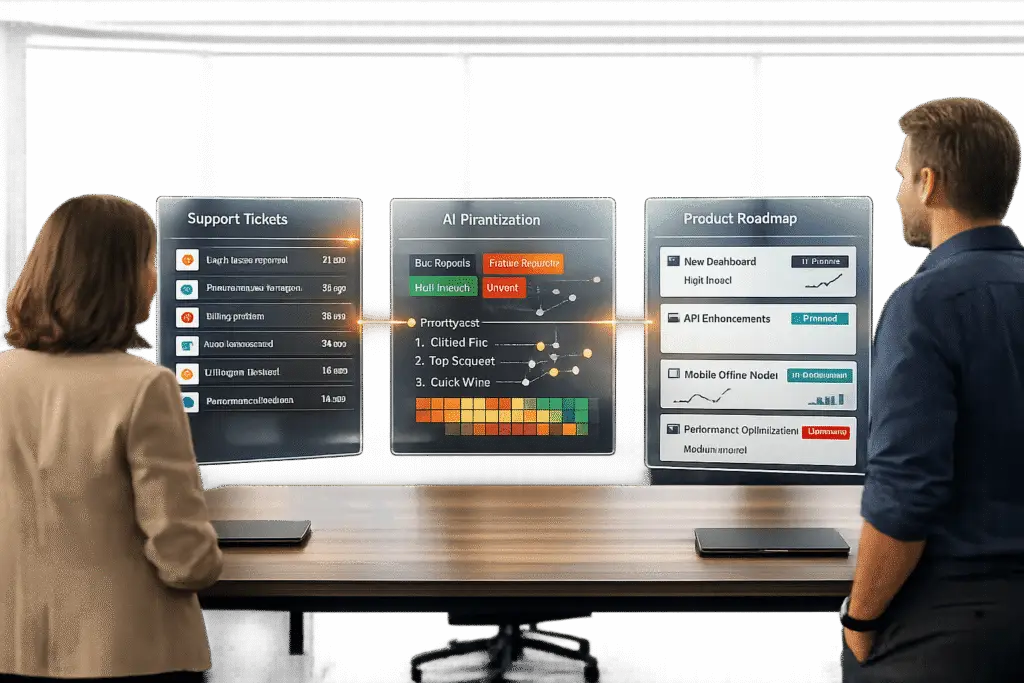
Building a “Customer Issues to Product” pipeline means creating a system where customer feedback directly informs product decisions. Without this, support teams struggle with repeated issues, and product teams risk building features based on assumptions. Here’s a quick breakdown of how to make this work:
- Collect feedback consistently: Centralize all customer feedback (emails, tickets, chats) in one place. Use AI customer support tools to summarize and standardize data for easier analysis.
- Categorize and prioritize: Create clear rules for scoring issues based on customer impact (e.g., revenue, account tier). Use AI to group similar issues and automate prioritization.
- Establish trust with product teams: Align support and product teams by creating shared workflows, regular syncs, and real-time visibility into feedback.
- Leverage AI for insights: Use AI to generate actionable summaries, spot patterns, and tie feedback to business metrics like ARR or churn risk.
- Measure and improve: Track metrics like feedback-to-feature time, repeat issue rates, and tagging accuracy. Regularly review and refine the system.
Done right, this pipeline saves time, reduces friction, and ensures product updates address real customer needs, leading to better collaboration and cost savings.
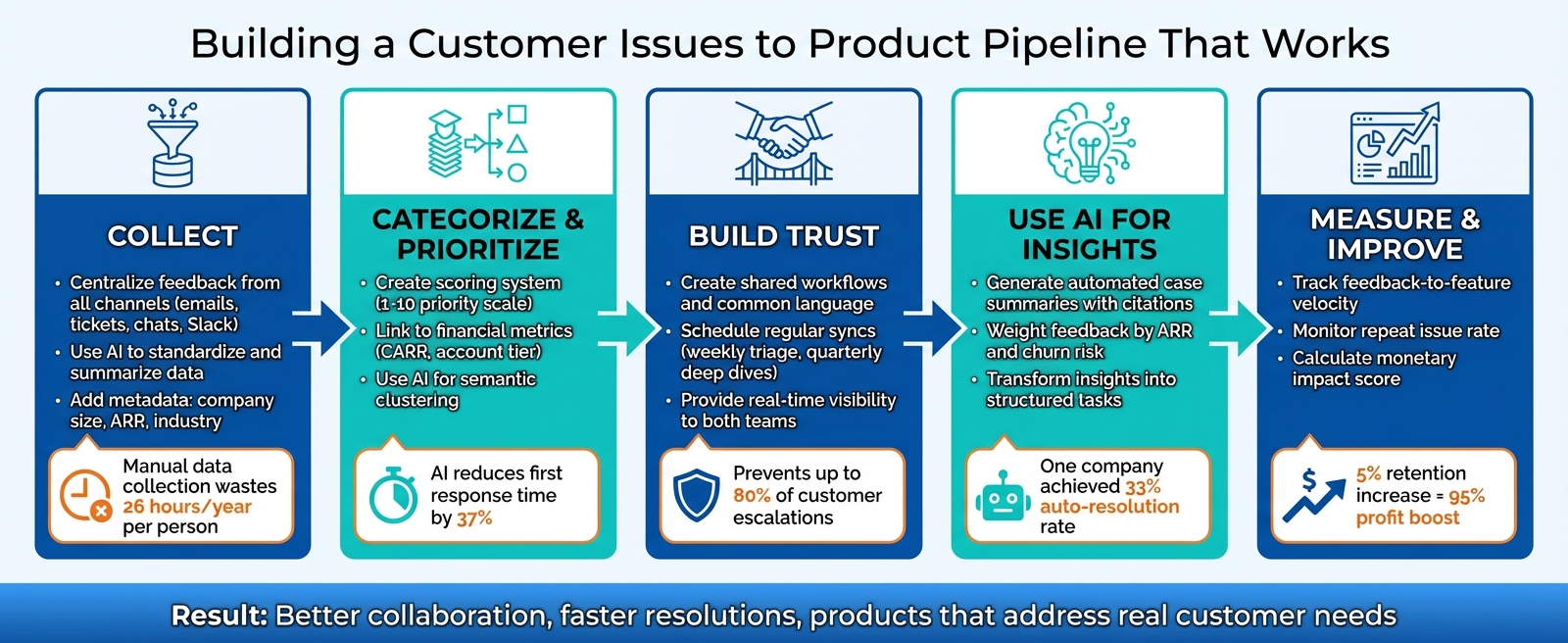
5-Step Customer Feedback to Product Pipeline Framework
How to Leverage the Customer Feedback Loop for Your Product’s Roadmap
sbb-itb-e60d259
Step 1: Collect Customer Issues Consistently
The first step in creating a reliable feedback process is ensuring you capture customer issues completely. Missing or incomplete data not only wastes time but also erodes trust – product teams can’t rely on partial information, and support teams lose precious time hunting for context.
For example, manually pulling data from four key sources – support tickets, CRM, product analytics, and billing – takes about 30 minutes per week. Over the course of a year, that adds up to 26 hours that could have been spent on more impactful work.
Gather Feedback from All Support Channels
Customer feedback doesn’t just come through your ticketing system. It shows up in emails, chats, phone calls, Slack messages, and even LinkedIn DMs. If you’re only tracking one channel, you’re missing a big piece of the puzzle.
The solution? Bring all feedback into a single, centralized repository. This means integrating tools like your CRM, call recording software, and internal communication platforms with your support system. When everything flows into one place, you’re better positioned to capture every issue.
Some teams simplify this process with creative hacks, like using emoji reactions in Slack. For instance, a team member can add a specific emoji to a Slack message, and that feedback is automatically logged in the central system. This eliminates the extra effort of typing out detailed notes, which often leads to overlooked issues.
To make the data even more actionable, attach key metadata like company size, plan tier, ARR (Annual Recurring Revenue), and industry. This helps product teams understand the broader business impact of each issue.
Use AI to Standardize and Summarize Data
Once feedback from multiple channels is collected, the next challenge is making sense of it all. Different systems often use inconsistent labels – what one tool calls "high priority", another might tag as "urgent." Without standardization, identifying patterns can feel impossible.
AI-driven tools, especially Large Language Models (LLMs), can solve this problem by tagging, classifying, and summarizing open-ended feedback automatically. What used to take weeks can now be done in minutes. These tools can group tickets based on meaning rather than relying on exact keywords, making it easier to spot high-volume issues that traditional search methods might overlook.
For transparency, AI-generated insights should always include references. For example, if the AI notes that "15 customers requested dark mode", there should be clickable links to the original tickets so product managers can verify the context before making decisions.
Once the data is standardized, double-check that it meets quality standards.
Make Sure Your Data Is Complete and Accurate
Standardization is just the beginning. To ensure the data is actionable, you need validation rules and mandatory fields. For example, require support agents to tag each ticket with a "Product Area" or "Feature" before closing it. This small step helps maintain consistency across the board.
Using standardized request templates is another way to improve data quality. Instead of vague entries like "I need more colors", templates can guide agents to ask clarifying questions that uncover the real functional need behind the request.
Set up workflows to automatically reject incomplete feedback entries. For instance, if a submission lacks a clear user problem statement, it shouldn’t make it into the system. You can also create "materialized views" in your database, which combine ticket data with billing and product usage information. This provides real-time analytics without the need for manual exports.
Lastly, close the loop with customers. When their issue is resolved or a requested feature is launched, notify them through your support system. This builds trust, encourages better feedback in the future, and ensures your team knows when they can stop relying on temporary workarounds.
In short, clean and consistent data is the backbone of a feedback pipeline that product teams can rely on.
Step 2: Categorize and Prioritize Issues
Once you’ve gathered feedback, the next step is to create a system that ties customer pain points directly to business outcomes. This ensures you’re addressing the most pressing issues efficiently.
Set Up Clear Categorization Rules
Start by defining a standardized scoring system. For example, GitLab uses a 1–10 priority scale, where ~customer priority::10 signals a "Blocker" (a situation where an account is likely to churn) and ~customer priority::1 represents a "Low" priority (a minor quality-of-life improvement). This kind of structure makes it easier to determine what needs immediate attention.
To measure the potential impact of each issue, link it to financial metrics like CARR (Contracted Annual Recurring Revenue), account tier, or customer health. Also, consider time-sensitive factors. For instance, an account with a "Red" health score and a renewal date in six months should take precedence over a healthy account with a renewal further down the road. GitLab addresses this with an urgency matrix, applying multipliers from 1.0x to 4.0x based on urgency.
Another key point: categorize issues by themes, not just feature requests. For example, instead of tagging a request as "wants dark mode", dig deeper to understand the underlying need – like reducing eye strain or improving accessibility. As Elyse Mankin, Product Support Lead at Help Scout, explains:
A well-prepared support team can turn the first type of request into the second type just by asking a good follow-up question and digging in deeper… you’ve surfaced research gold for your product team – the problem behind the customer’s solution request.
Once you’ve set up these categories, you can use AI tools to streamline prioritization.
Let AI Handle Automated Prioritization
Manually scoring and sorting issues becomes unmanageable as ticket volume grows. This is where AI shines – it can process thousands of tickets quickly and apply consistent logic without bias.
For example, AI can cluster similar tickets into meaningful topic groups. Instead of relying on exact keyword matches, advanced language models can identify patterns like "API integration failures" or "billing discrepancies" without manual tagging. Additionally, sentiment analysis can flag tickets with frustration, urgency, or negative language in real time, ensuring that critical issues are escalated immediately.
AI can also calculate a Weighted Priority Score, which factors in impact versus engineering effort. GitLab, for instance, recalculates these scores daily by combining data like customer votes, CARR, health scores, and renewal dates. This gives product managers a clear view of which issues offer the best return on investment. Automating this process has tangible benefits – AI-driven prioritization has been shown to reduce first response times by 37%.
Even with automation, it’s essential to focus on actionable insights rather than getting bogged down by irrelevant data.
Filter Out Noise and Focus on What Matters
Not all submissions are helpful. Filter out incomplete reports that lack clear problem statements, screenshots, or logs.
It’s also crucial to differentiate between bugs and feature requests. Bugs – where existing features aren’t working – should be escalated immediately since they directly affect revenue. Feature requests, however, require a more thoughtful evaluation based on factors like reach, cost, and alignment with company goals.
For example, in April 2025, Lemuel Chan, a Support Operations Analyst at Front, noticed an 85% quarterly increase in manual requests for inbox ownership transfers. By documenting this trend and calculating potential annual cost savings, he turned what seemed like noise into a compelling case for a product update, which ultimately led to a successful launch.
Finally, use anomaly detection to identify sudden spikes in specific ticket volumes, ensuring no emerging issues go unnoticed.
Step 3: Build a Pipeline Product Teams Will Trust
Once you’ve categorized and prioritized issues, the next step is to establish workflows, ensure real-time visibility, and create a system that product teams can rely on. Here’s how to make it happen.
Create Shared Workflows Between Teams
Start by developing a common language. Support and product teams often describe the same issues differently. For example, support might tag an issue as a "login problem", while the product team may call it "authentication flow" or "onboarding friction." Without a shared terminology, valuable feedback can lose its impact.
Regular syncs can replace scattered check-ins to keep everyone aligned. A great example comes from Front, which introduced quarterly "Support Fix" meetings. By tracking recurring issues in a shared spreadsheet, they identified an 85% rise in requests for manual inbox ownership transfers. This insight led to the launch of a self-serve UI feature, saving the company between $30,000 and $57,000 annually.
Embedding support roles within product teams can also foster collaboration. At Quizlet in May 2022, Natalie Rothfels, a former product leader, embedded "Product Support Specialists" (PSS) into cross-functional squads. When a fragile feature was being phased out, the PSS team anticipated potential issues and coordinated a pre-mortem to avoid a flood of customer complaints. Rothfels explained:
This enabled everyone to have a shared understanding of the product strategy.
Here’s a snapshot of meeting types that help maintain alignment:
| Meeting Type | Frequency | Primary Goal | Participants |
|---|---|---|---|
| Triage Sync | Weekly | Review high-severity bugs and emerging patterns | Support Leads, PMs, Engineering |
| Analysis Review | Biweekly | Examine top feedback themes and segment data | Product Ops, Support Analysts |
| Roadmap Sync | Monthly | Align on upcoming features and close the loop on fixes | Support Managers, PMs |
| Support Fix | Quarterly | Deep dive into recurring issues and inefficiencies | Support Ops, Product Leadership |
These shared processes naturally lay the groundwork for real-time visibility.
Give Both Teams Real-Time Visibility
A unified workflow is only effective if it’s paired with real-time insights. Manual data collection from multiple sources – like support, CRM, product, and billing systems – can waste 26 hours per year per person before analysis even begins. Real-time visibility solves this by linking your support desk directly with product delivery tools, ensuring feedback IDs are tied to epics and PRDs.
Automated analytics pipelines allow for early detection of patterns. For instance, instead of waiting weeks to notice a rise in API integration failures, AI systems can flag these issues on day one. This proactive approach can prevent up to 80% of customer escalations. Erika Warren, CEO of Inciteful, warns against the "vicious spiral" where support teams feel undervalued, and product teams feel the need to constantly defend their priorities.
Wyzant offers another example. In May 2022, product leader Erika Warren introduced a monthly shadowing program where the product team listened to support calls. This initiative revealed low conversion rates among parents of elementary-school learners, leading to a new activation path that improved both conversion rates and lifetime value.
Track Progress and Close the Loop
Once visibility is established, tracking progress ensures accountability and fosters trust between teams. A clear definition of "completion" – such as notifying both the reporter and the customer when a fix is shipped – reinforces the idea that feedback drives action.
Lemuel Chan from Front highlighted the importance of this approach, stating:
Scheduled time for feedback means important issues are not forgotten or lost in the noise.
Resolving complaints quickly not only builds trust but also strengthens customer loyalty. Statistics show that 95% of customers will return to a company if their complaint is resolved immediately, and 83% feel more loyal to brands that actively address their concerns.
For teams using Supportbench, this process becomes even smoother. The platform’s AI-driven tools can automatically assign issue types, tag cases, and trigger Slack or email updates when feedback status changes. This reduces manual effort and ensures high-priority issues receive the attention they deserve. Dynamic SLAs further enhance this by adjusting based on customer health or renewal dates, ensuring critical issues are addressed promptly.
Step 4: Use AI to Connect Support and Product
Once you have a solid data pipeline in place, the next step is to use AI to turn raw data into insights that can shape your product decisions. This goes beyond just counting tickets – it’s about delivering actionable, business-focused insights that directly inform your roadmap.
Generate Case Summaries and Insights Automatically
AI tools excel at grouping related issues, even when customers describe them differently. For example, complaints like "battery life", "power drain", and "device won’t hold a charge" might all point to the same root problem. Through semantic clustering, AI captures the context behind these variations, offering a clearer picture of recurring issues. When paired with consistent data collection and categorization, these insights can build trust across teams.
It’s crucial to back up AI-generated insights with reliable data. As the Inkeep Team emphasizes:
Citations are non-negotiable: PMs won’t prioritize unverifiable AI suggestions.
This is a critical point – around 40% of AI-driven customer service implementations fail because they produce responses that sound convincing but lack validation.
AI can also identify gaps in your existing documentation by comparing common support queries against your knowledge base. This "gap analysis" reveals opportunities to improve – whether that’s addressing a missing feature or simply updating outdated help content. For instance, one tech company achieved a 33% auto-resolution rate by grounding its AI chatbot in indexed documentation and historical support data. These concise, AI-generated summaries provide a strong foundation for integrating customer feedback into your strategic planning.
Feed AI-Driven Data into Your Product Roadmap
Once you’ve gathered insights, the next step is to weigh and contextualize them in line with your business goals. Raw data can be misleading – for example, a feature request mentioned 50 times by smaller accounts might carry less weight than one brought up twice by clients contributing $500,000 in Annual Recurring Revenue (ARR). AI platforms can factor in metrics like ARR, customer tier, and churn risk, helping product teams prioritize what truly matters.
Aakash Gupta, a product growth expert, describes this emerging approach as:
the use of artificial intelligence to automatically analyze, categorize, and synthesize customer feedback… to identify patterns, quantify business impact, and inform product decisions.
This shift from reactive analysis to predictive intelligence allows teams to anticipate churn risks and spot growth opportunities before customers even complete a survey.
AI can also streamline prioritization frameworks like RICE (Reach, Impact, Confidence, Effort). By analyzing customer data, AI tools can score Jira epics or feature requests automatically, cutting down what used to take weeks of manual effort to just hours – or even completing it in real-time as feedback rolls in. Once data is prioritized, automated workflows ensure it’s put to use efficiently.
Make Feedback Easy for Product Teams to Use
The best AI tools don’t stop at generating insights – they also simplify the process of turning those insights into action. Advanced platforms can transform customer feedback into structured tasks, complete with assigned owners and deadlines, ensuring that critical insights lead to tangible product updates.
Some systems even notify customers automatically when a requested feature is released. This closes the feedback loop, keeping customers informed and engaged.
Platforms like Supportbench take it a step further by automating prioritization, tagging cases, and assigning issue types to reduce manual work. They can generate case summaries the moment a case is created, predict CSAT, CES, and NPS scores, and flag first-contact resolution – all without requiring complex configurations. Features like dynamic SLAs adjust based on factors like customer health or renewal timelines, ensuring that high-value accounts receive the attention they need. When support and product teams have shared, real-time visibility into these AI-powered insights, the data pipeline becomes more than just another report – it becomes a trusted resource for driving meaningful product improvements. This final layer of automation ensures that high-quality data translates into actionable tasks, seamlessly closing the feedback loop.
Common Mistakes and How to Fix Them
Once you’ve set up a solid pipeline, the next challenge is avoiding common mistakes that can derail your efforts to extract actionable insights.
Even the most efficient pipelines can fall apart when these issues persist. For instance, unverifiable data can erode trust. Product managers need to see insights tied directly to source tickets to understand the context. As the Inkeep Team emphasizes:
The citation requirement is non-negotiable. Product managers need to verify context before prioritizing features. Unlinked AI summaries create extra work – someone still has to find the original tickets.
Another common issue is data overload. When product teams are bombarded with thousands of raw, unstructured tickets, it becomes nearly impossible to identify critical patterns. Then there’s keyword blindness – where similar issues are described in different ways, like "battery drain", "power issues", or "won’t hold charge", all referring to the same underlying problem.
Inconsistent taxonomy is another stumbling block. Support teams often categorize tickets for staffing purposes, while product teams need them grouped by use case or lifecycle stage. This mismatch can prevent support data from translating into meaningful product insights. Meanwhile, feedback black holes, where customer concerns are ignored or unresolved, can frustrate both support agents and customers.
Finally, priority bias can skew focus. For example, a feature requested by 50 small accounts might overshadow a request mentioned only twice by customers contributing $500,000 in annual revenue.
Common Pitfalls and Practical Fixes
| Pitfall | Description | Practical Solution | AI’s Role |
|---|---|---|---|
| Unverifiable Data | PMs don’t trust insights without evidence | Link every insight to its source | Inline Citations: AI ties claims to specific, clickable source documents |
| Data Overload | Too many tickets to review manually | Centralize inputs into one feedback system | Automated Triage: AI categorizes, themes, and scores feedback quickly |
| Keyword Blindness | Missing issues due to varied phrasing | Use semantic search instead of keywords | Semantic Clustering: AI groups related tickets no matter how they’re worded |
| Inconsistent Taxonomy | Support and Product teams use different categorization systems | Build a shared classification framework | Auto-Tagging: AI applies a unified taxonomy across all channels |
| Feedback Black Hole | Customers and support agents don’t see follow-ups | Create a workflow to notify when issues are addressed | Automated Follow-ups: AI triggers updates when related features are shipped |
| Priority Bias | Noisy feedback overshadows high-value input | Weight feedback by customer lifetime value (LTV) | Impact Scoring: AI prioritizes feedback based on ARR and churn signals |
Platforms like Supportbench help solve these challenges by using AI to tag cases, prioritize issues based on customer health and renewal likelihood, and generate instant case summaries. This reduces manual work and ensures product teams receive structured, actionable insights – bridging the gap between customer feedback and product development.
Step 5: Measure Results and Keep Improving
This phase is all about closing the feedback loop and ensuring that the insights and actions from earlier steps lead to tangible results. Metrics play a dual role here: they validate manual processes and measure how effective AI-driven feedback analysis has been.
Key Metrics to Track Success
For your feedback pipeline to truly matter, its metrics need to show that customer input is making its way to product teams and driving meaningful changes.
Start by tracking feedback-to-feature velocity – how many days it takes from when an issue is reported to when a fix or improvement is shipped. This metric reveals how responsive your system is. Next, monitor the repeat issue rate to pinpoint recurring problems that erode customer trust. If the same issue keeps popping up, it’s a red flag that demands immediate attention.
The monetary impact score is another critical metric. By multiplying the average lifetime value (LTV) of affected customers by the number of times an issue has been reported, you can prioritize fixes based on their financial impact. For instance, in April 2025, Lemuel Chan, a Support Operations Analyst at Front, identified an 85% quarterly increase in manual requests for inbox ownership transfers. By calculating the cost of handling these requests, Front projected annual support cost savings between $30,000 and $57,000 by introducing a self-serve UI feature. The feature launched the following year, delivering those savings while also streamlining customer workflows.
Another vital measure is the percentage of feedback items with complete tags and context. Missing or incomplete data slows down product teams by forcing them to dig for additional details. Additionally, track feedback adoption rates within 14 days of a product release to confirm whether the change resolved the reported issue.
Here’s a quick overview of the metrics you should focus on:
| Metric Category | Specific Metric | Purpose |
|---|---|---|
| Velocity | Feedback-to-Feature Days | Measures how quickly feedback is turned into solutions |
| Urgency | Repeat Issue Rate | Highlights recurring problems that harm trust |
| Impact | Monetary Score (LTV x Volume) | Assesses the financial value of implementing fixes |
| Quality | Tagging Completeness % | Ensures feedback is structured for analysis |
| Sentiment | CSAT/CES Trend (Pre vs. Post) | Confirms if changes have improved the user experience |
With these metrics in place, you’ll have a clear view of how well your pipeline is performing and where it needs improvement.
Regular Reviews Keep Your Pipeline on Track
Once you’ve established a way to measure performance, it’s crucial to regularly review and refine your pipeline. Treat it like a living system that needs ongoing care to stay effective. Schedule weekly triage sessions (30 minutes), biweekly deep dives, and monthly roadmap syncs to align feedback with product priorities. Conduct quarterly audits to weed out vanity metrics and fine-tune thresholds.
Support and product teams should also meet quarterly to discuss customer trends. These sessions give support teams a platform to advocate for customer needs. As Lemuel Chan from Front explained:
Support teams now have a direct line of communication to product, giving us the chance to advocate for customer pain points and ensure that feature updates reflect these real-world concerns.
Set clear goals to keep everyone accountable. For example, aim to notify 80% of reporters within seven days of a release or reduce duplicate feedback by 30% through improved tagging. After shipping a fix, inform customers and internal teams, then ask for feedback to confirm whether the change solved the issue. This final step ensures your pipeline isn’t just moving tickets around but actually delivering value.
Think of your feedback loop as a product in itself – one that requires regular iteration. Review it every quarter, adjust thresholds, and refresh team training as needed. The goal isn’t to get it perfect right away but to build a system that continually improves over time.
Conclusion: Build a Feedback Loop That Actually Works
A feedback system only works when it completes the entire cycle: gathering customer feedback, addressing the issues, and ensuring everyone – customers and internal teams alike – knows the resolution. If that loop isn’t closed, customer support stays frustrated, product teams lack direction, and customers feel overlooked. Each step, from collecting data to using AI for customer service to gain insights, is key to turning customer concerns into meaningful product improvements. As Thibaut Nyssens from Cycle explains:
The process is complete only when every released update is communicated back to both internal teams and customers.
For this to work, shared terminology and clear rules for categorization are critical. AI-powered systems help by turning raw feedback into structured, prioritized insights that product teams can act on. These tools also catch patterns early – potentially preventing 80% of escalations – and can process massive amounts of data, like 100,000 reviews weekly, at a minimal cost of just $15.70 per month.
But alignment isn’t just about the tools – it hinges on regular cross-team collaboration. Scheduled meetings between support and product teams ensure that customer needs are consistently addressed, leading to impactful updates that benefit everyone.
This alignment doesn’t just improve workflows; it also drives measurable financial results. For example, a 5% increase in customer retention can boost profits by as much as 95%, while promoters in NPS surveys have a customer lifetime value that’s 600% to 1,400% higher than detractors. Closing the loop with customers – by thanking them personally, referencing their feedback, and showing how it influenced a feature – builds trust. That trust transforms casual customers into loyal advocates.
FAQs
How can AI help prioritize customer feedback more effectively?
AI has the potential to completely change how customer feedback is handled, making it easier to prioritize and act on. With tools like AI-driven categorization and sentiment analysis, feedback can be sorted into themes and evaluated for its urgency or overall impact. For example, AI can sift through support tickets, social media mentions, and surveys to spot recurring problems and highlight the ones that affect customers the most.
On top of that, AI can assign scores to feedback by weighing effort against value, helping teams zero in on the features or fixes that offer the greatest benefit while using the least amount of resources. By automating time-consuming tasks – like directing feedback to the right teams or generating actionable insights – AI not only reduces manual work but also speeds up the decision-making process. This allows product teams to focus on what truly matters to their customers, ensuring that improvements align with broader strategic goals.
What are the biggest challenges when creating a customer feedback pipeline?
One major hurdle in creating a customer feedback pipeline is the absence of a well-defined process. Without a consistent way to gather, organize, and prioritize feedback, crucial insights can slip through the cracks. This not only risks losing valuable opportunities to enhance your product but also makes it harder to act on the feedback effectively.
Another frequent problem is weak communication between customer support and product teams. When feedback is poorly shared or prioritized, it often remains isolated, limiting its influence on key decisions. On top of that, relying on incomplete or subjective data – especially feedback without supporting metrics – can make it challenging to justify making changes to your product.
Lastly, neglecting to close the feedback loop with customers and internal teams can damage trust. If customers feel their input isn’t acknowledged or acted upon, they may stop sharing their thoughts altogether. To tackle these challenges, a well-structured system that encourages collaboration and leverages AI tools to streamline processes can ensure feedback leads to meaningful product improvements.
How can I build a feedback pipeline that product teams trust and use?
Creating a feedback pipeline that product teams genuinely trust and use starts with establishing a clear, reliable, and transparent process. This involves systematically gathering, organizing, and prioritizing customer feedback in a way that integrates seamlessly with the workflows of your product teams. To make it effective, assign clear ownership, document the process, and set realistic response timelines – this shows teams that customer feedback is taken seriously and acted upon.
Leveraging AI-powered tools can make this process much more efficient. These tools can automatically summarize, tag, and route feedback to the appropriate product owners, cutting down manual work and ensuring no feedback slips through the cracks. Regular collaboration between support and product teams is also key. Shared metrics, routine check-ins, and consistent follow-ups help build trust and ensure everyone stays aligned.
When product teams witness tangible results – like a drop in recurring issues or faster problem resolution – they’re more likely to see the value in the feedback pipeline and actively engage with it.
Related Blog Posts
- How to Manage Customer Support Across Multiple Products with Different Complexity Levels
- Customer Feedback Loop: How to Collect, Analyze, and Act on Feedback
- AI Prompts for Customer Support: 25 Copy-Paste Prompts for Faster Replies
- How do you identify the top ticket drivers and turn them into a Product backlog?






