



A Support Service Catalog is a centralized resource that outlines the services your support team provides, making it easier for users to request help and for teams to deliver it effectively. Here’s what it should include:
- Service Name and Description: Clear titles and simple explanations that focus on user benefits.
- Support Tiers and Eligibility: Define who can access specific services and their associated tiers (e.g., Basic, Premium).
- Service-Level Agreements (SLAs): Set realistic timelines for response and resolution, customized by service priority.
- Escalation Paths and Workflows: Document who owns the service and how issues are escalated or resolved.
- AI-Driven Features: Automate routing, prioritization, and SLA monitoring to improve speed and accuracy.
How to Implement:
- List and Organize Services: Gather input from stakeholders to ensure all relevant services are included.
- Set SLAs and Workflows: Define timelines, responsibilities, and escalation processes for each service.
- Add AI Automation: Use AI to streamline routing, prioritize requests, and provide predictive insights.
- Build and Test: Create a user-friendly portal, test workflows, and refine based on feedback.
- Keep It Updated: Assign ownership, review quarterly, and link to systems like your CMDB to ensure accuracy.
A well-structured catalog not only improves service delivery but also reduces costs, increases efficiency, and empowers users with self-service options. It’s the backbone of effective support operations.
What to Include in a Support Service Catalog
Building an effective Support Service Catalog requires five essential components. These elements bring clarity and help streamline processes, making it easier for both customers and support teams to navigate services – especially in B2B and AI-driven environments.
Service Name and Description
Start with clear, descriptive titles that immediately communicate the purpose of each service. For example, instead of a vague label like "Software Support", use something more specific like "Request a New Licensed Software Installation." Pair these titles with relevant icons or visuals to make the catalog easier to scan and more engaging.
Each service description should focus on answering the question: What does this service do for the customer? Avoid overly technical language. For instance, instead of "Database Query Optimization", say "Speed up slow database searches to improve application performance." This approach keeps the focus on customer benefits rather than technical details.
Support Tiers and Eligibility
Organize services into distinct support tiers, such as Basic, Standard, or Premium, and define clear eligibility rules. This ensures customers only access services that align with their roles or contracts. For example, eligibility could be limited to specific roles like "Managers Only" or to contract types like "Enterprise Plan Users."
It’s also important to clarify which team owns each service and who is authorized to make requests. This reduces confusion, prevents misdirected requests, and helps avoid wasting resources. Well-defined tiers also lay the groundwork for precise SLAs and escalation protocols.
Service-Level Agreements (SLAs)
SLAs are essential for setting clear expectations around response and resolution times. These timeframes should reflect your team’s actual capacity rather than overly optimistic goals. Each SLA should outline the service type, performance metrics, monitoring methods, issue reporting, and steps for addressing non-compliance.
Customize SLAs based on service impact and priority. For instance, high-priority services may require faster response times than routine requests. AI tools can make SLAs dynamic, adjusting them based on factors like customer tier, case context, or real-time workload. Internal triggers, such as alerts for "No updates in 2 hours", can help prevent SLA breaches before they happen.
Here’s a quick breakdown of SLA types and their uses:
| SLA Type | Scope | Best Use Case |
|---|---|---|
| Customer-based | Covers all services for a specific customer group | Ideal for dedicated account management in B2B settings |
| Service-based | Focuses on one service for all customers | Works well for standardized services like password resets |
| Multi-level | Combines corporate, customer, and service levels | Perfect for large organizations needing both global and local standards |
Once SLAs are in place, make sure you establish clear escalation paths to address issues quickly.
Escalation Paths and Workflows
Define who is responsible for each service and outline clear escalation triggers, such as approaching SLA deadlines. These triggers should initiate specialist intervention when needed.
Link catalog items to automated workflows that follow the SLA’s documented steps. This ensures every request follows a predictable process, with assigned ownership at each stage. Having these workflows in place prevents delays and ensures consistency.
AI-Driven Features
AI can play a powerful role in modern support catalogs. It can automatically match requests to the correct catalog items, route them to the right teams, and trigger SLA-based alerts. AI agents can also interpret plain-language requests and ensure they’re directed appropriately.
On top of that, AI can use eligibility data to suggest follow-up services or guide users through conversational interfaces, keeping interactions relevant to their needs. Predictive analytics can even identify services at risk of SLA breaches, allowing your team to act before issues escalate.
sbb-itb-e60d259
How to Design a Support Service Catalog
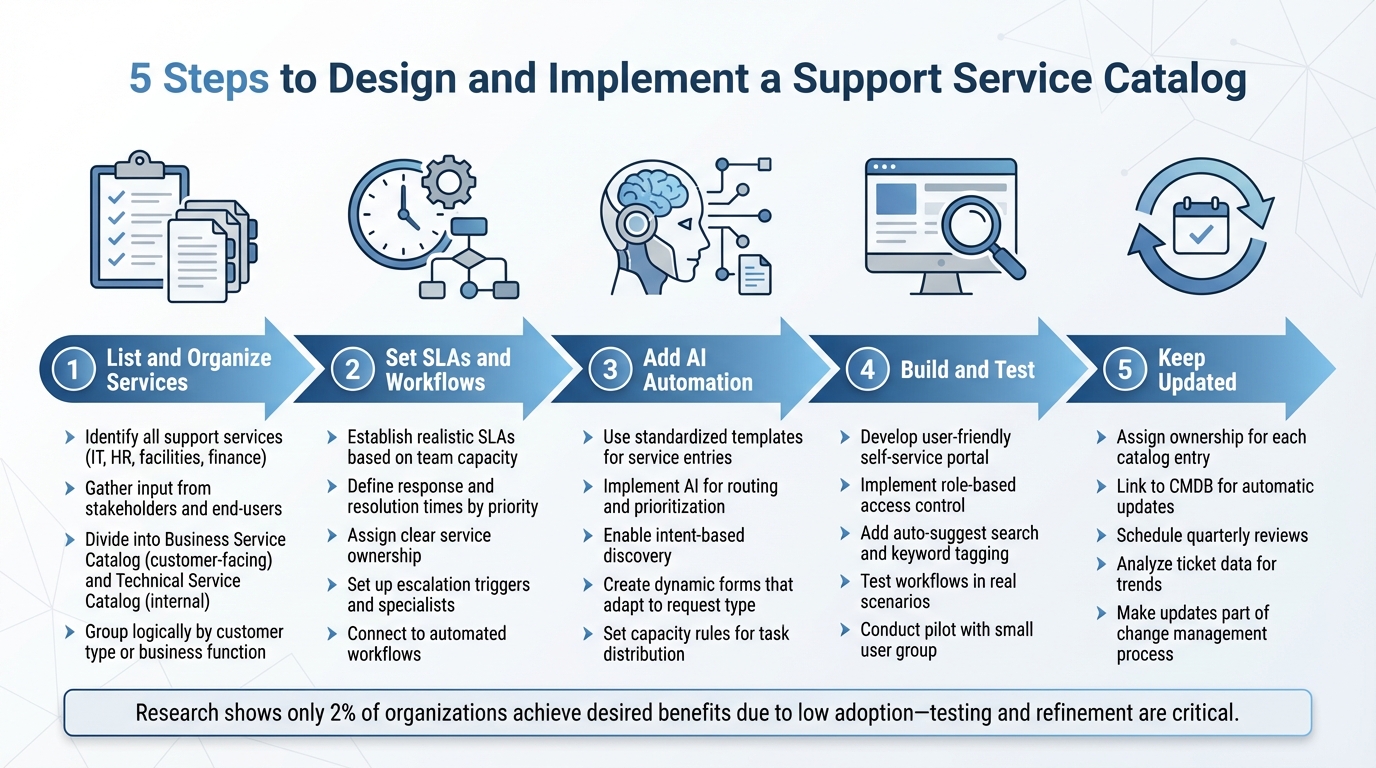
5-Step Process to Implement a Support Service Catalog
Creating a Support Service Catalog involves a thoughtful process that balances user convenience with operational efficiency. The main goal is to build a system that allows customers to easily find and request services while giving your team the tools and clarity needed for consistent and reliable delivery. Here’s how you can approach this step by step.
Step 1: List and Organize Your Services
Start by identifying all the services your support team provides. Go beyond IT – reach out to stakeholders in HR, facilities, and finance to include all business-to-business (B2B) services. To ensure you’re capturing the services users actually need, gather input through surveys, interviews, or focus groups with end-users.
Divide services into two categories: a Business Service Catalog for customer-facing services and a Technical Service Catalog for internal use. Group these services logically, either by customer type or business function, and focus on documenting only those services that are currently available.
Step 2: Set SLAs, Escalation Paths, and Workflows
Establish realistic service-level agreements (SLAs) that align with your team’s capacity. Work with service owners to define response and resolution times based on the impact and priority of each service. Assign clear responsibilities to service owners and ensure workflows are well-documented.
Set up escalation triggers, such as SLA deadlines, and designate specialists to handle these situations. Use AI-powered ticket routing and prioritization to manage requests based on urgency and impact. Connect each catalog item to automated workflows to ensure requests are consistently managed, with clear ownership and predictable processes.
Here’s an example of how SLA targets might look for different service tiers:
| Service Tier | Priority Level | Typical SLA Target | Example Service Request |
|---|---|---|---|
| Tier 1 (Critical) | Urgent | 1–4 Hours | Production System Outage / Security Breach |
| Tier 2 (Standard) | High | 8–24 Hours | New User Onboarding / Software Provisioning |
| Tier 3 (Self-Service) | Medium | 2–3 Days | Hardware Upgrade / Feature Request |
| Tier 4 (General) | Low | 5+ Days | General Inquiry / Documentation Update |
Step 3: Create Standard Templates and Add AI Automation
Use standardized templates for service entries. Each template should include key details like the service name, description, owner, eligibility, and associated SLA. A rich text editor can make these entries more user-friendly by allowing formatting and images.
Incorporate AI to streamline processes like routing, prioritization, and reporting. AI can interpret plain-language requests and match them to the correct service. Intent-based discovery tools can further refine the process, ensuring requests are routed accurately. Additionally, capacity rules can help distribute tasks based on factors like skill sets, seniority, and availability.
Dynamic forms can simplify the user experience. Instead of static, one-size-fits-all forms, use AI to generate personalized intake forms that ask only the necessary questions for each request type. This reduces friction by gathering all the required information upfront, cutting down on follow-up communication.
Step 4: Build and Test the Catalog
Develop a self-service portal that consolidates all available services in one place. Design it for ease of use, minimizing the number of clicks needed to find and request services. Features like an auto-suggest search bar, keyword tagging, and relevance ranking can make navigation smoother.
Implement role-based access control to ensure users only see services relevant to their role or department. For instance, "Requesters" should only see approved catalog items, while "Admins" can access drafts and manage templates. This approach keeps the interface clean and secure.
Before rolling out the catalog, test it in real-world scenarios. Verify that workflows for incident management, change management, and request fulfillment function as expected. Conduct a pilot with a small group of end-users to identify any issues, such as confusing descriptions or routing errors. This testing phase helps ensure the catalog integrates seamlessly with your broader AI-powered support strategy.
Research from 2012–2013 highlighted a key challenge: while 30–50% of organizations had a service catalog, fewer than 2% reported achieving the desired benefits due to low user adoption. Testing and refining the catalog can help address this gap.
How to Implement Your Support Service Catalog
Publishing and Automating the Catalog
Once your catalog is ready and tested, it’s time to make it available for use. Publish it on a self-service portal, using role-based visibility to ensure users only see services relevant to them. This keeps the interface simple and prevents unnecessary requests from cluttering your workflow.
Each service in the catalog should link to automated workflows that activate as soon as a request is submitted. These workflows can manage tasks like routing approvals, assigning tickets, and sending notifications. For example, if someone requests "New User Onboarding", the system can automatically forward the ticket to HR, seek approval from the user’s manager, and send out a confirmation email.
Integrating AI features can take efficiency to the next level. Predictive CSAT (Customer Satisfaction) tools can analyze request trends to predict satisfaction levels, helping your team address potential issues before they escalate. AI-powered agents can handle repetitive tasks – like resetting passwords or provisioning software – freeing up your team for more complex issues. Generative AI can assist by summarizing incoming requests, suggesting helpful knowledge base articles, or drafting responses based on similar past cases.
Before rolling out the catalog to everyone, conduct user acceptance testing (UAT) with a small group. This step can reveal problems like unclear service descriptions or misrouted requests that might have been missed during internal testing. Once everything is fine-tuned, announce the catalog through internal communication channels and provide brief training on how to navigate the portal.
Keeping the Catalog Current
An outdated catalog can quickly lose credibility. To avoid this, assign ownership for each catalog entry and link it to your CMDB (Configuration Management Database). This connection allows updates to service status and availability to happen automatically. Also, make updating the catalog a required step in your change management process whenever a service is added, modified, or retired.
Schedule quarterly reviews to refine the catalog based on user feedback. Check whether SLAs are being met and remove services that are no longer useful. Regularly analyze ticket data to identify trends. For instance, underused services might need to be retired, while highly requested ones could benefit from improved automation. Many platforms can even send automated reminders to service owners to review their entries, ensuring the catalog stays accurate and up-to-date.
Avoiding Common Mistakes
To keep your catalog effective, focus on simplicity and accuracy. Overloading it with too many categories or options can confuse users. Instead, structure it logically and minimize the number of clicks needed to find a service.
Service descriptions should be clear and free of technical jargon. For example, swap out terms like "Provision L2 VPN Access" for something more user-friendly, like "Work from Home Access."
Another common misstep is building the catalog without consulting support data or user feedback. This can lead to services that don’t align with actual needs. Involve business leaders and end-users early in the process to identify high-priority services and use the language they’re familiar with.
AI can also help smooth over these challenges. Conversational interfaces let users describe their needs in plain language, bypassing complicated service categories. Intelligent routing and prioritization can interpret user intent and send requests to the right team automatically. Additionally, automated deflection can suggest helpful articles before a request is even submitted, reducing ticket volume for straightforward issues. These AI-driven tools ensure users can still get the help they need, even if the catalog isn’t perfect.
Conclusion
A well-structured Support Service Catalog is the foundation of scalable B2B support operations. It equips AI agents with the critical data needed to interpret user intent, route requests effectively, and automate routine tasks – all without requiring human involvement. With 75% of service organizations offering self-service options and 72% of top-performing teams resolving simple issues this way, having a robust catalog can set you apart in a competitive landscape.
From an operational perspective, this catalog simplifies workflows and reduces costs. Predefined workflows streamline request intake, while Tier 0 self-service options – like resetting passwords or provisioning software – free up your team to focus on strategic, high-value projects. Meanwhile, AI takes care of repetitive, routine tasks.
"A structured catalog is the essential backbone for advanced automation. It provides the clear, organized data that AI agents need to understand user intent, suggest the right services, and route requests intelligently without human intervention." – Salesforce
Beyond operational efficiency, a thoughtful catalog builds trust and clarity. By outlining clear SLAs, eligibility criteria, and detailed service descriptions, it removes uncertainty about what’s available and when issues will be resolved. This transparency directly improves customer satisfaction and strengthens B2B relationships, where support quality can significantly influence retention and revenue.
Centralizing service requests also unlocks powerful insights. Tracking service demand and monitoring SLA performance in real time highlights bottlenecks and uncovers patterns in usage. This data enables you to refine processes and enhance automation, turning your support operations into a forward-thinking, strategic advantage.
FAQs
How can AI improve the functionality and efficiency of a Support Service Catalog?
AI can transform a Support Service Catalog by automating essential processes like classifying, routing, and prioritizing service requests. This streamlines operations, reduces human error, and speeds up response times – all of which contribute to improved customer satisfaction. Beyond that, AI can sift through support data to spot patterns, refine services, and recommend updates, ensuring the catalog stays relevant and efficient.
AI-powered chatbots and virtual agents are another game-changer. They can manage routine questions and guide users through self-service options, allowing human agents to concentrate on more complicated issues. The result? Faster resolutions and reduced operational costs. On top of that, AI can deliver predictive insights, helping support teams identify and address potential bottlenecks or service gaps before they become problems. By integrating AI, businesses can make their support operations smarter, more scalable, and cost-efficient.
What are the advantages of using a tiered structure in a Support Service Catalog?
Organizing services into tiers within a Support Service Catalog brings clarity and structure to both operations and customer interactions. By grouping services based on factors like complexity, urgency, or the expertise required, support teams can handle simpler requests at lower tiers while escalating more challenging issues to specialized teams. This approach not only speeds up resolution times but also ensures resources are used effectively.
For customers, a tiered system improves the experience by offering clear escalation paths and setting realistic expectations for response times. This leads to more precise and efficient support. On the organizational side, it helps balance workloads and reduces the risk of staff burnout. Tiers also make it possible to offer tailored services and Service Level Agreements (SLAs), allowing for more customized and impactful support.
How often should you update your Support Service Catalog to keep it relevant?
To keep your Support Service Catalog relevant and useful, make it a habit to review and update it at least once a year. This practice ensures it stays in sync with evolving customer expectations, new services, and any internal changes.
If you’re operating in a fast-moving or ever-changing environment, you might want to update it more often – perhaps every quarter or six months. This way, you can quickly adapt to shifts in demand or advancements in technology. Frequent updates help maintain the catalog as an effective resource for boosting efficiency and keeping customers happy.






