


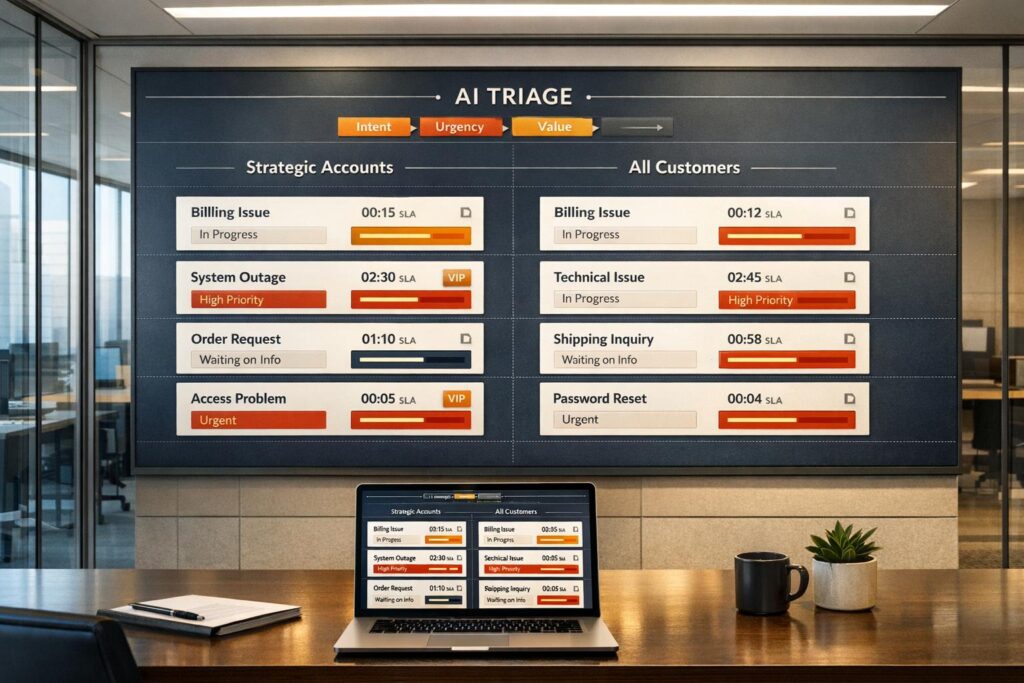
Managing VIP accounts can be tricky. These customers often drive most of a company’s revenue, so prioritizing their needs is essential. However, focusing too much on VIPs can leave other customers feeling neglected, risking complaints and churn. The solution? Use AI tools and clear rules to balance priorities effectively.
Here’s how you can do it:
- Identify VIPs: Use metrics like Annual Recurring Revenue (ARR) or Customer Lifetime Value (LTV) to flag high-value accounts. Automate this process with CRM integrations to ensure accuracy.
- Set clear prioritization rules: Define how tickets are handled based on urgency, sentiment, and customer value. Use AI to automate triage and escalation.
- Dynamic SLAs: Adjust response times based on account tiers and urgency to ensure prompt service for everyone.
- Transparent communication: Share your VIP criteria with your team and set clear expectations for all customers.
- Leverage AI: Automate routine tasks, predict ticket urgency, and optimize resource allocation.
How To Prioritize Customer Experience Efforts
What Are VIP and High-Value Accounts?
Not all customers contribute equally to your bottom line. VIP and high-value accounts stand out due to their measurable financial impact – metrics like Annual Recurring Revenue (ARR), Customer Lifetime Value (LTV), or contract size often define them. Interestingly, around 80% of revenue typically comes from just 20% of customers. Recognizing this key segment is crucial for maintaining profitability and focusing resources where they’ll have the biggest impact.
But it’s not just about the numbers. Strategic factors also play a role in identifying VIPs. Accounts with C-suite involvement or strong brand advocacy often take priority. Additionally, the first 90 days of a customer relationship are critical for setting the stage for long-term success. Effective onboarding during this window can make all the difference.
How to Identify VIP and High-Value Accounts
The best way to identify VIP accounts? Start with data. Financial metrics such as ARR, Average Order Value (AOV), and LTV provide a solid foundation. For example, if your business generates $10 million in ARR, and $4 million of that comes from just 50 accounts, those accounts clearly belong in your VIP tier. Combine these financial insights with qualitative factors like customer sentiment, expansion trends, and churn risk to ensure you’re not missing important nuances.
Automating this process can save time and reduce errors. Sync revenue data with your CRM to flag VIP accounts automatically. Add custom fields like a "VIP Customer?" checkbox to route their tickets directly to senior agents. This ensures VIP issues are handled promptly without getting lost in the general support queue.
| Criteria Category | Measurable Factors | Role in Prioritization |
|---|---|---|
| Financial Value | ARR, LTV, AOV, Contract Size | Focuses on accounts that drive the majority of revenue. |
| Business Type | Company Size, Industry | Larger enterprises often bring more complex needs and higher expectations. |
| Strategic Value | Influence, C-suite status | High-profile accounts demand immediate attention due to their organizational impact. |
| Lifecycle Stage | First 90 days, Renewal window | Prioritizes onboarding and retention for at-risk or new accounts. |
| Service Health | CSAT, NPS, Sentiment | Flags accounts with declining satisfaction for immediate action. |
These criteria make the segmentation process clear and actionable.
Making Account Segmentation Transparent
Clarity is key when rolling out a VIP strategy. Without transparency, your team might struggle to understand why certain accounts are prioritized, potentially leading to frustration. To avoid this, share the VIP workflow with your entire support team. Create a formal "Service Desk VIP Procedures Template" that outlines exactly what qualifies an account for VIP treatment – and what doesn’t.
"The reality for most organizations is that VIPs need special treatment; but providing VIP service shouldn’t come at the expense of good service delivery for the rest of the organization."
– Natalie Sansone, PhD, Research Director, Info-Tech Research Group
It’s also important to communicate your VIP model to both stakeholders and the VIP customers themselves. Clearly define service-level agreements (SLAs) and set realistic expectations. For your broader customer base, while engagement levels may vary (e.g., high-touch for VIPs versus tech-touch for others), the quality of your product and support should remain consistently high across all tiers. This balanced approach builds trust and prevents perceptions of favoritism.
Finally, don’t treat your VIP criteria as static. As your business evolves – whether through growth or entering new markets – your definition of "high-value" accounts will need to adapt. Regularly re-evaluate and refine your segmentation to stay aligned with your goals.
Setting Clear Prioritization Rules
After identifying your VIP accounts, the next step is ensuring their tickets are prioritized – without sidelining others. The key? Establishing clear, consistent prioritization rules across your support system. These rules eliminate guesswork, ensuring every ticket is handled based on urgency and business impact, not subjective decisions.
Automated, rule-based triage can remove manual bias from the equation. Using predefined "if-this-then-that" logic, tickets are categorized instantly. For example, if a customer has spent over $500, the system tags their ticket as "VIP" and sets the priority to "High" . But it’s not just about revenue – customer sentiment and urgency matter, too. AI-powered Natural Language Processing (NLP) can evaluate the tone of messages and escalate tickets when frustration or urgency is detected. Considering that 60% of customers expect "immediate" responses within 10 minutes, this ensures even non-VIP customers get prompt attention when necessary. Next, let’s explore how AI dynamically adjusts SLAs and streamlines case triage to support these prioritization rules.
Using AI to Adjust SLAs Dynamically
Static Service Level Agreements (SLAs) often fall short in dynamic support environments. Dynamic SLAs, however, adapt automatically to factors like case urgency, renewal timelines, or account tier, ensuring resources are allocated where they’re needed most.
Tag-based prioritization can trigger specific SLA targets . For instance, if a "VIP" customer has a renewal coming up in 30 days, the system could set a first reply target of 10 minutes instead of the usual 2 hours. This approach focuses resources on high-risk scenarios.
To ensure no account is overlooked, automated escalation is essential. For example, if a high-priority ticket is unassigned for more than 2 business hours, the system can escalate it to "Urgent" and notify supervisors . This safety net ensures critical issues are addressed even during peak times. And importantly, these adjustments for VIPs don’t come at the expense of service quality for others. A survey found that 90% of customer experience leaders using AI expect it to resolve 8 out of 10 issues without human involvement in the near future.
A practical way to structure SLA policies is by starting with the most restrictive rules and working down. For example, a VIP account nearing renewal would receive the tightest SLA, while broader rules cover other accounts. Tracking internal SLAs between departments can also help identify bottlenecks, ensuring routine tickets don’t stall, even when high-priority cases dominate.
| Metric Type | VIP Target | Standard Target | Purpose |
|---|---|---|---|
| First Reply Time | 10 minutes | 2 hours | Acknowledges high-value accounts immediately |
| Next Reply Time | 30 minutes | 4 hours | Keeps conversations moving for all tiers |
| Requester Wait Time | 2 hours max | 8 hours max | Prevents tickets from being neglected |
Automating Case Triage and Prioritization
Manual triage can be slow and inefficient, but automation ensures tickets are categorized and prioritized instantly. Predefined rules allow tickets to be routed to the right agent at the right priority level.
Event-based triggers are a great starting point. For instance, if a ticket comes from a customer with more than three orders or a lifetime spend exceeding $1,000, the system can automatically assign it to a "VIP Triage" group staffed by senior agents . This "fast lane" routing ensures high-value accounts reach experienced staff without unnecessary delays.
Time-based automation adds another layer of efficiency. If a high-priority ticket isn’t assigned within 30 minutes, the system escalates it to "Critical" and alerts management .
For even better accuracy, real-time CRM syncing can verify a customer’s current status when a ticket arrives. Combined with omnichannel routing – which considers agent status, workload, and skills – this system ensures VIP accounts are prioritized without compromising service for others.
Using AI to Allocate Resources Efficiently
Advanced AI systems are redefining how resources are managed in support operations. By predicting urgency, routing cases intelligently, and handling routine tasks, AI ensures that senior agents can focus on more complex, high-impact work. For instance, VIP accounts receive immediate, personalized attention, while standard customers experience shorter wait times.
AI’s capabilities go beyond reactive triage to proactive resolution. It speeds up ticket sorting, resolves common issues autonomously, and gathers critical context before involving human agents. A great example is B2B cybersecurity company Cynet, which, in 2025, implemented an AI-driven platform that deflected 47% of Tier-1 tickets, cut resolution times nearly in half, and improved its CSAT score from 79 to 93 points. This allowed senior engineers to handle more intricate escalations across all customer tiers without increasing staff.
Looking ahead, Gartner estimates that by 2028, a third of enterprise software will feature agentic AI – systems capable of analyzing unstructured data, solving complex problems, and executing multi-step tasks across tools like CRMs and billing systems. The goal isn’t to replace human agents but to enhance their effectiveness. As Team Mosaic explains:
"The rise of agentic AI workflows doesn’t make your human agents obsolete – it makes them more valuable. By automating the predictable and procedural, you free up your team to focus on what humans do best."
Real-time CRM integration is another game-changer. It ensures that a customer’s VIP status is verified the moment a ticket is submitted – not hours later due to delayed syncing. AI also proactively collects essential details like logs or account information before an agent steps in, saving time for high-value accounts. With 76% of customers now expecting immediate, tailored responses, this kind of efficiency benefits everyone. AI’s ability to predict ticket urgency and optimize prioritization is setting a new standard.
Predicting Case Urgency with AI
AI doesn’t just sort tickets – it anticipates which issues might escalate if not addressed promptly. By using natural language processing (NLP), AI analyzes sentiment and intent in real time, flagging urgent cases for immediate attention, whether they come from VIPs or standard customers.
This proactive approach closes service gaps. For example, if a standard customer has an urgent checkout issue or a VIP raises a billing concern, AI ensures these tickets are prioritized appropriately. Sentiment-based escalation also safeguards non-VIP accounts. If a standard customer shows signs of growing frustration, AI can override standard SLA rules, ensuring urgency – not just account status – drives prioritization. By 2029, analysts predict that AI systems will autonomously resolve up to 80% of routine issues, allowing human agents to focus on situations requiring empathy and expertise.
Manual vs. AI-Driven Prioritization
AI-driven prioritization takes automated triage to the next level by using real-time data, sentiment analysis, and urgency predictions to route tickets instantly. Unlike manual systems, which can falter during high-volume periods, AI handles spikes effortlessly. For example, if 200 tickets arrive in an hour, manual processes require agents to sift through them, delaying urgent cases. AI, on the other hand, processes all tickets immediately – escalating VIPs to senior agents, deflecting routine queries, and flagging cases with high frustration levels.
Manual triage often increases costs by requiring senior agents to sort through routine issues. AI eliminates this inefficiency by reducing Average Handle Time (AHT) and focusing human efforts on meaningful interactions. According to 90% of CX leaders who have fully integrated AI, these systems are expected to resolve 8 out of 10 issues without human input. This approach not only speeds up service but also makes it more equitable and cost-effective.
sbb-itb-e60d259
Creating Service Tiers That Work for Everyone
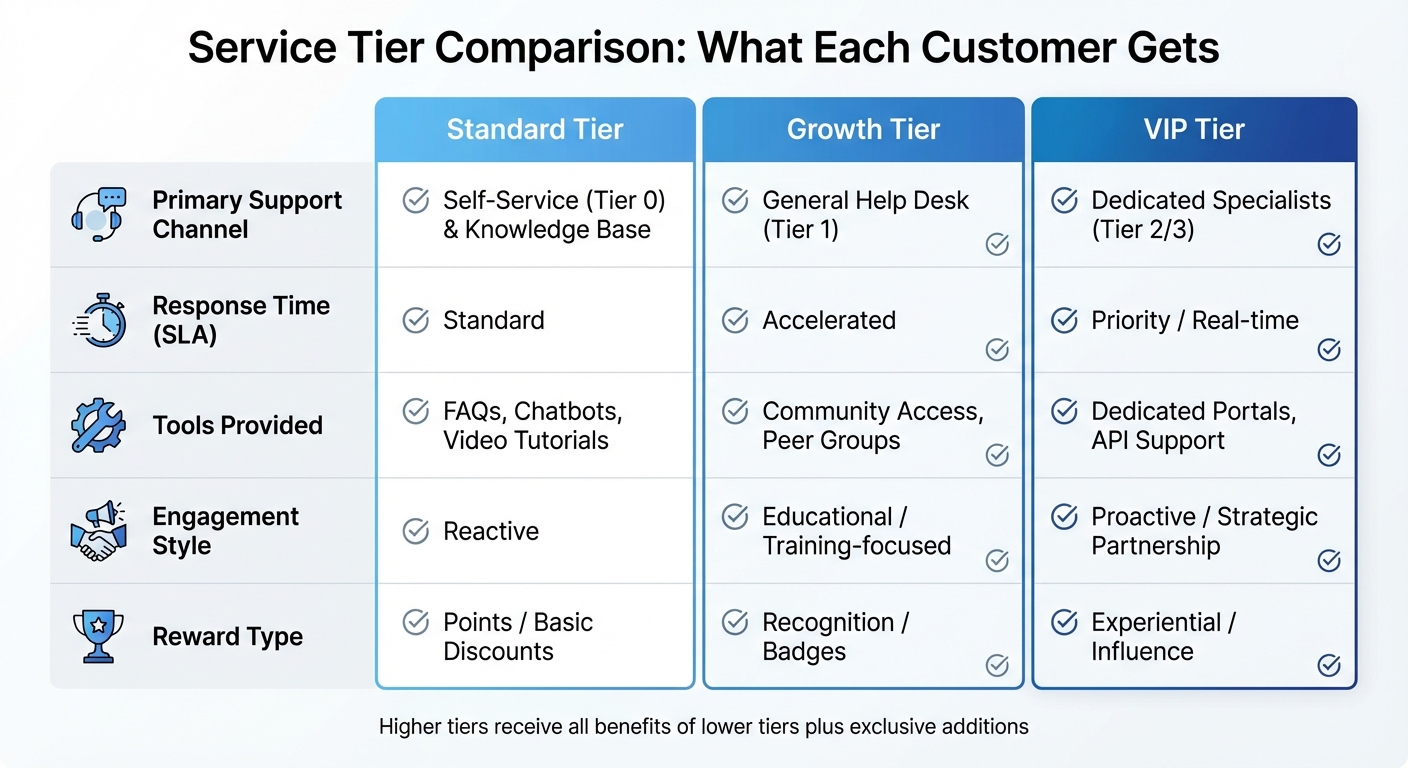
VIP vs Standard Customer Service Tier Comparison
Service tiers, when carefully structured, ensure that customers receive the right level of support based on their needs. This approach doesn’t compromise quality but instead aligns resources with the complexity of customer inquiries. By layering support, businesses can offer consistent service to all customers while dedicating advanced resources to high-priority accounts. This model builds on AI’s ability to route inquiries efficiently and adjust SLAs dynamically.
Most support organizations rely on a three- or four-tier framework. Here’s how it typically looks: Tier 0 provides self-service options like knowledge bases, AI chatbots, and FAQs. Tier 1 handles general inquiries, Tier 2 resolves technical issues, and Tier 3 (or sometimes Tier 4) addresses expert-level escalations. This system ensures that simpler issues are resolved quickly while complex cases or VIP customer needs are escalated to senior teams.
What VIP Accounts Get
VIP customers enjoy access to dedicated portals equipped with personalized dashboards. These dashboards allow them to track cases in real time, manage accounts, and access tailored resources. They also include AI-driven tools that monitor customer satisfaction (CSAT) and usage patterns. For example, predictive CSAT monitoring can alert account managers to early signs of dissatisfaction, giving them the chance to intervene before it affects renewal discussions.
VIPs also benefit from exclusive perks beyond faster response times. These include invitations to advisory boards, direct communication with company leadership, and personalized account reviews. Since 79% of millennials prefer experiences over material rewards, these perks often build stronger loyalty than discounts.
What All Customers Get
Standard customers aren’t overlooked in this model. They have access to the same high-quality knowledge base and self-service tools that VIP customers use. This ensures consistency – whether a customer is troubleshooting a billing issue or looking for technical documentation, they’ll find accurate, up-to-date information.
AI chatbots and semantic search engines further enhance the experience for all users. These tools interpret intent rather than relying solely on keywords, making searches more effective and reducing frustration. For instance, Darwinbox reported a 65% case deflection rate after implementing a chatbot powered by Fluid Topics, which delivered relevant articles directly in response to queries. Similarly, swissQprint saw a 34% drop in service tickets within a month of launching a self-service documentation portal.
The cost savings are substantial too. Self-service resolutions cost about $0.10 per issue, compared to $6–$12 for interactions with live agents. Investing in Tier 0 resources benefits all customers while allowing human agents to focus on complex cases. Importantly, there’s always a clear escalation path for customers who need more personalized support.
Comparing Service Tiers
This tiered approach ensures that both standard and VIP customers benefit from a well-rounded support strategy. Here’s how resources and benefits are distributed across the tiers:
| Feature | Standard Tier | Growth Tier | VIP Tier |
|---|---|---|---|
| Primary Support Channel | Self-Service (Tier 0) & Knowledge Base | General Help Desk (Tier 1) | Dedicated Specialists (Tier 2/3) |
| Response Time (SLA) | Standard | Accelerated | Priority / Real-time |
| Tools Provided | FAQs, Chatbots, Video Tutorials | Community Access, Peer Groups | Dedicated Portals, API Support |
| Engagement Style | Reactive | Educational / Training-focused | Proactive / Strategic Partnership |
| Reward Type | Points / Basic Discounts | Recognition / Badges | Experiential / Influence |
Higher-tier customers receive all the benefits of lower tiers, along with exclusive additions. For instance, VIP customers can still use standard channels like the knowledge base while enjoying access to dedicated portals and senior specialists. This cumulative structure ensures fairness while delivering extra value where it’s most impactful.
Tracking and Maintaining Equitable Service
After outlining service tiers, the next step is ensuring they deliver consistent value to all customers. This means monitoring resource distribution and understanding how different customer groups experience support. By tracking key metrics, companies can avoid service gaps that might lead to customer dissatisfaction or attrition.
With automated AI workflows, quality assurance tools now evaluate every customer interaction – not just a random selection. This allows support teams to identify training needs and pinpoint service inconsistencies. Real-time dashboards enhance transparency, enabling support leaders to compare service quality across tiers. For instance, if resolution times or CSAT scores for standard accounts fall far behind those of VIPs, it signals an issue that needs to be addressed. Transparency is crucial, especially since 75% of businesses worry that opaque AI decision-making could increase customer churn. Let’s look at the metrics that help ensure fairness in service delivery.
Metrics That Show If Service Is Equitable
Key performance indicators (KPIs) such as First Response Time (FRT), Average Resolution Time, Customer Effort Score (CES), and First Contact Resolution (FCR) should be segmented by account tier. This segmentation highlights disparities and helps address them. For example, VIPs may have faster FRT targets, but monitoring the gap ensures non-VIPs still receive timely responses. If the gap grows too large, it may signal a resource allocation issue requiring immediate action. These insights can guide updates to SLAs and resource distribution.
If standard accounts show consistently higher CES scores, it might indicate problems with self-service tools or escalation processes. Similarly, tracking FCR across tiers – now made easier through AI analysis of case histories – helps assess whether agents can effectively resolve issues for all customers.
AI-driven sentiment analysis can also flag service gaps by detecting sudden increases in negative sentiment within specific customer segments. Addressing these issues early is vital, as 13% of unhappy customers share their negative experiences with more than 20 people. Additionally, AI-powered omnichannel routing ensures tickets are distributed based on real-time factors like agent availability, skill set, and ticket priority, preventing non-VIP cases from being consistently sidelined.
Using Feedback to Improve Workflows
Customer feedback is a powerful tool for identifying and addressing service gaps. For example, surveys can help flag "Exceptionally Angry Customers", allowing teams to assign temporary VIP status to resolve their issues quickly and mitigate brand damage. Automated feedback tools integrated into workflows – such as after a ticket is closed or an onboarding milestone is achieved – ensure consistent data collection.
AI summarization tools simplify the process of analyzing large volumes of feedback. They can condense information from various channels or discussion threads, helping support leaders identify trends and actionable insights. Additionally, setting up alerts in platforms like Slack ensures teams are notified immediately when highly negative feedback arises, preventing critical issues from being overlooked.
Equally important is closing the feedback loop. Demonstrating that customer input leads to tangible changes builds trust across all service tiers. Regular quality assurance reviews can evaluate individual agent performance and uncover team-wide training needs. This approach ensures improvements benefit all customers, not just VIPs. Considering that increasing customer retention by just 5% can boost profits by up to 95%, prioritizing feedback-driven workflows is a smart investment that pays off far beyond customer support.
Conclusion
Managing VIP and strategic accounts requires a thoughtful approach to maintain balance and transparency. The key is to define VIP accounts using clear, objective criteria like revenue, strategic importance, or engagement levels. When your team understands why certain tickets are prioritized, it helps reduce frustration and boosts overall efficiency.
By combining clear segmentation with prioritization strategies, AI-driven workflows can bring even more precision to the process. These tools ensure high-priority cases are routed to experienced agents, while features like time-based escalations and real-time monitoring keep the service flowing smoothly for everyone. As Nooshin Alibhai, Founder and CEO of Supportbench, explains:
"Effective ticket escalation is not just a backup option – it’s a vital strategy for delivering fast, personalized, and trustworthy customer support".
Tiered service models work best when VIPs receive quicker responses and access to specialized experts, while the rest of your customers benefit from high-quality self-service tools and clear communication. The distinction lies in the speed and level of expertise offered – not in whether support is provided at all.
Tracking metrics specific to each service tier ensures fairness across the board. Keep an eye on First Response Time, CSAT, and Customer Effort Score by segment to identify and address any gaps early. AI-powered dashboards make this easier by offering automated insights and flagging potential issues before they lead to customer churn. Platforms like Supportbench offer built-in features such as dynamic SLA management, real-time CRM integration, and detailed analytics – eliminating the need for costly add-ons.
Striking the right balance between efficiency and fairness isn’t just achievable; it’s what sets modern support teams apart in a competitive landscape.
FAQs
How can AI tools help provide excellent service to VIP customers without being unfair to others?
AI tools can help create balanced customer service experiences by automating workflows that cater to both VIP and non-VIP customers. For instance, intelligent routing systems can prioritize VIP requests while ensuring other customers are served in a fair and organized queue. By leveraging triggers, tags, and customer data, AI makes it possible to give high-value accounts the attention they need without sidelining standard requests.
AI can also adapt workflows dynamically based on customer value, automating processes like SLA adherence and escalation rules. This ensures VIPs receive top-tier service while other customers are managed efficiently and with transparency. These approaches build trust and loyalty across all customer groups, ensuring fairness remains at the core of operations.
How do you determine which accounts qualify as VIPs?
VIP accounts are defined by their value and strategic importance to a business. These are often customers who contribute significantly to revenue, show strong loyalty, make frequent purchases, or play a key role in achieving long-term business objectives.
To manage these accounts effectively, businesses typically tag or categorize them within their support systems. Labels like "VIP" or custom fields help identify these customers, enabling workflows that prioritize their requests. This ensures they receive faster responses and more tailored service.
In many cases, companies also implement specific Service Level Agreements (SLAs) and routing rules to cater to the unique needs of these high-value accounts. The ultimate goal? To provide support that strengthens their loyalty, drives revenue growth, and aligns with broader strategic goals.
How can businesses provide excellent support for VIP customers while staying fair to everyone?
To provide top-notch support for VIP or high-priority accounts without alienating other customers, businesses need a well-thought-out system. Tools like tags, dedicated views, and custom SLAs can help your team prioritize VIP requests while keeping the workflow smooth for everyone else. For instance, tagging VIP accounts and setting specific response time targets allows your team to manage priorities effectively.
Automating workflows with triggers can take this a step further by routing VIP tickets directly to senior agents or specialized teams. This ensures that high-value customers get the attention they need without compromising the service quality for others. Additionally, clear communication about support levels and thorough training for your team can create a fair and respectful experience for customers across all tiers.
Integrating AI-powered support tools can also help you allocate resources more efficiently, making it easier to scale operations while maintaining excellent service for every customer.






