


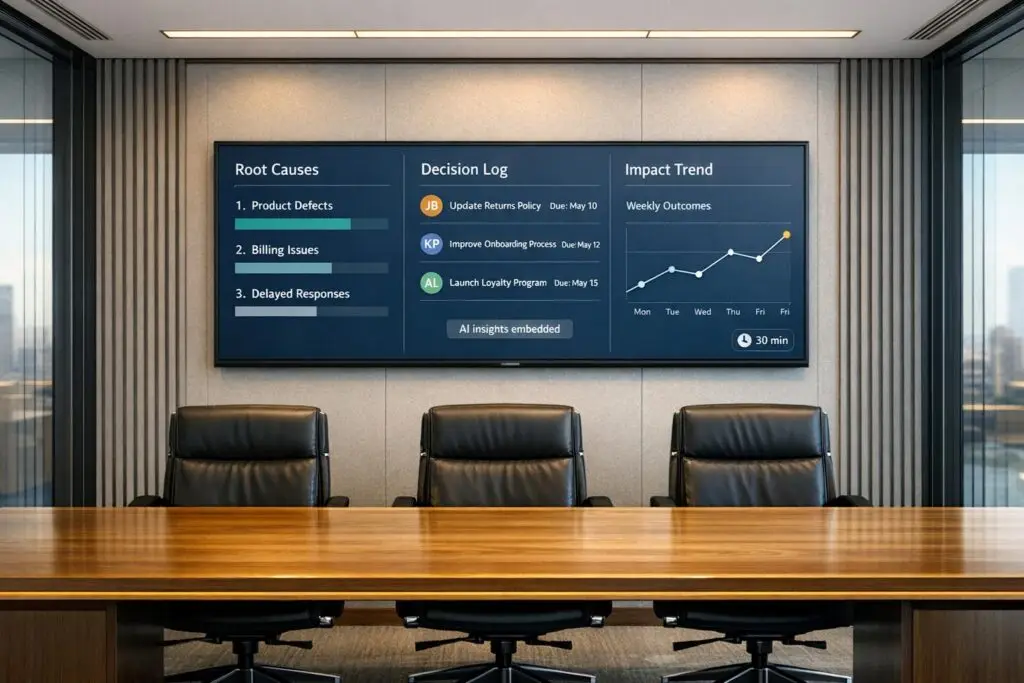
Most CX reviews waste time. They focus on sharing metrics and dashboards without solving real problems. The result? No follow-up, no accountability, and no action. This inefficiency can hurt revenue, with 50% of customers leaving after one bad experience. But a 30-minute, action-focused CX review can change that.
Here’s how to make your CX reviews impactful:
- Prepare actionable data: Use AI to analyze 100% of interactions, uncover patterns, and track key metrics like Predictive CSAT and First Contact Resolution.
- Structure for decisions: Dedicate time to review past actions, highlight key trends, and assign clear tasks with deadlines.
- Avoid common mistakes: Focus on fewer metrics with context, ensure decisions are executed, and align teams with a full customer view.
- Track and improve: Log decisions, measure results with AI-driven surveys, and identify hidden issues for continuous improvement.
This approach ensures every CX review leads to measurable outcomes, stronger customer retention, and growth.
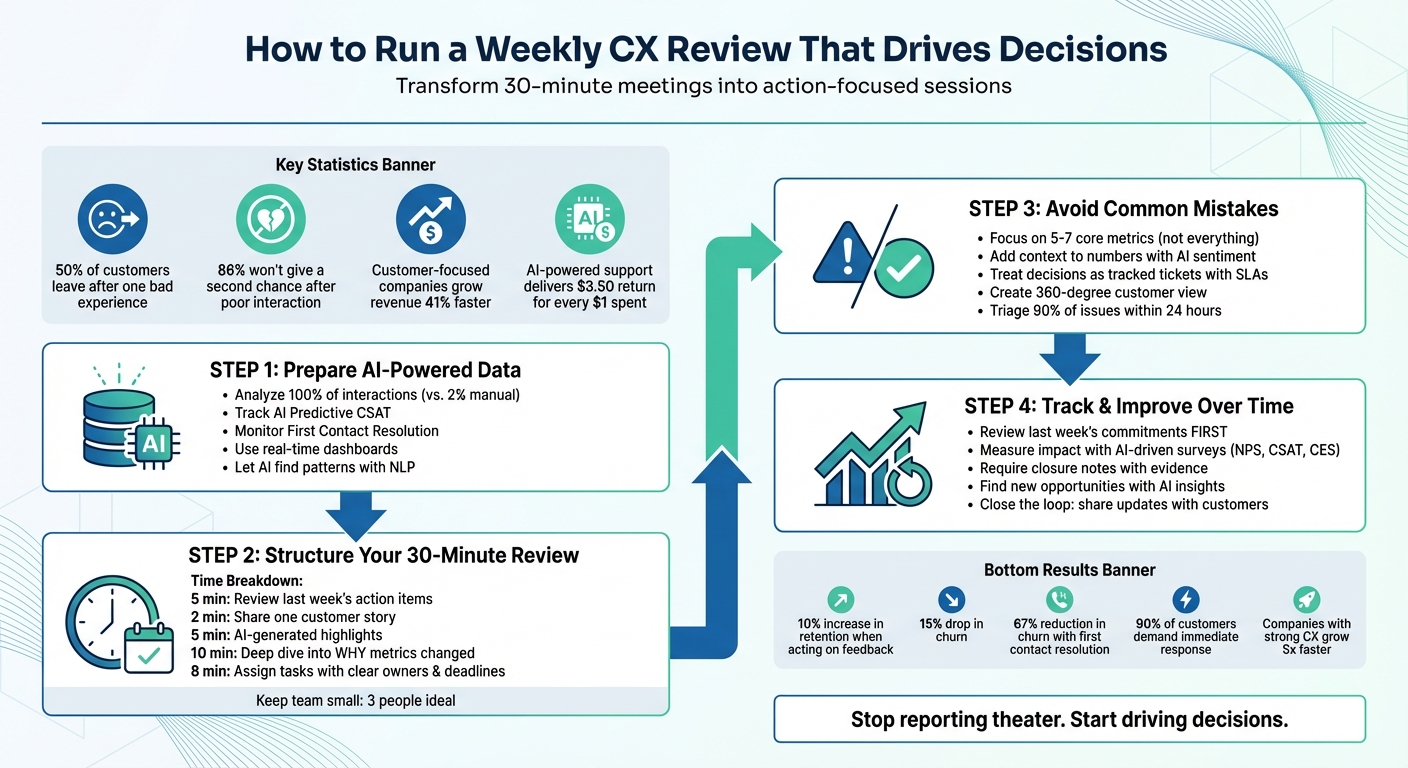
4-Step Framework for Running Effective Weekly CX Reviews
Why Most CX Reviews Don’t Work
What Is Reporting Theater?
Reporting theater happens when teams share dashboards and metrics that look impressive but fail to drive real action. It’s like watching a recap of a game without any strategy for the next match. As Reputation.com explains:
"The metric is just the number, what you do with it is more important".
Legacy tools often act like speedometers – they tell you how fast you’re going but don’t show you the road ahead. For example, seeing a drop in NPS or CSAT without context doesn’t help you understand why it happened or how to fix it. It’s just another data point, not a solution.
This lack of actionable insights creates a foundation for bigger problems in B2B CX reviews.
Common Problems in B2B CX Reviews
The concept of reporting theater ties directly to several challenges that weaken CX reviews.
One of the biggest issues is data silos. Teams like support, product, and marketing often work with their own metrics, which fragments the view of the customer journey. This separation makes it harder to pinpoint the real reasons behind problems like customer churn. On top of that, manual data collection slows down the process, so insights are outdated by the time they’re analyzed.
Another challenge is metric overload. Teams juggle a long list of KPIs – NPS, CSAT, CES, First Response Time, Average Handle Time – leading to endless debates about numbers instead of solving actual problems. And the disconnect is glaring: while 87% of companies think they deliver excellent CX, only 11% of customers feel the same. This gap shows what happens when reviews prioritize internal metrics over meaningful customer outcomes.
What Ineffective CX Reviews Cost You
The stakes are high. Half of all customers leave a brand after just one bad experience, and 86% won’t give it a second chance after a single poor interaction. Ineffective CX reviews don’t just risk losing customers – they also waste time and resources. Worse, when decisions aren’t tracked, the same problems keep coming back.
On the flip side, companies that make customer experience a priority see real benefits. Customer-focused organizations grow revenue 41% faster and achieve 49% higher profits than their competitors. The message is clear: failing to act on CX reviews costs more than just numbers – it costs loyalty and growth.
Seven Steps to Run an Effective Customer Experience Team Meeting
Step 1: Prepare AI-Powered Data for Your Review
The difference between a CX review that drives real change and one that’s just for show lies in how you prepare your data. Proper preparation sets the stage for actionable insights rather than surface-level reporting. While manual data collection only scratches the surface – processing about 2% of interactions – AI tools analyze 100% of interactions in real time, delivering a far deeper understanding.
Pick Metrics That Drive Decisions
Focus on metrics that directly inform decisions. For instance, AI Predictive CSAT can predict customer satisfaction before a survey is even completed, allowing you to take action with at-risk accounts right away. Similarly, AI First Contact Resolution uses machine learning to confirm whether an issue was truly resolved on the first attempt.
You should also monitor customer health scores and SLA compliance by tier. These metrics directly shape key decisions, such as adjusting staffing levels, setting training priorities, or escalating product issues. Lindsay Fifield, Director of Customer Success at Forethought, emphasizes this approach:
"A healthy CX team doesn’t just keep track of metrics – they really dig into what those numbers mean".
Once you’ve chosen metrics that matter, let AI dive deeper to uncover patterns and root causes.
Let AI Find the Patterns
AI tools equipped with Natural Language Processing (NLP) can analyze thousands of unstructured tickets and group them into recurring themes – no manual tagging required. Instead of broad categories like "workflow questions", AI can pinpoint specific issues, such as "confusion about adding delay steps". This level of granularity helps you zero in on areas that need immediate attention.
Modern platforms also detect sentiment and urgency in real time, flagging critical issues as they arise. For example, if a high-value account’s sentiment score drops below -40, the system can instantly alert the account manager. Consider this: Motel Rocks used AI-driven sentiment analysis to boost their CSAT by 9.44% and cut ticket volume by half. Similarly, Liberty, a luxury goods company, analyzed 100% of customer interactions with AI and achieved an impressive 88% CSAT by addressing knowledge gaps identified by the system.
These insights should feed directly into dashboards that provide up-to-date, actionable data.
Build Dashboards That Update in Real Time
Once AI identifies critical patterns, showcase them on real-time dashboards. Unlike static dashboards, which rely on outdated data, dynamic dashboards pull live updates from tools like your support platform and CRM. This ensures decisions are always based on the most current information. You can even customize dashboards by role – executives can view overarching trends, while managers can drill down into individual agent performance.
Step 2: Structure Your 30-Minute Weekly Review
Once you’ve gathered your AI-driven insights, the next step is to turn those insights into decisions. Think of this review as your action-planning moment, where observations are immediately transformed into tasks with clear ownership and deadlines. This approach ensures your AI data leads to real, measurable outcomes.
How to Split Your 30 Minutes
Start by revisiting last week’s action items. This keeps accountability front and center. Then, share one customer story – whether it’s a win or a challenge – to keep your team focused on the customer experience. As Jeannie Walters, CCXP, CSP, puts it:
"These meetings are about more than just about meeting. They’re about action. Make your CX meetings worthwhile by taking the actions that drive CX forward".
Next, allocate five minutes to review AI-generated highlights. Focus on key trends like ticket volumes, anomalies, or shifting sentiment. Dedicate ten minutes to digging deeper into the data, asking why metrics have changed instead of simply noting the changes. Finally, use the last ten minutes to create actionable hypotheses and assign specific tasks with deadlines. Keep the group small – three people is often the sweet spot for effective, high-level discussions.
Guide Discussions Toward Root Causes
Every data point should answer the question: "So what?". For example, don’t just report that ticket volume increased – explain that a recent product launch caused a spike in certain types of tickets. If the team can’t identify the reason behind a metric shift during the meeting, assign someone to investigate and report back next week. By focusing on these root causes, your discussions naturally lead to clear next steps and accountability.
Assign Clear Owners and Deadlines
To ensure decisions lead to action, assign tasks immediately. Each task should have a single, named owner to avoid confusion or shared responsibility. Use specific commitments like, “[Name] will [Action] by [Date],” instead of vague plans. Document all decisions in a structured workflow tool to maintain transparency and accountability. Establish clear SLAs for these tasks so they’re treated with the same urgency as customer requests. A dashboard showing open versus completed actions can provide instant visibility into progress and keep the team on track.
sbb-itb-e60d259
Step 3: Avoid Common CX Review Mistakes
Even with a solid process in place, teams often fall into predictable traps that turn productive reviews into wasted time. The upside? AI-native tools can help you sidestep these pitfalls and keep your efforts on track.
Track Fewer Metrics with More Context
Too much data can paralyze decision-making. When teams attempt to monitor everything, they often lose sight of what really matters. The fix? Zero in on 5-7 core metrics that align directly with your current business priorities. For example, if reducing churn is your goal, focus on metrics like NPS and customer retention. If service quality is the priority, hone in on CSAT and Customer Effort Score (CES).
But here’s the catch: numbers alone don’t tell the full story. A CSAT score of 4.2 won’t reveal why customers are unhappy or what needs to change. That’s where AI-powered sentiment analysis steps in. By analyzing 100% of customer interactions, AI uncovers hidden patterns and provides crucial insights. As Lindsay Fifield, Director of Customer Success at Forethought, explains:
"A healthy CX team digs deeper into the numbers, organizing metrics to promptly spot trends and issues".
Pairing your metrics with qualitative insights – like customer quotes, sentiment trends, and AI-detected effort scores – helps you understand the why behind the data. It’s worth noting that only 1 out of 26 unhappy customers will actually voice their concerns; the rest simply leave. Without AI to identify this silent dissatisfaction, you’re left guessing.
By focusing on key metrics and pairing them with context, you’ll set the stage for making decisions that lead to meaningful actions.
Make Sure Decisions Get Executed
Good decisions that never see follow-through are the ultimate waste of time. As the Moxo Team puts it:
"Decisions matter only when they result in action. Many reviews fail because tasks are logged in emails or spreadsheets with no clear accountability".
Workflow engines can solve this issue. Instead of dumping action items into shared documents, treat every decision as a task with an assigned owner, deadline, and service-level agreement (SLA). Use a live dashboard to track open and completed tasks, ensuring nothing gets overlooked. When decisions are treated with the same urgency as customer requests, execution improves dramatically.
Set clear service-level objectives for your action items. For instance, aim to triage 90% of flagged issues within 24 hours and follow up with customers within 10 business days. This kind of accountability prevents the dreaded “we’ll circle back on that” problem and keeps momentum alive.
Align Teams with Full Customer Views
Tracking and execution are important, but alignment across teams is what ensures lasting impact. Fragmented data leads to fragmented decisions. If your support team sees ticket history, your sales team sees deal stages, and your success team sees health scores – but no one has the full picture – you’ll end up addressing symptoms instead of root causes.
AI insights can help create a 360-degree customer view, breaking down silos so every team works from the same comprehensive data set. For instance, if ticket volume spikes for a specific account, your team can immediately determine if it’s tied to a recent product launch, an upcoming renewal, or a billing issue. This kind of context leads to smarter decisions.
AI-native platforms can also integrate tools like session replays or co-browsing data into your reviews, providing instant clarity on technical challenges. This not only boosts first contact resolution (FCR) but also reduces time spent troubleshooting.
When everyone in the room is looking at the same complete customer journey – not just their department’s slice – alignment happens naturally. These practices can turn every review into a springboard for meaningful change.
Step 4: Track Decisions and Improve Over Time
The success of any customer experience (CX) review process isn’t just about the discussions – it’s about the actions that follow. Without a clear system, decisions can easily get lost in Slack threads or buried in spreadsheets. The solution? Create a process that logs commitments, tracks their outcomes, and highlights new opportunities automatically.
Review Last Week’s Commitments First
Begin each weekly review by revisiting the action items from the previous week. This creates a reliable cycle of accountability. Instead of jumping straight into new data, dedicate the first few minutes to reviewing your decision log: what’s been completed, what’s still pending, and what might need escalation.
Treat every decision as if it’s a tracked ticket. Assign an owner, set deadlines, and define a Service Level Agreement (SLA). For instance, aim to triage 90% of feedback items within 24 hours and assign ownership within 72 hours. Use automated alerts to flag overdue tasks, ensuring they’re brought to leadership’s attention rather than slipping through the cracks.
In 2025, the Polish travel company Travelist adopted a shared inbox system with tools like "Email Notes" and "Collision Alerts" to track accountability. This approach improved their response speed by 50% and reduced resolution times by 44%. The key? Every task had a clear owner and deadline.
Also, require closure notes that include evidence of the decision’s impact. This not only preserves context but also creates an institutional memory, helping future teams understand not just what was decided, but why it mattered.
By reviewing past commitments, you build a foundation for assessing the effectiveness of current actions with measurable data.
Measure Impact with AI-Driven Surveys
After implementing a decision, it’s crucial to evaluate whether it delivered the desired results. AI-powered surveys can help measure this effectively. Use tools like Net Promoter Score (NPS) to assess long-term loyalty, Customer Satisfaction (CSAT) for immediate feedback, and Customer Effort Score (CES) to gauge friction points. Automate these surveys to trigger right after customer interactions, capturing real-time sentiment.
AI-driven quality assurance (QA) can also analyze interactions for sentiment, accuracy, and compliance. For example, in January 2026, the fashion retailer Motel Rocks used AI sentiment analysis and ticket routing to achieve a 9.44% boost in CSAT and cut ticket volume by 50%.
Here’s the bottom line: companies that act on customer feedback see a 10% increase in retention and a 15% drop in churn. But this only works if you measure whether your actions are making a difference, ensuring every decision leads to meaningful change.
Beyond tracking results, AI can also uncover areas you might not have considered.
Find New Opportunities with AI Insights
Effective CX reviews don’t just address known issues – they reveal hidden ones. AI insights can help identify these opportunities between reviews. Advanced tools can analyze open-ended feedback to uncover the "why" behind customer scores, often providing deeper insights than the numbers alone.
For example, AI can detect patterns, like multiple customers mentioning the same product issue, even if no formal complaints were submitted. Without these tools, such silent dissatisfaction might go unnoticed.
You can also deploy AI bots to investigate both product and operational challenges. Assign a "rotating insights steward" (on two-week cycles) to validate AI-generated tags and sentiment, ensuring accuracy in the data that informs your reviews. Keep false positives under 10% to maintain trust in the system.
Finally, close the loop by sharing updates with customers. A monthly bulletin titled "What we changed because of you" can show customers how their feedback led to real improvements. This matters – 85% of customers are more likely to provide feedback when they see it drives change. When customers see their input making a difference, they become collaborators in the process, not just another data point.
Conclusion
A results-focused weekly CX review boils down to four key steps: prepare AI-powered data, conduct a concise 30-minute meeting with clear ownership, avoid drowning in metrics, and track decisions from previous reviews. Together, these steps transform your review process from routine updates into a driver for meaningful change.
Instead of relying on static dashboards, dynamic workflows powered by AI take center stage. These tools handle the heavy lifting – assembling scorecards, analyzing interactions, predicting outcomes, and identifying root causes. The payoff? Companies using AI-powered support report a $3.50 return for every $1 spent. However, the real magic happens when these insights are tied to tracked actions, complete with SLAs and clear accountability.
Cross-team alignment is critical to avoid fragmented decisions. With 75% of service leaders struggling with siloed data gaps, every decision should translate into a tracked ticket, complete with ownership, deadlines, and evidence of closure.
Customer expectations are moving faster than ever. Today, 90% of customers demand an immediate response, and 60% expect it within 10 minutes. Delivering exceptional CX has a direct impact – companies with strong customer experiences grow 5x faster, while prompt feedback responses can boost retention by 12%. Resolving issues on the first contact reduces churn by as much as 67%.
Manual feedback analysis? That’s a thing of the past. The future lies in building an AI-native process that turns customer conversations into actionable insights. Start small by piloting a solution for a high-priority problem. The goal is to create a culture where every review concludes with clear, actionable commitments. This approach aligns with Supportbench’s vision of modern, cost-effective, AI-driven customer support. By embracing this streamlined, data-driven strategy, your CX reviews can consistently power impactful operational decisions.
FAQs
How can AI make CX reviews more actionable and effective?
AI has the potential to reshape CX reviews by delivering real-time insights that dig deeper than traditional reporting. For example, AI-powered tools can sift through massive amounts of customer feedback – like surveys and support interactions – to uncover patterns, shifts in sentiment, and recurring issues. This allows review discussions to center on actionable takeaways rather than just revisiting past metrics.
On top of that, AI can streamline the analysis of support data, spot unusual trends, and even forecast customer satisfaction or churn risks. By identifying problems early, support teams can focus on initiatives that make a real difference. Using AI in CX reviews transforms them into dynamic, results-focused discussions that enhance customer experiences and boost operational performance.
What mistakes should I avoid when running a CX review?
Running customer experience (CX) reviews can be incredibly impactful – if done right. However, several common missteps can derail their effectiveness. Here’s what to watch out for:
- Prioritizing data over decisions: Numbers alone don’t drive change. Pair metrics with context to reveal trends and actionable insights that lead to meaningful outcomes.
- Undefined goals: Without clear objectives, reviews risk turning into routine check-ins rather than opportunities for real improvement. Set specific goals and outline follow-up actions to ensure progress.
- Misaligned stakeholders: Leaving out key cross-functional teams can result in insights that never translate into decisions or accountability. Involve the right people from the start to make sure everyone is on the same page.
- Too much irrelevant data: Bombarding teams with excessive or unrelated information can obscure the real priorities. Focus on the data that matters most to identify and address key issues.
To make your CX reviews impactful, center them around measurable outcomes, engage stakeholders early on, and emphasize insights that directly inform decision-making.
How can you make sure decisions from CX reviews lead to real action?
To make CX review decisions lead to impactful actions, start by assigning clear responsibilities. Ensure specific team members or stakeholders are tasked with each action item, set firm deadlines, and establish measurable goals to keep everyone on track.
Consistent follow-ups are just as important. Build regular check-ins or progress updates into your review process to monitor execution and address challenges as they arise. AI-powered tools can simplify this by automating reminders, tracking progress, and delivering real-time updates, helping your team stay organized and focused.
The real game-changer is creating a culture where accountability and follow-through thrive. By emphasizing actionable insights and sustaining momentum, CX reviews can become a force for real change, rather than just another report.






