



Your support tickets can be a goldmine for creating self-service content. Every resolved ticket holds the problem, solution, and customer language that can be transformed into helpful knowledge base articles. Here’s how to do it efficiently:
- Identify high-impact tickets: Focus on recurring issues or time-consuming problems.
- Leverage AI for speed: Use AI to analyze tickets, summarize solutions, and draft articles in minutes.
- Collaborate with agents: Verify AI-generated content with agent expertise to ensure accuracy.
- Standardize formatting: Follow templates like PERC (Problem, Environment, Resolution, Cause) for consistency.
- Publish and maintain: Integrate articles into workflows and regularly update content based on ticket trends.
This approach reduces support costs, improves agent productivity, and empowers customers to solve issues on their own.
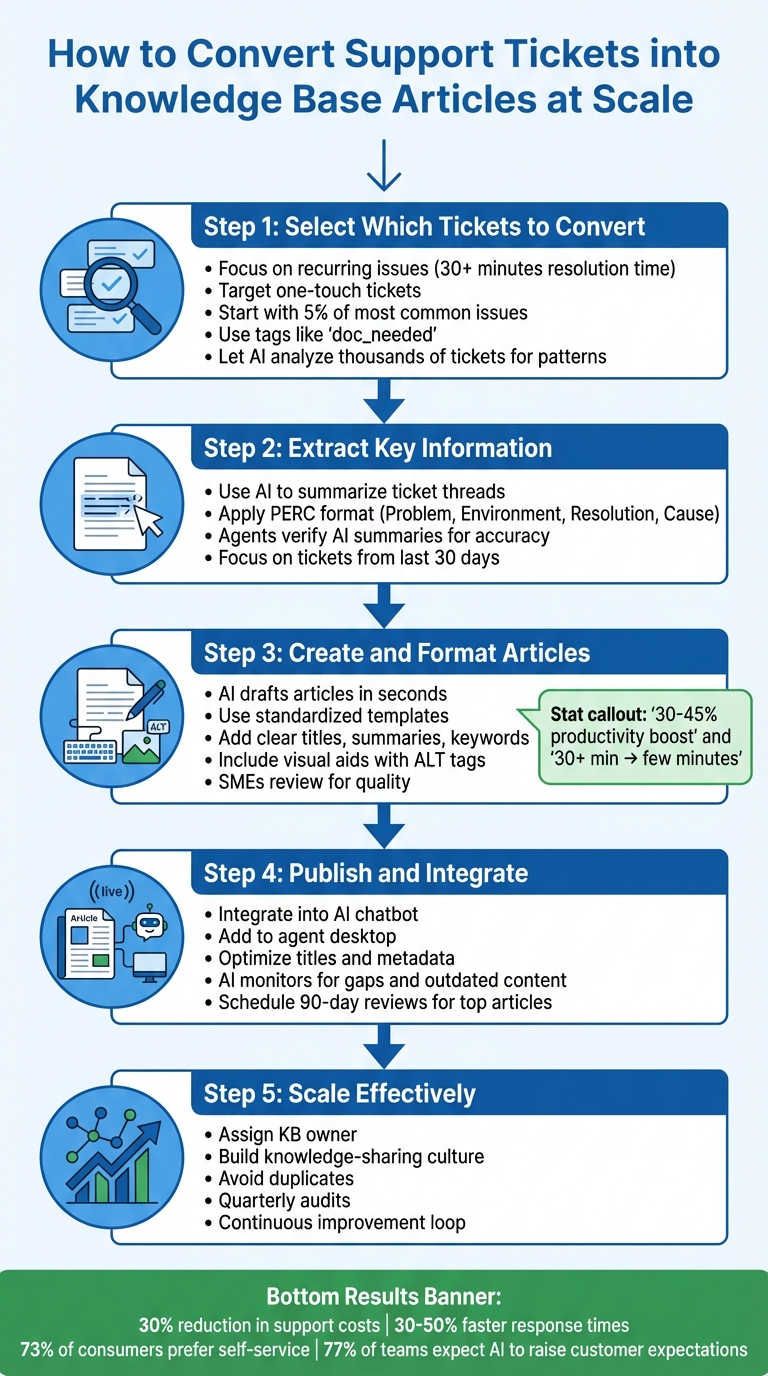
5-Step Process to Convert Support Tickets into Knowledge Base Articles
Watch This AI Generate Perfect FAQs From Support Tickets! #n8n #aiagent #artificialintelligence
Step 1: Select Which Tickets to Convert
To make the most of your efforts, focus on tickets that address recurring customer issues and lighten the load for your support team. A clear selection process ensures you’re not wasting time on rare or low-impact problems. By prioritizing the right tickets, you can create self-service solutions that deliver real results.
Criteria for Choosing High-Impact Tickets
Start by targeting tickets that frequently occur or require significant time to resolve. For instance, recurring issues that take up 30+ minutes of agent time are perfect candidates for conversion into self-service content. These articles can significantly cut down on resolution times. Similarly, one-touch tickets – those resolved with a single agent reply – are great opportunities, as they often involve simple instructions that customers could easily follow on their own.
Elizabeth Williams from the Zendesk Documentation Team suggests this approach:
"Start by identifying 5% of your most common issues, and focus acting on those first. Taking small steps toward developing knowledge base content to address ticket issues will yield huge benefits."
To simplify the process, consider adding a custom "About" field in your ticketing system to categorize tickets by product feature or issue type. Review your most-used macros, and encourage agents to tag tickets with labels like doc_needed to highlight documentation gaps as they arise.
Using AI to Flag Tickets for Conversion
While manual methods help identify high-impact tickets, AI can take this process to the next level. Advanced platforms can analyze thousands of tickets at once, uncovering recurring issues and grouping them by common themes. These tools can also redact sensitive information, summarize recent ticket data, and suggest up to 40 potential self-service articles based on frequent inquiries. AI not only speeds up the process but also reveals patterns that manual analysis might miss.
For example, AI can flag one-touch tickets and link specific categories to high handle times, helping you zero in on the most time-consuming problems. Orsolya Forster from Zendesk highlights how AI is evolving:
"continuous monitoring engines" that recommend updates to your knowledge base based on incoming ticket trends
This evolution means your knowledge base can stay up-to-date without requiring constant manual input.
When using AI, focus on tickets created within the last 30 days, particularly those in "Solved" or "Closed" status and originating from web or email channels. This ensures the data is fresh and text-rich for analysis. Combine AI insights with agent expertise to verify high-priority topics. By aligning AI findings with manual criteria, you can ensure your documentation addresses the most pressing customer needs.
Step 2: Extract Key Information from Tickets
After identifying the tickets to convert, the next step is to pull out the most important details: the problem, resolution, and surrounding context. Combining AI’s efficiency with human verification ensures you capture useful insights without spending hours reformatting. This partnership between technology and human expertise helps create reliable, scalable knowledge content.
Using AI Case Summaries to Extract Insights
AI summarization tools can process massive amounts of data quickly, turning lengthy email threads or chat logs into structured insights. These platforms can analyze tickets, identify recurring issues, and even redact sensitive information. For instance, AI can take a 15-message thread about a password reset and produce a summary that highlights the problem, the environment, the steps taken to resolve it, and the root cause. Many tools use structured formats like PERC (Problem, Environment, Resolution, Cause) to make it easier to convert this information into a knowledge base article.
AI can also refine brief agent notes, such as "reset via admin panel", into well-written paragraphs. Most AI tools focus on ticket data from the last 30 days, ensuring that the content reflects current customer challenges. Outputs often include summarized insights, suggested article titles, and category structures based on ticket frequency and volume.
Working with Agents to Verify Accuracy
While AI summaries are fast and efficient, they aren’t perfect. Agents play a crucial role in reviewing the extracted insights to ensure accuracy and identify any errors, such as AI "hallucinations" where incorrect or fabricated information may appear. As one documentation expert explained:
"KB authors should schedule a subject matter expert (SME), to review articles for accuracy and thoroughness. Multiple review cycles or multiple reviewers might be necessary for complex topics."
To streamline this process, create a workflow where agents flag resolved tickets, compare them to existing knowledge base content, and involve SMEs for more complicated issues. This collaboration ensures the insights are both precise and comprehensive. Agents can also spot areas where AI may have missed subtle details or where existing content needs updates based on recent trends. By combining AI’s speed with human judgment, you can deliver knowledge base articles that are trustworthy and genuinely helpful for customers.
Step 3: Create and Format Knowledge Base Articles
Once you’ve gathered insights from your support tickets, the next step is turning that raw data into well-organized, user-friendly articles. With AI, this process becomes faster and more efficient, cutting review time from over 30 minutes to just a few minutes. The goal here is to create content that’s not only easy for users to understand but also structured for accurate retrieval by AI agents. Here’s how to use AI to transform raw information into polished drafts.
Using AI to Draft Articles Automatically
Modern AI tools can generate complete article drafts in seconds. For example, Supportbench‘s AI KB Article Creation from Case History feature analyzes all interactions from a resolved case and produces a structured draft. This draft includes the subject, summary, and keywords, ready for a quick review and refinement.
These AI systems do more than just copy and paste information. They suggest titles, summaries, and keywords tailored to your organization’s tone and historical resolutions. This ensures the content fits seamlessly with your existing knowledge base. Studies show that using generative AI for customer care tasks can boost productivity by 30–45%, making it easier to expand your knowledge base without adding extra team members.
Setting Up Templates and Formatting Standards
Consistency is key when you’re creating articles at scale. Without a clear structure, your knowledge base can turn into a chaotic mix of formats that frustrates both users and AI agents. Jennifer Rowe from the Zendesk Documentation Team puts it perfectly:
"A template makes it faster and easier to create content. No one likes facing a blank page… A template also ensures your articles are consistent and users know what to expect."
To maintain uniformity, use a formal style guide to define the tone, layout, terminology, and visual elements. Every article should include a clear title, a summary, step-by-step instructions, and expected outcomes. For technical issues, consider using a PERC structure (Problem, Environment, Resolution, Cause). For FAQ-style content, stick to a straightforward Question-Answer-Overview format.
Visual aids like screenshots, GIFs, and videos can improve understanding, but make sure to include ALT tags for accessibility. Keep each article focused on a single topic to improve clarity and make it easier for both users and AI to find the right information. This approach ensures a better experience for readers while optimizing content for AI retrieval.
Reviewing and Editing for Quality
While AI-generated drafts save time, they aren’t flawless. A human review is crucial to catch errors, verify accuracy, and ensure the content matches your brand’s voice. Assign drafts to senior agents or subject matter experts (SMEs) for review before publishing, and schedule regular updates – especially for high-impact articles.
Focus on simplifying the language, avoiding unnecessary jargon, and making sure each article can stand on its own without relying too heavily on visuals. For your most-used articles – the top 20% – plan quarterly reviews to keep the content relevant and accurate. This collaborative process ensures your articles are polished and ready for seamless integration into your knowledge base.
sbb-itb-e60d259
Step 4: Publish and Integrate Articles into Workflows
After thorough review and editing, the next step is publishing your articles and embedding them into your support workflows. Articles that are hard to find or not seamlessly integrated into workflows won’t help reduce ticket volumes or improve resolution times. The idea is to connect these articles to three critical areas: your AI chatbot for self-service, your agent desktop for inline suggestions, and the escalation process that hands off context to human agents. This integration ensures smoother self-service options for customers and faster ticket resolutions.
Making Articles Easy to Find and Access
Before publishing, keep articles in draft mode until subject matter experts (SMEs) verify their accuracy. When ready, limit publishing permissions to "Knowledge admins" or specific agents to maintain consistency across your knowledge base. For agents, integrate these articles into their workspace through a context panel, so they can access relevant content without disrupting their workflow.
To improve discoverability, focus on clear titles, metadata, and tags. These elements should reflect the language customers use in their searches and include links to related content. As Jennifer Rowe from the Zendesk Documentation Team emphasizes:
"If users can’t easily find answers in your KB, they might get frustrated and file tickets instead."
For customer-facing portals, structure articles for quick scanning. Use bullet points, numbered steps, and subheadings to make information easy to digest. This not only helps customers but also aids AI agents in pulling relevant details quickly. Plan your publishing schedule to coincide with product launches or updates, ensuring customers have the information they need right when they need it.
Using AI to Keep Articles Updated
Publishing is just the beginning. Keeping your content updated is just as important as creating it. AI tools can play a major role in identifying outdated information and content gaps. These tools monitor search queries and ticket data to flag areas where your knowledge base might be falling short. For example, they can analyze "zero-result searches" or cases where users submit tickets after viewing an article, helping you pinpoint areas for improvement.
In 2025, Intercom introduced a knowledge management system for their AI agent, Fin, which identifies gaps in knowledge during escalations. Their weekly reviews typically generate 10–15 AI-driven suggestions, most of which are implemented in under an hour. The system also flags articles with a resolution rate below 50% for further review and updates. Orsolya Forster from Zendesk highlights the evolving role of these tools:
"We are working on a new feature which is going to address the critical issues of gap detection, enhancing outdated content, and rather work as a continuous monitoring engine that recommends updates to your knowledge base."
To keep your content fresh, establish a feedback loop where agents can flag gaps or errors directly from their ticketing interface using custom tags or fields. Use AI to review the last 30 days of support tickets to identify recurring customer issues and suggest new articles or updates. Perform monthly audits of search data to address "zero-result" queries and refine article keywords. For your most-used articles, schedule a 90-day review to update visuals, remove duplicates, and confirm accuracy. These steps ensure your knowledge base stays relevant and effective.
Step 5: Scale Knowledge Base Creation Effectively
Scaling a knowledge base is about maintaining quality while increasing the volume of content. To do this, you need solid workflows and a culture that encourages knowledge sharing. At the same time, it’s essential to steer clear of common mistakes that can derail your efforts.
Building a Culture of Knowledge Sharing
A thriving knowledge base relies on making content creation a shared responsibility rather than leaving it solely to a documentation team. As Jennifer Rowe from the Zendesk Documentation Team aptly says:
"If you don’t designate people to write content for your KB, then chances are no one will write content for your KB".
Start by assigning a dedicated knowledge base (KB) owner. This person ensures content is consistent and identifies documentation priorities.
Make it easy for team members to contribute by embedding knowledge-sharing tools into daily workflows. For instance, include a "KB Update" checkbox or use specific tags in your ticketing system so agents can flag content gaps as they arise. Rotating writing responsibilities among agents not only spreads the workload but also brings in varied perspectives. To encourage participation, consider tying knowledge contributions to performance metrics or recognizing contributors through awards or shoutouts.
Why does this matter? Because 73% of consumers prefer solving issues themselves. Each well-written article empowers self-service, cutting down on support costs while improving customer satisfaction. This collaborative culture also complements AI-driven tools that streamline ticket-to-article conversions.
Avoiding Common Mistakes When Scaling
Scaling isn’t just about creating more content – it’s about doing so thoughtfully. One key step is ensuring every AI-generated draft goes through human review to maintain quality and accuracy.
Another common problem is duplicate content. Before publishing, check if similar articles already exist. Using a standardized template, like the PERC format, can help keep articles focused and consistent. Each piece should address one core issue clearly and concisely.
Also, be vigilant about protecting sensitive information. Automated workflows should include steps to redact personally identifiable information (PII).
Finally, don’t fall into the "set it and forget it" mindset. Knowledge bases need regular upkeep. Schedule quarterly audits to identify and remove outdated articles. Stale content can frustrate users and increase ticket volumes instead of reducing them. Keeping your knowledge base fresh ensures it remains a valuable resource for both customers and your team.
Conclusion
By following a structured approach – from selecting the right tickets to leveraging AI for drafting – you can transform resolved tickets into a powerful knowledge base. The benefits are clear: companies using AI in knowledge management have reported up to a 30% reduction in support costs and have slashed article creation time from over 30 minutes to just a few minutes of review and editing. Each step in the process, from identifying impactful tickets to generating AI-powered drafts, contributes to a continuously improving support system.
Platforms like Supportbench take this process a step further by embedding knowledge creation directly into daily workflows. Instead of being a static resource, your knowledge base evolves into a dynamic, real-time system. It identifies content gaps, flags relevant tickets for conversion, and produces structured drafts that ensure consistency across your help center.
The move from reactive problem-solving to proactive support is no longer just a good idea – it’s essential. With 77% of support teams anticipating that AI will raise customer expectations for faster response times, scaling your knowledge base efficiently while maintaining quality is critical. By blending human expertise with AI automation, you can cut response times by 30–50% and boost customer satisfaction.
Start small, monitor your results, and let AI help you streamline your operations. This shift not only improves efficiency but also positions your support team as a key driver of exceptional customer experiences.
FAQs
How can AI identify the most important support tickets for creating knowledge base articles?
AI has the power to spotlight the most pressing support tickets by sifting through massive amounts of customer interactions. It can pinpoint recurring problems, identify common pain points, and highlight frequently asked questions. By automatically categorizing tickets based on factors like severity, topic, or frequency, AI helps support teams zero in on issues that impact the largest number of customers.
It doesn’t stop there – AI can also uncover patterns, such as persistent technical glitches or time-intensive issues that drive up ticket volumes. With this insight, teams can prioritize creating knowledge base articles to address these widespread challenges. The result? Fewer repetitive inquiries, smoother self-service options for customers, and lower support costs for the organization.
How can I turn solved tickets into knowledge base articles efficiently?
To turn solved tickets into top-notch knowledge base articles, start by pinpointing tickets that tackle frequent customer issues or provide well-documented solutions. Prioritize ones with clear, repeatable steps to ensure they’re both practical and easy to follow.
Next, carefully review AI-generated drafts to confirm they align with the original ticket’s details. Double-check for accuracy, clarity, and relevance, especially for any technical or complex topics. Enlisting the help of subject matter experts or seasoned support agents can be invaluable for catching errors or outdated information.
Lastly, monitor how these articles perform using analytics and user feedback. This data can highlight areas for improvement, making it easier to refine and update content. Keeping your knowledge base current and effective not only improves self-service options but can also significantly cut down on support ticket volume.
How can I keep my knowledge base accurate and relevant over time?
To maintain a knowledge base that stays useful and up-to-date, it’s important to set up a regular schedule for reviewing and refreshing your content. Pay attention to support ticket trends – these can highlight recurring questions or gaps in your articles. Tackling these areas ensures your knowledge base stays aligned with what your customers actually need.
Make sure there’s a clear process in place for identifying and updating outdated or incorrect information. Assigning a dedicated person or team to manage this process can help keep things organized. Tools powered by AI can also be a huge help here, whether it’s for drafting new articles or spotting content that needs improvement. This can save time while still keeping quality high.
Don’t forget to track how your articles are performing. Metrics like deflection rates (how often customers find answers without needing extra support) and user feedback can give you valuable insights. This data helps you fine-tune your content, ensuring your knowledge base grows and adapts to meet customer expectations, boosting both self-service success and satisfaction.
Related Blog Posts
- How AI Cuts Knowledge Base Costs for B2B Support Teams
- How to Build a Knowledge Base for Ticket Deflection
- How to Build a Knowledge Base That Actually Reduces Tickets
- What’s the best way to implement KCS in a support team step-by-step?
Evaluating help desks for a B2B team?
Supportbench is all-inclusive from $32 per agent per month, with migration and onboarding included. See pricing or book a 20-minute demo.






