



Customers want personalized support, but scaling it is tough. Businesses struggle with fragmented systems, manual processes, and growing expectations. Here’s how to solve it with AI:
- Understand your customers: Collect detailed data on roles, needs, and account structures using CRM integrations and unified platforms.
- Segment effectively: Group accounts by complexity, value, and user roles to tailor support strategies.
- Leverage AI: Use tools for sentiment detection, ticket triage, and real-time prioritization to speed up responses while maintaining a personal touch.
- Automate smarter: AI-generated replies, summaries, and dynamic SLAs improve efficiency without losing relevance.
- Predict and prevent issues: AI identifies escalation risks early and forecasts satisfaction scores, allowing proactive adjustments.
- Improve knowledge access: AI-powered tools create and update resources, making information easily accessible for agents and customers.
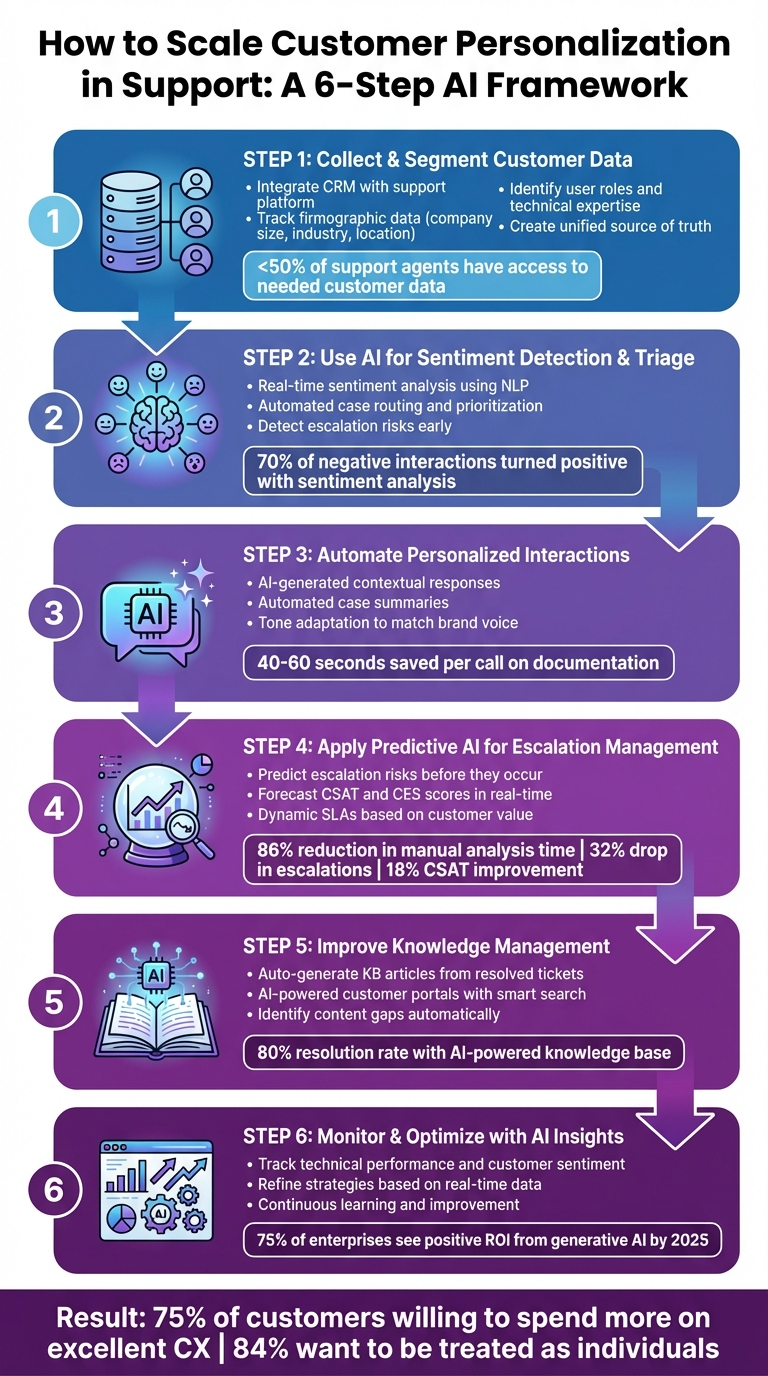
6-Step Framework for Scaling Personalized Customer Support with AI
The Future of AI-Powered Hyper-Personalization in Customer Support
Step 1: Collect and Segment Customer Data
Scaling personalization starts with understanding your organization’s structure and the roles of individuals within it. The problem? Fewer than half of support agents have access to the data they need to assist customers effectively. Without the right insights, even the most advanced AI tools can’t deliver tailored customer experiences.
Identify Key Data Points
In B2B support, firmographic data is essential. This includes details like company size, industry, location, and organizational structure, which form the foundation for effective engagement. Combine this with relationship metrics – such as account value, tenure, and product mix – to assess how critical a customer is to your business. Together, these data points reveal not just who the customer is but also how much they matter to your organization.
User-specific context is where personalization truly thrives. For instance, a developer troubleshooting an API error needs access to technical logs and engineering resources, while a marketing manager benefits more from visual guides and simplified instructions. By identifying user roles and technical expertise, you can provide solutions tailored to their needs. Access to full interaction histories also ensures agents avoid repetitive questions and streamline the support process.
"In the software context, the type of permissions and licensing [users] have completely dictates how you’re able to provide them with support." – Zoe Koven, Senior Director of Innovation
To gather this data efficiently, connect your CRM to your support platform for seamless tracking of interaction details. Use authenticated portals and widgets that require logins, enabling the system to pull up customer profiles and histories during support requests. For potential customers at the top of the sales funnel, leverage tracking tools to gather data during trial sign-ups or website visits. The goal is to establish a single, unified source of truth that eliminates data silos and gives agents a complete view of the customer.
Once you have this unified data, you can segment accounts to address their specific support needs.
Segment Customers by Account Complexity
With detailed, segmented data, you can customize your support strategy by categorizing accounts based on complexity and business value. This approach ensures resources are allocated wisely, avoiding a one-size-fits-all model. For example, you might group accounts into tiers such as:
- Strategic: Large enterprise clients with intricate needs.
- Mid-market: Growing businesses with moderate support requirements.
- Long-tail: Smaller accounts that benefit from self-service options.
Within each tier, additional segmentation by technical skill level and stakeholder role refines the strategy further. Experienced users likely require advanced resources, while newcomers benefit more from guided tutorials and proactive support. This structure allows you to route tickets efficiently, ensuring that a CFO’s billing question doesn’t receive the same treatment as a developer’s bug report.
A great example of this in action comes from Kayo Sports. In fiscal year 2024, they launched an AI-powered personalization engine that analyzed individual fan behavior to determine the best message, channel, and timing for each subscriber. By scaling from 300 communication variations to 1.2 million personalized messages, they achieved a 14% increase in subscriptions, an 8% rise in annual occupancy, and a staggering 105% growth in cross-sells. The secret? Segmenting customers based on real-time behavior and preferences to deliver the right experience at the right moment.
Step 2: Use AI for Sentiment Detection and Triage
After gathering and segmenting your customer data, the next hurdle is handling incoming requests quickly and effectively. Manually reviewing tickets in high-volume settings can cause delays, creating frustration for both customers and agents. This is where AI steps in, offering a way to streamline personalized support, especially in intricate B2B environments. By leveraging AI for sentiment detection and triage, businesses can analyze tone, intent, and context in real time, ensuring that the right cases land with the right agents without delay.
Detect Customer Sentiment with AI
Modern AI tools use natural language processing (NLP) and acoustic analysis to evaluate tone, pitch, and pace, capturing emotional nuances that simple keyword-based systems often miss. This approach can pick up on subtleties like sarcasm, irony, or quiet frustration – elements that might otherwise go unnoticed.
One game-changing feature of today’s sentiment detection tools is their ability to provide continuous real-time updates. Instead of waiting until the end of a conversation to assess sentiment, advanced systems analyze and update sentiment scores throughout the interaction. This allows supervisors to step in proactively when a conversation takes a negative turn. For instance, they can use tools like call whispers or escalate the issue immediately. Some platforms even give extra weight to the sentiment expressed at the end of a conversation, as it often reflects the customer’s overall satisfaction with the resolution.
"Real-time sentiment analysis is the process of evaluating a customer’s emotions and tone while an interaction is still happening, not just after a call ends." – Chris Kontes, Co-Founder, Balto
Here’s a real-world example: In August 2025, online fashion retailer Motel Rocks adopted sentiment analysis to monitor customer emotions during live interactions. According to Customer Service Manager Lucy Hussey, this technology enabled her team to address negative experiences proactively, turning around 70% of negative interactions into positive outcomes.
To make the most of sentiment detection, businesses can tag tickets with labels like sentiment_very_negative and set up real-time alerts for high-priority cases. When paired with effective account segmentation, this ensures that urgent issues from key clients are addressed promptly.
With sentiment insights in hand, AI can take it a step further by automating case triage and prioritization.
Automate Case Triage and Prioritization
While sentiment detection focuses on customer emotions, AI triage analyzes intent and ensures tickets are routed to the right team. By identifying the ticket’s purpose, language, and sentiment, AI automates sorting and prioritization, eliminating the delays caused by manual processing. This not only speeds up response times but also reduces the risk of tickets being misrouted.
Take HyperJar, a mobile banking app, as an example. In August 2025, the company automated its "replace bank card" request process, which previously accounted for 16% of all inquiries. With AI detecting this intent and handling the workflow automatically, resolution times dropped from 15–20 minutes to under two minutes. This freed up agents to focus on more complex issues, as straightforward requests no longer required their attention.
Today’s AI agents do much more than follow pre-written scripts. They can retrieve relevant information, apply business logic, and even perform backend tasks. For instance, an AI system handling a billing inquiry might pull the customer’s payment history from the CRM, identify a failed transaction, and request updated payment details – all before a human agent even sees the ticket.
To implement AI triage effectively, it’s crucial to cross-check ticket intent with sentiment. This ensures that requests are handled appropriately based on the customer’s emotional state and the nature of their issue. For example, a ticket marked with "subscription cancellation" intent and "angry" sentiment should be routed to a retention specialist. Confidence thresholds can also help determine when AI should act automatically versus when a ticket requires human review.
A great example of this approach is Liberty London, a UK-based department store. In August 2025, the company rolled out AI-driven triage to route tickets based on intent, sentiment, and language. This eliminated delays caused by manual sorting, boosted one-touch resolutions, and allowed agents to focus on high-priority tasks during peak times. By using pre-trained intent models, the company avoided the time-consuming process of building custom datasets, enabling a faster rollout.
For B2B teams managing complex accounts with multiple stakeholders, AI triage provides much-needed structure. Whether it’s a developer reporting an API issue or a marketing manager requesting a new feature, AI ensures that each case is prioritized appropriately. By automating the routing and prioritization process, businesses can create a tailored support experience that considers the customer’s role, technical expertise, and urgency.
Step 3: Automate Personalized Interactions with AI
Once sentiment detection and triage are in place, AI-powered automation steps in to replace slow, inconsistent manual responses. By crafting tailored replies and summarizing case histories, AI frees up agents to focus on building stronger customer relationships. This smooth transition from identifying customer needs to delivering dynamic responses lays the groundwork for advancing escalation management.
Generate Faster Replies with AI Auto-Responses
Forget generic templates – advanced AI taps into CRM data, billing systems, past interactions, and knowledge bases to craft responses that are tailored to each customer’s specific situation. For instance, AI can differentiate between a technical support question and an account-related update, ensuring the reply fits the context.
AI also remembers the details of prior interactions, sparing customers from having to repeat themselves – a feature that aligns with the expectations of 71% of consumers who value personalized interactions. By leveraging the unified customer data established in Step 1, these responses stay relevant and specific.
What makes this even more powerful is AI’s ability to adapt its tone to match your brand’s voice. Whether you aim for a professional, empathetic, or even playful tone, AI can adjust to suit your audience – be it technical engineers or executive-level clients.
To get this right, integrate AI directly with your backend systems. Connecting it to your CRM and billing platforms provides real-time access to account details, while sentiment-based routing can detect customer frustration and adjust the tone of replies accordingly. In high-stakes scenarios, AI can draft responses for agent review, striking a balance between speed and accuracy.
A customer experience leader summed it up well:
"Customers expect a personalized experience. We should know our customer and personalize their experience, regardless of what channel they engage with us in." – Heather Wintermantel, Senior Director of Customer Experience Strategy and Programs, Zendesk
Use AI-Generated Summaries to Boost Agent Productivity
Long case histories can bog down agents, forcing them to sift through past interactions to piece together the context. AI-generated summaries solve this problem by quickly pulling out key points, outcomes, and next steps from lengthy conversations. This not only streamlines workflows but also prevents agents from experiencing "repetition fatigue" when cases are transferred or escalated. Built on the strong data foundation mentioned earlier, these summaries ensure agents have all the relevant details at their fingertips.
Take DailyPay, for example. In September 2025, the company implemented Observe.AI‘s Summarization AI tool, which helped agents save an average of 40 to 60 seconds per call on post-call documentation. By reducing time spent on administrative tasks, agents can stay more engaged during live interactions.
To fully harness the benefits of AI-generated summaries, enable real-time generation so supervisors can review cases without disrupting the flow of customer interactions. It’s also a good idea to let agents review and refine summaries before they’re logged into the CRM. This ensures accuracy and preserves critical context. When integrated with your CRM, summarization tools can also automate the entry of disposition codes and case details, while capturing sentiment cues to guide future interactions.
"The moment a call is ramped up to an agent, AI can guide the conversation. An agent can ask it, ‘Summarize the case history for me. Tell me why this has been elevated.’" – John Doyle, Senior Director Product Marketing, Microsoft
Step 4: Apply Predictive AI for Escalation Management
Once you’ve automated responses and summaries, the next step is to focus on proactive escalation management. Predictive AI helps support teams shift from simply reacting to problems to anticipating and addressing them before they escalate. By identifying potential issues, forecasting customer satisfaction, and adjusting service commitments in real-time, this approach ensures smoother operations and better customer experiences.
Spot Escalation Risks Early
Predictive models continuously monitor tickets, analyzing factors like sentiment, response delays, reopen counts, and customer history to assess escalation risks. When the AI detects red flags – such as a frustrated tone or repeated handoffs – it can trigger specific actions like routing the case to a specialist, adjusting response cadence, or flagging it for managerial review.
The results speak for themselves. Companies leveraging AI for escalation prediction have reported an 86% reduction in the time spent on manual analysis, a 32% drop in escalation rates, and 28% faster Mean Time to Resolution (MTTR). For high-risk tickets managed with AI, customer satisfaction (CSAT) scores improved by 18%.
To make this work effectively, integrate ticket data with entitlement details and SLA statuses so the AI can assess both urgency and customer value. Link specific interventions – like goodwill credits or expert routing – to resolution outcomes, and retrain models monthly to minimize false positives. Additionally, maintain a control group of tickets handled without AI to measure the true impact of your predictive system.
This early identification of risks lays the groundwork for real-time satisfaction forecasting.
"AI predicts which support tickets are likely to escalate by learning from historical patterns, customer profiles, sentiment, and agent workload." – The Pedowitz Group
Forecast CSAT and CES Scores
Beyond escalation prediction, AI can also estimate customer satisfaction (CSAT) and customer effort scores (CES) in real-time – well before surveys are sent. By analyzing cues like language, resolution times, and interaction trends, predictive models can forecast customer ratings. This gives agents a chance to adjust their approach mid-conversation or take proactive steps to prevent a low score.
Tools like Supportbench‘s AI Predictive CSAT and AI Predictive CES display these forecasted scores directly in the case list, highlighting interactions that require immediate attention. When paired with sentiment-based routing, this ensures that frustrated customers are quickly escalated to the right resource, preventing further dissatisfaction.
To fine-tune accuracy, compare CSAT and CES scores for AI-managed and human-handled interactions to pinpoint friction points in automated processes. Conduct weekly calibration sessions to align AI’s "high-risk" thresholds with current business priorities and staffing levels.
Use AI for Dynamic SLAs
Dynamic SLAs take a personalized approach to response times, ensuring high-value customers receive the attention they deserve. Unlike static SLAs, which treat all cases equally, AI-powered dynamic SLAs adjust commitments in real-time based on factors like account value, upcoming renewals, or shifts in customer sentiment. This ensures critical cases are prioritized without requiring manual oversight.
For example, if AI identifies a high-value customer facing recurring issues ahead of a renewal, it can automatically tighten the SLA. Similarly, a sharp drop in sentiment can trigger shorter response time requirements.
Supportbench’s Dynamic SLAs feature makes this level of customization straightforward, allowing teams to prioritize cases based on real-time context rather than just their place in the queue. To implement this effectively, unify data streams by combining ticket details with entitlement and SLA data, giving the AI a complete view of the customer’s value and history.
"If you grant the agent three approvals a day without asking, it not only empowers the agent, it improves morale and supercharges the customer experience, without much of a risk." – Geoff Maxwell, General Manager for Microsoft’s Customer and Digital Experience
sbb-itb-e60d259
Step 5: Improve Knowledge Management with AI
Speeding up support is all about making information easy to find – both for customers and support agents. When customers can solve problems on their own and agents can access information quickly, the entire support process becomes more efficient and consistent. AI takes knowledge management to the next level by turning what used to be a slow, manual effort into a system that improves itself over time.
Create Knowledge Base Articles with AI
Traditional methods of writing knowledge base articles can take hours. AI changes that by transforming resolved tickets, internal updates, or even simple bullet points into detailed, customer-friendly articles. This not only saves time but also ensures high-quality content.
Take Intercom, for example. They use AI to generate first drafts of articles from internal release notes. This allows their team to review and publish polished content in under an hour – a huge improvement over the 5–8 hours it used to take for manual updates. AI also helps identify gaps in knowledge by analyzing escalated tickets. If multiple customers ask about the same issue that isn’t covered in existing articles, AI flags it as a topic for new content. Supportbench takes this a step further with its AI KB Article Creation feature, which automatically generates articles from resolved cases.
To keep your knowledge base effective, review AI-generated content weekly and audit high-traffic articles monthly. Pay special attention to articles that haven’t been updated in over six months. Additionally, if an article’s AI resolution rate drops below 50%, it’s time to restructure it.
"Knowledge is no longer a static help center that customers visit when trying to find an answer. It’s a dynamic and strategic component of your resolutions." – Ryan McGrew, Vice President of Product – AI Agents, Self-service, Knowledge Management, Zendesk
This approach makes it easier to scale personalized support across your team.
Build Smart Customer Portals with AI
AI doesn’t stop at creating articles – it also powers smarter customer portals that provide real-time, tailored support. These AI-driven portals go beyond simple search functions by offering direct answers through generative search and semantic understanding. In other words, customers get responses that are specific to their account details, product setup, and support history.
Modern AI can handle natural language, pull data from unified sources, and even perform backend actions like updating account settings. Intercom’s AI agent, Fin, is a great example. By training their AI with a constantly updated knowledge base, they achieved an 80% resolution rate.
Supportbench offers tools like the Customer QA AI Bot and Custom Knowledge Base AI Bot, which scan your entire knowledge base to answer questions accurately. If the AI can’t find an answer, it automatically creates a new case and starts a chat session, ensuring no customer is left hanging.
For authenticated portals, AI can recognize users and deliver personalized content based on factors like their plan type or product usage. This means high-value customers can instantly access the most relevant resources or troubleshooting steps without waiting for human intervention. This level of customization reduces frustration and boosts satisfaction.
To get the most out of your portal, make sure your AI pulls from a unified knowledge base to avoid conflicting answers. Use clear, structured language in your articles to improve how AI interprets and delivers content. Finally, set up a feedback loop so agents can flag incorrect or outdated responses, prompting quick updates.
With AI-powered portals, your support team can deliver tailored, efficient service at scale, ensuring every customer gets the right answer exactly when they need it.
Step 6: Monitor and Optimize Personalization with AI Insights
Personalization isn’t a “set it and forget it” process – it requires constant attention. Surprisingly, only 35% of enterprises actively track AI performance metrics, even though 80% consider reliability to be a top priority. Keeping a close eye on these metrics ensures that your personalization efforts stay flexible and effective.
Track Performance with AI Dashboards
AI dashboards are like a control center for your personalization strategy. They connect technical metrics to business outcomes, offering real-time updates on critical areas like support demand, quality issues, and customer sentiment. This means you can spot potential problems – like a sudden spike in negative feedback – before they spiral out of control. For B2B support, it’s especially important to track firmographic data (e.g., industry, company size) and relationship data (e.g., spending patterns, products purchased) to see how personalization affects different customer segments. Modern dashboards even let you ask natural language questions, such as, “Which high-value accounts experienced a drop in sentiment this week?”.
Here are four key metric categories to monitor:
- Technical Performance: Metrics like accuracy and hallucination rates.
- Operational Efficiency: Indicators such as resolution rates, containment rates, and latency.
- Customer Experience: Sentiment shifts, CSAT (Customer Satisfaction), and tone scores.
- Business Impact: Measures like ROI, customer retention, and revenue growth.
For context, a small 5% boost in customer retention can drive profits up by 25% to 95%.
"AI metrics are where the guesswork of AI strategy meets scientific and operational rigor." – Ian Heinig, Agentic AI Marketer, Sendbird
To strike the right balance, combine automated tracking with human quality checks. For example, keep an eye on how often agents use AI-suggested replies or summaries. This can highlight areas where training or tool adjustments are needed. Also, track the "involvement rate" – the ratio of AI-handled queries to human-handled ones – to measure how well automation is scaling your personalization efforts.
These insights become the foundation for refining your approach over time.
Refine Strategies Based on AI Analytics
Once you’re tracking the right metrics, the next step is to use that data to fine-tune your workflows. A structured pipeline – Analyze, Train, Test, Deploy – can help you improve AI agent performance before rolling out updates. AI analytics also help identify gaps in your customer support resources. For instance, if customers frequently ask about topics not covered in your documentation or if sentiment dips during specific interactions, these are clear signs that updates are needed.
This process encourages continuous learning from customer interactions. One useful metric to watch is sentiment shift – the change in a customer’s mood before and after interacting with AI. If sentiment consistently drops, it’s time to adjust your approach. Similarly, track Bot Satisfaction (BSAT) separately from overall CSAT to understand how AI performance compares to human agents.
Segmented data can also reveal which personalization techniques resonate best with different customer groups. For example, novice users might appreciate detailed explanations, while more experienced users may prefer concise, technical responses. Document these findings to keep your team aligned.
"The insights coming in through AI give us the chance to be better customer service agents and provide a better customer experience." – Billy Abrams, Executive Vice President of Distribution, Medline
The bottom line? Treat optimization as an ongoing effort, not a one-time task. By 2025, 75% of enterprises are expected to see positive ROI from generative AI. This success comes from consistently refining strategies based on real-world data – not just setting up AI and hoping for the best.
Common Pitfalls and Best Practices
Building on the AI-driven strategies discussed earlier, let’s dive into the common pitfalls and best practices that can refine scalable personalization. Creating AI-powered, personalized customer support is no small feat. Even seasoned support teams face challenges. Consider this: while 81% of American consumers prefer companies that deliver a personalized experience, 53% report negative encounters with personalized marketing. This disconnect underscores the need to avoid mistakes and adopt strategies that make personalization effective rather than intrusive.
Balance Automation with Human Interaction
One of the biggest missteps is trying to replace human agents entirely with AI. Instead, aim to use AI for automating repetitive tasks while reserving human agents for more complex, nuanced issues. Interestingly, only 28% of companies have achieved measurable business value from generative AI in customer service. Why? Many automate flawed processes instead of rethinking their workflows. AI works well for tasks like ticket labeling, routing, and generating summaries, but emotional intelligence and creative problem-solving remain firmly in the human domain.
Here’s something to consider: 80% of customers prefer self-service options before reaching out to a human agent. However, this doesn’t mean customers want every interaction to be automated. A great example comes from GrandStay Hotels, which implemented a multilingual AI chatbot. This chatbot handled 70% of customer queries automatically, cutting call handle times by 28% and improving first-call resolutions by 15%. The key to their success? Knowing when to escalate issues to human agents for situations that require empathy or out-of-the-box thinking.
Another effective strategy is ticket swarming, where multiple experts collaborate on a single ticket to resolve issues faster and ensure a personalized touch. This approach eliminates the frustration of customers having to repeat their concerns to multiple agents – a frustration that drives 32% of customers to abandon a brand.
"The future of customer service lies not in the solitary actions of people or machines but in smart partnerships between the two." – BCG Article
Beware of overwhelming customers with constant recommendations. Traditional personalization methods often backfire, leaving customers twice as likely to feel overloaded with information and nearly three times more likely to feel pressed for time. Instead, focus on active personalization – confirm customer choices and identify additional needs. This method makes customers 2.3 times more likely to confidently make critical purchase decisions.
While balancing automation and human interaction is crucial, safeguarding customer data is equally important.
Protect Customer Data and Maintain Compliance
Consumers are conflicted about data usage. On one hand, 59% want companies to use their data to personalize experiences, but 75% remain hesitant to share personal information. Worse, customers who have negative personalized experiences are 44% less likely to purchase from a brand again.
Start with data minimization – only collect what’s essential. Holding onto massive amounts of historical data indefinitely increases risks without adding much value. Instead, use behavioral data to trigger real-time personalized responses, then discard it when no longer needed. Ensure all personally identifiable information (PII) is encrypted, whether it’s at rest or in transit, and require multi-factor authentication for agents accessing centralized customer databases.
When it comes to privacy, transparency wins every time. Skip the confusing legal jargon and clearly explain what data is collected and how it improves the customer experience. As Jason Maloney, Customer Success Manager at Grafana Labs, explains:
"I look at personalization as adding familiarity for end-users. As humans, we are drawn to the familiar… whenever a person is interacting with a company, they want that sensation of, ‘Oh, I feel like they know me, and they understand my wants and needs.’"
The moment customers feel their data is being misused, that sense of familiarity and trust disappears.
Even if your business isn’t bound by EU regulations, adopting GDPR standards as your baseline ensures you meet stringent security requirements. Use authenticated channels with secure login credentials to protect customer profiles and ensure data is accessible only to the correct individual. For global operations, carefully manage regional data residency requirements – store data in appropriate locations to comply with local laws.
Fragmented data across CRM systems, billing platforms, and contact centers can hinder consistent personalization. Centralizing data through a Customer Engagement Platform (CEP) or Customer Data Platform (CDP) helps maintain unified customer profiles. This ensures privacy preferences and compliance standards are applied across all channels, making your personalization efforts both effective and trustworthy.
Conclusion
Scaling personalized support is now within reach by combining AI’s efficiency with the human touch. The strategies outlined here illustrate how AI-native platforms can handle tasks like data collection, sentiment analysis, triage, and predictive analytics, allowing human agents to dedicate their efforts to more complex and high-stakes customer interactions.
Recent statistics highlight the importance of personalization. For instance, 75% of customers are willing to spend more with businesses that deliver an excellent customer experience, and 84% appreciate being treated as individuals rather than just numbers. Despite this, many teams still grapple with fragmented systems and cumbersome workflows. AI-native platforms like Supportbench address these challenges by integrating tools such as emotional scoring, predictive CSAT and CES, automated triage, and dynamic SLAs into a single, streamlined solution – all starting at just $32 per agent per month.
This approach not only cuts costs but also replaces expensive add-ons and additional staffing with AI-powered tools that manage volume surges and shift support to faster digital channels. For example, automated triage can save an average of 45 seconds per ticket, which translates to approximately 120 hours saved monthly for an average enterprise retailer. These time and cost savings can mean the difference between sustainable growth and overburdened teams.
"The insights coming in through AI give us the chance to be better customer service agents and provide a better customer experience." – Billy Abrams, Executive Vice President of Distribution, Medline
AI bridges the gap between efficiency and empathy, enabling scalable, one-on-one personalized support.
FAQs
How does AI help deliver personalized customer support at scale?
AI takes personalized customer support to a new level by diving into data like past interactions, purchase history, and individual preferences. This enables it to deliver customized responses instantly. Plus, by automating repetitive tasks like routing tickets, analyzing sentiment, and predicting escalations, AI frees up support teams to concentrate on more meaningful, human-centered conversations – all while keeping things efficient.
This means customers get responses that are precise, contextually relevant, and tailored to their needs, even during peak times. AI allows businesses to scale up personalized service without sacrificing speed or quality, ensuring every customer feels heard and valued.
How does sentiment detection improve customer service?
Sentiment detection helps customer service teams get a clearer picture of how customers feel during interactions. By examining tone and language, it becomes easier to identify urgent matters, craft personalized responses, and provide support that feels more understanding and human.
This approach not only boosts customer satisfaction but also strengthens loyalty by making customers feel acknowledged and appreciated. Plus, it gives teams the chance to tackle issues early on, preventing them from growing into bigger problems and improving the overall support experience.
How does AI improve customer support by predicting and preventing issues?
AI improves customer support by examining interactions to spot potential issues early. Tools like sentiment analysis, triage automation, and escalation prediction empower support teams to tackle problems before they grow into bigger concerns.
This method shortens response times and enhances customer satisfaction by offering tailored and efficient support on a larger scale. AI-driven solutions allow teams to manage challenges effectively, maintaining seamless operations even during periods of high demand.






