


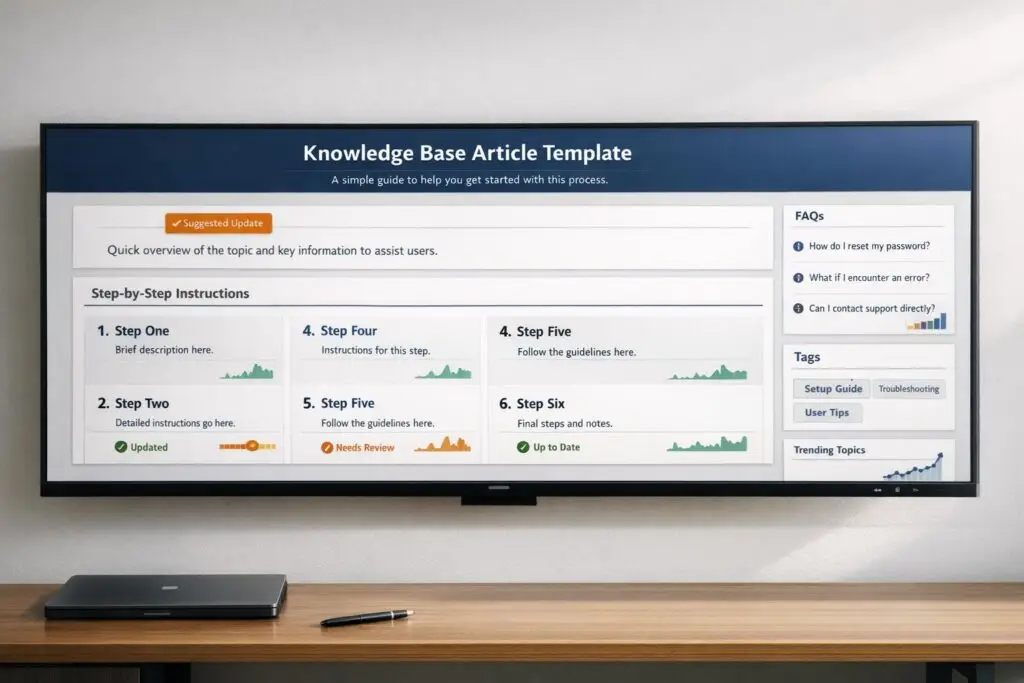
Scattered documentation across platforms like Slack, emails, and wikis creates confusion, inconsistent support, and wasted time. A standardized knowledge base template solves this by organizing information for both humans and AI, ensuring accurate and consistent answers.
Key Takeaways
- 84% of customers prefer self-service portals, and effective documentation resolves up to 60% of support tickets.
- Standardized templates reduce onboarding time, deflect repetitive tickets, and improve efficiency.
- A well-structured knowledge base can reduce ticket volume by 23% and cut handle times by 40%.
- AI integration with structured templates enables faster, accurate responses.
Core Features of a Knowledge Base Template
- Clear Titles: Use natural language like “How to reset your password.”
- Scannable Structure: Use headings, numbered steps, and bulleted lists.
- Actionable Instructions: Start steps with strong verbs like "Click" or "Select."
- SEO Optimization: Incorporate user-friendly keywords and meta descriptions.
- Regular Updates: Keep content current with scheduled reviews and AI-powered monitoring.
Why It Matters
A structured template not only improves user experience but also powers AI systems to deliver accurate, consistent answers. This reduces support costs, boosts customer satisfaction, and helps your team focus on complex issues.
Start with a clear template, train your team, and use AI to maintain and optimize your knowledge base.
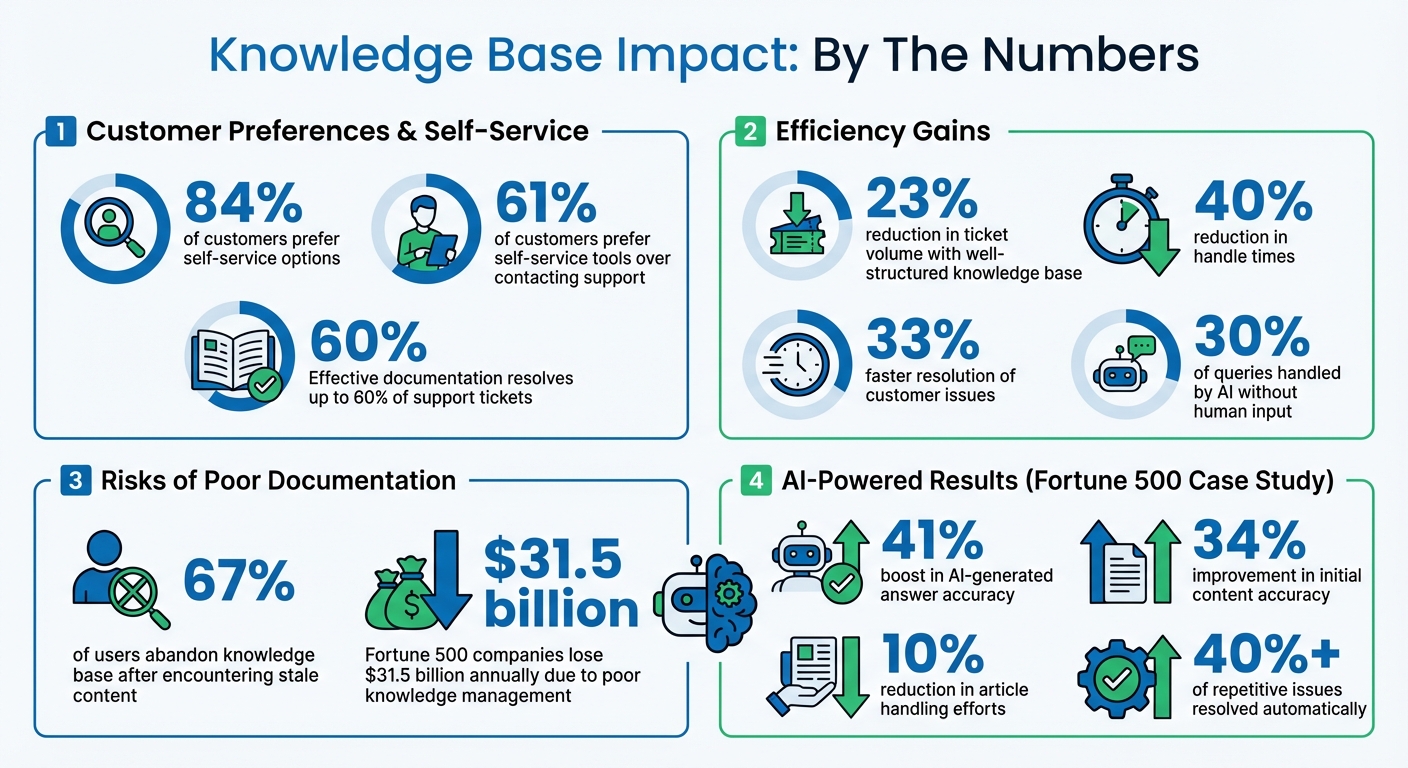
Knowledge Base Impact Statistics: Self-Service, Ticket Reduction & AI Performance
Core Components of a Knowledge Base Article Template
A well-designed knowledge base article template is built on essential elements that cater to both human readers and AI systems. It starts with a searchable title written in natural language. For instance, use "How to reset your password" instead of something generic like "Password Management Guidelines." This ensures users can quickly identify the article’s purpose. Follow this with a brief summary – just one or two sentences – to set clear expectations for the reader.
The main body should have a scannable structure, achieved through hierarchical headings paired with action-oriented instructions. These instructions should start with strong verbs like "Click", "Select", or "Navigate", making each step easy to follow. For more complicated processes, include visual aids such as annotated screenshots or short videos. These can simplify dense instructions and improve comprehension.
"An effective knowledge base article makes complex knowledge simple to consume. Finding an answer shouldn’t be a scavenger hunt."
– Lauren Hakim, Director of Product Marketing, Zendesk
In business-to-business (B2B) settings, it’s crucial to specify permissions and prerequisites. For example, highlight if a task requires admin access or a specific subscription plan (e.g., "Admin only" or "Requires Pro plan"). This avoids frustration for users attempting tasks they can’t complete. Considering that 61% of customers prefer self-service tools over contacting support, these structural details can significantly reduce support tickets while improving user satisfaction.
Structure and Formatting
A predictable and consistent structure is key to a successful knowledge base article. Start with a clear title, followed by a summary, step-by-step instructions, and troubleshooting tips. Since most readers skim rather than read every word, use bulleted lists for non-sequential items (like system requirements) and numbered lists for chronological steps (like installation instructions). These formatting choices make information easier to digest.
Additionally, use modular content blocks that can be updated across multiple articles to maintain consistency.
"Consistency signals credibility. When the same structure and visual style carry across every article, users know what to expect."
– Vivienne Chen, Author, Assembly
Headings play a dual role: they guide navigation and improve semantic clarity. Use H1 for the help center or site name, H2 for the article title, and H3 for individual steps. Avoid skipping heading levels, as this can confuse both screen readers and search engines. For longer articles, include a table of contents with anchor links to help users jump directly to relevant sections.
SEO and Keyword Optimization
A clear structure is just the beginning; optimizing for SEO ensures your content reaches its audience effectively. Use the language your users actually employ. For example, if customers commonly say "change plan" instead of "update subscription", incorporate both terms naturally into the article. Titles should reflect natural questions, like "How do I export my data?" This helps improve visibility on search engines and AI-driven tools.
While keywords are important, avoid overloading your text with them. Instead, focus on semantic relevance by weaving in related terms and synonyms naturally. For meta descriptions, aim for 150–160 characters, including your primary keyword. Although meta descriptions don’t directly influence rankings, they can improve click-through rates by making your content more appealing in search results.
Actionable Instructions and Examples
Clear, step-by-step instructions are the backbone of any knowledge base article. They reduce ambiguity, helping users solve problems independently while also providing structured data for AI systems. Each step should start with a strong verb and assume no prior knowledge. For example, instead of saying, "Access the dashboard and modify your settings", break it into smaller, actionable steps:
- Click the Dashboard tab
- Scroll to Account Settings
- Toggle Email Notifications to Off
Including real-world examples makes abstract instructions more relatable. For instance, a troubleshooting guide for VPN issues could explain:
"If you see the error ‘Server not responding,’ check that your firewall allows outbound traffic on port 443. In Windows 10, go to Control Panel > System and Security > Windows Defender Firewall > Advanced Settings."
For B2B products, examples should align with actual workflows. For instance, when onboarding a new sales team, admins might need to create a shared workspace, assign role-based permissions, and configure single sign-on (SSO) during the setup process.
"The purpose of your knowledge base articles is to help your employees get unstuck."
– Rebecca Lane, Content Marketing Manager, ScreenSteps
It’s also helpful to list prerequisites upfront, such as requiring admin access or an API key. In more complex scenarios, use decision trees or multiple-choice lists to guide users through different paths based on their account type or specific situation. This approach ensures clarity and empowers users to find solutions tailored to their needs.
sbb-itb-e60d259
How to Implement the Template
Using a knowledge base template effectively means weaving it seamlessly into your support workflow. This requires thoughtful planning, clear responsibilities, and regular updates. Start by defining and standardizing your article structure to create a reliable framework.
Define and Standardize Article Sections
Assign a dedicated individual or team to oversee the knowledge base. This ensures that articles remain consistent in tone, structure, and quality over time. The owner should create specific templates tailored to different types of content, such as FAQs, how-to guides, troubleshooting steps, or product descriptions. Each template should include essential sections like:
- A clear, descriptive title
- A concise overview
- Prerequisites (e.g., admin access or subscription requirements)
- Step-by-step instructions
- Links to related resources
"Having a KB owner is also a great way to make sure that your KB content meets standards and is consistent and thorough."
– Jennifer Rowe, Zendesk Documentation Team
Establish formatting rules to make content easy to skim. Use numbered lists for sequential steps, bullet points for unordered details, and bold text to highlight UI elements or navigation paths. Before publishing, have subject matter experts review the articles to catch errors and build trust with users. This proactive approach can reduce the volume of support tickets by empowering users to find answers independently.
Once the structure is in place, it’s crucial to train your team to use the template effectively.
Train Teams on the Template
A template is only as good as the team using it. Make identifying gaps in the knowledge base a routine part of every support interaction. If an agent resolves an undocumented issue, they should flag it for immediate documentation. Clearly define roles and permissions to ensure quality control – determine who can create, edit, and publish content.
"If you don’t designate people to write content for your KB, then chances are no one will write content for your KB."
– Jennifer Rowe, Zendesk Documentation Team
Use microlearning tools, like short videos or interactive checklists, to train agents quickly and effectively. If you lack dedicated writers, consider rotating writing and reviewing tasks among support agents. To ensure clarity, have someone unfamiliar with the topic test new guides step-by-step before they are published.
This structured approach helps teams adopt the template smoothly and sets the stage for ongoing improvements.
Monitor and Update Based on Performance
A knowledge base template isn’t a one-and-done solution. Regularly review its performance to keep it effective. Conduct quarterly audits using analytics and insights to track metrics like page views, popular search terms, and user feedback. Implement features like upvote/downvote buttons or comment sections to gauge user satisfaction and identify areas for improvement. Research shows that well-implemented knowledge base articles can lead to 33% faster resolution of customer issues, making it essential to track these metrics.
Leverage AI tools to analyze customer inquiries, pinpoint content gaps, and even draft updates based on ticket data. These tools can also flag underperforming articles that need revisions. By creating a feedback loop driven by real user needs, your template evolves into a more effective resource over time.
Common Mistakes in Knowledge Base Article Creation
Building an effective knowledge base requires more than just a good template. Even with a solid framework in place, teams often make mistakes that can derail self-service efforts and drive up support costs. Recognizing these common missteps can help you avoid them. One of the biggest issues? Making the content unnecessarily complicated.
Overcomplicating Content
A frequent error is burying simple answers under layers of complex explanations. Teams sometimes assume users have prior knowledge, use jargon that alienates non-experts, or create dense blocks of text without scannable elements like headers or bullet points. The result? Frustrated users who abandon the article altogether.
"What makes a knowledge base article unique… is its focus on practicality and clarity. Unlike blog posts, which might aim to entertain or inform, these articles prioritize delivering solutions in a straightforward way."
– Diego Alamir, CX Professional
To avoid this, use plain, straightforward language and define any necessary terms. Titles should be action-oriented and match common search queries, like "How to reset your password". Focus your efforts where they matter most: the top 20% of your articles, which typically address 80% of user issues. And don’t forget – outdated articles can be just as damaging as overly complex ones.
Failing to Update Articles Regularly
Nothing undermines user trust faster than outdated information. Articles with incorrect screenshots or broken links send a message that your product – and your support – may be neglected. In fact, 67% of users will abandon a knowledge base after encountering stale or inaccurate content. For context, Fortune 500 companies lose an estimated $31.5 billion annually due to poor knowledge management.
"If you can’t keep your help articles current, what else are you neglecting?"
– Sarah Mooney, Ariglad
To keep your knowledge base fresh, schedule monthly audits of your most-viewed articles. Tie documentation updates to your product release process to avoid day-one support spikes when new features go live. Leverage tools like content blocks to quickly update repetitive elements – such as pricing tables or contact details – across multiple articles at once. However, even with regular updates, ignoring customer feedback can leave critical blind spots.
Ignoring Customer Feedback
Customer feedback is a goldmine for improving your documentation, yet many teams fail to prioritize it. Support agents, for instance, often encounter articles that are confusing, outdated, or incomplete during their interactions with customers. Without this feedback, teams risk making assumptions rather than addressing real user needs.
Set up voting tools so users can rate how helpful articles are, and analyze search data to identify queries that yield no results. Create a workflow where agents can tag problematic articles directly in support tickets. Weekly reviews of "Was this helpful?" feedback can spotlight low-performing content and identify areas for improvement. This continuous feedback loop ensures your knowledge base evolves alongside your customers’ needs, turning it into a dynamic, reliable resource.
Using AI to Automate Article Creation and Maintenance
As support demands grow more complex, manually managing content becomes less practical. AI steps in to tackle the repetitive tasks of drafting, updating, and optimizing articles, offering a scalable way to create error-free documentation. By automating routine processes, AI transforms how knowledge bases are built and maintained.
AI-Powered Article Drafting
AI can analyze resolved tickets and customer interactions to create articles that address key issues and solutions. Instead of relying on agents to document solutions manually after closing cases, AI reviews case histories and auto-fills key details like subject, summary, and keywords.
Take, for example, a project in December 2025, when a Fortune 500 technology provider partnered with Concentrix to overhaul over 6,000 articles using AI workflows. The results were impressive: a 41% boost in AI-generated answer accuracy, a 34% improvement in initial content accuracy, and a 10% reduction in article handling efforts. This allowed support teams to dedicate more time to complex customer issues rather than routine documentation tasks. AI can also adapt tone and language to suit different markets, ensuring consistent messaging across customer touchpoints without requiring manual rewrites.
"A multifaceted approach transformed intricate articles into easily digestible AI-structured content, improving accessibility."
– Concentrix Case Study
To maximize AI’s effectiveness, content must be structured in a machine-readable format. This means using short paragraphs (2–4 lines), clear headings, and well-defined sections. Known as the "atomic knowledge" method, this approach ensures AI systems can extract accurate answers without errors or confusion. The payoff? AI-powered knowledge bases can handle at least 30% of queries without human input.
Automated Quality Assurance and Content Updates
Creating content is just the beginning – keeping it up-to-date is equally critical. AI can monitor articles for outdated screenshots, broken links, and inconsistencies, flagging these issues automatically. It also identifies when updates are needed after product changes or when customer feedback highlights confusion.
AI-powered gap analysis identifies weak spots in documentation by analyzing patterns like empty searches, low-confidence responses, and frequently recurring ticket topics. Instead of waiting for agents to report these problems, AI highlights them proactively and can even draft updates to fill the gaps. It also adjusts review frequency based on traffic, ensuring high-priority articles receive timely attention.
This constant monitoring ensures your knowledge base evolves alongside your product. Stale content doesn’t just frustrate customers – it erodes trust in your entire support system. AI eliminates this risk, turning quality assurance into an automated background process. The result? Actionable insights that continuously improve your documentation.
AI-Driven Insights for Optimization
AI doesn’t stop at creating and maintaining content – it also provides actionable insights. By analyzing search behavior, article views, and customer feedback, AI identifies which topics need more attention and which articles are underperforming. For instance, Supportbench uses sentiment analysis to gauge customer reactions to support interactions, helping identify documentation gaps.
AI also converts unresolved questions into draft articles, creating a feedback loop that keeps your knowledge base aligned with customer needs. Similarly, BlueHub’s Gap Analysis Method combines data from failed chatbot responses, "no results" search queries, and ticket trends to pinpoint blind spots in your documentation.
With AI-driven insights, your knowledge base becomes more dynamic, complementing the streamlined creation and maintenance processes. It evolves from a static library into an operational brain that powers AI agents, delivering answers directly in tools like Slack, Microsoft Teams, or even your product’s UI. As Wei Zheng, Chief Product Officer at Conductor, explains:
"AI optimization is about making AI work smarter and using AI to make sure you work smarter, too."
– Wei Zheng, Chief Product Officer at Conductor
When AI takes care of creation, updates, and optimization, your team can focus on solving complex challenges rather than managing documentation workflows.
Conclusion
Creating a scalable knowledge base is all about structure, not just piling on more content. The templates and formatting tips we’ve explored here are the backbone of making your documentation easy to read for people and easy to process for AI. With clear headings, concise writing, and consistent sections, AI tools can quickly find accurate answers and deliver them directly within your support systems.
Taking this structured approach a step further, AI-native support turns your knowledge base into a true operational system. As Enjo puts it:
"A knowledge base stopped being a content project and became an operational system."
This shift enables teams to resolve over 40% of repetitive issues automatically, freeing up agents to handle more complex and valuable customer interactions.
We also touched on how standardized templates and automated tools simplify the content creation process. They remove the stress of starting from scratch, shorten the learning curve for new team members, and ensure your documentation remains consistent and reliable. By combining AI-powered drafting, automated quality checks, and gap analysis, your knowledge base becomes a living, evolving resource that adapts to your product and customer needs.
For B2B teams dealing with complex environments, moving toward AI-native support isn’t just helpful – it’s essential. Platforms like Supportbench seamlessly integrate these AI-driven workflows, from automated article creation to predictive health scoring, without the need for costly add-ons or extra IT resources. The payoff? Faster resolutions, reduced support expenses, and a system that grows effortlessly as your business scales.
Start with a standardized template, add AI-driven insights, and turn your knowledge base into the command center of your support operations.
FAQs
How does AI make a knowledge base more efficient?
AI transforms a knowledge base into a dynamic, ever-evolving resource that adapts to meet customer needs. By automating tasks like drafting articles, updating existing content, and conducting quality checks, it frees up support teams to tackle more complex challenges.
It also excels at analyzing support data to pinpoint frequently asked questions and create clear, concise articles that enhance self-service options. This not only reduces escalations but also keeps the knowledge base relevant and practical, leading to quicker resolutions and a smoother customer experience.
What makes a knowledge base article template effective?
An effective knowledge base article template needs to be clear, well-organized, and user-friendly for both customers and support teams. Begin with a straightforward title that immediately conveys the article’s purpose. Stick to a consistent format, incorporating headings, bullet points, and visual aids like images or icons to make the content easy to navigate.
Include step-by-step instructions, relevant links, and explanations tailored to your audience’s needs. A standardized layout not only ensures uniformity across articles but also makes updates easier and supports growth as your operations expand. When your articles are structured for clarity and ease of use, they help users find solutions quickly and improve the overall efficiency of your support system.
Why is it important to regularly update knowledge base articles?
Keeping your knowledge base articles current is key to maintaining user trust. When the information provided is accurate and relevant, users know they can depend on it, which helps cut down on confusion and frustration.
Frequent updates also reduce the number of support tickets by addressing common questions upfront. This saves time for both your customers and support team. Plus, as your business grows and changes, updating these articles ensures they reflect your latest processes, products, and customer expectations, making your support resources more reliable and efficient.
Related Blog Posts
- How AI Cuts Knowledge Base Costs for B2B Support Teams
- How to Build a Knowledge Base for Ticket Deflection
- What Is a Help Desk? Definition, Benefits, and Real Examples
- How to Build a Knowledge Base That Actually Reduces Tickets
Evaluating help desks for a B2B team?
Supportbench is all-inclusive from $32 per agent per month, with migration and onboarding included. See pricing or book a 20-minute demo.






