



Resistance to change is common, especially in high-pressure environments like B2B support teams. When introducing new systems or workflows, pushback can slow progress and impact productivity. Here’s what you need to know:
- 70% of change initiatives fail, often due to employee resistance.
- Resistance stems from fears like job security, inadequate training, or discomfort with new tools.
- Effective change management improves success rates by up to six times.
To manage resistance, focus on these steps:
- Identify Root Causes: Use direct conversations, anonymous surveys, and workflow analytics to understand concerns.
- Communicate Clearly: Explain the "why" behind changes, align messaging with team impact, and use multiple channels like emails, Slack, and Q&A sessions.
- Involve the Team: Include employees in planning and testing through cross-functional groups and pilot programs.
- Provide Training: Tailor role-specific training with hands-on practice, microlearning, and accessible resources.
- Offer Support: Create feedback channels, leverage AI tools, and monitor adoption metrics to address challenges early.
- Measure Results: Track KPIs, compare pre- and post-change data, and refine based on feedback.
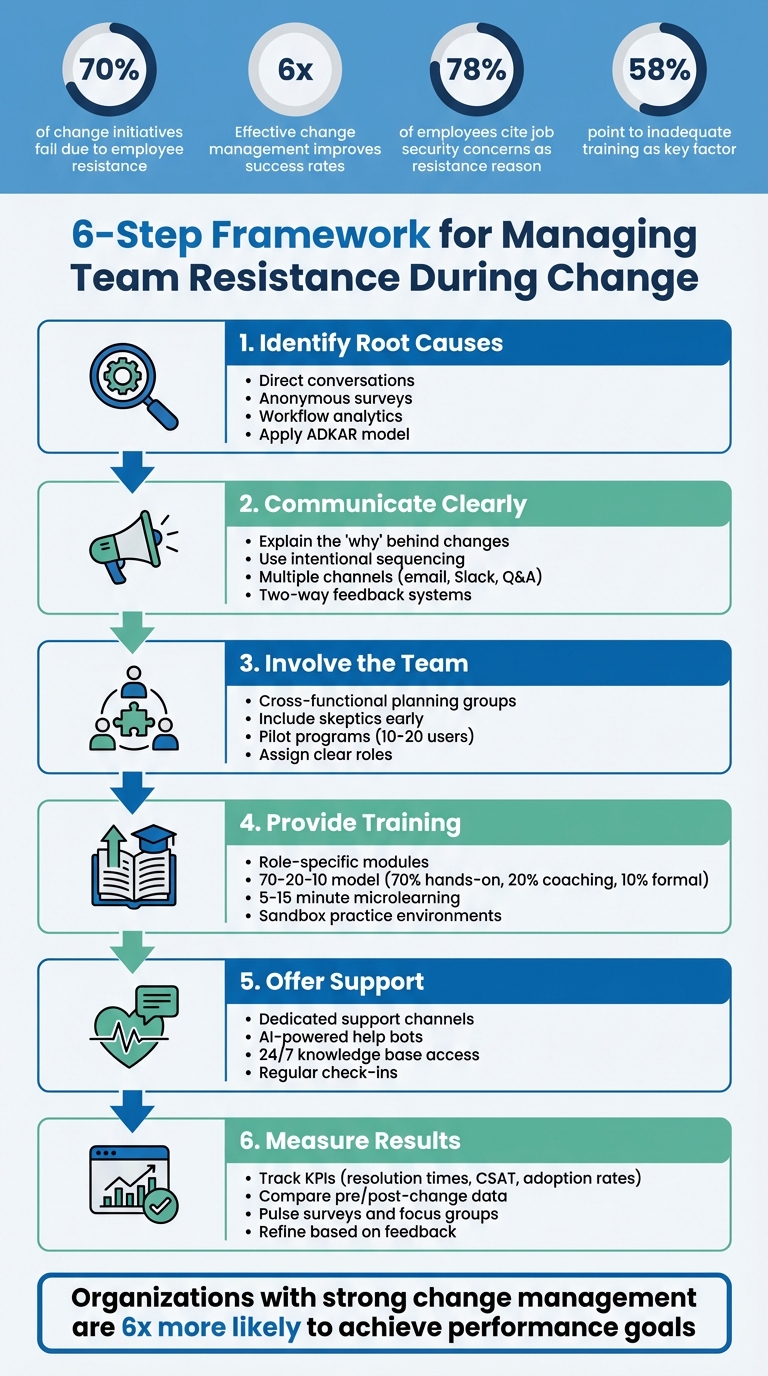
6-Step Framework for Managing Team Resistance During Change
Resistance to Change: Causes & How to Overcome It
Finding the Root Causes of Resistance
Resistance to change doesn’t happen randomly – it often stems from specific fears and frustrations. For instance, 78% of employees cite job security concerns as a major reason for resisting organizational change, while 58% point to inadequate training and support for new systems as a key factor. By identifying these root causes, you can tackle them head-on before they disrupt your transition.
The tricky part? Resistance rarely presents itself in obvious ways. Some team members may worry their skills won’t measure up in an AI-driven environment, while others fear making critical mistakes in live systems that could affect real customers. Then there are those who feel disoriented when familiar workflows are replaced. These underlying issues often show up as vague complaints like, “There’s too much change,” or, “The old system worked just fine.” To address these concerns, it’s essential to dig deeper and gather insights directly from your team.
It’s also important to separate technical challenges from psychological ones. For example, if someone struggles with a new platform even in a low-pressure testing scenario, the problem might not be the tool itself but a deeper discomfort with change. Similarly, a “wait and see” attitude could signal more than just hesitation – it might reflect fatigue from previous changes or a lack of trust in leadership.
Identifying Your Support Team’s Concerns
Start by having direct, two-way conversations with your team instead of relying solely on broad announcements. One-on-one meetings are especially useful for uncovering whether employees understand the reasons behind the change and see any personal benefits. Questions like, “Do you feel prepared for the new system?” or, “What would make this transition easier for you?” can open the door to honest feedback.
Anonymous surveys are another great tool for surfacing concerns that employees might not feel comfortable sharing openly. Applying the ADKAR model (Awareness, Desire, Knowledge, Ability, Reinforcement) can help pinpoint where resistance is coming from. For example, if issues arise during the Knowledge or Ability stages, it might signal a need for better training. On the other hand, challenges during the Awareness or Desire stages may point to deeper fears about job security or doubts about the organization’s direction.
Workflow analytics can also provide valuable insights. Digital adoption platforms can track whether team members are avoiding the new system entirely – indicating disengagement – or struggling with specific tasks, which may highlight a skills gap. For example, Windward Risk Managers used workflow analytics within the Duck Creek platform to identify bottlenecks, boosting self-service success rates from 61% to 87% and significantly reducing support calls across a network of over 5,500 agents.
By understanding these individual concerns, you can also uncover how outdated systems might be contributing to the resistance.
Reviewing Legacy Tool Problems
Outdated tools often make resistance worse by piling on extra complexity and inefficiency. Employees may stick to familiar systems simply because they allow them to get their work done without the added mental strain of learning something new. Recognizing these pain points gives you a chance to position the new platform as a solution rather than just another challenge.
"Resistance is rarely driven by a lack of willingness to adapt. Instead, it emerges… when change is introduced without the clarity, context, and execution support people need to perform their work effectively." – Levi Olmstead, Whatfix
For B2B support teams moving away from legacy helpdesk systems, common frustrations include fragmented workflows requiring multiple logins, manual triage that eats up time, and expensive AI add-ons that deliver little value. A modern, AI-native platform like Supportbench can address these issues with features like unified case management, automated prioritization, and built-in AI tools. This shifts the narrative from “Why do we have to change?” to “Why didn’t we switch sooner?”
The aim isn’t to force compliance but to remove obstacles by showing how the new system solves real, everyday problems for your team.
Creating a Clear Communication Plan
After pinpointing the root causes of resistance, the next step is crafting a communication plan that minimizes uncertainty and builds trust. Using the insights gained from understanding team concerns, your plan should directly address those issues. Poor communication is a common culprit behind failed change initiatives, with one in four efforts falling short due to this reason. It also undermines leadership effectiveness.
A well-structured communication plan follows intentional sequencing: start by explaining why the change is happening, then move on to how it will impact each team member. The messenger also matters. For example, company-wide updates – like outlining the vision for adopting an AI-native platform – should come from senior leaders to reinforce strategic alignment. Meanwhile, messages about personal impacts, such as changes to daily workflows or training schedules, are better delivered by immediate supervisors who have closer relationships with their teams.
"No one says they learned about a change too early. But many people say they’ve learned about a change too late." – Michelle Haggerty, Chief Operating Officer, Prosci
Two-way communication is equally important. Set up formal and informal feedback systems, such as Slack channels, anonymous surveys, or Q&A sessions, allowing employees to share concerns and receive responses within a set timeframe (e.g., 48 hours).
Setting Clear Goals and Timelines
Ambiguous goals can create anxiety. When employees don’t understand why a change is happening or when it will affect them, resistance often follows. In fact, the top reason for employee resistance is a lack of awareness about the purpose behind the change. Clearly defining the future state – like transitioning from a fragmented legacy helpdesk to a unified AI-native platform – can help employees shift from an emotional reaction to a more logical perspective.
Frame the goal in relatable terms. Try the "Hope Template": "If we just do X, we will be able to do Y." For instance, "By migrating to an AI-native platform like Supportbench, we’ll eliminate manual triage and reduce ticket resolution times by 20%." This approach gives employees a concrete reason to care. Use phased, realistic timelines to avoid overwhelming your team with change fatigue.
Before rolling out changes, establish pre-change benchmarks. Gather baseline metrics – such as current ticket resolution times or error rates – so you can later demonstrate the benefits of the new system. This also helps counter any nostalgia employees may feel for "the old way" when challenges arise. Being transparent about timelines helps manage expectations and prevents employees from feeling blindsided, which can erode trust.
Once goals and timelines are clear, focus on using the right communication channels to ensure everyone stays informed.
Using Communication Channels for Updates
Different updates call for different communication methods. For business-level announcements – like the overall migration vision or the risks of sticking with a legacy system – opt for company-wide emails or town hall meetings led by senior leaders. For personal-impact updates, such as training schedules or specific workflow changes, rely on direct manager briefings or smaller team huddles.
Slack channels work well for real-time updates, such as system outage notices, pilot testing milestones, or answers to frequently asked questions. You can also use Slack polls or Google Forms to quickly gauge team sentiment or identify obstacles. Email remains a reliable channel for formal updates, including progress reports or detailed timelines.
To empower employees, create a self-service knowledge base with 24/7 access to training videos, FAQs, and step-by-step guides. Include visuals like screenshots and numbered instructions to make the content easy to follow. This reduces the burden on managers and IT teams while enabling employees to find answers independently. Additionally, schedule regular briefings, such as weekly team meetings or one-on-one check-ins, to provide skeptics with a safe space to share concerns constructively.
Here’s how to align communication methods with message types:
- Company-wide emails: Use for high-level vision and major milestones (monthly or as needed).
- Slack or Teams: Ideal for real-time updates and Q&A (daily or weekly).
- Manager briefings: Focus on personal impacts and training schedules (weekly or bi-weekly).
- Knowledge bases: Provide self-service guides (always available).
- Town halls: Reserve for senior leader messaging (quarterly or as needed).
Including Team Members in the Change Process
Change often meets resistance, especially when it feels forced. But when team members are actively involved in planning, they’re more likely to feel a sense of ownership over the new system. This sense of participation makes the transition feel self-driven rather than imposed, turning potential resistors into allies who focus on improving the process instead of obstructing it.
Involving team members also brings valuable insights to the table. Those on the front lines often have a clearer view of everyday pain points – like inefficient workflows, lost data, or integration hiccups – that leadership might miss.
"Don’t do the change to me – do the change with me!" – Prosci
Giving employees a real say in how the change unfolds – even if leadership has already decided on what will change – makes a huge difference. When people see their feedback reflected in the outcome, resistance tends to drop. A practical way to achieve this is by forming dedicated planning groups.
Forming Cross-Functional Planning Groups
Start by creating a planning group that includes representatives from across the organization – not just management. Bring in front-line agents, team leads, IT staff, and even those who are skeptical about the change. This diversity ensures a broader range of perspectives and fosters a stronger sense of ownership. Research shows that organizations with strong change management practices are six times more likely to achieve their performance goals than those without.
Assign clear roles to each group member. For instance, senior agents can handle data mapping (deciding which fields need to transfer from the legacy system), IT staff can manage integration testing, and team leads can oversee feedback collection during pilot programs. This structured approach, often referred to as forming "integrated teams", ensures the new platform aligns with real-world workflows.
Including skeptics early in the process can also be a game-changer. Addressing their concerns upfront can shift their perspective, making them more open to the change. Keep in mind, buy-in doesn’t mean everyone will love the change – it simply means they’re willing to give it a shot. Empower the planning group by giving them control over specific implementation details, like customizing ticket views, setting up automation rules, or designing role-specific training modules. This level of involvement strengthens their commitment to the project.
Collecting Feedback During Pilots
Once your cross-functional teams are in place, test their strategies through pilot programs. A pilot with 10–20 users from different roles acts as a trial run, helping you identify usability issues, performance glitches, and workflow gaps before rolling out the changes to everyone. Schedule the pilot at least a week before the full launch to allow time for meaningful adjustments.
Use a mix of metrics and targeted questions to uncover problems quickly. For example, ask, “What almost made you give up?” or “Which part felt slower than expected?” These kinds of questions help identify hidden friction points.
Regular check-ins during the pilot are essential for spotting and addressing blockers in real time. For instance, if agents report that a new AI triage feature is misrouting tickets, you can adjust the settings immediately instead of waiting until the pilot ends. Automated feedback loops can speed up this process by up to 80% compared to manual methods.
After the pilot, organize feedback into three categories: "must-fix before launch", "nice-to-have", and "future ideas." This method helps your development team focus on critical updates without being overwhelmed. Finally, close the feedback loop by sharing the results with pilot participants. Let them know how their input influenced the final version. This transparency builds trust and reinforces the idea that their perspectives are valued.
sbb-itb-e60d259
Providing Training and Ongoing Support
Building on clear communication and team involvement, effective training and continuous support are key to ensuring the long-term success of any new system.
Even the most carefully planned changes can falter if your team isn’t equipped to use the new tools effectively. Training not only builds confidence but also prepares your team to tackle practical challenges. Research highlights that well-structured training programs can improve learning outcomes by up to 60%, and companies with comprehensive training see 218% higher income per employee.
Focus your training efforts on practical, day-to-day tasks by shifting from "learning goals" to "transfer goals." Instead of offering a broad overview of the new system, dive into specific use cases. For example, demonstrate how Level 1 agents can triage tickets using AI-powered suggestions, while Level 3 specialists learn to customize automation rules for more complex scenarios.
Delivering Role-Specific Training
Generic system overviews often miss the mark because different roles within your team have unique needs. A frontline agent managing dozens of tickets a day requires a different skill set compared to a specialist engineer handling escalations. Conduct a role-based needs analysis to create tailored training plans for each support tier.
The 70-20-10 model offers a practical guideline: 70% of learning should come from hands-on practice, 20% from coaching or peer collaboration, and 10% from formal training sessions. This means allocating 30% to 50% of training time to hands-on activities – like working through simulated tickets in a sandbox environment – rather than relying on passive lectures. For instance, in 2022, Sophos applied this model during Salesforce updates for its 3,300+ employees. By incorporating in-app, just-in-time training, they reduced global sales operations support tickets by 15%, cutting approximately 12,000 inquiries over a year.
To prevent information overload, use 5–15 minute microlearning modules. Create short, focused videos on topics like "Using AI Triage for Incoming Cases", "Setting Up Custom SLA Rules", and "Navigating the New Knowledge Base." These bite-sized lessons improve retention and allow team members to revisit specific topics as needed. Supplement these with quick-reference tools, such as one-page cheat sheets with screenshots and step-by-step instructions, which agents can use during their first few weeks on the platform.
This customized training approach naturally lays the groundwork for ongoing support after the system goes live.
Offering Post-Implementation Support
Once the system is live, ongoing support becomes essential as employees juggle their regular workloads while getting comfortable with the new tools. Companies with regular feedback mechanisms report 14.9% lower employee turnover, partly because workers feel supported during transitions.
Set up dedicated support channels, such as an internal help desk or a Slack channel, to handle questions. Leverage AI-powered bots to guide employees to relevant knowledge base articles, freeing up IT and training teams to focus on more complex issues. For example, Windward Risk Managers improved their internal support search success rate from 61% to 87% in one year by implementing these measures.
"Training is most effective when it provides clear learning objectives and performance evaluation methods." – Yaz El Hakim, CEO of VerifyEd
The numbers back it up: for every dollar spent on employee training, companies see an average return of $4.53. This makes post-implementation support not just a helpful addition, but a smart business choice.
Cost-efficient platforms like Supportbench integrate role-specific training and AI-driven support tools into daily workflows. This ensures a smoother transition, minimizes disruptions, and helps your team adopt new processes while maintaining operational efficiency.
Measuring Results and Adjusting Strategies
Once training wraps up, it’s time to measure the impact of your changes. Research shows that solid change management can boost KPI success by six times. Even moving from "poor" to "fair" change management increases the odds of meeting project goals by 30%.
Start by capturing baseline data before the migration kicks off. Compare error rates and mistakes in the old system with those in the new one to showcase measurable improvements. Keep an eye on whether team members are sticking to new processes or slipping back into old habits.
"How an organization manages change impacts employee retention and engagement, which in turn impacts customer satisfaction and ultimately organizational performance." – David Lewin, Professor, UCLA Anderson School of Management
Keep the feedback loop open with pulse surveys, focus groups, and one-on-one check-ins. These tools help you spot and address issues early, before they become ingrained. Be alert to signs of passive resistance, like reduced productivity, increased absenteeism, or hesitation in adopting the new system. This phase bridges the gap between pre-implementation insights and ongoing improvements after launch.
Tracking Key Performance Indicators (KPIs)
To measure success, focus on operational efficiency and team adoption. Track whether the migration stays on schedule and within budget, and monitor how effectively agents are using the new features. Compare key metrics – like first-contact resolution rates, average resolution times, and CSAT scores – before and after the switch to gauge the impact.
Engagement with training materials is another critical metric. Monitor knowledge base usage, and if certain resources aren’t resonating, improve them with better visuals or step-by-step instructions. Watch out for signs of change fatigue, where employees lose faith in the value of new initiatives and stop participating in feedback efforts. While most employees can handle one or two major changes a year, more than half of business leaders plan to implement three or more in the next two years.
AI-driven platforms such as Supportbench can simplify this process. These tools come with built-in analytics that track adoption patterns automatically, allowing you to identify resistance early and address it before it disrupts your implementation.
Using Feedback to Improve
Once your KPIs reveal trends, tap into direct feedback to fine-tune your approach. Acting on feedback quickly is key – employees are 3.6 times more likely to feel motivated when they receive daily feedback compared to annual reviews. Use multiple channels, such as Employee Net Promoter Scores (eNPS), town halls, Slack channels, and one-on-one conversations, to gather input from your team.
If you notice low adoption or lingering resistance, dig deeper to find the root cause. Use your change model to pinpoint where things are breaking down. Is there a lack of understanding about why the change matters? Are training gaps holding people back? Or is there insufficient reinforcement to maintain new behaviors?
Don’t overlook your most vocal critics. Listening to their concerns and addressing them directly can often turn them into your biggest supporters. Review performance data with individual employees to identify areas for improvement and align personal development goals with organizational objectives. This approach can increase performance by up to 22%.
Conclusion
Overcoming team resistance during times of change hinges on three key strategies: clear communication to explain the importance of the change, active involvement of team members in the process, and thorough training to build confidence. When these components align, organizations are six times more likely to achieve their project KPIs compared to those with weak change management practices.
It’s important to understand that resistance often stems from uncertainty. By addressing concerns openly, involving skeptics in planning, and celebrating early successes, you can transform critics into supporters. Keep a close eye on adoption metrics, gather feedback from various channels, and refine your approach based on the insights you collect.
As your team navigates through resistance with effective communication and engagement, the right tools can make the process even smoother. Platforms like Supportbench are designed to simplify transitions by offering a unified system that minimizes the learning curve and avoids the fragmentation that can lead to pushback. With AI-powered features integrated into case management, knowledge creation, and workflows, teams can focus on mastering one streamlined platform instead of juggling multiple disconnected tools and costly add-ons.
FAQs
What causes employees to resist change in the workplace?
Resistance to change tends to arise from a handful of familiar reasons. Fear of the unknown often tops the list – employees may feel anxious about how new tools or processes could impact their skills, roles, or even job security. Another key factor is a lack of trust – whether in leadership or the change process itself – which can leave employees doubtful about whether the transition will be fair or successful. On top of that, a sense of losing control can spark resistance, especially when decisions are made without consulting the people they affect. Add to this mix poor communication, which can fuel uncertainty and rumors, and the challenge of breaking away from established habits and routines, and it’s no wonder change can feel daunting.
By recognizing these underlying issues – fear, mistrust, loss of control, communication breakdowns, and attachment to routines – organizations can take meaningful steps to ease concerns and guide their teams through transitions. This is especially important when introducing modern AI-based platforms aimed at streamlining workflows and boosting outcomes.
How can we clearly communicate the benefits of change to our team?
To communicate the benefits of change effectively, start with a clear, purpose-driven message. Connect the change directly to your team’s daily responsibilities and the broader goals of the organization. Present the change as a solution to a specific issue – like high ticket-handling costs or disorganized workflows – and highlight the concrete benefits it brings, such as faster response times, better service-level agreements, or lower expenses. When the reasoning is simple and tied to measurable results, the change feels logical and worthwhile.
Foster open communication by encouraging team members to ask questions, voice concerns, and share their ideas. This kind of involvement not only builds a sense of ownership but also helps reduce resistance. Back up your message with real-world examples, like how AI-powered tools can make tasks easier or save time. Offering targeted training and sharing success stories from early adopters can further illustrate how the change positively impacts both the team and customers.
Keep the momentum going by regularly celebrating quick wins, such as reduced manual effort or cost savings achieved through AI-driven processes. Share these successes in team meetings or through dashboards to show tangible results. By consistently focusing on outcomes, you can turn skepticism into support and position the change as a strategic advantage for everyone involved.
How does training help address team resistance during system changes?
Training is a key factor in helping teams adapt to a new AI-native platform. When employees get hands-on experience, they not only develop the skills they need but also gain the confidence to see the change as a chance for growth rather than a hurdle. Structured training sessions can clarify the purpose of the shift, showing how features like AI-driven case triage or predictive CSAT insights translate into real business benefits. This transparency helps ease uncertainties and reduces hesitation.
A mix of learning methods – such as role-specific e-learning modules paired with live Q&A sessions – works particularly well. This approach gives team members the chance to practice real-world scenarios in a low-pressure setting. It helps them adjust to new workflows, avoid costly errors, and keep operations running smoothly. When training is woven into the transition process, it can turn initial resistance into increased productivity and a more seamless adoption of AI tools.






