Video knowledge bases (KBs) can be a powerful tool for reducing support tickets and improving customer experience – but only when used in the right situations. Here’s the bottom line:
- Use videos for complex, multi-step processes that are hard to explain with text alone. They work well for technical workflows, troubleshooting, and onboarding, where visual demonstrations save time and reduce confusion.
- Stick to text for simple, quick questions like password resets or basic account information. Text is faster to scan, easier to update, and more accessible for users in various environments.
The key is to combine both formats strategically. Pair videos with written summaries and transcripts to improve searchability and accessibility. Keep videos short (2–5 minutes) and focused on specific tasks. Regularly review performance metrics, like ticket deflection rates, while building a knowledge base to ensure it meets customer needs effectively.
Quick Takeaways:
- Videos shine for showing "how" to do something, especially for visual learners.
- Text excels for quick, scannable answers and frequent updates.
- Blend formats to cater to different user preferences and learning styles.
By aligning the content format with the complexity of the issue, support teams can reduce workload and deliver better customer experiences.
When to Use Video vs Text in Knowledge Bases: A Decision Framework
When Video KBs Work Well
Video content stands out when explaining a task in words feels like trying to describe a dance move over the phone. The trick lies in recognizing when a visual demonstration truly helps rather than just adding flair.
Complex Processes That Need Visual Steps
Video KBs shine brightest for workflows with multiple steps or tricky timing. Think about tasks like recording, exporting, or navigating through layered menus – video removes the guesswork that often comes with written instructions [2][8]. For example, showing how to configure advanced integrations or fix sync errors becomes much simpler when users can follow cursor paths and watch operations in real time [5][9].
"Video walkthroughs make complicated tasks simple. They capture everything that matters: cursor movements, interface changes, multi-step workflows, and drop-down menu options." – TechSmith [5]
When it comes to technical troubleshooting, video builds trust by letting users see the problem and solution unfold. This approach is especially useful in industries dealing with physical hardware – like manufacturing or food service – where assembling or repairing equipment is often best demonstrated visually [4][9].
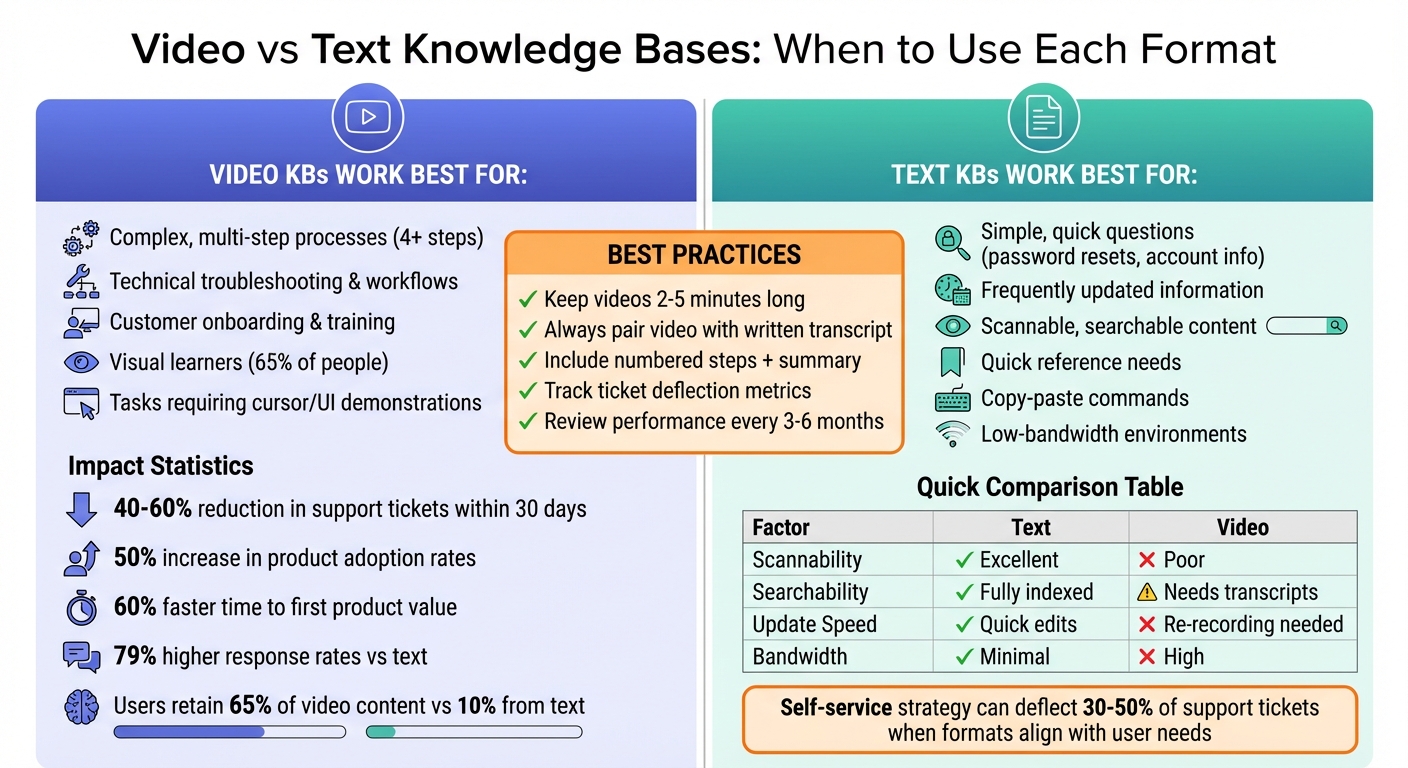
The results speak for themselves. Video explainers have been shown to cut support tickets by 40–60% within just 30 days of implementation [9]. A great example? In October 2025, Intenseye expanded its global support by producing 52 support videos in four languages. Using AI translation, they maintained consistent branding while offering clear troubleshooting guidance for their AI-driven workplace safety platform [9].
This visual clarity naturally extends to other areas like troubleshooting and onboarding.
Customer Onboarding and Initial Training
Video isn’t just for solving problems – it’s also a powerhouse for onboarding. New customers need to experience their first "aha moment" with your product quickly, and video helps them get there faster. In fact, customers who follow a structured onboarding process reach their first product value 60% faster than those without one [10]. Video ensures every customer gets a consistent, high-quality walkthrough of setup and essential features, reducing the need for live training sessions [10][4].
Companies with scalable onboarding programs often see product adoption rates soar by 50% [10]. Why? Because the brain processes visual content 60,000 times faster than text, making even complex workflows easier to grasp [9]. Embedding videos directly into onboarding emails, in-app tooltips, or empty states can provide timely guidance, cutting down on support tickets before they even happen [10][9].
"Customer Success cannot scale on live calls and static PDFs alone." – Knowlify [10]
To keep viewers engaged, onboarding videos should be short – ideally 2–3 minutes – and laser-focused on a single task or feature. This way, users can complete a task in one go without flipping between documentation and the product interface [11].
Customers Who Learn Better from Video
Not everyone learns the same way. For visual and auditory learners, video is a game-changer. By combining images, animations, and voiceovers, video helps these users absorb and retain information far better than text alone. In fact, people remember 65% of what they see in videos compared to just 10% from text [9].
This "show, don’t tell" approach resonates with many users. Watching cursor movements and button clicks beats deciphering written descriptions of UI interactions any day [3][11]. Plus, a human voice in the video adds a personal touch, making users feel supported rather than left to figure things out on their own [3][1].
"Video explainers cut through the noise by showing, not telling." – Kevin Alster, Strategic Advisor, Synthesia [9]
The impact is undeniable. Organizations report up to 79% higher response rates when using video support versus text [9]. Additionally, 98% of professionals using video at work say it makes their communication more effective [5]. For tasks involving complex UI or unfamiliar ideas, video eases the mental effort required to process dense articles [3][1]. That said, it’s important to use video wisely – if it complicates rather than clarifies, it can create more friction than value.
sbb-itb-e60d259
When Video KBs Increase Support Load
Video knowledge bases (KBs) can sometimes create more problems than they solve, especially when used for straightforward, quick inquiries. The issue isn’t with video as a medium – it’s about using it in situations where it doesn’t fit.
Simple Questions That Need Quick Answers
Imagine needing to reset a password or check an account balance. A video tutorial for these tasks can feel unnecessarily time-consuming. Text-based content allows users to scan headings, locate the exact step they need, and even copy-paste commands within seconds. In contrast, video forces a linear experience – users have to scrub through the timeline, guessing where the relevant information might be [3].
Statistics back this up: over 70% of customers prefer solving issues on their own before reaching out to support [3]. But if your KB requires them to sit through a three-minute video for a 10-second answer, it’s not empowering them – it’s frustrating them. And frustration often leads to support tickets.
"Serve the wrong format to the wrong person in the wrong moment, and you’ve lost them. They’ll submit a ticket, hop on chat, or worse – churn." – Daniel Sternlicht, Founder & CEO, Vidocu [3]
Accessibility and Technical Barriers
When videos lack captions or transcripts, they don’t just inconvenience users – they exclude entire groups from accessing help. Hearing-impaired individuals, non-native speakers, or someone in a noisy coffee shop or quiet library may find video-only content unusable. Plus, videos are slower to load. A delay of just one-tenth of a second in mobile page load time can reduce conversion rates by up to 10%, and video files are far heavier than text [13].
This problem doesn’t just affect customers – it impacts your team, too. Fixing accessibility issues after the fact is a grueling process. For instance, remediating 47 PDFs to meet WCAG standards took about 141 hours – nearly a month of full-time work [12]. Video remediation is even more demanding, requiring manual captioning, audio descriptions, and alternative text formats.
"The math was crushing: if he maintained that pace, he’d need 141 hours to fix his PDFs alone, not counting presentations, videos, or web content. That’s nearly four full-time work weeks on top of his existing job." – Tawnya Means, Strategic Advisor, Synthesia [12]
On top of that, accessibility gaps often make it harder for users to search and find the help they need, further complicating the support process.
Search Problems and Time Waste
Even if the perfect answer exists in your video KB, it’s useless if customers can’t find it. Without detailed transcripts or captions, videos aren’t searchable [3]. Customers might search, come up empty, and end up contacting support anyway.
Another issue is retention. Customers may feel confident after watching a video but forget the steps later, leading to repeat inquiries [9]. Without text summaries or quick-reference guides, they’ll likely return to your queue with the same question.
| Factor | Text Documentation | Video Documentation |
|---|---|---|
| Scannability | Excellent (headings, skim-friendly) | Poor (linear viewing) |
| Searchability | Fully indexed by default | Requires transcripts |
| Update Speed | Quick text edits | Often needs re-recording |
| Bandwidth Needs | Minimal | High; requires good connection |
These challenges highlight the importance of using video thoughtfully, ensuring it enhances the customer experience without adding unnecessary strain on your support team.
How to Use Video KBs Without Creating More Work
The goal here isn’t to eliminate video altogether – it’s about using it wisely. By combining video with text, keeping videos short and targeted, and regularly monitoring their impact, you can make video content work for your support efforts instead of adding to your workload.
Mix Video with Text Content
To address the challenges of searchability and maintenance, consider blending video with text. Videos are excellent for visually demonstrating a process, while text provides the "what" and "why", ensuring the content is both searchable and informative. This combination appeals to a variety of learning styles.
"The video shows how, the text explains what and why, and the structure makes everything findable." – Daniel Sternlicht, Founder & CEO, Vidocu [2]
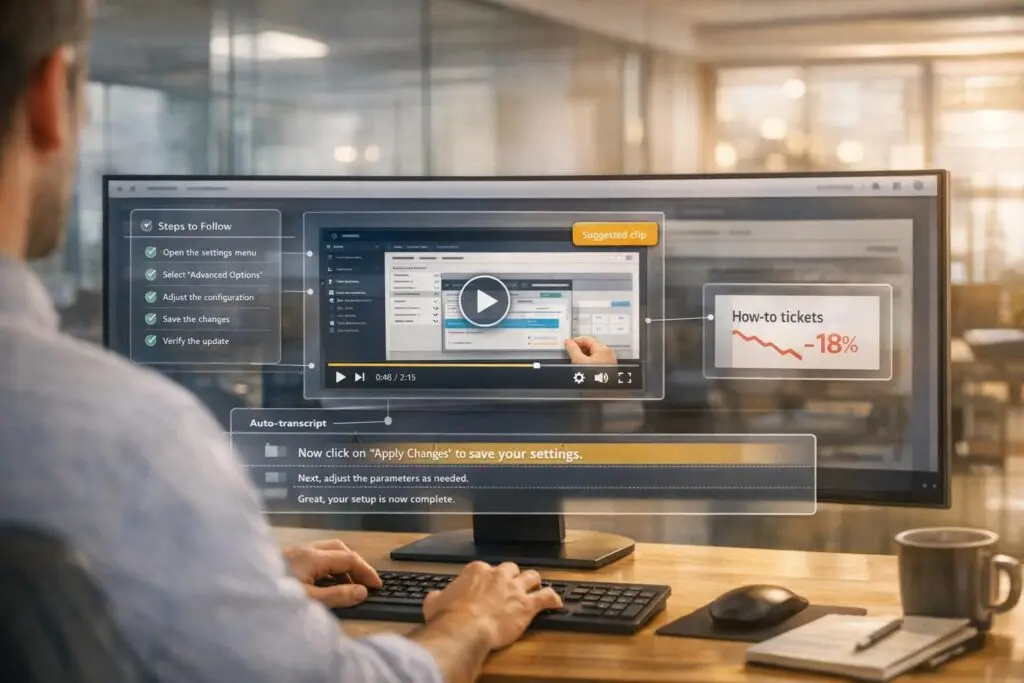
Always include a written summary, numbered steps, and a full transcript alongside your videos. This approach ensures your content is accessible to those in sound-sensitive environments or users with hearing impairments. AI tools can simplify this process by generating step-by-step guides and screenshots directly from a single recording, eliminating the need for redundant documentation [2][6].
This method also encourages creating precise, focused videos that tackle specific challenges effectively.
Make Videos Short and Focused
The shorter, the better. If a process takes too long to explain, break it into smaller, more manageable segments [2][9]. Aim for videos that are 2 to 5 minutes long, each addressing a single issue or workflow [9]. This keeps the content digestible and easier for viewers to follow.
A helpful structure for your videos is the FOCA Framework:
- Focus: Highlight the problem within the first 10 seconds.
- Organize: Lay out 3–5 clear steps.
- Conversational Tone: Keep the delivery engaging and approachable.
- Action: End with a clear next step or confirmation question [9].
This approach ensures your videos are both efficient and actionable. Once your content is streamlined, the next step is to track how well it performs.
Track Usage and Update Based on Feedback
Creating content is just the beginning – monitoring its performance is key to ongoing improvement. Metrics like the article-to-ticket ratio can reveal whether your videos are resolving issues or causing confusion [6]. For example, if users often open support tickets after watching a video, it might mean the content is unclear, outdated, or missing critical details [6].
Review support data every 3–6 months to identify recurring issues that can be solved visually, and prioritize those topics for new video content. Tools like video heatmaps and rewatch data can highlight which parts of a video are unclear or skipped, helping you refine your content [9][14]. Additionally, tracking zero-result searches in your knowledge base can point to gaps where new videos might be helpful [8].
"Placement matters more than video quality for deflecting tickets." – Kevin Alster, Strategic Advisor, Synthesia [9]
Strategically embed videos at key friction points – like error messages, tooltips, or chatbot interactions – so they’re immediately available when users need them most [9]. When updates to your UI occur, AI-powered tools like "Smart Updates" can save time by editing only the affected scenes, cutting maintenance efforts down to just 5–10 minutes [9].
Conclusion
Main Points for Support Leaders
Video knowledge bases can be incredibly effective – but only when used in the right context. Research shows that videos shine when explaining complex, visual workflows, like navigating software interfaces or performing multi-step tasks. These are situations where seeing a demonstration is far more helpful than reading about it. On the flip side, text-based content is better for straightforward questions, frequently updated details, or information users need to find quickly via search. The smartest strategy blends both formats: use video to show the "how", while text focuses on the "what" and "why" [2][3].
Even though approximately 65% of people are considered visual learners [7], concise, scannable text remains critical for users who need fast answers. By aligning the content format with the user’s intent and the complexity of their issue, a well-structured self-service strategy can deflect between 30% and 50% of incoming support tickets [6].
These insights give support leaders the tools to refine their knowledge base strategy for maximum efficiency.
How to Start Improving Your KB Strategy
Start with an audit. Review your top 20 ticket categories from the past 90 days and identify the 5 to 10 topics that account for 60% to 80% of your support volume [6]. Pay close attention to recurring "How do I…" questions. This will help you determine whether the issues involve repeatable, visual tasks or require more detailed troubleshooting.
For repeatable, visual tasks, create short videos (2–5 minutes) and pair them with clear, step-by-step written instructions [2][7]. For topics that need more depth or involve nuanced problem-solving, focus on building detailed text-based documentation. Keep an eye on key metrics like ticket deflection rates to see which type of content is reducing your support load. If ticket volume increases after publishing a video, it’s a sign to revise the content or explore presenting the solution in text instead.
Make changes one step at a time, testing each adjustment over a 30-day period. The ultimate goal? To reduce the $15–$25 cost per support ticket [6] by delivering the right content format at the right time.
FAQs
Which KB topics should be video first?
Video-first knowledge base (KB) topics shine when tackling complex processes, visual troubleshooting, or tasks where a clear demonstration makes all the difference. They’re particularly helpful for actions performed often, where step-by-step visuals can save time and reduce support requests. However, steer clear of using videos for simple questions or in situations where accessibility could pose challenges.
How do I make support videos searchable?
To help users find your support videos more easily, consider using AI-generated subtitles or captions. These not only make your videos more accessible but also improve their indexing and visibility in search results. Pair this with descriptive titles, relevant tags, and structured metadata, which can further boost discoverability.
Additionally, features like chapter markers, callouts, and presentation slides can make it simpler for viewers to navigate your content. These tactics ensure your videos are easy to use and optimized for search engines at the same time.
What metrics prove videos reduce tickets?
Videos are a game-changer for customer support, and the numbers back it up. Metrics like lower ticket volumes, quicker resolution times, and higher self-service success rates all point to their impact. Research even shows that videos can improve information retention by up to 95%, which naturally leads to fewer support inquiries. It’s clear that video content isn’t just engaging – it’s also a powerful tool for simplifying and improving customer support workflows.