
Unifying internal service requests with external customer support into a single system can eliminate inefficiencies, reduce costs, and improve both employee productivity and customer satisfaction. Here’s the core idea: fragmented systems lead to wasted time, duplicate efforts, and missed insights. By consolidating workflows into an AI-powered platform, organizations can streamline operations, cut resolution times, and enhance the overall experience for both employees and customers.
Key takeaways:
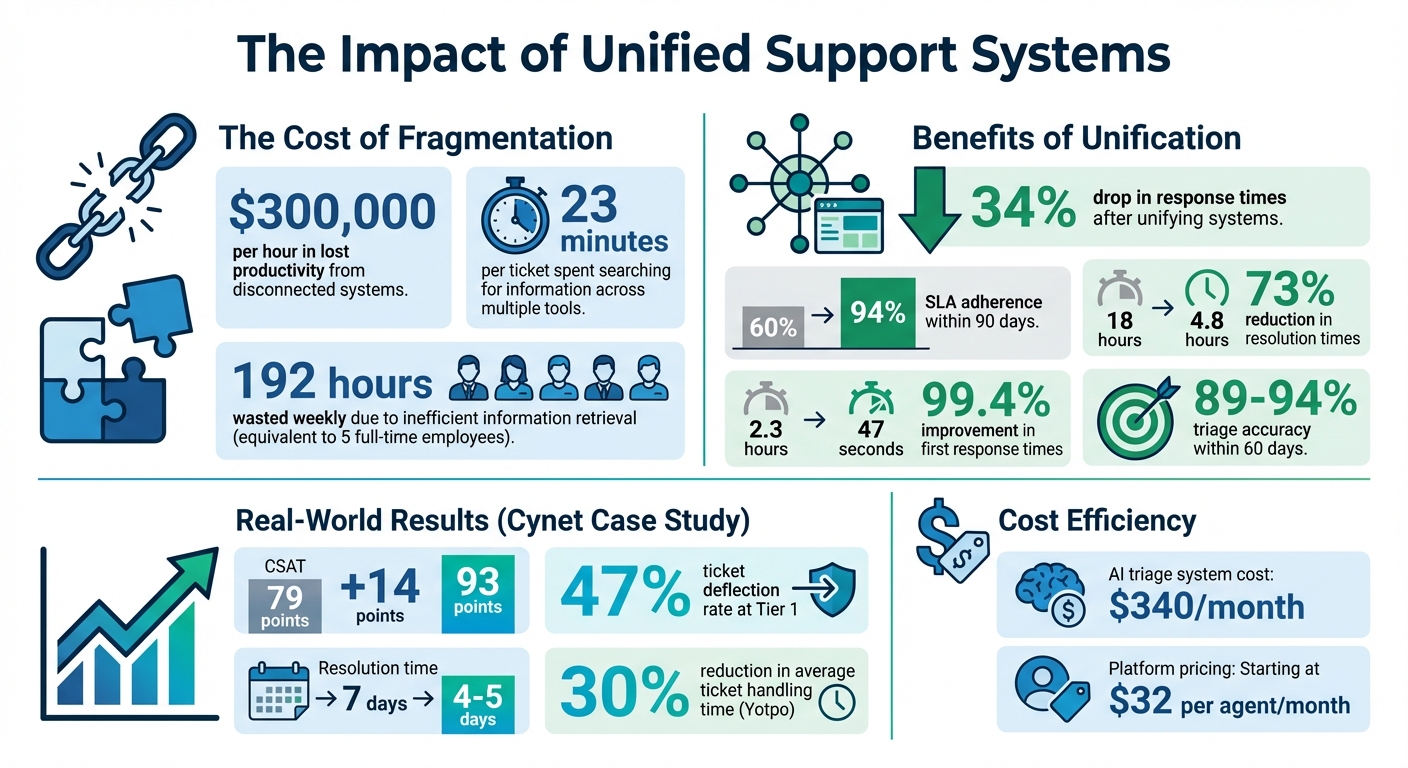
- Fragmentation costs: Disconnected systems waste time and resources, costing companies up to $300,000 per hour in lost productivity.
- Agent challenges: Support agents spend 23 minutes per ticket searching for information across multiple tools.
- Unified benefits: Companies report a 34% drop in response times and SLA adherence rising from 60% to 94% within 90 days of unifying systems.
- AI-driven solutions: Features like automatic ticket prioritization, sentiment analysis, and knowledge base creation can save time and improve accuracy.
The solution starts with auditing workflows, identifying inefficiencies, and implementing an AI-native platform like Supportbench. This approach consolidates data, automates repetitive tasks, and ensures requests – whether internal or external – are handled efficiently. By integrating tools like CRMs, Slack, and Jira, and leveraging AI for triage and routing, businesses can reduce ticket volumes, improve customer trust, and boost operational efficiency.
Benefits of Unifying Internal and External Support Systems: Key Statistics
How Unified Communication Tools Improve Customer Experience in Modern Contact Centers
sbb-itb-e60d259
Assess Your Current Workflow and Find Integration Opportunities
To streamline your service operations, the first step is to get a clear understanding of how things currently work. Begin by auditing all request channels – this includes email, phone, Slack, walk-ins, web forms, and any other touchpoints your team uses [3]. Many B2B teams discover they’re juggling multiple disconnected intake methods, each with its own set of challenges and blind spots.
Once you’ve identified all channels, classify the types of requests you handle. This means separating "incidents" (unexpected issues like software bugs or outages) from "service requests" (routine needs like feature updates, hardware changes, or account modifications) [6]. This distinction is crucial because incidents usually demand immediate attention, while service requests can often follow predefined workflows, which makes them ideal candidates for automation.
Talk to your service teams and frequent requesters to uncover key pain points and must-have features [3]. Leaders might face bottlenecks that differ from the challenges agents encounter. For example, agents might share that they’re wasting time searching for information across disconnected tools or manually tagging experts on Slack due to a lack of a centralized knowledge base [4].
Map Internal and External Workflows
Document your internal service requests (like IT, HR, or facilities) alongside external customer support processes. This helps you spot overlaps, inefficiencies, and gaps. Pay attention to metrics that reveal hidden costs, such as Average Handle Time, First Response Time, First Contact Resolution, and ticket backlog volume [6] [4]. For instance, if your team processes 500 tickets weekly, inefficient information retrieval could waste 192 hours each week – nearly the equivalent of five full-time employees [4].
Don’t forget to monitor customer-facing metrics like CSAT, CES, and NPS. These can highlight how operational fragmentation affects the end-user experience [6] [4].
"When an agent opens a ticket, they rarely see a clear picture of the customer. Instead, they see a puzzle with pieces scattered across different systems."
- Mosaic AI [4]
With workflows mapped out, the next step is to pinpoint tasks that consume the most resources.
Identify High-Volume, Repetitive Processes
Zero in on tasks where frequency and complexity intersect. Common high-frequency tasks – like password resets or status updates – are obvious candidates for automation. However, don’t overlook less frequent but complex tasks that occur quarterly or annually. Automating these ensures they’re handled efficiently when they do come up, reducing setup time and potential errors [7].
Use the DRY (Don’t Repeat Yourself) principle to identify inefficiencies. Look for areas where the same data is entered multiple times or where agents frequently copy and paste information between systems. These redundancies are prime opportunities for integration. Additionally, watch for "data manipulation patterns", such as employees repeatedly cleaning or transforming data tables [7]. Automating these processes can significantly reduce manual effort.
"High-frequency tasks are prime candidates for automation, as automating these tasks can save significant time and effort in the long run."
- Sharon R.M., Software Developer [7]
To prioritize, create a simple matrix that plots tasks by frequency and resource consumption. Focus first on tasks with a high effort-to-impact ratio – those that are relatively easy to automate but offer substantial gains in productivity or accuracy [7]. This approach ensures you tackle the most pressing bottlenecks without wasting time on less impactful edge cases.
These insights lay the groundwork for choosing an AI-native platform that can unify your workflows effectively.
Choose the Right AI-Native Platform
Once you’ve mapped out your workflows, the next step is selecting an AI-native platform that seamlessly integrates internal service requests with external customer support. The goal? To break down silos, not create new ones. These platforms are built from the ground up to streamline workflows by automating tasks like triage, routing, and reporting.
Here’s why the term "AI-native" matters: Unlike "AI-enabled" systems, which often tack on artificial intelligence as an afterthought (and usually with costly add-ons), AI-native platforms embed intelligence into their core functionality from day one. That means features like automatic ticket prioritization, sentiment analysis, and knowledge base creation are baked in – no extra configuration or fees required [8].
For example, research shows that collaboration inefficiencies can reduce revenue targets by as much as 37% [9]. If you’re stuck with unpredictable per-agent licensing fees or need to pay extra for essential features like automation and reporting, costs can spiral out of control. The right platform should offer clear, scalable pricing that grows fairly with your team, avoiding what’s often called the "fragmentation tax."
With this foundation in mind, let’s dive into the must-have features every AI-native platform should provide.
Key Features to Look for in a Platform
Managing B2B relationships comes with unique challenges. A single customer might involve dozens of contacts, multiple contracts, and cases that can stretch over weeks or months. To handle this complexity, look for a platform with the following features:
- AI-driven triage and prioritization: Automatically route tickets based on urgency, business impact, and customer-specific priorities. This ensures high-value accounts don’t get buried under routine requests [8].
- Automated knowledge base generation: When issues are resolved, the platform should create help articles and documentation on the fly. This reduces repetitive questions and empowers both employees and customers with self-service options. For example, resolving a password reset issue should instantly update the knowledge base, making answers easy to find [8].
- AI Co-Pilot functionality: Agents should be able to quickly access ticket, customer, and product context using natural language. This eliminates the need to search through disconnected systems, saving time and improving response accuracy [8].
- Sentiment and health scoring: By analyzing customer communications, the platform can uncover subtle signals about account health. This helps teams proactively address potential churn risks, especially for renewals or enterprise accounts [8].
- Dynamic SLA management: Service Level Agreements (SLAs) should adapt to the customer journey. For instance, accounts nearing contract renewals might require tighter SLAs, while low-priority internal requests could allow for more flexibility. Static SLAs often fail to capture the nuances of B2B relationships [8].
- Role-based access control (RBAC): The platform should allow custom policies for different user types, ensuring the right people have access to the right information. This is critical for managing sensitive data and maintaining control over internal and external communications [8].
These features are what make platforms like Supportbench stand out in the B2B space.
Why Supportbench Works for B2B
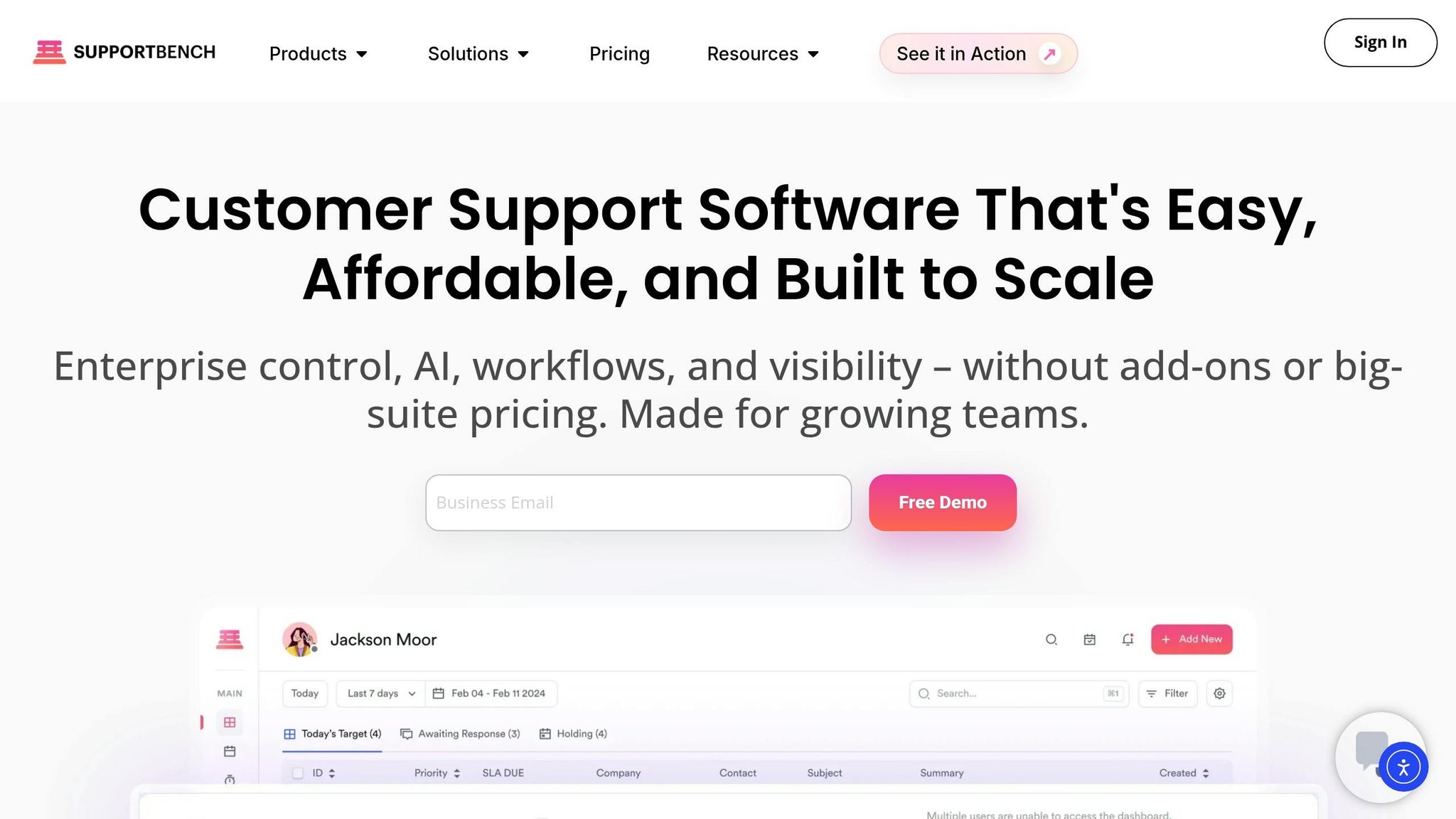
Supportbench is specifically designed for the complexities of B2B service operations, offering a full suite of AI capabilities without the need for additional integrations. Unlike platforms built for high-volume B2C environments, Supportbench excels in areas like triage, knowledge base creation, sentiment analysis, and AI Co-Pilot functionality – all seamlessly integrated [8].
Here’s what sets it apart:
- AI Automation: Issues are automatically categorized and prioritized, ensuring that both internal and external requests are routed to the right specialist immediately [8].
- AI Co-Pilot: Teams can query tickets, customer data, and product information using natural language, eliminating the need for time-consuming manual searches [8].
Supportbench’s reputation speaks for itself. It has been recognized as a leader by G2, Gartner Capterra, and Software Advice [8]. Users frequently praise its intuitive interface and the benefit of having all client management tools in one place.
"Supportbench has supplied our group with a whole client control system. Because the whole things is in a single platform, all are capable of control all conversation in a single area and feature complete over sight into each clients and group."
- Hugh Dauterman, Data Operations Director [8]
Pricing starts at $32 per agent per month, with transparent scaling that supports growth without penalizing your team as it expands [8]. For industries like manufacturing, logistics, supply chain, or managed service providers (MSPs), Supportbench delivers an enterprise-grade solution tailored to the demands of complex B2B operations.
Step-by-Step Guide to Unifying Internal and External Workflows
Once you’ve chosen your platform, the next step is to connect all your systems. The goal? To create a single, unified system where internal service requests and external customer support tickets flow seamlessly. This approach reduces inefficiencies and speeds up resolution times. Let’s break it down.
Connect Data Sources and Tools
Start by syncing all your data sources into one centralized hub. Link your internal tools (like Jira or Slack), your CRM (such as Salesforce or HubSpot), and your customer portals. This ensures every request – whether it’s from an employee or a customer – lands in the same system.
Use a unified ticketing API to manage data across platforms. Organize your core data into four key categories: Tickets (the issues), Customers (the requesters), Notes (internal updates), and Categories (how you classify requests) [1].
To ensure smooth identity mapping, connect your ticketing system’s customer_id to CRM records and user_id to internal HR or directory systems. This way, the system knows each user’s role, department, and access level [1].
Real-time syncing is essential. Use webhooks or polling to make sure your data stays up to date, preventing agents from working with outdated information [1]. Tools like Supportbench provide deep connectors for platforms like Salesforce, HubSpot, Slack, and Jira, offering more than just surface-level data.
Additionally, implement an AI-driven ETL layer (Extract, Transform, Load) to clean up duplicates, standardize terminology, and enrich unstructured data (like emails or chats) with metadata such as urgency or sentiment [4]. Without this, your system could become chaotic and inefficient.
With your data unified, the next step is automating workflows to improve efficiency.
Configure AI Automation for Efficiency
Once your data is centralized, leverage AI to streamline processes. Often, the bottleneck in support operations isn’t solving problems – it’s the initial triage. Tasks like reading, categorizing, prioritizing, and routing tickets can slow everything down [5].
"The LLM handles classification. Business rules handle routing. Mixing these two responsibilities is the number one reason AI triage systems fail in production." – Saksham Solanki, AI Automation Consultant [5]
Set up a three-layer architecture for automation:
- Unified Intake: Standardizes incoming data.
- LLM Classification: Identifies intent and priority.
- Deterministic Routing: Assigns tickets using business rules [5].
The AI can classify tickets by intent – whether it’s a bug, billing issue, or feature request – while deterministic rules handle routing. To avoid errors, set a confidence threshold of around 70%. Tickets below this threshold should be flagged for human review [5].
Here’s a real-world example: In March 2026, Saksham Solanki implemented an AI triage system for a B2B SaaS company managing over 400 tickets weekly. In just 11 days, the system was up and running at a cost of $340 per month. It reduced resolution times by 73% (from 18 hours to 4.8 hours) and improved first response times by 99.4% (from 2.3 hours to 47 seconds). Triage accuracy started at 89% and climbed to 94% within 60 days [5].
Supportbench offers built-in AI Automation features, including tools for categorizing and prioritizing tickets automatically. It also provides AI Predictive CSAT, First Contact Resolution detection, and AI sentiment analysis – all included without additional setup or fees.
This automation lays the groundwork for unified queues and flexible SLAs.
Set Up Unified Queues and SLAs
With your data and workflows in sync, the next step is creating unified queues and SLAs (Service Level Agreements) to ensure consistent handling of all requests.
Centralize all incoming requests – whether they come from email, phone, digital portals, or internal tools – into a single system [6][11]. This eliminates silos and streamlines operations. Use standardized methods to capture critical information upfront, enabling faster triage [11].
Define clear prioritization frameworks early on. Instead of processing requests in the order they arrive, assess factors like urgency, impact, and cost. For customer-facing requests, consider the customer’s perspective. For instance, a billing question from a customer nearing renewal should take priority over a low-urgency internal IT request.
Supportbench’s Dynamic SLAs allow you to adjust service levels based on context. For example, if a customer renewal is approaching, the system can automatically tighten the SLA to ensure a better experience. This flexibility is especially important for B2B operations.
Monitor key performance metrics like average handle time, on-time success rate, and ticket backlog to measure your system’s effectiveness [6]. To further reduce queue volumes, integrate self-service options like knowledge bases and FAQs [6][11]. With Supportbench, you can easily create help articles using AI-driven templates, which pull from resolved tickets to generate useful content.
Optimize with AI-Driven Features
AI-powered tools in a unified platform bring efficiency and improved customer experiences to the forefront. By centralizing data, these features streamline workflows, cut down on manual tasks, and address potential issues before they escalate.
Automated Summaries and Knowledge Base Creation
One standout feature is AI’s ability to summarize lengthy ticket threads, delivering instant context for complex cases. This becomes invaluable when escalating issues to subject matter experts (SMEs), as they receive detailed summaries complete with troubleshooting steps [2].
But the benefits don’t stop there. AI can transform resolved cases into a dynamic knowledge base. When an agent solves a challenging issue, the system drafts a knowledge base article from the case history, including subject lines, summaries, and keywords. This creates a cycle where every solution contributes to reducing repetitive tickets, giving agents more time to tackle new challenges [2][4].
For instance, real-world use of automated knowledge base creation has shown measurable results, such as faster resolutions and significant reductions in ticket volume [2].
Supportbench takes this further with AI-driven knowledge base templates and tools for article creation, pulling directly from resolved tickets. This ensures your knowledge base evolves naturally as your team works – without additional effort.
Once your knowledge base is automated, the next step is using AI for proactive customer monitoring.
Customer Health Scoring and Escalation Management
AI also facilitates proactive customer care by monitoring customer health and managing potential escalations. After automating knowledge capture, AI can assess customer sentiment and predict escalation risks before minor issues grow. By analyzing data from your CRM (engagement trends), ticketing system (support activity), and billing platform (financial indicators), AI generates a customer health score to help prioritize responses intelligently [12].
Here’s an example: If a customer nearing renewal has several unresolved high-priority tickets, the system flags the account and adjusts SLAs accordingly. Metrics like ticket volume, resolution time, and request frequency feed into this score, giving you a clear, real-time view of accounts needing immediate attention [12].
A unified system eliminates the inefficiency of juggling multiple tools to piece together customer insights [2]. With AI-driven triage, incoming tickets are categorized by intent, urgency, and sentiment, then routed based on intent based on the customer’s health profile. This ensures high-risk accounts receive faster, more accurate responses [2].
In February 2026, Yotpo implemented an AI-powered search layer across all data sources under VP of Delivery Gil Fiarberger. The results were striking: a 30% reduction in average ticket handling time, as agents could quickly find answers and identify gaps in knowledge [2].
"The ability to search across all our data sources is simply incredible. It saves our team so much time. And if the answer doesn’t exist, it allows us to identify the knowledge gaps." – Gil Fiarberger, VP Delivery, Yotpo [2]
Supportbench enhances this process with customer health scoring, AI sentiment analysis, and predictive CSAT tools, helping you identify at-risk accounts early. Together, these features provide proactive insights, allowing you to address issues before they escalate into bigger problems.
Test, Launch, and Monitor Performance
Testing your unified system with a pilot program is a smart way to identify issues, collect feedback, and fine-tune workflows before rolling out the system on a larger scale. Once launched, monitoring performance through key metrics ensures the system delivers on its goals and continues to improve.
Run a Pilot Program
The pilot phase is your opportunity to ensure all workflows and integrations function smoothly. Before starting, clearly define the features and workflows you’ll test. Make a list of every connected application – your CRM, billing software, ticketing tools, and any legacy systems still in play [13]. This preparation keeps the pilot focused and prevents unnecessary complications.
Set SMART objectives to guide your pilot. For instance, aim to "reduce IT request resolution time by 25% within 60 days" or "achieve 80% agent satisfaction with the new interface within 30 days" [14]. Outline all technical requirements ahead of time to avoid disruptions during testing [13].
To prevent confusion, assign clear roles to stakeholders, technical leads, agents, and vendor contacts. Success criteria should cover several areas, such as system performance (e.g., uptime and response times), operational efficiency (time saved per ticket), user satisfaction (agent and customer feedback), and broader business goals like improved ticket deflection rates or better CSAT scores [13].
The pilot phase is also a chance to evaluate how well AI handles ticket escalations. For example, agents should receive a complete troubleshooting history when taking over from automated systems, not start from scratch [2]. If multiple platforms are integrated, verify that ticket statuses are consistent across systems for accurate reporting [1].
Use feedback from dashboards, surveys, and agent insights to refine the system. Pay close attention to areas where agents face difficulties – these often point to training gaps or configuration issues that need fixing before a full rollout [14].
Once the pilot wraps up, shift your focus to tracking performance metrics and leveraging AI insights.
Monitor KPIs and Use AI Insights
After launch, measuring performance with targeted KPIs is essential. Focus on 5–7 key metrics to keep your analysis clear and actionable [15]. Efficiency metrics like time-to-resolution and average handling time help pinpoint bottlenecks and improve workflows [2]. For example, tracking the ticket deflection rate shows how effective your self-service options are [2].
While speed is important, quality metrics like CSAT scores and Customer Effort Score (CES) reveal whether faster resolutions are genuinely enhancing customer satisfaction [15]. A great example comes from Cynet, whose CSAT rose from 79 to 93 points after introducing a unified AI platform. Resolution times also dropped from one week to just 4–5 days. Adi Boxer, Cynet‘s Director of Global Customer Support, highlighted the improvement:
"Time to resolve went from one week to 4-5 days. It dramatically reduced the noise and the time it takes to get an answer" [2].
Other critical metrics include knowledge coverage, which measures how many questions your system can handle without human intervention, and escalation rates, which indicate whether fewer issues require specialist involvement [2][15].
Real-time dashboards with color-coded indicators (green/yellow/red) allow teams to quickly address rising response times [15]. AI plays a key role here by identifying which questions take the longest to answer and which topics generate the most internal inquiries, helping you target documentation gaps [2][4].
| KPI Category | Specific Metric | Metric Purpose |
|---|---|---|
| Efficiency | Time-to-Resolution | Identifies bottlenecks in workflows [2] |
| Deflection | Ticket Deflection Rate | Measures self-service effectiveness [2] |
| Quality | CSAT / CES | Tracks customer satisfaction [15] |
| Coverage | Knowledge Coverage | Highlights documentation gaps [2] |
| Productivity | Agent Handling Time | Shows time saved by reducing tool-switching [2] |
AI-driven systems can also improve over time with feedback loops. For example, agents correcting AI-triaged tickets teach the system to boost accuracy, often improving from 89% at launch to over 94% within 90 days [5]. AI can even detect emerging trends, like a spike in mentions of a specific feature or competitor, so you can address potential issues before they grow into major problems [2][4].
Platforms like Supportbench offer tools such as AI-driven dashboards, predictive CSAT, and customer health scoring. These features turn raw data into actionable insights, enabling you to make informed decisions and continually optimize your system’s performance.
Avoid Common Pitfalls in Unification Efforts
When bringing together internal and external support workflows, the goal is increased efficiency. However, this process can also introduce challenges like security risks and scalability issues – problems that, if ignored, can lead to significant setbacks. Here’s how to sidestep these common pitfalls and keep your system on track.
Ensure Security and Role-Based Permissions
Combining internal service requests with customer-facing support creates new pathways for data exchange. Without proper controls, sensitive information could end up in the wrong hands. A key concern is accidental data exposure in multi-tenant environments, where an agent or AI designed for one customer might inadvertently access another customer’s data [16].
To mitigate these risks, implement Role-Based Access Control (RBAC). Define specific permissions for each role:
- Tier 1 agents should only see assigned tickets, with personally identifiable information (PII) masked.
- Billing specialists can access billing details but not complete card numbers.
- Managers may need anonymized data for analytics, with special approval required for bulk actions.
A zero-trust AI gateway can act as a secure buffer between agents and backend systems. This ensures API credentials are never directly exposed and that every request aligns with central security policies [16]. As ByteBridge cautions:
"Uncontrolled AI can be a liability. From privacy breaches to compliance violations, an AI that’s not properly governed could do more harm than good" [16].
For high-risk actions, such as refunds over $500 or account deletions, require human approval to maintain oversight [16][17]. Dynamic PII redaction is another essential step – mask fields like Social Security numbers or credit card details before they reach the support interface or AI model [16][4]. Additionally, store sensitive API keys and tokens in an encrypted vault, injecting them into API calls only when needed to minimize exposure [16].
Once your security measures are solid, it’s time to focus on preparing your system to handle future growth.
Plan for Scalability and Growth
A unified system must not only work well today but also handle tomorrow’s demands. Systems that perform under light workloads often falter as volume increases, typically due to architectural shortcomings.
Think of ticket triage and data unification as an automated pipeline – data flows in, gets enriched, scored, and routed in real time [18]. To achieve this, use platforms offering normalized, real-time APIs that integrate with multiple service providers [10]. Be mindful of constraints like tool-calling limits in large language models (LLMs) – some models support 20 tools, while others may only handle 10 [10]. Limit the tools and actions available to AI models accordingly, maintaining data security as the system scales [18][10].
Start with straightforward assignment rules and refine them based on key metrics like routing accuracy and SLA compliance [18]. During high-demand periods, monitor for API rate-limit errors (e.g., 429 errors) and implement retry mechanisms with backoff logic [10]. By addressing these scalability challenges early, you reduce the likelihood of costly rework as your system grows.
Conclusion
Combining internal service requests with external customer support isn’t just a technical tweak – it reshapes how B2B companies operate. By eliminating silos, businesses save time and create a more streamlined and cohesive support experience.
The numbers paint a clear picture. Research shows support agents can lose up to 192 hours weekly due to disconnected internal and external systems, leading to major productivity losses [4]. In 2025, cybersecurity firm Cynet tackled this issue by centralizing knowledge and automating repetitive tasks. The results? A 14-point jump in CSAT (from 79 to 93), a 47% ticket deflection rate at Tier 1, and resolution times nearly cut in half [4].
These challenges emphasize the need to rethink operational strategies. Moving away from talent-heavy approaches to process-driven workflows is key. As Jim Schleckser, CEO of The CEO Project, explains:
"Businesses relying too much on talent can stagnate. Building scalable business systems allows you to reduce dependence on individual expertise" [19].
This shift means embracing platforms where AI handles transitions seamlessly, unified queues ensure internal and external responses are equally efficient, and every team member has a full view of customer interactions.
Supportbench rises to meet this need. Its built-in AI tools – like automated summaries, conversational search, health scoring, and knowledge base creation – eliminate inefficiencies caused by fragmented tools and expensive add-ons. Starting at just $32 per agent per month, it offers an enterprise-grade solution for teams of all sizes.
FAQs
What’s the first step to unify internal and external support?
To get started, you’ll need a centralized system that brings both workflows together. This means selecting a unified platform that can handle internal service requests and external customer support tickets without any hiccups. By consolidating everything into one system, you make it easier to share data, simplify processes, and speed up resolution times – all while keeping your support operations running smoothly.
How do you keep employee and customer data secure in one system?
To keep both employee and customer data safe in a single system, it’s essential to adopt a unified security strategy. This includes using advanced tools for monitoring, detecting, and responding to potential threats. Key measures like encryption, role-based permissions, and strict access controls help shield sensitive information. Regular updates to security protocols and routine vulnerability assessments are equally important to stay ahead of risks. By taking these steps, you can maintain data confidentiality, protect its integrity, and reduce the chances of breaches or unauthorized access.
How do you measure ROI after unifying support workflows?
To determine ROI effectively, focus on tracking metrics that reflect both financial and operational improvements. Key indicators include time savings, error reduction, and enhanced customer satisfaction. For instance, evaluate how much process execution time has decreased, whether error rates have dropped, and if response times have improved. Additionally, consider the impact on cost savings and productivity.
These measurements provide a clear picture of the advantages gained by streamlining internal and external support workflows. By analyzing these factors, you can quantify the tangible value a unified system brings to your organization.