
When customer information is scattered across systems, it creates inefficiencies, wastes time, and frustrates both teams and customers. A unified customer view solves this by consolidating key data – like CRM records, support tickets, and billing details – into a single platform. This allows teams to access real-time insights, collaborate effectively, and deliver faster, more consistent support.
Key Takeaways:
- Time Savings: Support agents spend 23 minutes per ticket searching for data. Centralized systems eliminate this inefficiency.
- Customer Impact: 62% of buyers experience disconnected departments, leading to repeated explanations and inconsistent answers.
- Business Benefits: Companies with unified data see faster resolutions, reduced costs, and higher customer satisfaction (CSAT).
By leveraging AI and streamlined workflows, businesses can improve collaboration between teams, predict customer needs, and reduce operational inefficiencies. However, challenges like data fragmentation, integration issues, and maintaining accuracy must be addressed to fully realize the benefits.
Why It Matters: Unified customer data isn’t just about convenience – it directly impacts revenue, retention, and customer loyalty. Companies that prioritize this approach are better equipped to deliver seamless experiences and stay competitive.
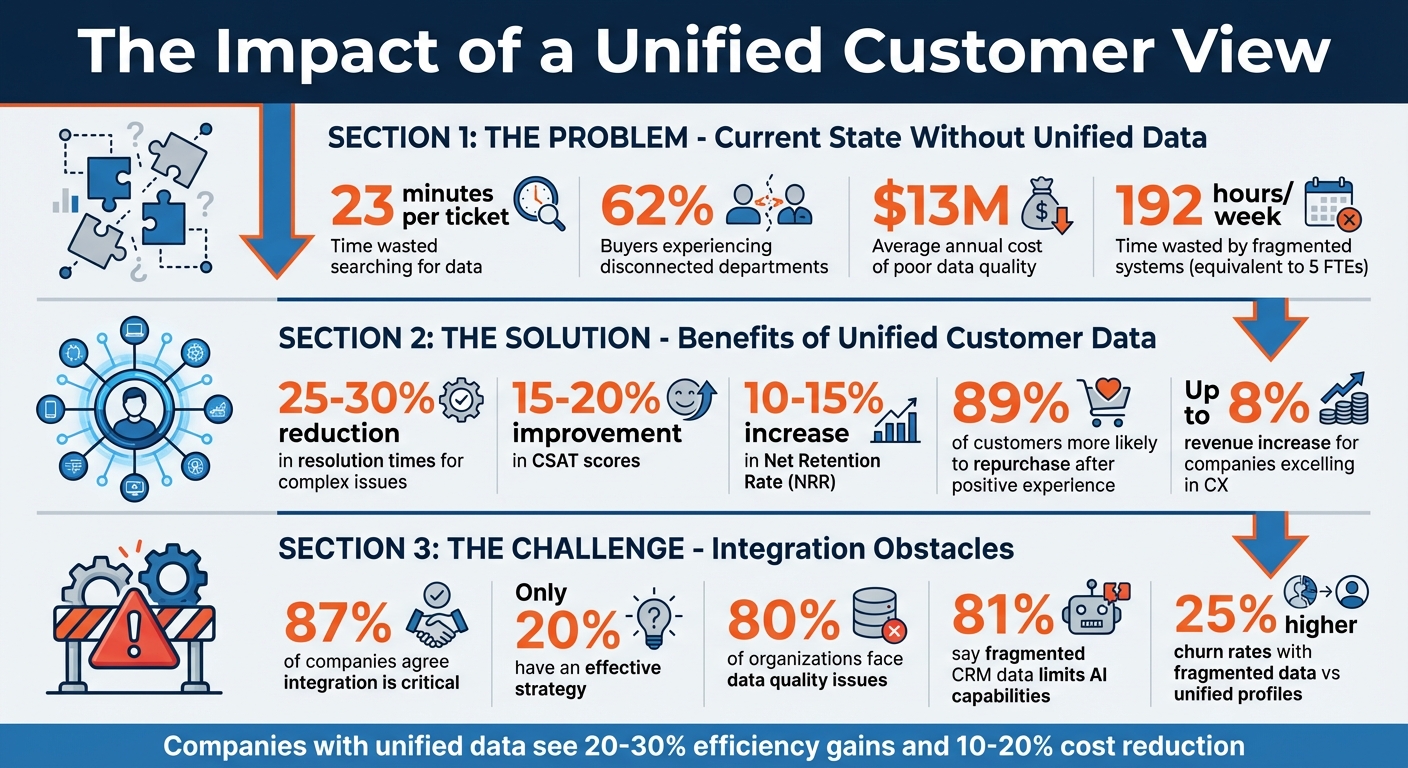
Impact of Unified Customer View on B2B Support Performance
Why a Unified Customer View Improves B2B Support
Faster Resolution Times and Higher CSAT Scores
When customer data is consolidated into a single view, support teams can resolve issues much faster. For example, agents no longer need to spend 23 minutes searching across multiple systems to find relevant information – it’s all available in one place[2]. This streamlined access eliminates the need to switch between platforms, saving time and effort[6].
AI-native platforms take this a step further by using comprehensive customer data to provide accurate resolution suggestions. Imagine an AI Copilot equipped with details like account tiers, infrastructure specifics, and recent customer success notes. With this context, agents can deliver faster, more precise solutions[6]. And the benefits are clear: 89% of customers are more likely to make another purchase after a positive experience[7]. Plus, companies that excel in customer experience can see revenue increases of up to 8%[7].
Unified data also allows teams to act proactively. By identifying declining product usage or spotting negative sentiment early, businesses can address potential issues before customers even submit a ticket[2][5]. This proactive approach not only improves efficiency but also strengthens collaboration across departments.
Better Collaboration Between Teams
A unified view of customer data doesn’t just help support teams – it transforms how sales, support, and customer success teams work together. For example, sales reps can check recent support interactions before reaching out to clients, ensuring their outreach is timely and informed. Additionally, support tickets often reveal buying signals that sales teams can act on immediately[2].
"It’s not just about listening to calls and coaching the team through that, it’s about managing your pipeline, managing your renewals pipeline, getting alerts, and using data that we extract from those conversations to really know what is happening throughout the customer journey."
This seamless flow of data strengthens collaboration across teams. When engineering teams resolve bugs, support agents are updated instantly. Similarly, if ticket volumes spike for a high-value account, Customer Success Managers are alerted in real time, enabling them to step in before renewal discussions even begin. This level of coordination ensures every team is aligned and working toward the same goals.
Lower Costs and Predictive Customer Insights
The benefits of unified data extend beyond faster resolutions and better teamwork – it also reduces costs and helps predict customer needs. Fragmented systems can waste up to 192 hours a week, equivalent to the workload of five full-time employees. Centralized data eliminates this inefficiency, allowing agents to handle more tickets without increasing headcount[2].
AI tools further enhance this by turning unified data into actionable insights. Sentiment analysis and health scoring, for instance, can detect frustrated language or declining product usage. These tools flag at-risk accounts early, giving teams the chance to intervene before issues escalate[2]. This predictive capability reduces unnecessary escalations and ensures agents have quick access to answers from internal documentation or past resolutions.
The financial impact is hard to ignore. Poor data quality costs companies an average of $13 million each year[1]. By using real-time context to predict customer needs and route cases intelligently, businesses can cut costs while boosting retention and revenue. It’s a win-win for both companies and their customers.
sbb-itb-e60d259
Common Obstacles to Building a Unified Customer View
Data Scattered Across Multiple Systems
Customer data often lives in multiple places – CRMs, marketing tools, support platforms, billing software, and even spreadsheets. This fragmentation forces teams to waste time hunting for information across 20 different systems[8].
But the problem runs deeper than inconvenience. Many integrations struggle with syncing custom fields or resolving "schema mismatches." For instance, one system might label urgent issues as "High" priority, while another calls them "Blocker"[4]. When these systems attempt to sync, the data can end up corrupted or misinterpreted. Although 87% of companies agree that data integration is critical, only 20% have a strategy that addresses these challenges effectively[8].
The consequences of siloed data extend beyond inefficiency. Teams miss important signals, like early signs of churn or opportunities to upsell. For example, a customer asking about features in a higher-tier plan might go unnoticed if their data is fragmented[2][3]. This lack of visibility delays decisions, hinders proactive support, and amplifies the challenges of integration.
Keeping Data Accurate and Up-to-Date
Even when data is centralized, keeping it accurate is a constant struggle. Around 80% of organizations face issues with data quality[8], leading to mixed messages and inconsistent customer experiences. This is especially problematic in B2B settings, where customer details – like new contacts, infrastructure updates, or contract adjustments – change frequently.
"Bad data no longer just creates bad reports; it creates bad decisions at machine speed."
Traditional data management methods rely on batch updates that run every few hours or overnight. But in today’s world, where AI-driven tools demand real-time context, even a 15-minute delay can make data feel outdated during a live customer interaction[4]. Modern platforms address this by using automated ETL (Extract, Transform, Load) processes to clean duplicates, fix formatting issues, and standardize terms across systems in real time[2].
The stakes are high. Companies with fragmented data see churn rates up to 25% higher than those with unified profiles[8]. On the other hand, effective data integration can improve customer retention by 20% to 30%[8]. However, maintaining accuracy at scale remains a tough challenge.
Integration and Scaling Difficulties
Bringing together multiple systems into one cohesive platform sounds simple – until you try it. A major hurdle is identity resolution: matching customer records across channels like email, phone, and social media to form a single, reliable profile[8]. When AI systems fail to map users correctly, it leads to duplicate tickets and forces customers to repeat their information. In fact, 56% of customers report having to repeat themselves during support interactions due to disconnected data[11].
Technical debt adds another layer of complexity. As companies grow and adopt more tools, custom integrations and scripts become harder to manage. Without bidirectional synchronization, updates in one system don’t flow back to others. For instance, engineering notes in Jira might never reach support agents using a helpdesk platform[4]. This creates "information asymmetry", where teams operate with conflicting data.
| Integration Challenge | Impact on Support | AI-Driven Solution |
|---|---|---|
| Data Silos | 23 mins/ticket wasted searching[2] | Automated aggregation across tech stack[2] |
| Schema Mismatch | Corrupted or unusable data[4] | Intelligent schema translation/mapping[4] |
| Manual Work | Error-prone data entry[2] | AI-powered ETL processes[2] |
| One-Way Sync | Inconsistent team data[4] | Bidirectional real-time sync[4] |
Scaling these systems is another challenge. What works for a small team of 10 agents can break down entirely when the team grows to 100. A staggering 81% of companies say fragmented CRM data limits their ability to fully leverage AI[11], while 62% admit they cannot harmonize data effectively for AI-driven projects[11]. Without a solid integration foundation, adding more tools only makes the problem worse, further complicating the path to seamless, AI-powered support.
How to Build a Unified Customer View
Use AI-Native Platforms to Centralize Data
To centralize customer data effectively, start by selecting an AI-native platform designed to unify information without relying on costly middleware or custom development. Platforms like Supportbench offer pre-built, bi-directional connectors for tools like Salesforce, Jira, and Slack. This approach minimizes IT involvement and reduces maintenance headaches.
The process begins with an inventory of all systems holding customer data – CRM software, ITSM platforms, billing tools, monitoring systems, and communication channels. From there, identify the specific data agents need during interactions, such as account tier, open opportunities, infrastructure details, or recent notes from customer success managers. This ensures only relevant information is synced, keeping interfaces clean and efficient.
Once requirements are clear, set up bi-directional data flows. For instance, sync customer data from Salesforce to your helpdesk while feeding back real-time updates like case summaries, sentiment scores, and resolution times. Eric Klimuk, Founder and CTO of Supportbench, highlights this strategy’s importance:
"Integrating your AI-powered helpdesk deeply with Salesforce isn’t just a technical task; it’s a strategic necessity. It’s about breaking down silos, empowering agents, supercharging your AI capabilities, and ultimately delivering the seamless, informed support experiences your customers expect."
Security is a top priority. Use OAuth 2.0 for authentication and establish role-based access controls to ensure agents only see data they’re authorized to access. Assign a dedicated team member to manage API tokens and credentials, preventing disruptions caused by expired tokens.
Apply AI to Unify Data and Generate Insights
Centralizing data is just the first step – AI can transform this information into actionable insights. Modern AI-native platforms include automated ETL (Extract, Transform, Load) layers to clean, organize, and standardize data from sources like emails, chats, tickets, and CRM systems. This resolves inconsistencies in formatting or terminology across platforms.
Once data is unified, AI can deliver insights that empower agents. Predictive CSAT scores, for example, help identify unhappy customers before they even submit feedback, enabling teams to act proactively. Sentiment analysis flags urgency and emotion in ticket text, while case summaries condense long interaction histories into concise overviews, saving agents valuable time.
Consider the example of Cynet, a B2B security company. By leveraging AI to centralize knowledge and automate Tier 1 support, they saw a 14-point increase in CSAT (from 79 to 93), a 47% ticket deflection rate, and nearly halved resolution times. This allowed agents to resolve issues independently without escalating to senior engineers [2].
AI also streamlines conversational intelligence. Instead of toggling between multiple systems, agents can ask natural language questions like, "What API issues has this customer reported in the last six months?" and receive instant, comprehensive answers. This eliminates the "swivel chair" routine – switching between tabs and tools – that wastes an average of 23 minutes per ticket [2].
To get the most out of AI, automate knowledge creation by converting resolved tickets into knowledge base articles with a single click. Additionally, use data-driven triggers to escalate tickets automatically, such as routing high-priority cases flagged by Salesforce for accounts nearing renewal.
With these insights in place, the next step is to implement workflows that connect teams across departments.
Set Up Workflows That Work Across Departments
Unified data becomes even more powerful when it drives actions across departments. Automated workflows help overcome data fragmentation by aligning teams around shared objectives. Start by identifying key triggers, such as renewal dates or account health scores.
Design workflows that link systems seamlessly. For instance, tagging a ticket as a "bug" could automatically create a Jira issue for the engineering team. Similarly, if a support agent identifies an upsell opportunity, a task can be generated in Salesforce for the sales team. These triggers prevent manual handoffs and ensure nothing slips through the cracks.
Granular access controls are essential. Tailor permissions to each role, and integrate collaboration tools like Slack or Microsoft Teams directly into your support platform. This allows teams to discuss tickets in real-time while maintaining a unified customer view. Shared dashboards that combine data from sales, support, and customer success provide leadership with a complete picture of the customer journey.
Before rolling out new workflows, pilot them with a small group of agents. Test data synchronization, SLA performance, and alert systems. Use feedback to refine field mappings and ensure API credentials are up-to-date to avoid disruptions caused by expired tokens or renamed fields.
"When your tools talk to each other, your support strategy works smarter."
- Nooshin Alibhai, Founder and CEO, Supportbench
How to Measure the Impact of a Unified Customer View
Key Metrics to Track Performance
After rolling out AI-powered workflows, it’s crucial to track how a unified customer view impacts your operations. Start by focusing on efficiency metrics like First Response Time (FRT), Resolution Time, and First Contact Resolution (FCR). A unified view eliminates the need to search through multiple systems, significantly reducing resolution time [12][2].
But it’s not just about speed. Financial performance and customer loyalty also paint a clear picture of the benefits. Keep an eye on metrics like Net Retention Rate (NRR), churn rates, and indicators like cancellations and downgrades, all of which can be derived from unified data. Companies that integrate support and success teams often report a 25%-30% decrease in resolution times for complex issues, 15%-20% better CSAT scores, and 10%-15% higher net retention rates [13][14].
Operational efficiency is another key area. Metrics such as tickets resolved per agent and backlog growth show how well your team is handling demand. Unified data helps agents resolve tickets faster by cutting down on time spent hunting for information [2][13]. According to Gartner, 96% of customers who experience high-effort service interactions lose loyalty, compared to just 9% for low-effort interactions [12]. That’s why the Customer Effort Score (CES) is a must-have metric – it helps you measure whether your unified view is truly making things easier for customers.
| Metric Category | Key KPI | Impact of Unified Customer View |
|---|---|---|
| Efficiency | Resolution Time | 25%-30% reduction for complex B2B issues [14] |
| Sentiment | CSAT / NPS | 15%-20% improvement with personalized context [14] |
| Loyalty | Net Retention Rate (NRR) | 10%-15% increase through proactive support [14] |
| Operational | Deflection Rate | Improved by addressing knowledge gaps for self-service [2][13] |
For high-value accounts, set tiered response targets. For instance, strategic accounts may require responses within minutes on real-time channels, while commercial accounts could have a one-day response window for email. Fast responses matter – businesses that reply within the first hour are seven times more likely to retain customers and 60% more likely to convert leads [12].
Using AI to Monitor Performance Metrics
AI tools take performance tracking to the next level by offering real-time insights and early warnings. By improving resolution times and fostering collaboration across teams, these tools provide a clear view of how a unified customer approach is working. AI platforms consolidate data from CRM systems, product usage, support tickets, and even Slack, creating a single, real-time analysis layer for the entire customer journey [2]. This means you no longer need to wait for quarterly reviews to understand what’s working.
One standout feature of AI is sentiment and risk detection. By analyzing conversation patterns, AI can identify frustration, mentions of competitors, or signs of cancellation, giving you early warnings about potential churn that manual monitoring might miss [13][2]. By 2026, AI is expected to handle 27% of support cases, a number projected to hit 50% by 2027 [13]. To truly assess automation’s impact, separate "system performance" (AI-handled cases) from "human performance" (complex cases requiring judgment) [13].
Health scoring offers a comprehensive view of customer relationships. AI tools dynamically calculate Customer Health Scores by combining data like engagement metrics, product usage, support history, and sentiment analysis [3][14]. For example, Supportbench’s KPI scorecards integrate these insights directly into workflows, so there’s no need to toggle between tools.
"It’s not just about listening to calls and coaching the team through that, it’s about managing your pipeline, managing your renewals pipeline, getting alerts, and using data that we extract from those conversations to really know what is happening throughout the customer journey." – Eran Aloni, EVP, Gong [3]
To dig deeper, establish a Support Health Index that evaluates five dimensions: Speed (25%), Quality (25%), Workload (20%), Risk (20%), and Learning Loops (10%) [13]. This composite score provides a monthly benchmark of your organization’s overall health. You can also set up automated alerts in Slack to flag risks, like a drop in product usage paired with a spike in support tickets [3]. Additionally, AI can identify knowledge gaps by analyzing which topics take the longest to resolve or require frequent internal consultations [2].
The ultimate goal? Zero additional clicks. Agents should have all the context they need directly in their primary workflow [2]. Embedding metrics into your ticketing system eliminates unnecessary friction – essential when 90% of customers consider an immediate response critical, with 60% defining "immediate" as under 10 minutes [13].
The Customer Journey Black Hole: How a Unified Platform Illuminates the Unseen
Conclusion
Breaking down departmental silos isn’t just about streamlining operations – it’s a financial necessity. Silos can drain between 20% and 30% of a company’s annual revenue. On the flip side, adopting a unified approach can boost efficiency by 20–30% and cut costs by 10–20% [16]. To put it into perspective, these inefficiencies can equate to the workload of nearly five full-time employees [2].
The numbers make one thing clear: businesses need AI-native solutions that provide a unified view of their customers. AI systems are only as effective as the data they’re fed [15]. Without access to complete information – like sales records, usage patterns, or support histories – AI ends up making educated guesses instead of informed decisions. Companies that have implemented AI-powered unified platforms report an average 25% rise in customer satisfaction and a 15% increase in revenue [16].
To succeed with this approach, three key strategies stand out:
- Adopt a hub-and-spoke architecture: This connects all systems to a central integration layer, avoiding the fragility of point-to-point connectors [15].
- Start with staged autonomy: Begin with low-risk tasks, such as tagging tickets, and gradually move to more complex actions, like processing refunds [10].
- Integrate unified customer context into agent workflows: Aim for "zero additional clicks" to ensure efficiency and ease of use [2].
AI-native platforms that centralize customer data can do more than just streamline operations – they can encourage collaboration across departments. And the stakes couldn’t be higher. While 70% of customers expect seamless interactions across all touchpoints, only 30% of companies currently deliver on that expectation [16]. By 2028, it’s estimated that at least 70% of customers will rely on conversational AI to kick off their service interactions [10]. Businesses that act now to unify their customer data – leveraging platforms that automate workflows and enhance cross-department collaboration – will position themselves for long-term success. Those that don’t risk losing revenue and falling behind competitors due to inefficiency.
FAQs
What data should be included in a unified customer view?
A unified customer view pulls together all the data needed to fully understand each customer. This includes details like interaction history across various channels (emails, phone calls, social media, and support tickets), demographic information, preferences, and behavioral patterns.
One key element is identity resolution, which ensures that a customer’s profile remains consistent across different devices and platforms. Additionally, real-time data – covering product usage, support history, and feedback – empowers teams to provide quicker resolutions, tailor support to individual needs, and collaborate more effectively. The result? A smoother, more personalized customer experience.
How do we keep customer data accurate in real time across systems?
To keep customer data accurate and up-to-date across various systems, it’s important to connect platforms effectively. Using APIs and no-code connectors can help achieve smooth synchronization between systems. Leveraging AI-powered tools can also streamline the process by unifying different channels and automating data sharing, which helps cut down on manual mistakes.
Additionally, focusing on standardized identity management, context handoffs, and write-back actions ensures that information stays consistent and current across all platforms. These steps work together to create a more reliable and efficient data management process.
What’s the fastest way to start without a big IT project?
The fastest route is to implement AI-driven tools that streamline and automate support workflows without needing complex integrations. Begin by reviewing your systems to identify disconnected channels and data silos. Next, use AI-native, no-code solutions to link support channels, CRM platforms, and knowledge bases. This method reduces the need for heavy IT support, speeds up issue resolution, boosts efficiency, and enhances customer satisfaction through gradual rollouts and clear performance metrics.