
On-premise software and cloud-based SaaS differ significantly in how they are supported, deployed, and scaled. On-premise systems require customers to manage hardware, updates, and security, leading to challenges like version fragmentation and slower troubleshooting. SaaS shifts these responsibilities to the vendor, offering faster deployment, centralized updates, and easier scalability.
Key differences include:
- Infrastructure: On-premise requires physical servers and manual maintenance, while SaaS relies on vendor-managed cloud infrastructure.
- Scalability: On-premise scaling involves hardware upgrades, taking weeks or months. SaaS scaling is nearly instant with scalable support solutions.
- Security: On-premise customers handle all security. SaaS uses a shared responsibility model, with vendors managing infrastructure security.
- Costs: On-premise involves high upfront costs (CapEx), while SaaS follows a subscription-based model (OpEx) with predictable fees.
- AI Integration: On-premise AI focuses on version-specific troubleshooting, while SaaS AI supports centralized, real-time assistance.
Quick Comparison:
| Feature | On-Premise | Cloud SaaS |
|---|---|---|
| Infrastructure | Customer-managed hardware | Vendor-managed cloud |
| Deployment Speed | Weeks to months | Minutes to days |
| Scalability | Manual hardware upgrades | Instant subscription changes |
| Security | Fully customer-managed | Shared responsibility model |
| Costs | High upfront investment (CapEx) | Subscription-based (OpEx) |
| AI Use | Version-specific troubleshooting | Centralized, real-time tools |
While SaaS offers convenience and agility, on-premise systems may suit organizations with strict data control needs or stable workloads. Each model has distinct trade-offs, and the choice depends on your business priorities.
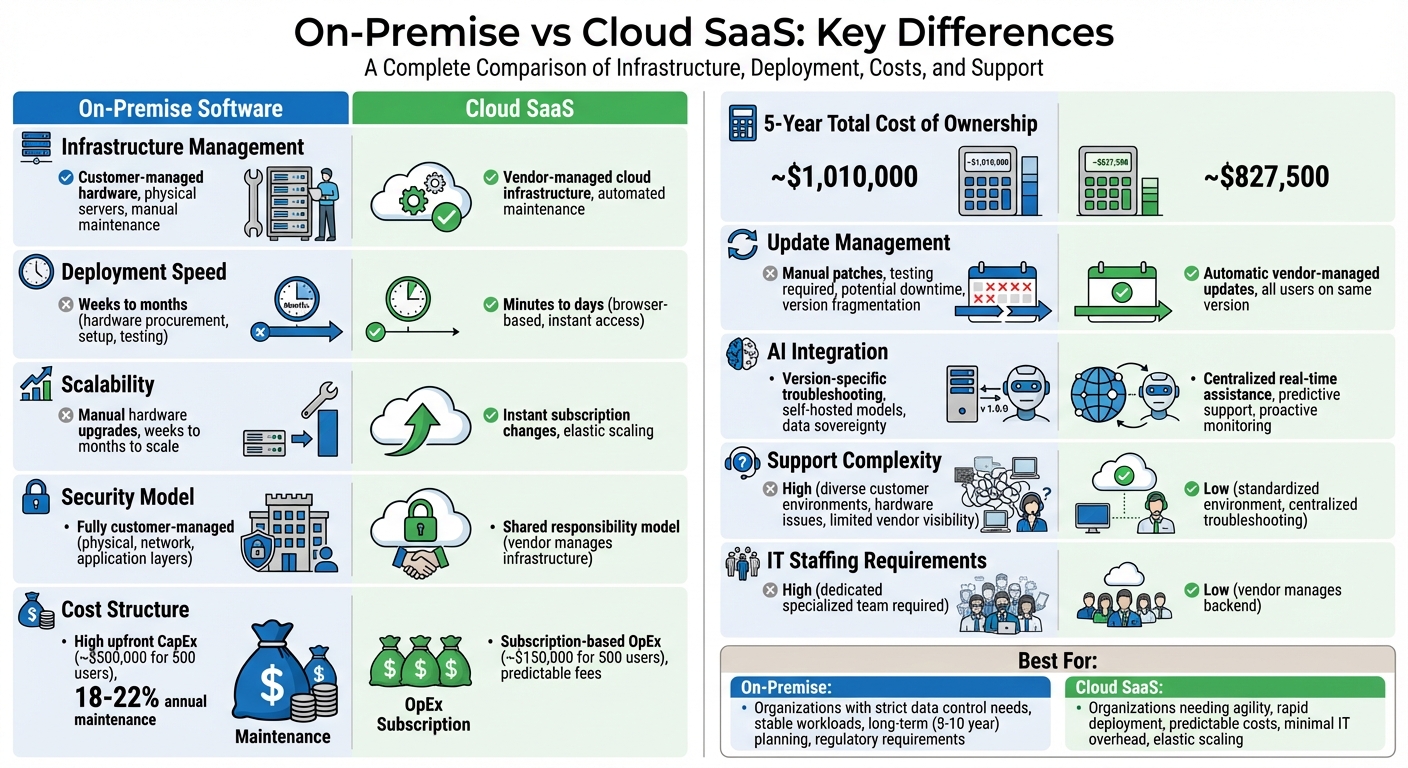
On-Premise vs Cloud SaaS: Complete Comparison of Infrastructure, Costs, Security, and Support
The Pros and Cons of SaaS vs On Premise Software: Which is Right for Your Business
sbb-itb-e60d259
Infrastructure and Deployment: How Support Challenges Differ
The way infrastructure is managed plays a major role in shaping support challenges. With on-premise software, customers are responsible for maintaining physical servers, storage systems, and networking equipment. On the other hand, cloud-based SaaS takes care of infrastructure management for the customer, requiring only a stable internet connection and a compatible browser.
These differences lead to unique support needs. On-premise support teams often deal with hardware failures, power outages, network issues, and application errors. In contrast, SaaS support teams work within a controlled, vendor-managed environment, which reduces the number of variables they need to address.
Deployment timelines also highlight this divide. SaaS solutions can be up and running in just a few minutes or days. On-premise deployments, however, may take months or even years due to hardware procurement, physical setup, and extensive integration testing. A notable example is 37signals‘ decision in 2023 to move their products from the public cloud to an on-premise setup. This shift saved them around $2 million annually, with projected savings of over $10 million within five years [3]. However, this transition required significant planning and dedicated IT resources upfront. These infrastructure distinctions also influence scalability and upgrade strategies, which we’ll touch on next.
On-Premise: Hardware Dependencies and Manual Maintenance
On-premise environments come with their own set of challenges. Support teams must handle server maintenance, operating system updates, hardware troubleshooting, and disaster recovery. A server failure, even in the middle of the night, demands immediate attention from the customer’s IT team.
Hardware refresh cycles typically occur every three to five years, requiring careful capacity planning and a substantial financial investment. Scaling up an on-premise system involves purchasing and installing new hardware, a process that can take weeks or even months. Additionally, support teams must navigate a variety of configurations across different customer environments, making troubleshooting more complex and time-consuming.
Cloud SaaS: Centralized and Scalable Infrastructure
Cloud-based SaaS, on the other hand, simplifies management significantly. In this model, the vendor handles all infrastructure responsibilities, freeing customers from concerns about hardware. Updates, patches, and maintenance are automated, maintaining a consistent and standardized environment that makes troubleshooting more straightforward.
"With a SaaS offering, you don’t have to think about how the service is maintained or how the underlying infrastructure is managed. You only need to think about how you will use the software."
Scaling with SaaS is nearly instantaneous – customers can simply adjust their subscription to meet their needs. Deployment is quick, typically taking minutes or days, and built-in disaster recovery ensures greater reliability. While this approach reduces the operational load on customer IT teams, it shifts their focus to managing vendor relationships and optimizing application use.
Comparison Table: Infrastructure and Support Responsibilities
Here’s a quick comparison of how infrastructure and support responsibilities differ between on-premise and cloud SaaS models:
| Responsibility | On-Premise | Cloud SaaS |
|---|---|---|
| Hardware Maintenance | Customer (In-house IT) | Vendor (Cloud Provider) |
| OS Patching | Customer | Vendor |
| Physical Security | Customer (Facility control) | Vendor (Data center security) |
| Deployment Speed | Weeks to Months | Minutes to Days |
| Connectivity | Local Network / VPN | Internet / Browser-based |
| Scaling | Manual (Buy/Install hardware) | Automatic (Subscription change) |
Scalability and Upgrades: Managing Customer Growth
When it comes to scaling and upgrades, the differences between on-premise systems and cloud-based SaaS solutions are stark. These distinctions directly influence how support teams operate and how quickly businesses can adapt to growth.
On-Premise: Manual Upgrades and Scaling Challenges
Scaling an on-premise system is no small feat. It involves purchasing, installing, and testing new hardware – a process that can drag on for weeks or even months. This forces businesses to predict future needs well in advance, often leading to over-provisioned hardware that sits idle when demand is low.
Upgrades are another hurdle. Each major update requires IT teams to manually apply patches, check for compatibility issues, and manage potential downtime. These processes are often delayed because companies fear disrupting custom integrations or ongoing operations. As a result, many organizations end up running outdated software versions, exposing themselves to security risks and missing out on new features [2].
For example, one enterprise that transitioned back to an on-premise setup managed to save $2 million annually. However, this move came with a hefty upfront investment in IT resources [3]. While on-premise systems can be cost-efficient for steady-state workloads, they demand significant operational effort. In contrast, cloud SaaS platforms simplify scaling and upgrades, making them more agile and user-friendly.
Cloud SaaS: Effortless Scaling and Automatic Updates
SaaS platforms take a completely different approach. Customers can scale their capacity within minutes using a self-service portal, eliminating the need for hardware purchases and lengthy setup times [3]. This flexibility is especially useful for handling seasonal spikes, like holiday shopping surges, without committing to permanent infrastructure.
Upgrades are also handled seamlessly in SaaS environments. Vendors manage updates for all users, ensuring everyone operates on the latest version simultaneously [5]. This removes the need for manual testing or downtime, though support teams must stay on top of release notes as updates can introduce immediate changes to workflows.
"Cloud shifts the operational burden from hardware to software optimization, but it doesn’t eliminate it."
SaaS support teams now focus more on optimizing performance rather than maintaining hardware. For instance, Palo Alto Networks used autonomous platforms to handle over 89,000 production changes in their cloud infrastructure without any incidents [3]. However, cloud environments aren’t without inefficiencies – 31% of IT leaders report wasting over half of their cloud budgets, often due to over-provisioning for peak demand and failing to scale back afterward [3].
Comparison Table: Scalability and Upgrade Processes
| Feature | On-Premise | Cloud SaaS |
|---|---|---|
| Time to Scale | Weeks to months (hardware procurement) | Minutes (subscription adjustment) |
| Upgrade Process | Manual; requires testing and downtime | Automatic; vendor-managed |
| Resource Impact | Dedicated hardware and IT staff required | Vendor-managed; FinOps oversight needed |
| Customer Impact | Potential downtime during upgrades | Seamless; continuous feature rollouts |
| Cost Model | Capital expenditure; high upfront costs | Operational expenditure; subscription-based |
| Elasticity | Low; idle hardware during low usage | High; scales down to save costs |
Security, Compliance, and Support Accountability
Security and compliance play a crucial role in shaping support responsibilities, and these dynamics differ significantly between on-premise solutions and SaaS platforms. How these responsibilities are divided impacts everything from incident management to regulatory compliance efforts.
On-Premise: Customer-Owned Security and Compliance
On-premise solutions place the entire burden of security and compliance on the customer. From controlling physical access to their data centers to managing firewalls and application-level protections, customers are responsible for every layer of security. This setup directly affects support workflows. When security issues arise, vendors often have limited visibility into the customer’s infrastructure, making it much harder to identify and resolve the root cause of incidents [7].
"In practice, it creates a partnership dynamic where you and your customer must work together to implement a secure environment for that application."
Support teams often face delays when coordinating with customer IT teams, particularly for tasks like applying security patches. Many organizations rely on outdated software, creating vulnerabilities. In fact, on-premise environments are attacked over three times more often than cloud-based solutions [1].
Compliance adds further challenges. On-premise customers must independently achieve certifications like SOC 2, ISO 27001, or HIPAA. When auditors ask where sensitive data resides, the answer points to the customer’s own data centers. While this gives them full control, it also means they bear full responsibility [2]. Additionally, support teams need to adapt to each customer’s unique identity systems – whether it’s LDAP, SAML, or a proprietary solution – requiring custom integrations for every deployment [7]. This division of responsibilities not only complicates security but also intensifies the demands on support teams.
Cloud SaaS: Centralized Security and Compliance Oversight
SaaS platforms operate under a Shared Responsibility Model, which simplifies security and compliance processes. The provider takes care of infrastructure security, while customers focus on securing their data and access configurations [3]. Vendors manage physical security, network defenses, and automated patching across all customers, creating a standardized and transparent environment that simplifies support.
Interestingly, customer misconfigurations are the leading cause of cloud security incidents, as frequent changes can outpace manual reviews [3]. However, SaaS providers maintain key compliance certifications like SOC 2, ISO 27001, and HIPAA, reducing the compliance burden for customers. Instead of building their own programs, customers can rely on the provider’s certifications [6].
"Cloud providers focus more of their efforts on security and governance issues than do enterprises that generate their own security walls and barriers because it actually is their business."
- Beyond Software [1]
When a breach occurs in a SaaS environment, the provider’s dedicated security team often detects and addresses the issue before customers are even aware [4]. As a result, support efforts shift away from troubleshooting infrastructure and toward managing vendor relationships and access governance.
Comparison Table: Security and Compliance Responsibilities
| Responsibility | On-Premise | Cloud SaaS |
|---|---|---|
| Physical Security | Customer managed | Vendor managed |
| Infrastructure/Hardware | Customer managed | Vendor managed |
| OS Patching | Manual; customer IT team | Automatic; vendor managed |
| Application Security | Primarily customer | Shared (vendor/customer) |
| Compliance Certifications | Customer must obtain | Vendor provided (SOC 2, ISO) |
| Breach Detection | Customer-led using internal tools | Vendor-led with dedicated teams |
| Data Sovereignty | Full customer control | Data in vendor’s cloud regions |
| Support Complexity | High; limited vendor visibility | Low; standardized environment |
These differences in security and compliance responsibilities highlight the contrasting operational demands of on-premise and SaaS solutions, setting the stage for how AI can enhance support in both models.
Cost Structures: Impact on Support Efficiency and Planning
Financial models play a key role in shaping support operations, resource allocation, and growth strategies. The choice between on-premise and cloud-based solutions significantly impacts cost efficiency and long-term planning.
On-Premise: High Upfront Costs and Long-Term Maintenance
On-premise software requires a hefty initial investment, categorized as Capital Expenditure (CapEx). For example, deploying a 500-user system can cost around $500,000 in the first year, covering licenses, hardware, and infrastructure expenses [2]. Beyond this, organizations face ongoing costs like staffing, hardware refresh cycles every 3–5 years, and maintenance fees ranging from 18% to 22% of the initial license cost [2].
There are also hidden expenses. Power, cooling, and data center space add to the financial burden. A Dell PowerEdge server, comparable to a medium-scale cloud instance, is priced at $14,300 [8]. For AI-driven support, an NVIDIA H100 GPU server – costing between $25,000 and $40,000 – can break even against monthly cloud costs in roughly 15 months [8][9].
In 2026, Lenovo‘s Total Cost of Ownership analysis highlighted that a single NVIDIA H100 GPU server could handle enterprise-level AI workloads equivalent to cloud services costing over $100,000 annually [9]. However, this assumes the organization has the expertise to manage and maintain the infrastructure, which often requires a significant staffing investment. Without skilled personnel, the cost advantage of on-premise systems diminishes.
Cloud SaaS: Subscription-Based and Predictable Costs
SaaS operates under an Operational Expenditure (OpEx) model, offering predictable monthly or annual subscription fees that simplify budgeting. By 2024, enterprise SaaS spending exceeded $232 billion, reflecting its widespread adoption [2]. For a 500-user deployment, the first-year cost is approximately $150,000, eliminating the need for hardware procurement [2].
However, this predictability comes with challenges. Organizations must plan for annual price increases of 5% to 15% and address inefficiencies like "SaaS sprawl", where 25% to 30% of licenses remain unused [2]. For instance, an AWS c8g.8xlarge instance costs about $11,200 per year [8]. AI-specific costs can also add up quickly; a GPT-4-class API call, priced at $0.03 to $0.06 per 1,000 tokens, could result in annual expenses exceeding $100,000 for high-volume use cases [9].
"At enterprise scale, cloud AI API costs compound into six- and seven-figure annual bills – and they grow linearly with usage."
Some organizations have reported significant savings by switching to SaaS. For example, in 2025, Xero saved $500,000 annually by migrating its internal support and collaboration systems to a SaaS platform [11]. SaaS providers handle backend maintenance, freeing support teams to focus on enhancing user experiences rather than troubleshooting infrastructure. This shift has led to a 70% increase in gross profit margins and a 41% boost in operating margins for some organizations [4].
The OpEx model also facilitates the integration of AI-driven customer support, enabling scalable and cost-efficient operations.
Comparison Table: Cost Models and Support Implications
| Cost Category | On-Premise | Cloud SaaS |
|---|---|---|
| Upfront Investment | High ($500,000 for 500 users) | Low ($150,000 for 500 users) |
| Budgeting Category | CapEx (Capital Expenditure) | OpEx (Operational Expenditure) |
| Annual Maintenance | 18–22% of initial license cost | Included in subscription |
| IT Staffing Needs | High; requires specialized team | Low; vendor manages backend |
| Hidden Costs | Power, cooling, hardware refresh | Recurring fee increases, unused licenses |
| 5-Year TCO (500 users) | ~$1,010,000 | ~$827,500 |
| Scalability Cost | Requires new hardware | Pay-as-you-go; elastic pricing |
| Break-Even Point | ~15 months for hardware vs. cloud | N/A; ongoing subscription |
Over a five-year period, SaaS solutions are generally more cost-effective, with a Total Cost of Ownership (TCO) of $827,500 compared to $1,010,000 for on-premise systems [2]. However, for large, stable workloads, on-premise deployments can become more economical over a longer timeframe, such as 5–10 years [10]. Organizations need to carefully evaluate the ROI of AI and their technical capabilities when deciding between these models, especially in AI-driven support environments.
AI-Driven Support for On-Premise and SaaS
AI is transforming how support teams tackle technical challenges, but its application varies significantly between on-premise and SaaS models. Each approach has distinct hurdles, and AI offers tailored solutions to address them effectively.
AI for On-Premise: Tackling Version-Specific Complexities
On-premise deployments often involve customers running various software versions on diverse infrastructures, making support a logistical maze. AI tools trained on version-specific documentation help streamline this process by offering targeted troubleshooting based on the exact software version in question [14].
Multimodal AI interfaces play a key role here. These tools can analyze error screenshots, parse log files, and interpret code snippets in a single request, speeding up root-cause analysis in fragmented environments [14]. For instance, tools like "Cursor Lookup" allow AI to query specific codebases, delivering precise answers instead of generalized solutions [14].
Security and compliance are also major concerns for on-premise solutions, especially in regulated industries. Self-hosted AI models, such as Llama 3 or Mistral, ensure sensitive data stays on-premises, meeting strict guidelines like GDPR and HIPAA [14][15]. This setup also gives organizations control over their update cycles, avoiding disruptions caused by SaaS providers phasing out model versions.
"We built our legal tech product on OpenAI’s
gpt-3.5-turbo-0301. When they deprecated it, our entire prompt engineering library broke overnight."
- CTO of a Series B Startup [15]
AI-powered auto-triage systems further enhance support, achieving up to 92% accuracy in categorizing technical queries. These systems quickly identify whether an issue relates to APIs, SDKs, or billing, ensuring it reaches the right team without delay [14]. This precision is critical when managing multiple software versions simultaneously.
On the other hand, SaaS environments leverage centralized data to deliver more unified support experiences.
AI for SaaS: Predictive and Proactive Assistance
SaaS platforms benefit from centralized infrastructures that enable AI to deliver context-aware suggestions in real time. By indexing external documentation and integrating with tools like vector databases, SaaS AI creates a unified knowledge layer for seamless customer interactions [17].
One standout strength of SaaS AI is its ability to detect issues proactively. Real-time sentiment analysis and automated SLA breach alerts help reduce response times. These systems also integrate with popular tools like Linear and Jira, cutting first-response times by up to 50% [14]. With 84% of developers already using or planning to adopt AI tools, these capabilities are becoming increasingly valuable [14].
However, cloud-based AI comes with its own challenges. Organizations often become reliant on vendor-controlled roadmaps, pricing models, and uptime guarantees. As one developer aptly put it:
"Cloud AI gives you incredible agility. But it also means you grow dependent on the vendor’s roadmap, pricing, and uptime."
Practical AI Applications Across Both Models
Both on-premise and SaaS setups benefit from advanced AI tools that simplify support operations. Agentic AI, for example, autonomously handles multi-step tasks like retrieving account data, generating customized code snippets, and resolving routine tickets without human intervention [14].
Supportbench‘s AI Predictive CSAT feature highlights how AI can enhance service quality. By analyzing case histories, it predicts customer satisfaction scores before surveys are sent, enabling teams to address potential issues proactively. Similarly, AI-powered knowledge base tools can automatically generate articles from resolved cases, turning every support interaction into a reusable resource.
For technical B2B support, a human-in-the-loop model ensures quality control. AI drafts responses and suggests solutions, but human agents review them before finalizing to prevent errors or security risks in code recommendations [14].
"The support team becomes a quality gate, not just a routing mechanism."
It’s crucial for organizations to audit their knowledge bases before deploying AI. The quality of AI outputs directly depends on the accuracy of the training data – bad data leads to bad results.
In a notable example, global engineering firm Worley partnered with Dell and NVIDIA in February 2026 to build on-premise AI infrastructure. They reported that running AI workloads in-house was 75% more cost-effective than using cloud solutions for their steady, high-volume needs [13][18]. While SaaS offers quicker deployment, on-premise AI can be more economical for organizations with consistent workloads and technical expertise.
Many enterprises are finding that the best approach is a hybrid model. By using cloud platforms for experimentation and large-scale training while deploying stable models on-premise, companies can strike a balance between agility, cost control, and data sovereignty [13][12].
Conclusion
Supporting on-premise software and cloud-based SaaS requires entirely different approaches. On-premise setups demand in-house hardware management, large upfront investments, and the ability to handle diverse customer infrastructures. On the other hand, SaaS shifts these responsibilities to the vendor, enabling support teams to prioritize customer success rather than infrastructure management.
The operational differences between the two are striking. On-premise support teams face the challenge of managing various customer environments, while SaaS benefits from centralized systems where all users operate on the same version. This impacts everything from troubleshooting processes to upgrade cycles. These differences also influence cost and technology strategies. By 2025, it’s estimated that 85% of enterprise applications will be SaaS-based, signaling the industry’s growing preference for subscription models [19].
Cost structures vary significantly as well. On-premise solutions require major capital expenses, whereas SaaS operates on predictable subscription fees. However, there’s a catch – companies often waste 25–30% of their SaaS budgets on unused licenses, highlighting the importance of effective vendor management [2].
AI is reshaping both models in unique ways. For on-premise systems, AI emphasizes data sovereignty and custom automation for specific software versions. In contrast, SaaS leverages AI for proactive and predictive support through centralized platforms. Many organizations are now adopting hybrid approaches – using the cloud for experimentation while relying on on-premise systems for stable, high-volume workloads.
FAQs
When is on-prem support cheaper than SaaS?
On-prem support can save money for organizations that already have the infrastructure and a dedicated IT team in place. It’s a solid choice for businesses that prefer to take charge of updates, security, and hardware management themselves, steering clear of ongoing subscription costs. This setup works well when a company can manage these tasks effectively without driving up expenses.
How do you prevent on-prem version drift?
To keep on-premise systems consistent and avoid version drift, it’s important to implement strategies that maintain uniform configurations across environments. Techniques like immutability practices – where environments are kept in a fixed state – and GitOps, which uses version-controlled configurations, are highly effective. Tools for automated deployment and configuration management can ensure systems stay aligned with their intended state. Another helpful approach is regularly replacing servers with pre-defined, version-controlled configurations. This not only ensures consistency but also minimizes the risk of unexpected changes over time.
What’s the best AI setup for regulated support?
The most effective AI setup for regulated support emphasizes security, control, and compliance – critical factors in sectors such as healthcare and finance. An on-premise AI solution stands out here, as it processes data locally, keeping sensitive information secure while adhering to regulations like HIPAA or GDPR. Incorporating fine-tuned small language models (sLLMs) and retrieval-augmented generation (RAG) boosts performance without compromising data sovereignty. Additionally, strict access controls and detailed audit trails ensure regulatory requirements are met.
Related Blog Posts
- Which helpdesk tools are built outside the United States (UK/EU/Canada/Australia)?
- What are common reasons teams leave Service Cloud for a dedicated support platform?
- Help Scout alternatives for B2B teams: what to choose when you outgrow shared inbox
- ServiceNow vs. Supportbench: Do You Really Need ITSM for Customer Support?