



Customer churn costs U.S. businesses $136.8 billion annually. The good news? 67% of churn cases can be avoided if addressed early. Support conversations often contain early warning signs of churn – subtle cues like negative sentiment, repeated complaints, or reduced engagement. Identifying these signals helps you act before it’s too late.
Key early churn signals to watch for:
- Negative tone or language: Shifts from friendly to curt or frustrated messages.
- Recurring complaints: Issues brought up repeatedly without resolution.
- Long-open tickets: Unresolved issues that linger signal neglect.
- Cancellation-related language: Phrases like “not working for us” or questions about contract terms.
- Decreased engagement: Fewer interactions or reduced activity from key contacts.
Manual reviews can work for small teams, but AI tools like sentiment analysis and predictive scoring scale this process. These tools flag at-risk accounts by analyzing trends in tone, engagement, and unresolved issues. Acting quickly on these insights – especially for high-value customers – can significantly reduce churn rates.
Support interactions are a goldmine for spotting dissatisfaction. By addressing warning signs early, you can save relationships and protect revenue.
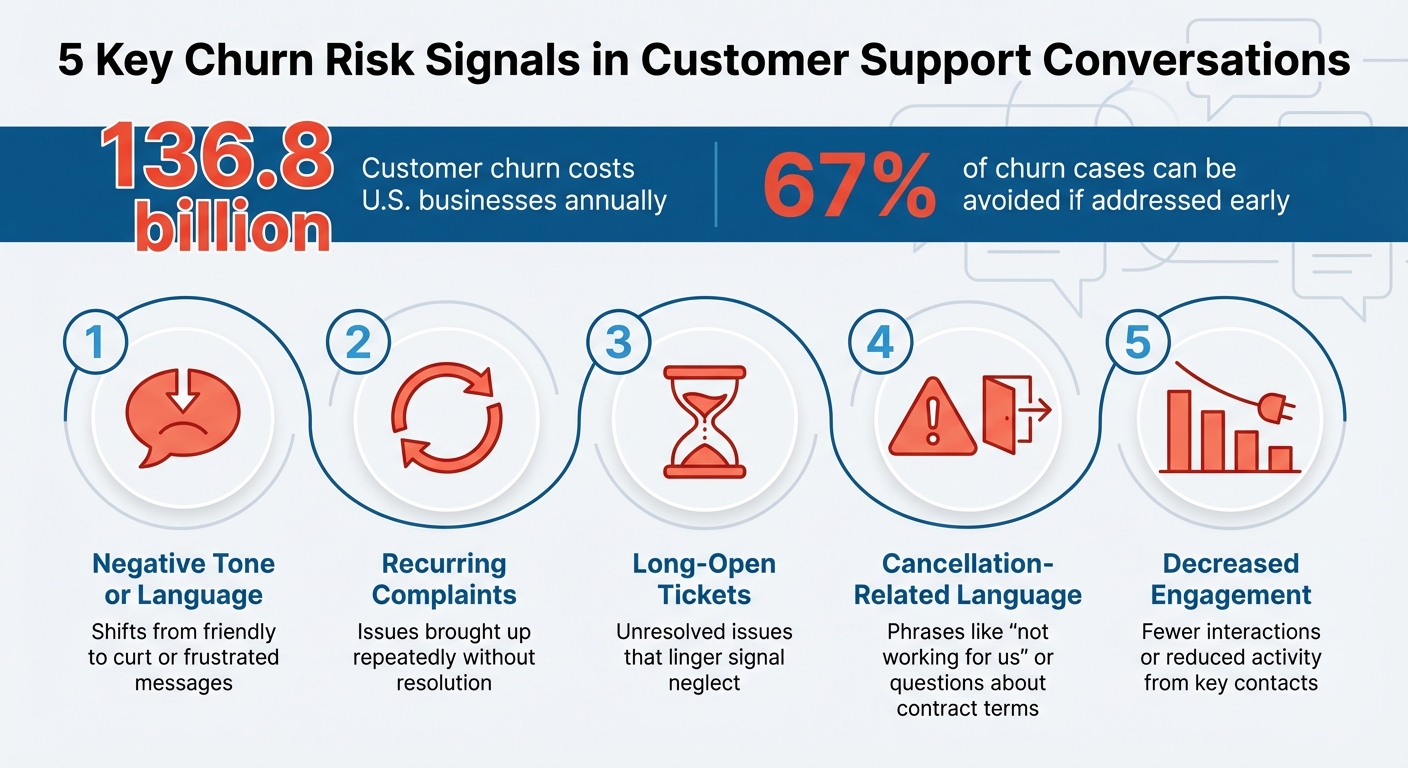
5 Key Churn Risk Signals in Customer Support Conversations
Customer Churn Prediction Explained | Reduce Churn with Data Science
sbb-itb-e60d259
Common Churn Risk Signals in Support Conversations
Churn signals don’t come with loud alarms or neon signs. Instead, they slip into everyday support interactions as subtle cues. Spotting these early can shift your support team from merely solving problems to actively preventing customer loss. By identifying these signs in customer messages, your team can step in before churn becomes inevitable. Let’s explore some of the most common signals that hint at customer dissatisfaction.
Negative Sentiment in Customer Messages
A shift in tone is often the first clue. A customer who used to say, "Thanks for your help!" might start replying with curt phrases like "still not working" or "disappointed." Words like these often reflect frustration, confusion, or a sense of being ignored – clear signs that the relationship is fraying.
Changes in communication patterns are just as telling. Customers who once asked detailed, enthusiastic questions might start sending vague or infrequent messages. This "silent churn" often signals they’ve mentally checked out long before they officially cancel.
Repeated Complaints About the Same Issues
When customers bring up the same issue over and over, it’s a major warning sign. Recurring complaints suggest they’re losing faith in your ability to resolve their problems. If your team notices multiple tickets for the same issue, it’s time to dig deeper. These unresolved frustrations can erode trust quickly. As Johnny Grow puts it, "When complaints or cases repeat or are not satisfactorily resolved they become terminal" [3].
Multiple Escalations and Long-Open Tickets
Nothing screams neglect like an unresolved ticket lingering for weeks. Long-open tickets signal to customers that their concerns aren’t being prioritized. Each passing day reinforces their dissatisfaction, making it harder to rebuild trust. Resolving issues promptly through dynamic SLAs isn’t just good service – it’s essential for keeping customers from walking away.
Language Suggesting Contract Cancellation
Sometimes, the signs are right there in the customer’s words. Phrases like "I have been trying to", "this is the third time", or "is there an alternative" often indicate they’re already exploring other options [4]. Questions about cancellation policies, contract terms, or whether the product is still a good fit are also red flags.
Statements such as "I’m not sure this is working for us" or "We’re evaluating our options" are even more direct. As Atticus Li notes, "The cancellation button is a lagging indicator. By the time a user clicks it, the decision to leave was made days, weeks, or even months earlier" [4]. Spotting these signals early gives your team a chance to intervene and re-engage the customer.
Reduced Participation from Key Contacts
When a primary contact at a customer account goes quiet, it’s a serious concern. A significant drop – say, 70% less engagement – often predicts churn [4]. This isn’t just about fewer tickets; it’s about a noticeable withdrawal from the relationship.
If a once-active user stops engaging, it’s rarely because they’re fully satisfied. More often, they’ve given up. Look for customers who stop using advanced features or only interact with the most basic aspects of your product. These shifts often signal they’re on the verge of disengaging entirely – and canceling their account soon after.
Methods for Detecting Churn Risk Signals
Once you’ve defined churn signals, the next step is figuring out how to detect them effectively – especially when you’re dealing with hundreds or even thousands of interactions each month. Manually reviewing every single ticket isn’t realistic, but there are several ways to tackle this challenge, ranging from manual reviews to AI-powered tools that handle the heavy lifting.
Manual Analysis of Support Transcripts
If your customer base is smaller, manual analysis can still work well. According to Josh Solomon from Mosaic AI, "Support is a gold mine of early customer churn signals for one simple reason: it’s where customers tell the truth first" [5]. Support tickets often reveal candid feedback that customers might hesitate to share in more formal settings, like Quarterly Business Reviews.
Start by looking for specific keywords that signal frustration. Early signs might include mentions of minor issues, but as dissatisfaction grows, you’ll notice stronger language like "misleading", "unacceptable", or "disappointed." Phrases such as "regret buying", "switching to a competitor", or "considering canceling" are direct red flags. Another major warning sign? Requests to export data, which often indicate customers are preparing to leave, possibly for a competitor.
To make this process more actionable, you can use a simple scoring system. For example:
- Assign 1 point for mentions of minor bugs.
- Assign 5 points for high-risk phrases like data export requests.
This approach helps you prioritize accounts that need immediate attention [5]. However, for larger customer bases or quicker insights, automation becomes essential.
AI-Powered Sentiment Analysis and Pattern Recognition
AI tools can process thousands of conversations in minutes, analyzing sentiment and detecting subtle changes in tone that might indicate disengagement [1]. These tools go beyond what manual reviews can achieve, identifying when a customer’s tone shifts from proactive and engaged to reactive and frustrated.
AI can also group similar issues together, such as repeated complaints about billing or consistent feedback on a problematic feature. This clustering helps identify broader, systemic problems that could be driving churn [1].
Building on this, AI-driven predictive scoring offers a more comprehensive way to assess account health.
Predictive Churn Scoring with Supportbench
Supportbench takes churn detection to the next level by combining AI with predictive scoring. This system identifies subtle patterns in customer behavior, such as reduced executive engagement or an increase in escalations [7]. It integrates data from product usage, support tickets, customer sentiment, and engagement levels to calculate a health score for each account on a 1–10 scale:
- 9–10: Healthy accounts with potential for expansion.
- 7–8.9: Stable accounts.
- 5–6.9: At-risk accounts requiring proactive action.
- Below 5: Critical accounts needing immediate attention [7].
The platform prioritizes more predictive signals, like negative sentiment in support tickets or the departure of an executive sponsor, over less impactful metrics. These scores can automatically trigger playbooks for follow-ups, whether that means personalized emails or urgent calls to address critical issues [7].
As Angeline Gavino, VP of Customer Success and Support at Katalon, puts it: "We don’t do red, amber, green signals. These are your accounts at churn risk because of these particular reasons, signals around product adoption and product usage. That’s what actually tells you what to do next" [6].
Taking Action on Identified Churn Risks
Once you’ve identified churn risks, the next step is to act quickly. Without a clear plan to address warning signs, even the most advanced detection system becomes just another unused tool.
Prioritizing High-Risk Cases
Start by focusing on the customers who matter most to your bottom line – those with high revenue or lifetime value (LTV). For example, a customer paying $50,000 annually showing signs of churn should get immediate attention, while a $500-per-month account might follow a standard retention process. This revenue-based approach ensures your team’s efforts are aligned with the financial stakes [9][11].
Pay extra attention to new customers during their first 90 days, as this is when churn risk is highest. Monthly contracts, in particular, have a churn rate of about 55%, compared to just 21% for annual contracts. Encouraging monthly customers to switch to annual plans can help reduce this risk [9].
Another often-overlooked indicator is the "absence of signal" – customers who stop responding to surveys, skip meetings, or show no product activity. These "silent" accounts require proactive outreach. As Cary Self, VP of Education at CustomerGauge, puts it:
"You have to bring the same level of excitement to retention that you bring to new sales!" [11]
Responding to negative feedback within 48 hours can boost retention rates by 8.5% [11]. Use automated workflows to ensure your team reacts promptly to early warning signs, such as declining feature usage or a spike in support tickets [10].
To make these efforts effective, combine prioritization strategies with a robust health scoring system.
Combining Support Data with Customer Health Scores
Support data alone can’t give you the full picture. Instead, combine it with usage patterns and customer sentiment to create a more accurate health score. For example, analyzing the past 6–12 months of data from churned and retained customers can reveal which support patterns – like repeated issues or lack of engagement – signal a higher risk of churn [7].
Rachael Bueckert, Marketing Manager at Union Square Consulting, highlights the importance of accurate health scores:
"A health score built on the wrong assumptions won’t just fail to predict churn – it’ll actively hide it" [7]
Tools like Supportbench use an automated scoring system, assigning accounts a score from 1 to 10. Accounts scoring below 5.0 require immediate attention, while those between 5.0 and 6.9 need proactive outreach [7]. Tailor these scores based on customer segments. For instance, a seasoned enterprise client might have fewer support tickets because they’re self-sufficient, while a new customer with no tickets might actually be disengaged [12].
Interestingly, only 42% of customer success teams currently track health scores [13]. This means many companies are operating without clear visibility into customer health. Pairing metrics like the Customer Effort Score (CES) and other satisfaction metrics with health scores during onboarding can help identify early pain points. For instance, if many customers struggle with the same integration step, it’s a sign of a broader issue that needs fixing [13].
Once these scores are in place, track their impact to refine your strategies over time.
Tracking Retention Impact Over Time
To gauge the effectiveness of your retention efforts, monitor key metrics like Customer Churn Rate, Revenue Churn Rate, and Net Revenue Retention (NRR). For enterprise B2B SaaS, a monthly churn probability above 5% is often considered a red flag [16].
Use cohort analysis to identify trends among specific groups of customers. For example, segment customers by their onboarding date or feature usage. If customers who integrate your product with other tools have a 40% lower churn rate, focus your efforts on promoting those integrations during onboarding [14][15].
Track Time-to-Value (TTV) – the time it takes for a new customer to achieve their first meaningful outcome with your product. If TTV exceeds 90 days, the risk of churn increases significantly [16]. Regularly review metrics like churn rate, retention rate, and the percentage of high-risk customers through a dashboard to stay on top of account health [9].
Beyond the immediate revenue impact, consider the broader costs of churn. For instance, if you’re spending $10,000 to acquire a customer who leaves after six months, your retention efforts must account for that acquisition cost, not just the subscription revenue loss [17].
Keep in mind that 44% of customers churn because they’re not achieving their desired outcomes [10]. Yet, 73% of Customer Success Managers lack a formal strategy to win back lost customers [10]. Use the data you collect to not only react to churn but also to build proactive strategies that help customers realize value early on. That "a-ha moment" can make all the difference.
Conclusion
Support interactions can act as an early warning system for customer churn. The key difference between simply solving problems and actively retaining customers lies in paying attention to what customers aren’t saying. Silent churn – when customers disengage without voicing complaints – is especially tricky to spot. Yet, the clues often hide in plain sight within support transcripts [1].
Switching from manual ticket reviews to AI-powered detection transforms this process. Tools like Supportbench monitor customer sentiment in real time, compile data from multiple touchpoints, and use machine learning to identify patterns that even experienced managers might miss [8]. For instance, if a high-value customer shifts from asking proactive questions to logging reactive complaints, or if their tone becomes vague and detached, these subtle changes are flagged before they escalate into cancellations [1]. This kind of precision allows for timely and effective interventions.
What makes this approach so impactful is its blend of detection and action. AI-driven alerts enable teams to address escalated or unresolved tickets before they lead to churn, resulting in improved CSAT and NPS scores, faster resolutions, and reduced manual workload [2]. Beyond operational benefits, this strategy strengthens customer relationships by showing them they’re valued and understood [1]. Identifying dissatisfaction early gives businesses the chance to make things right before it’s too late.
FAQs
What’s the fastest way to spot “silent churn” in tickets?
The fastest way to spot “silent churn” is by keeping an eye on support-related signals, such as shifts in behavior, drops in sentiment, and unusual ticket trends. Be alert for things like slower reply times, canceled meetings, changes to more formal communication, or negative language (e.g., phrases like “fed up”). Also, pay attention to ticket volume – both sudden spikes and long periods of inactivity (like no tickets for over 60 days) can be red flags. Using AI tools for sentiment analysis and alerts can help you catch these signs early and take action before it’s too late.
Which support signals predict churn most reliably?
When it comes to spotting churn risks in customer support, some signals stand out as particularly telling. These include negative sentiment shifts, frequent complaints, unresolved problems, a noticeable rise in ticket volume, reduced product usage, and tickets that escalate over time. By digging into support conversations and ticket data, you can identify patterns and trends that often hint at customers who may be on the verge of leaving.
How do I prioritize at-risk accounts without overreacting?
To manage at-risk accounts effectively, start by assessing the level of risk and the account’s importance to your business, such as its Annual Recurring Revenue (ARR). Concentrate your efforts on customers that have the most significant impact, rather than treating every warning sign with the same urgency. It’s also essential to get input from account managers about the customer relationship and any recent feedback. This can help you determine whether the situation requires immediate action or can be addressed more calmly. Taking this thoughtful approach helps prevent churn without wasting resources on overreacting to minor issues.






