


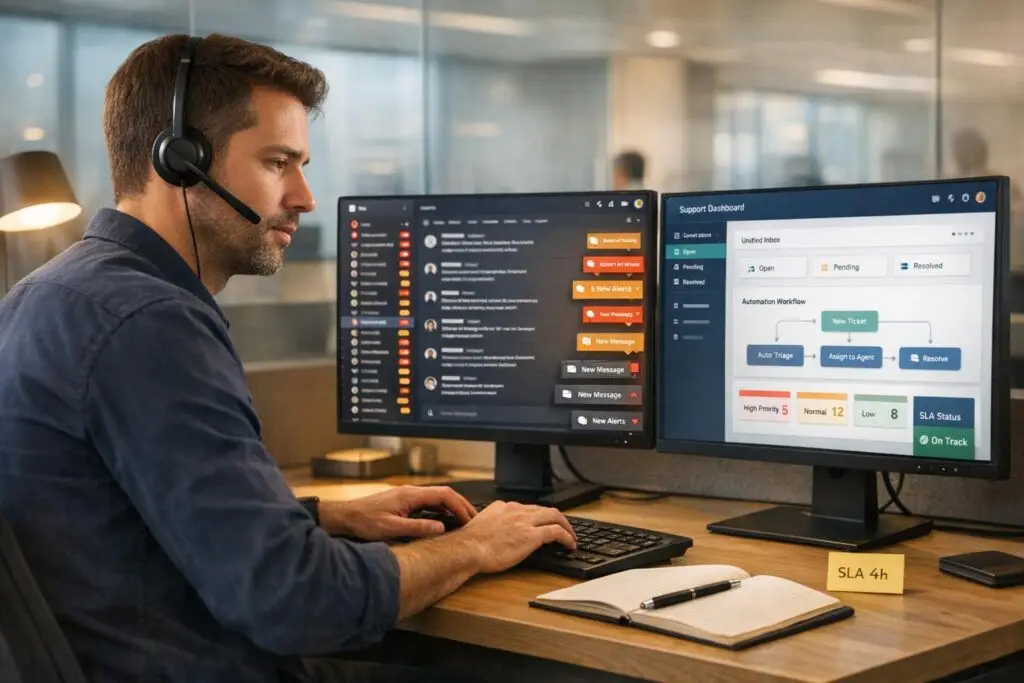
Slack is burning out your support agents. Constant notifications, endless threads, and the pressure to always respond are overwhelming teams. Here’s why this matters:
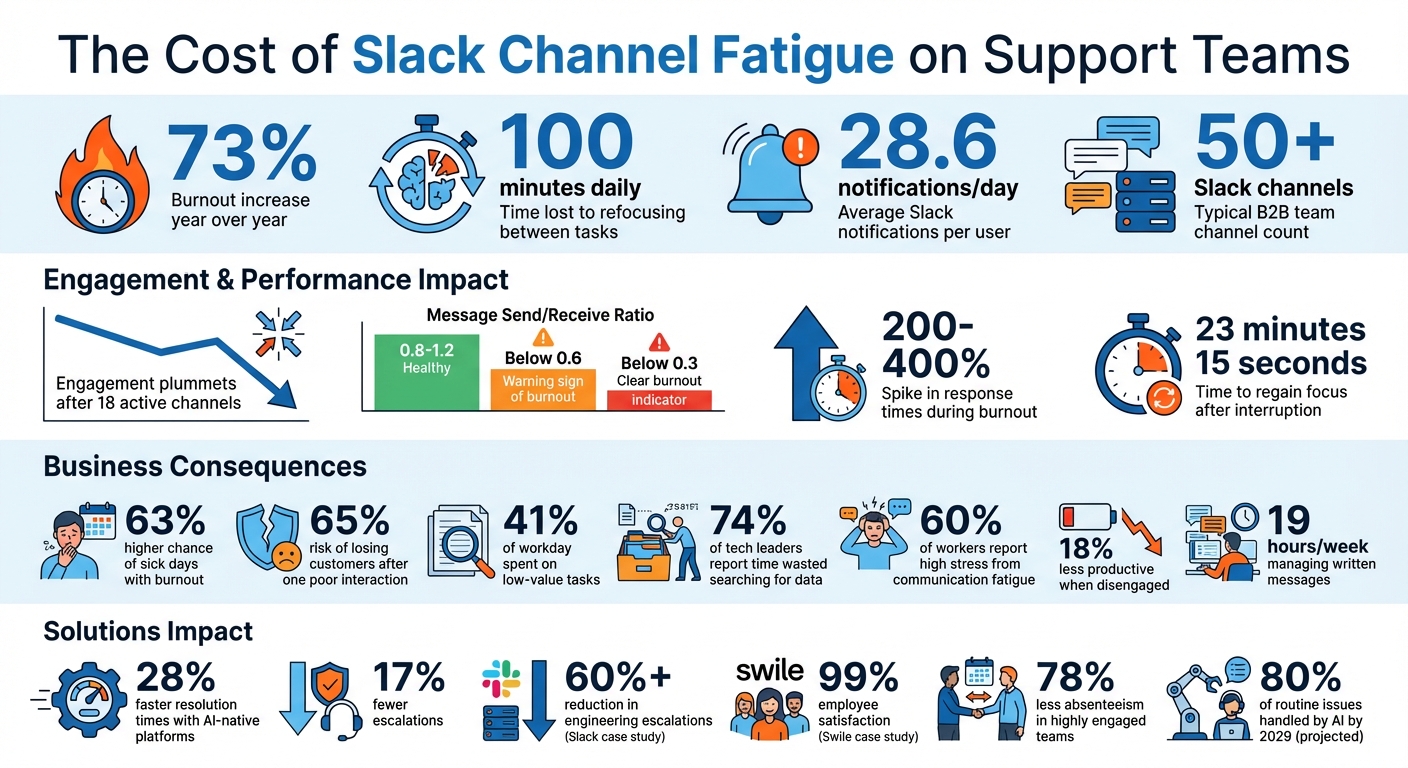
- Burnout is up 73% year over year.
- Agents lose 100 minutes daily refocusing between tasks.
- 28.6 notifications/day disrupt focus, leaving agents mentally drained.
For B2B teams managing 50+ Slack channels, critical customer issues are buried in the chaos. Missed SLAs, slower resolutions, and unhappy VIP clients are the result.
The good news? AI-driven tools and better workflows can cut the noise, reduce stress, and improve productivity. Let’s dive into the problem and solutions.
Slack Channel Fatigue Statistics: Impact on Support Agent Burnout and Productivity
What Is Slack Channel Fatigue?
Slack channel fatigue happens when constant notifications, scattered communication, and endless context-switching overwhelm your brain. It’s the mental strain caused by an "always-on" messaging culture that makes it nearly impossible to focus deeply on solving tough problems. As Cal Newport pointed out, Slack was built to "optimize the haphazard approach to work that e-mail had initiated", but no one stopped to question whether this chaotic work style was worth optimizing in the first place [7].
For B2B support teams, this issue is especially severe. These teams aren’t just handling basic customer questions – they’re juggling high-priority accounts that require premium service. They navigate multiple Slack Connect channels, often balancing internal and external communication, all while deciding which VIP request needs immediate attention. Each notification leaves attention residue, a lingering distraction that makes it harder to concentrate – especially when you’re troubleshooting critical issues for top-tier clients. The impact shows up in their daily performance metrics.
The numbers tell the story: On average, users receive 28.6 Slack channel notifications daily, but engagement plummets once they’re part of more than 18 active channels [4]. Those unread badges? They cause stress spikes comparable to low-grade anxiety [4]. Bill Cushard captures the feeling perfectly: "Be on. All the time. Respond now" [7].
This constant cognitive strain forces us to rethink how support workflows operate. Without better systems, agents face message fatigue – skimming or ignoring high-traffic channels entirely, which risks missing critical updates for key accounts. Many experience "anticipatory stress", compulsively checking for the next notification. For teams managing complicated, multi-stakeholder B2B cases, this communication overload buries essential information in a sea of messages. The result? Repeated questions, slower resolutions, and more mistakes.
Tom Abernathy sums it up best:
"Alerts should be three things: urgent, actionable, and targeted. Anything else is just noise" [9].
When everything feels urgent, nothing actually is – and that’s when burnout sets in.
How to Spot Slack-Induced Burnout in Support Teams
Slack burnout doesn’t arrive with flashing lights or dramatic exits – it sneaks in quietly through subtle changes in behavior. Managers often miss these signs until it’s too late, which is why identifying early warning patterns is so important. Let’s break down the key indicators of burnout in your support team.
Decreased Responsiveness and Engagement
One red flag is what some call the "message sink" pattern – when an agent receives far more messages than they send. A healthy communication ratio sits between 0.8 and 1.2. If it dips below 0.6 over two weeks, it’s a sign of trouble. A ratio under 0.3? That’s a clear sign of burnout [12].
Pay attention to language changes as well. Agents who once favored collaborative phrases like "we could try" or "let’s troubleshoot this together" might shift to curt, one-word responses like "ok" or "done." As Sohail Saifi, a software development engineer, points out:
"Lower values… might be a sign of having more demands than resources. This imbalance creates a loss of control, which directly correlates with burnout risk" [12].
Another clue is when agents withdraw from social Slack channels like #watercooler or #random. If they only engage when directly @mentioned, that shift from proactive to reactive participation signals mental exhaustion [12].
Errors, Procrastination, and Missed Deadlines
Constant Slack notifications can wreak havoc on productivity. Burnout often leads to slower response times – sometimes spiking anywhere from 200% to 400% longer than usual [12]. For example, an agent who typically responds within two hours might start taking up to 18 hours for non-urgent messages [13].
Then there’s cognitive overload. Each Slack notification can leave behind "attention residue", making it harder to refocus on complex tasks. This residue can linger for up to 23 minutes, increasing the likelihood of errors and missed deadlines [4]. It’s no surprise that burnout correlates with a 63% higher chance of sick days and a 65% risk of losing customers after a single poor support interaction [12][6].
These declines in performance often pair with crumbling personal boundaries, creating a vicious cycle that accelerates burnout.
Blurred Work-Life Boundaries
Slack’s "always-on" culture can erase the line between work and personal life. A telling sign? Agents sending messages late at night – often after 10 PM – for 12 or more consecutive business days [13]. This habit points to work spilling over into personal time.
This behavior can lead to anticipatory stress, where employees compulsively check Slack even when no new messages have arrived. The mere fear of falling behind keeps them glued to the app [8]. Some may even maintain an active status despite being disengaged.
Data reveals a stark reality: employees working after-hours are twice as likely to report burnout, and those skipping regular breaks are 1.7 times more prone to it [14]. Experts agree this overlap between work and personal life highlights deeper issues, such as unmanageable workloads and poorly defined boundaries.
The takeaway? These patterns don’t reflect flaws in your team – they’re symptoms of how Slack is being used. Recognizing them early can make all the difference.
Root Causes of Slack Channel Fatigue in B2B Support
Support team communication issues often go beyond minor annoyances, revealing deeper problems like fragmented workflows and constant interruptions.
Too Many Channels and Notifications
On average, support agents juggle 65.3 notifications a day [16]. For support teams, this number can soar when factoring in customer escalations, internal handoffs, and cross-team discussions. Each notification disrupts focus and triggers stress. As psychologist Larry D. Rosen points out:
"We have created a weird monster here. We are like Pavlov’s dogs in the sense that we get a beep and we get a visceral feeling. I would describe it as my heart skips a beat." [16]
This constant barrage creates an expectation of instant responses, with 71% of workers replying immediately to direct messages [16]. The result? A cycle of inefficiency and fragmented workflows.
Manual Communication and Context-Switching
Switching from focused work to answer Slack messages isn’t just a quick interruption – it takes an average of 23 minutes and 15 seconds to fully regain concentration [16]. Add to that the fact that employees spend 41% of their day on low-value tasks like searching for information or answering repetitive questions [1].
For example, in April 2025, Swile reported losing 30 minutes per agent daily to manual triage. By introducing structured Slack forms and AI-driven routing, they achieved a 99% employee satisfaction rate [17].
Manual triage not only wastes time but also drains mental energy. Constant judgment calls on escalations and priorities lead to decision fatigue, which compounds cognitive strain and increases burnout risks. Stress management coach Rebecca O’Brien highlights this challenge:
"The constant back-and-forth use of several communication tools can affect our focus, concentration, and working memory. When we start finding it difficult to pay attention, this can then lead to poorer performance and lessen our self-confidence." [16]
Lack of Centralized Workflows
Scattered Slack threads, without a dedicated support platform, make it easy for critical information to get lost. A staggering 74% of tech leaders say employees waste time searching for data across multiple tools [5]. This scattered approach forces teams into "invisible work" – efforts that only come to light when something goes wrong. Instead of enabling proactive processes, fragmented workflows keep teams stuck in reaction mode.
The consequences are both personal and economic. Sixty percent of workers report high stress and burnout due to online communication fatigue [16]. Disengaged employees, often a result of this fatigue, are 18% less productive than their engaged peers [15]. When Slack becomes the primary tool for support rather than a supplementary channel, agents can spend up to 19 hours a week managing written messages [16].
sbb-itb-e60d259
How to Reduce Slack Fatigue and Prevent Burnout
Cutting down on Slack fatigue starts with simplifying workflows, automating repetitive tasks through AI, and shifting away from the expectation of constant availability. These adjustments can significantly improve agent productivity and well-being. Let’s break down how to fine-tune your Slack strategy.
Streamline Channel Management
First, reduce channel clutter. Instead of creating a separate Slack channel for every minor topic, try a tiered approach. Use Slack Connect for high-priority accounts, while self-service tiers can rely on shared community channels or AI tools for support [3][10]. This approach lightens the tracking load but ensures premium clients still get personalized care.
Set up automated SLA alerts to avoid missing deadlines [3]. For onboarding, centralize all training materials in a Slack Canvas within dedicated channels. This creates a searchable resource for new agents, reducing interruptions caused by repetitive questions [10].
You might also consider a "swarming" support model, where agents can instantly pull in specialists – like engineers or product managers – via Slack instead of passing tickets through multiple tiers. This method speeds up resolutions and minimizes the context-switching that can lead to fatigue [10][11].
Use AI for Automation and Efficiency
AI tools can take over repetitive tasks that drain energy. For example, automated triage systems can act as the entry point for support requests, routing them to the right channels based on the query type [11]. Slack’s own Customer Experience team uses a "#help-ce bot" and a "Product Specialist" workflow, triggered by emojis, to streamline escalations. This system resolved over half of their issues internally, cutting engineering escalations by more than 60% [11]. Kevin Albers, Senior Director of Customer Experience at Slack, explained:
"The #help-ce bot educates our team about all our self-service options. At the end of the day, most humans don’t want to ask for help; they want to find answers on their own." [11]
Additionally, AI-powered agents can handle repetitive inquiries 24/7. For instance, reMarkable’s AI agent "Mark" participated in over 15,000 conversations within weeks of launch, resolving 20% of inquiries and boosting customer satisfaction [1].
You can also automate routine tasks like approvals and integrate your CRM with Slack. This eliminates the need to switch between apps, helping your team stay focused on high-value work [1][10].
Adopt an AI-Native Support Platform
Using Slack as your main support tool can lead to fragmented communication. An AI-native platform brings everything together, offering a structured system that scales with your team’s needs. For example, Supportbench integrates case management, SLA tracking, escalations, and AI automation into one platform – no additional add-ons required. Features like ticket summaries, case history search, and automated knowledge article creation reduce manual work that often leads to burnout.
Unlike older help desks that treat Slack as an afterthought, AI-native platforms integrate seamlessly with Slack for bi-directional communication, unified queues, and advanced SLA workflows. This approach has been shown to improve resolution times by 28% and reduce escalations by 17% [10].
| Feature | Legacy Help Desks | Slack-First Apps | AI-Native Platforms (e.g., Supportbench) |
|---|---|---|---|
| Bi-directional messaging | ❌ Notifications only | ✅ Full threads | ✅ Complete conversations |
| Agent works entirely in Slack | ❌ Separate UI | ⚠️ Mostly | ✅ Complete workflows |
| Unified queue across channels | ❌ Per-channel only | ⚠️ Basic | ✅ Advanced filtering |
| SLA management | ✅ Strong | ⚠️ Basic | ✅ Advanced with escalations |
| AI automation | ⚠️ Add-ons | ⚠️ Basic | ✅ Native AI agents |
Centralizing your workflows helps eliminate time wasted searching through scattered threads and reduces decision fatigue caused by manual triaging.
Encourage Focus Time and Async Communication
Interruptions are productivity killers. Encourage agents to set "Do Not Disturb" hours for uninterrupted focus on complex tasks. Use Slack Huddles for quick, real-time collaboration when necessary, but lean on asynchronous communication for everything else [10].
Standardizing workflows with AI-powered SOPs ensures agents have clear guidelines to follow, cutting down on unnecessary interruptions [6]. Implement intelligent routing to distribute tasks fairly based on workload and expertise, which helps prevent burnout among top performers [6]. Pre-built workflows and smart prioritization remove the need for agents to constantly question whether they should escalate cases.
Stress disproportionately affects younger employees, with those under 30 reporting a 62% drop in productivity due to stress. One-third of Gen Z employees have even left jobs because of burnout [6]. Building in time for focused, asynchronous work is not just about productivity – it’s also key to retaining talent.
Monitor Team Health with AI Insights
AI-driven dashboards can help you spot early signs of burnout by tracking metrics like response times, case volumes, and escalation rates. For example, AI predictive CSAT and CES can flag cases where customer dissatisfaction is likely, allowing managers to intervene proactively.
AI-powered customer health scoring also identifies which accounts need extra attention versus those that can rely on self-service options. This data helps teams allocate resources more effectively, reducing the reactive workload that often leads to burnout. Gartner predicts that by 2029, agentic AI will resolve 80% of common customer service issues [3], freeing up agents to focus on tasks that require human judgment.
Regularly reviewing these insights with your team can help you adjust workflows and prevent burnout before it becomes a crisis. Transparency around workload and expectations reassures agents that they’re supported, not just monitored.
Conclusion: Building Healthier Slack Habits in Support Teams
Slack channel fatigue often signals inefficiencies in workflow design. Tackling this issue starts with streamlining channel structures, automating repetitive tasks using AI, and setting boundaries to curb the expectation of being "always on."
The numbers tell the story: companies that embrace AI-native tools report 28% faster resolution times and 17% fewer escalations [10]. Platforms like Supportbench combine case management, SLA tracking, and AI automation into a single system, cutting down on fragmented workflows and reducing the need to jump between apps. This not only improves efficiency but also helps protect team mental health in an era of increasing burnout [2].
As the CoffeePals Team wisely puts it: "The goal isn’t to use Slack less – it’s to use it better, in ways that support well-being and help your team feel energized rather than depleted" [2]. By setting clear response guidelines, enforcing Do Not Disturb hours, and relying on AI for repetitive tasks, agents can focus on more complex and meaningful work. Research shows that highly engaged teams see 78% less absenteeism [15], underscoring the benefits of a thoughtful approach to team engagement.
Start by auditing notification settings, consolidating redundant channels, and automating tedious workflows. These changes can yield quick wins – and by 2029, AI is projected to autonomously handle 80% of routine service issues [3]. Adopting these practices now sets the foundation for a resilient, high-performing support team.
FAQs
How many Slack channels are too many for support?
When teams manage dozens – or even hundreds – of Slack channels, it’s easy to hit a point of channel overload. While there’s no magic number to define this, the effects are clear: communication becomes chaotic, stress levels rise, and productivity takes a hit.
Common signs of overload include struggling to keep up with conversations, missing important updates, and seeing a drop in overall team efficiency. To tackle this, consider simplifying your channels and fine-tuning workflows. These steps can help restore clarity and make collaboration smoother.
What should be urgent vs async in Slack support?
When it comes to urgent support, the focus is on tackling critical issues or escalations right away. The goal here is clear: deliver quick solutions to problems that simply can’t wait.
In contrast, asynchronous support is better suited for non-urgent concerns. This approach allows responses to come at a more measured pace, easing communication overload and encouraging smoother workflows.
Striking the right balance between these two methods is key. It not only boosts efficiency but also helps maintain a healthier, less stressful work environment.
How can AI reduce Slack noise without missing SLAs?
AI helps cut down on Slack noise while keeping SLAs on track by automating repetitive tasks and sorting out more complex issues. It can take care of up to 80% of routine requests, deliver instant replies, and prioritize messages with features like sentiment analysis. These systems simplify workflows, reduce unnecessary interruptions, and ensure only the most urgent matters are escalated. This allows teams to stay focused, respond faster, and meet SLA requirements more effectively.
Related Blog Posts
- How AI Simplifies Multi-Channel Support Integration
- How do you prevent SLA breaches without micromanaging agents (alerts + workflows)?
- How do you decide which channels to offer (email/chat/phone) without creating chaos?
- What are the most common HappyFox pain points for Support Ops (and how to fix them)?






