
Duplicate knowledge base (KB) content wastes time, confuses users, and undermines trust. It happens when multiple teams independently create near-identical articles without coordination. This leads to conflicting information, outdated links, and inefficiencies for both support teams and customers.
Here’s how to stop duplication and keep your KB accurate and reliable:
- Set clear ownership and workflows: Assign content owners, conduct pre-publishing audits, and maintain a centralized knowledge base to track articles and prevent overlaps.
- Use automation tools: Leverage AI-powered systems to detect duplicate or near-duplicate content using similarity scores and semantic analysis.
- Centralize reusable snippets: Create shared content blocks for frequently used details (e.g., policies, instructions) to ensure consistency across articles.
- Customize only where needed: Use conditional logic and metadata to manage product or version-specific differences within a single article, instead of creating multiple versions.
- Monitor and audit regularly: Schedule automated scans and manual reviews to catch and resolve duplication before it becomes a problem.
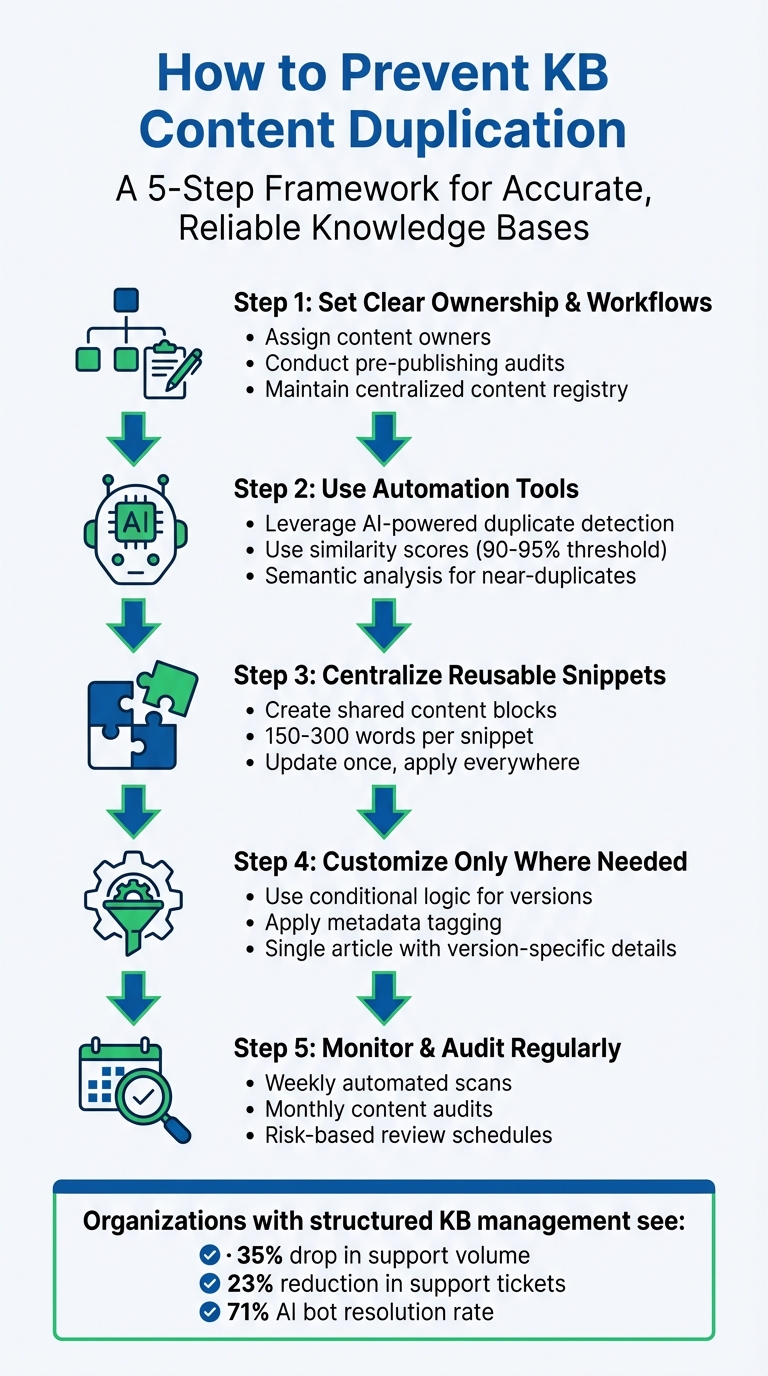
5-Step Framework to Prevent Knowledge Base Content Duplication
Build an Effective Knowledge Base & Help Center for Customer Success
sbb-itb-e60d259
Set Up Governance and Processes to Prevent Duplication
Duplication often arises when publishing happens in silos without proper oversight. Teams working independently can unintentionally create multiple versions of the same information. The solution? Establish clear governance with structured KCS workflows to catch duplication before it enters your knowledge base. Here’s how to do it.
Assign Content Ownership and Approval Workflows
Every piece of content should have a designated owner who ensures its accuracy, manages duplicates, and retires outdated material. Use tools like Airtable or Notion to create a content registry. This registry should track each URL, its owner, the content’s lifecycle status (e.g., active, merge candidate, or deprecated), and its primary purpose.
Set up a centralized intake process to review new content ideas. Authors must first search for similar existing articles and justify why a new article is needed instead of updating an existing one. To maintain oversight, schedule a weekly 30–45 minute review of drafts in progress. When duplicates are identified, use a consistent framework to decide which version becomes the "canonical" one. Factors to consider include accuracy, audience relevance, and ease of maintenance. Regular audits should then be enforced to catch redundancies before they go live.
Require Pre-Publishing Content Audits
Pre-publication audits are crucial for stopping duplication in its tracks. Writers should search for overlapping titles, keywords, and topics to ensure they’re not creating redundant content. Pay special attention to the top-performing 20% of articles, as these attract the most traffic and carry the highest risk of misinformation.
Maintain a register of canonical articles – again, tools like Notion or Airtable can help – to document related articles, their merge status, and the designated canonical URL. This system makes it easier to track decisions and prevents teams from unintentionally duplicating content that’s already been consolidated. When duplicates are found, outdated URLs should either be redirected to the canonical page or marked with a "superseded by" notice. If your knowledge base platform doesn’t support hard redirects, remove deprecated articles from search results by adjusting their search labels. Clearly defined policies ensure everyone follows the same approach.
Document and Share Content Policies
Documented policies are the final piece of the governance puzzle. Without shared guidelines, teams may use inconsistent terminology – like alternating between "Wi‑Fi" and "wifi" or "user" and "customer" – which can confuse readers and hurt searchability. A study shows that nearly 90% of documents submitted for professional review contain capitalization inconsistencies, highlighting the importance of clear standards.
Create a style guide and glossary to enforce uniform terminology and formatting. For example, decide whether to use "Admin" or "Superuser" and stick with that choice across all content. Adopt a "canonical first" approach by designating one primary article as the authoritative source for each topic. Any variations (e.g., platform-specific details) should be added as subsections or scoped sub-pages. Make sure your intake process, canonicalization rules, and content retirement procedures are documented in a shared, easily accessible location to maintain consistency as your team grows.
| Governance Component | Responsibility | Frequency |
|---|---|---|
| Deduplication Loop | Knowledge Manager / Support Ops | Weekly (60–90 mins) |
| Triage Meeting | SMEs, Product Leads, Support Leads | Weekly (30 mins) |
| Content Audit | Support Agents / Writers | Monthly (Rotating) |
| Intake Review | Knowledge Base Owner | Continuous/As-needed |
Use Technology for Automated Content Detection
When managing enterprise-level knowledge bases (KBs), manual audits just can’t keep up. This is where AI-powered tools step in, offering a smarter way to detect duplicate content. These tools rely on vector embeddings and semantic similarity to spot not only exact duplicates but also near-duplicates – content that conveys the same message in different words or formats. This automated method pairs perfectly with the governance processes covered earlier.
The technology works by translating your content into mathematical models that measure similarity between texts. If two articles score above a certain similarity threshold (typically 90% to 95%), the system flags them for review. This approach identifies paraphrased content, restructured procedures, and conceptual overlaps that traditional keyword searches often miss. Industry data reveals that duplicate records account for 10% to 30% of business records in many organizations, with poor data quality costing U.S. businesses an estimated $3.1 trillion annually [5].
"Duplicate content is a quiet killer of AI answer quality. When the knowledge base contains 10 near-identical chunks about the same topic, retrieval returns mostly those chunks – even when a different, more relevant article would better answer the question." – 99helpers [4]
Automated Duplicate Detection Tools
To tackle duplicates effectively, choose tools that can detect both exact matches and near-duplicates. Look for platforms using fuzzy matching algorithms, which identify variations in spelling, formatting, and minor edits. Advanced systems often rely on techniques like min-hash locality-sensitive hashing (LSH) to scan massive knowledge bases efficiently, avoiding the need to compare every document individually – an essential feature for enterprises managing large-scale content.
The best tools offer side-by-side comparisons, highlighting differences in red so you can quickly identify overlapping or conflicting content. Some systems even group similar articles into clusters and flag contradictions, making it easier to address redundancies in bulk.
For example, in 2025, Children’s Medical Center Dallas used advanced algorithms to slash their duplicate content rate from 22% to just 0.14%. Similarly, MGT Consulting reduced their time spent on duplicate detection from 1–2 weeks per month to just 15 minutes – cutting manual labor by 98% [5].
Schedule Regular Scans and Reports
Once you’ve implemented the right tools, set up a regular monitoring schedule. Running scans on a weekly basis – say, every Monday morning – ensures your team starts the week with actionable insights. Configure the system to send automated notifications via Slack or email as soon as scans are complete, summarizing suggested merges and deletions.
Set your similarity threshold at 90% or higher to minimize false positives. To make the biggest impact, prioritize deduplication efforts on the top 20% of your most-viewed articles. While AI can identify duplicate clusters and suggest changes, it’s crucial to have a knowledge manager review and approve all merges to ensure accuracy and maintain proper audience targeting. Don’t forget to retire outdated URLs and set up redirects to the new canonical version to avoid broken links and maintain seamless navigation.
Centralize Reusable Content for Consistency
After tackling duplicate content with automation, the next step is to prevent new duplicates from cropping up. The solution? Centralize shared content – like product descriptions, disclaimers, contact details, and policy statements – into reusable blocks that automatically update across all articles. This approach eliminates repetitive copy-pasting and ensures consistency, reducing the risk of outdated or mismatched information. By addressing duplication at its source, you can boost efficiency while maintaining accuracy across all support channels.
Create Snippets and Reusable Content Blocks
Snippets are the foundation of a well-organized knowledge base. Instead of rewriting the same details for every product or version, you create a single master snippet and reuse it wherever necessary. Modern snippet tools even support rich content, allowing these reusable blocks to be as detailed as full articles [7].
Start by pinpointing content that frequently appears across multiple articles – examples include API authentication instructions, billing policies, system requirements, or standard company statements. Break down larger documents into concise snippets of 150-300 words, focusing on specific topics for clarity and AI-friendly retrieval [9]. To make these snippets even more effective, tag them with metadata like product area, version, audience, and region for precise filtering and easy access [9].
Between February and August 2025, Aha! Knowledge base teammates Erik and Jessica created over 300 reusable snippets for their product documentation. This effort saved them hundreds of hours in manual editing. When the master snippet is updated, every linked instance is automatically refreshed, streamlining the process. Additionally, tools like "Related" tabs or source IDs make it simple to track which articles rely on a specific snippet, making updates even more manageable [7][8].
Centralized snippets don’t just save time – they make your content more reliable and easier to maintain.
Benefits of Centralized Updates
The biggest advantage of centralized content? You edit once, and every article using that snippet is updated instantly. This is especially crucial for time-sensitive updates, like deprecation notices or urgent policy changes.
"Updating shared content is simple, and everyone benefits from one source of truth." – Claire George, Vice President of Marketing, Aha! [7]
Centralized content also minimizes errors. Manual copy-pasting often leads to inconsistencies – whether it’s outdated version numbers, slight wording differences, or conflicting instructions. A single, unified source ensures uniformity across your knowledge base. As Typewise puts it, "Structure outperforms volume. A smaller, well-structured knowledge base can deliver better results than a larger, disorganized one" [9].
Customize Content for Specific Products and Versions
When working with centralized reusable content, it’s essential to adapt it for instances where product differences require specific details. Reusable snippets help avoid duplicating shared content, but what about content that’s almost identical across products? This is where smart customization comes into play. Instead of creating separate articles for every product version – which can quickly become a maintenance nightmare – you can use single-sourcing techniques and metadata tagging to manage variations within a single document. This approach keeps your knowledge base streamlined while delivering accurate, version-specific content. While reusable snippets handle shared elements, smart customization tackles the finer differences across products and versions.
Rewrite for Version-Specific Differences
Stick to one main article and use conditional logic to display version-specific details only when necessary. Tools like modern template languages (e.g., Liquid) allow you to embed ifversion tags directly into your content. This way, readers see the right information based on the product or version they select.
For instance, instead of creating separate articles for API authentication across various product versions, you can craft a single article with conditional logic like this:
{% ifversion ghes > 3.0 %}Use OAuth 2.0{% elsif ghes = 3.0 %}Use API tokens{% else %}Use basic authentication{% endif %} This method follows the DRY (Don’t Repeat Yourself) principle, ensuring you address actual differences in functionality without duplicating content unnecessarily.
Only include version-specific details when absolutely necessary. Overusing versioning can make maintenance more complex. Reserve conditional rendering for critical differences, like changes in user interfaces or deprecated features.
Apply Metadata and Version Control
Metadata is your key to scalable customization. By adding YAML frontmatter to each article, you can define exactly which products and versions the content applies to. For example:
versions: fpt: '*' ghes: '>=3.1' This metadata helps automate filtering, improves search accuracy, and ensures outdated content doesn’t appear for users on newer versions.
For documents that evolve over time, use stable filenames (e.g., api_contracts.md) and update them rather than creating new, versioned files. Include in-file headers like "Status", "Version", and "Last Updated" to signal document recency to both readers and automated systems. When retiring old versions, archive the content with a "Status: Archived" header and set up redirects to preserve bookmarked links.
Feature-based versioning is another powerful tool. Instead of tagging entire articles, use feature flags within your metadata to manage version-specific capabilities. When a feature expands to more products, you only need to update the relevant YAML flag rather than rewriting the whole article. This minimizes duplication while ensuring your content stays accurate across your product lineup.
Maintain Deduplication with Monitoring and Governance
Keeping a knowledge base free from duplication is an ongoing effort. Even the most organized systems can spiral into disorder without consistent oversight. As fitgap points out, duplication tends to resurface quickly in the absence of centralized controls [1]. To combat this, you need robust monitoring systems, regular audits, and clear governance protocols that ensure teams stay aligned. Below, we’ll explore how to maintain a clean and efficient knowledge base through continuous monitoring and cross-team collaboration.
Set Up Monitoring Systems
Automated tools are your first line of defense against duplication. Start by building a content registry – a centralized system (like Airtable or Confluence) that tracks every published URL along with metadata such as ownership, product area, intent, and lifecycle status [3][10]. This registry acts as your single source of truth, making it clear what content exists and who’s responsible for it.
Leverage SEO crawlers or AI tools to identify duplicate titles, H1 tags, meta descriptions, and clusters of near-duplicate content. Advanced AI systems can flag content with 90% similarity, helping teams manage duplicates effectively. For teams with large knowledge bases (100+ articles), running scans weekly – perhaps every Monday – can keep duplicate groups manageable, ideally capped at 20 at a time [6]. Suspected duplicates should be routed to a triage queue (like Jira) with clearly defined service-level agreements (SLAs) [10].
Use tools like Visualping to monitor upstream source updates – such as pricing pages, release notes, or policy documents – and automatically trigger review tasks for your knowledge base when changes occur. These tools can target specific sections of a page and ignore trivial updates (like date changes) to minimize unnecessary alerts [10]. As fitgap aptly notes, "Accuracy improves when reviews are triggered by change, not hope" [10].
Once automated systems are in place, regular audits can add an extra layer of protection to ensure your content remains consistent and up to date.
Conduct Regular Content Audits
Audits are essential for maintaining the integrity of your knowledge base after content has been published. These risk-based reviews ensure that deduplication strategies continue to work effectively. Not all content requires the same level of scrutiny, so tailor your audit frequency based on risk levels:
| Risk Tier | Content Types | Review Cadence |
|---|---|---|
| High Risk | Policy, Billing, Security | Every 30–60 days |
| Medium Risk | Core Workflows | Every 90 days |
| Low Risk | Evergreen Concepts | Every 180 days |
During audits, use semantic clustering to group similar articles based on user intent or symptoms rather than just keyword matches [1]. Focus on the top 20% of articles by view count to maximize the impact of your efforts [1]. When merging duplicates, retire outdated URLs, update internal links, and replace old article content with deprecation notices or hard redirects to the canonical page. Don’t forget to update internal macros and templates to reflect these changes.
Create Governance Checkpoints for Cross-Team Collaboration
Clear governance processes are critical to avoiding accidental duplication across teams. These checkpoints build on foundational practices like assigning content ownership and setting up intake gates. A few key steps include:
- Weekly narrative conflict checks: Dedicate 45 minutes for editorial leads to review planned content and catch overlaps early, before drafting starts [3].
- Weekly registry triage: Review newly created or updated URLs, assign ownership, and resolve potential overlaps [3].
- Canonicalization triage meetings: Hold 30-minute sessions with support teams, product subject matter experts (SMEs), and compliance to decide on a single source of truth for duplicate clusters [1].
- Daily alert triage: Spend 15 minutes reviewing automated alerts from upstream changes and trigger necessary updates to your knowledge base [10].
Set clear SLAs for content updates to ensure timely action – e.g., two business days for policy updates and five business days for general how-to guides [10].
Finally, implement a mandatory new article intake gate. Require authors to use a standardized template that lists similar articles they’ve reviewed and explains why a new page is necessary instead of updating an existing one [1]. Every URL should have a named owner, as content without accountability is more likely to fall into duplication and become outdated [3][10].
Conclusion
Avoiding duplication in your knowledge base demands consistent effort and operational focus, but the payoff is worth it. By implementing governance structures (like content ownership and approval workflows), leveraging automation tools (such as duplicate detection and scheduled scans), centralizing content management (with reusable snippets and canonical sources), and maintaining continuous monitoring (through audits and triage meetings), you can transform your knowledge base into a powerful asset rather than a source of inefficiency.
In 2026’s competitive climate, the stakes have never been higher. As Val Swisher points out, improving content practices benefits both human users and AI systems alike [11]. This is especially critical when you consider that 40% of AI customer service projects fail due to poor documentation [2]. Companies that prioritize effective knowledge management report impressive results: a 35% drop in support volume and AI bots achieving a 71% resolution rate, far outperforming the 25% rate of older systems [2].
The advantages go beyond AI performance. Organizations with well-structured knowledge bases see a 23% reduction in customer support tickets [2] and save valuable time by eliminating the need to sift through redundant articles. Providing a single, reliable source of truth ensures consistent answers across every platform – whether customers are reaching out via Slack, Microsoft Teams, or your web portal. This consistency is key to building and maintaining customer trust across all channels.
"Canonicalization is a workflow, not a cleanup project" – fitgap [1]
FAQs
What should be a ‘canonical’ KB article vs a separate page?
A ‘canonical’ knowledge base (KB) article serves as the main, authoritative resource that brings together the most accurate and detailed information on a specific topic. Its purpose is to ensure consistency and eliminate duplication across content. Other pages, such as those for localized content, related topics, or specific use cases, should link back to the canonical article. This approach helps maintain accuracy and avoids repetitive or conflicting information.
How do we set a similarity threshold without lots of false positives?
To fine-tune a similarity threshold and avoid false positives, consider using a combination of detection methods like exact hashing, semantic embeddings, and approximate algorithms such as SimHash or MinHash. Begin with more cautious thresholds and tweak them as you monitor the balance between false positives and false negatives. Make sure to normalize URLs and content before running comparisons to minimize unnecessary noise. Continuously review and adjust your thresholds to strike the right balance between precise detection and keeping false positives to a minimum.
How can one KB article safely cover multiple product versions?
To handle multiple product versions within a single knowledge base (KB) article, it’s essential to use version control and organize content in a structured way. Start by creating clearly defined sections for each version, making it easier for readers to find the information they need. Adding metadata tags allows users to filter content efficiently based on the version they’re looking for.
Incorporating reusable components, such as shared snippets, helps maintain consistency across versions and reduces the need for repetitive updates. This method not only saves time but also ensures the content remains accurate and error-free for every product release.