


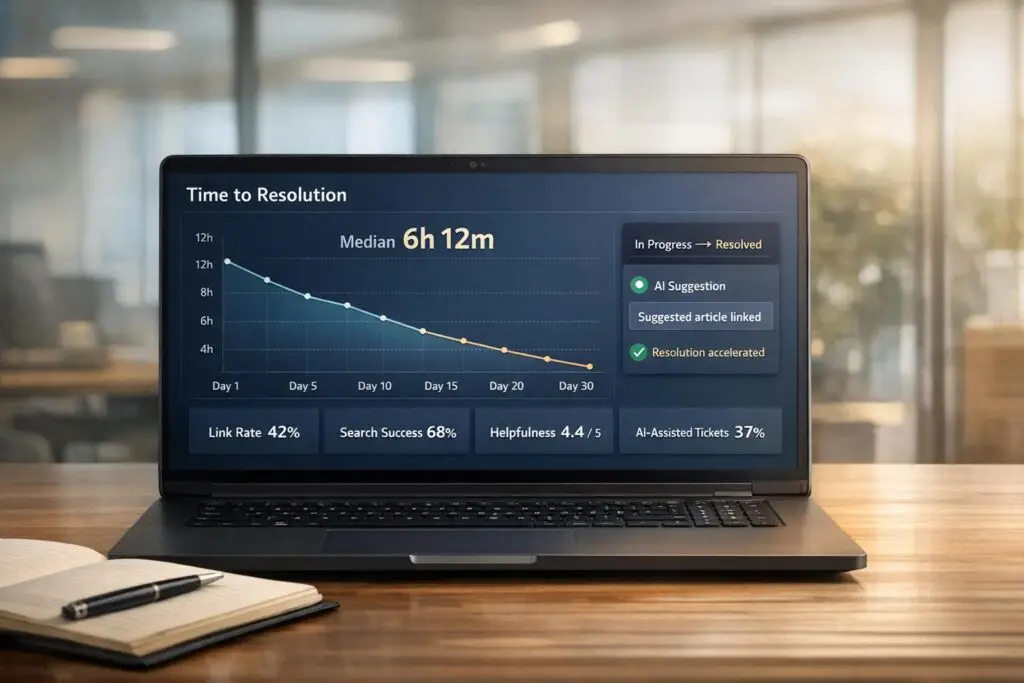
Deflection rate – how often customers solve issues without contacting support – is a common metric for knowledge base (KB) performance. But it doesn’t tell the whole story. Customers might still face unresolved issues, frustration, or delays. To truly measure KB effectiveness, focus on time-to-resolution – how quickly problems are solved, whether through self-service or agent assistance.
Key takeaways:
- Deflection is incomplete: It shows fewer tickets but not if issues were resolved.
- Time-to-resolution matters: Faster resolutions mean happier customers, lower costs, and better productivity.
- Useful metrics: Track link rate, search success, helpfulness scores, and customer effort to evaluate KB impact.
- AI tools help: Automate context-gathering, improve content, and track resolution times for deeper insights.
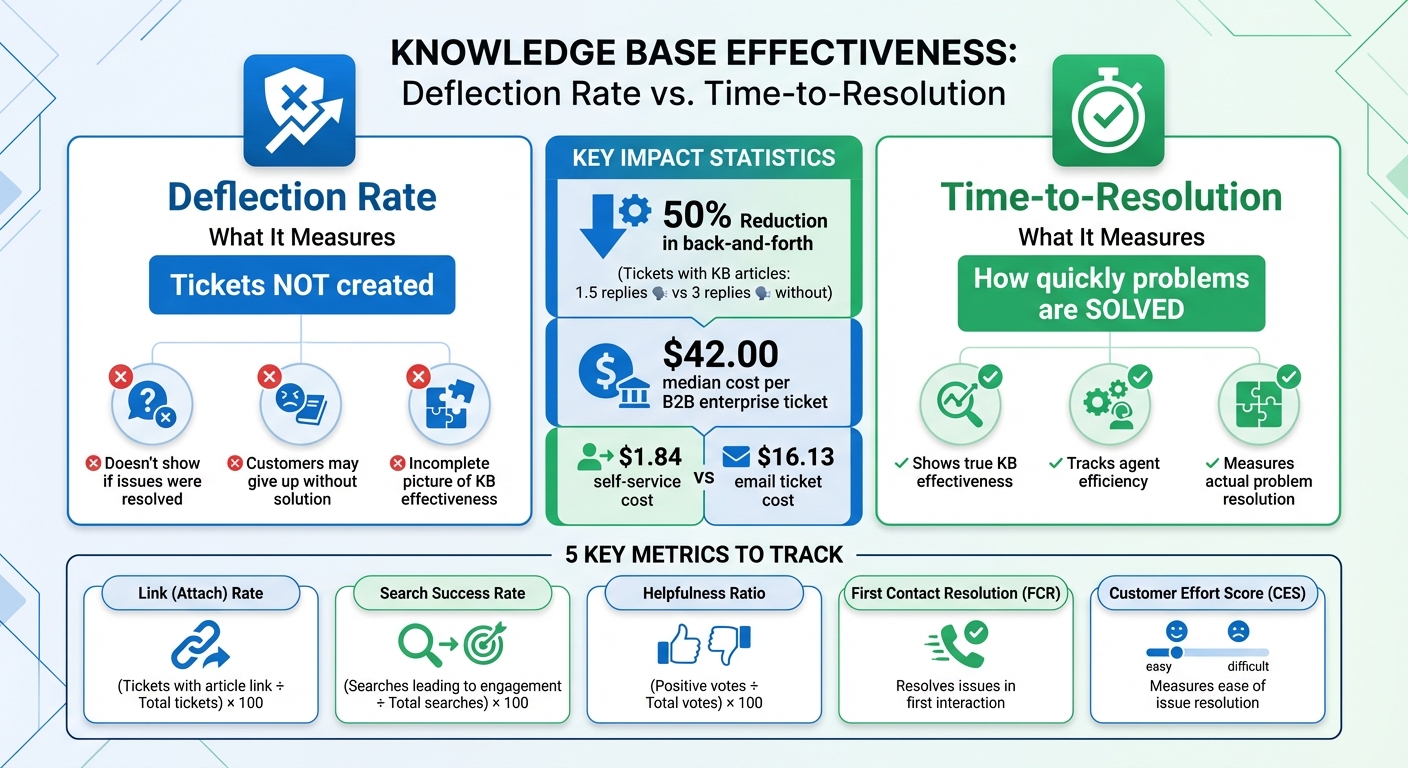
Deflection vs Time-to-Resolution: Key Metrics Comparison for Knowledge Base Effectiveness
Why Time-to-Resolution Matters for Knowledge Base Performance
Time-to-resolution measures something deflection simply can’t: how effectively your team resolves issues. In complex B2B support scenarios, where tickets often require detailed context, a strong knowledge base does more than just deflect basic inquiries. It speeds up resolutions by giving agents instant access to reliable troubleshooting resources.
Engineers often spend valuable time gathering context, and a well-organized knowledge base minimizes this delay. Without it, the extra time spent searching for information directly increases resolution times, slowing down the actual problem-solving process. This distinction highlights why time-to-resolution offers a deeper insight into your support team’s efficiency.
Deflection vs. Time-to-Resolution: What Each Metric Actually Tells You
Deflection only tracks what didn’t happen – like a ticket that wasn’t created – but it doesn’t tell you if the customer found a solution. For instance, if a customer leaves the help center without resolving their issue, they might escalate through other channels, delay their implementation, or even churn.
Time-to-resolution, on the other hand, measures how well your knowledge base empowers agents to resolve tickets efficiently. For example, when agents include KB articles in their responses, they provide thorough information upfront, which reduces the need for follow-up questions. Tickets supported by KB documentation average just 1.5 replies, compared to 3 replies for tickets without it [1]. That’s a 50% reduction in back-and-forth communication, allowing your team to handle more tickets without increasing headcount.
This shift also reframes how content quality is assessed. Instead of asking, “Did this article prevent a ticket?” the better question becomes, “Did this article help an engineer resolve the issue faster and more accurately?” For complex Tier 2 and Tier 3 issues, this focus is far more impactful. As Matthew Plotkin, Head of Accounts at Inkeep, explains, effective resolution starts with high-quality pre-debugging information [2].
Recognizing this difference underscores how reducing resolution times directly enhances your team’s overall efficiency.
What You Gain by Reducing Time-to-Resolution
Shorter resolution times deliver benefits across the board. A well-crafted knowledge base not only improves customer satisfaction but also reduces costs and sets your team up for future AI-driven improvements.
Customer satisfaction sees a direct boost. A 1% increase in First Contact Resolution can lead to a 0.5% to 1% improvement in CSAT scores [4]. In B2B environments, where trust and reliability are critical for retention, these gains have a compounding effect over time.
Operational costs also take a noticeable dip. The median cost per ticket for B2B Enterprise support is $42.00 [4]. When your knowledge base enables agents to resolve issues in a single interaction instead of multiple exchanges, the cost per case drops significantly. For comparison, self-service interactions cost around $1.84 – just 11% of the $16.13 median cost of an email ticket [4].
Agent productivity and morale improve as well. With accurate, easily accessible documentation, support teams spend less time searching for answers and more time solving problems. This not only boosts efficiency but also helps reduce burnout and turnover – issues that can cost between 50% and 200% of an employee’s annual salary when factoring in recruitment and lost productivity [1].
Metrics That Show How Your KB Affects Time-to-Resolution
Tracking the right metrics can reveal whether your knowledge base (KB) is actually speeding up issue resolution. These metrics not only highlight how well your KB performs but also directly tie into time-to-resolution – an essential performance indicator. By focusing on how agents and customers interact with KB content, you can measure its real impact.
Take Link (Attach) Rate, for example. This metric shows how often agents include KB article links in their ticket responses. It’s calculated as:
(tickets with an article link ÷ total tickets) × 100.
A high rate means agents are frequently using KB content to address issues, signaling its usefulness.
Next is Search Success Rate, which measures how often users find relevant content during their searches. The formula is:
(searches leading to article engagement ÷ total searches) × 100.
A low success rate suggests customers are struggling to find answers, potentially leading them to contact support. Alongside this, the Zero-Result Rate – the percentage of searches that yield no results – can highlight gaps in your KB, which might be causing unnecessary ticket volume.
To measure how well your KB solves problems, look at the Helpfulness Ratio and Article CSAT. The Helpfulness Ratio is calculated as:
(positive votes ÷ total votes) × 100.
If high-traffic articles have low helpfulness scores, it’s a red flag that customers’ issues remain unresolved. According to Gartner, 38% of Gen Z and Millennial customers are likely to abandon a service issue if they can’t resolve it on their own [5].
Now, let’s explore how a strong KB can improve First Contact Resolution and, in turn, reduce overall resolution times.
First Contact Resolution (FCR) and Its Impact on Resolution Time
First Contact Resolution (FCR) measures whether agents resolve issues during the first interaction. A well-structured KB plays a key role here. When agents have access to reliable, easy-to-share information, they can provide complete answers right away, cutting down on follow-ups. A high Link (Attach) Rate often correlates with improvements in FCR, as agents rely on relevant KB articles to address customer needs in one go.
Analyzing which KB articles are frequently linked in resolved tickets can highlight content that’s effective for first-contact resolutions. On the flip side, if articles addressing common issues are rarely used, they might need updates to make them more actionable.
Internal search behavior among agents also matters. On average, employees spend 9.3 hours per week searching for information [5]. A well-organized KB with strong search functionality can save agents significant time – up to 30 minutes per ticket on average. This time savings adds up quickly across hundreds of tickets each week, leading to faster resolutions and greater efficiency [5].
While FCR focuses on immediate solutions, tracking repeat contacts can uncover deeper issues that your KB might not be addressing.
Repeat Contact Rate and Self-Service Success Rate
Repeat Contact Rate measures how often customers need to follow up after using your KB. If customers engage with your help center but still submit a ticket within 24 hours, it could mean your content is incomplete, outdated, or too generic. This indicates that your KB isn’t fully resolving their issues.
Although a high deflection rate (fewer tickets submitted) might look like a win, it doesn’t always mean customers are resolving their problems. In fact, 81% of customers try to solve issues on their own before reaching out to support [3][5].
Reading Time can also provide insight. This metric, calculated as total session time divided by unique views, can reveal if confusing content is slowing customers down. Long reading times may indicate that articles are hard to follow, forcing customers to eventually contact support, which extends overall resolution times.
Customer Effort Score (CES) and Cost Per Ticket
Reducing customer effort is a direct way to speed up resolutions and cut costs. Customer Effort Score (CES) measures how easy it is for customers to resolve their issues using your KB. Feedback mechanisms like “Was this helpful?” buttons or embedded surveys help gather this data. Metrics like the Helpfulness Ratio and Article CSAT (calculated as total scores divided by the number of responses) can show whether your KB content is actually solving problems or just creating more work for customers.
If highly viewed articles have low helpfulness scores, it’s a sign that customers are finding the content but not getting the answers they need. Updating these articles can lower customer effort and reduce ticket volume.
Lastly, Cost Per Ticket is a crucial metric for evaluating KB efficiency through agent productivity. For example, the median cost per ticket for B2B enterprise support is about $42.00 [4]. A high Link (Attach) Rate suggests agents are effectively using the KB, which reduces the time spent on each ticket and lowers operational costs. Self-service interactions, which typically cost just $1.84, are far cheaper than email tickets, which average $16.13 [4].
| Metric | Formula | What It Reveals |
|---|---|---|
| Link (Attach) Rate | (Tickets with article link ÷ Total tickets) × 100 | How often agents use KB content to resolve tickets |
| Search Success Rate | (Searches leading to article engagement ÷ Total searches) × 100 | Whether customers find relevant answers easily |
| Helpfulness Ratio | (Positive votes ÷ Total votes) × 100 | Whether the content resolves issues effectively |
| Zero-Result Rate | (No-result searches ÷ Total searches) × 100 | Highlights content gaps that lead to more support tickets |
| Article CSAT | Sum of scores ÷ Number of responses | Reflects content quality and customer effort |
Regularly reviewing zero-result search queries can help pinpoint missing content, reducing the need for support tickets and lowering costs [3][5].
How to Track and Improve Time-to-Resolution Using AI Tools
AI tools are transforming how businesses track and improve time-to-resolution metrics. By automating data collection and analysis, these tools eliminate the need for manual tracking, giving you precise insights into how well your knowledge base (KB) supports ticket resolution. From the moment a ticket is opened to its final closure, AI captures every detail, helping you understand how your KB impacts resolution speed [6].
One of the most time-consuming parts of technical B2B support isn’t the debugging itself – it’s the time spent gathering context. Agents often spend 15 to 30 minutes collecting logs, version details, and configuration information before they can even begin solving a problem [2]. AI-powered tools like support copilots streamline this process by assembling "context packets." These packets include environment snapshots, relevant traces, and comparable past cases, allowing engineers to jump straight into debugging without wasting time searching through internal systems.
"The ‘work’ starts before debugging starts… AI can pull the right context in a few minutes, [so] your team can start debugging sooner." – Matthew Plotkin, Head of Accounts, Inkeep [2]
Tracking metrics like Time to First Useful Response – which measures how quickly agents provide key context and actionable steps – offers a clearer picture of how well your KB supports agents. This metric is particularly crucial for complex B2B issues, where the focus is on resolving tickets efficiently rather than deflecting them [2].
Using AI to Automate Time-to-Resolution Tracking
AI excels at managing the intricacies of modern ticket workflows. Unlike manual methods, which often overlook details like "pending" statuses or customer confirmations, AI tools automatically account for these variables to deliver an accurate Total Resolution Time [6].
Platforms like Supportbench offer features such as AI Predictive CSAT and AI First Contact Resolution (FCR) Detection, which analyze case histories to determine whether an issue was truly resolved on the first contact. These tools also predict customer satisfaction (CSAT) scores, even when surveys are not completed. Additionally, AI tracks Average Handle Time (AHT) for Tier 2 and Tier 3 cases, where support costs are the highest. By separating metrics for Tier 1 self-service cases from those for more complex issues, you gain a clearer view of where your KB is reducing research time and where inefficiencies remain [2].
AI tools can significantly cut resolution times. For instance, chatbots and automated workflows can reduce resolution times by 30%, while CRM integration can add another 20% reduction [6]. Fast resolutions – those under 24 hours – can increase customer retention by up to 20% and boost loyalty by 70% [6].
Breaking Down Time-to-Resolution Data by KB Article Usage
Once AI is tracking your resolution metrics, the next step is identifying which KB articles contribute most to faster ticket closures. AI can analyze data to highlight your most effective content and pinpoint areas where your KB falls short [3].
For example, look at which articles agents link most often in quickly resolved tickets. If certain articles consistently contribute to fast resolutions, they’re working well. Conversely, if high-traffic articles rarely show up in resolved tickets, they may be too vague or outdated to be helpful.
AI can also cluster search queries to uncover patterns. If agents frequently search for specific terms but don’t click on existing articles, it’s a sign that your content isn’t meeting their needs. This is where Search Gap Analysis comes into play. AI identifies search terms that yield no results, giving you clear opportunities to create new content [3].
"Plugging these search gaps is likely the lowest-hanging fruit in terms of improving consumer self-serve!" – Arush Balyan, Product Marketing, DevRev [3]
Another useful metric to monitor is Reading Time for KB articles accessed during ticket resolution. If agents spend an unusually long time reading an article, it could mean the content is unclear or incomplete, delaying ticket resolution [3].
| Metric | Insight | AI Advantage |
|---|---|---|
| Time to First Useful Response | Measures speed of initial diagnosis with context | Detects technical context and next steps in first reply [2] |
| Research Time | Tracks time spent gathering context | Logs time spent accessing logs and tools [2] |
| Search Gaps | Highlights missing KB content | Groups queries with zero results [3] |
| Article Helpful Rating | Evaluates content effectiveness | Links ratings to ticket closure without reopening [3] |
Beyond tracking, AI can also transform how you maintain and enhance your KB content.
Using AI to Create and Update KB Articles
Keeping KB content up-to-date is critical for maintaining fast resolution times, but manual updates are often time-intensive. AI tools like Supportbench’s AI KB Article Creation from Case History simplify this process by analyzing resolved tickets and drafting new KB content automatically [2].
When an agent resolves a ticket using a new method or workaround, AI detects that the solution isn’t documented and drafts a KB article. It auto-fills the subject, summary, and keywords, ensuring the knowledge base evolves continuously. This proactive approach addresses search gaps and content deficiencies, making it easier for agents to resolve similar issues through self-service in the future.
"If the knowledge is stale, you get a worse outcome than a human queue: you get confident wrong answers." – Matthew Plotkin, Head of Accounts, Inkeep [2]
AI copilots can also pull data like logs and environment details from solved cases to create highly specific KB articles. This is particularly useful for technical B2B products, where different configurations require tailored solutions. Instead of generic troubleshooting advice, your KB can include "known issues" for specific product versions, cutting down research time for future tickets [2].
Supportbench’s AI Agent Knowledgebase AI Bot reads your entire KB to assist agents in real time, while the AI Custom Knowledge base AI Bot focuses on customer-facing articles. Both tools ensure that KB content is easy to find and actionable, whether it’s used by agents or directly by customers.
Finally, regularly reviewing articles with low helpfulness ratings but high view counts can help prioritize updates. AI flags these underperforming articles so you can revise them before they lead to more tickets. With 81% of customers attempting to solve issues independently before contacting support, outdated or incomplete KB content directly impacts ticket volume [3].
sbb-itb-e60d259
Common Mistakes and Performance Benchmarks for Time-to-Resolution
Mistakes to Avoid When Measuring Time-to-Resolution
One common misstep is lumping together metrics from all support tiers. For example, mixing Tier 1 self-service data with Tier 2 and Tier 3 metrics can obscure inefficiencies. Instead, track Tier 1 self-service coverage separately from Average Handle Time (AHT) for more complex cases. This allows you to pinpoint where your knowledge base (KB) is effective and where it falls short.
Another mistake is focusing on response time instead of the time it takes to provide a meaningful, actionable response. A simple acknowledgment like, "We are looking into it", doesn’t move the ticket forward. What truly matters is how quickly your team delivers specific context and outlines the next steps. Using AI to measure "time to first useful response" can help eliminate subjective tracking errors.
"Deflection is incomplete for technical support. The real metric is time to first useful response." – Matthew Plotkin, Head of Accounts, Inkeep [2]
Don’t ignore the context-gathering phase. Technical support teams often spend a significant amount of time collecting logs, software versions, and system configurations before they can even start debugging. If you only track total resolution time without breaking down how much of that is spent gathering context, you might miss a major bottleneck that your KB could address.
High reading times for KB articles can signal unclear content. Always cross-check these metrics with user feedback. If articles with long reading times also receive "not helpful" ratings, it’s a sign the content needs improvement.
Finally, avoid relying solely on percentage-based ratings for article performance. Absolute counts of "helpful" and "not helpful" ratings provide a clearer picture. Users are more likely to leave negative feedback than positive, which can skew percentage-based metrics [3].
By avoiding these pitfalls, you can measure time-to-resolution more effectively and use the following benchmarks to guide your improvements.
Time-to-Resolution Benchmarks for B2B Support
Once you’ve addressed the common measurement mistakes, it’s important to understand industry benchmarks for resolution times.
For SaaS and software support, the median time to fully resolve an issue is 11 hours. Top-performing teams, however, can resolve tickets in under 2 hours [4]. If your B2B enterprise support consistently takes longer than 48 hours, it’s a warning sign that needs immediate attention [4].
First Response Time has improved by 20–30% annually as AI now handles initial triage. However, the focus has shifted to "Time to First Useful Response", which measures how quickly agents provide actionable solutions rather than just acknowledging the ticket [2][4]. For strategic customers using Slack, top teams deliver responses in under 5 minutes. For enterprise customers communicating via email, the target is 4–8 hours for a useful response [8].
To improve efficiency, aim for a 20–30% reduction in research time by automating context gathering with AI. Tools that pull environment snapshots, logs, and related cases can reduce this phase to just a few minutes [2]. When it comes to autonomous resolutions, advanced AI systems can handle 70–92% of tickets without human intervention [7].
| Metric | Misleading Approach | Best Practice |
|---|---|---|
| Resolution Time | Using mean (skewed by outliers) | Use median for more accurate planning [4] |
| Deflection | Celebrating ticket reduction alone | Combine with search gap analysis and self-service success rates [3] |
| Handle Time | Aggregating all tiers | Separate Tier 1 from Tier 2/3 to uncover hidden costs [2] |
| Article Performance | Relying on percentage-based ratings | Use absolute counts of helpful/not helpful ratings [3] |
Lastly, consider the cost implications. AI-resolved tickets cost about $1.40, whereas human-handled email tickets average $16.13 [4]. If your time-to-resolution improvements don’t lead to cost savings, it may indicate you’re not measuring the right metrics or failing to separate data by support tiers effectively.
Conclusion
Deflection metrics might indicate that a ticket wasn’t created, but they don’t tell you if a customer successfully solved their issue or simply gave up. In contrast, time-to-resolution provides a clearer picture of how your knowledge base (KB) impacts the tickets that do make it to your queue. It shows whether your documentation helps agents resolve issues faster, with fewer replies and reopenings.
In B2B technical support, the real drain on resources isn’t the straightforward Tier 1 questions that get deflected – it’s the time agents spend digging through logs and past cases to gather context before they can even begin debugging [2]. By measuring time-to-resolution and analyzing it alongside KB article usage, you can identify where your documentation speeds up research and where it falls short.
The metrics we’ve discussed work together to offer a comprehensive view of your KB’s performance. Pairing these with AI-powered tools – like those that automate context gathering and track "time to first useful response" – lets you move beyond guessing about deflection success to measuring true operational efficiency. These insights pave the way for meaningful improvements.
For example, you can separate metrics for Tier 1 from Tier 2/3 cases and deploy AI tools to pull context automatically, cutting down on manual searches. Monitor how often agents share KB articles in their responses and track whether those tickets are resolved faster with fewer back-and-forth exchanges. Supportbench’s built-in AI simplifies ticket summarization, KB article creation, and surfaces relevant documentation – all without requiring costly add-ons or complex integrations. This approach reduces time-to-resolution and ensures your KB stays flexible and effective.
This shift reflects the evolving needs of AI-driven B2B support operations. Moving from deflection-focused metrics to time-to-resolution tracking isn’t just about better numbers – it’s about building a knowledge base that enhances your entire support system. The result? Faster resolutions, reduced costs, and a team ready to tackle the complex, multi-tier challenges of modern B2B support.
FAQs
How do I measure time-to-resolution correctly in B2B support?
To gauge time-to-resolution effectively in B2B support, prioritize tracking the time it takes to deliver the first helpful response, rather than just focusing on deflection metrics. This means measuring how quickly agents or AI provide essential information and clear next steps toward resolving the issue. You can speed up this process by standardizing context packets and consistently updating documentation. These steps minimize research time, leading to quicker resolutions and more efficient support.
Which KB metrics best predict faster ticket resolution?
The most telling knowledge base (KB) metrics for speeding up ticket resolution are time-to-first useful response and overall resolution time. These two metrics highlight how efficiently support teams provide meaningful help and resolve issues completely. Keeping an eye on these can reveal how your knowledge base contributes to smoother operations and boosts customer satisfaction.
How can AI reduce context-gathering time for complex tickets?
AI streamlines the process of handling complex tickets by cutting down the time it takes to gather context. It does this through advanced methods like context engineering and selective retrieval, which focus on accessing only the most relevant information while filtering out unnecessary details. By grouping conversations into semantic themes and utilizing memory systems such as xMemory, AI ensures responses remain clear and organized. This not only speeds up resolution times but also improves the accuracy of addressing intricate problems.






