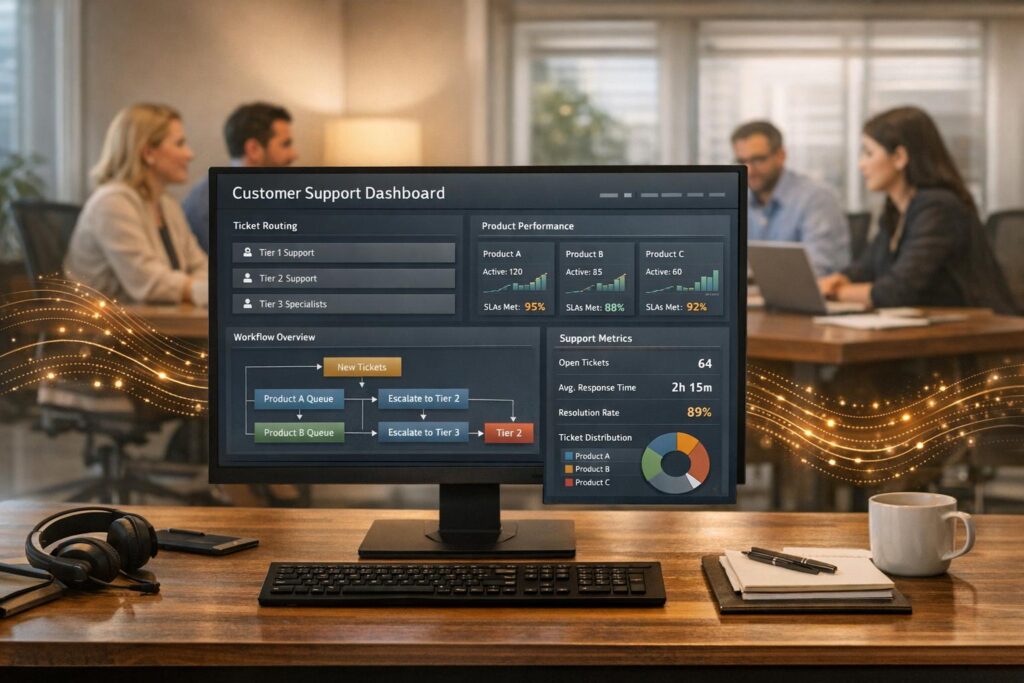
Managing customer support for multiple B2B products with varying levels of complexity can be challenging. Some products generate simple requests like password resets, while others require in-depth technical investigations. Here’s the key to handling this effectively:
- Categorize products by complexity: Group products into tiers based on factors like request volume, technical difficulty, and resolution time.
- Allocate resources strategically: Use self-service tools for low-complexity products and assign specialists to handle complex cases.
- Leverage AI tools: Automate routine tasks, use AI-powered ticket routing to dynamically route cases based on urgency, and provide agents with real-time context.
- Set product-specific SLAs: Define response times and escalation paths tailored to each product’s importance and customer impact.
- Measure performance: Track metrics like First Contact Resolution (FCR) and Customer Satisfaction (CSAT) to identify areas for improvement.
How to Categorize Products by Complexity and Support Requirements
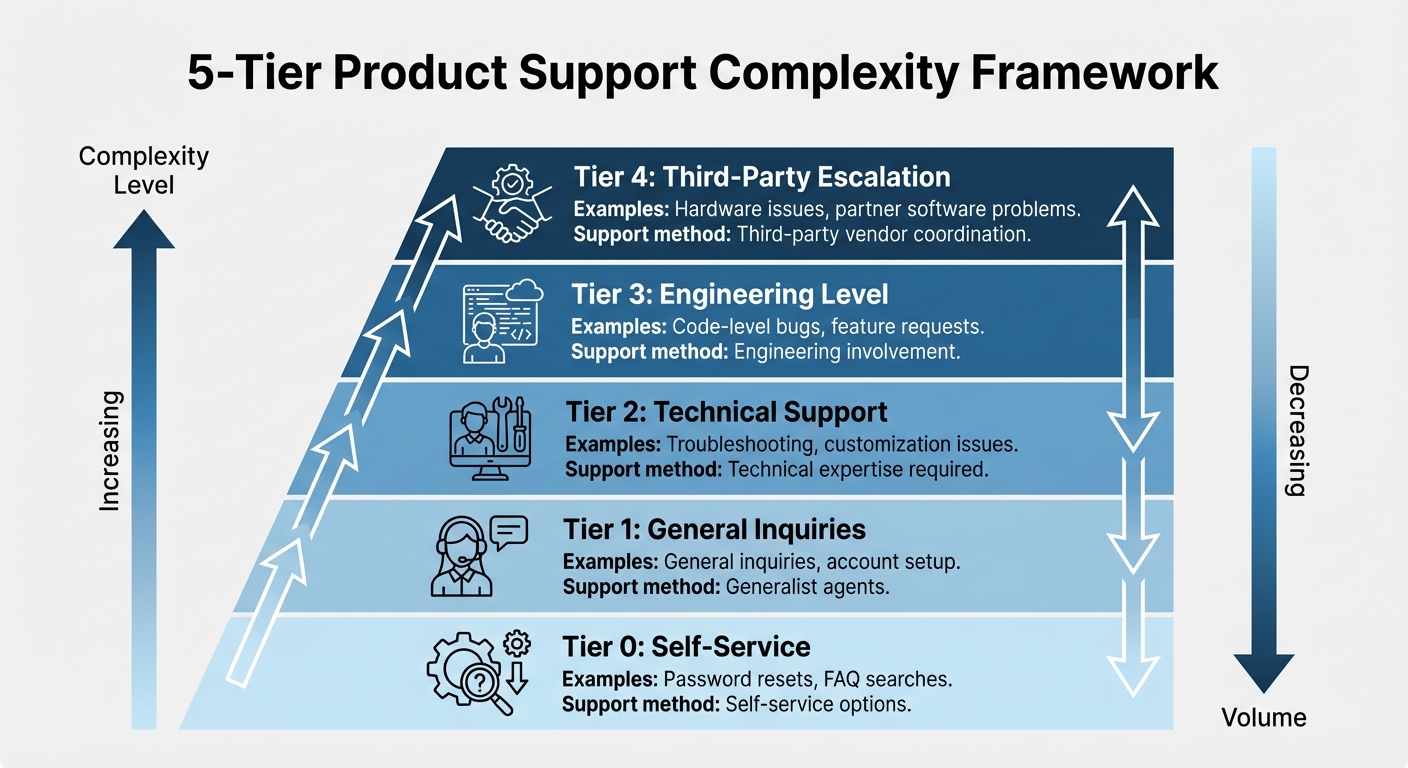
5-Tier Product Support Complexity Framework for B2B Customer Service
Before designing workflows, it’s essential to evaluate the support needs of each product. This step helps address common routing and escalation challenges by clearly identifying the level of support required.
Creating Complexity Profiles
Start by assessing each product across four main factors: request volume, technical complexity, average resolution time, and customer impact. For instance, one product might generate 500 password reset requests weekly, while another might only produce 20 tickets a month – but those tickets might require engineering input and take days to resolve.
Customer context also plays a crucial role. A billing question from an account nearing renewal and in good standing carries more weight than one from a long-term contract with no immediate urgency [1][2]. By incorporating factors like entitlements, contract status, and account health into prioritization, businesses can go beyond static queues and apply dynamic case weighting.
To organize products effectively, use a tiered framework:
- Tier 0: Self-service options, such as password resets or FAQ searches.
- Tier 1: General inquiries and account setup handled by generalist agents.
- Tier 2: Troubleshooting and customization issues requiring technical expertise.
- Tier 3: Code-level bugs and feature requests needing engineering involvement.
- Tier 4: Issues tied to third-party vendors, such as hardware or partner software.
This tiered approach ensures that each product’s support needs are clearly defined, making it easier to allocate the right resources.
Matching Support Resources to Product Profiles
Once you’ve categorized products, align your support resources accordingly. For low-complexity products, rely on self-service tools, AI bots, and knowledge bases. Automation can handle 50% to 80% of routine inquiries like order statuses and FAQs, allowing your team to focus on more complex issues [5].
For products in Tier 2 and Tier 3, assign specialists with deep expertise in those specific product lines. A product-based divisional structure works well here, as agents gain a thorough understanding of both the technical details and the typical customer personas [5]. This setup minimizes wasted time, as agents are already equipped with the context they need to start troubleshooting effectively.
For high-impact products, establish clear escalation paths based on customer entitlements and service-level agreements (SLAs). Clearly defining what agents can resolve independently versus what requires specialist input helps avoid bottlenecks [5]. Businesses that use their support data to make these operational decisions often see tangible results, such as a 10% increase in annual revenue [2]. Thoughtful resource alignment doesn’t just speed up ticket resolution – it also boosts overall business performance.
sbb-itb-e60d259
How to Structure Support Operations for Multiple Products
Once you’ve categorized your products and matched support resources accordingly, the next step is to streamline your workflows. The goal is to keep operations efficient and avoid bottlenecks by ensuring high-priority issues are addressed quickly while automating routine tasks.
Setting Up Dynamic Routing and Prioritization
Relying on static routing methods, like using product tags or round-robin assignments, often falls short in handling the complexities of B2B support. For example, you might prioritize a billing issue from a renewing, high-value customer over a routine query from a long-term, low-risk account. This is where dynamic routing and prioritization come in.
Dynamic SLAs adapt to the specifics of each case, taking into account factors like account value, renewal timelines, or even customer sentiment [2][1]. AI-powered systems equipped with tools like intent detection and sentiment analysis can identify high-impact tickets and assign them to the most qualified agents. This approach can reduce resolution times by as much as 30% [2][1].
For instance, imagine a customer expressing frustration over a critical feature failure. AI can flag the urgency of the case and immediately route it to a senior specialist, bypassing the standard queue. This kind of intelligent triage ensures that pressing issues are handled promptly, while lower-priority tasks remain in the queue.
Creating Product-Specific SLAs and Escalation Paths
Not all products carry the same weight in customer relationships. A bug in a core enterprise tool that disrupts daily operations demands quicker attention than a feature request for an auxiliary product. Product-specific SLAs help align response times with the importance of the issue at hand.
These SLAs can be tied to entitlements or support contracts, making it clear what level of service each customer is entitled to based on their agreement [4]. For example, enterprise clients with premium support might receive a four-hour response time for Tier 3 issues, while standard customers might have a 24-hour SLA for similar cases.
Clear escalation paths are equally important. Define which issues agents can resolve on their own and which need to be escalated to specialists. This minimizes delays and keeps the process smooth. Adopting full-case ownership, where a single agent handles a case from start to finish, can further enhance accountability and improve the customer experience, especially for complex incidents [3].
"In this digital age, speed and efficiency are the currencies of customer service" [2].
Next, ensure that routine, low-complexity requests don’t clog up your team’s resources.
Preventing Low-Complexity Requests from Overwhelming Your Team
To maintain focus on high-impact cases, it’s crucial to filter out low-complexity, high-volume requests. Tasks like password resets, account setups, or order status inquiries can easily overwhelm your support team if not managed effectively.
One solution is to implement Tier 0 self-service options. Tools like chatbots, automated responses, detailed FAQ sections, and community forums empower customers to handle simple issues on their own [6]. AI-driven triage systems can also analyze incoming requests and redirect routine inquiries to self-service resources or Tier 1 generalists. This ensures that Tier 2 and Tier 3 agents are free to focus on more complex and critical cases [2][1].
Using AI-Native Tools to Scale Multi-Product Support
Once a streamlined operational setup is in place, AI-native tools can take efficiency to the next level by automating repetitive tasks and enhancing the way agents interact with customers. Supporting multiple products, each with its own complexities, doesn’t have to mean hiring more people or building complicated workflows. Platforms like Supportbench are specifically built to tackle this challenge. They automate routine tasks while keeping operations lean and effective. What sets AI-native systems apart from older, legacy platforms is their deep integration of AI. These modern tools can dynamically adjust workflows, prioritize cases, and instantly provide agents with the context they need. This allows support teams to scale across diverse product lines without adding unnecessary operational strain. Let’s dive into how AI-native tools improve workflows, give agents better context, and simplify knowledge management.
AI-Driven Workflows and Automation
AI-native platforms are equipped with workflow engines designed to take over tasks that would otherwise require hours of manual work [1]. Forget about manually tagging tickets, setting priorities, or routing cases – these systems use advanced tools like intent detection and sentiment analysis to figure out what a request is about and send it to the right place [1]. For instance, when a ticket is submitted, the AI can distinguish between a simple question and a critical issue, routing each to the appropriate team. It can even adjust service-level agreements (SLAs) based on factors like the customer’s account value, renewal dates, or overall sentiment. This kind of automation has been shown to cut resolution times by 30% [1]. On top of that, AI agents can independently handle 50% to 80% of routine inquiries – like checking order statuses, answering FAQs, or managing subscription changes – without needing human involvement [5].
Giving Agents Product Context with AI Copilots
While automation helps with routing, agents still need quick access to the right information. This is especially true when dealing with multiple products. AI Copilots are a game-changer here, providing real-time summaries and context-aware recommendations directly within an agent’s workflow [1]. When an agent opens a ticket, the AI instantly pulls together relevant details from previous cases, the knowledge base, and CRM data, giving the agent a complete view of the customer’s situation. This eliminates the need for repetitive questions or time-consuming manual searches. A great example of this in action is Intuit QuickBooks. In 2024, they integrated a custom AI knowledge base into Slack for their support teams. This allowed agents to search across messages, files, and apps without leaving their workspace. The result? A 36% faster case resolution time, along with improvements in both Net Promoter Score (NPS) and agent confidence [7].
Managing Knowledge Across Multiple Products
Maintaining separate knowledge bases for different products often leads to outdated information, inconsistencies, and wasted time for agents. AI-native platforms solve this by automatically generating and updating support articles based on resolved cases [1]. When an agent successfully handles a complex issue, the AI analyzes the case and drafts a knowledge base article with a subject line, summary, and keywords – keeping documentation current without requiring manual updates. These systems also use semantic search to understand how concepts are related, allowing agents to find product-specific information using natural language rather than exact keywords [7]. By centralizing knowledge into a single, constantly updated repository, teams can onboard new agents faster, deliver more consistent customer experiences, and spend less time managing documentation.
| Feature | Legacy Support Systems | AI-Native Platforms (e.g., Supportbench) |
|---|---|---|
| SLA Management | Static; based on fixed rules | Dynamic; adjusts based on customer context |
| Ticket Routing | Manual or basic keyword-based | AI-driven intent and sentiment detection |
| Knowledge Base | Manually updated and maintained | AI-generated and automatically optimized |
| Agent Support | Manual context gathering | AI Copilots and automated case summaries |
| Scalability | Requires increased headcount | Scales through automation and AI agents |
How to Measure and Improve Multi-Product Support Performance
Once you’ve streamlined your operations and integrated AI tools, the next step is to focus on performance measurement. To gauge the effectiveness of multi-product support, it’s essential to track the right KPIs and leverage unified dashboards.
Key Metrics for Multi-Product Support
When managing support for multiple products, focus on metrics that reflect the unique demands of each. Start with core efficiency measures like First Contact Resolution (FCR) – a key indicator of how often issues are resolved without the need for escalation. Another critical metric is Mean Time to Recover (MTTR), especially for technical products where downtime can directly impact customers’ operations.
Beyond efficiency, monitor quality metrics like Customer Satisfaction (CSAT) and Net Promoter Score (NPS) at the product level. These help identify areas where customers might be encountering friction. AI tools can add another layer of insight by performing real-time sentiment analysis, allowing teams to address potential problems before they escalate. These metrics also inform critical adjustments to case routing and service level agreements (SLAs), as discussed earlier. In fact, research shows that businesses effectively using these data points can achieve up to a 10% increase in annual revenue [2].
Using Dashboards for Cross-Product Visibility
Centralized dashboards are indispensable for managing multiple products. By bringing together data from ticketing systems, CRM platforms, and chat tools, these dashboards provide a single source of truth for all support operations. They enable teams to track KPIs across products, ensuring alignment with strategic objectives.
AI-powered dashboards take this a step further by using predictive analytics to flag high-risk accounts or recurring issues.
"In this digital age, speed and efficiency are the currencies of customer service" [2].
This level of visibility empowers teams to act quickly and make informed decisions, paving the way for continuous operational improvements.
Improving Processes Over Time
Regularly auditing and refining your support processes is key to long-term success. Ideally, this should happen at least once a year or whenever you launch a new product or enter a new market [5]. Actionable data is the foundation for these improvements. For instance, if FCR rates are consistently low for a specific product, it may signal issues with routing logic or gaps in agent training.
AI can also help by automating the creation of knowledge base articles, which enhances self-service options and reduces the number of routine support requests. Additionally, keeping an eye on agent utilization ensures workloads are balanced, helping to prevent burnout while maintaining high levels of customer satisfaction.
"Your most unhappy customers are your greatest source of learning" [2].
Conclusion
Handling customer support for multiple products with varying complexity levels doesn’t have to be overwhelming – if you’ve got the right structure in place. The secret lies in aligning your support framework with product complexity. This means grouping products into categories, using dynamic case routing, and ensuring the right expertise is available where it’s needed most.
Today, AI-powered tools are changing the game. They can handle routine questions, provide instant context about products, and even adjust SLAs based on customer behavior. These capabilities let teams manage diverse product portfolios without adding extra workload. Companies leveraging AI automation have reported 30% faster ticket resolution times and up to 30% lower support costs [1][8]. It’s a significant shift in how B2B support teams operate.
But technology isn’t the whole story. What sets top-performing support teams apart is their commitment to continuous improvement. Regularly auditing processes, tracking product-level KPIs, and creating feedback loops that connect support insights to product development keep operations sharp and aligned with business needs. And the payoff? Research shows that a 5% increase in customer retention can drive revenue growth of 25% to 95% [9].
As product portfolios grow, support challenges will naturally increase. The teams that succeed are those that embrace flexible workflows, AI-driven insights, and data-backed strategies. With the right tools and structure, it’s possible to deliver consistent, top-notch customer experiences across every product, all while staying efficient and avoiding burnout. By adopting these AI-driven practices, you can ensure your support operations remain strong and ready to scale with your business.
FAQs
How can AI improve the efficiency of customer support for multiple products with varying complexity?
AI-powered tools can make multi-product customer support much more efficient and scalable. By analyzing data from tickets, CRM systems, and product usage, AI can route cases intelligently to the right team or specialist. It considers factors like the complexity of the product and the potential impact on the customer, ensuring that straightforward, high-volume issues don’t bog down teams responsible for critical, high-priority cases.
These tools also help agents work more efficiently by summarizing key context – such as account history, recent interactions, or product configurations – so they can quickly grasp the issue without wasting time digging through multiple systems. On top of that, AI can handle repetitive tasks like suggesting relevant knowledge base articles, analyzing customer sentiment, or dynamically adjusting SLAs to align with the urgency and importance of each case.
AI-driven analytics bring everything together by offering a unified view across products, helping support leaders spot trends like recurring issues or product-specific failures. This insight enables teams to allocate resources proactively, refine documentation, or loop in product teams before minor issues escalate into larger problems. The result? Support operations can scale effectively without adding unnecessary costs or manual effort.
What are the advantages of using a tiered support model for managing multiple products?
A tiered support model aligns customer issues with the appropriate level of expertise, ensuring quicker resolutions and higher success rates during the first interaction. Frontline agents manage straightforward, low-complexity tickets, while more intricate, high-stakes cases are escalated to specialists. This setup reduces wait times and guarantees that urgent issues get the focused attention they require.
Segmenting workflows allows you to introduce flexible SLAs that adapt to the product’s priority and the customer’s specific needs. This approach prevents minor issues from bogging down teams responsible for more challenging cases, helping to balance workloads and curb agent burnout. Clear escalation protocols and a shared knowledge base further streamline the process, giving agents easy access to product-specific details, which enhances both their efficiency and the overall customer experience.
This strategy not only improves operational workflows but also supports growth and ensures a consistent customer experience – all without unnecessarily straining your team or driving up costs.
How can product-specific SLAs improve customer satisfaction?
Product-specific SLAs are a smart way to align response times with the importance and complexity of each product, ensuring a better customer experience. For instance, a mission-critical platform – something customers rely on heavily – might need faster response and resolution times compared to a simpler, lower-priority add-on. This tailored approach gives customers confidence that their concerns will be handled appropriately, reducing uncertainty and strengthening trust.
Modern support platforms make this process even smoother. They can automatically tag tickets to the right product and apply the correct SLA rules. This ensures that cases are routed to the appropriate agents and escalated based on priority. The result? Bottlenecks are minimized, critical issues are addressed faster, and customers see that your team truly understands the unique role each product plays.
Tracking SLAs by product also provides valuable insights for improving operations. Support leaders can spot patterns, reallocate resources, and refine processes for specific products – all without disrupting the entire workflow. This focused approach helps maintain efficient, consistent support while keeping costs under control and customer satisfaction high.