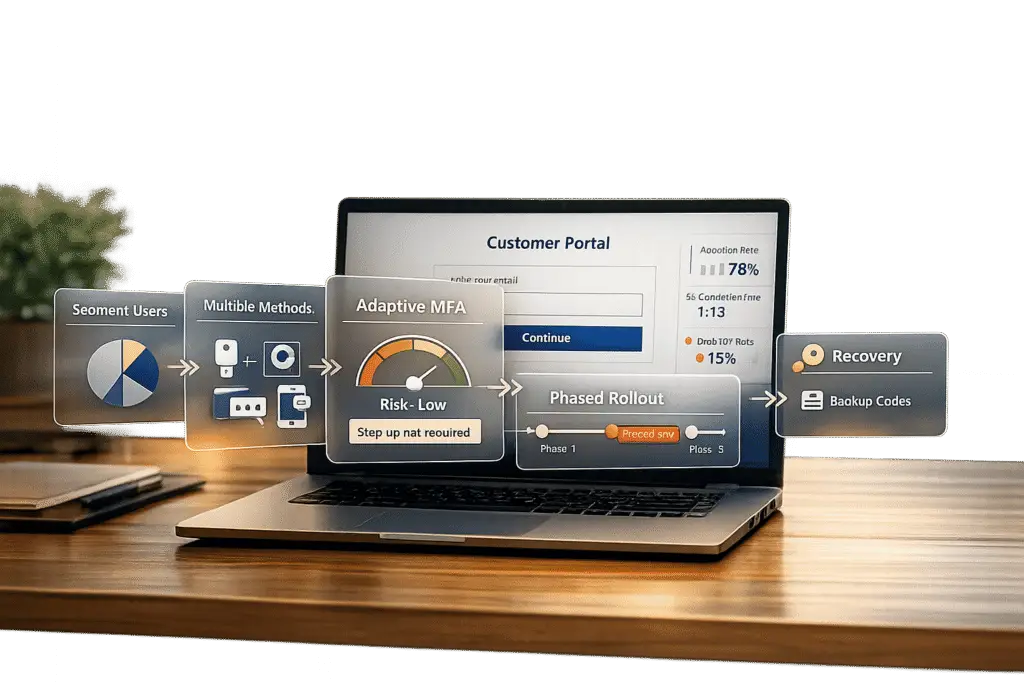
Adding multi-factor authentication (MFA) to your customer portal is necessary for security but can frustrate users if done poorly. Here’s how to balance security and user experience effectively:
- Understand your users: Segment customers by technical ability and device access. Offer options like SMS, email codes, or authenticator apps to suit diverse needs.
- Tailor MFA to risks: Use stronger methods (e.g., biometrics) for sensitive actions and simpler ones for low-risk tasks. Step-up authentication can trigger MFA only when needed.
- Pick user-friendly methods: Push notifications, TOTP (authenticator apps), and adaptive MFA reduce friction. Avoid relying solely on SMS or email OTPs due to vulnerabilities.
- Phased rollout: Start with a small pilot group, expand gradually, and address issues early. Communicate changes clearly with simple instructions and support channels.
- Simplify setup and recovery: Use intuitive interfaces, real-time guidance, and backup options to minimize lockouts.
- Leverage AI: Adaptive MFA adjusts security based on user behavior, reducing unnecessary prompts while maintaining protection.
- Monitor and improve: Track adoption rates, user feedback, and security metrics to refine your approach over time.
System Design of MFA (Multi Factor Authentication) | System Architecture
sbb-itb-e60d259
Assess Your Customer Base and Portal Security Needs
Understanding your customers and their data protection needs is key. A single approach won’t satisfy everyone – what works perfectly for a tech-savvy developer might frustrate someone less comfortable with digital tools.
Review Customer Technical Abilities and Device Access
Start by segmenting your users based on their familiarity with technology. Some may easily navigate authenticator apps, while others might struggle with basic digital tasks. Don’t overlook users without smartphones – many still rely on desktops, landlines, or simple mobile devices.
The devices your customers use are just as important as their technical skills. For those in areas with poor cellular service or limited app access, provide offline alternatives like TOTP (time-based one-time passwords) or hardware tokens. Avoid requiring extra app downloads by offering options like SMS, email codes, or push notifications. By giving users multiple choices, you make it easier for them to pick what works best for their situation and devices [1][2].
Once you’ve mapped out user abilities and device availability, shift your focus to the sensitivity of the data they access.
Identify Data Sensitivity and Security Requirements
Using what you’ve learned about your users, evaluate how secure their data needs to be. Not all portal actions carry the same level of risk. For example, updating a profile picture doesn’t demand the same security as transferring money or accessing medical records. Tailor your MFA (multi-factor authentication) requirements to the level of risk involved [1][6]. For higher-risk tasks, consider stronger measures like biometrics or hardware tokens, while keeping low-risk actions simple and easy.
For portals handling a mix of sensitive and less sensitive data, step-up authentication can be a smart solution. This means MFA is triggered only for high-risk activities, like updating payment details [7]. It’s a way to maintain security without over-complicating everyday tasks. However, industries like finance (under PCI DSS) or healthcare (regulated by HIPAA) often have strict MFA standards that must be followed, regardless of user preferences [1]. Be sure to account for these mandatory requirements early in your planning.
Select MFA Methods That Minimize User Friction
Choosing the right MFA (multi-factor authentication) method can mean the difference between users embracing your platform or abandoning it out of frustration. The goal is to strike a balance: strong security paired with user-friendly convenience.
Compare MFA Options and Their Impact
Each MFA method has its own strengths and challenges. For example, biometrics and passkeys offer a seamless, password-free experience by using device-bound cryptography, such as FaceID, TouchID, or Windows Hello. These methods are phishing-resistant and easy to use, making them ideal for many scenarios [3][5]. For B2B portals, hardware security keys (FIDO2) provide the highest level of security, especially for administrative accounts, but they come with the drawback of requiring users to carry a physical device [3][5].
Push notifications are convenient, offering one-tap approval. However, they’re not without risks. A notable example is the 2022 Uber breach, where attackers exploited push notification fatigue by bombarding an employee until they mistakenly approved access [3]. To mitigate this, use number matching, which requires users to input a code displayed on the login screen into their mobile app [3].
Authenticator apps (TOTP) provide strong security and work offline, making them reliable in areas with poor internet connectivity. While they require manual code entry, they’re still less cumbersome than hardware keys [5]. On the other hand, SMS and email OTPs – though widely accessible – should be treated as fallback options due to their vulnerabilities [3][5].
"The best MFA strategies balance protection and usability – and they look different depending on whether you’re building a consumer app (B2C) or an enterprise platform (B2B)." – Maria Paktiti, WorkOS [3]
Adaptive MFA takes things a step further by evaluating real-time risk signals, such as device trust, location, and IP reputation. It only challenges users when something seems suspicious, reducing friction by 60% to 80% [8]. As LoginRadius describes, adaptive MFA feels "invisible" when everything checks out and "strict" when risks arise [8]. These adaptive methods help boost security without compromising user experience, making them a strong choice for many platforms.
Offer Multiple Delivery Methods
Once you’ve evaluated the best MFA options, offering multiple delivery methods ensures inclusivity and accessibility. Not all users have access to the latest smartphones or reliable cellular service, so providing a range of options – such as authenticator apps, SMS, email, and backup recovery codes – caters to diverse needs [3][5].
A great example of this flexibility is Air New Zealand’s 2026 implementation of a WhatsApp-first OTP system with SMS as a fallback. This approach reduced SMS costs by 90% and sped up logins by 3.7x [9]. The key to their success? Letting users choose the method that worked best for them.
Encourage users to save recovery codes or register a secondary contact during setup. This minimizes lockouts caused by device loss or upgrades, which are common reasons for support tickets and user churn [3][5]. Additionally, always include a visible "Try another method" option for situations where the primary method isn’t available.
For mobile users, small technical tweaks can make a big difference. For example, using inputmode="numeric" and autocomplete="one-time-code" enables SMS autofill, reducing friction during the authentication process [2]. These small details go a long way in improving the overall user experience.
Roll Out MFA in Phases
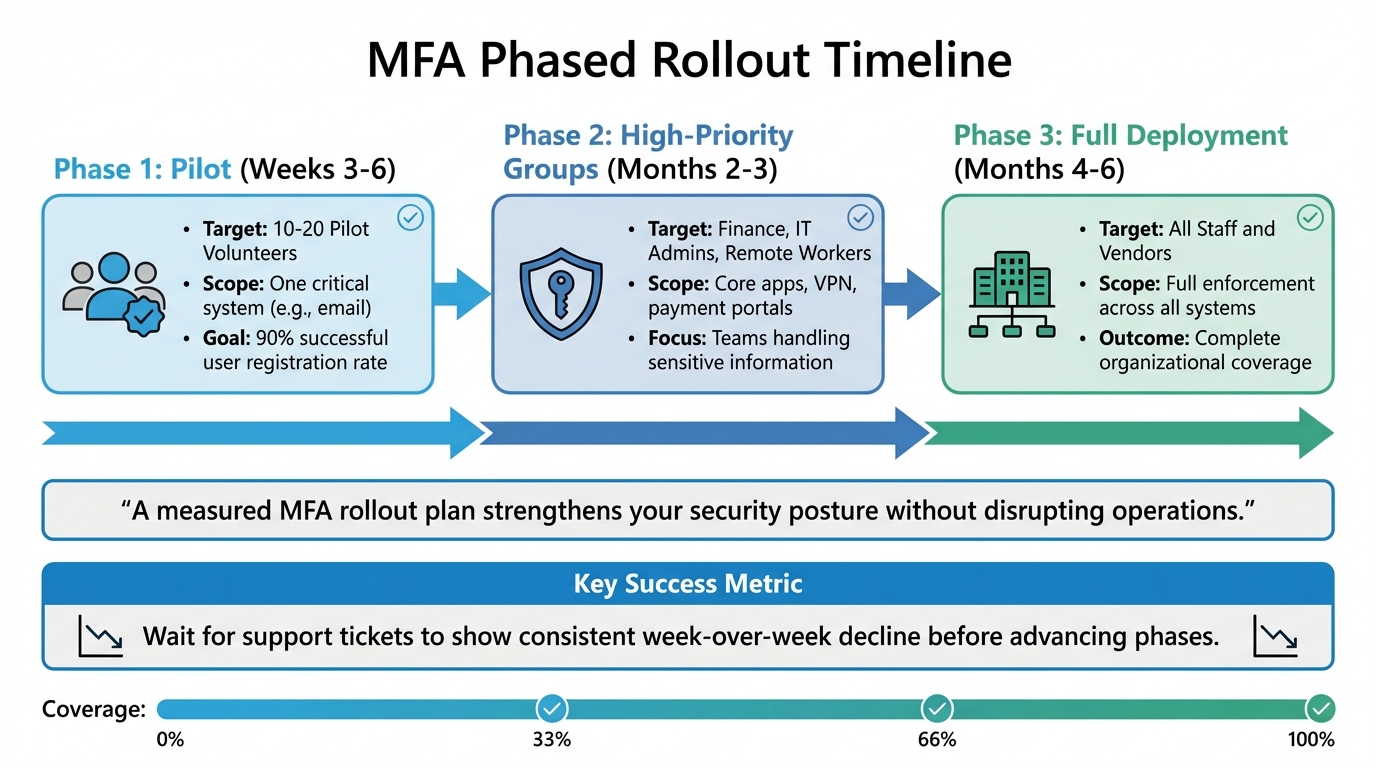
MFA Phased Rollout Timeline: 3-Phase Implementation Strategy
Rolling out MFA (Multi-Factor Authentication) in phases can mean the difference between a smooth transition and a chaotic support overload. Instead of enabling MFA for everyone at once, a gradual approach helps you identify potential issues early and ensures users adapt comfortably. This step-by-step method bridges the gap between planning and implementation, reducing friction.
Start with Specific User Groups
Kick off your rollout with a pilot group of 10–20 users. Make sure this group includes a mix of non-technical users and those in unique scenarios, like frequent travelers or employees working off-hours [10]. This diversity helps uncover real-world challenges that might not appear in controlled testing.
For the initial phase, focus on high-priority groups – teams handling sensitive information or accessing systems through riskier pathways. Finance departments, IT administrators, and remote workers using VPNs or Remote Desktop are prime candidates [10]. Instead of rolling MFA out across all applications at once, start small. Protect a single critical system – like email or your primary identity provider – before expanding [10].
Your goal during this phase should be a 90% successful user registration rate [10]. For smaller organizations, this pilot phase usually takes 3 to 6 weeks [10]. Only move forward when support tickets for common issues show a consistent week-over-week decline.
Phased Rollout Timeline
| Phase | Timeline | Target User Groups | Enforcement Scope |
|---|---|---|---|
| Phase 1 | Weeks 3–6 | 10–20 Pilot Volunteers | One critical system (e.g., email) |
| Phase 2 | Months 2–3 | Finance, IT Admins, Remote Workers | Core apps, VPN, payment portals |
| Phase 3 | Months 4–6 | All Staff and Vendors | Full enforcement across all systems |
"A measured MFA rollout plan strengthens your security posture without disrupting operations." – CTO Input [10]
Communicate Changes Clearly and Early
Make sure users know about the MFA rollout well in advance. Explain the benefits, timelines, and setup instructions in plain language. For example, describe MFA as a "seatbelt" for added protection, not as an inconvenience or a response to user mistakes. Use simple phrases like "Enter the code from your app" instead of technical jargon [10][11][3].
Address common concerns proactively, such as worries about location tracking, lost devices, or users without smartphones. Publish a clear recovery process – like backup codes or helpdesk-assisted resets – before enforcement begins. This way, users won’t fear being locked out if something goes wrong [10]. Provide easy-to-follow guides with screenshots, short videos, and on-screen tooltips to make setup straightforward [10][4].
During the rollout, offer dedicated support channels. These could include live training sessions, "office hours" for questions, or a specific helpdesk line for MFA-related issues [10][4]. Introduce a grace period with friendly reminders and clear deadlines, giving users time to adjust before enforcement kicks in [11].
Test in Report-Only Mode First
Before full enforcement, run a report-only mode to identify potential issues without disrupting user access. This testing phase can reveal device compatibility problems (e.g., Android vs. iPhone), login challenges for users traveling internationally, or issues in low-connectivity environments – problems that might not be obvious during initial planning [10].
During this phase, track key friction points and refine your instructions based on real-world feedback [10]. Monitor helpdesk tickets and average sign-in times to determine whether you’re ready to proceed [10][4]. If specific teams face high failure rates, shared devices won’t authenticate, or recovery paths remain unclear, pause the rollout. Address these problems before moving forward [10].
To streamline the user experience, consider integrating SSO (Single Sign-On) later in the process. This can help reduce the number of MFA prompts users encounter [10][2].
Reduce Friction During Setup and Login
Even the best Multi-Factor Authentication (MFA) systems can fail if the setup process confuses users. While phased rollouts and clear communication help, ensuring a smooth setup and login experience is key to keeping users engaged. In fact, 60% of users abandon an app if the login process feels too complicated [1]. The following strategies aim to simplify setup and login, safeguarding sensitive data while keeping the process user-friendly.
Create Simple Setup Instructions
The goal here is to make instructions so clear that users don’t need extra help. For technical implementation, use <input type="text" inputmode="numeric"> with autocomplete="one-time-code" and enable auto-submission for valid entries. Always include the TOTP secret key in plain text alongside QR codes to accommodate users relying on screen readers or those with camera issues.
Simplify technical explanations by using relatable language, like "protecting your account from hackers." Visual aids such as progress bars and color-coded indicators can guide users through the enrollment process step by step. Add a "Try another method" link to the MFA screen so users can switch to an alternative if their primary device isn’t available.
Provide Responsive Support Channels
Support is especially important during the transition phase. Offer live chat, chatbots, and a dedicated help desk, and back these up with a self-service knowledge base containing FAQs, screenshots, and short video tutorials. Hosting live Q&A sessions during the rollout and temporarily increasing support staff can also make a big difference.
To further assist users, integrate tooltips and smart notifications into the MFA interface. These can provide real-time guidance based on user actions or errors. A feedback button within the interface allows users to report frustrations immediately, helping you address issues quickly.
For account recovery, make options clear and accessible. Offer backup codes, alternative email addresses, and step-by-step recovery wizards to ensure users can regain access without hassle.
Use AI to Adjust Authentication Requirements
When traditional support methods aren’t enough, AI can help fine-tune the process. AI-powered adaptive MFA reduces friction by challenging users only when it’s truly necessary. Instead of requiring MFA for every login, these systems evaluate contextual data – like device type, location, user behavior, and more – to assign a dynamic risk score.
"Adaptive MFA dynamically adjusts authentication requirements based on contextual factors like device type, IP address, and user behavior to balance strong security with a seamless user experience." – Alex Lawrence, Author, Stytch [12]
For users logging in from familiar devices, locations, or during their usual hours, AI can simplify access by skipping unnecessary steps. If anomalies are detected – like an unfamiliar device or suspicious IP address – additional security measures such as biometrics or one-time passwords (OTPs) are triggered. Over time, this approach builds baseline profiles for users, reducing false positives and unnecessary hurdles.
Use device fingerprinting to recognize returning users and bypass repetitive MFA prompts. Programmable actions can create workflows that activate specific MFA factors only under certain risk conditions or for specific user roles. Pairing adaptive MFA with Single Sign-On (SSO) further streamlines authentication by requiring users to log in just once to access multiple applications.
| Feature | Traditional MFA | AI-Driven Adaptive MFA |
|---|---|---|
| User Experience | High friction; repetitive challenges | Low friction; challenges only when needed |
| Security Response | Static; same for all users | Dynamic; adjusts to threat levels |
| Risk Assessment | None; binary (pass/fail) | Real-time scoring based on context |
| Productivity | Often hindered by constant prompts | Improved with smoother trusted logins |
Monitor Performance and Improve Over Time
Once you’ve streamlined setup and login processes, the work doesn’t stop there. Continuous monitoring is crucial to ensure these improvements stick and security stays solid. After deployment, keep a close eye on the performance of your MFA system to catch potential security gaps and minimize any friction for users.
Track Adoption Rates and User Issues
Pay attention to adoption rates, the authentication methods users prefer, and where they drop off during enrollment. Monitoring authentication times can also help spot areas where users might be facing friction. Using AI analytics, you can link user behavior to security incidents, enabling you to make real-time adjustments that balance security with ease of use.
Look for patterns, such as failed login attempts from unfamiliar locations or at odd hours. A spike in failed logins could indicate potential security risks or that users are struggling with the process. Similarly, an increase in support tickets – complaints like "I’m locked out" or "I can’t access my account" – is a clear sign your MFA process might need tweaking.
Update Policies Based on Results
MFA policies shouldn’t be static. As user behavior and security threats evolve, your policies need to adapt too. For instance, if data shows that trusted devices rarely lead to security issues, you could introduce step-down authentication to make the login process smoother. On the flip side, if suspicious activity is linked to certain regions or devices, you might tighten security requirements for those scenarios.
AI-powered policy engines can simplify this process by automatically applying additional verification steps – like biometric scans or extra challenges – only when specific risk levels are detected. This approach keeps security tight without making life harder for legitimate users. By using real-world data to refine your policies, you can directly link technical improvements to better user satisfaction.
Use Customer Feedback to Refine the Process
While metrics and analytics are valuable, direct feedback from users offers insights you can’t get anywhere else. Use tools like in-app feedback options or periodic surveys to quickly spot and address recurring issues.
Dive into your support tickets by categorizing them into common problems like "lost device", "OTP delays", or "confusing interface." Identifying trends can help you address widespread issues. For example, if many users struggle with enrollment, you might offer alternative methods like text-based solutions. If login-time MFA feels too intrusive, consider limiting challenges to high-risk actions within the app.
Finally, use this feedback to create detailed FAQs, step-by-step troubleshooting guides, and even video tutorials. These resources not only reduce the number of support tickets but also improve the overall user experience, making the MFA process smoother and more user-friendly.
Conclusion
Adding MFA (Multi-Factor Authentication) to your customer portal doesn’t have to mean choosing between strong security and a smooth user experience. The secret lies in finding the right balance through thoughtful planning, offering diverse options, and continuously refining your approach. Start by understanding your customers – their needs, workflows, and technical comfort levels – and choose authentication methods that fit their habits instead of forcing a one-size-fits-all approach.
A phased rollout can make a big difference. Begin with a small pilot group of 10–20 users to identify and resolve potential issues early on. This method not only helps fine-tune the process but also builds trust as you expand the implementation based on real-world feedback.
Using AI-driven adaptive authentication can also help combat MFA fatigue. These tools analyze risk signals like location, device type, and user behavior to decide when extra verification is necessary. This way, legitimate users experience fewer interruptions, while security remains uncompromised.
Finally, ongoing monitoring and adjustments are essential to keep your MFA strategy effective and user-friendly. By adopting these practices, you can protect your customer portal while delivering the seamless experience your users expect.
FAQs
Which MFA method should I default to for most customers?
The most effective MFA method strikes a balance between security and usability, while also offering flexibility. It’s smart to let users pick their preferred method during enrollment. Options like SMS, email, authenticator apps, or biometrics give users that choice. Among these, SMS and authenticator apps are often suggested as default options because they’re easy to use and widely accessible. However, providing multiple options can lead to better adoption rates and happier users.
How do I use step-up MFA without confusing users?
To make step-up MFA seamless for users, the key is dynamic and transparent application. Trigger additional verification only when it’s absolutely necessary – like during risky activities or sensitive transactions. Incorporate risk-based detection to identify these scenarios effectively.
When it comes to user experience, opt for easy-to-use methods such as biometrics or passwordless options. These reduce frustration while maintaining security. It’s also important to clearly explain the purpose of step-up MFA, focusing on how it enhances their account’s safety.
Finally, introduce it gradually. A phased rollout, paired with accessible support, helps users adapt smoothly and minimizes disruptions.
What recovery options prevent the most lockouts?
When it comes to account recovery, the best systems rely on a mix of flexible methods. By offering options like email recovery, SMS codes, and security questions, users have multiple ways to regain access. This approach helps avoid lockouts when one method – like a lost phone or inaccessible email – isn’t an option. The result? Fewer disruptions and a smoother recovery process for everyone.
Related Blog Posts
- How do you set up a customer portal that supports role-based access and multiple customer teams?
- SSO and MFA for Customer Portals: Best Practices for Security
- Customer portal authentication options: SSO, magic links, and invite-only access
- Customer portal security hardening: rate limits, MFA, and session policies