



Slack is widely used for support teams because it enables fast communication and integrates with other tools. However, relying on Slack as your primary support platform comes with serious risks:
- Data Retention Issues: Free plans delete messages after 90 days, while paid plans keep everything indefinitely, creating compliance risks with laws like GDPR and HIPAA.
- Audit Challenges: Limited visibility into private channels and direct messages makes compliance audits difficult. Deleted messages leave no trace unless advanced tools are used.
- Legal Risks: Handling subpoenas for Slack data can cost $15,000–$100,000. Improper data management can lead to penalties, as seen in cases like Teledrip LLC.
- Sensitive Data Exposure: Slack often retains excessive customer data, increasing the risk of breaches and compliance violations.
To mitigate these risks, configure retention policies, use third-party backup tools, and consider moving support operations to platforms designed for compliance and audit readiness.
Slack DLP (Data Loss Prevention): How to protect Slack Workspace from security and compliance risks?
sbb-itb-e60d259
Data Retention Risks in Slack-First Support
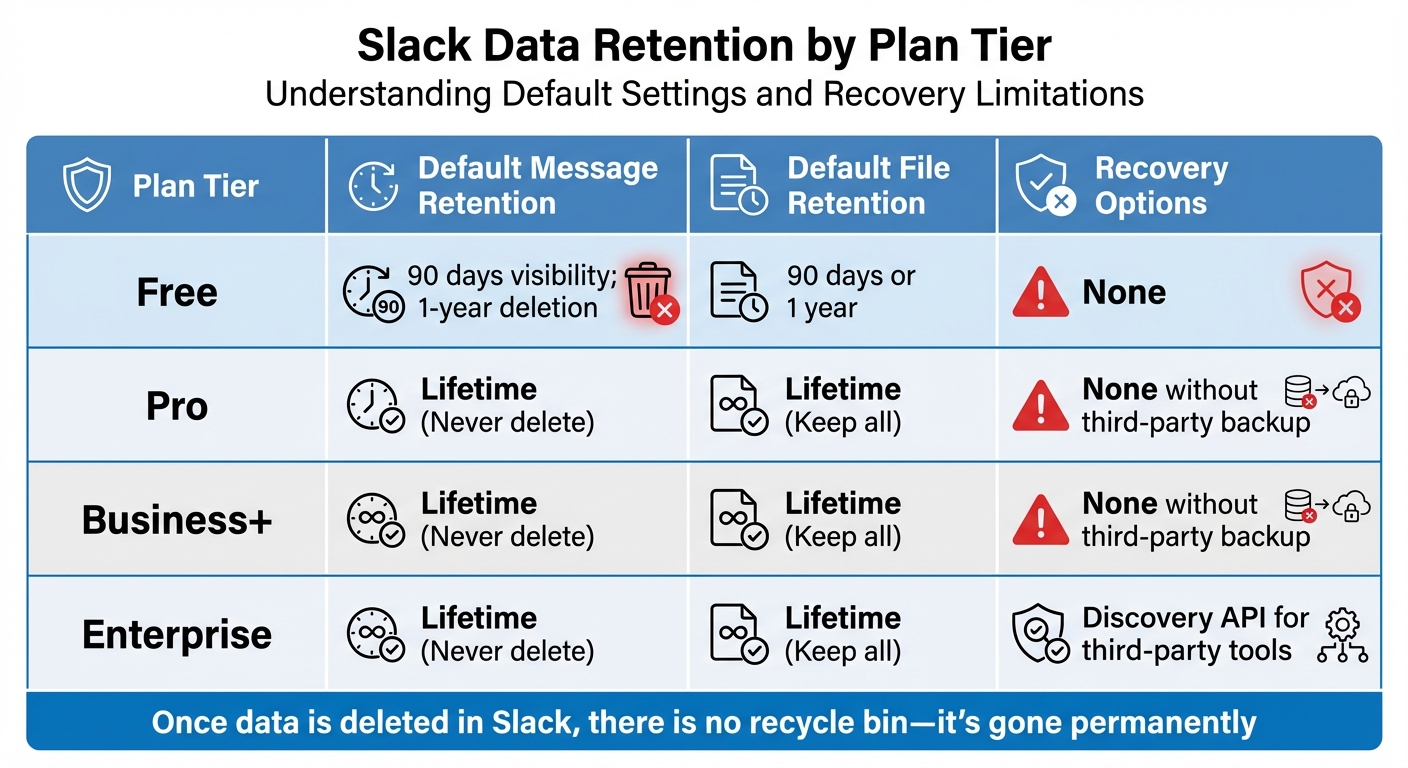
Slack Plan Data Retention Policies and Recovery Options Comparison
Slack’s Default Retention Settings and Compliance Problems
Slack’s retention settings are highly dependent on the plan you’re on, and this can lead to serious compliance headaches. If you’re using Slack’s Free plan, you’re limited to just 90 days of message visibility, and after that, conversations vanish into thin air. For paid plans, the default flips entirely – messages and files are kept forever unless you manually adjust those settings.
For support teams handling customer inquiries, both extremes can cause trouble. On the Free plan, critical conversations might disappear before you even realize they’re gone. On the other hand, paid plans like Pro, Business+, and Enterprise keep everything indefinitely. While this might sound like a safer bet, it creates a different issue: storing years of sensitive customer data that compliance laws like GDPR and HIPAA require you to delete once it’s no longer necessary.
Slack also doesn’t offer a safety net for deleted data. There’s no "recycle bin", and once a message or file is gone – whether manually deleted or removed by a retention policy – it’s gone for good. Unless you’re on an Enterprise plan using third-party backup tools, recovery isn’t an option. This lack of recovery has led to severe legal consequences for companies that didn’t configure their retention settings properly before litigation.
Take the case of Teledrip LLC. As litigation loomed, they switched their Slack retention policy from "unlimited" to "seven days" but failed to pause this policy after receiving a litigation hold letter. For nearly a year, data continued to be deleted. The U.S. District Court penalized them by instructing the jury to assume the missing evidence would have been harmful to their case.
| Plan Tier | Default Message Retention | Default File Retention | Recovery Options |
|---|---|---|---|
| Free | 90 days visibility; 1-year deletion | 90 days or 1 year | None |
| Pro | Lifetime (Never delete) | Lifetime (Keep all) | None without third-party backup |
| Business+ | Lifetime (Never delete) | Lifetime (Keep all) | None without third-party backup |
| Enterprise | Lifetime (Never delete) | Lifetime (Keep all) | Discovery API for third-party tools |
These retention settings not only risk losing vital support data but also create the opposite problem – hoarding too much data, which brings its own set of challenges.
Keeping Too Much Sensitive Data
Retaining excessive data can be just as risky as losing it. Slack’s default "lifetime" retention for paid plans often leads to overretention. For support teams using Slack as their main communication channel, this means years of customer conversations pile up, often containing sensitive information like personally identifiable information (PII), protected health information (PHI), or even payment card details. This overretention opens the door to compliance violations.
Laws like GDPR and HIPAA require organizations to delete sensitive data once it’s no longer needed for its original purpose. But Slack’s default settings keep this data indefinitely, increasing the risk of exposure during a data breach and making legal discovery a nightmare. Support teams are often left digging through mountains of irrelevant data just to find what’s actually needed.
"If Slack did not prune its users’ messages, it would incur unnecessary data storage costs as well as other liabilities such as the risk of data breaches and reduced performance of its product."
Adding to the complexity, Slack integrates with over 2,600 apps, which expands the volume of data that could fall under retention and compliance requirements. For most support teams, managing this sprawling data landscape is a task they’re simply not equipped to handle.
Data Visibility and Access Control Problems
Retention issues are only part of the problem. Slack’s limited access controls make compliance even harder. Even with proper retention settings in place, workspace owners and admins can only manage public channels and private channels they’ve joined. They have no built-in visibility into private channels or direct messages (DMs) they’re not part of.
This lack of visibility complicates compliance audits. On Free and Pro plans, accessing private channel or DM data requires a formal legal review process. Business+ plans allow for self-service exports of private channel data, but only after going through an application process. Full data access, including DMs, is only available on Enterprise plans via the Discovery API.
The visibility issue gets worse over time. On Free plans, messages older than 90 days are simply hidden, making compliance checks impossible. DMs can also vanish from the sidebar when new conversations start, causing support teams to lose track of older threads. By default, Slack allows users to delete their own messages, removing them from all instances permanently – a serious risk during litigation.
Audit logs, which track changes and help prevent misuse, are only available on Enterprise plans. Even then, search query logs are capped at 90 days. For support teams on lower-tier plans, this means operating with limited oversight, making it difficult to track who accessed what data and when. Essentially, you’re navigating compliance in the dark.
Audit Failures and Legal Risks in Slack-First Support
Unclear Ownership and Lost Context
Slack’s structure, while convenient for quick communication, often blurs the lines of conversation ownership. Discussions may start in public channels but then shift to private threads, making it difficult to piece together the full story during audits. Adding to the problem, users are typically allowed to delete their own messages, and these deletions leave no trace. Without a proper audit trail, crucial information can disappear, creating gaps that are hard to explain during legal reviews. Slack’s legal hold mechanism is another weak point – it operates on a user-based system rather than a channel-based one. This means if even one key participant in a critical discussion isn’t flagged as a custodian, their input could vanish entirely.
A stark example of this occurred in September 2022, when the U.S. District Court issued a default judgment against Bia Capital Management LLC in a trade secret case brought by Red Wolf Energy Trading LLC. The court found serious discovery misconduct, including the failure to produce Slack communications. Forensic investigations later revealed a pivotal chat about creating an algorithm to mask intellectual property theft, along with 87 empty folders in Slack archives, suggesting intentional deletion of data.
This lack of continuity in message records can lead to further complications, especially when legal holds are in place.
Auto-Deletion During Legal Holds
Slack’s auto-deletion features pose another significant risk, even when legal holds are applied. For instance, users can delete entire channels under a legal hold. Once a channel is deleted, all its messages and files are gone for good, with no way to recover them.
On Slack’s Free plan, the risks are even higher. Messages older than one year are automatically deleted on a rolling basis. Standard Slack exports also fail to capture edits or deletions. This means if someone modifies or deletes a key message before an export is initiated, that evidence could be lost forever – unless real-time ingestion tools are used to capture data as it happens.
These deletion policies add yet another layer of difficulty and expense when it comes to legal data discovery.
High eDiscovery Costs and Complexity
Slack’s export limitations make legal discovery not only challenging but also expensive. Data exports are provided in JSON format, which is difficult to interpret without specialized tools. This often forces support teams to hire costly eDiscovery vendors just to make sense of their own data. To put things in perspective, the average employee sends around 30 messages daily on Slack, which can add up to tens of millions of messages each month for a mid-sized company. Sorting through this massive volume of fragmented JSON data can drive legal costs through the roof. Unlike centralized support platforms that organize conversations by customer or case, Slack scatters context across channels, threads, and private messages. Auditors are left to manually reconstruct these fragmented discussions.
"Several courts have ruled that the technical difficulty of performing eDiscovery in these datasets is no excuse for failing to meet legal obligations."
- Emily Schwenke, Mimecast Aware
Additionally, Slack’s more advanced legal hold and Discovery API functionalities are only available on the Enterprise Grid plan. This leaves most teams reliant on basic export tools that aren’t designed to handle the complexities of legal discovery, further amplifying compliance risks.
How to Reduce Data Retention and Audit Risks
To address the challenges of data loss and complex audits, it’s crucial to adopt targeted strategies that ensure compliance across all your support channels.
Setting Up Slack Retention Policies for Compliance
Start by configuring Slack’s retention settings to align with your regulatory requirements. On desktop, go to Admin > Workspace settings > Data retention > Expand. For industries with strict compliance needs, like those governed by SEC 17a-4, select "Never delete messages – save edits" to maintain a full record of communications, including any changes. If specific retention periods are mandated (e.g., seven years for many financial institutions), choose "Custom timeline" and set the appropriate duration.
Keep in mind that Slack’s retention features vary by subscription plan. On Business+ and Enterprise Grid plans, Admin Overrides let you apply policies to individual channels, while lower-tier plans only support workspace-wide settings. Enterprise Grid users can also utilize Legal Holds by navigating to Organization Settings > Security > Legal Holds. This tool preserves data for specific users (custodians) during investigations, overriding standard deletion settings. You’ll need to configure separate retention policies for messages, files, canvases, and lists, as each data type requires its own setup. It’s worth noting that Slack’s deletion process runs daily, and once data is deleted, it’s gone permanently.
While Slack’s internal settings are a good start, external data consolidation can further enhance compliance efforts.
Centralizing Support Data Outside of Slack
Relying solely on Slack’s built-in export tools can introduce risks. Standard JSON exports often lack the necessary context, making it harder to reconstruct data accurately. A better solution is to centralize all support interactions in a platform designed for compliance and audit readiness. Tools like Supportbench allow you to consolidate customer data, case histories, and communication threads in one easily searchable and traceable system. Unlike Slack, which scatters conversations across channels, threads, and direct messages, a centralized platform organizes data by customer and case, simplifying audits and ensuring complete records.
For Enterprise Grid users, Slack’s Discovery API can connect with third-party archiving tools, enabling real-time exports of messages and files – even after edits or deletions. This creates an unchangeable archive that can serve as a reliable record during legal reviews. Additionally, the Audit Logs API provides a way to monitor system access and detect suspicious behavior, integrating seamlessly with security tools like SIEM systems. However, these advanced features are exclusive to Slack’s highest-tier plans, making centralized platforms a more cost-effective option for many B2B teams.
Beyond centralized storage, incorporating AI tools can take compliance and audit preparation to the next level.
Using AI Tools for Compliance and Audit Preparation
AI technologies can significantly lighten the load when it comes to compliance monitoring and audit preparation. Tools leveraging Natural Language Processing (NLP), sentiment analysis, Optical Character Recognition (OCR), and federated search can automate tasks like identifying sensitive data (e.g., PII, PHI, or PCI), transcribing audio and video files for searchability, and triggering legal holds for policy violations. For example, in June 2024, one AI platform identified 20,000 instances of improperly shared credit card data, helping a company avoid PCI Standards Council fines, which can reach $100,000 per month.
AI-powered federated search also simplifies audits by quickly surfacing relevant case histories across Slack and other communication channels. It converts complex JSON exports into clear, human-readable formats, saving time and reducing errors. By automating these processes, your team can focus on delivering excellent customer service, rather than scrambling to piece together fragmented data during audits.
Conclusion: Moving Beyond Slack-First Support for Secure Operations
While Slack offers undeniable convenience, it comes with serious risks. Research shows that 1 in 17 messages contains sensitive data like PII, PHI, or PCI information. On top of that, Slack’s default retention settings can lead to permanent deletion of critical communications, increasing the likelihood of data loss when employees leave.
Courts and regulators are also putting Slack data under the microscope for employment disputes, commercial cases, and regulatory investigations. If communications aren’t properly preserved, auto-deleted or lost messages can lead to spoliation risks that could jeopardize your entire case.
"If you don’t export and preserve Slack data before it’s deleted, it’s gone forever (and you risk spoliation sanctions)." – Alex Boyd, ViewExport
The financial stakes are no small matter. A single subpoena for Slack data can cost anywhere from $15,000 to $100,000, while PCI violations could result in fines of up to $100,000 per month. In one instance, investigators uncovered 20,000 cases of shared customer credit card numbers, highlighting the urgent need for stronger data governance.
To address these risks, it’s time to rethink how support operations are managed. Adopting an AI-native, centralized support platform like Supportbench can close these gaps. This platform organizes conversations by customer and case, creating defensible audit trails from the start. AI tools built into the system flag sensitive data, generate searchable case histories, and maintain tamper-proof records.
Proactive data management isn’t just about avoiding penalties – it’s about creating scalable, efficient operations that protect your business and enhance customer experiences. By shifting support data out of Slack and using AI to monitor compliance, you can focus on solving customer issues instead of scrambling to recover deleted messages during audits.
FAQs
What’s the safest Slack retention setup for regulated support data?
To ensure the safest setup, it’s important to align Slack’s data retention policies with your compliance requirements. Adjust retention periods for both messages and files to match these standards. Additionally, consider using third-party tools to boost management capabilities and prepare for audits. This approach helps manage regulated data responsibly while reducing the risk of non-compliance.
How can we prove what was said in Slack if messages get edited or deleted?
To keep Slack messages verifiable, even when they’re edited or deleted, it’s essential to use tools that capture the original content along with its metadata. For compliance, you can export data that includes timestamps and preserves message integrity. Alternatively, Slack’s Audit Logs API, available with Enterprise plans, allows you to track edits and deletions. These approaches ensure an audit trail is in place, providing a dependable record of communications for legal or regulatory needs.
When should support teams move customer conversations out of Slack?
Support teams need to move customer conversations out of Slack when compliance or legal policies call for proper data preservation. This approach helps avoid data loss, ensures readiness for audits, and keeps everything aligned with retention policies. Mismanaging Slack data can lead to regulatory trouble and operational risks.






